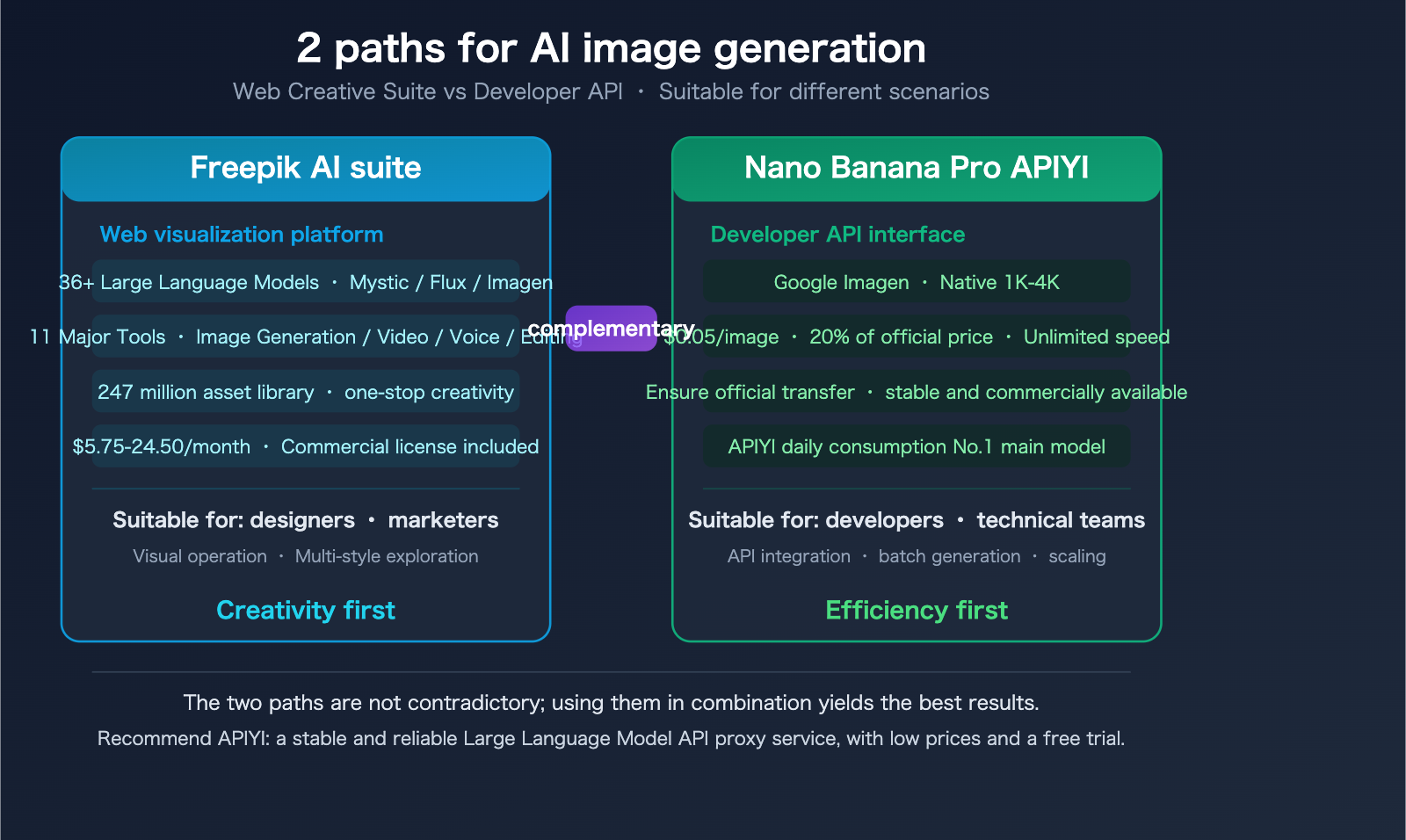
The AI image generation landscape is splitting into two distinct paths: one is the all-in-one web creative suite represented by Freepik, which offers visual operations for 36+ models; the other is the high-performance, cost-effective API represented by Nano Banana Pro, designed for developers and large-scale applications. These two paths aren't mutually exclusive—understanding their respective strengths and boundaries is key to choosing the right solution for your project.
Freepik recently launched its proprietary Mystic photorealistic model and a unified creation platform that integrates 36+ models, including Flux, Google Imagen, and Ideogram. Meanwhile, the Nano Banana Pro API has become the top-performing model on the APIYI platform by daily consumption, thanks to its 20% of official site pricing ($0.05/image) and stable, high-speed service.
Core Value: This article provides a comprehensive overview of the 11 major tools in the Freepik AI suite and compares the technical and pricing advantages of the Nano Banana Pro API to help you choose the best image generation solution for your specific needs.
A Panoramic View of the Freepik AI Suite: 11 Tools at a Glance
Freepik has evolved from a simple stock asset site into a full-featured creative platform integrating AI image generation, video, and voice capabilities. Here’s a look at their core tool matrix:
| No. | Tool Name | Core Function | Technical Highlights |
|---|---|---|---|
| 1 | AI Image Generator | text-to-image | 36+ models available, supports 4-model side-by-side comparison |
| 2 | Mystic | Hyper-realistic generation | Freepik self-developed, fine-tuned on Flux, native 2K |
| 3 | Sketch to Image | Sketch-to-image | Real-time rendering, millisecond response |
| 4 | AI Video Generator | Text/Image-to-video | Supports multiple styles |
| 5 | AI Voice Generator | AI voice synthesis | Natural-sounding multi-language voice |
| 6 | Image Upscaler | Image upscaling | Up to 10K resolution (16x clarity) |
| 7 | Reimagine | Style transformation | Generate multiple style variants from one image |
| 8 | Background Remover | Background removal | One-click cutout |
| 9 | AI Assistant | Conversational design | Real-time creation, editing, and customization |
| 10 | Retouch | Image retouching | Detail adjustment and object modification |
| 11 | Image Editor | Image editor | Built-in editing suite |
Additionally, the Freepik platform hosts a library of over 247 million assets (images, videos, vectors, icons), which paid users can combine with these AI tools.
Mystic: Freepik's "Killer App"
Mystic is a proprietary hyper-realistic model developed jointly by Freepik and Magnific AI. It’s the core competitive advantage that sets Freepik apart from other platforms:
- Architecture: Based on a fine-tuned Flux model + Magnific AI's high-resolution technology.
- Native Resolution: Generates 2K images directly, no post-upscaling required.
- Realism: Many reviews claim it "surpasses Midjourney in realism."
- Limitations: Available exclusively to Premium and higher-tier subscribers.
Freepik Pricing Plans
| Plan | Monthly (Annual Billing) | AI Credits | Commercial Rights | Core Limitations |
|---|---|---|---|---|
| Free | $0 | ~20/day | ❌ No commercial rights | Limited features, no commercial use |
| Essential | $5.75/mo | 84,000/yr | ✅ Commercial included | No Mystic |
| Premium | $12/mo | 168,000/yr | ✅ Commercial included | Includes Mystic |
| Premium+ | $24.50/mo | 600,000/yr | ✅ Commercial included | Full feature unlock |
Commercial Licensing Note: The free plan does not support commercial use. For paid plans, AI-generated content belongs to the user, but it cannot be resold as standalone assets (e.g., uploading to other stock sites), and there is no guarantee against third-party intellectual property infringement. Copyright laws for AI-generated content vary by country, so you should assess compliance risks yourself.
🎯 Who is this for?: If you're a designer or marketer who needs a visual interface and a variety of styles, the Freepik AI suite is a great choice. But if you're a developer who needs to integrate AI into your product, or if you require high-volume, cost-effective image generation—keep reading.
Nano Banana Pro API: A High-Value Choice for Developers
Nano Banana Pro is the image generation model behind Google Gemini 3 Pro Image, enabling text-to-image and image-to-image via API. For developers looking to integrate AI image generation into their products, it offers a completely different capability path compared to Freepik.
Nano Banana Pro Core Capabilities
| Capability | Details |
|---|---|
| Resolution | Native 1K, 2K, 4K (no external upscaling needed) |
| Text Rendering | Clear multi-language text rendering, accurate fonts and calligraphy |
| Subject Consistency | Supports up to 14 reference images, maintains consistency for up to 5 characters |
| Advanced Reasoning | "Thinking" mode to understand complex instructions |
| Search-Enhanced | Integrates Google search data to generate accurate charts and terminology |
| Quality Control | Fine-grained control over lighting, composition, and texture |
APIYI Nano Banana Pro Pricing: 20% of Official Rates
Nano Banana Pro is the #1 most-consumed model on the APIYI platform. We invest heavily in operational resources to maintain its stability, ensuring direct official access with no speed throttling.
| Access Method | 1K-4K Flat Rate | vs. Google Official | Discount |
|---|---|---|---|
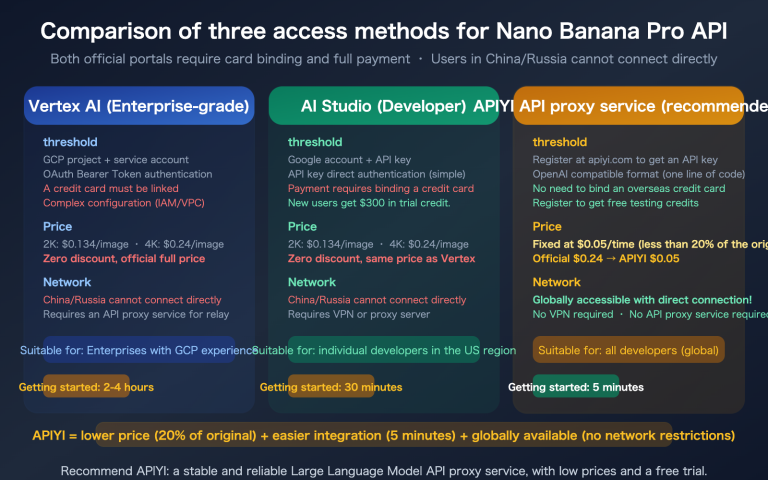
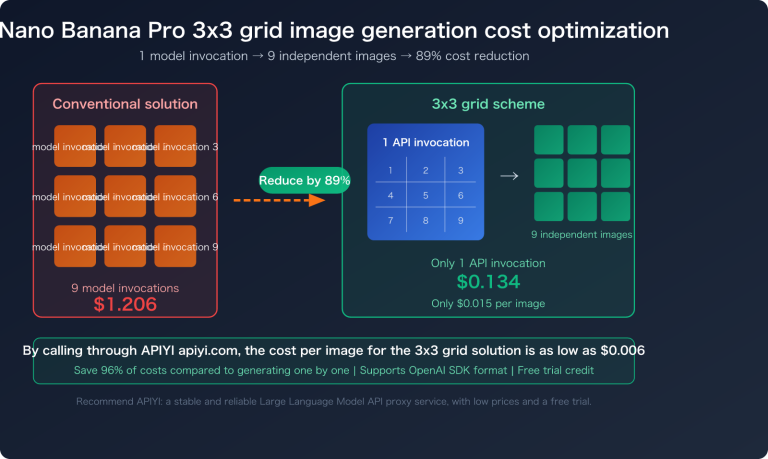
| APIYI apiyi.com | $0.05/img | $0.234/img | ~80% Off |
| Nano Banana 2 | ~$0.035/img | — | Lower pay-as-you-go |
| Google Official Standard API | $0.134-0.234/img | Base Price | — |
| Google Batch API | $0.067-0.12/img | 50% off batch | Requires wait time |
3 Core Advantages of APIYI:
- Flat $0.05 for 1K-4K: Unlike Google’s tiered pricing based on resolution, we offer a flat rate.
- Guaranteed Official Access, No Throttling: Direct connection to official Google models; we never use intermediate caches or substitute models.
- Stable and Commercial-Ready: We invest heavily in maintenance to ensure service stability, making it perfect for production environments.
title: Freepik AI Suite vs. Nano Banana Pro API: Which One Should You Choose?
description: A side-by-side comparison of Freepik AI Suite and Nano Banana Pro API to help you decide which tool fits your image generation needs.
Freepik AI Suite vs. Nano Banana Pro API: Which One Should You Choose?
It’s not really a question of "which is better," but rather "which is better for your specific use case."
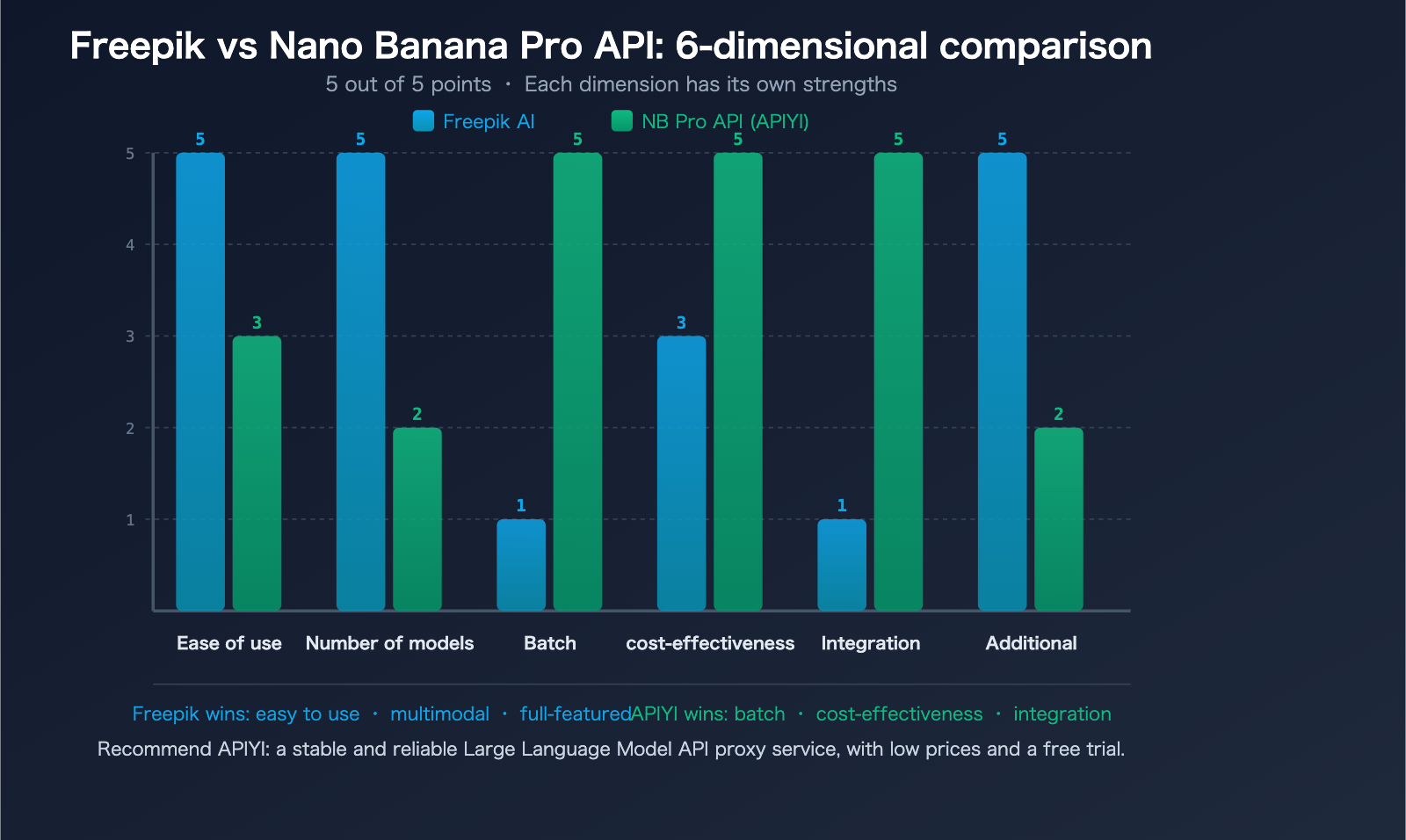
6-Dimensional Comparison
| Comparison Dimension | Freepik AI Suite | Nano Banana Pro API (APIYI) |
|---|---|---|
| Interaction | Web-based visual interface | API code invocation |
| Target Audience | Designers, marketers | Developers, technical teams |
| Model Selection | 36+ models (Flux/Imagen/Mystic) | Nano Banana Pro (Google Imagen) |
| Cost per Image | Credit-based, approx. $0.02-$0.10/img | $0.05/img (1K-4K same price) |
| Batch Capability | Manual, hard to scale | API-driven, infinite automation |
| Commercial Rights | Included in paid plans, with limits | Pay-per-call, no extra licensing limits |
| Integration | Web-only | Integratable into any app/product |
| Additional Features | Video, audio, editing, asset library | Focused on image generation |
4 Scenarios to Choose Freepik
- You're a designer who needs a visual interface and real-time previews.
- You need model comparison, testing different styles like Flux, Mystic, or Imagen side-by-side.
- You need an all-in-one creative toolkit, including video, audio, and editing features.
- Your volume is low (a few hundred images per month), and you don't need API integration.
4 Scenarios to Choose Nano Banana Pro API
- You're a developer who needs to integrate image generation into your own product.
- You need batch generation (hundreds to tens of thousands per day) and require automated workflows.
- You need 4K high resolution without paying extra for it (APIYI offers 1K-4K at the same price).
- You need a stable production environment and cannot rely on the availability of a web interface.
The Hybrid Strategy
The most pragmatic approach is to combine both:
- Creative Exploration Stage: Use the Freepik AI Suite's multi-model comparison to quickly find the style and prompt that works for you.
- Batch Production Stage: Use the finalized prompts to trigger batch requests via the Nano Banana Pro API to keep costs down.
- Daily Operations: Use Freepik for small, ad-hoc tasks and the API for large, planned production runs.
Cost Breakdown by Volume
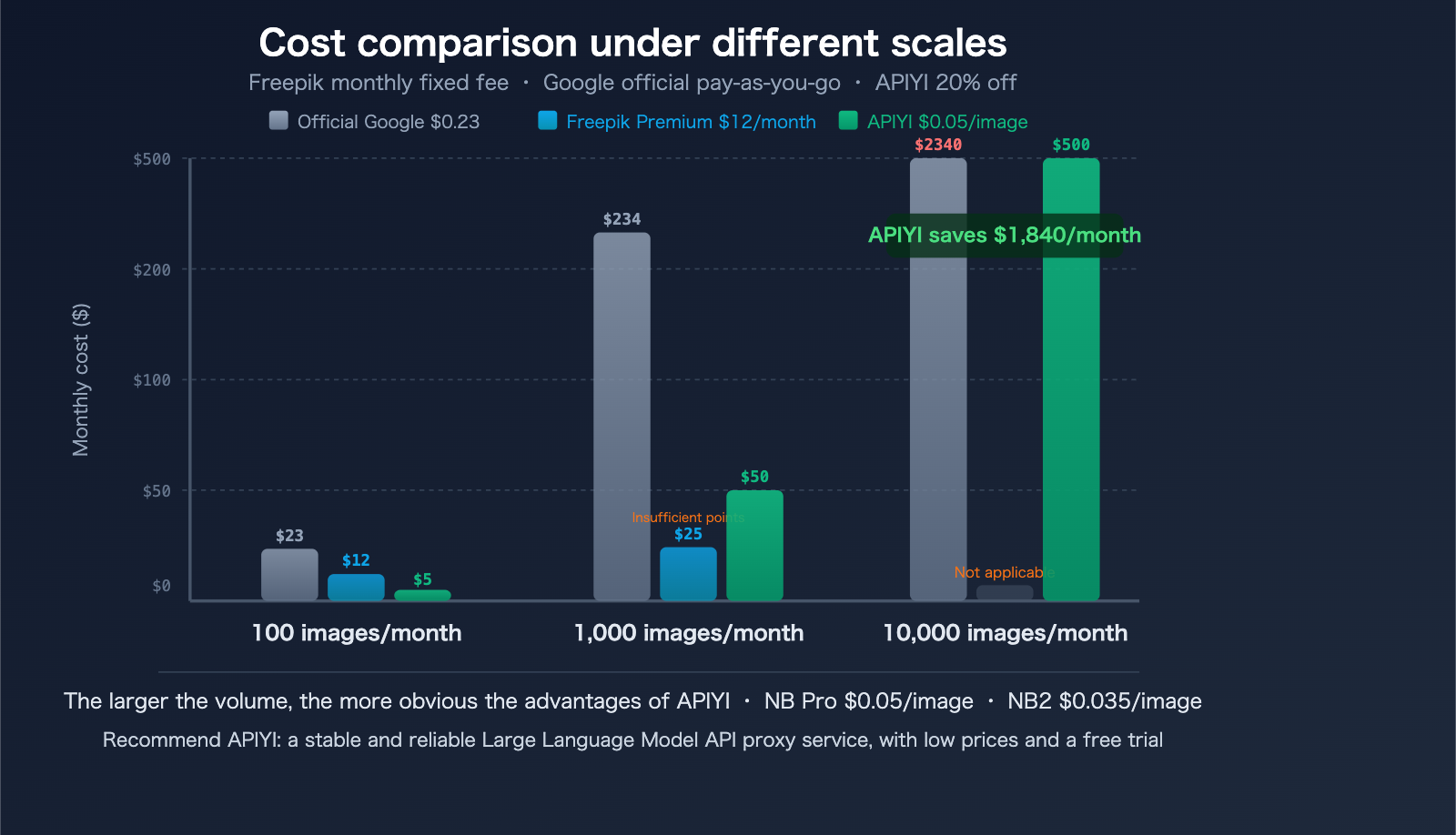
Here is a monthly cost comparison based on actual usage to help you see which plan is more cost-effective:
| Monthly Volume | Google Official ($0.234) | Freepik Premium ($12/mo) | APIYI NB Pro ($0.05) | APIYI Savings vs. Official |
|---|---|---|---|---|
| 100 images | $23.40 | $12 (within credits) | $5.00 | Save $18.40 |
| 500 images | $117.00 | $24.50 (likely over limit) | $25.00 | Save $92.00 |
| 1,000 images | $234.00 | Credits exhausted, need more | $50.00 | Save $184.00 |
| 5,000 images | $1,170.00 | N/A | $250.00 | Save $920.00 |
| 10,000 images | $2,340.00 | N/A | $500.00 | Save $1,840.00 |
Key Takeaways:
- Under 100 images/month: Freepik Premium ($12/mo) is the most hassle-free choice.
- 100-500 images/month: APIYI NB Pro ($0.05/img) starts to show its value.
- Over 500 images/month: The pay-per-use advantage of the API grows significantly with volume.
- Using Nano Banana 2 (~$0.035/img) can further reduce costs by about 30%.
💡 Recommended Setup: Use the Nano Banana Pro API via APIYI (apiyi.com) for batch image generation tasks—at $0.05/image, it's 80% cheaper than the official Google price. Meanwhile, sign up for Freepik Essential ($5.75/mo) for daily creative exploration and small, one-off needs.
Nano Banana Pro API Quick Start Guide
Minimalist Code Example
The Nano Banana Pro API is compatible with the official Google format; simply replace the base URL and your API key to get started.
import openai

client = openai.OpenAI(
    api_key="your-api-key",
    base_url="https://api.apiyi.com/v1"  # APIYI unified endpoint
)

# Text-to-image: Nano Banana Pro
response = client.images.generate(
    model="nano-banana-pro",
    prompt="An orange cat sitting under a cherry blossom tree, Japanese watercolor style, 4K high definition",
    n=1,
    size="1024x1024"
)

image_url = response.data[0].url
print(f"Image URL: {image_url}")
View full code (including batch generation and error handling)
import openai
import time
import os

# Calling Nano Banana Pro via APIYI
client = openai.OpenAI(
    api_key="your-api-key",
    base_url="https://api.apiyi.com/v1"
)

# Batch generation example
prompts = [
    "Modern minimalist tech company logo, dark blue color scheme, 4K",
    "E-commerce product on white background, sneakers, professional studio lighting, 4K",
    "Social media cover image, gradient background, minimalist typography, 4K",
    "App splash screen illustration, flat style, purple tones, 4K",
]

results = []
for i, prompt in enumerate(prompts):
    try:
        response = client.images.generate(
            model="nano-banana-pro",
            prompt=prompt,
            n=1,
            size="1024x1024"
        )
        url = response.data[0].url
        results.append({"prompt": prompt, "url": url})
        print(f"[{i+1}/{len(prompts)}] Generation successful: {url[:60]}...")
    except Exception as e:
        print(f"[{i+1}/{len(prompts)}] Generation failed: {e}")
    time.sleep(0.5)  # Avoid rate limiting

print(f"\nSuccessfully generated {len(results)}/{len(prompts)} images")
print(f"Estimated cost: ${len(results) * 0.05:.2f}")
Other Integration Methods:
- Fully compatible with Google's official documentation:
ai.google.dev/gemini-api/docs/image-generation - Sample code download:
xinqikeji.feishu.cn/wiki/W4vEwdiCPi3VfTkrL5hcVlDxnQf - Online testing:
imagen.apiyi.com
🚀 Quick Experience: Visit imagen.apiyi.com to test the output of Nano Banana Pro online. Register at APIYI (apiyi.com) to get your API key and start generating images for just $0.05 each.
Google Imagen in Freepik: How Does It Differ from a Direct API Connection?
An interesting fact: The Google Imagen model is built directly into the Freepik AI suite. Users can select Google Imagen within Freepik's AI Image Generator to create visuals. But what’s the difference between using it through Freepik versus connecting via an API?
| Comparison Dimension | Freepik Built-in Imagen | APIYI Nano Banana Pro |
|---|---|---|
| Method | Web interface click-to-generate | API code invocation |
| Resolution Control | Platform presets | Fully customizable (1K-4K at same price) |
| Batch Capability | Manual, one-by-one | Programmatic batch calls |
| Billing | Consumes AI credits | Fixed price of $0.05/image |
| Integration | Cannot be integrated into products | Integrates into any application |
| Extra Features | Includes editor and asset library | Pure image generation |
| Parameter Control | Limited | Full API parameters |
In short: Freepik is the "deluxe version" of Google Imagen (complete with an interface and toolchain), while APIYI is the "base version" (direct API access, flexible and cost-effective). Which one you choose depends on whether you need "out-of-the-box" convenience or "deep customization."
FAQ
Q1: Can images generated by Nano Banana Pro be used for commercial purposes?
Yes. Images generated via the APIYI (apiyi.com) Nano Banana Pro API follow the Google Gemini API terms of service. Unlike Freepik, there is no "free plan is non-commercial" restriction here—since you pay-as-you-go, the images you generate are yours to use commercially. However, we do recommend avoiding the use of registered trademarks or descriptions that clearly infringe on others' intellectual property in your prompts.
Q2: What’s the difference between the $0.05/image rate and Google’s official $0.234/image? Is the quality the same?
The quality is exactly the same. APIYI's Nano Banana Pro is a verified official-proxy service—requests are forwarded directly to Google's official models without using any intermediate caching or substitute models. The low price of $0.05/image is made possible by our economies of scale and operational efficiency. This is exactly why Nano Banana Pro has become the top-performing model by daily consumption on the APIYI platform; its stability and cost-effectiveness have been validated by a massive user base.
Q3: Which is better, Freepik’s Mystic model or Nano Banana Pro?
They serve different purposes and each has its own strengths. Mystic is a specialized model for hyper-realistic styles, excelling in portrait and scene realism, making it perfect for design needs that require "photo-grade" results. Nano Banana Pro is a general-purpose model that is stronger in text rendering, multilingual support, and subject consistency, while also supporting native 4K resolution and search-enhanced knowledge. We recommend trying out Mystic on Freepik to evaluate the style, and then using APIYI (apiyi.com) to call Nano Banana Pro for high-volume production to keep costs down.
Summary: Two Paths, One Goal
The Freepik AI suite and the Nano Banana Pro API represent two mainstream paths for AI image generation—visual creative tools vs. developer API interfaces. They aren't competitors; they're complementary.
3 Core Recommendations:
- Designers and Marketers: Prioritize the Freepik AI suite ($5.75–$24.50/month) to enjoy visual operations with 36+ models and a library of 247 million assets.
- Developers and Technical Teams: Prioritize the Nano Banana Pro API (via APIYI, apiyi.com, at $0.05/image) to integrate into your products for scalable generation.
- Mixed Needs: Use Freepik to explore creative concepts and the API for batch production—combining both is the optimal strategy.
As the top-performing model by daily consumption on APIYI, we've invested significant operational resources to ensure Nano Banana Pro remains stable and commercially viable. 1K–4K at the same price of $0.05/image, 80% off the official site price, guaranteed official proxy, and no speed limits—these commitments have been verified by tens of thousands of users every day.
Online Image Generation Test: imagen.apiyi.com | API Integration: apiyi.com
Author: APIYI Team | Nano Banana Pro API: 80% off official site, $0.05/image for 1K-4K. Visit APIYI (apiyi.com) to get started.
📚 References
-
Freepik AI Suite Official Website: An all-in-one creative platform
- Link:
freepik.com/ai - Description: A unified creative hub featuring 11 AI tools and over 36 models.
- Link:
-
Freepik Pricing Page: Details on plans and credit rules
- Link:
freepik.com/pricing - Description: Four tiers available: Free, Essential, Premium, and Premium+.
- Link:
-
Google Official Documentation: Imagen image generation API
- Link:
ai.google.dev/gemini-api/docs/image-generation - Description: API invocation specifications and parameter details; APIYI is fully compatible with this format.
- Link:
-
APIYI Image Generation Test: Experience Nano Banana Pro online
- Link:
imagen.apiyi.com - Description: Test image generation results without needing to register.
- Link:
-
APIYI Sample Code: Developer integration reference
- Link:
xinqikeji.feishu.cn/wiki/W4vEwdiCPi3VfTkrL5hcVlDxnQf - Description: Multi-language sample code and best practices.
- Link: