Author's Note: This guide walks you through the complete purchasing process for official Nano Banana 2 API access (AI Studio card binding + Vertex AI configuration). We'll analyze network restrictions for non-US users and explore how APIYI serves as a reliable fallback to keep your business running smoothly.
Following our previous article on accessing Nano Banana Pro, this piece covers its "sibling," Nano Banana 2 (gemini-3.1-flash-image-preview). Although both are built on the same underlying Gemini image model, the access process for NB2 differs—AI Studio updated its billing system to a prepaid model in March 2026, and Vertex AI configuration has also changed. This article provides a step-by-step walkthrough of the official purchasing process and explains how to use APIYI as a fallback—ensuring you can connect directly to the official source while maintaining business continuity if the official service goes down or hits rate limits.
Core Value: Complete the official purchasing process, understand the costs and barriers at each step, and set up APIYI as a fallback to ensure your business stays online.
Nano Banana 2 API Official Integration Core Information
| Dimension | Description |
|---|---|
| Model ID | gemini-3.1-flash-image-preview |
| Alias | Nano Banana 2 |
| Official Portal | AI Studio (Developers) / Vertex AI (Enterprise) |
| Free Tier | Virtually zero (Official blog explicitly states "requires paid API key") |
| Minimum Deposit | $10 minimum for AI Studio prepay |
| Resolution | 512px / 1K / 2K / 4K |
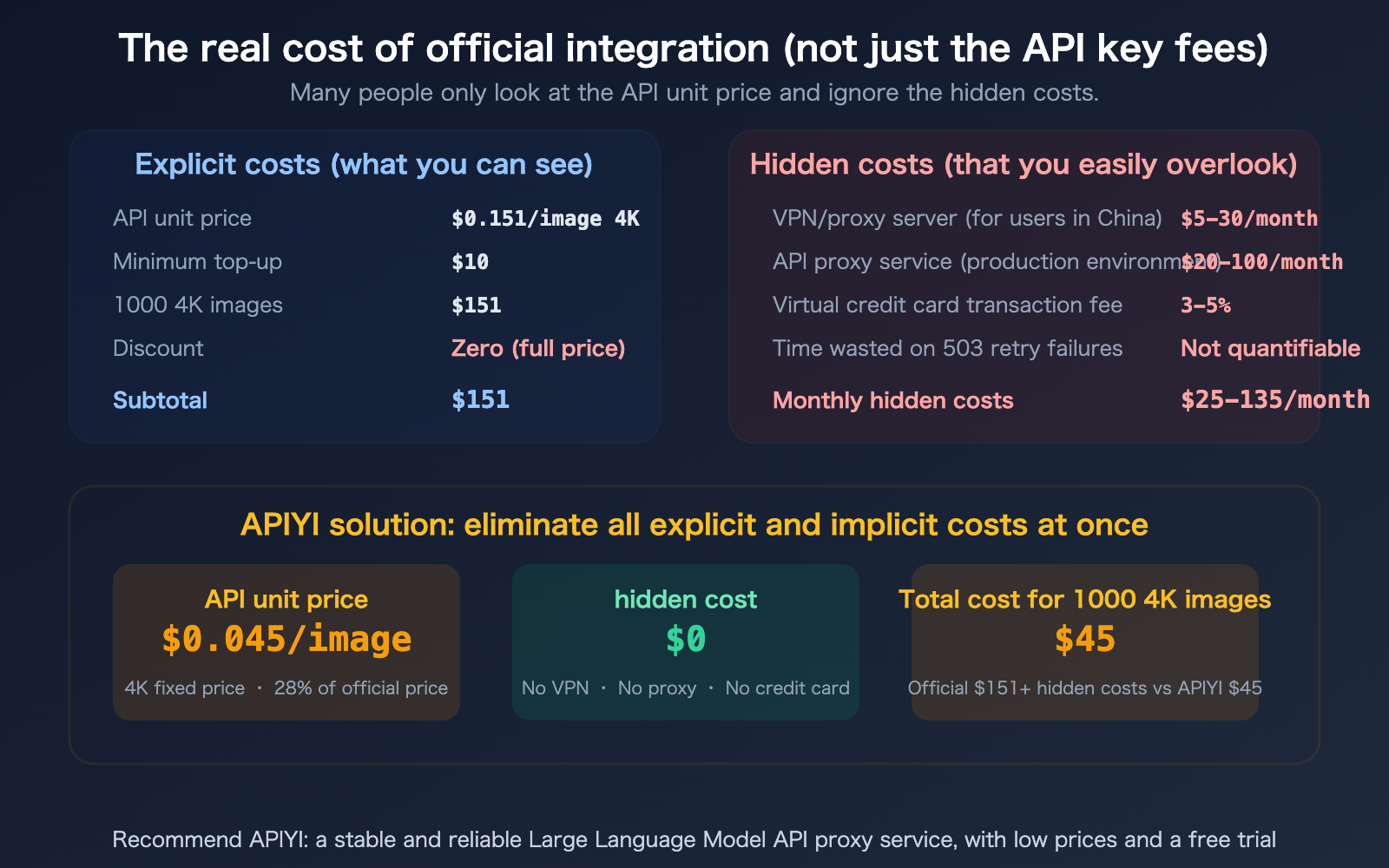
| 4K Unit Price | $0.151/image (Standard) · $0.076/image (Batch 50% off) |
| Available in China | No direct access |
Process 1: AI Studio Purchase and Integration (Full Steps)
AI Studio is the go-to portal for most developers. As of March 2026, the billing system has been updated—shifting from GCP-linked billing to a built-in prepay/postpay system within AI Studio.
Step 1: Create a Google Account and Log in to AI Studio
| Action | Notes |
|---|---|
Visit aistudio.google.com |
Requires a non-Chinese Google account |
| Log in with Google account | Accounts registered in China may be restricted |
| Select "Get Started" upon first entry | Agree to the Terms of Service |
Note for users in China: You'll need a VPN to access AI Studio. Even with a VPN, Google checks the account's registration region—we recommend using a US-based Gmail account.
Step 2: Generate an API key
| Action | Description |
|---|---|
| Click "API Keys" in the left menu of AI Studio | — |
| Click "Create API Key" | — |
| Select a GCP project (or create a new one) | A default project will be created automatically |
| Copy the generated key | Save it carefully; it's only displayed once |
At this point, you have a free-tier key. Nano Banana 2 is essentially unusable on the free tier (the RPD is extremely low or zero), so you must upgrade to the paid tier.
Step 3: Link Payment Method and Top Up
Effective March 23, 2026, AI Studio uses a new billing system:
| Billing Mode | Description | Best For |
|---|---|---|
| Prepay | Top up before use, $10 minimum | Individual developers, controlled budgets |
| Postpay | Pay after use (requires credit check) | Enterprise users |
Prepay steps:
- Go to the AI Studio → Billing page
- Click "Buy Credits"
- Select the amount ($10 / $50 / $100 / Custom, up to $5,000)
- Enter credit card information
Supported credit cards: Visa, Mastercard, American Express, Discover, JCB
Threshold for users in China: Requires an overseas credit card. Domestic UnionPay cards are not accepted. You'll need a Visa/Mastercard foreign currency credit card or use a virtual credit card service.
Step 4: Write Code to Invoke the API
from google import genai
from google.genai import types

client = genai.Client(api_key="YOUR_AI_STUDIO_KEY")

response = client.models.generate_content(
    model="gemini-3.1-flash-image-preview",
    contents=["A golden retriever running on the beach, afternoon sunlight"],
    config=types.GenerateContentConfig(
        response_modalities=["TEXT", "IMAGE"],
        image_config=types.ImageConfig(
            image_size="4K",
            aspect_ratio="16:9"
        ),
    )
)

for part in response.parts:
    if image := part.as_image():
        image.save("output.png", format="PNG")
Step 5: Monitor Usage and Costs
| Monitoring Item | Location |
|---|---|
| Remaining Credits | AI Studio → Billing → Available Credits |
| Usage Details | AI Studio → Billing → Usage |
| Auto-reload | Optional: Enable Auto-reload (automatically tops up when balance is low) |
The entire process takes about 30-45 minutes (including waiting time for credit card verification).
Process 2: Vertex AI Purchase and Integration (Enterprise Level)
Vertex AI is the go-to choice for enterprise users who need SLAs, IAM permission controls, and compliance certifications.
Overview of Vertex AI Integration Steps
| Step | Action | Estimated Time |
|---|---|---|
| 1 | Create a Google Cloud account | 10 mins |
| 2 | Create a GCP project | 5 mins |
| 3 | Bind a credit card (Required) | 10 mins |
| 4 | Enable Vertex AI API | 5 mins |
| 5 | Create service account + download JSON credentials | 15 mins |
| 6 | Configure IAM permissions (roles/aiplatform.user) | 15 mins |
| 7 | Install gcloud CLI + authenticate | 30 mins |
| 8 | Write code for model invocation | 30 mins |
Total estimated time: 2-3 hours.
Vertex AI Pricing
It's exactly the same as AI Studio—2K is $0.067/image, 4K is $0.151/image. There are no discounts.
The added value of Vertex AI lies in its 99.9% SLA guarantee, granular IAM permissions, VPC network isolation, and customizable RPM quotas.
Vertex AI Network Restrictions
Just like AI Studio, you cannot directly access aiplatform.googleapis.com from mainland China or Russia. Enterprise users typically need to deploy an API proxy service in Singapore or Japan to handle the traffic.
APIYI Failover Strategy: Why You Need a "Dual-Track" Setup
Some developers have asked: "Since APIYI is cheaper and easier to use, why should I keep the official direct connection?"
Scenarios where official direct connection is a good fallback
| Scenario | Explanation |
|---|---|
| Compliance Audits | Some enterprises require using first-party vendors directly |
| SLA Guarantees | Vertex AI offers a 99.9% SLA contract |
| APIYI Maintenance | Though rare, proxy platforms may have maintenance windows |
| Special Parameters | Certain Vertex AI-exclusive features (like outputMimeType) |
Scenarios where APIYI is the better fallback (and more common)
| Scenario | Explanation |
|---|---|
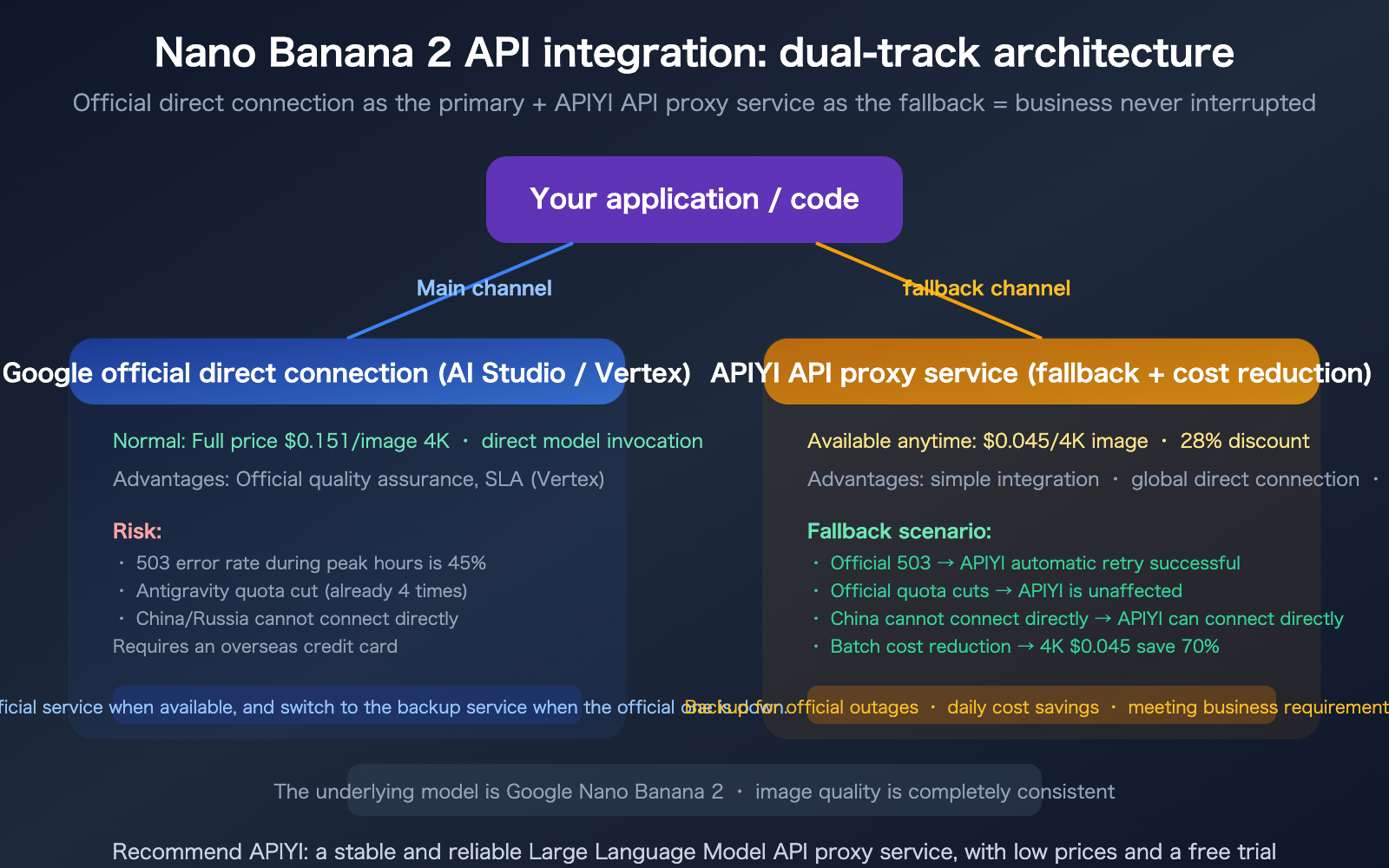
| Official 503 Crashes | 45% error rate during peak times → APIYI handles multi-channel auto-retries |
| Antigravity Quota Cuts | Cut 4 times in 4 months → APIYI remains unaffected |
| No Direct Access (CN/RU) | APIYI provides global direct access, no VPN required |
| No Overseas Credit Card | APIYI supports multiple payment methods |
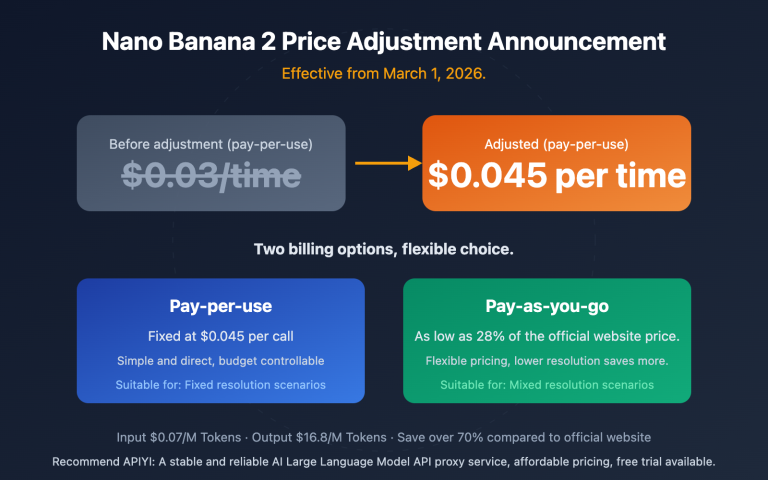
| Bulk Cost Savings | 4K at $0.045 vs. Official $0.151, saving 70% |
| Fast Onboarding | 5-minute integration vs. 30 minutes to 3 hours for official |
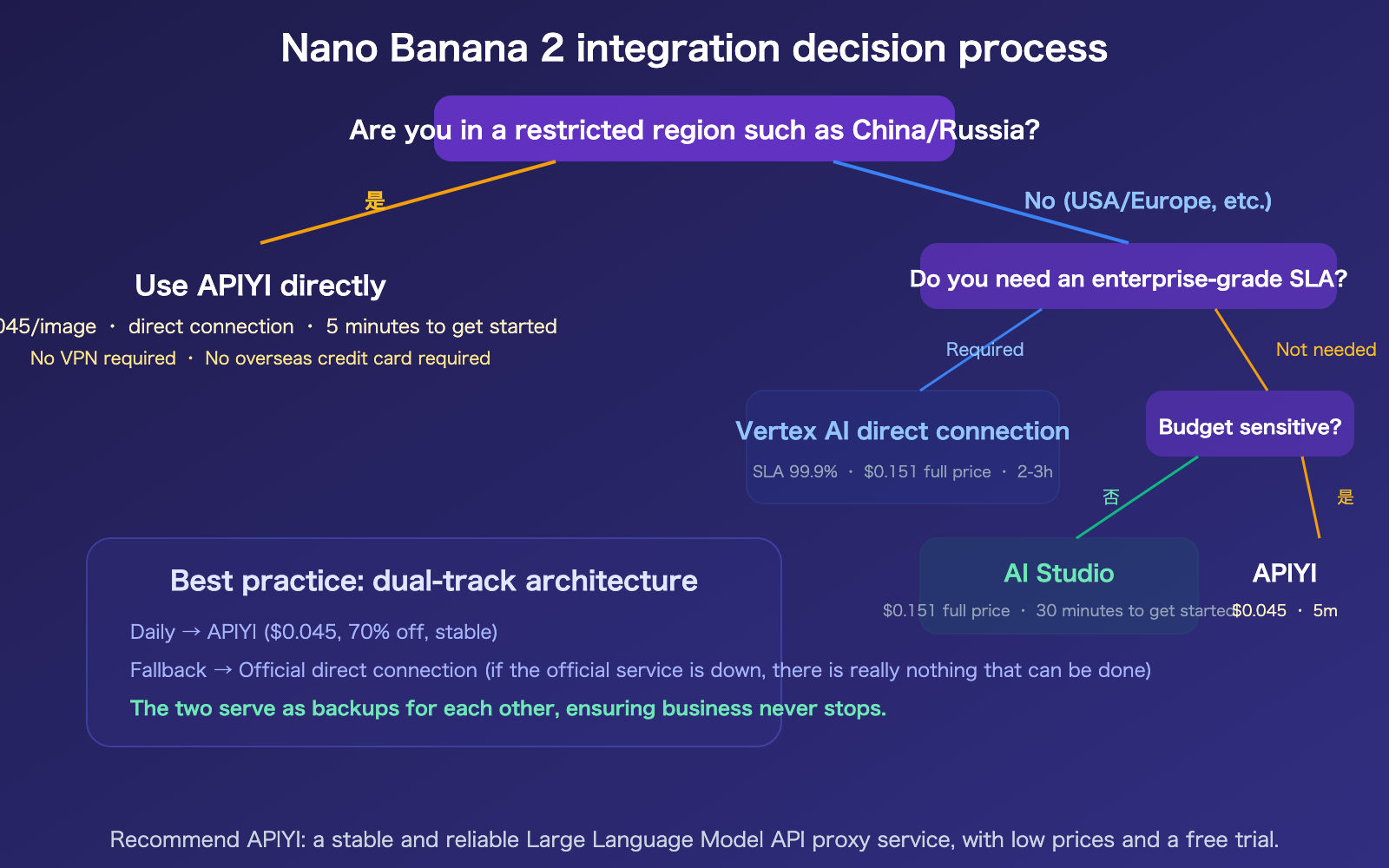
Recommended Architecture: Prioritize APIYI (cost-effective + stable) and keep the official connection as a backup (though if the official service goes down, there's not much you can do).
APIYI Integration Code (only one line different from official)
import openai

# APIYI integration: change one line for base_url
client = openai.OpenAI(
    api_key="YOUR_APIYI_KEY",
    base_url="https://vip.apiyi.com/v1"
)

response = client.chat.completions.create(
    model="gemini-3.1-flash-image-preview",
    messages=[{
        "role": "user",
        "content": "A golden retriever running on the beach, afternoon sunlight"
    }]
)
View Dual-Track Fallback Code
import openai

# Primary: APIYI (Cheap + Stable)
apiyi_client = openai.OpenAI(
    api_key="APIYI_KEY",
    base_url="https://vip.apiyi.com/v1"
)

# Fallback: Official direct connection
from google import genai
official_client = genai.Client(api_key="GOOGLE_KEY")

def generate_image(prompt: str):
    """Dual-track: APIYI first, fallback to official on failure"""
    try:
        # First choice: APIYI ($0.045/image, stable)
        response = apiyi_client.chat.completions.create(
            model="gemini-3.1-flash-image-preview",
            messages=[{"role": "user", "content": prompt}]
        )
        return response, "apiyi"
    except Exception as e:
        print(f"APIYI failed: {e}, switching to official direct connection...")
        try:
            # Fallback: Official direct connection ($0.151/image)
            from google.genai import types
            response = official_client.models.generate_content(
                model="gemini-3.1-flash-image-preview",
                contents=[prompt],
                config=types.GenerateContentConfig(
                    response_modalities=["TEXT", "IMAGE"],
                ),
            )
            return response, "official"
        except Exception as e2:
            print(f"Official also failed: {e2} (If the official service is down, there's really no way around it)")
            return None, "both_failed"
🎯 Architectural Advice: Use APIYI for daily operations (savings + stability) while keeping the official code path as a backup. If APIYI goes down, switch to official; if the official service goes down, switch to APIYI. They act as mutual failovers, ensuring your business never stops (unless both go down simultaneously, which would imply a Google infrastructure-level failure).
Nano Banana 2 vs. Nano Banana Pro: Official Integration Differences
If you read the previous article on NB Pro, here are the key differences for integrating NB2:
| Difference | Nano Banana Pro | Nano Banana 2 |
|---|---|---|
| Model ID | gemini-3-pro-image-preview |
gemini-3.1-flash-image-preview |
| Free Tier | Almost zero | Limited free tier (~500 RPD Flash Image) |
| Official 4K Price | $0.24/image | $0.151/image (37% cheaper) |
| APIYI Price | $0.05/call fixed | $0.045/call fixed |
| APIYI Discount | Below 20% of official | Approx 28% of official |
| Speed | 10-20 sec/1K | 4-6 sec/1K (3x faster) |
| Billing System | Same as NB2 (New policy as of 2026.3.23) | Pre-paid/Post-paid |
| Image Quality | 100% (Baseline) | ~95% (Extremely close) |
FAQ
Q1: What’s changed with the new AI Studio billing system?
Starting March 23, 2026, AI Studio has moved away from GCP-linked billing to a built-in prepaid/postpaid system. You can top up with as little as $10, and there's an auto-recharge option. Postpaid accounts require a credit check. This change really streamlines the process—no more messing around in the GCP console. However, the credit card requirements remain the same; Chinese UnionPay cards are still not accepted.
Q2: I’m already using AI Studio directly. Do I still need APIYI?
We recommend it. APIYI isn't meant to replace the official service; it’s there for failover and cost optimization: 1) When the official service hits a 503 error (which happens with 45% probability during peak times), your business won't be interrupted; 2) When Antigravity slashes quotas (they've done it 4 times in 4 months), APIYI remains unaffected; 3) For daily batch tasks, using APIYI costs $0.045 per 4K vs. the official $0.151, saving you 70%. Just add a try/except fallback logic in your code—it’s only two lines.
Q3: What’s the difference between connecting to APIYI versus the official site? When is it better to use APIYI?
APIYI also routes to Google's model infrastructure, so the image quality is identical. APIYI is a better choice if: 1) You are in a restricted region like China or Russia (where the official site is unreachable); 2) You don't have an overseas credit card; 3) You need high-volume generation (APIYI has no RPM limits); 4) You are cost-sensitive (28% of the original price); 5) You need to switch between multiple models (one key covers NB2 + NB Pro + Claude). The official route is better if you have strict compliance audit requirements for first-party vendors or need Vertex AI SLA.
Q4: What do you mean by “if the official service crashes, there’s nothing we can do”?
APIYI’s multi-channel load balancing can maintain service during partial Google node failures by automatically retrying on available nodes. However, if Google’s entire Nano Banana 2 model infrastructure goes down (all nodes failing simultaneously), then truly no one can help—because all channels ultimately rely on Google’s models. Such extreme cases are very rare (no total collapse has occurred since 2026), but we believe being honest about this limitation is more responsible than promising "100% uptime."
Summary
Key takeaways for integrating the Nano Banana 2 API:
- Official routes require credit cards and full pricing: AI Studio takes 30 minutes to set up but requires an overseas credit card at $0.151/image; Vertex AI takes 2-3 hours but includes an SLA. Both are inaccessible from China/Russia.
- APIYI is the optimal solution for failover and cost savings: 5-minute integration, $0.045/4K image (28% of the price), global direct access, no overseas credit card required, pay-as-you-go, and no charges for failed requests. It meets the vast majority of business needs.
- A dual-track architecture is the safest bet: Use APIYI for daily cost savings and keep the official code path as a backup. They serve as mutual backups to ensure your business never stops (if the official service crashes, there's really nothing to be done, but such total failures are extremely rare).
We recommend accessing the Nano Banana 2 API via APIYI at apiyi.com—$0.045 per 4K, global direct access, 5-minute setup, and free test credits upon registration.
📚 References
-
Nano Banana 2 Official Developer Guide: Google's tutorial on integrating and using NB2
- Link:
blog.google/innovation-and-ai/technology/developers-tools/build-with-nano-banana-2/ - Description: Covers model capabilities, code examples, and best practices.
- Link:
-
AI Studio Billing Documentation: Details on the new prepaid/postpaid billing system
- Link:
ai.google.dev/gemini-api/docs/billing - Description: Detailed explanation of the new policy effective March 23, 2026.
- Link:
-
Gemini API Rate Limits: Official rate limits and tier information
- Link:
ai.google.dev/gemini-api/docs/rate-limits - Description: Specific quotas for Free Tier, Tier 1, Tier 2, and Tier 3.
- Link:
-
APIYI Documentation Center: Nano Banana 2 $0.045/image 4K integration guide
- Link:
docs.apiyi.com - Description: 5-minute integration, global direct connection, pay-as-you-go, and no charges for failed requests.
- Link:
Author: APIYI Technical Team
Technical Discussion: Feel free to join the discussion in the comments. For more resources, visit the APIYI documentation center at docs.apiyi.com.