Author's Note: Google has unexpectedly launched the Nano Banana 2 image generation model. Based on the Gemini 3.1 Flash architecture, it's already available on the Gemini web version. This post shares my hands-on findings and a guide for API access.
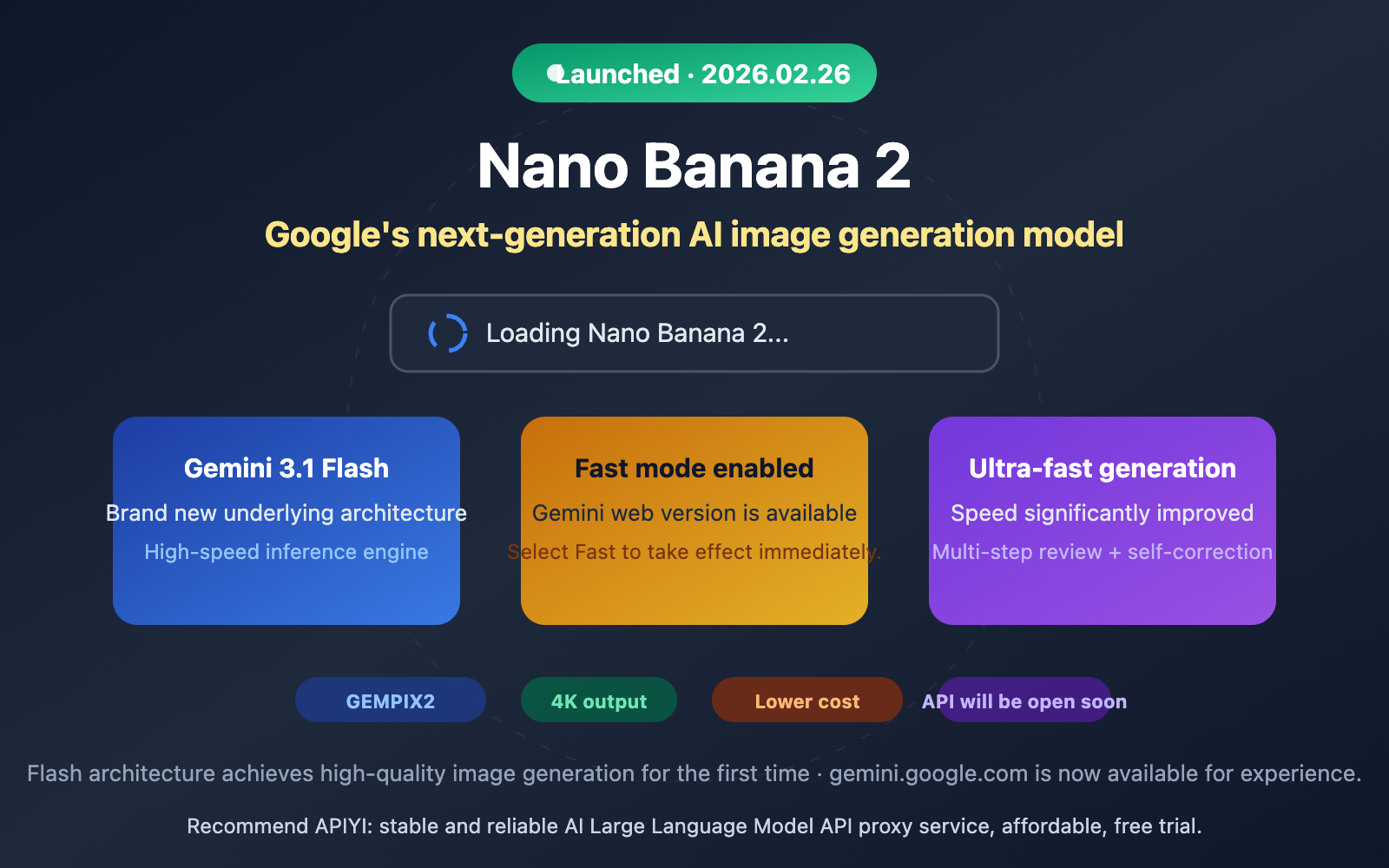
Google just dropped Nano Banana 2, and it's officially live on gemini.google.com. When you select "Fast" mode for image generation in the Gemini interface, the loading screen now explicitly displays "Loading Nano Banana 2…"—marking the first time Google has publicly used this name within its product UI.
Core Value: Through hands-on testing and deep analysis, I'll help you understand Nano Banana 2's real-world capabilities, how it differs from previous generations, and how to be among the first to call it via API.
Nano Banana 2 Core Findings
| Key Finding | Details | Source |
|---|---|---|
| Official Name | Nano Banana 2 (Internal codename: GEMPIX2) | Gemini web loading prompt |
| Architecture | Gemini 3.1 Flash inference engine | Official docs, community verification |
| Usage | Select Fast mode on Gemini web | Hands-on verification |
| Biggest Takeaway | Extremely fast generation speed | Hands-on experience |
| Branding Strategy | Official docs now use "Nano Banana" as the primary label | Official documentation pages |
Two Key Details of the Nano Banana 2 Launch
Detail 1: UI explicitly displays "Nano Banana 2"
On gemini.google.com, when a user selects Fast mode and requests an image generation, the interface shows a "Loading Nano Banana 2…" message. This is the first time Google has clearly used the "Nano Banana 2" name in a user-facing interface, confirming it's no longer just a community-speculated codename but an officially recognized product name.
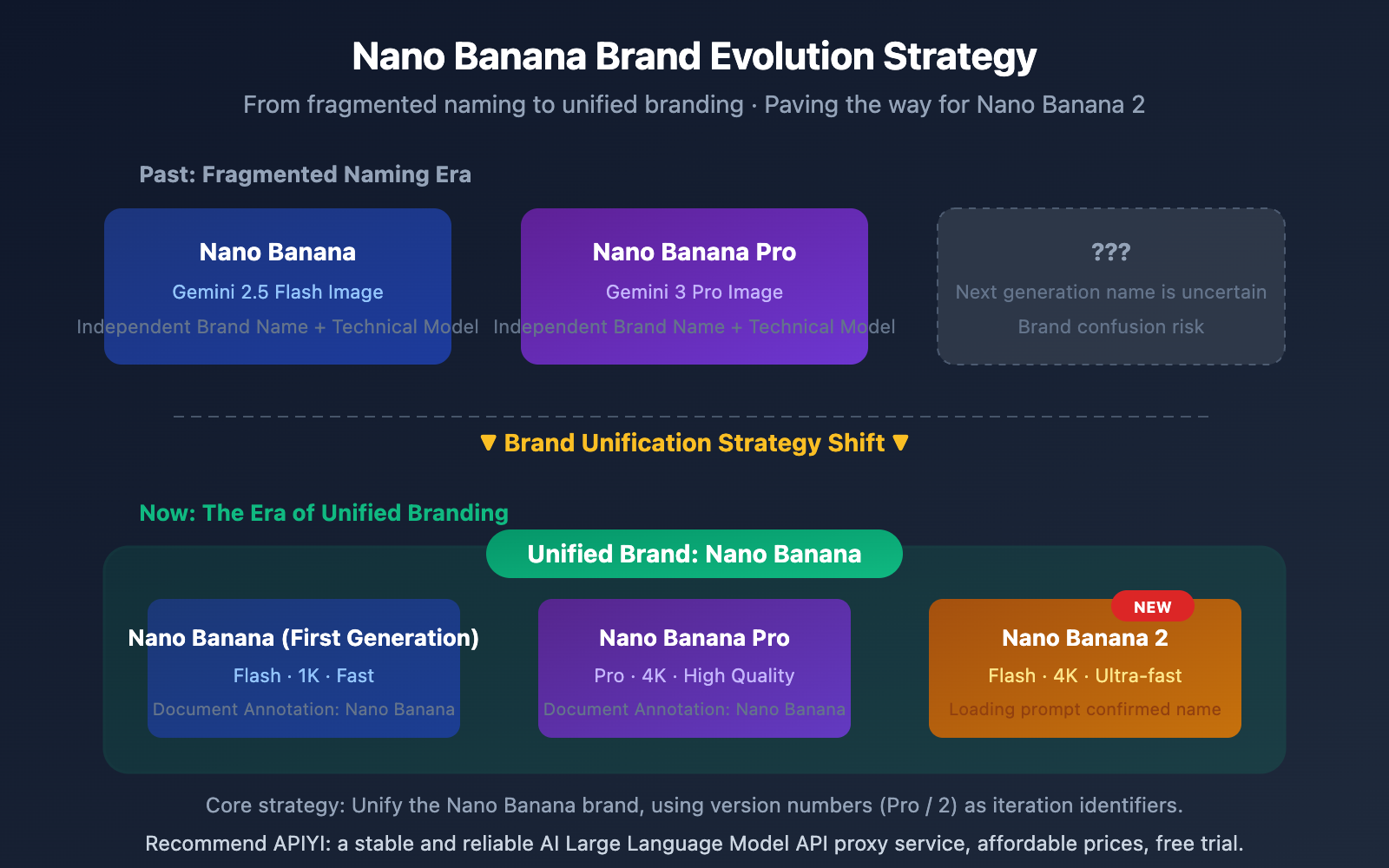
Detail 2: Official documentation unifies branding under "Nano Banana"
Simultaneously, Google has updated its official developer documentation to label all current image generation models as "Nano Banana," without necessarily distinguishing specific version numbers in every instance. This branding consolidation aligns perfectly with the Nano Banana 2 launch. It suggests Google is prepping for a broader rollout, turning "Nano Banana" into a unified brand for image generation, while version numbers (1, 2, Pro) serve as specific iteration identifiers.
Nano Banana 2 Technical Architecture Analysis
Technical Significance of Nano Banana 2 Based on Gemini 3.1 Flash
Nano Banana 2's choice of Gemini 3.1 Flash as its underlying architecture, rather than Gemini 3.1 Pro, carries clear technical implications:
| Architecture Feature | Gemini 3.1 Flash (Nano Banana 2) | Gemini 3 Pro (Nano Banana Pro) |
|---|---|---|
| Inference Speed | Extremely fast, optimized for real-time interaction | Slower, optimized for high-quality output |
| Inference Cost | Low cost, suitable for large-scale calls | Higher cost, suitable for precision tasks |
| Model Size | Lightweight, high deployment efficiency | Large model, high resource requirements |
| Use Cases | Fast generation, batch processing | Professional-grade, high-precision needs |
In the Gemini web version, you need to select Fast mode to use Nano Banana 2. This further confirms its Flash architecture positioning—Fast mode corresponds directly to the Gemini Flash series models.
Multi-step Generation Workflow of Nano Banana 2
Based on known technical details, Nano Banana 2 employs a novel multi-step generation process:
- Planning Phase: The model first understands the prompt and plans the image composition.
- Generation Phase: Synthesizes the image via a Diffusion Head.
- Review Phase: An internal image analysis module automatically checks the generated results.
- Correction Phase: Identifies and fixes errors (such as common issues with text or fingers).
- Output Phase: Delivers the final result.
This "self-review + self-correction" mechanism is the key technical reason Nano Banana 2 maintains high quality even at Flash speeds.
🎯 Developer Tip: Nano Banana 2's Flash architecture means API invocation costs will be significantly lower than Nano Banana Pro. We recommend keeping an eye on model release updates via the APIYI (apiyi.com) platform, as they typically integrate Google's latest models as soon as they're available.
Comparison: Nano Banana 2 vs. Previous Generations
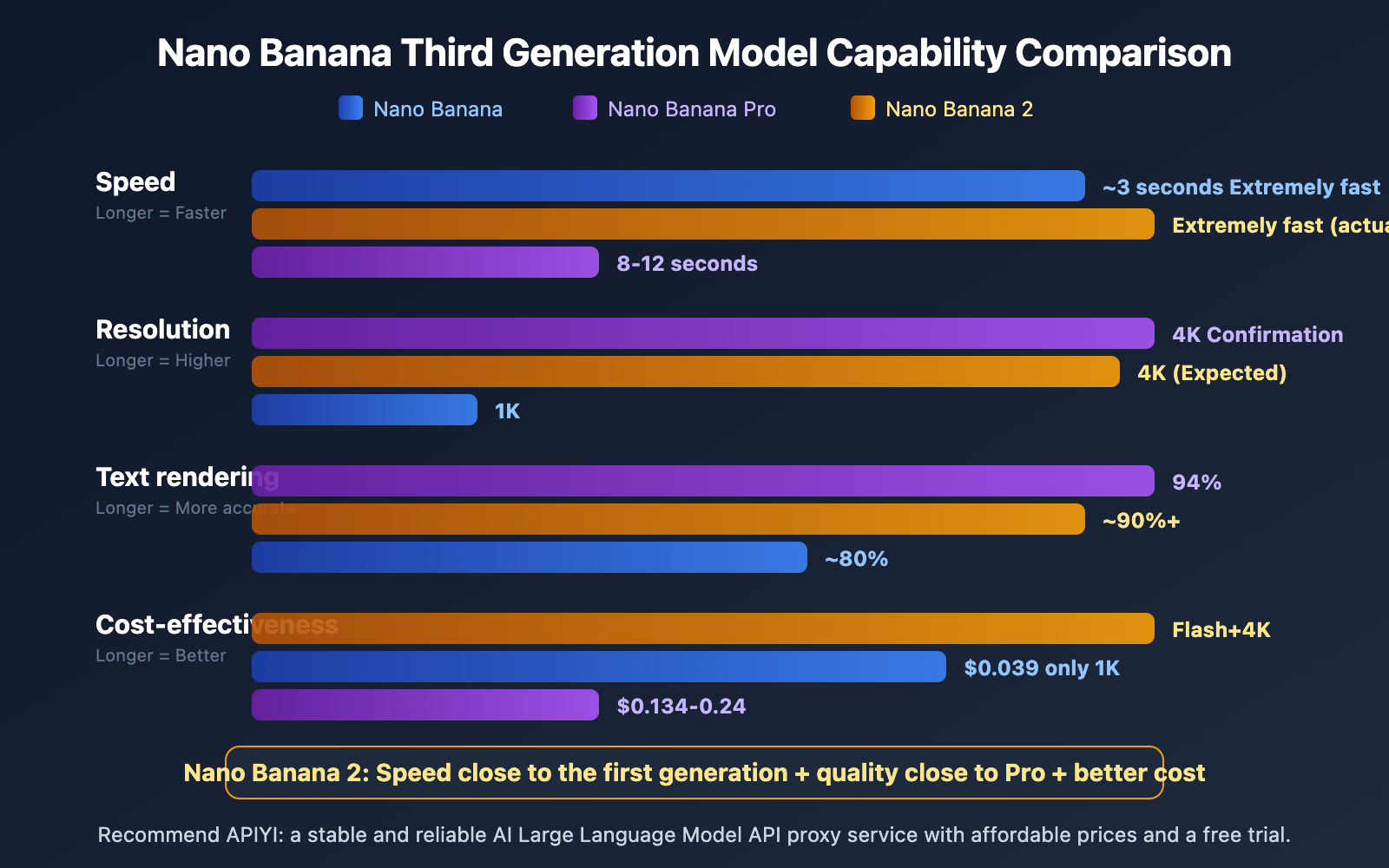
| Dimension | Nano Banana (V1) | Nano Banana Pro | Nano Banana 2 |
|---|---|---|---|
| Underlying Architecture | Gemini 2.5 Flash | Gemini 3 Pro | Gemini 3.1 Flash |
| Max Resolution | 1K (1024×1024) | 4K (4096×4096) | 4K (Expected) |
| Generation Speed | ~3 seconds | 8-12 seconds | Extremely fast (perceived) |
| Text Rendering | ~80% | 94% | 90%+ (Expected) |
| Internal Codename | GEMPIX | — | GEMPIX2 |
| Gemini Mode | — | — | Fast Mode |
| Price per 1K Images | $0.039 | $0.134 | TBD |
From a hands-on perspective, the most intuitive improvement in Nano Banana 2 is speed. User feedback indicates that "images generate incredibly fast," which aligns perfectly with the high-speed inference capabilities of the Flash architecture. If the image quality can approach the level of Nano Banana Pro, Nano Banana 2 will become the most cost-effective AI image generation solution currently available.
🎯 Testing Suggestion: While waiting for the official Nano Banana 2 API release, you can use APIYI (apiyi.com) to test Nano Banana Pro (
gemini-3-pro-image-preview) first to get familiar with how to call Google's image generation APIs.
Nano Banana 2 API Integration Guide
Currently Available Access Methods
Nano Banana 2 is currently live on the Gemini web version, and official API access is expected to follow soon. Based on the consistent design of Google's Gemini image generation API, the model invocation method is expected to look like this:
import openai

client = openai.OpenAI(
    api_key="YOUR_API_KEY",
    base_url="https://vip.apiyi.com/v1"
)

# Expected invocation method for Nano Banana 2
response = client.chat.completions.create(
    model="gemini-3.1-flash-image-preview",
    messages=[{"role": "user", "content": "An orange cat sitting at a desk reading a book, warm lamp lighting, 4K ultra-clear"}]
)
View the full code for the currently available Nano Banana Pro
import openai

client = openai.OpenAI(
    api_key="YOUR_API_KEY",
    base_url="https://vip.apiyi.com/v1"
)

# Nano Banana Pro is already available
response = client.chat.completions.create(
    model="gemini-3-pro-image-preview",
    messages=[
        {
            "role": "user",
            "content": "Professional product photography: a pair of wireless headphones, white background, soft side lighting"
        }
    ],
    max_tokens=4096
)

if response.choices[0].message.content:
    print("Image generated successfully")
Pro Tip: Get a unified API key through APIYI (apiyi.com) to call Nano Banana Pro and the upcoming Nano Banana 2. The platform offers free test credits and supports OpenAI-compatible formats.
Nano Banana 2 Use Cases and Industry Impact
Nano Banana 2 Use Case Analysis
| Use Case | Why We Recommend It | Advantages Over Previous Gen |
|---|---|---|
| E-commerce Product Images | Quickly batch-generate product display images | Significant speed boost, lower costs |
| Social Media Content | Instantly generate illustrations and posters | Flash speed meets real-time demands |
| UI/UX Prototyping | Rapidly generate interface concept art | Multi-step review improves text rendering accuracy |
| Game Art Concepts | Efficiently produce character and scene concepts | 4K resolution meets high-detail requirements |
| Educational Content | Generate charts and diagrams | Enhanced rendering for math formulas and charts |
Short-term Industry Impact of Nano Banana 2
The launch of Nano Banana 2 sends a clear signal: Google is pushing high-quality AI image generation capabilities down to the Flash (lightweight) architecture. This means:
- Cost barriers continue to drop: Developers no longer need to pay Pro-level prices for 4K images.
- Real-time applications become viable: Flash-level speeds are fast enough to support real-time interactive scenarios.
- Competitors face pressure: Products like Midjourney and DALL-E will need to respond to Google's dual advantage of price and speed.
🎯 Strategic Advice: The update cycle for Google's image generation models is accelerating. We recommend using an aggregation platform like APIYI (apiyi.com) to manage your API calls centrally, making it easy to switch between models and perform comparative testing.
FAQ
Q1: How can I use Nano Banana 2 on the Gemini web version?
Head over to gemini.google.com, switch to Fast mode in the model selector, and just type in your image generation prompt. You'll see a "Loading Nano Banana 2…" notification during the process, which confirms you're using the latest version.
Q2: When will the Nano Banana 2 API be available for model invocation?
Nano Banana 2 is currently live on the Gemini web version, but the official API release date hasn't been announced yet. Based on Google's track record, the API usually follows within a few days to weeks after the web launch. I'd recommend keeping an eye on APIYI (apiyi.com) for the latest updates—the platform is usually the first to integrate new models.
Q3: Nano Banana 2 vs. Nano Banana Pro: Which one should I choose?
It really depends on your core needs. If you're after top-tier image quality and the best text rendering accuracy, go with Nano Banana Pro. If speed and cost-effectiveness are your priorities—especially for batch generation or real-time interaction—Nano Banana 2 is the way to go. Both support 4K resolution output.
Summary
Key takeaways from the official launch of Nano Banana 2:
- Live on Gemini Web: Just select Fast mode to use it. The loading screen explicitly displays "Nano Banana 2."
- Based on Gemini 3.1 Flash Architecture: It's lightning-fast, and costs are expected to be significantly lower than Nano Banana Pro.
- Brand Unification Strategy: Official documentation is now using the unified "Nano Banana" label, setting the stage for the new version's branding.
The launch of Nano Banana 2 marks another major milestone for Google in the AI image generation space. The combination of the Flash architecture and high-quality output is set to redefine the price-performance standard for AI image generation.
I recommend setting up your API environment ahead of time via APIYI (apiyi.com). The platform offers free testing credits and a unified interface for multiple models, making it super easy to start your model invocation as soon as the Nano Banana 2 API officially drops.
📚 References
-
Gemini Official Image Generation Documentation: Google's official developer documentation for the Gemini image generation API.
- Link:
ai.google.dev/gemini-api/docs/image-generation - Description: API access guide, model parameters, and code examples.
- Link:
-
TestingCatalog Nano Banana 2 Report: Technical analysis regarding Google's preparation for the upcoming Nano Banana 2 release.
- Link:
testingcatalog.com/google-is-preparing-nano-banana-2-for-the-upcoming-release/ - Description: Technical details on the internal codename GEMPIX2 and the release timeline.
- Link:
-
Google DeepMind Image Generation Models: Google DeepMind's official model introduction page.
- Link:
deepmind.google/models/gemini-image/ - Description: Official technical specifications and capability descriptions.
- Link:
-
Nano Banana Wikipedia: The complete history and technical evolution of the Nano Banana model series.
- Link:
en.wikipedia.org/wiki/Nano_Banana - Description: A comprehensive overview ranging from naming origins to various model generations.
- Link:
Author: APIYI Technical Team
Technical Exchange: Feel free to share your Nano Banana 2 experiences in the comments! For more AI model resources, visit the APIYI documentation center at docs.apiyi.com.