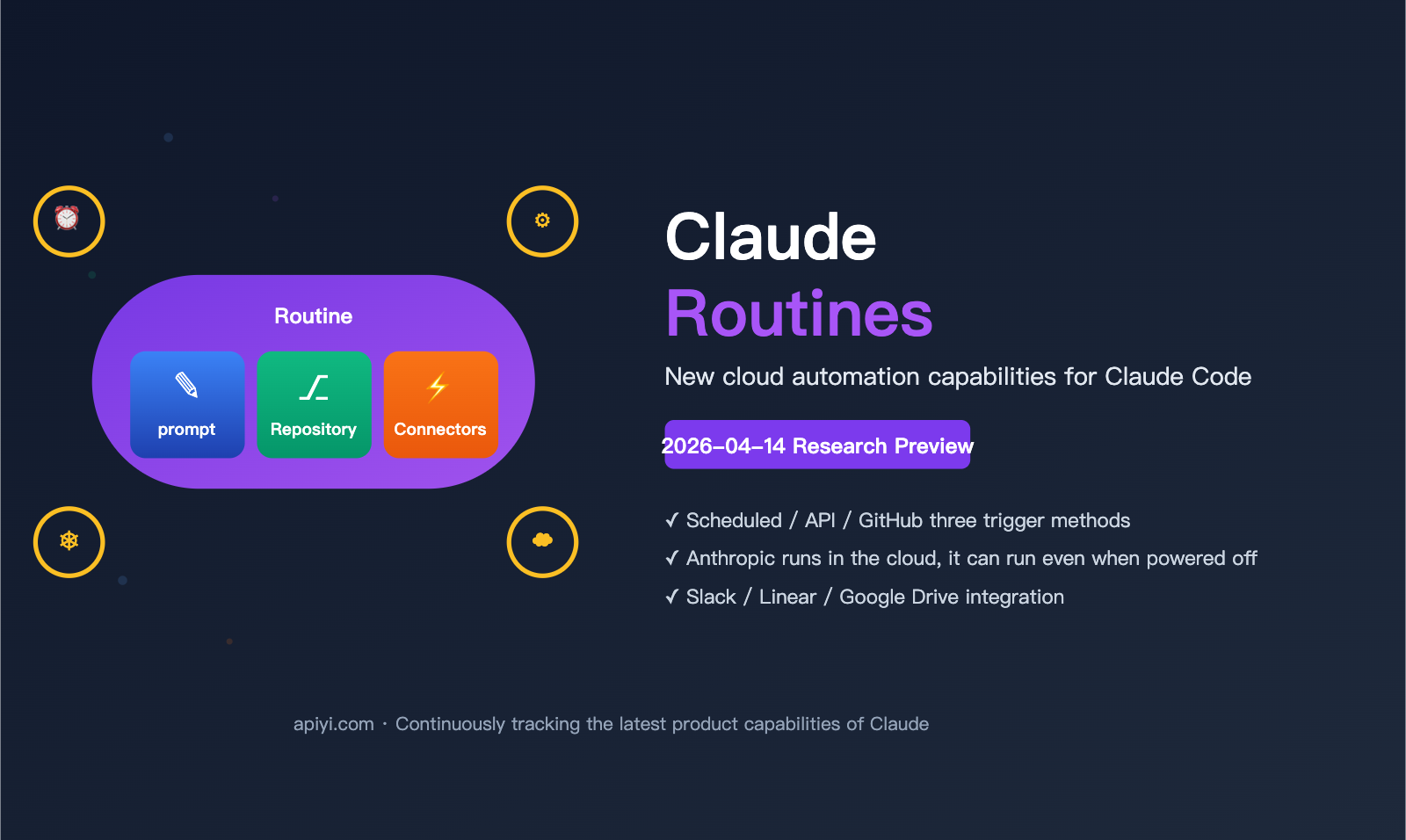
On April 14, 2026, Anthropic launched a highly "engineer-friendly" new capability for Claude Code: Claude Routines. To put it simply: You bundle a prompt, a code repository, and a set of connectors (Slack, Linear, Google Drive, etc.) into a "Routine," set the trigger conditions, and Claude will automatically run it for you on Anthropic's cloud infrastructure — even if your laptop is closed or you're away.
For many developers who are constantly bogged down by repetitive tasks like "daily PR summaries," "Slack status reports," or "automatic Linear ticket triage," this is a genuine game-changer. In this article, we’ll walk new users through Routines from scratch: what it is, how to combine its components, who can use it, where it fits in, and a question many readers are likely wondering — whether you can access this capability through third-party API platforms.
What are Claude Routines? A One-Minute Primer for New Users
Here’s the simplest mental model: A Routine = A Claude Code configuration that can be executed repeatedly.
Previously, when using Claude Code, the workflow was roughly: "Open terminal → write a prompt → Claude analyzes your code, generates a PR, or fixes a bug." But all of this required you to be at your computer, with your laptop open and connected to the internet. Routines move this process to Anthropic's cloud:
- You configure the task once (prompt + repository + connectors + trigger conditions).
- The Anthropic cloud runs it automatically based on your schedule or specific events.
- You can close your local laptop, go on a business trip, take a vacation, or go out for a walk.
- Once finished, it pushes the results to your specified destination (Slack, Linear, email, etc.).
📌 Key Fact: Claude Routines launched as a Research Preview on April 14, 2026, and is currently available to Pro / Max / Team / Enterprise subscribers. This is the first time Anthropic has officially productized "running Claude Code in the cloud" — previously, similar capabilities required you to cobble together your own cron jobs, CI pipelines, and custom scripts.
How is it fundamentally different from the previous Claude Code?
| Comparison Dimension | Traditional Claude Code | Claude Code + Routines |
|---|---|---|
| Execution Location | Local terminal / Laptop | Anthropic cloud infrastructure |
| Trigger Method | Manual command input | Schedule / API / GitHub events |
| Online Requirement | Must be powered on and connected | Runs even when your laptop is off |
| Code Access | Direct access to local file system | Clones repo in the cloud, no local access |
| External Services | Relies on local CLI/scripts | Built-in Connectors (Slack/Linear/Drive) |
| Best For | Interactive programming | Scheduled/event-driven repetitive tasks |
Essentially, Routines upgrade Claude Code from an "AI sidekick sitting at your computer" to a "cloud agent that works for you 24/7."
The Three Core Elements of Routines: Prompt + Repo + Connectors
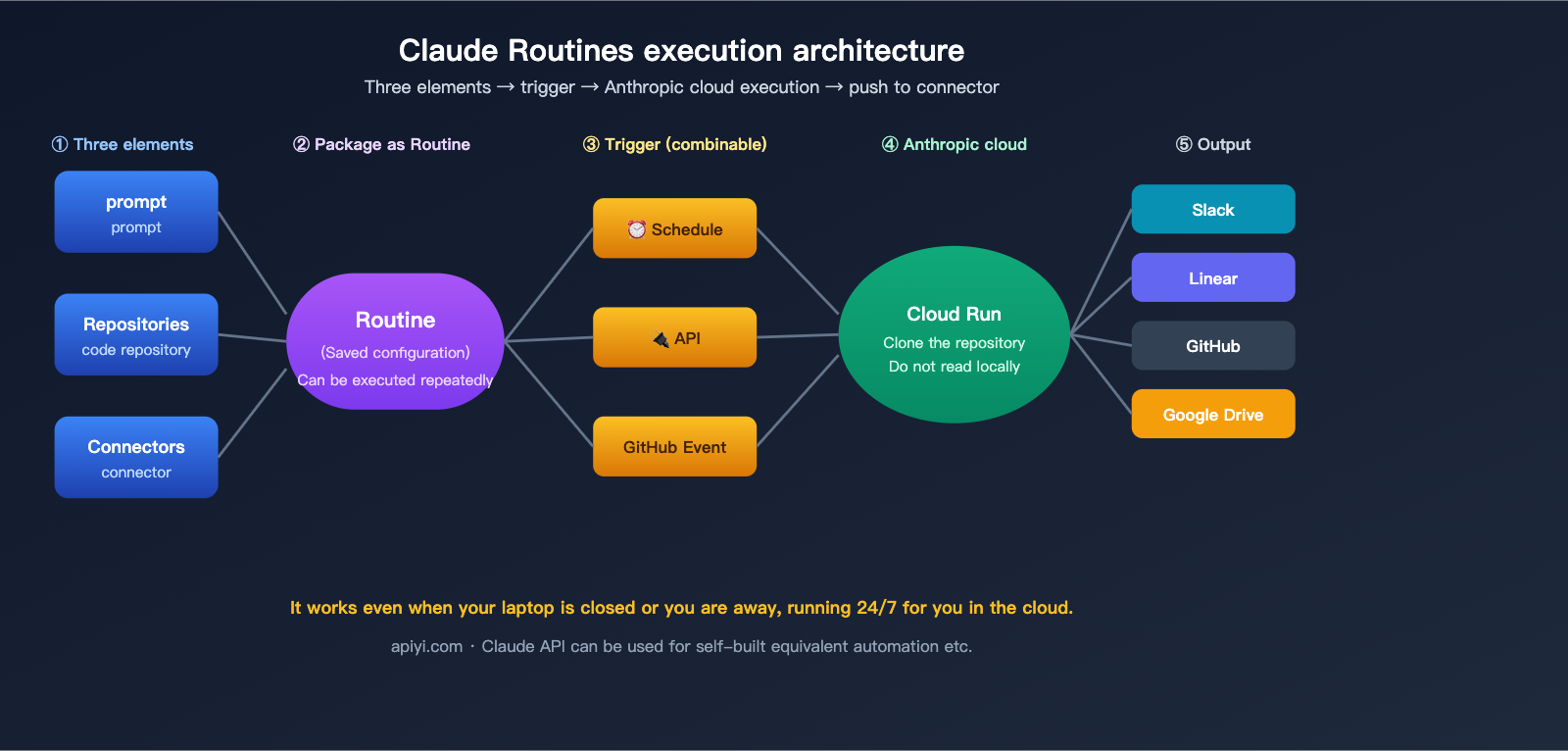
A Routine is built from three clear "building blocks":
Element 1: Prompt
This is a natural language instruction telling Claude "what to do this time." It's just like the prompt you use with Claude Code, but in this case, it's saved for repeated use.
Example:
"Please check all merged PRs in the
frontend-webrepository from the last 24 hours, summarize the main changes for each PR (one sentence is enough), perform a brief assessment of potential regression risks, and send the results to the#eng-dailychannel on Slack."
Element 2: Repositories
You specify one or more GitHub repositories. Each time the Routine runs, the Anthropic cloud clones these repositories into a sandbox environment where Claude performs its work. A key point to emphasize:
⚠️ The cloud does not access your local file system. Routines only pull code from the GitHub repositories you've configured; they don't have the ability to touch anything on your Mac or PC. This is a crucial security and privacy boundary.
Element 3: Connectors
Connectors are external services that Claude can "invoke" during execution. Officially supported Connectors typically include:
- Slack — Sending messages to channels/DMs, reading messages.
- Linear — Creating, updating, and querying issues.
- Google Drive — Reading documents and writing files.
- GitHub — Reading issues/PRs, commenting, and adding labels.
- Other connectors currently in development.
Connectors act as "capability switches"—you need the connection to interact with the corresponding platform. This transforms Claude Routines from a "brain that only thinks" into "hands that can get things done."
🎯 Mental Model: Think of a Routine as a "continuously running micro-service"—the Prompt is the business logic, Repositories are the code dependencies, Connectors are the external API permissions, and the trigger is the schedule or webhook. It’s essentially compressing what you’d normally build with Python + Airflow + GitHub Actions into a configuration that Claude can understand directly.
Three Trigger Methods: Schedule / API / GitHub Event
The second key capability of Routines is the trigger, and currently, there are three types that can be combined in any way you like.
Trigger 1: Schedule
The classic "scheduled task" mode. It supports two setup methods:
- Presets:
hourly,daily,weekdays,weekly. - Custom Cron: You can write a full cron expression in the CLI (e.g.,
0 9 * * 1-5for 9:00 AM on weekdays).
Ideal for: Daily stand-up summaries, weekly competitor news, or hourly alert monitoring.
Trigger 2: API
Anthropic provides an HTTP endpoint for every Routine. You can trigger an execution from any of your own systems (CI, webhooks, automation scripts).
Ideal for: When you have an existing business workflow and want to have Claude perform analysis or summarization at a specific step—just call the Routine API at that point.
Trigger 3: GitHub Event
This links to events in your GitHub repository—PR opened, PR merged, Issue created, Push, etc. It’s essentially giving your GitHub a "natural language-driven" lightweight CI.
Ideal for: Automatically reviewing and commenting when a PR is opened, triaging and labeling issues upon creation, or generating a changelog after a push to the main branch.
Trigger Capability Comparison
| Trigger | Configuration Entry | Typical Scenario | Combinable |
|---|---|---|---|
| Schedule | Web UI preset / CLI cron | Daily reports, periodic syncs | ✅ Can be combined |
| API | Auto-generated HTTP endpoint | External system triggers, CI integration | ✅ Can be combined |
| GitHub Event | GitHub webhook integration | PR/Issue/Push responses | ✅ Can be combined |
💡 Pro Tip: A single Routine can have multiple triggers attached. For example, a "PR Review Routine" can run on a daily schedule for a full audit, while also triggering instantly whenever a new PR is opened. One configuration covers multiple scenarios.
Who Can Use It? Pro / Max / Team / Enterprise Quota Comparison
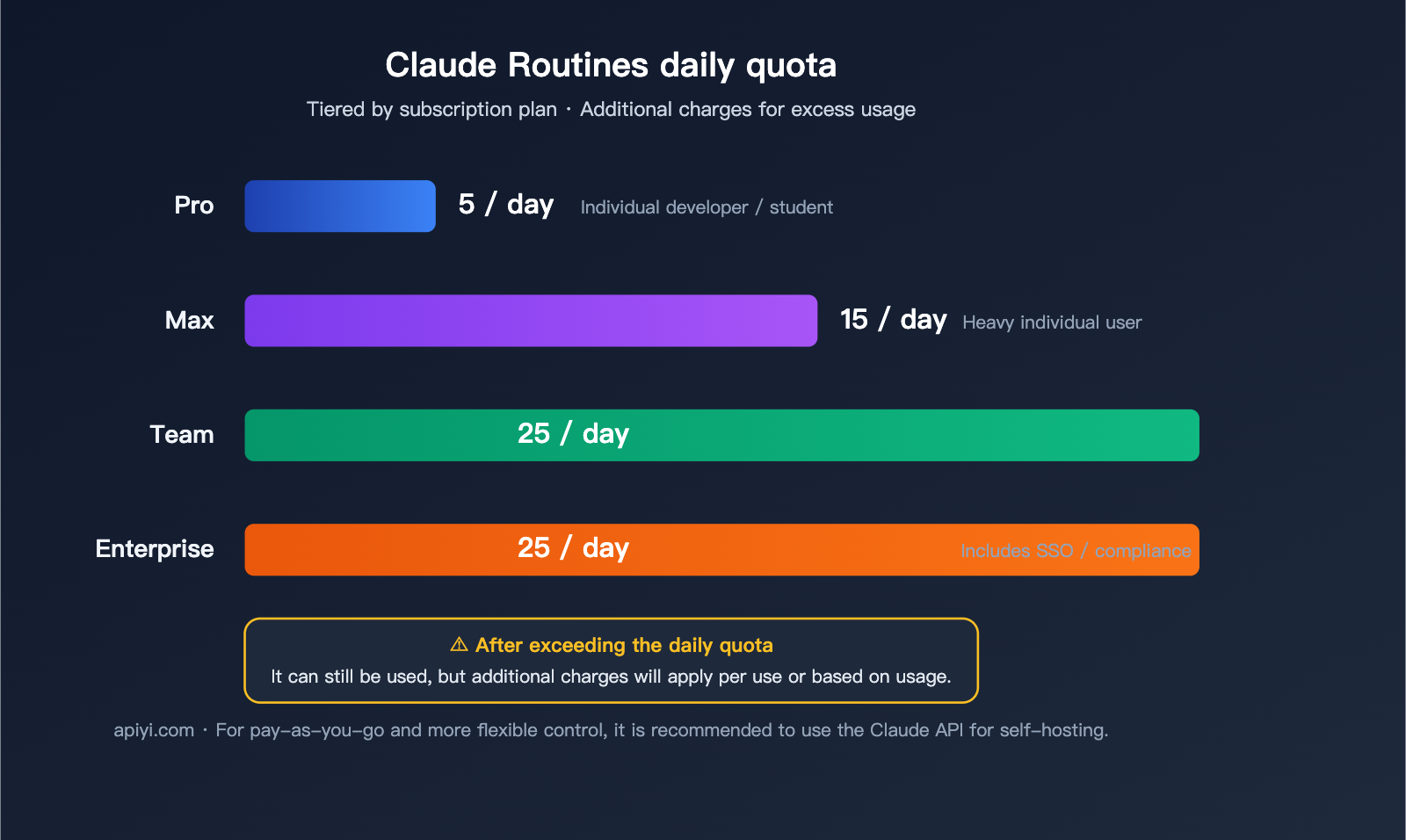
Claude Routines are currently subscription-bound. They aren't a free feature, and they aren't available to pure API users. Each subscription tier comes with a different number of daily Routine executions:
| Subscription Plan | Daily Routine Quota | Best For |
|---|---|---|
| Pro | 5/day | Individual developers, students, indie creators |
| Max | 15/day | Power users with high-frequency needs |
| Team | 25/day | Small to medium-sized teams |
| Enterprise | 25/day | Large organizations (includes SSO/compliance) |
📢 Over-Quota Note: Official documentation indicates you can continue using it after hitting your daily limit, but you'll be charged per-use for the extra usage. If you expect your use case to exceed the quota, it's best to estimate your costs beforehand or upgrade to Team/Enterprise.
How do new users get started?
If you don't have an Anthropic subscription yet, here's how to get onboard:
- Register for an Anthropic Claude account (claude.com).
- Subscribe to any of the Pro / Max / Team / Enterprise plans.
- Locate the "Routines" entry point in the Claude Code Web UI.
- Follow the prompts to configure your prompt, repo, connectors, and trigger.
- Enable it — you'll be able to see logs on the dashboard after the first run.
The process isn't complicated, but I recommend starting with a very simple task for your first configuration (like generating a summary of last week's commits for Slack every Monday at 9 AM). Get that running smoothly before scaling up.
Typical Use Cases: 5 Practical Routine Examples
Here are 5 actionable examples compiled from public use cases and official docs that you can adapt right away.
Case 1: Daily PR Summary Report
- Prompt: Summarize key changes and risks in PRs from the last 24 hours.
- Repo:
org/your-main-repo - Connectors: Slack
- Trigger: Schedule
dailyat 9:00 AM - Output: Automatically posted to the
#eng-dailychannel.
Case 2: Automatic Issue Triage
- Prompt: Read the latest issues, determine the type (bug/feature/question), apply the corresponding label, and assign to the relevant owner.
- Repo: GitHub repository
- Connectors: GitHub + Linear
- Trigger: GitHub Event
issue.opened - Output: Automatically label the issue and create a linked ticket in Linear.
Case 3: Weekly Technical Debt Scan
- Prompt: Scan the repo for TODO/FIXME comments, outdated dependencies, and test coverage gaps; generate a list.
- Repo: Multiple core repositories
- Connectors: Google Drive
- Trigger: Schedule
weeklyon Monday morning - Output: Write the summary to a Drive document for Tech Lead review.
Case 4: Slack Technical FAQ Bot
- Prompt: Listen to the
#ask-engchannel, read questions, search the codebase for answers, and reply. - Repo: Internal documentation/code repositories
- Connectors: Slack
- Trigger: API (linked to Slack bot webhook)
- Output: Reply directly in the Slack thread.
Case 5: Automated PR Code Review
- Prompt: Review PR diffs, identifying potential bugs, style issues, and missing tests.
- Repo: Target repository
- Connectors: GitHub
- Trigger: GitHub Event
pull_request.opened - Output: Post an automatic review comment on the PR.
Summary of the 5 Case Configurations
| Case | Minimum Connector Combo | Recommended Trigger | Difficulty |
|---|---|---|---|
| Daily PR Summary | Slack | Schedule daily | ⭐ |
| Issue Triage | GitHub + Linear | GitHub Event | ⭐⭐ |
| Tech Debt Scan | Google Drive | Schedule weekly | ⭐⭐ |
| Slack FAQ Bot | Slack | API | ⭐⭐⭐ |
| PR Code Review | GitHub | GitHub Event | ⭐⭐ |
🛠️ Getting Started Tip: For new users, I suggest starting with the "Daily PR Summary Report." It's the simplest to set up, provides immediate value, involves no write operations, and carries the lowest risk. Once you've got that running, you can gradually expand into write operations and more complex triggers.
Can You Use Claude Routines via Third-Party API Platforms? An Honest Answer
This is a question we get all the time:
"I'm already using Claude's API via APIYI (apiyi.com), can I also use Routines?"
🚨 The Current Answer: No
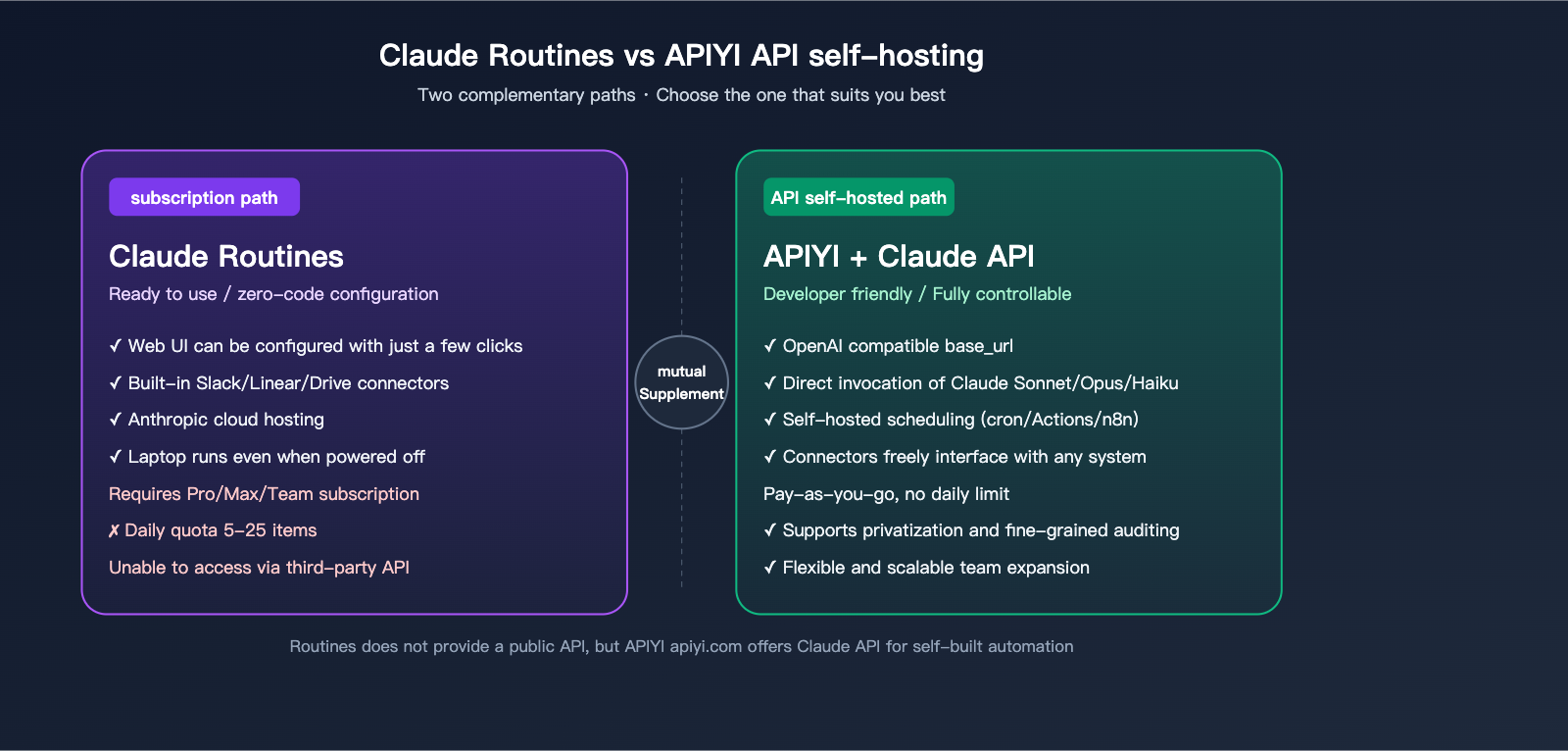
Claude Routines is a subscription-based feature of Anthropic's Claude Code, tied to Pro / Max / Team / Enterprise plans, and is not provided via the API.
This means:
- ❌ APIYI (apiyi.com) does not provide the Claude Routines feature itself.
- ❌ No other third-party API platform can "proxy" this capability.
- ❌ A pure API key (regardless of whether it's official or from an API proxy service) cannot be used to create or execute a Routine.
- ✅ Routines can only be used through an official Anthropic Claude Code subscription account.
This isn't a limitation of APIYI; it's Anthropic's product design—Routines are a product feature deeply bound to subscription accounts, not an "atomic capability" opened up for developers to re-package.
Developer Alternative: Build Your Own Setup with APIYI's Claude API
If you don't want to pay for a subscription, or if you want a more controllable scheduling/trigger system, you can absolutely build your own equivalent automation using APIYI's Claude API. It's not technically difficult:
- Trigger Layer: Use cron / GitHub Actions / custom schedulers (for periodic tasks) + Webhooks (for event-driven triggers).
- Execution Layer: Call the APIYI (apiyi.com) Claude Sonnet / Opus / Haiku API to perform reasoning.
- Connection Layer: Integrate your own wrappers for Slack Webhooks / Linear API / Google Drive API.
- Repository Layer: Run
git clonewithin your script and feed the code to Claude.
Comparison of the Two Paths
| Dimension | Claude Routines (Subscription) | APIYI API (Developer Path) |
|---|---|---|
| Pricing Model | Fixed monthly fee + overage | Pay-as-you-go based on usage |
| Setup Effort | Web UI, plug-and-play | Requires custom scheduler + connector code |
| Connectors | Built-in Slack/Linear/Drive, etc. | Custom wrappers/integrations |
| Flexibility | Limited by product features | Completely unrestricted |
| Runtime | Anthropic Cloud | Your own server/CI |
| Target User | Low-maintenance, immediate use | Engineering capability, control-oriented |
| Team Support | Native for Team/Enterprise | Depends on how you build it |
💼 Recommendation: If you are a Product Manager / Indie Developer / startup team member who wants to get automation running as quickly as possible, subscribe directly to Claude Pro/Max for Routines. If you are a large-scale engineer / cost-conscious user / someone requiring private deployment, using the Claude API via APIYI (apiyi.com) provides much more flexibility and long-term cost transparency.
Routines vs. cron / GitHub Actions / n8n Comparison
Many readers ask: There are already so many traditional automation tools out there—what makes Routines better? Let's compare the four most common options:
| Dimension | Claude Routines | cron (Self-hosted) | GitHub Actions | n8n |
|---|---|---|---|---|
| Language | Natural Language Prompt | Script | YAML + Script | Visual Nodes + JS |
| AI Reasoning | Native Claude integration | Manual implementation | Via action or script | Via external AI node |
| Maintenance | Anthropic hosted | Self-maintained | GitHub hosted | Self/Cloud hosted |
| External Integrations | Built-in connectors | Write your own | Rich Marketplace | Rich node ecosystem |
| Repo Integration | Native clone + analysis | Custom code | Native integration | Via node connection |
| Learning Curve | Lowest | Medium | Medium | Medium-Low |
| Best For | AI-driven repetitive tasks | General scheduling | CI/CD | General workflows |
Conclusion: Routines aren't trying to "replace" cron, GitHub Actions, or n8n. Instead, they excel in the niche of "AI-driven, repository-coupled, natural language-defined" tasks, making them more ergonomic for those specific needs than general-purpose tools. They will coexist for a long time. In the future, you'll likely see a team using "GitHub Actions for CI, Routines for intelligent summaries, cron for basic maintenance, and n8n for business logic."
FAQ Frequently Asked Questions
Q1: Will Routines read the code on my local Mac?
No. Routines run on Anthropic's cloud infrastructure. They only clone the GitHub repository you've configured and do not access your local file system.
Q2: Can I use it if I only have a Claude Free / Team Free subscription?
No. Currently, it's only available to Pro / Max / Team / Enterprise subscribers. The free tier does not include Routines.
Q3: When will APIYI (apiyi.com) support Routines?
It's not expected to be added. Routines are a feature of Anthropic's subscription products, not an open API capability. APIYI (apiyi.com) will continue to focus on model invocation for the Claude series (Sonnet / Opus / Haiku / other new versions), where users can use these APIs to build similar automations themselves.
Q4: Is 5 runs/day enough for Pro users?
For individual users who need 3-5 key Routines daily, it's enough. If you're planning to set up dozens of Routines, I'd recommend upgrading to Max (15/day) or Team (25/day).
Q5: Can I add a "human review" step to a Routine?
Currently, it's a fully automated cloud execution process without native human approval nodes. If you need an approval workflow, you can instruct Claude in the prompt to send a "change draft" to Slack and wait for a reply instead of executing write operations directly.
Q6: What should I do if a Routine fails?
The official platform provides execution logs and a status dashboard where you can see the reason for any failure. Failed runs do not count against your daily quota (subject to official billing terms).
Q7: Can I achieve similar results using APIYI's Claude Sonnet / Opus API?
Yes. Any combination of "prompt × repository understanding × external service calls" can be achieved via API, though you'll need to write the scheduling and connection code yourself. Many readers have already used APIYI (apiyi.com)'s Claude API combined with n8n, Coze, or custom scripts to build equivalent or even more flexible automations.
Q8: Do Routines support private repositories?
When you connect to GitHub, the official tool can access the repositories you've authorized (including private ones), but permission granularity varies by subscription level. Please refer to official Anthropic documentation for specifics. For enterprise-level permissions, we recommend using Team/Enterprise plans.
Summary: Routines Turn Claude Code from a "Sidekick" into an "Agent"
To wrap this up for new users, here's the gist in three points:
- What is Claude Routines?: Launched by Anthropic on 2026-04-14, this is a cloud-based automation capability for Claude Code. It packages a prompt, repository, and connectors into a repeatable Routine that can be triggered by schedules, APIs, or GitHub events.
- Who is it for?: Pro (5/day), Max (15/day), and Team/Enterprise (25/day) subscribers. If you're constantly bogged down by repetitive tasks like "daily PR summaries," "Slack reports," or "issue triage," this can save you a significant amount of time.
- Who is it not for / Alternative path: If you're strictly an API user, want to bypass subscriptions, or need more granular control, Routines isn't for you—building your own scheduling + connector solution using APIYI (apiyi.com)'s Claude API will be a more flexible and transparent path. The two paths aren't mutually exclusive and can coexist.
📢 A quick tip: New users should start by getting a "daily PR summary" running as a minimal use case before deciding whether to scale up. For developers who want more freedom in their automation, we still recommend building your own via APIYI (apiyi.com)'s Claude API—both paths serve different needs, so choose the one that fits you best.
Author: APIYI Team · Continuously tracking Claude / Anthropic product updates and developer tool practices · apiyi.com