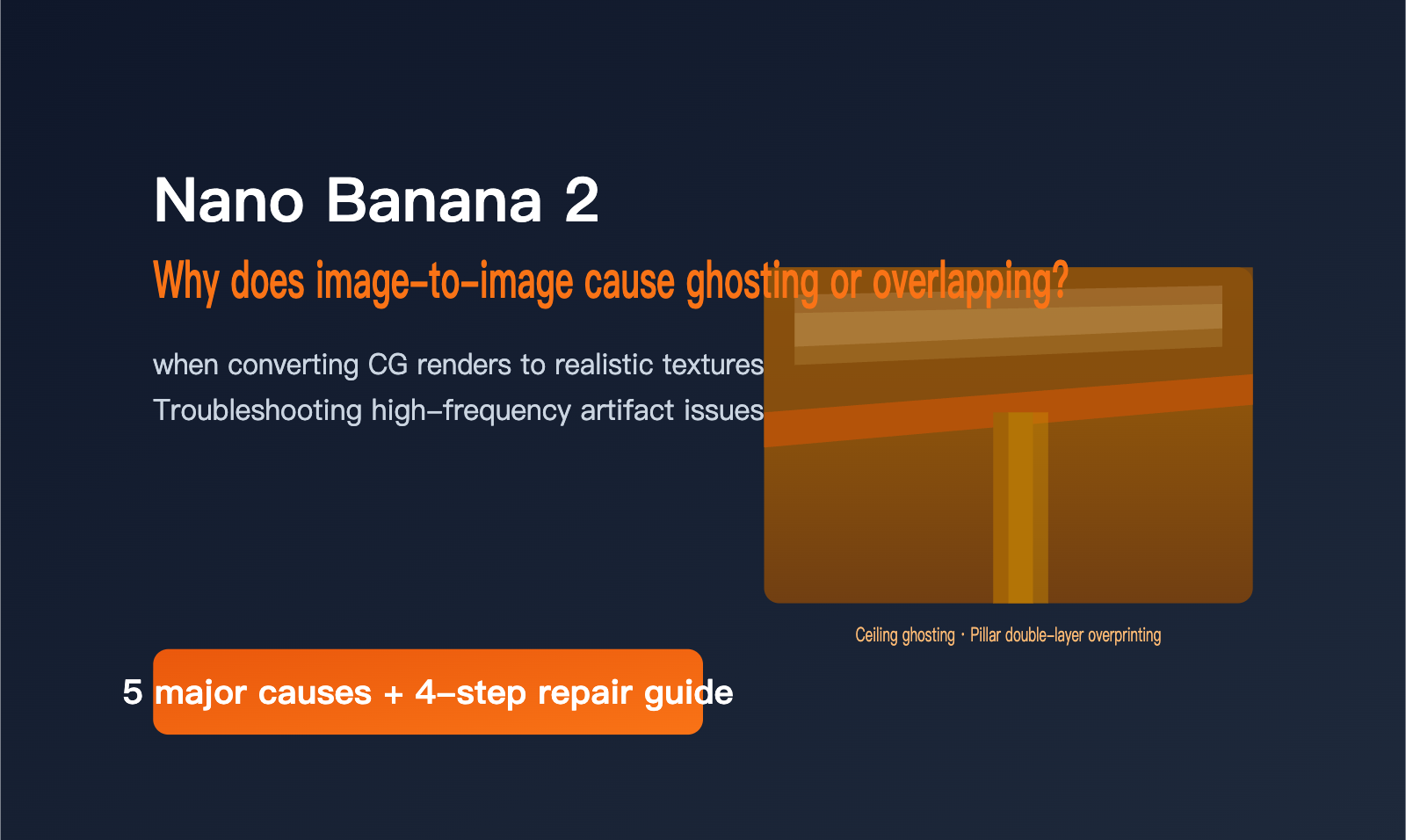
Recently, users have been using interior renderings for "image cleaning"—trying to remove CG rendering artifacts and convert them into the realistic texture of an iPhone shot. However, the images generated by Nano Banana 2 showed obvious ghosting on the ceilings and pillars: a single structural line became two, and a translucent "ghost" floated on the solid-colored ceiling, making it look like the image had been double-printed.
This isn't an isolated case. When Nano Banana 2 handles image-to-image tasks like editing or cleaning, ghosting, overlapping, and structural duplication are frequent issues. This stems from both the model itself and the prompts or usage methods. In this article, we'll break down the causes of Nano Banana 2's ghosting and overlapping issues and provide a step-by-step troubleshooting and repair workflow.
Why does Nano Banana 2 cause double-printing during image cleaning? Let's look at how ghosting occurs
"Image cleaning" refers to using AI to transform a CG rendering or design draft into a texture that looks more like a real photograph, commonly seen in interior design, e-commerce, and architectural visualization. It's essentially a large-scale image-to-image rewrite: you need to preserve the structure and layout of the original image while replacing the rendered lighting and materials. This "preserve while replacing" characteristic is exactly why image cleaning is more prone to ghosting than standard image generation.
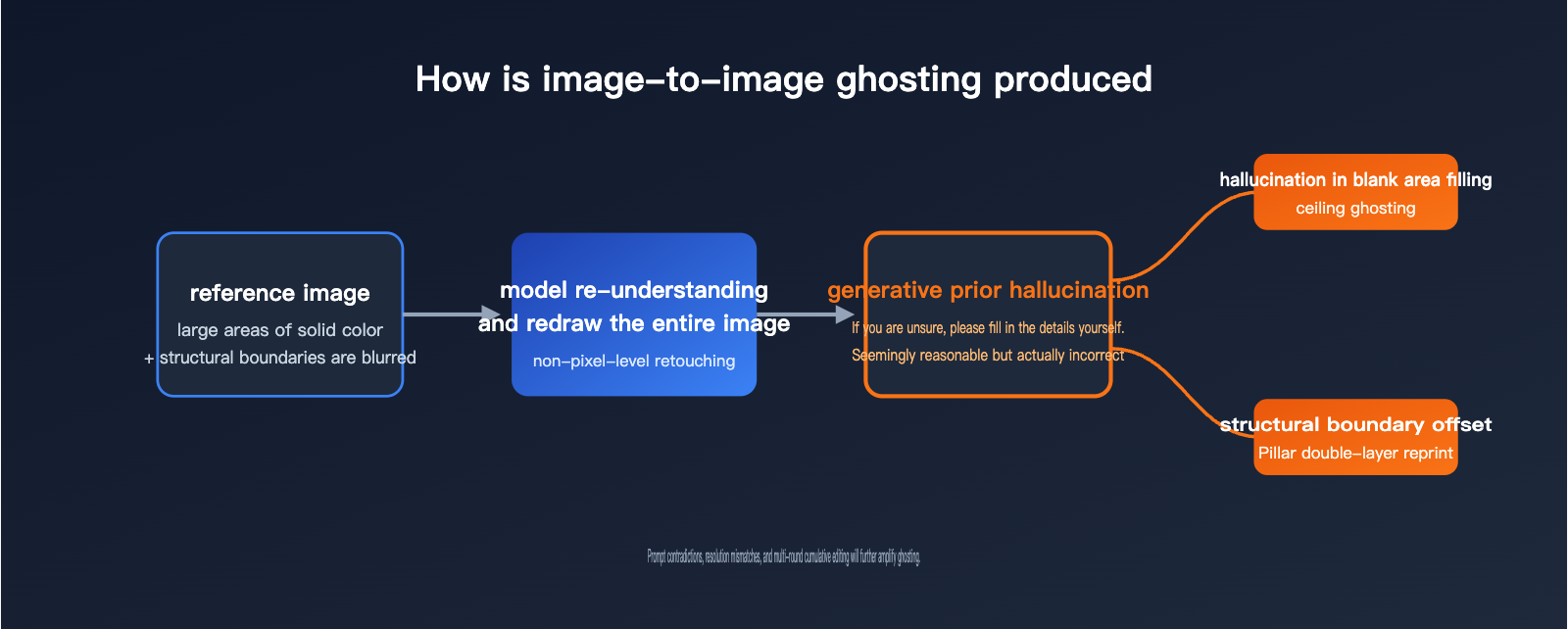
To solve ghosting, you first need to understand the underlying logic of AI image editing. When models like Nano Banana 2 perform "image cleaning," they don't perform fine-tuning on the original pixels like Photoshop; instead, they "redraw the image" after interpreting the original. When the model isn't certain about the structure of a specific area, it uses the "generative priors" learned during training to fill in the gaps.
That's where the problem lies. When the original image has large areas of solid color (like an interior ceiling) or insufficient structural boundary information, the model tends to "hallucinate" content that seems reasonable but is actually incorrect—filling in a layer of translucent outlines in empty spaces or drawing two edges for a single pillar. This is the direct source of ghosting and overlapping.
The case in the attached image is a classic example: the ceiling is a large solid color, so the model tries to "fill the canvas," resulting in gray, fog-like ghosts in empty areas. Meanwhile, the junction between the pillar and the beam is a critical structural boundary; the model's judgment of its position shifted, leading to double-printed edges. If you want to quickly reproduce or verify these issues, you can use the online testing tool at imagen.apiyi.com to upload the same image and compare the results repeatedly.
5 Common Causes of Ghosting and Overlapping in Nano Banana 2
Now that we understand the underlying principles, we've categorized the ghosting and overlapping issues you might encounter into five main causes. You can use the table below to identify your specific situation and apply targeted fixes. In most cases, ghosting is the result of multiple factors compounding rather than a single issue.
| Cause | Typical Symptom | Why it happens | Priority Strategy |
|---|---|---|---|
| Blank Area Hallucination | Ghosting appears on plain ceilings or walls | Model is trained to "fill the canvas" | Explicitly describe that blank areas should remain clean |
| Structural Boundary Over-correction | Double lines appear on pillars, beams, or door frames | Insufficient boundary info leads to model shifting/redrawing | Emphasize keeping original structure precise and unchanged |
| Resolution Mismatch | Repeated or tiled textures across the image | Forcing tiled patterns beyond native resolution | Generate images closer to the model's native resolution |
| Multi-round Cumulative Degradation | Image gets blurrier or more layered with each edit | Editing on top of previous output instead of the original | Revert to the original image and edit in one go |
| Model Quality Fluctuation | Same prompt/image yields inconsistent results | Quality degradation during official compute adjustments | Switch models or retry during off-peak hours |
A special note on the last point: Recent third-party evaluations and community feedback indicate that the Nano Banana series may undergo "quality degradation" during periods of high compute demand to maintain service availability. This manifests as the same image and prompt producing a normal result one moment and a ghosted one the next. This is an official-side fluctuation, and tweaking your prompt might not fully eliminate it. In such cases, switching to a different model is often more efficient.
Your Prompt Might Be Creating the Ghosting
Many people don't realize that ghosting is sometimes "written" into the prompt itself. Looking at the original prompt from that user, the problem is clear—it issues a set of contradictory instructions simultaneously.
Eliminate CG rendering traces and convert to an unedited iPhone photo texture. 100% restore the design structure, furniture layout, material usage, and composition of the reference image, with no modifications or additions. Ignore the lighting of the reference image, re-light with pure daylight, ignore the material textures in the image, adjust to have strong light and shadow, and enhance material reflections and highlight textures.
There are two sets of directly conflicting requirements hidden in this text. On one hand, it asks to "100% restore material usage, no modifications or additions," while on the other, it asks to "ignore material textures and enhance reflections and highlights." It also demands "100% restoration of design structure" while simultaneously asking for "re-lighting and strong light/shadow." The model is caught in a tug-of-war between "keep it the same" and "drastically rewrite," which easily leads to ghosting at structural boundaries—it tries to keep the original edge while drawing a new one, resulting in both being rendered.
The table below breaks down these contradictions so you can see where the model gets "confused." The core of prompt engineering is eliminating these self-contradictions.
| Prompt Intent | Conflicting Instructions | Model's "Confused" Outcome |
|---|---|---|
| Restore vs. Rewrite Material | "100% restore material" + "Ignore texture, enhance reflection" | Ghosting appears at material edges |
| Restore vs. Re-light | "100% restore structure" + "Re-light with strong light/shadow" | Structural lines are drawn twice |
| Remove CG vs. Add Texture | "Remove rendering traces" + "Enhance highlights/reflections" | Ghosting appears in highlight areas |
A better approach is to clearly define the boundaries between "keep" and "change": specify what must be locked (e.g., composition, furniture placement), what is allowed to be redone (e.g., lighting atmosphere), and add negative constraints. For example, adding a line like "Keep all structural edges clear and single; no repetitions, ghosting, or translucent outlines allowed" is very helpful in suppressing ghosting. Once you've refined your prompt, you can run a few versions on imagen.apiyi.com to compare the results.
Why do the same image and prompt work fine on other platforms?
That user also raised a key question: if the image and prompt are identical, why do I get ghosting here while it works perfectly on other Agent platforms? This isn't about different model versions, but rather the difference between "sending the prompt to the model as-is" versus "processing it along the way."
Many end-user-facing Agent platforms automatically "optimize your prompts" in the background—rewriting, expanding, adding negative constraints, or even resolving contradictory instructions for you. However, pure API proxy services (including APIYI) follow the principle of "what you send is what the model receives." We don't alter your prompts, ensuring that your results are reproducible and controllable. Therefore, a contradictory prompt that gets "fixed" by an auto-optimizing platform will trigger ghosting when sent through a pure proxy link.
The verification method is simple: take the same image and prompt and run them on the web version at gemini.google.com. If the web version also shows ghosting, it's an issue with the model itself, not the proxy platform. After the user tested this, the web version reproduced the ghosting, confirming the issue lies with the model and the prompt, not the API proxy.
| Environment | Auto-optimizes Prompts? | Ghosting Tendency | Best For |
|---|---|---|---|
| Some Agent Platforms | Yes | Less frequent | Users who don't want to tune prompts |
| Pure API Proxy (APIYI) | No (As-is) | Depends on your prompt | Developers needing reproducibility |
| gemini.google.com Web | Mostly as-is | Reproducible = Model issue | Troubleshooting origin of issues |
This is why we recommend using APIYI (apiyi.com) as a controllable baseline: it doesn't secretly modify your input, so you can clearly tell whether it's a prompt issue or a model issue and address it accordingly.
For developers, this "reproducibility" is crucial. If a platform rewrites your prompts without your knowledge, the results you tuned today might change tomorrow due to the platform's updated strategies, causing your batch image generation to spiral out of control. The benefit of a pure API proxy is that it puts the control back in your hands. If you want the "auto-optimized" effect, you can simply write your own negative constraints and structural locks into the prompt, retaining the benefits of optimization while ensuring stable, controllable results.
Fixing Nano Banana 2 Ghosting: A 4-Step Quick Start
Once you've identified the cause, fixing it becomes straightforward. Follow this 4-step process, and you'll be able to resolve or significantly mitigate most ghosting issues.
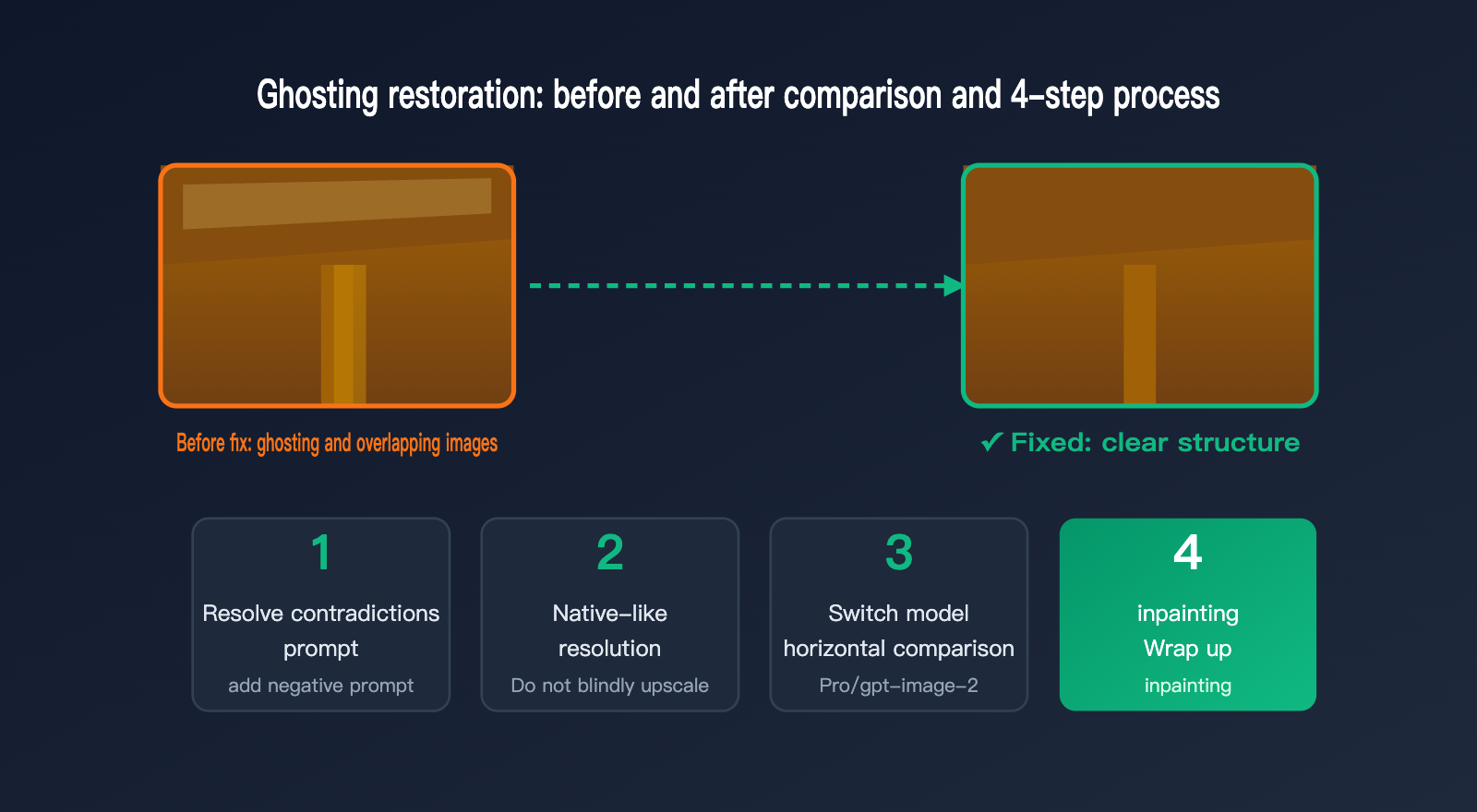
🎯 Quick Start Tip: Start with steps 1 and 2 to adjust your prompt and control resolution—these are zero-cost and highly effective. If ghosting persists, move to step 3 to switch models. We recommend testing Nano Banana 2, Nano Banana Pro, and gpt-image-2 one by one using the unified API at APIYI (apiyi.com); you can switch and compare with just one set of code.
Step 1: Eliminate contradictory prompts. Clearly separate the objects you want to "keep unchanged" from those you "allow to change." Remove conflicting instructions and add a clear negative constraint prohibiting repetition, ghosting, and translucent outlines. Step 2: Stick to native resolution. Don't jump straight to 4K upscaling; large discrepancies between resolution and the reference image can trigger tiling and ghosting.
Step 3: Compare models. If Nano Banana 2 shows severe ghosting, Nano Banana Pro often improves it due to better structural understanding and boundary stability. If you need strict structural fidelity, the high-fidelity mode of gpt-image-2 is also worth a try. Step 4: Inpainting. For images with only minor ghosting, use inpainting to isolate and redraw the problematic area; it's more efficient and controllable than regenerating the entire image.
How should you choose a model? The table below summarizes the performance and use cases of these three common models regarding ghosting. Note that these are general suggestions; always rely on actual testing for your specific image.
| Model | Ghosting Tendency | Key Strengths | Best For |
|---|---|---|---|
| Nano Banana 2 | More frequent during load spikes | Fast, cost-effective | Quick testing, batch generation |
| Nano Banana Pro | Stable structure, less ghosting | Strong structure, 4K support | Complex structures, HD images |
| gpt-image-2 | Stable boundaries, high control | Reasoning adherence, 3 tiers | Strict fidelity, cost control |
In practice, we suggest picking one representative "difficult" image as a benchmark. Run two or three versions of it across these three models using the same prompt, then select the one with the least ghosting and most accurate structure as your primary model. This comparison is lightweight on the APIYI (apiyi.com) unified interface—just change the model parameter without needing to re-integrate for each model.
Here is a simple example of how to switch models for comparison using the APIYI unified interface. Just point your base_url to https://api.apiyi.com/v1.
from openai import OpenAI

client = OpenAI(
    api_key="YOUR_APIYI_KEY",
    base_url="https://api.apiyi.com/v1"  # APIYI unified interface, switch models in one line
)

# When ghosting is severe, iterate through these three models to compare results
for m in ["nano-banana-2", "nano-banana-pro", "gpt-image-2"]:
    result = client.images.edit(
        model=m,
        image=open("room.png", "rb"),
        prompt="Keep composition and furniture placement unchanged, only change lighting to daytime;"
               "all structural edges should be clear and single, no repetition, ghosting, or translucent outlines",
    )
    print(m, "done")
FAQ
Q: I'm getting ghosting/double images with Nano Banana 2. Is it something I'm doing wrong, or is it a model issue?
It could be either. First, check your prompt for conflicting instructions and make sure your resolution isn't set too high. If you've ruled those out and the issue persists—and you can reproduce it on the gemini.google.com web interface—then it's a model-side issue. In that case, switching to Nano Banana Pro or gpt-image-2 is usually more effective.
Q: Why does the same image look fine one moment and get ghosting the next?
This is usually due to quality fluctuations during official compute resource adjustments. It's a server-side issue that's hard for users to fix permanently. We recommend trying again during off-peak hours or simply switching to a more stable model for image generation via APIYI at apiyi.com.
Q: Does adding negative prompts actually help reduce ghosting?
It helps, but it's not a silver bullet. Explicitly writing "keep structure edges single, no repetition, no ghosting, no translucent outlines" can lower the probability of the model "hallucinating" at the boundaries. However, if your prompt itself contains contradictions like "keep it identical but rewrite it," negative constraints won't save you—you'll need to resolve those contradictions first.
Q: Is Nano Banana Pro always less prone to ghosting than Nano Banana 2?
Not necessarily. Pro is generally more stable in terms of structural understanding, but it isn't always better for every scenario. The most reliable approach is to run the same set of assets through several models on APIYI at imagen.apiyi.com and let the actual results guide your choice.
Q: Are inpainting or full-image re-generation better for fixing ghosting?
If the ghosting is concentrated in a small area (like a single pillar), inpainting is more cost-effective and controllable. If there are ghosting artifacts throughout the entire image, it suggests a systemic issue with your prompt or resolution. In that case, it's better to fix the prompt first and then re-generate the whole image.
Q: Does pre-processing the source image help reduce ghosting?
It definitely helps. Cropping the original image to a size close to the model's native aspect ratio, avoiding large areas of solid white space, and ensuring structural boundaries are sharp and clear can all reduce the room for the model to hallucinate. Combining pre-processing with structural locking in your prompt is often more effective than relying on just one method. You can run versions of your image both with and without pre-processing on APIYI at imagen.apiyi.com to see the difference for yourself.
Summary
Ghosting or double images when using Nano Banana 2 for image processing essentially occur when the model uses its generative priors to "fill in the blanks" due to insufficient structural information or large areas of solid color. This is often compounded by conflicting prompts, mismatched resolutions, cumulative degradation over multiple rounds, and official compute fluctuations. Once you understand these five causes, you'll move from asking "why is this happening?" to knowing "how to fix it."
The path to a fix is clear: first, eliminate conflicting prompts and add negative constraints; then, generate at a resolution closer to the native one. If that doesn't work, switch models for a side-by-side comparison, and finally, use inpainting to polish the result. We recommend using APIYI at apiyi.com as a controlled baseline, allowing you to quickly switch between Nano Banana 2, Nano Banana Pro, and gpt-image-2 using a unified interface to find the best solution for your specific image.
This article was written by the APIYI technical team. APIYI (apiyi.com) provides a unified interface for various mainstream image models, including Nano Banana and gpt-image-2. It supports native prompt passing and one-line code switching, making it easy for you to troubleshoot, compare results, and ensure stable image generation.