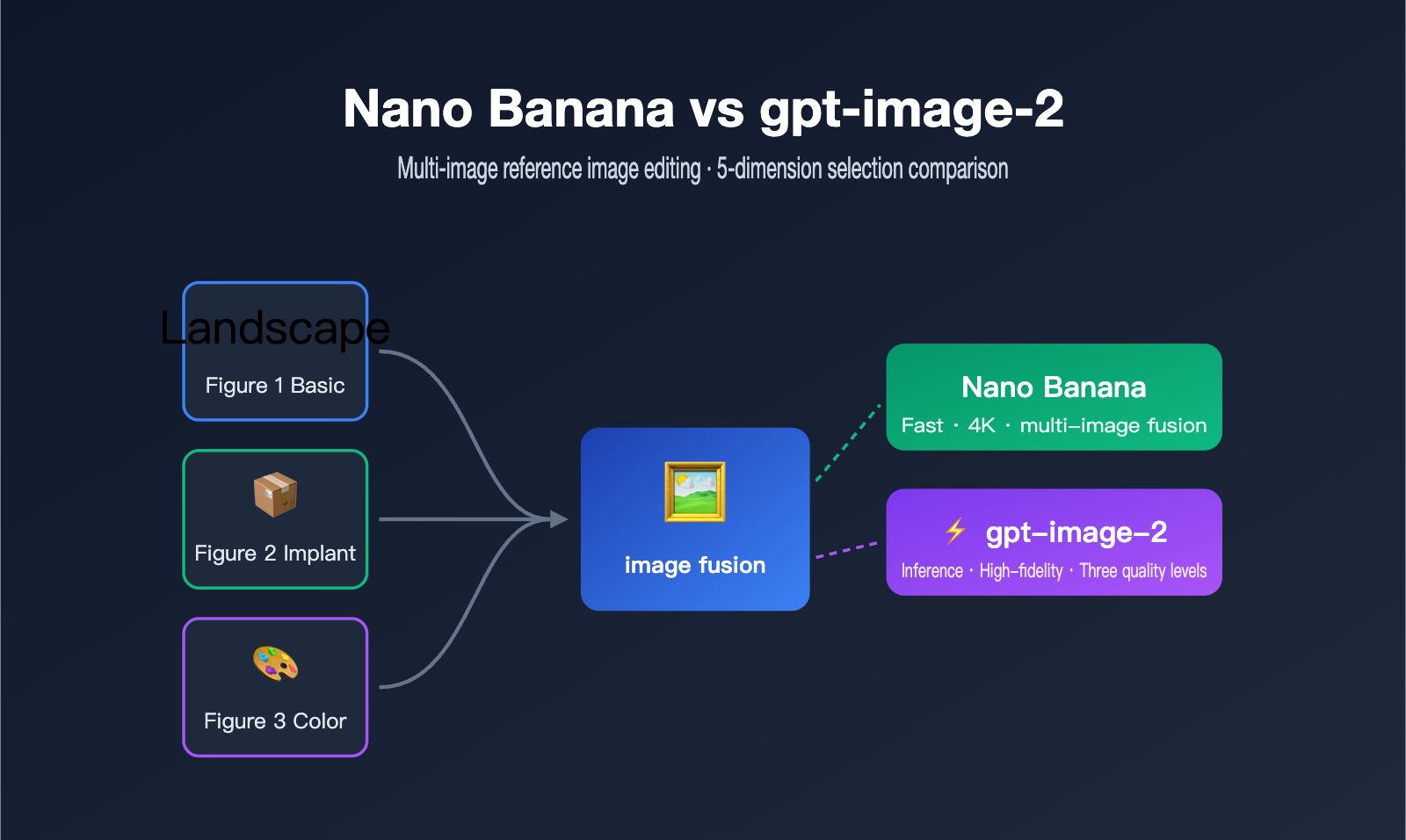
In the APIYI technical support group, we were recently asked a very specific question: if you feed a model three images—Image 1 as the base scene, Image 2 as the object to be inserted, and Image 3 as a reference for color and atmosphere—along with a long prompt, which one actually produces higher quality and better meets the requirements: gpt-image-2 or Nano Banana?
This is a classic "multi-image reference editing" use case, something many e-commerce, design, and marketing teams deal with every day. Our answer at the time was straightforward: both models have their own strengths. Nano Banana is currently much faster, while gpt-image-2 is slower but offers low, medium, and high quality tiers. The truly reliable approach is to test them with your own assets; there’s no "one size fits all" answer.
However, the advice to "just go test it" actually hides a whole methodology for how to evaluate and choose. This article breaks down the multi-image editing scenario across five dimensions—speed, quality, resolution, text, and fidelity—to clarify the differences between Nano Banana and gpt-image-2, while also providing prompt templates you can use right away.
Nano Banana vs. gpt-image-2: Core Differences in Technical Approaches
To understand why there's no "definitive winner," you first need to see that these two models follow different technical paths. Nano Banana is the collective name for Google's Gemini series image models, with its flagship Nano Banana Pro corresponding to Gemini 3 Pro Image, focusing on speed and multi-image fusion. Meanwhile, gpt-image-2 is the next-gen image model officially released by OpenAI in April 2026, based on the GPT-5.4 backbone, which brings O-series reasoning capabilities to image generation for the first time.
In short, Nano Banana is like a "lightning-fast visual creator"—you give it assets, and it generates an image immediately. gpt-image-2 is more like a "designer who thinks before they act"; it plans and reasons about the image structure before generating, which makes it slower but better at following complex instructions. This difference in positioning directly dictates their performance in multi-image editing scenarios.
The table below compares the key positioning of both paths to help you form a first impression.
| Dimension | Nano Banana Pro (Gemini 3 Pro Image) | gpt-image-2 (GPT-5.4 backbone) |
|---|---|---|
| Core Positioning | Speed-first, multi-image fusion, stunning visuals | Reasoning-first, structure-following, instruction-compliant |
| Ref. Image Limit | Up to 14 reference images | High fidelity, retains up to 5 input images |
| Consistency | Up to 5 characters / 14 objects consistent | More stable structure restoration for complex prompts |
| Generation Speed | Fast (sub-second response) | Slow (requires reasoning and planning) |
| Quality Tiers | Smooth scaling from 0.5K to 4K | Low / Medium / High options |
| Text Rendering | Strong, suitable for posters and infographics | Character-level accuracy across multiple languages |
If you want to intuitively experience the differences without writing any code, you can use the online testing tool provided by APIYI at imagen.apiyi.com to upload your assets, compare the results, and then decide which model to integrate into your production workflow.
The Key to Multi-Reference Image Editing: Assigning Clear Roles
Let's look back at that specific client scenario: Image 1 is the base, Image 2 is the content to be inserted, and Image 3 is the reference for color and atmosphere. Many people just dump all three images in at once, and the result is a mess because the model can't distinguish between the subject and the color palette, leading to an "off" result. The success of multi-reference image editing doesn't actually depend on the model itself, but on whether you've assigned a clear role to each reference image.
Whether you're using Nano Banana or gpt-image-2, current mainstream multi-image capabilities support the concept of "role assignment"—meaning you explicitly tell the model in your prompt what each reference image is supposed to control. Nano Banana Pro is particularly good at this; it can distinguish between identity references, pose/composition references, style/aesthetic references, and lighting/atmosphere references. gpt-image-2, on the other hand, allows you to prioritize the details of the first few input images through high-fidelity settings, making it ideal for scenarios that require strict adherence to brand identity, faces, or specific products.
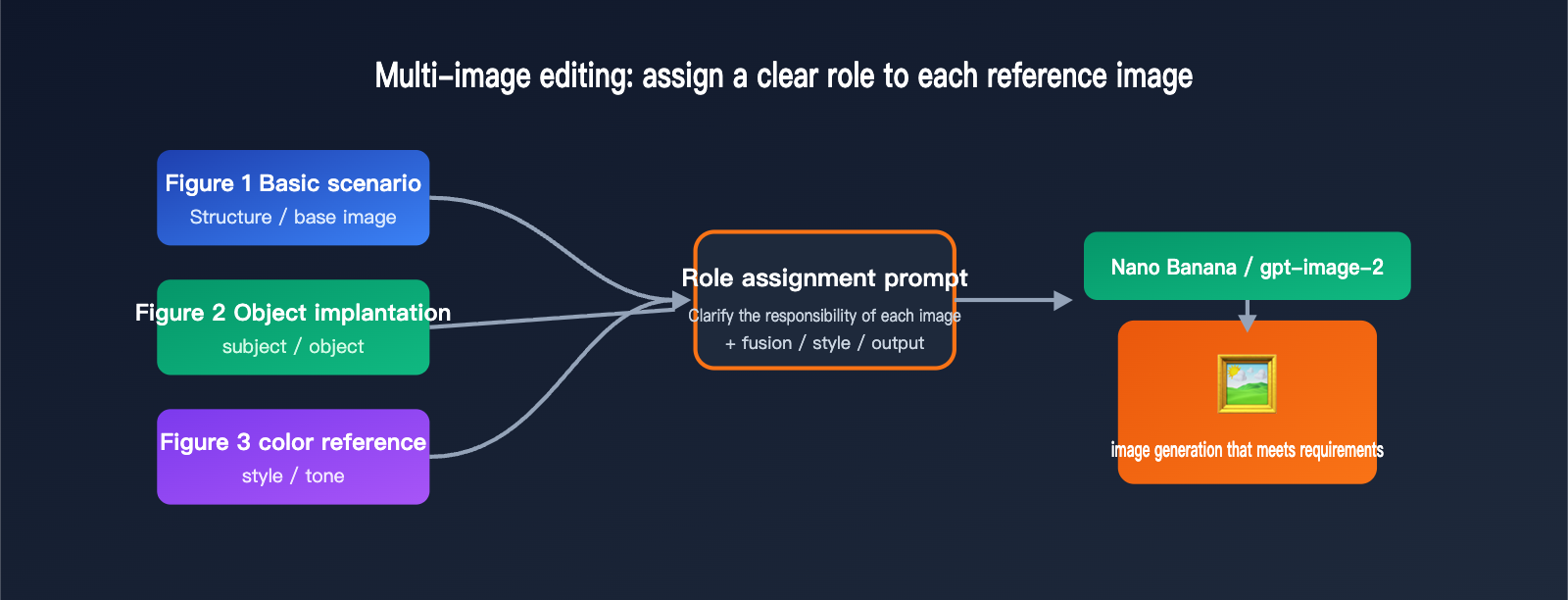
Translating the client's three images into "roles" the model can understand looks something like this. Once you clear up this table, your success rate for multi-image editing will jump significantly.
| Reference Image | Client Purpose | Role in Prompt | Key Instruction Wording |
|---|---|---|---|
| Image 1 | Base Scene | Structure / Base (structure) | "Use the first image as the overall composition and scene base" |
| Image 2 | Content to Insert | Subject / Object (subject) | "Naturally place the object from the second image into the scene" |
| Image 3 | Color & Atmosphere | Style / Tone (style) | "Adopt the color palette and lighting atmosphere of the third image" |
The essence of this method is: don't let the model guess which image is important; use language to "pin down" the responsibility of each image. When you're running comparison tests on imagen.apiyi.com, use the same role-assignment prompt for both models so that the results are truly comparable.
In practice, the three most common types of failures we see are all related to poor role assignment. The first is "color overshadowing the subject," where the color reference is treated as the subject, resulting in the generated image being "polluted" by the content of the third image. The second is "awkward object fusion," where the inserted object looks like it was just pasted on, lacking perspective and lighting consistency—this usually happens because the prompt didn't emphasize "natural fusion and consistent lighting." The third is "base scene being rewritten," where the model changes the composition of Image 1 without permission. In this case, you need to explicitly tell it to "keep the overall layout of the first image unchanged." Writing these three points into your prompt will significantly improve your success rate.
Five-Dimensional Comparison: gpt-image-2 vs. Nano Banana
Now that we've clarified the method, let's get back to the question you care about most: where do gpt-image-2 and Nano Banana each shine when it comes to multi-image editing? We've broken it down across five dimensions—speed, quality levels, resolution, text, and fidelity—to help you build an intuition for which one to choose. These are qualitative conclusions, so I still recommend running your own assets through both.
First, speed: Nano Banana is clearly superior, usually generating images in seconds, making it perfect for scenarios requiring large-scale, rapid iteration. gpt-image-2 takes longer per image because it performs structural reasoning first. Second, quality control: gpt-image-2 offers low, medium, and high tiers, allowing for a flexible trade-off between cost and results, while Nano Banana follows a smooth scaling path from 0.5K to 4K.
Third, resolution limits: Nano Banana Pro supports high-definition output up to 4K (approx. 8.3MP), giving you more headroom for large-format commercial prints, while gpt-image-2 currently focuses on 2K. Fourth, text rendering: neither is weak, but Nano Banana Pro has a better reputation for dense text layouts like posters and infographics, while gpt-image-2 is more stable in terms of multi-language character-level accuracy. Fifth, fidelity: in "high-fidelity" mode, gpt-image-2 can strictly preserve the details of the input images, making it suitable for content like brand logos, faces, or products that cannot be distorted.
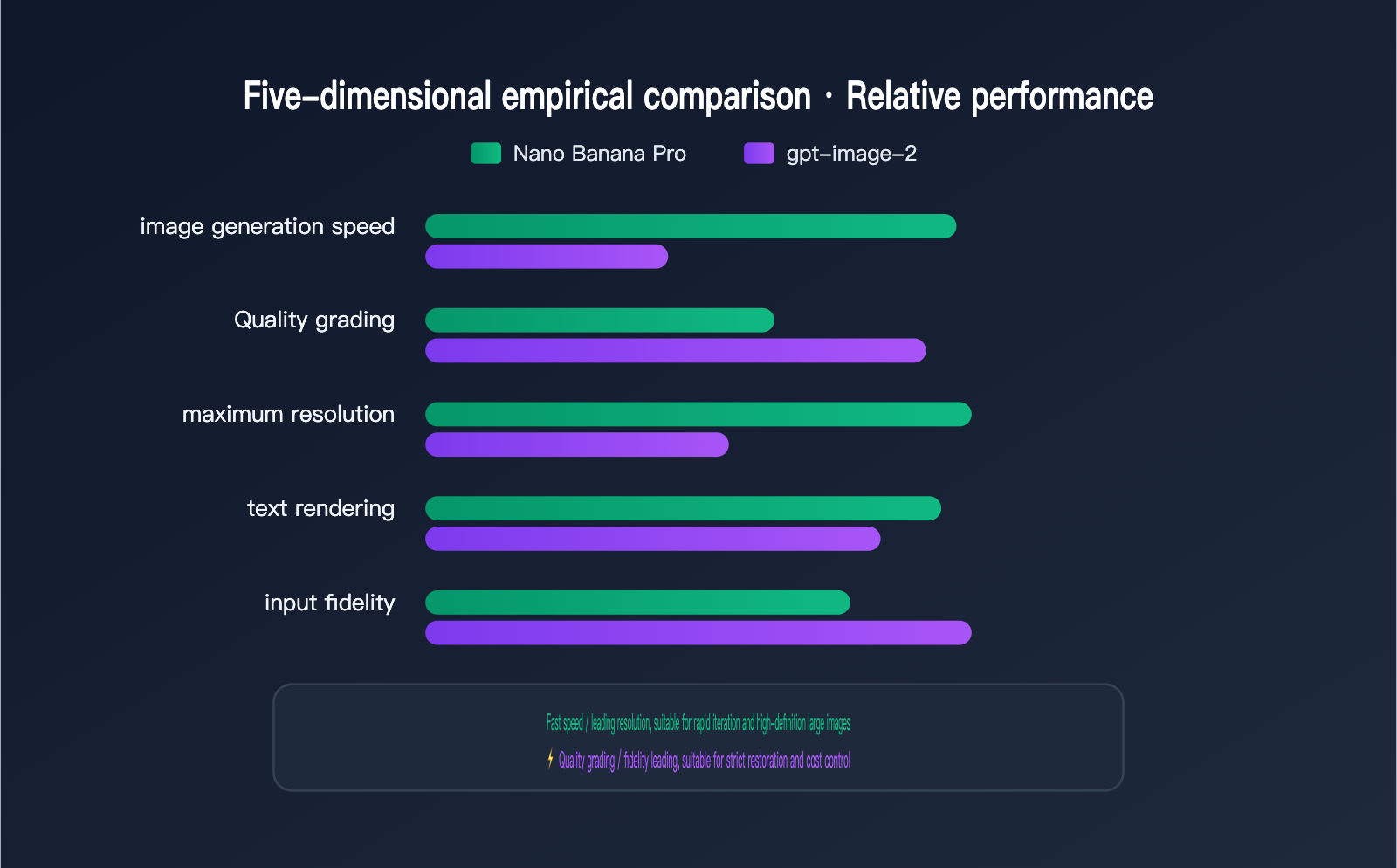
The table below summarizes the conclusions for these five dimensions, which you can use to quickly determine which model best fits your primary needs.
| Comparison Dimension | Nano Banana Pro | gpt-image-2 | Best For |
|---|---|---|---|
| Generation Speed | Seconds, very fast | Slower, requires reasoning | Rapid iteration: Nano Banana |
| Quality Control | 0.5K→4K smooth | Low/Med/High tiers | Cost control: gpt-image-2 |
| Resolution Limit | 4K (approx. 8.3MP) | 2K | Large-format: Nano Banana |
| Text / Layout | Better for posters | More accurate multi-language | Depends on content type |
| Input Fidelity | Natural multi-image fusion | Strict high-fidelity | Strict restoration: gpt-image-2 |
It's important to emphasize that there's no absolute winner. We've integrated various mainstream image models on the APIYI (apiyi.com) platform using a unified API, specifically so you can quickly switch and compare using the same code and the same batch of assets, without having to integrate each model separately.
Beyond image quality, cost and efficiency are factors you can't ignore when choosing a model. Nano Banana generates images quickly, leading to higher output per unit of time in batch scenarios—perfect for teams that need to iterate fast and produce high volumes. Because gpt-image-2 involves a reasoning process, it takes longer per image, but its low, medium, and high quality tiers give you the flexibility to pay as you go—using low quality to save costs during the draft phase and switching to high quality for the final version. In other words, speed and cost shouldn't be judged by the price of a single image; you need to calculate them based on your production rhythm and rework rate. Comparing them on a unified billing platform like APIYI allows you to see the total overhead of different models in your actual workflow more intuitively.
How to Choose Between Nano Banana and gpt-image-2 for Multi-Image Editing
Now that you know the five key differences, how do you make a decision for your specific business needs? We’ve put together a table of common image editing scenarios and our recommended models. Keep in mind that these "recommendations" are just starting points based on the characteristics we discussed—your actual results should always be the final deciding factor.
| Editing Scenario | Typical Requirement | Priority Recommendation | Reason |
|---|---|---|---|
| E-commerce Product Placement | Placing products into a scene | gpt-image-2 High Fidelity | Product details must remain accurate |
| Marketing Posters / Infographics | Heavy text + specific color schemes | Nano Banana Pro | Better stability for text layout and color |
| Batch Generation / Rapid Prototyping | Multiple versions in a short time | Nano Banana Pro | Faster speed, lower iteration cost |
| High-Res Output | 4K commercial printing | Nano Banana Pro | Higher resolution ceiling |
| Complex Multi-Step Instructions | Long prompt with multiple constraints | gpt-image-2 | Better reasoning and instruction following |
If you're looking at that "base + placement + color" three-image scenario for a client, and they care most about the detail of the object being placed, try the high-fidelity mode of gpt-image-2 first. If they prioritize overall atmospheric blending and production efficiency, Nano Banana Pro will be the smoother choice.
Our advice: don't get hung up on which one to pick right away. Instead, run two or three versions of the same assets on imagen.apiyi.com. Comparing them side-by-side will tell you more about what fits your needs than any leaderboard ever could.
Practical Tips for Writing Multi-Image Editing Prompts
Choosing the right model is only half the battle; if your prompt isn't up to par, even the most powerful model can't save the result. There's a fundamental difference between multi-image editing prompts and single-image generation: you must explicitly state "what each image does" and "what the final result should look like." The following structure works for both models.
A good multi-image editing prompt usually contains four parts: Role Assignment, Fusion Instructions, Style Constraints, and Output Specifications. Role Assignment tells the model the purpose of each reference image; Fusion Instructions describe how and where to place objects; Style Constraints define the color, lighting, and atmosphere; and Output Specifications set technical parameters like aspect ratio and resolution. Writing these four parts in order will significantly improve your control over the output.
Here is a prompt template you can use right away—just swap out the descriptions.
[Role Assignment]
- Image 1: Serves as the base for the overall scene and composition
- Image 2: Extract the main object from this image
- Image 3: Serves as the reference for color scheme and lighting atmosphere

[Fusion Instructions]
Place the object from the second image naturally in the center-right of the first image's scene, maintaining consistent perspective and lighting, with seamless edge blending.

[Style Constraints]
Adopt the warm tones and soft ambient lighting from the third image, with a realistic texture.

[Output Specifications]
Aspect ratio 16:9, high resolution, commercial photography quality.
If you're generating in batches via API, APIYI provides an OpenAI-compatible interface. Just point your base_url to https://api.apiyi.com/v1 and you can switch between models using the same code. Here’s a minimal example:
from openai import OpenAI

client = OpenAI(
    api_key="YOUR_APIYI_KEY",
    base_url="https://api.apiyi.com/v1"  # APIYI unified interface, switch models in one line
)

result = client.images.edit(
    model="gpt-image-2",        # Can also be replaced with nano-banana-pro
    image=[open("base.png","rb"), open("object.png","rb"), open("style.png","rb")],
    prompt="Role Assignment: Image 1 scene, Image 2 object, Image 3 color scheme; blend naturally into one image.",
    quality="high"
)
The "add a long paragraph of prompt" approach mentioned by clients is a common pain point: many people pile all their requirements into one giant block of text, and the model forgets the beginning by the time it reaches the end. A better approach is to write in blocks like the template above, using bracketed headers to separate "Role Assignment, Fusion Instructions, Style Constraints, and Output Specifications." This helps the model process each part step-by-step. For a model with reasoning capabilities like gpt-image-2, a structured long prompt actually leverages its ability to "plan before generating." For Nano Banana, clear segmentation reduces role confusion. A well-organized long prompt is almost always better than a long, messy description.
A few final pro-tips: First, ensure the order of your reference images strictly matches the "first, second, third" order in your prompt, or the roles will get mixed up. Second, when describing object placement, use spatial terms like "center-right" or "foreground" rather than just saying "put it in." Third, use specific vocabulary for colors, such as "warm orange tones" or "low-saturation Morandi color palette," instead of generic terms like "nice colors."
FAQ
Q: When it comes to multi-image editing, is gpt-image-2 or Nano Banana better?
There’s no one-size-fits-all answer. If you need strict adherence to object details or have a long prompt with multiple constraints, try gpt-image-2 first. If you’re looking for speed, 4K resolution, or text layout, Nano Banana Pro is usually the better choice. The safest bet is to run a side-by-side comparison using the same set of assets at imagen.apiyi.com.
Q: How should I choose between low, medium, and high quality for gpt-image-2?
Low quality is great for quick previews and draft verification, medium quality works for most daily tasks, and high quality is best for final commercial deliverables. Keep in mind that higher quality means slower generation and higher costs, so it’s usually best to finalize your composition in medium quality before switching to high for the final output.
Q: Why do my three reference images sometimes "bleed" into each other, where the subject gets influenced by the color palette image?
Most of the time, this happens because you haven't assigned specific roles, so the model can't distinguish between the subject and the color reference. Clearly stating in your prompt something like "The first image is the scene, the second is the object, and the third provides only the color palette" usually solves the issue.
Q: How can I compare two models simultaneously when using the API for batch image editing?
Through the unified APIYI apiyi.com interface, you just need to keep the base_url the same and toggle the model parameter between gpt-image-2 and nano-banana-pro. This allows you to run comparable results using the same code and the same batch of assets.
Q: Is it always better to have more reference images?
Not necessarily. Even though Nano Banana Pro supports up to 14 reference images, the more images you provide, the more likely the model is to get confused about their roles. For multi-image editing, it's best to stick to 3 to 5 images and clearly define the purpose of each one; you'll find the results are much more controllable that way.
Summary
To circle back to the original question: which model offers higher quality and better fits your needs for multi-image editing? The answer is—it depends on your assets and your goals; there’s no universal rule. Nano Banana Pro wins on speed, 4K resolution, and text layout, while gpt-image-2 excels at prompt adherence and high-fidelity restoration. Ultimately, what determines success is whether you’ve clearly assigned roles to your reference images.
Instead of agonizing over the choice, put the methodology to work: write your prompt with clear role assignments, then use the unified APIYI apiyi.com interface or the imagen.apiyi.com testing tool to run a few side-by-side comparisons using the same set of assets. The model you pick this way will be the one that truly "best fits your needs."
This article was written by the APIYI technical team. APIYI apiyi.com provides a unified interface for various mainstream image models, including Nano Banana and gpt-image-2. It supports switching models with a single line of code, making it easy for you to compare, select, and deploy.