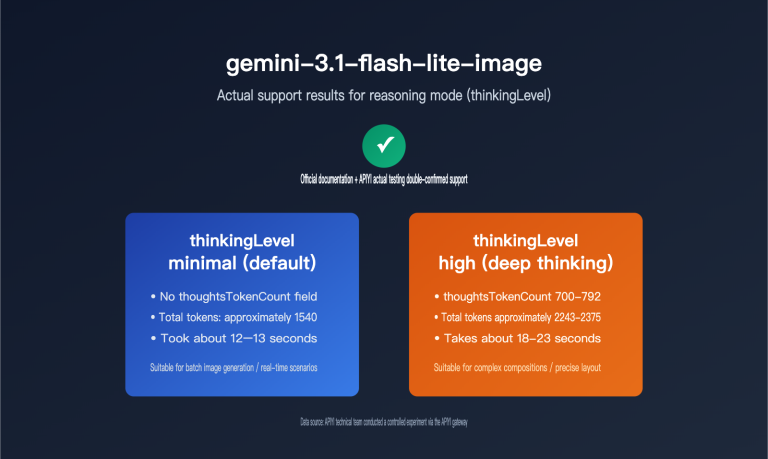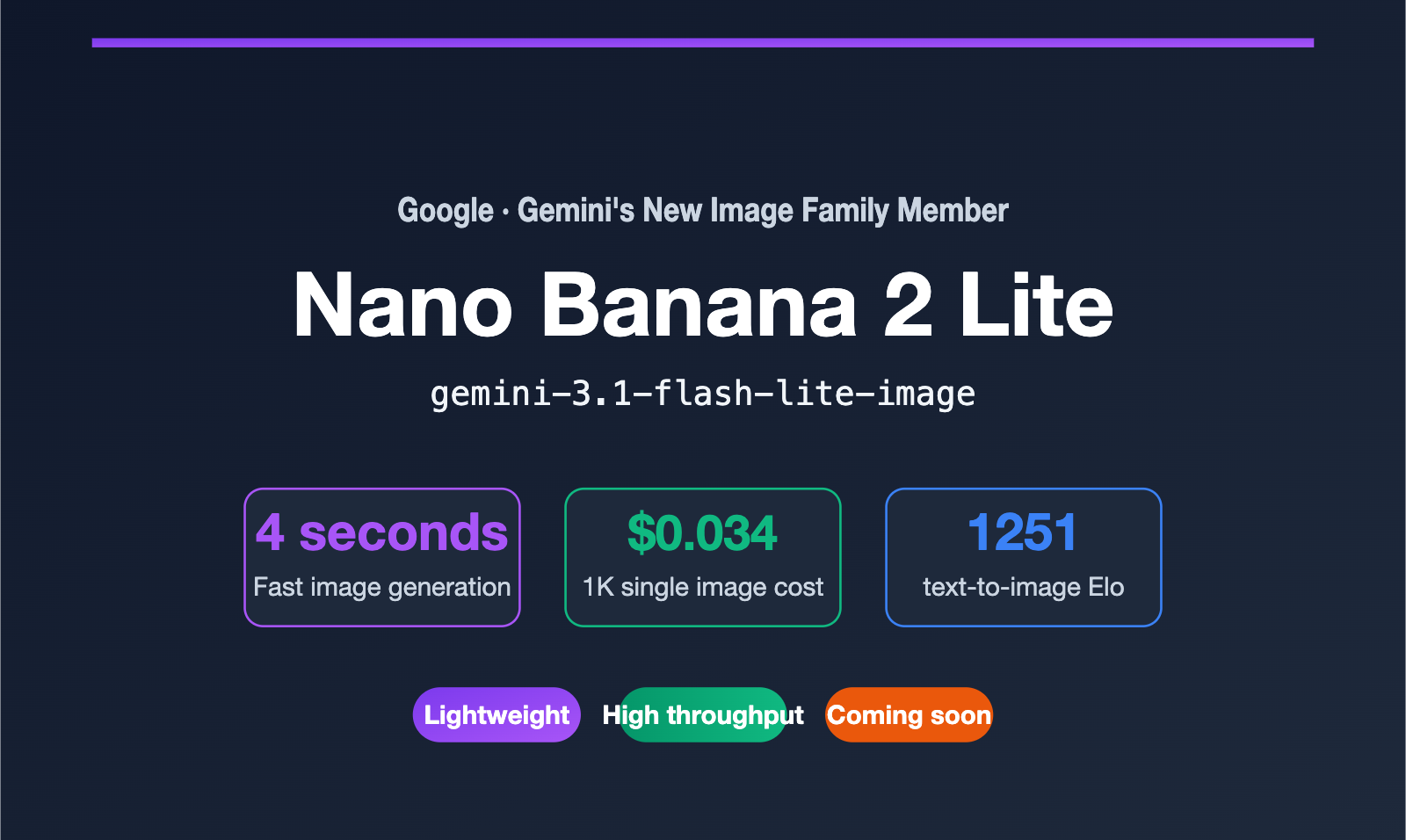
On June 30, 2026, Google rolled out major updates to both its Gemini image and video product lines. The most talked-about addition for developers was the new lightweight member of the image family: Nano Banana 2 Lite. Its official model name is gemini-3.1-flash-lite-image, and its purpose is crystal clear: it's built for scenarios demanding ultra-low latency and high-throughput, mass generation.
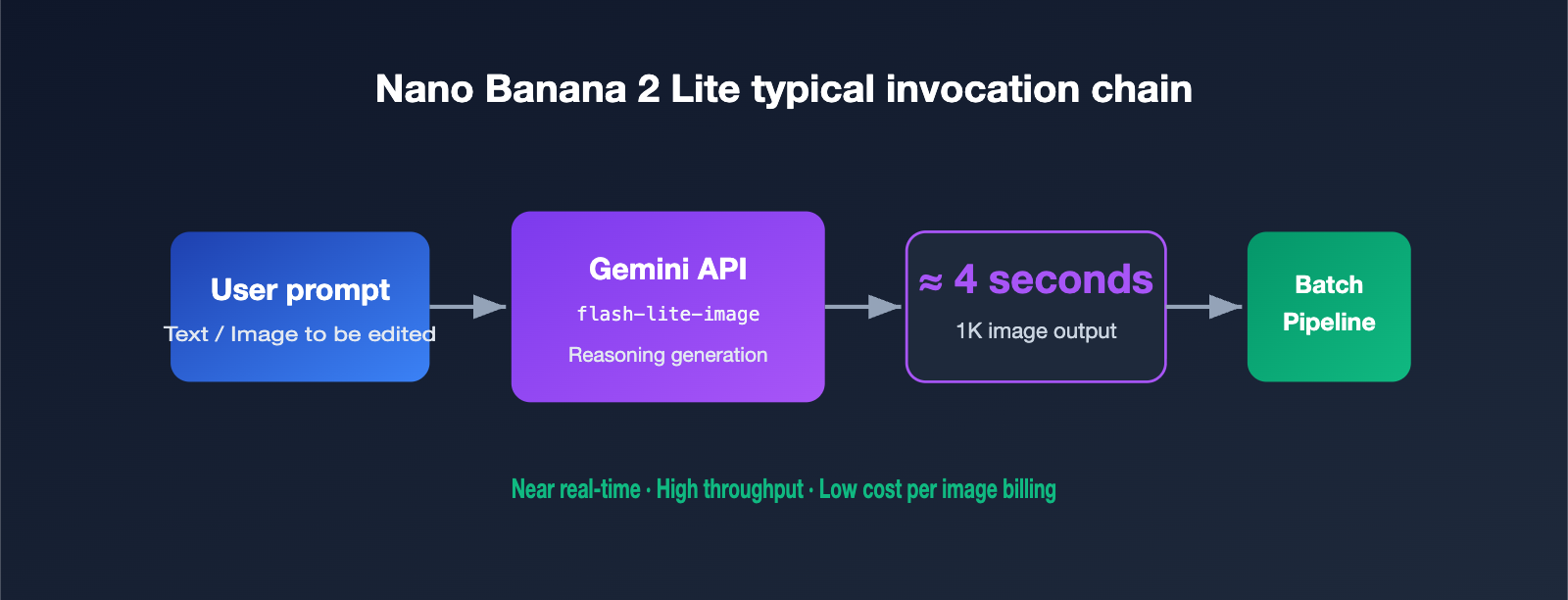
For many teams, the biggest pain point with using AI image APIs hasn't been quality, but rather that they're "slow and expensive." When you need to batch-generate product images for e-commerce, create social media graphics for marketing campaigns, or implement real-time previews in your product, waiting several seconds per image and accumulating costs per generation quickly becomes a major bottleneck. Nano Banana 2 Lite tackles both issues head-on: it generates images in about 4 seconds, with a cost of roughly $0.034 per 1K resolution image, while even scoring higher than its own Pro version on text-to-image benchmarks.
This article will give you a complete understanding of what Nano Banana 2 Lite is, where it fits within the Nano Banana family, how to choose between it and the Standard/Pro versions, and how to migrate smoothly. It's worth noting upfront that the model is already live on Google AI Studio and the Gemini API. Integration with Wentu AI and APIYI (apiyi.com) is also imminent, after which you'll be able to call it directly through a unified interface.
What is Nano Banana 2 Lite: Core Specifications at a Glance
Nano Banana 2 Lite is the "fastest and most economical" tier within the Nano Banana image family. It's essentially the image-generation version of the Gemini 3.1 Flash-Lite model. It sacrifices flexibility in output resolution, channeling all its engineering budget into speed and cost-per-image. This makes it particularly well-suited for workflows with "high generation frequency and non-extreme per-image requirements."
The table below summarizes the key official parameters to help you quickly get the gist:
| Specification | Nano Banana 2 Lite |
|---|---|
| Official Model Name | gemini-3.1-flash-lite-image |
| Release Date | June 30, 2026 |
| Generation Speed | ~4 seconds for text-to-image |
| Resolution Support | 1K only (does not support 2K / 4K) |
| Cost per Image | ~$0.034 per 1K resolution image |
| Text-to-Image Elo | 1251 |
| Core Capabilities | Text-to-image, image editing, character consistency, in-image text rendering |
| Availability | Google AI Studio, Gemini API, Gemini Enterprise Agent Platform, etc. |
From the specs, you can infer a few design trade-offs. First, it only supports a 1K canvas. This means it's not for print-quality, large-format images, but rather for screen display, thumbnails, batch drafts, and similar scenarios. Second, the ~4-second latency combined with low per-image pricing makes it a natural fit for interactive products—users can change a prompt and see a new image almost in real-time. Third, it inherits the core capabilities of the Nano Banana 2 generation, including better world knowledge, cross-image character consistency, and clear in-image text rendering—areas where previous lightweight models often struggled.
🎯 Quick Takeaway: If you've been using the first-gen Nano Banana (
gemini-2.5-flash-image) for high-frequency image generation, Lite is essentially its official upgrade and replacement. We recommend running a small regression test on Wentu AI or APIYI (apiyi.com) once it's integrated to confirm the style and consistency meet your expectations before switching over your full workload.
How the Nano Banana Family is Divided: Positioning Differences Between Lite, Standard, and Pro
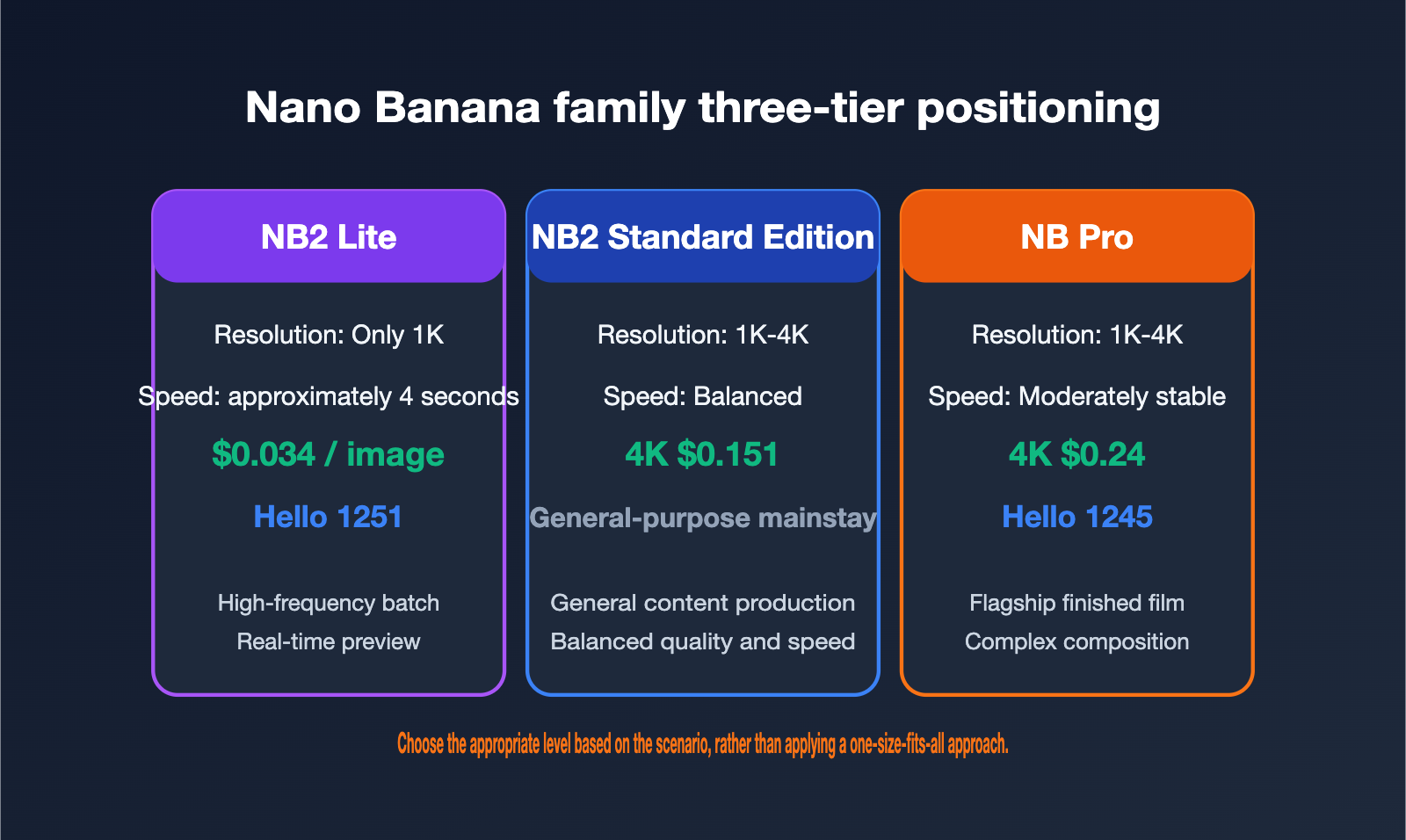
To use Lite correctly, the key is understanding its coordinates within the entire Nano Banana family. This generation's family is roughly divided into three tiers, each serving different quality and cost needs. Understanding the trade-offs between them is more important than looking at any single number in isolation.
- Nano Banana 2 Lite: The lightweight, high-speed tier. Only outputs 1K, but wins on speed and cost. Aimed at high-frequency, high-volume, interactive scenarios.
- Nano Banana 2 (Standard): The mainstay, general-purpose tier. Supports multiple resolutions (1K / 2K / 4K), balancing quality and speed. It's the default choice for most content production.
- Nano Banana Pro: The flagship quality tier. Most stable for complex multi-element compositions and realistic face handling. Best suited for final production scenes with the highest image quality demands.
Comparing their key metrics side-by-side makes the differences clearer:
| Comparison Dimension | NB2 Lite | NB2 Standard | NB Pro |
|---|---|---|---|
| Resolution | 1K only | 1K / 2K / 4K | 1K / 2K / 4K |
| Official 4K Price per Image | 4K not supported | ~$0.151 | ~$0.24 |
| Speed Positioning | Fastest (~4 sec) | Balanced | More deliberate |
| Text-to-Image Elo | 1251 | —— | 1245 |
| Best Use Case | High-frequency batch jobs, real-time previews | General content production | Flagship final renders, complex compositions |
There's a counterintuitive detail here worth unpacking: In the text-to-image benchmark, Lite's Elo (1251) is actually slightly higher than Pro's (1245). This doesn't mean Lite is universally better than Pro. The Text-to-Image Elo primarily measures the perceived quality of "generating a single image directly from text." Pro's real advantages lie in multi-image referencing, complex multi-subject compositions, ultra-high-resolution detail, and stability with realistic faces—things a 1K single-image benchmark can't capture.
In other words, you can't choose a model based on a single Elo number. If your need is "quickly producing a large volume of good-looking 1K images," Lite offers incredible value. If you need "a 4K key visual ready to deliver to a client," Pro is still the more reliable choice. For the vast majority of product shots, landscapes, abstract illustrations, and marketing graphics, the difference between Lite and Standard is barely noticeable on screen.
🎯 Selection Advice: Which tier you choose mainly depends on your resolution needs and image generation frequency. We recommend using a unified interface platform like APIYI (apiyi.com) to connect to multiple model tiers simultaneously. Run an A/B test with your real business data to decide which workflows go to Lite and which stay with Pro. This way, you can control costs without sacrificing critical image quality.
Text-to-Image Elo Explained: Why the Lightweight Model Can Outperform
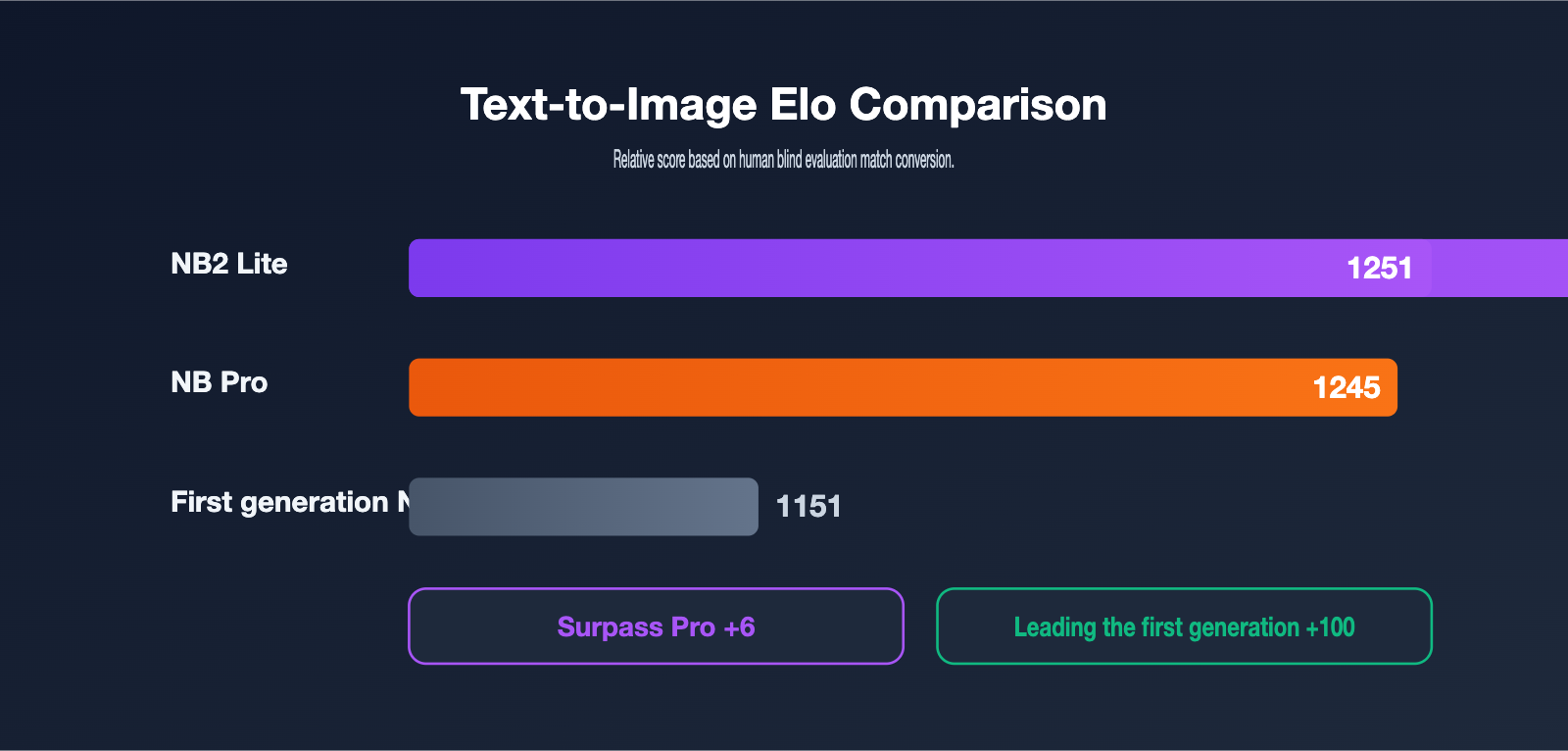
The most talked-about aspect of Nano Banana 2 Lite this time is its Text-to-Image Elo performance. Looking at this generation and the last on the same track, the improvement is quite significant.
| Model | Model Name | Text-to-Image Elo |
|---|---|---|
| Nano Banana 2 Lite | gemini-3.1-flash-lite-image |
1251 |
| Nano Banana Pro | (Flagship) | 1245 |
| Original Nano Banana | gemini-2.5-flash-image |
1151 |
In terms of numbers, Lite has improved by a full 100 Elo points compared to the original Nano Banana, which is a substantial leap in image model iterations. Elo is a relative score derived from human blind preference comparisons; a 100-point gap roughly corresponds to a "clearly more preferred" win rate, not a subtle, negligible difference.
This "lightweight yet high-scoring" phenomenon is driven by the benefits of a generational upgrade in the foundational model. Lite stands on the shoulders of the Gemini 3.1 generation, inheriting stronger world knowledge and instruction-following capabilities. So, even though it has cut high resolution and some heavy composition abilities, it performs better in the most common "one sentence, one image" scenario. For developers, this means you can achieve basic visual quality on par with the flagship at a lower cost, provided your needs fall within the sweet spot of 1K single-image generation.
It's important to remember that benchmark scores are always just a reference. In real business scenarios, your prompt style, brand consistency requirements, and the accuracy of rendering specific subjects (like faces or product logos) all need to be validated with your own data. We recommend that once your AI integration is stable, run a batch of representative prompts through both Lite and Standard models for a side-by-side comparison before drawing conclusions.
Nano Banana 2 Lite Use Cases: Which Workflows Benefit Most?
Deciding if a model is worth using comes down to specific scenarios. Nano Banana 2 Lite's combination of "4-second speed + low cost + 1K only" gives it a very clear sweet spot, and also clear areas where it's not the best fit. The table below helps you quickly identify where it fits:
| Scenario Type | Lite Recommended? | Reason |
|---|---|---|
| Batch generation for e-commerce product images | ✅ Highly Recommended | High volume, 1K is sufficient for screen display, cost-sensitive |
| Social media / operational graphics | ✅ Recommended | High generation frequency, 4-second response provides good user experience |
| Real-time image preview within a product | ✅ Recommended | Low latency supports interactive image editing |
| Creative drafts / rapid validation | ✅ Recommended | Cheap and fast, ideal for extensive trial and error |
| Print-grade / 4K key visuals | ❌ Not Recommended | Does not support 2K / 4K; use Standard or Pro |
| Complex multi-subject realistic final shots | ⚠️ Case-by-case | Complex composition and face stability are still more reliable on Pro |
To summarize these scenarios, Lite shines brightest at the intersection of "high frequency + acceptable 1K resolution + cost sensitivity." A classic example is a batch content production pipeline: generating hundreds or thousands of images per task. The few cents saved per image, multiplied by the volume, translates to real cost savings. Meanwhile, the 4-second latency significantly boosts the throughput of the entire pipeline.
Conversely, if your requirements include hard constraints like "must be 4K," "final deliverables for clients," or "zero-defect faces/products," you should route that workflow to the Standard or Pro version. The smart approach isn't an either/or choice, but a tiered strategy: use Lite for drafts and high-volume initial screening, then use Pro for final polished outputs. To implement this multi-tier collaboration, a unified API platform saves you the hassle of constantly switching between different model endpoints. This is one reason we recommend unified invocation through APIYI at apiyi.com.
Migrating from the Original Nano Banana: What Developers Need to Know
The official positioning of Nano Banana 2 Lite is as the recommended replacement for the original Nano Banana (gemini-2.5-flash-image). If your system is still calling the original model for high-frequency image generation, this is a low-risk, high-reward upgrade opportunity. The core migration task is actually quite simple, primarily involving replacing the model name:
# Calling Nano Banana 2 Lite via a unified interface (example)
# base_url points to APIYI apiyi.com, just replace the model name with the new one
import openai

client = openai.OpenAI(
    api_key="your_APIYI_key",
    base_url="https://api.apiyi.com/v1"
)

# Old: gemini-2.5-flash-image  →  New: gemini-3.1-flash-lite-image
resp = client.images.generate(
    model="gemini-3.1-flash-lite-image",
    prompt="A Shiba Inu wearing sunglasses, flat illustration style, solid color background",
    size="1024x1024"
)
print(resp.data[0].url)
While the name change is the main task, there are a few details we recommend checking during migration to avoid discovering style drift after deployment:
- Style Regression Testing: Run a batch of historical prompts through both the old and new models. Manually compare the style, color palette, and composition to ensure they align with your brand guidelines and that there's no significant drift before switching entirely.
- Resolution Confirmation: Lite only outputs 1K. If your old pipeline has any expectations for 2K / 4K outputs, those need to be separated and routed to Standard or Pro.
- Consistency Verification: For series of images requiring character/product consistency, specifically verify if Lite's cross-image consistency meets your requirements.
- Cost Recalculation: Based on your actual monthly generation volume, re-estimate the cost after the switch. You'll typically see a significant reduction, which can be used as justification for the migration.
For teams wanting a "one-time integration, flexible switching" setup, we recommend completing the migration through an aggregation platform like APIYI at apiyi.com. It supports the entire Nano Banana family through a unified OpenAI-compatible interface. This means you don't need to change authentication or request structures during migration; simply swapping the model field allows you to freely switch between Lite, Standard, and Pro.
Gemini Omni Flash: The Video Counterpart
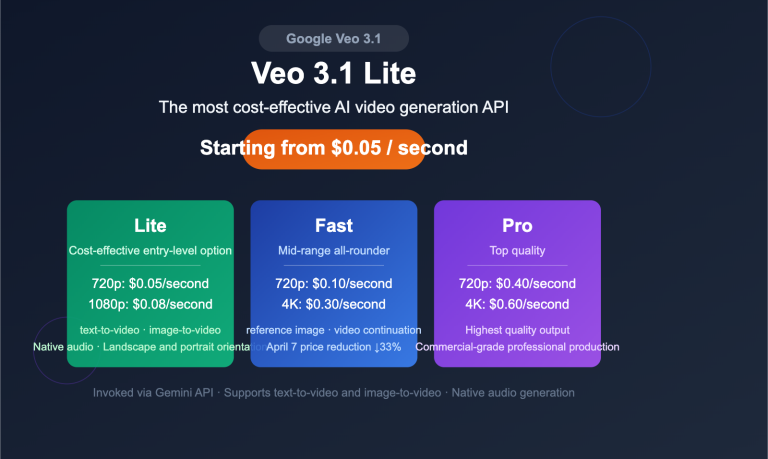
Alongside Nano Banana 2 Lite, the video-focused Gemini Omni Flash (gemini-omni-flash-preview) was also released. It takes a different approach: combining Gemini's multimodal reasoning with video generation and conversational editing. It currently supports generating videos up to 10 seconds long, priced at $0.10 per second of video output, matching Veo 3.1 Fast.
While it's not the same type of product as the image-focused Lite, together they send a clear signal: Google is making "fast, affordable, and conversationally editable" the main theme for this generation of multimodal models. For content teams, using Nano Banana for images and Omni Flash for video is forming a complete production line covering both static and dynamic assets. If your business involves both images and video, planning both workflows on a unified platform in advance will save you a lot of hassle.
Frequently Asked Questions (FAQ)
Q1: What's the real difference between Nano Banana 2 Lite and the standard Nano Banana 2?
The core differences are resolution and positioning. Lite only supports 1K, focuses on ~4-second speeds and the lowest per-image cost. The standard version supports 1K / 2K / 4K, offering a better balance of quality and speed, making it the general-purpose workhorse. Choose Lite for high-frequency image generation where 1K is acceptable; use the standard version when you need high-resolution final assets.
Q2: Lite's text-to-image Elo score is higher than Pro's. Does that mean it can directly replace Pro?
Not a simple replacement. The Elo 1251 score primarily reflects the perceived quality of single 1K images. Pro's advantages lie in 4K detail, complex multi-subject composition, and stability in realistic human faces—aspects not covered by that benchmark. It's recommended to use them in a tiered manner based on the scenario, not as a one-size-fits-all swap.
Q3: Where can I call Nano Banana 2 Lite?
Official channels include Google AI Studio, the Gemini API, and the Gemini Enterprise Agent platform. If you prefer to manage multiple models through an OpenAI-compatible interface for unification, WenTu AI and APIYI (apiyi.com) will also be launching this model soon. Once integrated, you'll just need to swap the model name to call it.
Q4: Is migrating from the first-gen Nano Banana to Lite complicated?
Not at all. Google positions Lite as the recommended replacement for the first generation (gemini-2.5-flash-image). Migration mainly involves changing the model name to gemini-3.1-flash-lite-image and then running a round of style regression and consistency tests. When calling via APIYI (apiyi.com), no changes are needed to the authentication or request structure.
Q5: Is 1K resolution insufficient?
It depends on the use case. For screen display, social media graphics, product thumbnails, or initial draft screening, 1K is perfectly adequate and offers excellent value. However, for print materials or creating 4K key visuals, you'll need to switch to the standard or Pro version.
Summary: Who is Nano Banana 2 Lite For?
Let's return to the original question—what problem does Nano Banana 2 Lite solve? It addresses the long-standing pain point of "AI image generation being slow and expensive" with a clear product positioning: 4-second image generation, ~$0.034 per 1K single image, and its text-to-image Elo score surpasses its own Pro version. It dramatically reduces both the cost and latency for "high-frequency, high-volume image generation."
It's not meant to replace the Pro version but rather to fill the missing "lightweight, high-throughput" tier in the family. The right approach is layered collaboration: use Lite for batch processing, drafts, and real-time previews, and use the Standard and Pro versions for high-resolution and flagship final images. For developers, the most hassle-free integration method is through the unified interface—connect once and freely switch between all models in the family.
Nano Banana 2 Lite is now available on official Google channels, and Stable AI and APIYI (apiyi.com) will soon complete their integration. Once live, you can use the same OpenAI-compatible interface to call it directly, quickly incorporating it into your existing content production pipeline and immediately benefiting from this "more for the same price" upgrade.
🎯 Next Step: Want to be among the first to experience the model when it goes live? We recommend following APIYI (apiyi.com) for model update announcements. Once integrated, you can use the unified interface to test Nano Banana 2 Lite and the entire model family, selecting the tier that best fits your specific business scenarios.
Author: Stable AI Technical Team | For more AI model evaluations and API integration guides, visit APIYI at apiyi.com