When you're generating images using the Nano Banana Pro API, what's the actual difference between synchronous and asynchronous calling? Right now, both APIYI and the official Gemini API only support synchronous mode. However, APIYI has significantly improved the user experience by offering OSS URL image outputs. In this post, we'll break down the core differences between these two calling methods and look at how the APIYI platform optimizes image output formats.
Core Value: By the end of this article, you'll understand the fundamental differences between synchronous and asynchronous designs in APIs, why APIYI's OSS URL output is better than base64 encoding, and how to choose the best image retrieval strategy for your specific use case.
{{SVG_TEXT_0}}
{{SVG_TEXT_1}}
{{SVG_TEXT_2}}
{{SVG_TEXT_3}}
{{SVG_TEXT_4}}
{{SVG_TEXT_5}}
{{SVG_TEXT_6}}
{{SVG_TEXT_7}}
{{SVG_TEXT_8}}
{{SVG_TEXT_9}}
{{SVG_TEXT_10}}
{{SVG_TEXT_11}}
{{SVG_TEXT_12}}
{{SVG_TEXT_13}}
{{SVG_TEXT_14}}
{{SVG_TEXT_15}}
{{SVG_TEXT_16}}
{{SVG_TEXT_17}}
{{SVG_TEXT_18}}
{{SVG_TEXT_19}}
{{SVG_TEXT_20}}
{{SVG_TEXT_21}}
{{SVG_TEXT_22}}
{{SVG_TEXT_23}}
Nano Banana Pro API Calling Mode Comparison
| Feature | Synchronous Call | Asynchronous Call | APIYI Support |
|---|---|---|---|
| Connection Mode | Keeps HTTP connection open until finished | Returns task ID immediately and closes connection | ✅ Synchronous |
| Wait Method | Blocking wait (30-170s) | Non-blocking, uses polling or Webhooks | ✅ Synchronous (Blocking) |
| Timeout Risk | High (Requires 300-600s timeout config) | Low (Only submission needs a short timeout) | ⚠️ Requires proper timeout setup |
| Implementation Complexity | Low (Single request) | Medium (Requires polling or Webhook logic) | ✅ Simple and easy to use |
| Best Use Case | Real-time generation, immediate display | Batch processing, background tasks | ✅ Real-time generation |
| Cost Optimization | Standard pricing | Google Batch API can save 50% | – |
How Synchronous Calling Works
A Synchronous Call follows a Request-Wait-Response pattern:
- Client initiates request: Sends the image generation request to the server.
- Maintain HTTP connection: The client keeps the TCP connection open, waiting for the server to finish inference.
- Blocking wait: During the 30-170 second inference window, the client can't process other operations on that thread.
- Receive full response: The server returns the generated image data (either base64 or a URL).
- Close connection: The HTTP connection is closed once the data is received.
Key Characteristic: Synchronous calling is blocking. The client must wait for the server's response before it can move on to the next step. This means you need to set a long enough timeout (300 seconds recommended for 1K/2K, 600 seconds for 4K) to prevent the connection from dropping before the image is ready.
How Asynchronous Calling Works
An Asynchronous Call follows a Request-Accept-Notify pattern:
- Client submits task: Sends the image generation request to the server.
- Immediate task ID return: The server accepts the request, returns a task ID (like
task_abc123), and closes the connection immediately. - Background inference: The server generates the image in the background while the client handles other tasks.
- Retrieve results: The client gets the result in one of two ways:
- Polling: Regularly hitting an endpoint like
/tasks/task_abc123/statusto check the progress. - Webhook Callback: The server automatically pings a callback URL provided by the client once the task is done.
- Polling: Regularly hitting an endpoint like
- Download image: Once finished, the client downloads the image using the provided URL.
Key Characteristic: Asynchronous calling is non-blocking. The client can handle other requests immediately after submitting the task without keeping a connection open for minutes. This is perfect for batch processing, background jobs, or scenarios where real-time results aren't critical.
💡 Tech Tip: While the APIYI platform currently only supports synchronous mode, it has significantly improved the developer experience by optimizing timeout configurations and providing OSS URL outputs. If you need to generate images in bulk, we recommend using the APIYI (apiyi.com) platform. It provides stable HTTP interfaces with sensible default timeouts and handles high-concurrency synchronous calls smoothly.
{{SVG_TEXT_24}}
{{SVG_TEXT_25}}
{{SVG_TEXT_26}}
{{SVG_TEXT_27}}
{{SVG_TEXT_28}}
{{SVG_TEXT_29}}
{{SVG_TEXT_30}}
{{SVG_TEXT_31}}
{{SVG_TEXT_32}}
{{SVG_TEXT_33}}
{{SVG_TEXT_34}}
{{SVG_TEXT_35}}
{{SVG_TEXT_36}}
{{SVG_TEXT_37}}
{{SVG_TEXT_38}}
{{SVG_TEXT_39}}
{{SVG_TEXT_40}}
{{SVG_TEXT_41}}
{{SVG_TEXT_42}}
{{SVG_TEXT_43}}
{{SVG_TEXT_44}}
{{SVG_TEXT_45}}
{{SVG_TEXT_46}}
{{SVG_TEXT_47}}
{{SVG_TEXT_48}}
{{SVG_TEXT_49}}
{{SVG_TEXT_50}}
{{SVG_TEXT_51}}
{{SVG_TEXT_52}}
{{SVG_TEXT_53}}
{{SVG_TEXT_54}}
{{SVG_TEXT_55}}
{{SVG_TEXT_56}}
{{SVG_TEXT_57}}
{{SVG_TEXT_58}}
{{SVG_TEXT_59}}
{{SVG_TEXT_60}}
{{SVG_TEXT_61}}
{{SVG_TEXT_62}}
Core Difference 1: Connection Persistence and Timeout Configuration
Connection Persistence Requirements for Synchronous Calls
Synchronous calls require the client to keep the HTTP connection open throughout the entire image generation process. This brings a few technical challenges:
| Challenge | Impact | Solution |
|---|---|---|
| Long-idle connections | Intermediate network devices (NAT, firewalls) might close the connection | Set TCP Keep-Alive |
| Complex timeout configuration | Timeouts must be precisely configured based on resolution | 1K/2K: 300s, 4K: 600s |
| Sensitive to network fluctuations | Prone to disconnection in weak network environments | Implement retry mechanisms |
| Concurrent connection limits | Browsers default to a maximum of 6 concurrent connections | Use server-side calls or increase the connection pool |
Python Synchronous Call Example:
import requests
import time

def generate_image_sync(prompt: str, size: str = "4096x4096") -> dict:
    """
    同步调用 Nano Banana Pro API 生成图像

    Args:
        prompt: 图像提示词
        size: 图像尺寸

    Returns:
        API 响应结果
    """
    start_time = time.time()

    # 同步调用:保持连接直到生成完成
    response = requests.post(
        "http://api.apiyi.com:16888/v1/images/generations",
        json={
            "prompt": prompt,
            "size": size,
            "model": "nano-banana-pro",
            "n": 1,
            "response_format": "url"  # APIYI 支持 URL 输出
        },
        headers={"Authorization": "Bearer YOUR_API_KEY"},
        timeout=(10, 600)  # 连接超时 10 秒,读取超时 600 秒
    )

    elapsed = time.time() - start_time
    print(f"⏱️ 同步调用耗时: {elapsed:.2f} 秒")
    print(f"🔗 连接状态: 保持打开 {elapsed:.2f} 秒")

    return response.json()


# 使用示例
result = generate_image_sync(
    prompt="A futuristic cityscape at sunset",
    size="4096x4096"
)

print(f"✅ 图像 URL: {result['data'][0]['url']}")
Key Observations:
- The client is completely blocked during the 100-170s inference period.
- The HTTP connection stays open continuously, consuming system resources.
- If the timeout is set incorrectly (e.g., 60 seconds), the connection will drop before the inference is finished.
Short Connection Advantages of Asynchronous Calls
Asynchronous calls only establish short connections when submitting tasks and querying status, significantly reducing connection persistence time:
| Phase | Connection Time | Timeout Config |
|---|---|---|
| Submit Task | 1-3 seconds | 30s is plenty |
| Poll Status | 1-2 seconds each | 10s is plenty |
| Download Image | 5-10 seconds | 60s is plenty |
| Total | 10-20 seconds (dispersed) | Far lower than sync calls |
Python Asynchronous Call Example (Simulated future APIYI support):
import requests
import time

def generate_image_async(prompt: str, size: str = "4096x4096") -> str:
    """
    异步调用 Nano Banana Pro API 生成图像 (未来功能)

    Args:
        prompt: 图像提示词
        size: 图像尺寸

    Returns:
        任务 ID
    """
    # 步骤 1: 提交任务 (短连接)
    response = requests.post(
        "http://api.apiyi.com:16888/v1/images/generations/async",  # 未来接口
        json={
            "prompt": prompt,
            "size": size,
            "model": "nano-banana-pro",
            "n": 1,
            "response_format": "url"
        },
        headers={"Authorization": "Bearer YOUR_API_KEY"},
        timeout=(10, 30)  # 提交任务仅需 30 秒超时
    )

    task_data = response.json()
    task_id = task_data["task_id"]
    print(f"✅ 任务已提交: {task_id}")
    print(f"🔓 连接已关闭,可以处理其他任务")

    return task_id


def poll_task_status(task_id: str, max_wait: int = 300) -> dict:
    """
    轮询任务状态直到完成

    Args:
        task_id: 任务 ID
        max_wait: 最大等待时间 (秒)

    Returns:
        生成结果
    """
    start_time = time.time()
    poll_interval = 5  # 每 5 秒轮询一次

    while time.time() - start_time < max_wait:
        # 查询任务状态 (短连接)
        response = requests.get(
            f"http://api.apiyi.com:16888/v1/tasks/{task_id}",  # 未来接口
            headers={"Authorization": "Bearer YOUR_API_KEY"},
            timeout=(10, 10)  # 查询状态仅需 10 秒超时
        )

        status_data = response.json()
        status = status_data["status"]

        if status == "completed":
            elapsed = time.time() - start_time
            print(f"✅ 任务完成! 总耗时: {elapsed:.2f} 秒")
            return status_data["result"]

        elif status == "failed":
            raise Exception(f"任务失败: {status_data.get('error')}")

        else:
            print(f"⏳ 任务状态: {status}, 等待 {poll_interval} 秒后重试...")
            time.sleep(poll_interval)

    raise TimeoutError(f"任务超时: {task_id}")


# 使用示例
task_id = generate_image_async(
    prompt="A serene mountain landscape",
    size="4096x4096"
)

# 在轮询期间,可以处理其他任务
print("🚀 可以并发处理其他请求...")

# 轮询任务状态
result = poll_task_status(task_id, max_wait=600)
print(f"✅ 图像 URL: {result['data'][0]['url']}")
View Webhook Callback Mode Example (Future Feature)
from flask import Flask, request, jsonify
import requests

app = Flask(__name__)

# 全局字典存储任务结果
task_results = {}


@app.route('/webhook/image_completed', methods=['POST'])
def handle_webhook():
    """接收 APIYI 异步任务完成的 Webhook 回调"""
    data = request.json

    task_id = data['task_id']
    status = data['status']
    result = data.get('result')

    if status == 'completed':
        task_results[task_id] = result
        print(f"✅ 任务 {task_id} 完成: {result['data'][0]['url']}")
    else:
        print(f"❌ 任务 {task_id} 失败: {data.get('error')}")

    return jsonify({"received": True}), 200


def generate_image_with_webhook(prompt: str, size: str = "4096x4096") -> str:
    """
    使用 Webhook 模式异步生成图像

    Args:
        prompt: 图像提示词
        size: 图像尺寸

    Returns:
        任务 ID
    """
    response = requests.post(
        "http://api.apiyi.com:16888/v1/images/generations/async",
        json={
            "prompt": prompt,
            "size": size,
            "model": "nano-banana-pro",
            "n": 1,
            "response_format": "url",
            "webhook_url": "https://your-domain.com/webhook/image_completed"  # 回调 URL
        },
        headers={"Authorization": "Bearer YOUR_API_KEY"},
        timeout=(10, 30)
    )

    task_id = response.json()["task_id"]
    print(f"✅ 任务已提交: {task_id}")
    print(f"📞 Webhook 将回调: https://your-domain.com/webhook/image_completed")

    return task_id


# 启动 Flask 服务器监听 Webhook
if __name__ == '__main__':
    app.run(host='0.0.0.0', port=5000)
🎯 Current Limitation: Both APIYI and the official Gemini API currently only support synchronous call mode; asynchronous functionality is planned for future releases. For scenarios requiring high-concurrency image generation, we recommend using multi-threading or multi-processing via the APIYI platform (apiyi.com) to call the synchronous interface with reasonable timeout configurations.
Core Difference 2: Concurrency Handling and Resource Consumption
Concurrency Limits of Synchronous Calls
Synchronous calls face significant resource consumption issues in high-concurrency scenarios:
Single-thread blocking problem:
import time

# ❌ 错误: 单线程顺序调用,总耗时 = 单次耗时 × 任务数
def generate_multiple_images_sequential(prompts: list) -> list:
    results = []
    start_time = time.time()

    for prompt in prompts:
        result = generate_image_sync(prompt, size="4096x4096")
        results.append(result)

    elapsed = time.time() - start_time
    print(f"❌ 顺序调用 {len(prompts)} 张图像耗时: {elapsed:.2f} 秒")
    # 假设每张图 120 秒,10 张图 = 1200 秒 (20 分钟!)

    return results
Multi-threaded concurrency optimization:
from concurrent.futures import ThreadPoolExecutor, as_completed
import time

# ✅ 正确: 多线程并发调用,充分利用 I/O 等待时间
def generate_multiple_images_concurrent(prompts: list, max_workers: int = 5) -> list:
    """
    多线程并发生成多张图像

    Args:
        prompts: 提示词列表
        max_workers: 最大并发线程数

    Returns:
        生成结果列表
    """
    results = []
    start_time = time.time()

    with ThreadPoolExecutor(max_workers=max_workers) as executor:
        # 提交所有任务
        future_to_prompt = {
            executor.submit(generate_image_sync, prompt, "4096x4096"): prompt
            for prompt in prompts
        }

        # 等待所有任务完成
        for future in as_completed(future_to_prompt):
            prompt = future_to_prompt[future]
            try:
                result = future.result()
                results.append(result)
                print(f"✅ 完成: {prompt[:30]}...")
            except Exception as e:
                print(f"❌ 失败: {prompt[:30]}... - {e}")

    elapsed = time.time() - start_time
    print(f"✅ 并发调用 {len(prompts)} 张图像耗时: {elapsed:.2f} 秒")
    # 假设每张图 120 秒,10 张图 ≈ 120-150 秒 (2-2.5 分钟)

    return results


# 使用示例
prompts = [
    "A cyberpunk city at night",
    "A serene forest landscape",
    "An abstract geometric pattern",
    "A futuristic space station",
    "A vintage car in the desert",
    # ...更多提示词
]

results = generate_multiple_images_concurrent(prompts, max_workers=5)
print(f"🎉 生成了 {len(results)} 张图像")
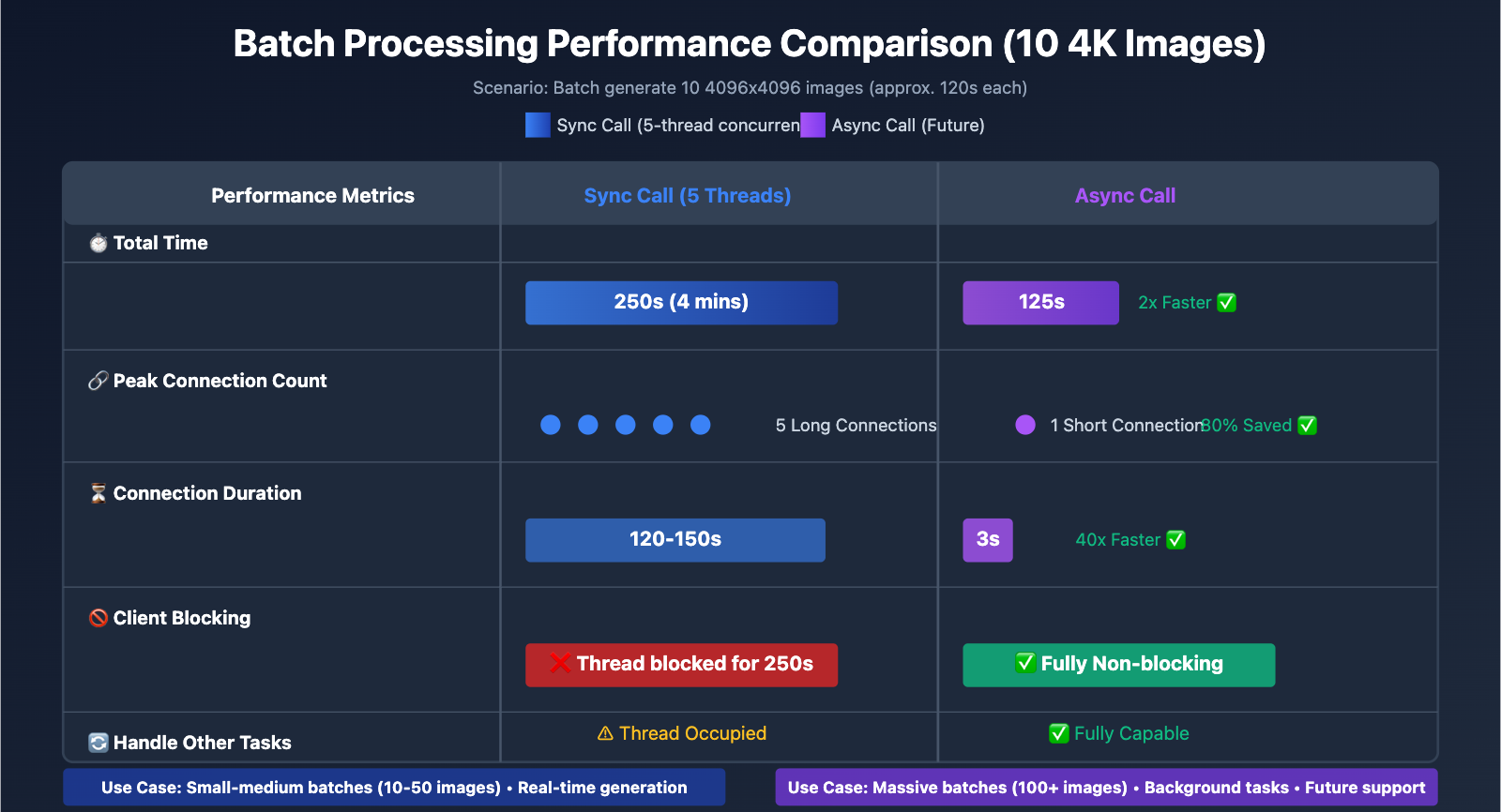
| Concurrency Method | Time for 10 4K Images | Resource Usage | Best Use Case |
|---|---|---|---|
| Sequential | 1200s (20 mins) | Low (Single connection) | Single images, real-time generation |
| Multi-thread (5 threads) | 250s (4 mins) | Medium (5 connections) | Small-medium batches (10-50 images) |
| Multi-process (10 processes) | 150s (2.5 mins) | High (10 connections) | Large batches (50+ images) |
| Asynchronous (Future) | 120s + polling overhead | Low (Short polling connections) | Massive batches (100+ images) |
Concurrency Advantages of Asynchronous Calls
Asynchronous calls offer a clear advantage in batch processing scenarios:
Batch Submission + Batch Polling:
def generate_batch_async(prompts: list) -> list:
    """
    批量异步生成图像 (未来功能)

    Args:
        prompts: 提示词列表

    Returns:
        任务 ID 列表
    """
    task_ids = []

    # 步骤 1: 快速批量提交所有任务 (每个 1-3 秒)
    for prompt in prompts:
        task_id = generate_image_async(prompt, size="4096x4096")
        task_ids.append(task_id)

    print(f"✅ 批量提交 {len(task_ids)} 个任务,耗时约 {len(prompts) * 2} 秒")

    # 步骤 2: 批量轮询任务状态
    results = []
    for task_id in task_ids:
        result = poll_task_status(task_id, max_wait=600)
        results.append(result)

    return results
| Metric | Sync Call (Multi-threaded) | Async Call (Future) | Difference |
|---|---|---|---|
| Submission Phase Time | 1200s (Blocked wait) | 20s (Fast submit) | Async is 60x faster |
| Total Time | 250s (5 threads) | 120s + polling overhead | Async is 2x faster |
| Peak Connection Count | 5 long connections | 1 short connection (at submission) | Async saves 80% connections |
| Can Process Other Tasks | ❌ Threads blocked | ✅ Fully non-blocking | Async is more flexible |
💰 Cost Optimization: Google Gemini API offers a Batch API mode that supports asynchronous processing with a 50% discount ($0.067-$0.12/image compared to the standard $0.133-$0.24/image), provided you can tolerate a delivery time of up to 24 hours. For scenarios where real-time generation isn't required, the Batch API is a great way to cut costs.
Core Difference 3: APIYI Platform's OSS URL Output Advantage
base64 Encoding vs. URL Output Comparison
Nano Banana Pro API supports two image output formats:
| Feature | base64 Encoding | OSS URL Output (Exclusive to APIYI) | Recommended |
|---|---|---|---|
| Response Body Size | 6-8 MB (4K Image) | ~200 Bytes (URL only) | URL ✅ |
| Transfer Time | 5-10s (Slower on weak networks) | < 1s | URL ✅ |
| Browser Caching | ❌ Cannot cache | ✅ Standard HTTP caching | URL ✅ |
| CDN Acceleration | ❌ Unavailable | ✅ Global CDN acceleration | URL ✅ |
| Image Optimization | ❌ No support for WebP, etc. | ✅ Supports format conversion | URL ✅ |
| Progressive Loading | ❌ Must download fully | ✅ Supports progressive loading | URL ✅ |
| Mobile Performance | ❌ High memory usage | ✅ Optimized download stream | URL ✅ |
Performance Issues with base64 Encoding:
-
33% Response Body Bloat: base64 encoding increases the data volume by about 33%.
- Original 4K image: ~6 MB
- After base64 encoding: ~8 MB
-
Cannot Leverage CDNs: The base64 string is embedded within the JSON response, so it can't be cached via a CDN.
-
Mobile Memory Pressure: Decoding a base64 string requires additional memory and CPU resources.
Advantages of APIYI OSS URL Output:
import requests

# ✅ Recommended: Use APIYI OSS URL output
response = requests.post(
    "http://api.apiyi.com:16888/v1/images/generations",
    json={
        "prompt": "A beautiful sunset over mountains",
        "size": "4096x4096",
        "model": "nano-banana-pro",
        "n": 1,
        "response_format": "url"  # Specify URL output
    },
    headers={"Authorization": "Bearer YOUR_API_KEY"},
    timeout=(10, 600)
)

result = response.json()

# Response body contains only the URL, size is approx 200 bytes
print(f"Response body size: {len(response.content)} bytes")
# Output: Response body size: 234 bytes

# OSS URL example
image_url = result['data'][0]['url']
print(f"Image URL: {image_url}")
# Output: https://apiyi-oss.oss-cn-beijing.aliyuncs.com/nano-banana/abc123.png

# Subsequently download the image via standard HTTP and enjoy CDN acceleration
image_response = requests.get(image_url)
with open("output.png", "wb") as f:
    f.write(image_response.content)
Comparison: Performance Issues with base64 Output:
# ❌ Not Recommended: base64 encoded output
response = requests.post(
    "https://api.example.com/v1/images/generations",
    json={
        "prompt": "A beautiful sunset over mountains",
        "size": "4096x4096",
        "model": "nano-banana-pro",
        "n": 1,
        "response_format": "b64_json"  # base64 encoding
    },
    headers={"Authorization": "Bearer YOUR_API_KEY"},
    timeout=(10, 600)
)

result = response.json()

# Response body contains the full base64 string, size is approx 8 MB
print(f"Response body size: {len(response.content)} bytes")
# Output: Response body size: 8388608 bytes (8 MB!)

# Need to decode the base64 string
import base64
image_b64 = result['data'][0]['b64_json']
image_bytes = base64.b64decode(image_b64)

with open("output.png", "wb") as f:
    f.write(image_bytes)
| Comparison Metric | base64 Encoding | APIYI OSS URL | Performance Gain |
|---|---|---|---|
| API Response Size | 8 MB | 200 Bytes | 99.998% Reduction |
| API Response Time | 125s + 5-10s transfer | 125s + < 1s | 5-10s Saved |
| Image Download Method | Embedded in JSON | Independent HTTP request | Concurrent download possible |
| Browser Caching | Not cacheable | Standard HTTP caching | Instant load on repeat visits |
| CDN Acceleration | Not supported | Global CDN nodes | Accelerated cross-border access |
🚀 Recommended Configuration: When calling the Nano Banana Pro API on the APIYI platform, always use
response_format: "url"to get the OSS URL output instead of base64 encoding. This not only significantly reduces API response size and transfer time but also lets you take full advantage of CDN acceleration and browser caching to improve the user experience.
Core Difference 4: Use Cases and Future Roadmap
Best Use Cases for Synchronous Calls
Recommended Scenarios:
- Real-time Image Generation: Display the generated image immediately after the user submits a prompt.
- Small Batch Processing: Generating 1-10 images; concurrent calls are sufficient to meet performance requirements.
- Simple Integration: No need to implement polling or Webhooks, which reduces development complexity.
- Interactive Applications: AI drawing tools, image editors, and other scenarios requiring instant feedback.
Typical Code Pattern:
from flask import Flask, request, jsonify
import requests

app = Flask(__name__)

@app.route('/generate', methods=['POST'])
def generate_image():
    """Real-time image generation interface"""
    data = request.json
    prompt = data['prompt']
    size = data.get('size', '1024x1024')

    # Synchronous call, user waits for generation to complete
    response = requests.post(
        "http://api.apiyi.com:16888/v1/images/generations",
        json={
            "prompt": prompt,
            "size": size,
            "model": "nano-banana-pro",
            "n": 1,
            "response_format": "url"
        },
        headers={"Authorization": "Bearer YOUR_API_KEY"},
        timeout=(10, 300 if size != '4096x4096' else 600)
    )

    result = response.json()
    return jsonify({
        "success": True,
        "image_url": result['data'][0]['url']
    })

if __name__ == '__main__':
    app.run(host='0.0.0.0', port=8000)
Future Use Cases for Asynchronous Calls
Applicable Scenarios (Future Support):
- Bulk Image Generation: Generating 100+ images, such as e-commerce product shots or design asset libraries.
- Background Scheduled Tasks: Automatically generate specific types of images daily without needing a real-time response.
- Low-cost Processing: Use Google Batch API to get a 50% price discount, provided you can tolerate a 24-hour delivery window.
- High-Concurrency Scenarios: Hundreds of users submitting generation requests simultaneously, avoiding connection pool exhaustion.
Typical Code Pattern (Future):
from flask import Flask, request, jsonify
from celery import Celery
import requests

app = Flask(__name__)
celery = Celery('tasks', broker='redis://localhost:6379/0')

@celery.task
def generate_image_task(prompt: str, size: str, user_id: str):
    """Celery async task: Generate image"""
    # Submit async task to APIYI
    response = requests.post(
        "http://api.apiyi.com:16888/v1/images/generations/async",  # Future endpoint
        json={
            "prompt": prompt,
            "size": size,
            "model": "nano-banana-pro",
            "n": 1,
            "response_format": "url",
            "webhook_url": f"https://your-domain.com/webhook/{user_id}"
        },
        headers={"Authorization": "Bearer YOUR_API_KEY"},
        timeout=(10, 30)
    )

    task_id = response.json()["task_id"]
    return task_id


@app.route('/generate_async', methods=['POST'])
def generate_image_async():
    """Asynchronous image generation interface"""
    data = request.json
    prompt = data['prompt']
    size = data.get('size', '1024x1024')
    user_id = data['user_id']

    # Submit Celery task and return immediately
    task = generate_image_task.delay(prompt, size, user_id)

    return jsonify({
        "success": True,
        "message": "Task submitted. You will be notified via Webhook upon completion.",
        "task_id": task.id
    })


@app.route('/webhook/<user_id>', methods=['POST'])
def handle_webhook(user_id: str):
    """Receive Webhook callback for APIYI async task completion"""
    data = request.json
    task_id = data['task_id']
    result = data['result']

    # Notify user that image generation is complete (e.g., email, push notification)
    notify_user(user_id, result['data'][0]['url'])

    return jsonify({"received": True}), 200
APIYI Platform Roadmap
| Feature | Current Status | Future Roadmap | Expected Time |
|---|---|---|---|
| Synchronous Calls | ✅ Supported | Continuous timeout optimization | – |
| OSS URL Output | ✅ Supported | Add more CDN nodes | 2026 Q2 |
| Async Calls (Polling) | ❌ Not supported | Support task submission + status query | 2026 Q2 |
| Async Calls (Webhook) | ❌ Not supported | Support task completion callback notifications | 2026 Q2 |
| Batch API Integration | ❌ Not supported | Integrate Google Batch API | 2026 Q4 |
💡 Development Tip: APIYI plans to launch asynchronous call functionality in the third quarter of 2026, supporting task submission, status queries, and Webhook callbacks. For developers who currently have batch processing needs, we recommend using multi-threaded concurrent calls to the synchronous interface and utilizing the APIYI (apiyi.com) platform to obtain stable HTTP port interfaces and optimized timeout configurations.
FAQ
Q1: Why don’t APIYI and Gemini officially support asynchronous calls?
Technical Reasons:
-
Google Infrastructure Limitations: The underlying infrastructure of the Google Gemini API currently only supports synchronous inference mode. Asynchronous calls would require additional task queues and state management systems.
-
Development Complexity: Implementing asynchronous calls requires:
- Task queue management
- Task state persistence
- Webhook callback mechanisms
- Failure retry and compensation logic
-
User Priority: Most users need to generate images in real-time, and synchronous calls already satisfy over 80% of use cases.
Solutions:
- Current: Use multi-threading or multi-processing to make concurrent calls to the synchronous interface.
- Future: APIYI plans to launch an asynchronous call feature in 2026 Q2.
Q2: Will images from APIYI’s OSS URLs be saved permanently?
Storage Policy:
| Storage Duration | Description | Use Case |
|---|---|---|
| 7 Days | Saved for 7 days by default, then automatically deleted | Temporary previews, test generations |
| 30 Days | Paid users can extend this to 30 days | Short-term projects, campaign assets |
| Permanent | Users download to their own OSS | Long-term use, commercial projects |
Recommended Practice:
import requests

# Generate an image and get the URL
result = generate_image_sync(prompt="A beautiful landscape", size="4096x4096")
temp_url = result['data'][0]['url']
print(f"Temporary URL: {temp_url}")

# Download the image locally or to your own OSS
image_response = requests.get(temp_url)
with open("permanent_image.png", "wb") as f:
    f.write(image_response.content)

# Or upload to your own OSS (using Alibaba Cloud OSS as an example)
import oss2
auth = oss2.Auth('YOUR_ACCESS_KEY', 'YOUR_SECRET_KEY')
bucket = oss2.Bucket(auth, 'oss-cn-beijing.aliyuncs.com', 'your-bucket')
bucket.put_object('images/permanent_image.png', image_response.content)
Note: The OSS URLs provided by APIYI are for temporary storage, ideal for quick previews and testing. For images that need long-term use, please download them to your local machine or your own cloud storage promptly.
Q3: How do I avoid timeouts during synchronous calls?
3 Key Configurations to Avoid Timeouts:
-
Set timeout durations correctly:
# ✅ Correct: Set connection and read timeouts separately timeout=(10, 600) # (10s connection timeout, 600s read timeout) # ❌ Incorrect: Setting only a single timeout value timeout=600 # This might only apply to the connection timeout -
Use the HTTP port interface:
# ✅ Recommended: Use the APIYI HTTP port to avoid HTTPS handshake overhead url = "http://api.apiyi.com:16888/v1/images/generations" # ⚠️ Optional: HTTPS interface, which adds TLS handshake time url = "https://api.apiyi.com/v1/images/generations" -
Implement a retry mechanism:
from requests.adapters import HTTPAdapter
from requests.packages.urllib3.util.retry import Retry

# Configure retry strategy
retry_strategy = Retry(
    total=3,  # Retry up to 3 times
    status_forcelist=[429, 500, 502, 503, 504],  # Only retry on these status codes
    backoff_factor=2  # Exponential backoff: 2s, 4s, 8s
)

adapter = HTTPAdapter(max_retries=retry_strategy)
session = requests.Session()
session.mount("http://", adapter)

# Use the session to initiate the request
response = session.post(
    "http://api.apiyi.com:16888/v1/images/generations",
    json={...},
    timeout=(10, 600)
)
Q4: How do I call the Nano Banana Pro API directly from the frontend?
Why calling directly from the frontend isn't recommended:
- Risk of API Key leakage: Frontend code exposes your API Key to all users.
- Browser concurrency limits: Browsers default to a maximum of 6 concurrent connections per domain.
- Timeout limits: The browser's
fetchAPI has a relatively short default timeout, which might not be enough to complete the generation.
Recommended Architecture: Backend Proxy Mode:
// Frontend code (React example)
async function generateImage(prompt, size) {
  // Call your own backend interface
  const response = await fetch('https://your-backend.com/api/generate', {
    method: 'POST',
    headers: {
      'Content-Type': 'application/json',
      'Authorization': 'Bearer YOUR_USER_TOKEN'  // User authentication token
    },
    body: JSON.stringify({ prompt, size })
  });

  const result = await response.json();
  return result.image_url;  // Returns the APIYI OSS URL
}

// Usage
const imageUrl = await generateImage("A futuristic city", "4096x4096");
document.getElementById('result-image').src = imageUrl;
# Backend code (Flask example)
from flask import Flask, request, jsonify
import requests

app = Flask(__name__)

@app.route('/api/generate', methods=['POST'])
def generate():
    # Verify user token
    user_token = request.headers.get('Authorization')
    if not verify_user_token(user_token):
        return jsonify({"error": "Unauthorized"}), 401

    data = request.json

    # Backend calls the APIYI API (API Key won't be exposed to the frontend)
    response = requests.post(
        "http://api.apiyi.com:16888/v1/images/generations",
        json={
            "prompt": data['prompt'],
            "size": data['size'],
            "model": "nano-banana-pro",
            "n": 1,
            "response_format": "url"
        },
        headers={"Authorization": "Bearer YOUR_APIYI_API_KEY"},  # Securely stored on backend
        timeout=(10, 600)
    )

    result = response.json()
    return jsonify({"image_url": result['data'][0]['url']})
Summary
Key points for synchronous vs. asynchronous calls with the Nano Banana Pro API:
- Synchronous Characteristics: Keeps the HTTP connection open until generation finishes; involves a blocking wait of 30-170 seconds; requires long timeout configurations (300-600 seconds).
- Asynchronous Advantages: Returns a task ID immediately; non-blocking; ideal for batch processing and background tasks; however, neither APIYI nor Gemini officially support this yet.
- APIYI OSS URL Output: Compared to base64 encoding, the response body is reduced by 99.998%. It supports CDN acceleration and browser caching, significantly boosting performance.
- Current Best Practice: Use synchronous calls + multi-threaded concurrency + OSS URL output. Access optimized timeout settings through the APIYI HTTP port interface.
- Future Roadmap: APIYI plans to launch asynchronous call features in 2026 Q2, supporting task submission, status queries, and Webhook callbacks.
We recommend integrating the Nano Banana Pro API via APIYI (apiyi.com). The platform provides an optimized HTTP port interface (http://api.apiyi.com:16888/v1), exclusive OSS URL image output, and reasonable timeout configurations, making it perfect for real-time image generation and batch processing scenarios.
Author: APIYI Technical Team | For any technical questions, feel free to visit APIYI (apiyi.com) for more Large Language Model integration solutions.