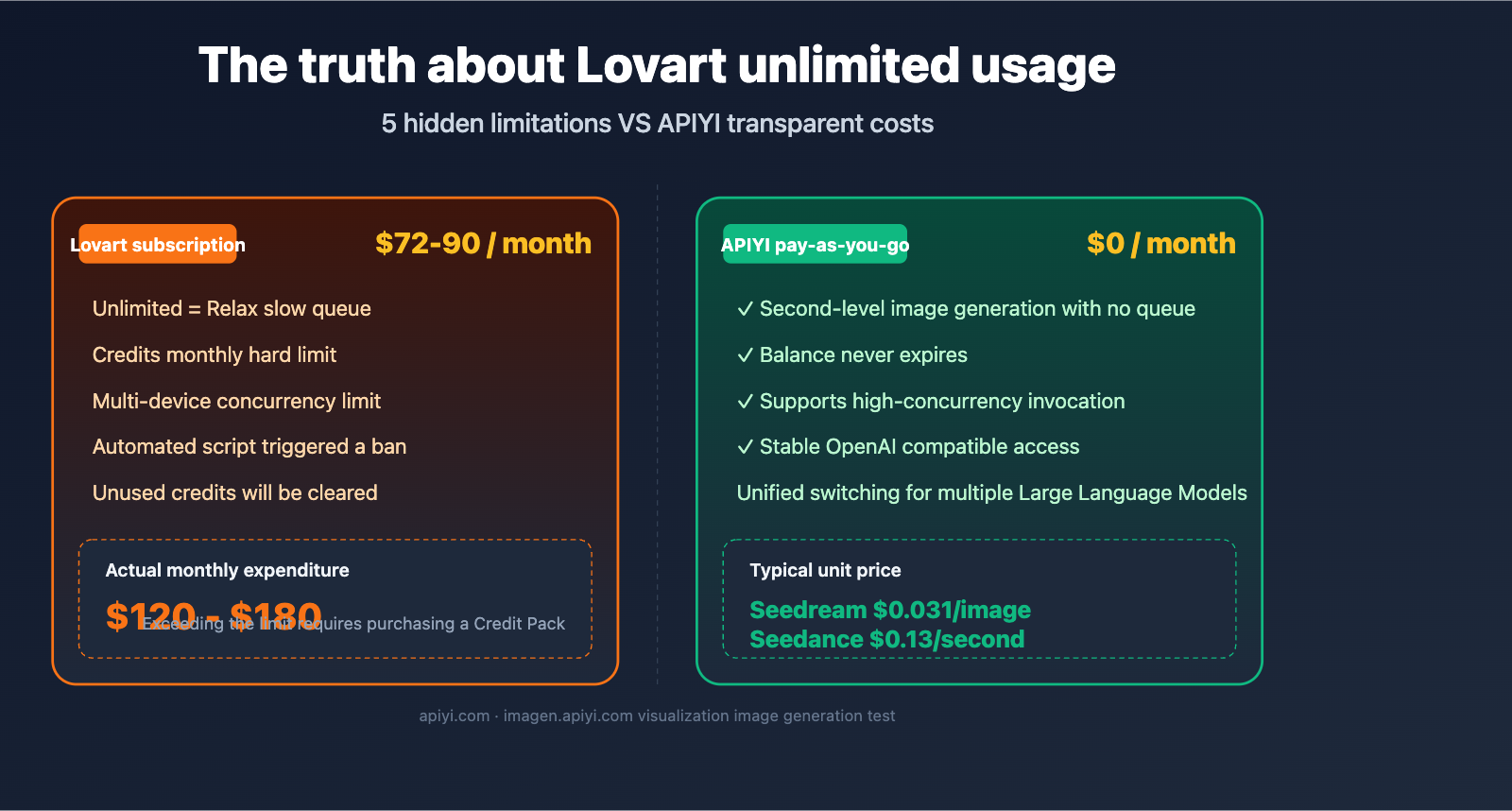
Recently, we’ve received quite a few messages from readers asking: "Lovart’s image and video subscriptions look so cheap and claim to be unlimited—is it really possible to run Nano Banana Pro and Seedance indefinitely for just $72 a month?" To be honest, we’ve verified this ourselves in our own projects, and the answer is disappointing: Lovart’s "unlimited" claim is a marketing gimmick, hiding at least 5 layers of hidden restrictions.
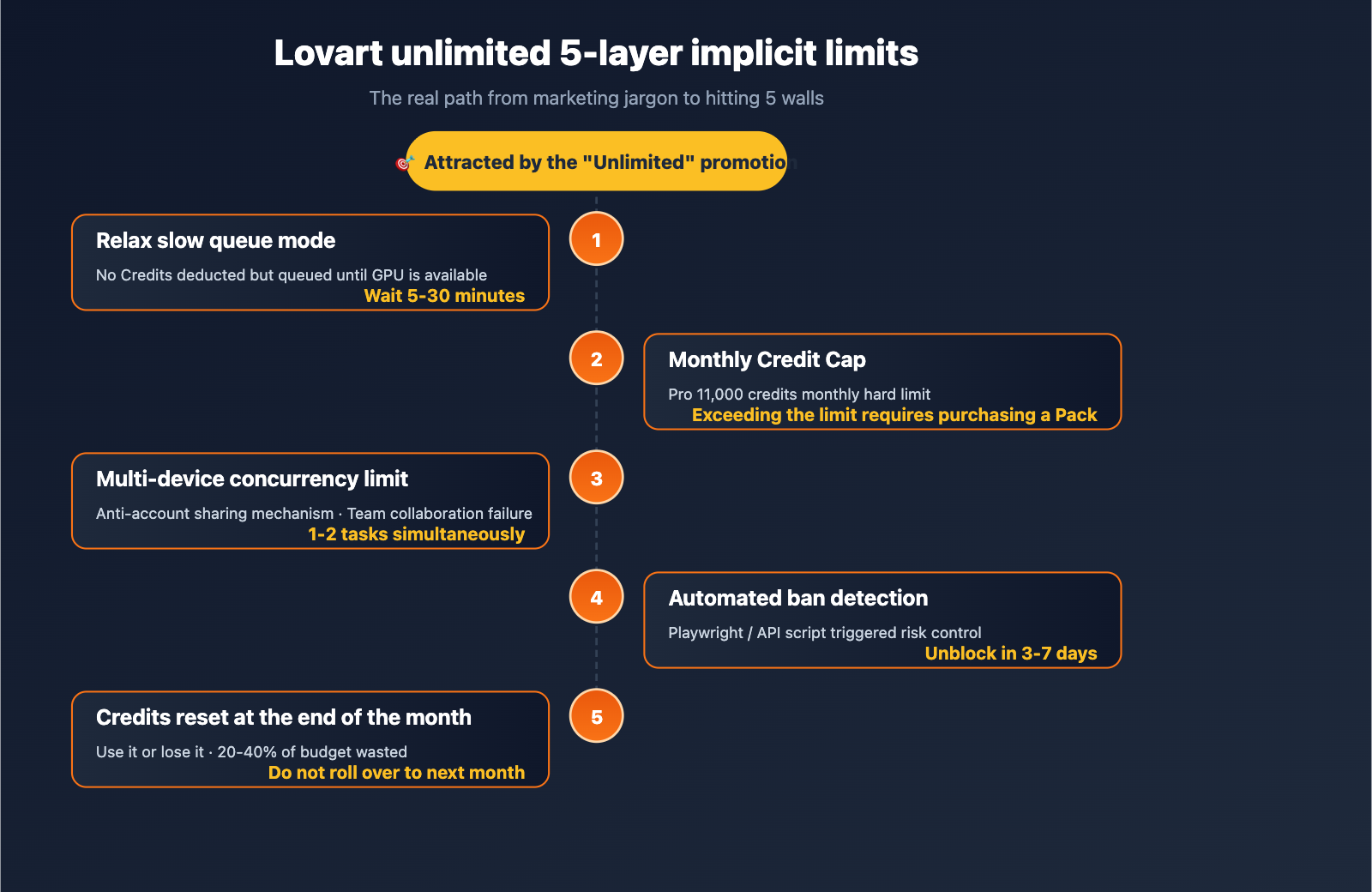
In the AI image and video generation space, Lovart bundles mainstream models like Nano Banana Pro, Seedream 5.0, and Seedance 2.0 into subscription plans. The pricing looks highly competitive compared to official APIs, attracting many individual creators and small teams. However, if you try to use it for a formal production pipeline, you'll eventually hit 5 walls: Relax slow queues, Credit caps, multi-device concurrency limits, automated detection bans, and non-rollover credits.
This article breaks down Lovart’s "unlimited" claims based on their official pricing page, subscription FAQs, genuine negative reviews on Trustpilot, and Product Hunt feedback. We’ll also provide real cost data from our experience running Seedream/Seedance/Nano Banana Pro on APIYI apiyi.com, helping you decide: Is a subscription actually cheaper, or is pay-as-you-go more reliable?
What is Lovart's "Unlimited": The 4-Tier Credit Pool Behind the Subscription
Before we dive into the truth about "unlimited," let's clarify Lovart's product model. Lovart is a design agent based on AI models. Its core selling point is an infinite canvas + multi-model orchestration. You just input a prompt, and it automatically calls models like Nano Banana Pro, Seedream 5.0, Flux, and Sora to generate visual content.
According to the latest information on the lovart.ai/pricing page, Lovart offers four subscription tiers:
| Plan | Monthly Fee | Monthly Credits | Best For |
|---|---|---|---|
| Free | $0 | 500 (Trial) | Exploring features |
| Starter | $19 | 2,000 credits | Light individual use |
| Basic | $32 | 3,500 credits | Independent designers |
| Pro | $90 ($72/mo billed annually) | 11,000 credits | Small teams / High-frequency use |
📌 Quick Start Tip: If you just want to access the interfaces for Seedream 5.0 or Nano Banana Pro, you don't need a Lovart subscription at all. Through APIYI
apiyi.com, you can directly invoke these models using the OpenAI-compatible format. You pay per image, have no subscription costs, and can test generation results visually atimagen.apiyi.comimmediately after registering.
Above these four tiers, Lovart also launched the 365 Unlimited Plan—this is the one that many users complain is "misleading." The official description says it provides "Unlimited Relax Generations" for models within the plan. The keyword here is Relax, which we'll break down in the next section.
How Lovart Performs: The Real Rate of Credit Consumption
Many people see the 11,000 credits in the Pro plan and think, "That should be enough," but you'll realize it's not once you run a few projects:
- One 4K Nano Banana Pro image consumes about 60-100 credits.
- One 5-second 1080p Seedance video consumes about 150 credits.
- A complete brand design project (Logo + Banner + Social Pack) can easily consume 500+ credits.
At this rate, the 11,000 credits in the Pro plan are only enough to produce about 150 4K images or 70 videos. Once you run out mid-month, you're forced to buy extra Credit Packs, pushing your actual monthly spending to the $100-$150 range. This massive gap between "actual vs. listed price" is the first layer of the marketing game we're exposing here.
description: A breakdown of the 5 hidden limitations behind Lovart's "unlimited" subscription model and why pay-as-you-go API alternatives are often better.
5 Hidden Limitations of Lovart's "Unlimited" Plan: Debunked
Limitation 1: "Unlimited" is just the Relax slow queue
Lovart's official FAQ defines "Unlimited" precisely: "Unlimited Relax Generation mode is available exclusively to subscribers of specific plans, allowing for unlimited generations without consuming fast credits. In this mode, your requests are placed in a queue and processed as system GPU resources become available. Wait times are typically longer than in Fast Generation mode."
In plain English:
- Fast mode: Consumes credits, generates images in seconds.
- Relax mode: No credits consumed, but you're stuck in a queue waiting for idle GPUs.
According to user feedback on Product Hunt and Trustpilot, in Relax mode:
- Image generation wait times start at 3-15 minutes, often exceeding 30 minutes during peak hours.
- Video generation can take over an hour, with some users reporting "queuing for hours without success."
- Your position in the queue can be "cut" by Fast mode users, with higher subscription tiers getting priority.
⚡ Technical Recommendation: If you need speed (for client demos, live streaming, or social media trends), the subscription-based Relax queue won't cut it. We recommend using APIYI (
apiyi.com) to connect directly to models like Seedream 5.0 or Nano Banana Pro for instant, queue-free model invocation, bypassing the "unlimited = slow" trap entirely.
Limitation 2: Monthly Credit Cap is a hard ceiling
Even if you subscribe to the 365 Unlimited Plan, your monthly credit quota is a hard limit. The official terms state: "Monthly subscription credits are valid for the duration of your current billing cycle and will automatically reset on your next billing date — unused credits do not roll over."
This means:
- Once your 11,000 credits (for the Pro plan) are gone, you either switch to the slow Relax queue or buy extra Credit Packs.
- Unused credits do not roll over to the next month.
- Credit Packs are 20-40% more expensive per unit than the credits included in your subscription.
A Trustpilot user put it bluntly: "After upgrading to the Pro plan, my credits were exhausted by a design project within a week. I spent the remaining three weeks stuck in the Relax queue. The 'unlimited' claim is just for show."
Limitation 3: Multi-device concurrency limits prevent account sharing
Lovart's FAQ is clear: "To prevent account sharing, abuse, or unfair consumption of system resources, there is a reasonable limit on the number of devices that can run tasks concurrently."
In practice:
- You can only run 1-2 tasks at a time per account (depending on your plan).
- Logging in on multiple devices triggers verification, forcing other devices to stop their tasks.
- If you're sharing an account within a team, it effectively becomes one person, one task.
This is a dealbreaker for small teams. If you're a 3-person design studio trying to share a Pro plan, you'll quickly realize that only one person can actually run tasks at a time—making the "team subscription" value non-existent.
Limitation 4: Automated detection leads to bans
Lovart's anti-cheat policy is strict: "Automation or non-human activity may trigger a temporary suspension of access for review to ensure fair and reliable use."
This means:
- Any scripting, API-based, or batch-processing calls may be flagged as automation.
- Browser automation tools (Playwright, Puppeteer) are highly likely to trigger a ban.
- Once flagged, you'll need manual review to get your account back, which usually takes 3-7 days.
If your business requires automated batch image generation (e.g., e-commerce product images, SEO assets, or video scripts), Lovart's subscription model is essentially unusable. This is why we always emphasize that for developer-grade AI image/video generation, pay-as-you-go APIs are the only viable solution.
Limitation 5: Unused credits expire
As mentioned before, it's worth reiterating: the "no rollover" rule means your subscription budget is a classic "use it or lose it" scenario.
If you only use 5,000 credits in March, the remaining 6,000 are wiped out at the start of the next month. In contrast, with a pay-as-you-go API model, your account balance remains yours, and you only pay for what you use—which is much better for your bottom line.
💰 Cost Optimization Tip: For irregular workloads (e.g., high usage during marketing campaigns, low usage otherwise), a subscription model almost always results in 20-40% waste. We suggest using the pay-as-you-go APIs via APIYI (
apiyi.com), where your balance never expires and you only pay for actual usage, perfectly aligning your costs with your real-world demand.
Lovart User Reviews: First-hand Feedback from Trustpilot and Product Hunt
Official terms and conditions only tell part of the story. We’ve summarized the most representative negative feedback for Lovart from Trustpilot and Product Hunt to help you understand the real experience after subscribing.
| Feedback Source | Core Complaint | Trigger Scenario |
|---|---|---|
| Trustpilot | "worst support team and process" | Slow support response, refund denied |
| Trustpilot | Charged 2 months after cancelling | Auto-renewal not fully disabled |
| Trustpilot | Refund denied after upgrade due to "credits used" | Requested refund after testing Pro on upgrade day |
| Product Hunt | Credits still decreasing under Unlimited mode | Some model invocations are still billed |
| Product Hunt | Relax queue wait times exceed 30 minutes | GPU resource congestion during peak hours |
| Platform still in Beta, poor output consistency | High variance in results for the same prompt |
These reviews don't negate Lovart's product value—its canvas interaction and multi-model orchestration experience are indeed superior to many competitors. However, when using it as a production tool, you must evaluate "subscription marketing claims" and "real-world usability" separately.
Lovart Subscription vs. API Pay-as-you-go: A Real Cost Comparison
The table below shows a real cost comparison based on official pricing and third-party API rates (assuming a monthly demand of 300 4K images + 50 10-second 1080p videos):
| Plan | Base Monthly Fee | Image Cost | Video Cost | Total Monthly Spend | Flexibility |
|---|---|---|---|---|---|
| Lovart Pro Subscription | $90 | Included in 11k credits | Extra packs required | $120–$180 | ❌ Low |
| Lovart 365 Unlimited | ~$40–$60/mo (annual) | Relax queue only | Relax queue only | $40–$60 | ❌ Very Low (Slow) |
| APIYI Seedream 4.0 + Seedance 2 | $0 (Pay-as-you-go) | 300×$0.018=$5.4 | 50×10×$0.13=$65 | ~$70–$80 | ✅ High |
| APIYI Nano Banana Pro + Seedance 2 | $0 (Pay-as-you-go) | 300×$0.05=$15 | 50×10×$0.13=$65 | ~$80–$90 | ✅ High |
🎯 Recommendation: If you prioritize maximum speed + production-grade stability + automation, we suggest calling models like Seedream, Seedance, and Nano Banana Pro directly via APIYI (
apiyi.com). You pay per image/second, with no subscription lock-in, and full support for concurrency and scripting. We recommend running a few samples on theimagen.apiyi.comtesting tool to confirm image quality and style before finalizing your tech stack.
Lovart Alternatives: Stable Pipelines Based on APIYI
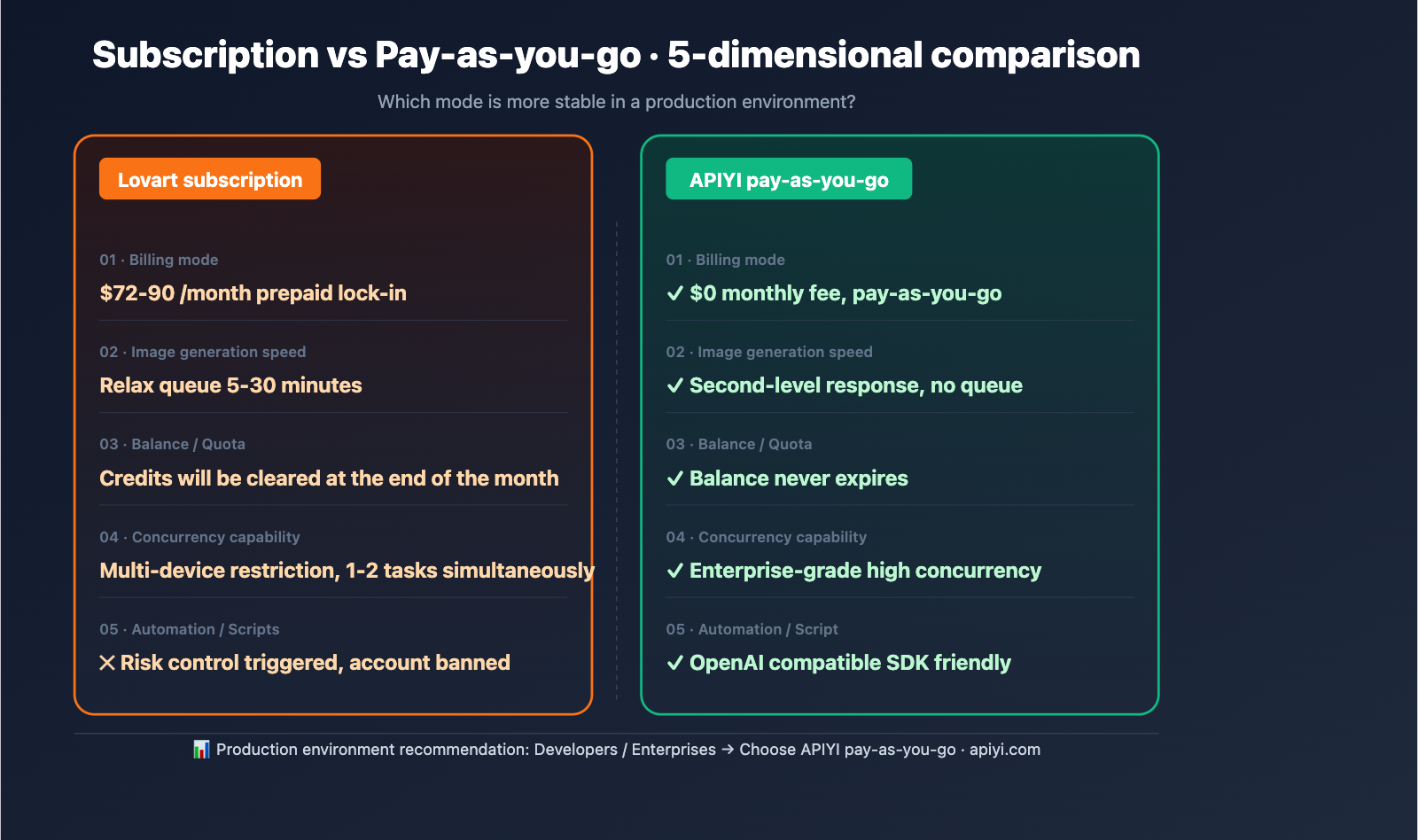
Since subscription models come with the five hidden limitations mentioned above, a more suitable approach for developers and formal business operations is to call the API directly. Below is a complete alternative route based on APIYI (apiyi.com).
Option 1: Seedream 5.0 Fast Image Generation (Lowest Cost)
Seedream 5.0 Lite is currently our top recommendation for image models in terms of cost-effectiveness. The official price of $0.035/image is reduced to approximately $0.031/image on APIYI, making it perfect for batch generation scenarios.
# Seedream 5.0 Lite invocation (OpenAI compatible format)
import openai

client = openai.OpenAI(
    api_key="YOUR_API_KEY",
    base_url="https://vip.apiyi.com/v1"  # APIYI proxy endpoint
)

response = client.images.generate(
    model="seedream-5.0-lite",
    prompt="Cyberpunk style e-commerce hero image, 2048x2048",
    n=1,
    size="2048x2048"
)

print(response.data[0].url)
📂 Click to expand: Complete example including image-to-image and batch invocation
import openai
import asyncio
from concurrent.futures import ThreadPoolExecutor

client = openai.OpenAI(
    api_key="YOUR_API_KEY",
    base_url="https://vip.apiyi.com/v1"
)

def generate_one(prompt, size="2048x2048"):
    response = client.images.generate(
        model="seedream-5.0-lite",
        prompt=prompt,
        n=1,
        size=size
    )
    return response.data[0].url

prompts = [
    "Cyberpunk e-commerce hero image",
    "Minimalist product white background image",
    "Vintage film poster style"
]

with ThreadPoolExecutor(max_workers=5) as pool:
    urls = list(pool.map(generate_one, prompts))

for i, url in enumerate(urls):
    print(f"Image {i+1}: {url}")
Option 2: Nano Banana Pro High-Quality Generation
If your business scenario requires Google-level semantic understanding and consistency (face consistency, brand element retention), Nano Banana Pro is the go-to choice. The official 4K unit price is $0.24, while the APIYI route brings it down to about $0.05/image.
# Nano Banana Pro invocation example
response = client.images.generate(
    model="nano-banana-pro",
    prompt="Maintain consistency of the same character across different scenes: office / beach / mountain top",
    n=3,
    size="2048x2048"
)
⚡ Technical Tip: Choose Nano Banana Pro for high semantic consistency (e.g., brand ambassador series); choose Seedream 5.0 Lite for ultimate cost-effectiveness + artistic style. Both can be switched seamlessly on the APIYI platform using the same API key and base_url, avoiding the "subscription lock-in" issue found with Lovart.
Option 3: Seedance 2.0 Video Generation
For video, Seedance 2.0 is the top-tier video generation model released by ByteDance following Seedream. It supports three resolutions: 480p, 720p, and 1080p, covering both text-to-video and image-to-video.
| Resolution | Text-to-Video | Image-to-Video | Typical Scenario |
|---|---|---|---|
| 480p | 6 credits/sec | 4 credits/sec | Social media short videos |
| 720p | 12 credits/sec | 8 credits/sec | E-commerce hero videos |
| 1080p | 30 credits/sec | 20 credits/sec | Brand advertisements |
On APIYI, Seedance 2 costs $0.13/second (Fast version $0.10/second). A 5-second 1080p video costs about $0.65, far lower than the amortized cost of a Lovart Pro plan.
# Seedance 2.0 video generation example
response = client.videos.generate(
    model="seedance-2",
    prompt="Exquisite close-up shot of product unboxing, 10 seconds",
    duration=10,
    resolution="1080p"
)

print(response.data[0].url)
🎥 Production Tip: Run a few 5-second samples in the
imagen.apiyi.comtesting tool to confirm the style before putting them into a formal batch generation pipeline. We recommend templating your prompts and using the Seedance 2 Fast version for A/B testing; you can realistically drive the cost of a single short video under $0.40.
Option 4: Multi-model Intelligent Orchestration (Replacing Lovart Agent)
Lovart's biggest selling point is "multi-model orchestration"—it automatically selects the most appropriate model based on your design task. This capability can be fully achieved via APIYI's unified base_url + multi-model parameters, combined with LangChain or custom orchestration logic.
# Automatically route to different models based on task type
def smart_route(task_type, prompt):
    model_map = {
        "logo": "seedream-5.0-lite",      # Strong artistic style
        "product": "nano-banana-pro",      # High semantic consistency
        "banner": "seedream-4.5",          # Balanced cost-effectiveness
        "video": "seedance-2-fast"         # Fast video generation
    }
    return client.images.generate(
        model=model_map[task_type],
        prompt=prompt
    )

smart_route("logo", "Minimalist tech-style logo, letter A")
smart_route("product", "White background e-commerce image, sneakers")
Compared to Lovart's black-box Agent, this approach has three clear advantages:
- Fully Controllable Costs: You know exactly how much each call costs, eliminating "wasted subscription fees."
- Programmable Extensibility: You can integrate your own business logic, version management, and review workflows.
- No Lock-in Risk: Switching underlying models only requires changing the
modelparameter, with no need to migrate platforms.
title: "5-Step Practical Guide: Migrating from Lovart to APIYI"
description: "A quick, 1-2 hour guide to migrating your production workflows from Lovart to APIYI without service interruption."
tags: [AI, API, Migration, APIYI, Workflow]
5-Step Practical Guide: Migrating from Lovart to APIYI
If you're planning to move away from your Lovart subscription, this checklist will help you complete a production-grade migration in 1-2 hours without disrupting your existing business.
Step 1: Inventory Your Current Lovart Model Invocations
First, list the models you frequently use in Lovart and map them to their corresponding APIYI model IDs. Here’s a common mapping reference:
| Lovart Internal Model | APIYI Model ID | Unit Price (Ref) |
|---|---|---|
| Nano Banana (Default) | nano-banana-2 |
$0.02 / image |
| Nano Banana Pro | nano-banana-pro |
$0.05 / image |
| Seedream 4.0 | seedream-4.0 |
$0.018 / image |
| Seedream 4.5 | seedream-4.5 |
$0.03 / image |
| Seedream 5.0 Lite | seedream-5.0-lite |
$0.031 / image |
| Seedance 2 | seedance-2 |
$0.13 / sec |
| Seedance 2 Fast | seedream-2-fast |
$0.10 / sec |
Step 2: Register and Get Your API Key on APIYI
Visit the official APIYI website at apiyi.com to register your account and grab your API key from the dashboard. We recommend starting with a $10-20 credit top-up for migration testing; you can always add more once everything is running smoothly.
Step 3: Update base_url and Model Parameters in Your Code
If you were previously using the Lovart API or another platform, you only need to change two things:
# Before (Any OpenAI-compatible platform)
client = openai.OpenAI(base_url="https://old-provider.com/v1")
response = client.images.generate(model="any-model", prompt=...)

# After (APIYI unified endpoint)
client = openai.OpenAI(base_url="https://vip.apiyi.com/v1")
response = client.images.generate(model="seedream-5.0-lite", prompt=...)
Step 4: Validate with Sample Images at imagen.apiyi.com
Before deploying to production, head over to imagen.apiyi.com and run 3-5 sample images using the same prompts. This confirms that the image quality, style, and dimensions meet your expectations. This step helps you catch model discrepancies early, preventing surprises after you go live.
Step 5: Cancel Lovart Auto-Renewal
The final—and most overlooked—step: Log into your Lovart account and turn off auto-renewal. Users on Trustpilot have reported being charged even two months after canceling their subscriptions. After turning off renewal, we suggest setting a reminder on your credit card or Alipay statement to ensure you aren't hit with any unexpected charges.
✅ Migration Verification: Once you've completed these 5 steps, your image/video generation pipeline will be fully running on APIYI's pay-as-you-go model. You can check your real-time consumption in the
apiyi.comdashboard, finally leaving behind the "end-of-month surprise" billing model of Lovart.
FAQ: Alternatives to Lovart
Q1: Is the Lovart 365 Unlimited Plan worth it?
Verdict: Only for non-production creators. If you're an independent creator who isn't in a rush and doesn't need automation, the annual plan (averaging $40-60/month) might seem cheaper than pure API usage. However, as soon as you have any requirements for speed, concurrency, or automation, the "Relax" slow queue will make you regret your purchase. We recommend using APIYI's apiyi.com pay-as-you-go model for a much higher level of flexibility.
Q2: How likely is it to get banned on Lovart?
According to feedback on Trustpilot and Product Hunt, using automation tools, sharing accounts, or frequently calling the same model can trigger risk controls. Lovart's official terms reserve the right to ban accounts, and refunds are notoriously difficult to obtain. If you plan on doing batch or scripted calls, skip the subscription model and use an API.
Q3: Which is better for replacing Lovart: Nano Banana Pro or Seedream 5.0?
They serve different purposes. Nano Banana Pro excels in semantic understanding and face consistency (keeping characters/brands stable), making it ideal for scenarios requiring high precision. Seedream 5.0 Lite wins on artistic style and price ($0.031/image), making it perfect for bulk generation. In real-world projects, we suggest using both—you can dynamically switch between them using the same APIYI apiyi.com key and base_url to optimize both cost and quality.
Q4: How stable is the APIYI connection?
APIYI is an enterprise-grade AI model proxy service built for developers. It uses multi-path routing and failover mechanisms to maintain uptime above 99.9%. All major image/video models (Seedream series, Nano Banana series, Seedance series, Flux, Kling, etc.) are available under the same OpenAI-compatible interface, so switching models only requires changing one parameter. The official site apiyi.com provides detailed documentation and SDK examples, and the imagen.apiyi.com tool lets you visualize output quality.
Q5: How long does it take to migrate from a Lovart subscription to APIYI?
If you were previously using the Lovart UI, migrating to APIYI takes only 1-2 hours: register, top up, copy your API key, update the base_url to https://vip.apiyi.com/v1, and adjust the model parameter. There's almost zero code change required (thanks to the OpenAI-compatible format). If you need batch scripts, check out the Python/Node.js examples in the APIYI documentation; you can have a production-grade pipeline set up within a day.
Q6: Is the video generation quality of Seedance 2 better than the models embedded in Lovart?
Seedance 2 is a top-tier video generation model developed by ByteDance. Its dynamic stability and physical realism at 1080p resolution are significantly better than the open-source models typically used by Lovart. For quality-sensitive scenarios like e-commerce videos or brand advertisements, we recommend using Seedance 2 or Seedance 2 Pro. The cost is manageable at $0.13-$0.25/second, which is much more cost-effective than the amortized fees of a Lovart Pro plan.
Q7: What payment methods does APIYI support? Do balances expire?
APIYI supports mainstream payment methods like Alipay, WeChat Pay, and corporate bank transfers. Account balances never expire. Unlike Lovart's "monthly credit reset" policy, the pay-as-you-go model allows you to flexibly allocate your budget to peak periods like marketing seasons or product launches without worrying about waste.
Summary: Don't Get Fooled by Lovart's "Unlimited" Marketing
Returning to the reader's original WeChat message: "Lovart's video/image pricing is so cheap and they claim it's unlimited—is that for real?" After a systematic breakdown in this article, the answer is clear:
- ❌ "Unlimited" only applies to the Relax (slow) queue, where you'll often wait over 30 minutes during peak times.
- ❌ There's a hard monthly limit on Credits. Once you exceed it, you have to buy extra packs, bringing your actual monthly spend to $120–$180.
- ❌ Concurrent device usage is restricted, making team sharing practically impossible.
- ❌ Automation or scripting will trigger a ban, making it high-risk for production-level use.
- ❌ Credits don't roll over, so any unused balance is simply wasted at the end of the month.
For developers and enterprises that prioritize speed, stability, automation, and team collaboration, we strongly recommend ditching the subscription model in favor of pay-as-you-go APIs. Through APIYI (apiyi.com), you can access mainstream models like Seedream 4.0/4.5/5.0, Nano Banana/Pro, and Seedance 2/2 Pro with transparent, per-image or per-second billing. You get sub-second response times, support for high concurrency, and balances that never expire.
🚀 Next Steps: First, register for an account at the APIYI official site
apiyi.comto get your API key. Then, head over to the image generation test toolimagen.apiyi.comto run a few sample prompts and verify the quality. Finally, just update yourbase_urltohttps://vip.apiyi.com/v1to switch over instantly. Based on our testing, migrating from a Lovart subscription to APIYI's pay-as-you-go model can save you 30–50% on monthly costs while letting you escape the "unlimited" word games for good.
While Lovart has some merits as a design agent product, it falls short as a developer production tool. Instead of being frustrated by Relax queues, credit caps, and device limitations every month, it's time to embrace the pay-as-you-go API model—it's transparent, stable, scalable, and the truly correct way to handle AI image and video generation.
Author: APIYI Technical Team | Visit apiyi.com for complete documentation on integrating Seedream, Seedance, and Nano Banana Pro models, or use imagen.apiyi.com to test your image generation results visually.