Author's Note: Comparing Minimax-M2.5 and GLM-5 across price, performance, and tool calling to help you pick the most cost-effective Large Language Model for OpenClaw.
OpenClaw, the most popular open-source AI Agent framework in early 2026, surpassed 175,000 GitHub Stars in less than two weeks. It can autonomously execute tasks via WhatsApp, Telegram, Slack, and more. However, your choice of model directly impacts both operating costs and task quality.
Core Value: By the end of this article, you'll know exactly whether Minimax-M2.5 or GLM-5 is better for your OpenClaw use cases and how to get the best results at the lowest cost.
Core Metrics for OpenClaw Model Selection
OpenClaw is an autonomous AI Agent. Unlike standard chat scenarios, it has specific requirements. Picking the wrong model can lead to failed tasks or skyrocketing token costs.
| Core Metric | Importance | Description |
|---|---|---|
| Tool Calling Capability | ⭐⭐⭐⭐⭐ | OpenClaw relies on Function Calling to execute Shell commands, browser operations, and 100+ other skills. |
| Output Speed | ⭐⭐⭐⭐ | Agent task chains are long; slow speeds mean exponentially longer wait times. |
| Context Window | ⭐⭐⭐⭐ | Complex tasks require maintaining a full history of dialogues and tool calls. |
| Token Unit Price | ⭐⭐⭐⭐⭐ | Agents consume massive amounts of tokens; a 2x price difference means a 2x difference in your monthly bill. |
| Reasoning Capability | ⭐⭐⭐ | Complex tasks need multi-step reasoning, though many daily tasks are less demanding. |
Minimum Requirements for OpenClaw
Based on OpenClaw community experience, the primary model should have at least 14B+ parameters (8B or smaller models often suffer from tool calling hallucinations). A context window of 32K+ is recommended. Both Minimax-M2.5 and GLM-5 far exceed these requirements. The real question is: Since they both work, which one gives you more bang for your buck?
Minimax-M2.5 vs. GLM-5: A Comprehensive OpenClaw Cost-Performance Showdown
Basic Model Specifications
| Parameter Dimension | Minimax-M2.5 | GLM-5 | Comparison Conclusion |
|---|---|---|---|
| Total Parameters | 230 Billion | 744 Billion | GLM-5 is 3.2x larger than M2.5 |
| Active Parameters | 10 Billion | 40 Billion | GLM-5 has 4x more active parameters |
| Architecture | MoE (Mixture of Experts) | MoE (256 experts, Top-8 active) | Both use MoE architecture |
| Context Window | 205K tokens | 200K tokens | Roughly equal |
| Max Output | 128K tokens | – | M2.5 is stronger for long-text output |
| Open Source License | MIT | MIT | Both are commercially viable |
Key Performance Comparison for OpenClaw
This table is the core basis for your choice—it directly impacts your experience and costs when using OpenClaw:
| Performance Metric | Minimax-M2.5 | GLM-5 | Winner |
|---|---|---|---|
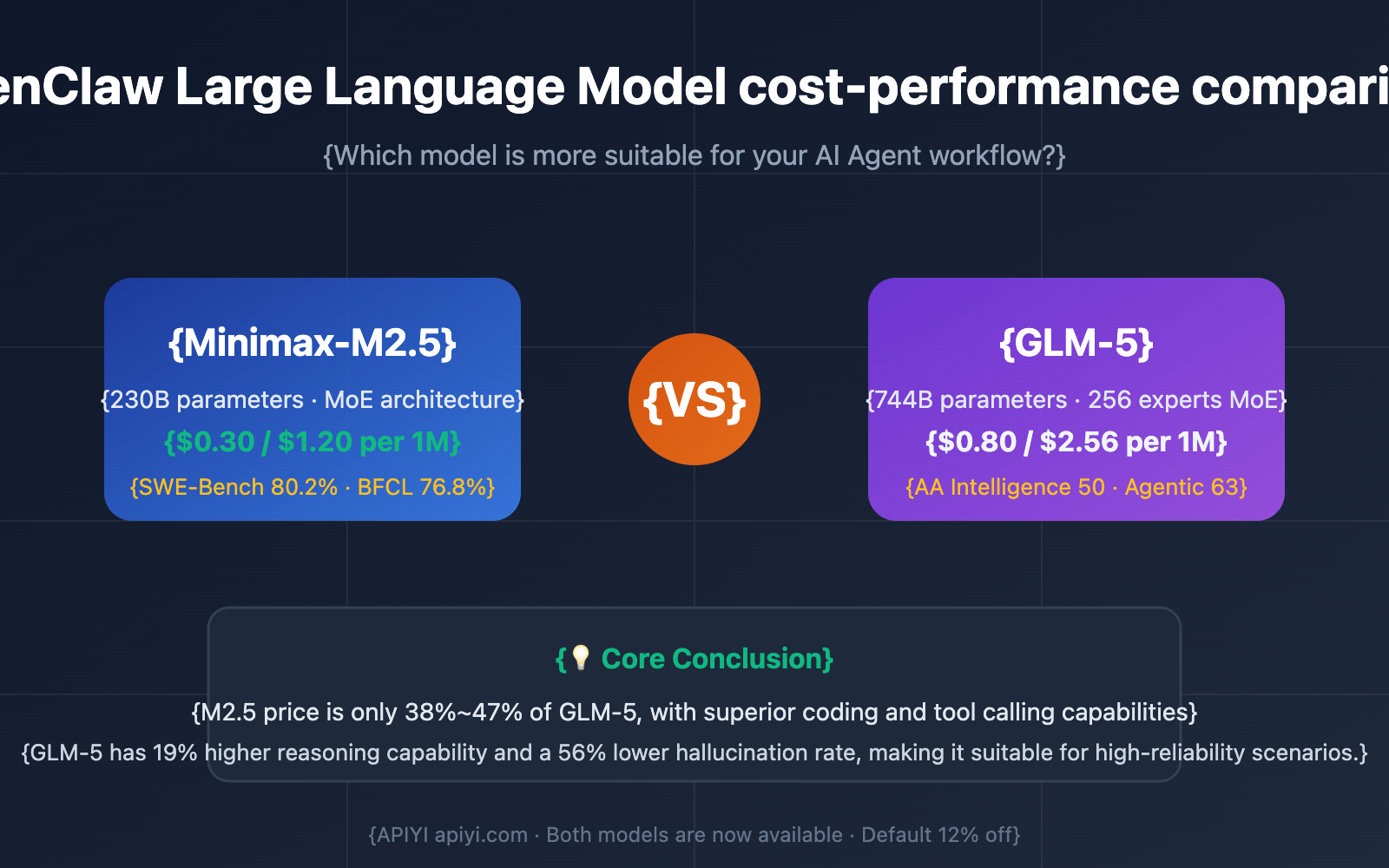
| Input Price (per 1M Tokens) | $0.30 | $0.80 | ✅ M2.5 is 62% cheaper |
| Output Price (per 1M Tokens) | $1.20 | $2.56 | ✅ M2.5 is 53% cheaper |
| Output Speed | 54 tokens/s | 68.6 tokens/s | ✅ GLM-5 is 27% faster |
| First Token Latency | 2.57s | 1.36s | ✅ GLM-5 is 47% faster |
| SWE-Bench (Coding) | 80.2% | 77.8% | ✅ M2.5 is 2.4% higher |
| AA Intelligence Index | 42 | 50 | ✅ GLM-5 is 19% higher |
| BFCL Tool Calling | 76.8% | – | M2.5 tool calling has data support |
| Hallucination Rate Improvement | – | 56% lower than previous gen | GLM-5 offers higher knowledge reliability |
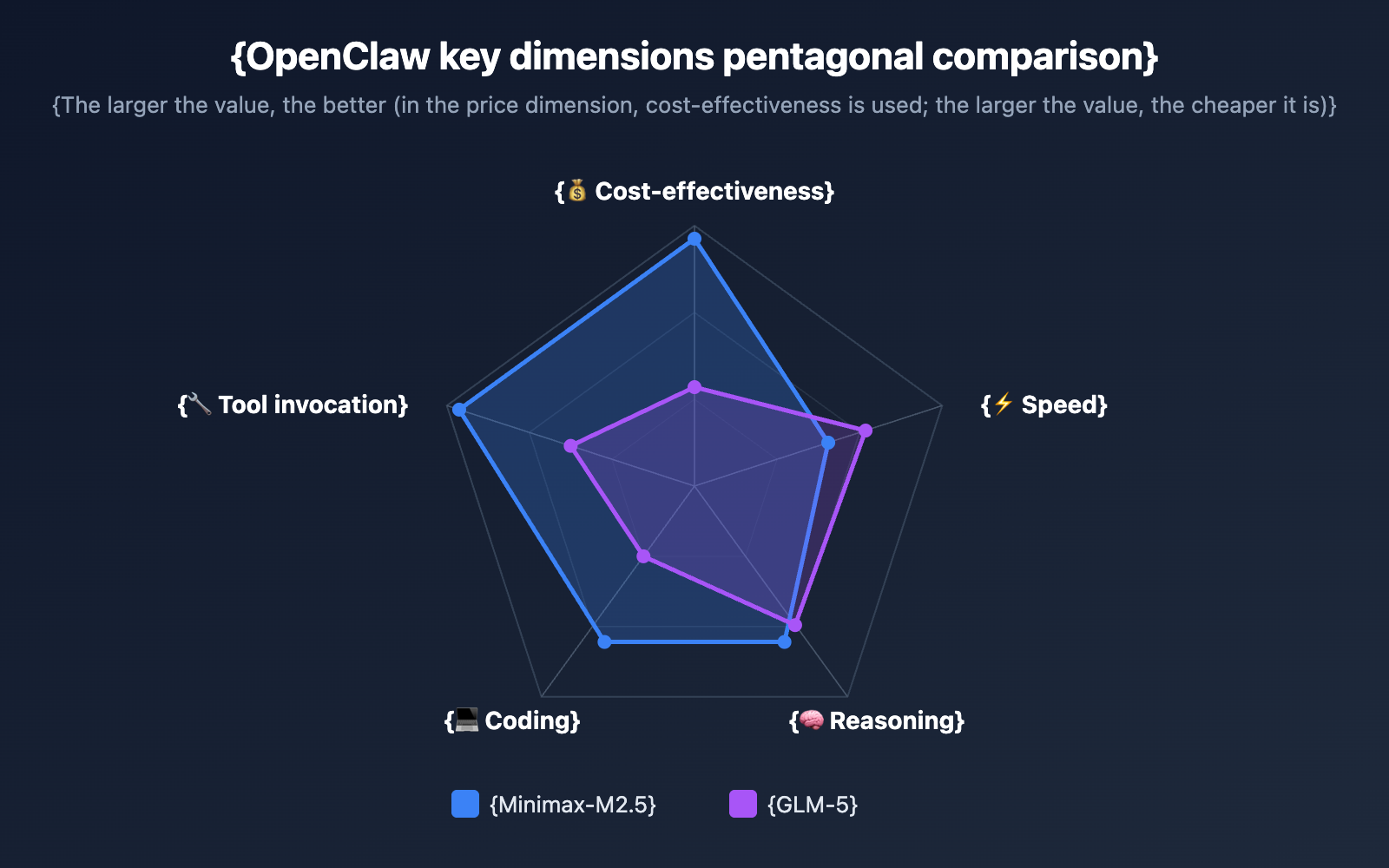
🎯 Key Finding: Minimax-M2.5's token price is only 38%-47% of GLM-5's, yet it performs comparably or even better in coding and tool calling—the two most critical capabilities for OpenClaw. This means for most OpenClaw users, M2.5 offers significantly higher value for money.
Model Selection Advice for Different OpenClaw Scenarios
Different use cases prioritize different model capabilities. Here are our recommendations for typical OpenClaw scenarios:
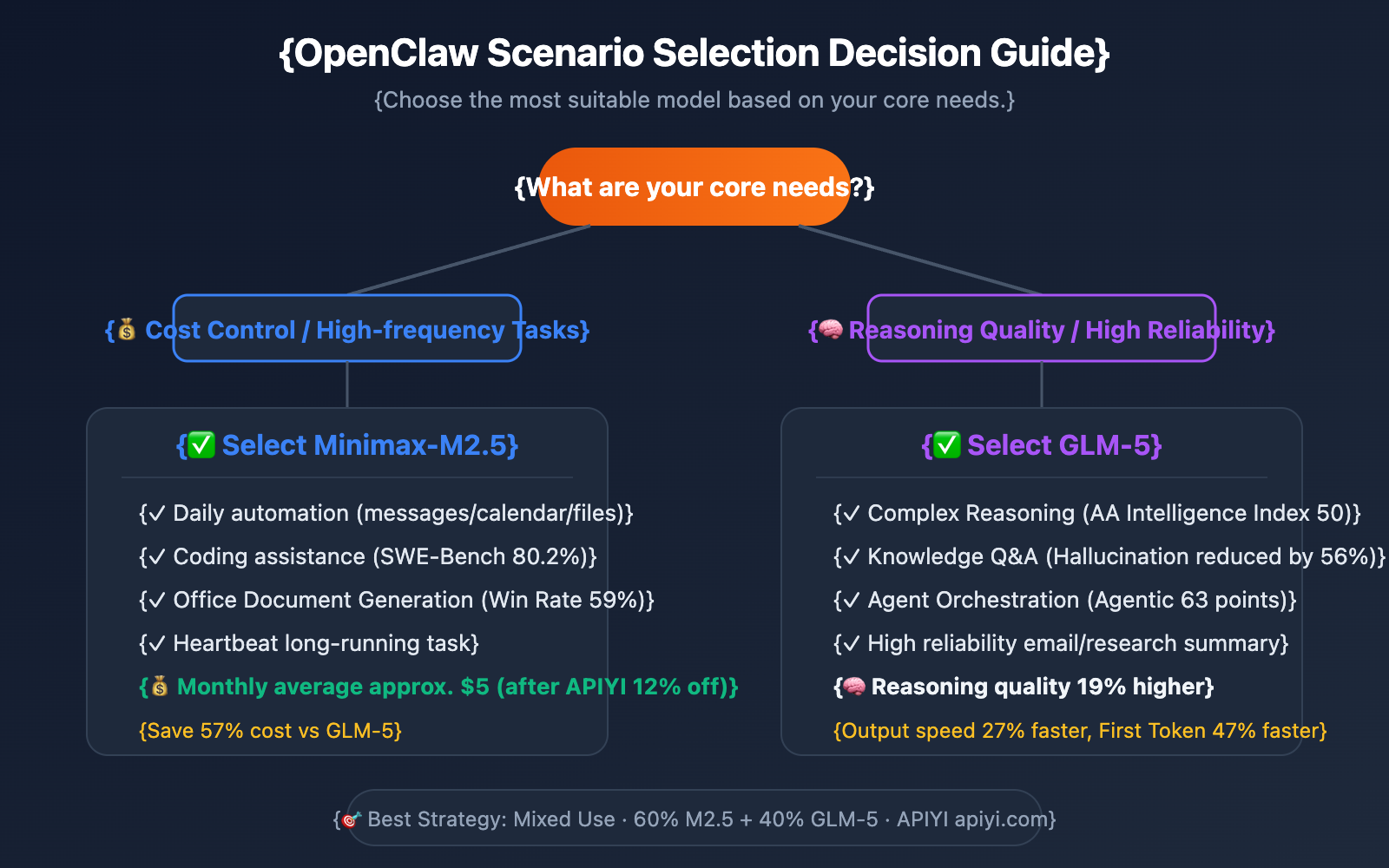
When to Choose Minimax-M2.5
- Daily Automation Tasks: For high-frequency, low-complexity tasks like scheduled messaging, calendar management, and file organization, M2.5's low price advantage really adds up over massive model invocations.
- Coding Assistance: A SWE-Bench score of 80.2% shows that M2.5 is excellent at code generation and debugging.
- Office Document Generation: M2.5 has an average win rate of 59% in Word/PPT/Excel tasks, making it ideal for document automation workflows.
- Budget-Sensitive Long-Term Runs: OpenClaw's Heartbeat scheduler periodically wakes the model to execute tasks. For long-term operations, M2.5 can save you over 50% in costs.
When to Choose GLM-5
- Complex Reasoning Tasks: With an AA Intelligence Index of 50 (compared to M2.5's 42), GLM-5 is more stable for multi-step reasoning and logical analysis.
- Knowledge-Intensive Q&A: With a 56% reduction in hallucination rates, GLM-5 is more trustworthy when tasks require highly reliable information output (like drafting emails or research summaries).
- Agent Chain Orchestration: Boasting an AA Agentic Index of 63 (the highest among open-source models), it's perfect for complex, multi-step Agent workflows.
Quick Start: Connecting OpenClaw to Minimax-M2.5 and GLM-5
Minimalist Example
With the APIYI platform, you can switch between the two models simply by changing the model parameter:
import openai

client = openai.OpenAI(
    api_key="YOUR_API_KEY",
    base_url="https://vip.apiyi.com/v1"
)

# Use Minimax-M2.5 (The cost-effective choice)
response = client.chat.completions.create(
    model="minimax-m2.5",
    messages=[{"role": "user", "content": "Help me write a Python script to monitor file changes in a specific directory"}]
)
print(response.choices[0].message.content)
View GLM-5 invocation example and tool calling code
import openai

client = openai.OpenAI(
    api_key="YOUR_API_KEY",
    base_url="https://vip.apiyi.com/v1"
)

# Use GLM-5 (Stronger reasoning capabilities)
response = client.chat.completions.create(
    model="glm-5",
    messages=[{"role": "user", "content": "Analyze the trends in this sales data and provide optimization suggestions"}]
)
print(response.choices[0].message.content)

# Tool calling example (A core capability of OpenClaw)
tools = [{
    "type": "function",
    "function": {
        "name": "run_shell_command",
        "description": "Execute a Shell command",
        "parameters": {
            "type": "object",
            "properties": {
                "command": {"type": "string", "description": "The command to execute"}
            },
            "required": ["command"]
        }
    }
}]

response = client.chat.completions.create(
    model="minimax-m2.5",
    messages=[{"role": "user", "content": "List all Python files in the current directory"}],
    tools=tools
)
print(response.choices[0].message)
Pro Tip: Get free test credits at APIYI (apiyi.com). Both models can be tested directly. The platform offers a default 12% discount (priced at 88% of official rates), which can significantly lower costs for long-term OpenClaw usage.
OpenClaw Model Cost Estimation
Let's take a typical OpenClaw user performing 50 Agent tasks per day as an example, with each task averaging 5,000 input tokens and 2,000 output tokens:
| Cost Item | Minimax-M2.5 | GLM-5 | Savings Ratio |
|---|---|---|---|
| Avg. Daily Input Cost | $0.075 | $0.20 | 62% |
| Avg. Daily Output Cost | $0.12 | $0.256 | 53% |
| Avg. Daily Total Cost | $0.195 | $0.456 | 57% |
| Avg. Monthly Total Cost | $5.85 | $13.68 | 57% |
| Avg. Monthly (After APIYI Discount) | $5.15 | $12.04 | 57% |
🎯 Cost Conclusion: Using Minimax-M2.5 with APIYI's 12% discount brings the monthly cost down to about $5—less than half that of GLM-5. For users on a budget who need to run OpenClaw long-term, M2.5 is the more practical choice.
Of course, if your tasks lean toward complex reasoning and high-reliability output, spending an extra $7 a month for GLM-5's superior reasoning and lower hallucination rate is a solid investment.
FAQ
Q1: Can I configure two models at once in OpenClaw?
Absolutely. OpenClaw lets you configure multiple model providers. You can set Minimax-M2.5 as your default for daily tasks and keep GLM-5 as a backup for complex reasoning. A popular cost-optimization strategy in the community is to handle 60%-70% of tasks with a budget-friendly model and save the high-performance model for the remaining 30%-40% of complex work. Using the APIYI platform, you can switch between both models using just one API key.
Q2: What’s the pricing for these two models on APIYI?
APIYI offers a standard 12% discount off official prices (you pay 88%). Based on this, Minimax-M2.5 costs about $0.264/1M tokens for input and $1.056/1M tokens for output. GLM-5 is roughly $0.704/1M tokens for input and $2.253/1M tokens for output. Check the latest rates at APIYI (apiyi.com).
Q3: Besides these two, what are some other cost-effective options for OpenClaw?
Based on feedback from the OpenClaw community, here are some other great bang-for-your-buck options:
- Gemini 2.5 Flash: $0.15/$0.60—currently the cheapest cloud-based option.
- Kimi K2.5: $0.50/$2.40—its tool-calling chain supports over 200 steps.
- DeepSeek V3.2: $0.28/1M input tokens—excellent coding capabilities.
All these models are available on the APIYI (apiyi.com) platform. We recommend testing them against your specific tasks to see which fits best.
Summary
Here’s the bottom line for choosing a model in OpenClaw:
- Go with Minimax-M2.5 for pure value: It costs only 38%-47% of GLM-5's price while offering excellent coding and tool-calling capabilities. It’s the perfect fit for most daily OpenClaw scenarios.
- Go with GLM-5 for reasoning quality: With a 19% higher AA intelligence index and a 56% lower hallucination rate, it’s the better choice for complex reasoning and knowledge-intensive tasks.
- The best strategy is a hybrid approach: Use M2.5 for routine tasks to keep costs down, and switch to GLM-5 for complex tasks to ensure high-quality results.
Both models are now available on APIYI with a standard 12% discount off official prices. We recommend heading over to APIYI (apiyi.com) to grab some free test credits and see how these two Large Language Models perform in your own OpenClaw workflows.
📚 References
-
OpenClaw Official Docs: Model Provider Configuration Guide
- Link:
docs.openclaw.ai/concepts/model-providers - Description: Learn how to configure custom models within OpenClaw.
- Link:
-
Minimax-M2.5 Official Intro: Tech Specs and Performance Data
- Link:
minimax.io/news/minimax-m25 - Description: Check out the full benchmark results and architectural details for M2.5.
- Link:
-
GLM-5 Tech Docs: Model Capabilities and API Reference
- Link:
docs.z.ai/guides/llm/glm-5 - Description: Get the lowdown on GLM-5's reasoning capabilities and multimodal features.
- Link:
-
Artificial Analysis Model Comparison: Independent Third-Party Benchmarks
- Link:
artificialanalysis.ai/models/comparisons/minimax-m2-5-vs-glm-5 - Description: Objective data comparing performance, speed, and pricing.
- Link:
Author: Technical Team
Join the Conversation: We'd love to hear about your experience choosing models for OpenClaw in the comments! For more insights on Large Language Models, visit APIYI at apiyi.com.