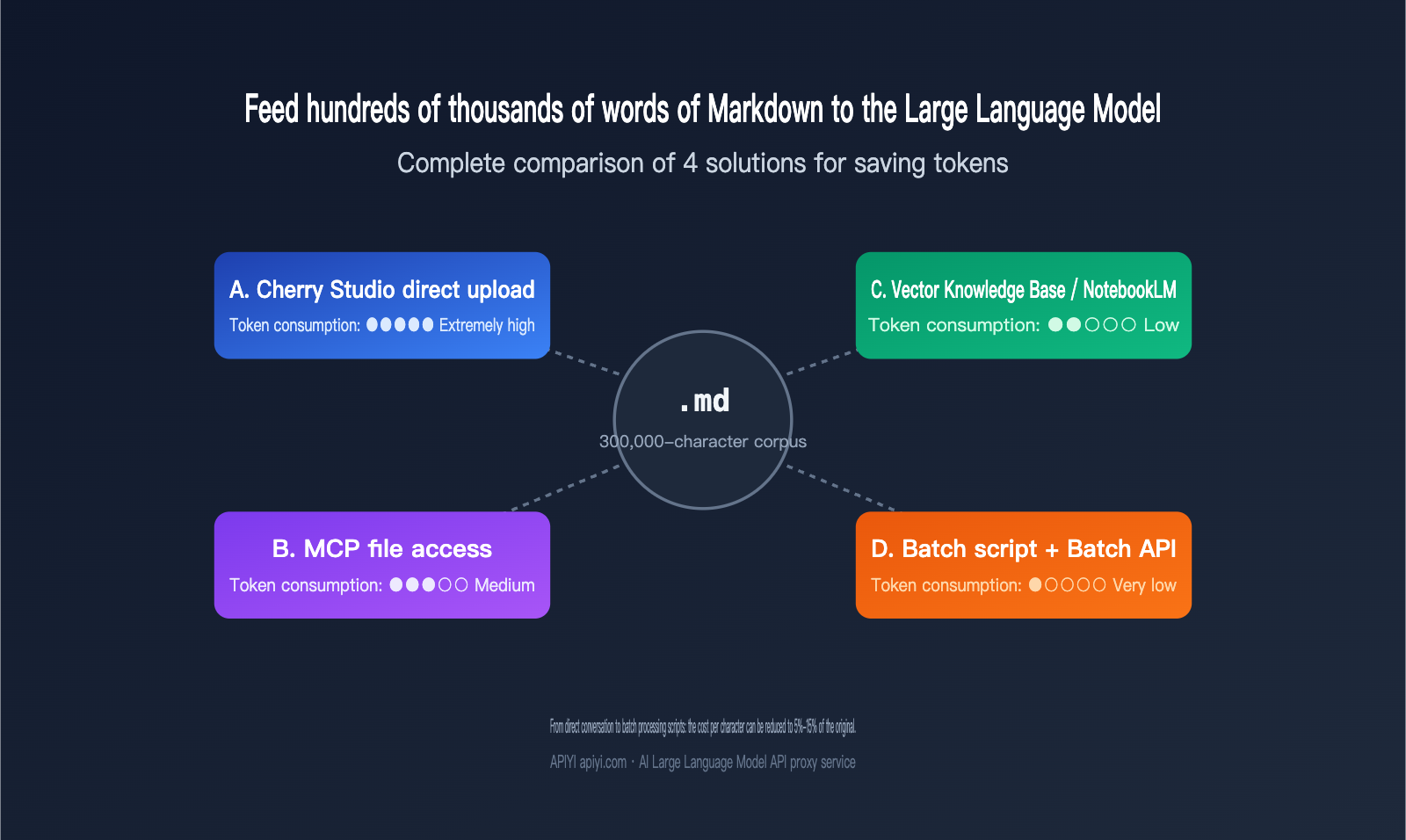
I recently received a classic inquiry: a user wanted to "distill" hundreds of thousands of words from a prolific writer into a Large Language Model to serve as a stylistic foundation, but they weren't sure how to feed the Markdown corpus in most cost-effectively. Three common approaches come to mind: uploading files one by one into chat tools like Cherry Studio, using MCP to let the model directly access files on the hard drive, or dumping everything into a knowledge base for RAG. At first glance, all of these seem viable, but once the corpus exceeds 300,000 words, the Token bills and latency diverge rapidly. Choosing the wrong path can easily cost you ten times your budget.
This article breaks down four mainstream approaches for optimizing Markdown corpus token usage with Large Language Models. We'll compare actual token consumption, cost per task, time-to-first-token latency, controllability, and the best choices for different corpus scales. Finally, I'll provide a phased decision-making path—what to use for early exploration and what to switch to once you scale up. If you're currently working on style distillation, knowledge base Q&A, or data cleaning before fine-tuning, reading this should help you make an informed decision immediately.
1. The Core Challenge of Optimizing Markdown Corpus Tokens for LLMs
Before we break down the solutions, let's clarify where the real costs lie. Feeding hundreds of thousands of words of Markdown into an LLM is essentially a balancing act between four types of costs: input tokens, output tokens, retrieval/indexing costs, and human debugging time.
Input tokens are the most underestimated factor. If a technical blog post is in raw HTML, converting it to Markdown can typically save 70%–80% of tokens because tags, styles, and embedded scripts are stripped away. This is why the first step in any pipeline processing large corpora should be to standardize content into Markdown or plain text. If you get this right, the cost baseline for whichever ingestion method you choose will drop significantly.
Output tokens might seem irrelevant, but they are actually a hidden bottleneck in "distillation" tasks. Claude Sonnet and Opus have made the 1-million-token context window a standard pricing tier (Sonnet input at $3/M, Opus at $5/M). Theoretically, you could dump hundreds of thousands of words in at once, but the maximum output per response is still only a few tens of thousands of tokens. This means you can't complete a full rewrite in a single call. Tasks must be sliced, which directly dictates that batch processing scripts are usually better suited for large-scale scenarios than interactive chat.
🎯 Preparation Advice Before Selection: Before picking a solution, perform data sanitization and format normalization on all your Markdown files. We recommend using the APIYI platform to run small-batch samples first to confirm the actual token consumption per thousand words before deciding whether to use chat tools or batch scripts, preventing costs from spiraling out of control later on.
2. Core Differences and Applicability of the 4 Approaches
Each of these four approaches has clear capability boundaries. Understanding these differences is far more important than memorizing technical parameters.
2.1 Approach A: Direct Upload via Chat Tools (e.g., Cherry Studio)
This is the lowest barrier to entry. Tools like Cherry Studio, Claude Desktop, and ChatGPT allow you to drag multiple Markdown files directly into the chat box. The model then stitches all the content into one long prompt. The advantage is zero engineering effort and "what you see is what you get" results. The downside is that you have to re-feed the files every time you start a new session, leading to significant redundant Token consumption. Plus, the amount of data you can cram in is strictly limited by the context window.
For small-scale tasks under 50,000 characters, this is actually the most efficient method because you can iterate and observe results in natural language. However, once your corpus exceeds 200,000 characters, you'll frequently hit context truncation, long-context latency (the first Token might take 20-30 seconds to appear), and redundant billing issues.
2.2 Approach B: MCP for Local File Access
MCP (Model Context Protocol) allows the model to read files on your hard drive as if it were calling a tool. It sounds elegant: the model calls what it needs, so there's no need to load everything at once. However, in practice, Token consumption with MCP is often underestimated. Even if a tool call returns a JSON where you only need three fields, the entire structure enters the context. Keyword matching patterns consume about three times as many Tokens as vector retrieval.
The real strength of MCP lies in dynamic data sources, such as real-time logs, private user data, or financial data that must remain local and off-cloud. For a typical scenario like "hundreds of thousands of characters of static Markdown," MCP is overkill and can easily exhaust your context window during multi-turn calls.
2.3 Approach C: Vectorized Knowledge Base / NotebookLM
This is the RAG (Retrieval-Augmented Generation) route: chunking all files, embedding them, storing them in a database, and retrieving relevant segments on demand. A well-designed RAG pipeline only retrieves 5-20 chunks per query, usually totaling 2,000-10,000 Tokens, which can save 50-200 times the input Tokens compared to loading everything.
NotebookLM is an out-of-the-box RAG product from Google that handles embedding, retrieval, and citations automatically. It's great for tasks like writing style analysis, literature reviews, or Q&A based on notes. Its limitation is that answers are based solely on the source files—it won't proactively draw on its training data—and customization is limited. If you need complex retrieval strategies or multi-step reasoning, building your own vector knowledge base will be much more flexible.
🎯 Pro-tip for Approach C: The quality of your vector knowledge base directly determines the quality of your output. You'll need to tune chunking strategies, embedding models, and top-k retrieval based on your corpus. We recommend running a small-scale evaluation on the APIYI (apiyi.com) platform using Claude or GPT to compare accuracy across different retrieval parameters before deciding whether to use NotebookLM or build your own.
2.4 Approach D: AI-Generated Batch Scripts (The Scalability Winner)
This is the approach emphasized in the original response: have the AI write a batch processing script for you. First, use a Large Language Model to process 5-10 sample files, identify reusable patterns (like sentence templates, paragraph structures, or keyword distributions) either manually or automatically, and then bake those rules into code. The code then handles the remaining hundreds of thousands of characters, with the Large Language Model only intervening at critical nodes.
This is essentially "rule-based offloading": the Large Language Model discovers the patterns, and the code handles the bulk execution. When combined with Claude/GPT's Batch API (which offers a 50% discount), the overall cost is typically only 5%-15% of Approach A. The downside is that it requires 1-2 days of engineering effort upfront, making it unsuitable for one-off tasks.
III. Token Consumption and Cost Comparison of 4 Approaches
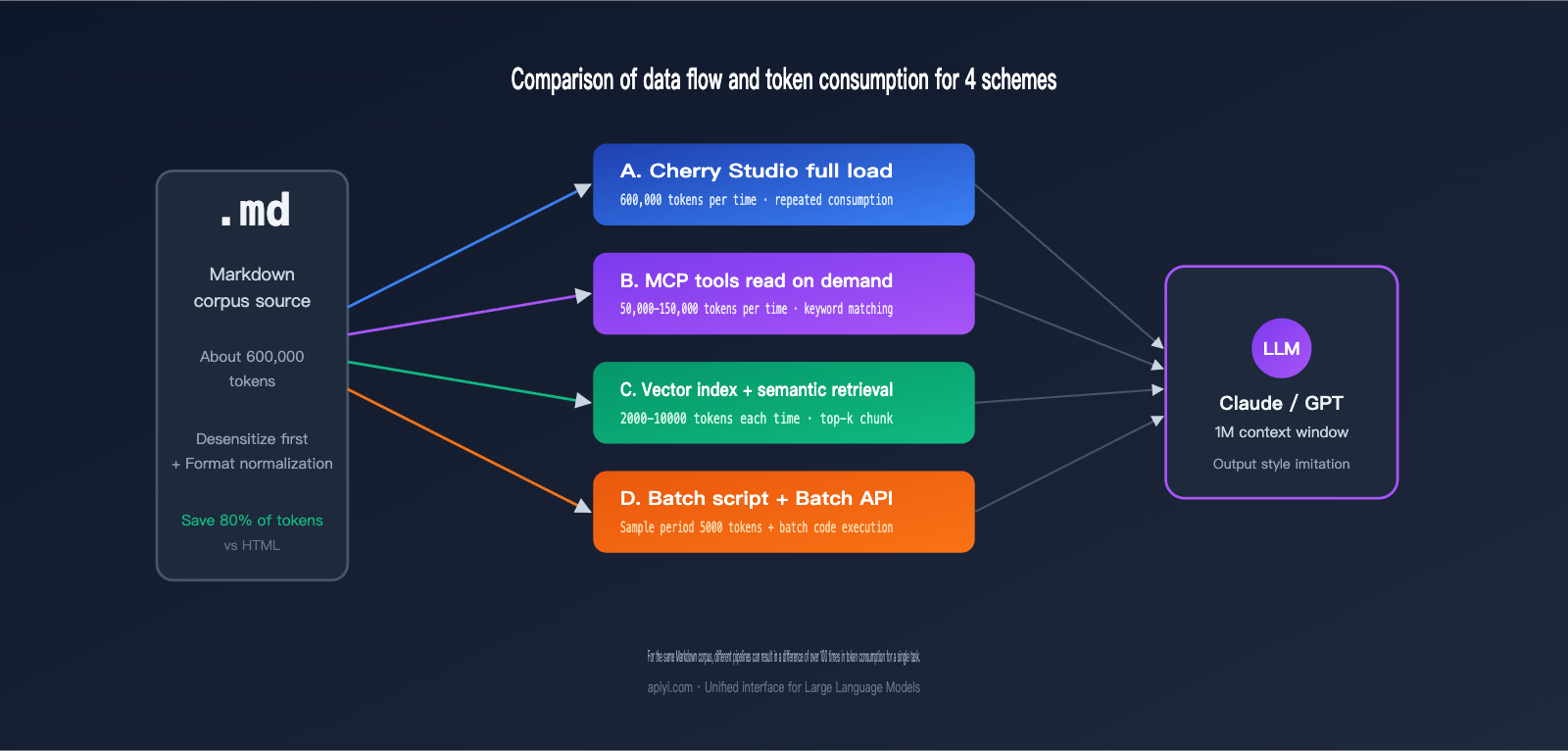
You can only truly crunch the numbers once you translate abstract differences into concrete data. The table below compares these approaches based on a specific scenario: a user wants to distill 300,000 words of Markdown source material (approx. 600,000 tokens) to generate 100 style-mimicked articles (approx. 2,000 words each).
| Approach | Single Input Tokens | Total Input Tokens | Total Output Tokens | Estimated Cost (Sonnet) | First Token Latency |
|---|---|---|---|---|---|
| A. Direct Chat Upload | 600k | 60M (100 runs) | 6M | ≈ $270 | 20-30s |
| B. MCP File Access | 50-150k (segmented) | 15M | 6M | ≈ $135 | 8-15s |
| C. Vector Knowledge Base | 5k-10k | 1M | 6M | ≈ $93 | 1-2s |
| D. Batch Script + Batch API | 5k (sampling) + processing | 1M | 6M | ≈ $46 | Asynchronous |
As you can see, Approach D costs only about 17% of Approach A and offers the most stable latency. If you factor in the 50% discount from the Batch API, the actual cost for Approach D could be cut in half again. While Claude's 1M context window has standardized pricing (removing the previous 2x surcharge for long contexts), the waste caused by repeatedly inputting the same source material remains—it's an unavoidable pain point in conversational workflows.
🎯 Cost Verification Tip: The costs above are based on public pricing. Actual figures may fluctuate by 30%-50% depending on your prompt design, cache hit rates, and whether prompt caching is enabled. We recommend using the usage monitoring tools in the APIYI (apiyi.com) console to reconcile your accounts daily for the first three days. Turn those abstract budget figures into a visual curve before deciding whether to migrate more tasks to the Batch API.
The following table incorporates the engineering complexity of each approach to help you evaluate them side-by-side:
| Dimension | A. Direct Chat | B. MCP | C. Vector KB | D. Batch Script |
|---|---|---|---|---|
| Engineering Effort | Almost zero | Moderate | Moderate to High | High (Initial) |
| Time to Onboard | 5 mins | 1-2 hours | Half to 1 day | 1-2 days |
| Reproducibility | Weak (history lost) | Moderate | Strong | Extremely Strong |
| Corpus Scale | < 50k words | 50-300k (dynamic) | 100k – 10M (static) | 300k+ words |
| Output Control | Limited by context | Limited by tool calls | Limited by retrieval | Fully controllable |
IV. Recommendations by Corpus Scale
Applying these approaches to specific scenarios makes the choice much clearer. Here are recommendations based on three different scales.
4.1 Small Corpus (< 50k words): Exploration Phase
At this stage, your core goal is to validate ideas quickly, not to optimize for cost. Direct chat (Approach A) is the most logical choice. Simply drag all your files into Cherry Studio or Claude Desktop and chat directly with the model to debug your prompt. Focus on these questions: Does the model actually capture the author's stylistic traits? Which dimensions are quantifiable (sentence length, vocabulary, structure)? Which are subjective (tone, rhythm)? These questions are cheap to answer at a small scale—you can finish testing for just a few dollars.
4.2 Medium Corpus (50k-300k words): Research & Analysis Phase
Once you hit this range, the overhead of repeatedly inputting data in Approach A will balloon quickly. The best practice here is to switch to a vector knowledge base (Approach C) or tools like NotebookLM. Once your samples are in a vector database, you can use semantic search to call them on demand. If you're just doing content analysis, style summarization, or Q&A exploration, NotebookLM requires almost zero engineering. If you need more complex multi-step reasoning, build a RAG system based on Claude or GPT.
🎯 Medium-Scale Selection Tip: NotebookLM is great for pure reading and analysis, but it doesn't support custom retrieval strategies or complex workflows. We recommend using the APIYI (apiyi.com) platform to connect to Claude Sonnet or Opus with a 1M context window to run your RAG. You'll enjoy standard pricing while maintaining flexible control over chunk sizes and retrieval weights—perfect for long-term corpus management.
4.3 Large Corpus (300k+ words): Production Phase
At the scale of hundreds of thousands or even millions of words, the Batch script (Approach D) is almost the only sustainable choice. Break your task into a three-stage workflow: "Pattern discovery from samples → Batch processing via code → LLM for key nodes only." Combined with the Batch API for asynchronous execution, you can drive your per-word costs down to 5%-15% of the original. At this stage, you don't need a "smarter" prompt; you need a more robust engineering pipeline.
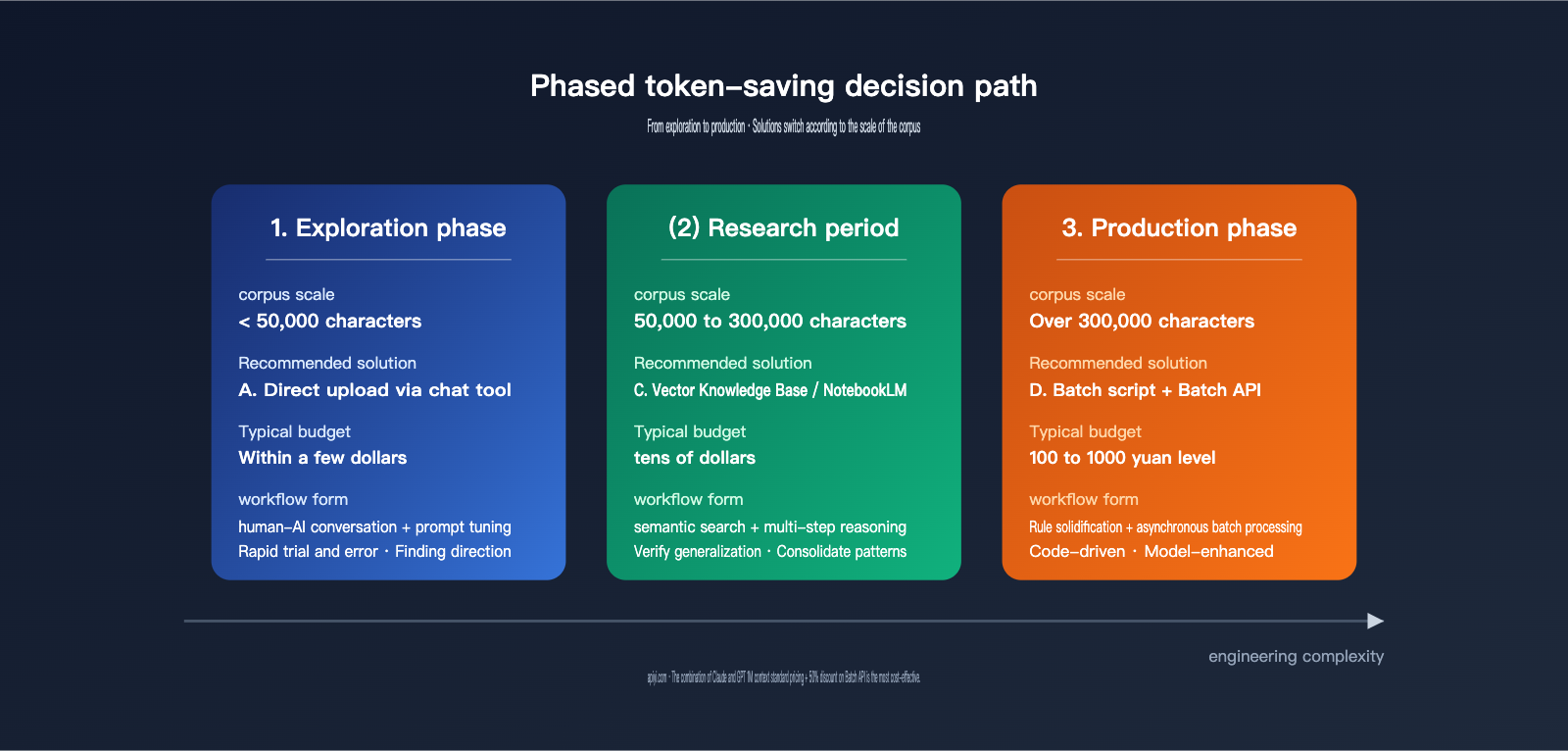
V. Phased Token-Saving Decision Guide
I've condensed the analysis above into a practical roadmap you can follow directly:
| Trigger Condition | Recommended Solution | Key Action |
|---|---|---|
| < 50k words / One-off exploration | Solution A: Direct Chat | Drag and drop files, tune the prompt, and save effective prompts. |
| 50k–300k words / Static data / Analysis-heavy | Solution C: Vector Knowledge Base | Use NotebookLM or build a custom RAG; prioritize tuning chunk size and top-k. |
| > 300k words / Repetitive tasks / Production scale | Solution D: Batch Script + Batch API | Have the AI write the script for you; verify patterns manually during the sample phase. |
| Dynamic data / Local-only requirements | Solution B: MCP | Limit tool call frequency; use keyword search sparingly. |
In real-world projects, the most common workflow is "Start with A, move to C, and finish with D." This is because task understanding is an iterative process: small-sample chats help you clarify goals and success metrics; medium-sample sets help you verify retrieval quality and generalization; and the large-scale phase is where you solidify mature workflows into code.
A common pitfall is jumping straight to batch scripts—you might end up with a "perfect" script that produces poor results because the initial prompt wasn't fully optimized. Conversely, staying in the chat phase for too long wastes tokens; you could end up with a hundreds-of-dollars bill for only a few dozen effective samples.
🎯 Signals for Switching Phases: If you find yourself using similar prompts to process similar files for five consecutive chats, it’s time to switch to a vector knowledge base. If you’re repeating the same retrieval logic for every task, it’s time to write a script. We recommend enabling prompt caching and usage statistics on the APIYI (apiyi.com) platform so you can base your decisions on data rather than gut feeling.
VI. A Minimal Viable Example for Batch Processing Scripts
To make Solution D more concrete, here’s a simplified skeleton script demonstrating the core flow of "Sample Discovery → Rule Solidification → Batch Execution":
import os, json
from anthropic import Anthropic

# Using APIYI as the API proxy service
client = Anthropic(base_url="https://vip.apiyi.com")

def extract_style_features(markdown_text: str) -> dict:
    """Use a Large Language Model to extract quantifiable style features from a single article."""
    resp = client.messages.create(
        model="claude-sonnet-4-6",
        max_tokens=1500,
        messages=[{"role": "user", "content": f"""
Please extract the writing style features from the following Markdown article and output them as JSON, including:
- avg_sentence_length: Average sentence length
- paragraph_structure: Paragraph structure pattern
- key_phrases: Top 10 high-frequency phrases
- tone: Tone label (e.g., rigorous/casual/sharp)

Article content:
{markdown_text}
"""}],
    )
    return json.loads(resp.content[0].text)

# Sample phase: Discover patterns using 10 articles
samples = [open(f, encoding="utf-8").read() for f in os.listdir("samples")[:10]]
features = [extract_style_features(s) for s in samples]

# Rule solidification: Write high-frequency features into a config file for code-based application
with open("style_profile.json", "w", encoding="utf-8") as f:
    json.dump(features, f, ensure_ascii=False, indent=2)
Once the sample phase is complete, the actual batch rewriting stage can rely entirely on the rules in style_profile.json. The Large Language Model only needs to intervene for the "final polish" step, which can reduce token consumption from hundreds of thousands down to just a few thousand.
🎯 API Integration Tip for Batch Scripts: The
base_urlabove points to the APIYI (apiyi.com) API proxy service, allowing you to reuse the official Anthropic SDK without changing your code. We recommend adding retry and cost-tracking logic to your scripts. Automatically stopping the process if it exceeds your budget is the best way to avoid common pitfalls in large-scale batch processing.
VII. FAQ
Q1: Since Claude Sonnet and Opus both support a 1 million token context window, can't I just dump everything in at once?
Technically, yes, but there are two hidden costs. First, the time-to-first-token latency can drag on for 20–30 seconds, which ruins the interactive experience. Second, you'd be re-inputting the same corpus every single session, which ends up being 50–200 times more expensive than RAG after just a few turns. A 1M context window is great for one-off global reasoning (like "finding contradictions across documents"), but it's not meant for repeatedly accessing the same data. We recommend using Sonnet 1M on APIYI (apiyi.com) for global reasoning tasks and Haiku for batch processing sub-tasks; that combination gives you the best bang for your buck.
Q2: How do I choose between NotebookLM and building my own vector database?
If you're an individual or a small team doing static corpus analysis, style research, or Q&A, NotebookLM is the fastest way to get started—you just drag and drop your files. If you need to customize chunking strategies, control retrieval weights, integrate with business systems, or use models from other providers for generation, building your own vector database is much more flexible.
Q3: Is MCP really useless?
Not at all. MCP shines in scenarios where data changes frequently or cannot leave the local environment, such as reading real-time logs, querying private databases, or calling internal APIs. For static Markdown corpora, however, RAG is superior in almost every dimension—that's the real takeaway.
Q4: Does the Batch API really save 50%? Is the response slow?
The Batch API is asynchronous and usually returns results within 24 hours, at 50% of the standard API price. It's perfect for tasks that don't require real-time responses, like "distilling a writing style to generate 100 imitation articles." When you combine this with the standard pricing for a 1M context window, you can push your total costs down to 30%–40% of the original. We suggest using the synchronous API on APIYI (apiyi.com) to get your workflow running first, then switching to Batch mode for high-volume output.
Q5: What should I do if my corpus contains images, tables, and code blocks?
Markdown already preserves these structures quite well, but keep in mind: large code blocks consume a massive amount of tokens. If you're only analyzing writing style, you can use a script to strip out the code first. If tables are too complex, we recommend converting them to CSV and storing them separately, then feeding only the summary to the Large Language Model. This can save you an additional 30% or more in tokens.
VIII. Conclusion
Back to the original question: which method should you use to feed hundreds of thousands of words of Markdown to a Large Language Model? The answer isn't a single choice; it's a phased combination. During the small-sample exploration phase, direct upload is fastest. During the medium-scale research phase, a vector knowledge base or NotebookLM is most stable. During the large-scale production phase, you must switch to batch processing scripts combined with the Batch API. This shifts the role of the Large Language Model from "executor" to "pattern discoverer," letting your code handle the heavy lifting.
Once you understand this path, optimizing token usage for Markdown corpora with Large Language Models changes from "which tool should I pick" to "which combination should I use at this stage." If you're currently stuck at a certain stage and aren't sure whether to switch, try running a small-scale evaluation on the APIYI (apiyi.com) platform. Compare the cost per thousand characters, retrieval accuracy, and time-to-first-token latency—the right decision will become much clearer. We hope this comparison helps you avoid a few detours and spend your budget on the parts that actually generate value.
— APIYI Team (api.apiyi.com)