Author’s note: A breakdown of three meanings of “free” for GPT-6.1 Terra, including regional restrictions, rate limits, and the cheapest way to test it.
Bottom line: GPT-6.1 Terra has no free API credits. The only free usage available comes from allowances included with ChatGPT Work/Codex plans. For developers in China, a more realistic option is to spend about ¥0.03 on a single test.
Many people searching for GPT-6.1 Terra free trial are looking for a way to call the API without paying. That option doesn’t exist. The official API has three paid tiers, and the documentation, pricing page, and model page make no mention of free credits or a trial period.
This isn’t meant to discourage you. This article breaks “free” into three meanings and assesses each one, then gives you a low-cost way to test the model in five steps or fewer. Developers in China can use a third-party API proxy service such as APIYI at apiyi.com, subject to the platform’s rules. The information in this article is based on official pages retrieved on 2026-10-27.
GPT-6.1 Terra Free Trial: What “Free” Actually Means
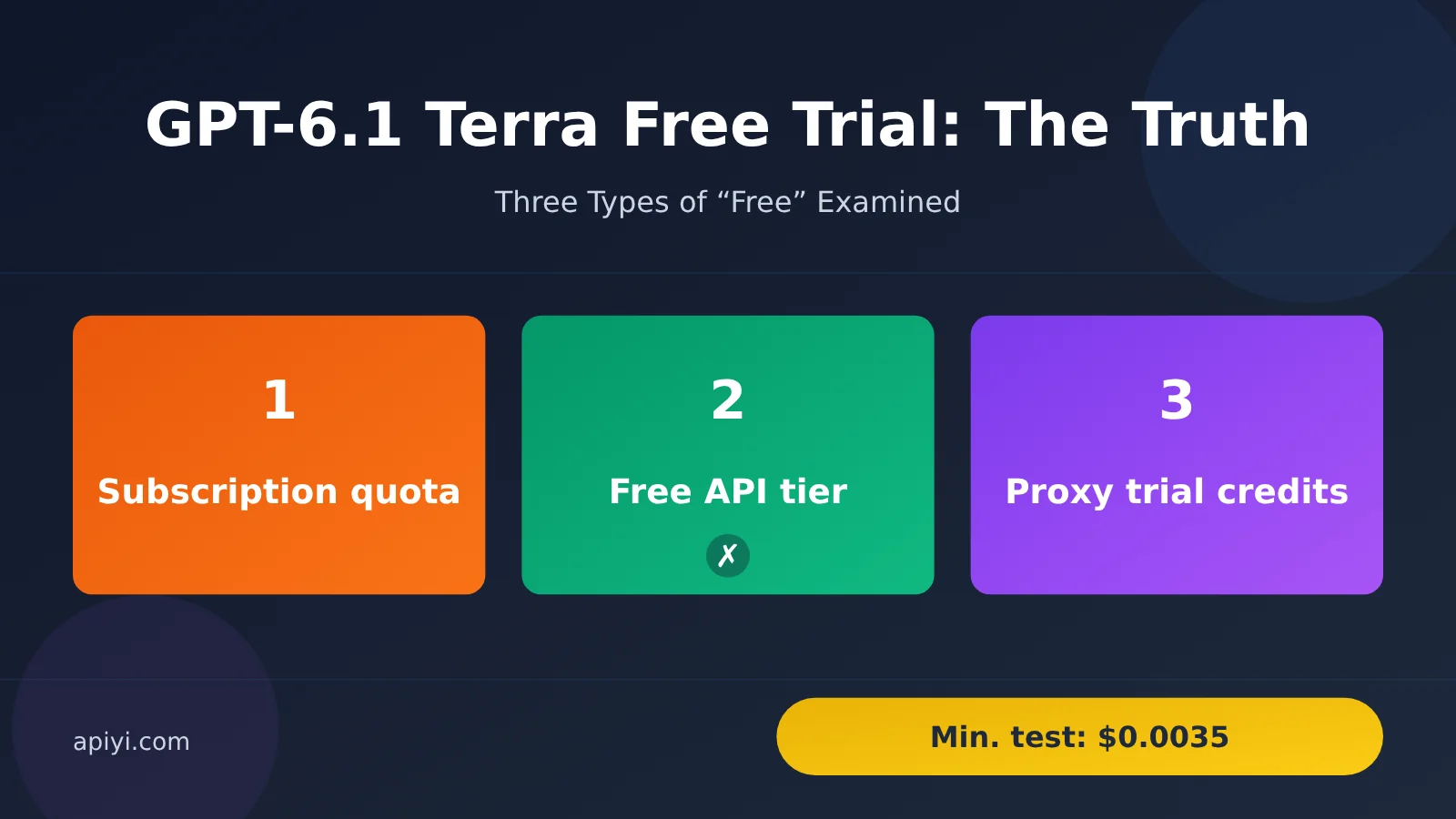
“Free” can mean three different things, and the answer is different for each. Here’s who qualifies and what limits apply.
| What “free” means | Is it available? | Who it applies to | Hard limits |
|---|---|---|---|
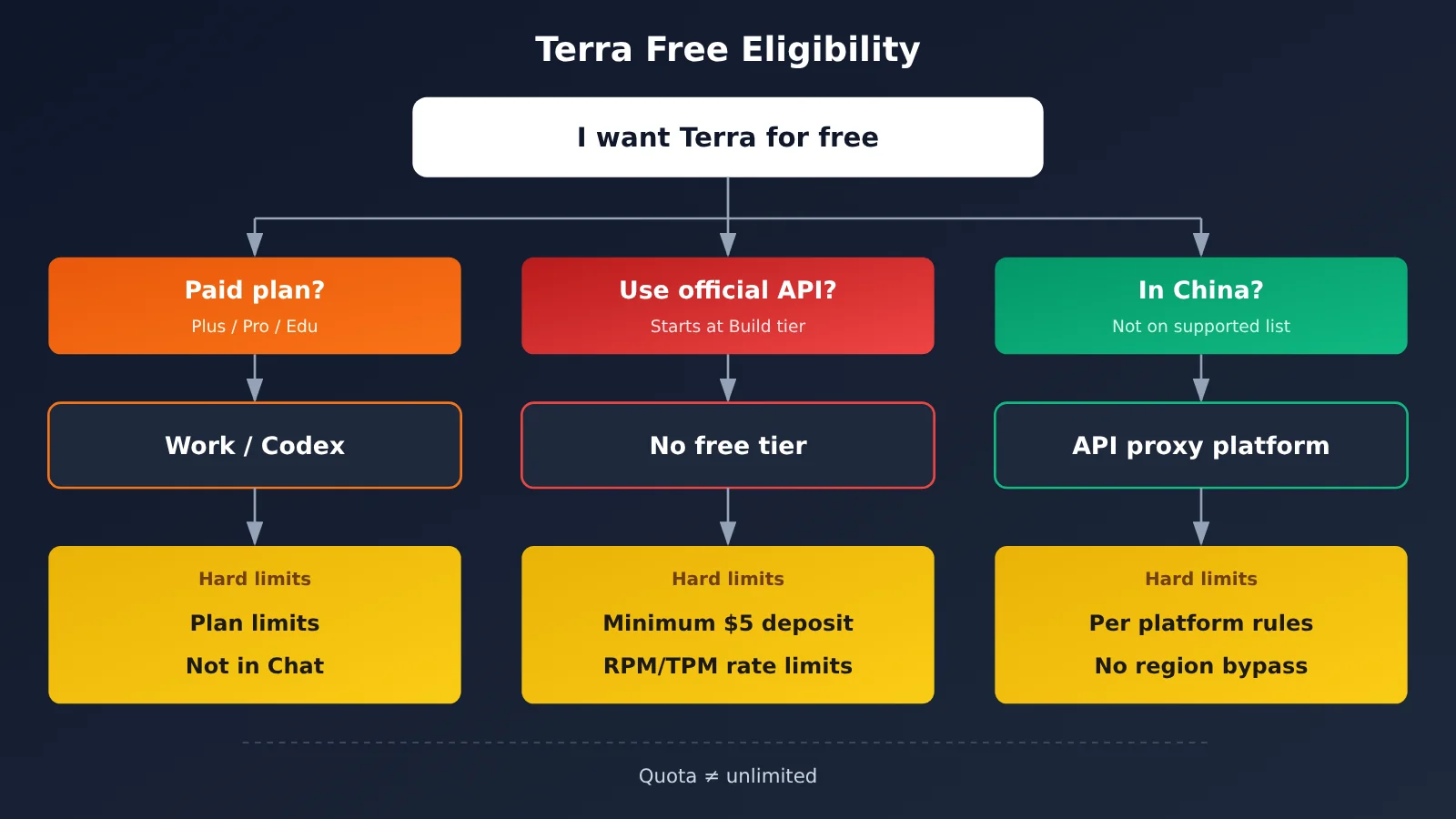
| Usage included in a ChatGPT subscription | Partially | Plus, Pro, Enterprise, and Edu users | Available only in Work and Codex, not Chat; subject to plan-wide limits |
| Official API free tier | No | Nobody | No free tier; add at least $5 in credits to enter the Build tier |
| API proxy service trial credit | Yes, but the credit is small | Developers in mainland China | New APIYI accounts at apiyi.com receive $0.05 to test their integration |
GPT-6.1 Terra Usage Included in Your Subscription: Available, but Not Unlimited
According to the official launch blog, Terra has been available to Plus, Pro, Enterprise, and Edu users since launch day. It appears only in ChatGPT Work and Codex—the official wording is “available in Work and Codex, not Chat.” Work and Codex support Standard and Fast modes, using the existing Power preset and plan limits.
This usage isn’t billed separately by token, but it’s not unlimited. OpenAI hasn’t said that Terra is available on the free ChatGPT plan, so don’t assume it is.
GPT-6.1 Terra API Free Tier: It Doesn’t Exist
The official API has three usage tiers—Build, Launch, and Grow—and all require cumulative credit purchases. Three other features are also commonly mistaken for being “free”:
- Cached reads: $0.05 per million tokens. This reduces the cost of reading repeated prefixes to 5% of the input price, but it isn’t free.
- Batch/Flex 50% discount: Pricing is 50% of the standard rate, with the trade-off of queuing or slower responses.
- Subscription usage: It’s valid only in ChatGPT and can’t be used for API calls.
GPT-6.1 Terra Regional Restrictions: First, Check Whether You Can Apply Directly
This determines which route you can take. Mainland China, Hong Kong, and Macau aren’t on the official list of supported countries and regions. The page states that accessing or providing access to the service outside those regions may result in account suspension or termination. A rejected request returns a 403 error: “Country, region, or territory not supported.”
This article doesn’t provide ways to bypass regional restrictions. For developers whose network location isn’t on the list, the only compliant path is to use a third-party API proxy service and follow that platform’s rules. Terra also doesn’t support inference residency in the UAE. This restriction depends on where inference takes place, not where the user is located.
GPT-6.1 Terra Rate Limits: What You’ll Encounter at the Build Tier
Once you’ve added funds and entered the Build tier, rate limits are likely to be the first constraint you encounter. The table below shows the Standard tier limits.
| Tier | Total Funds Added | Monthly Usage Limit | RPM | TPM |
|---|---|---|---|---|
| Build | $5 | $500 | 5,000 | 1,000,000 |
| Launch | $100 | $5,000 | 10,000 | 4,000,000 |
| Grow | $500 | $200,000 | 15,000 | 40,000,000 |
The Build tier’s batch queue limit is 3,000,000. There’s another rate-limiting gotcha: ramping up too quickly can also trigger slow_down. The official rule of thumb is that once input traffic reaches 1 million tokens per minute, you should increase it by no more than 50% every 15 minutes.
There are five possible causes of a 429 error, and each calls for a different response.
| 429 Cause | Meaning | Does Retrying Help? |
|---|---|---|
| slow_down | Concurrency ramped up too quickly | Yes, slow down and gradually increase traffic |
| rate limit reached | RPM/TPM exceeded | Yes, retry with backoff |
| credit_balance_exhausted | Prepaid balance exhausted | No, add funds |
| organization/project_spend_limit_exceeded | Your configured spending limit was exceeded | No, adjust the limit |
| organization_usage_limit_exceeded | The official usage limit for your tier was exceeded | No, upgrade your tier |
GPT-6.1 Terra Quick Start: Validate in 5 Steps at Minimal Cost
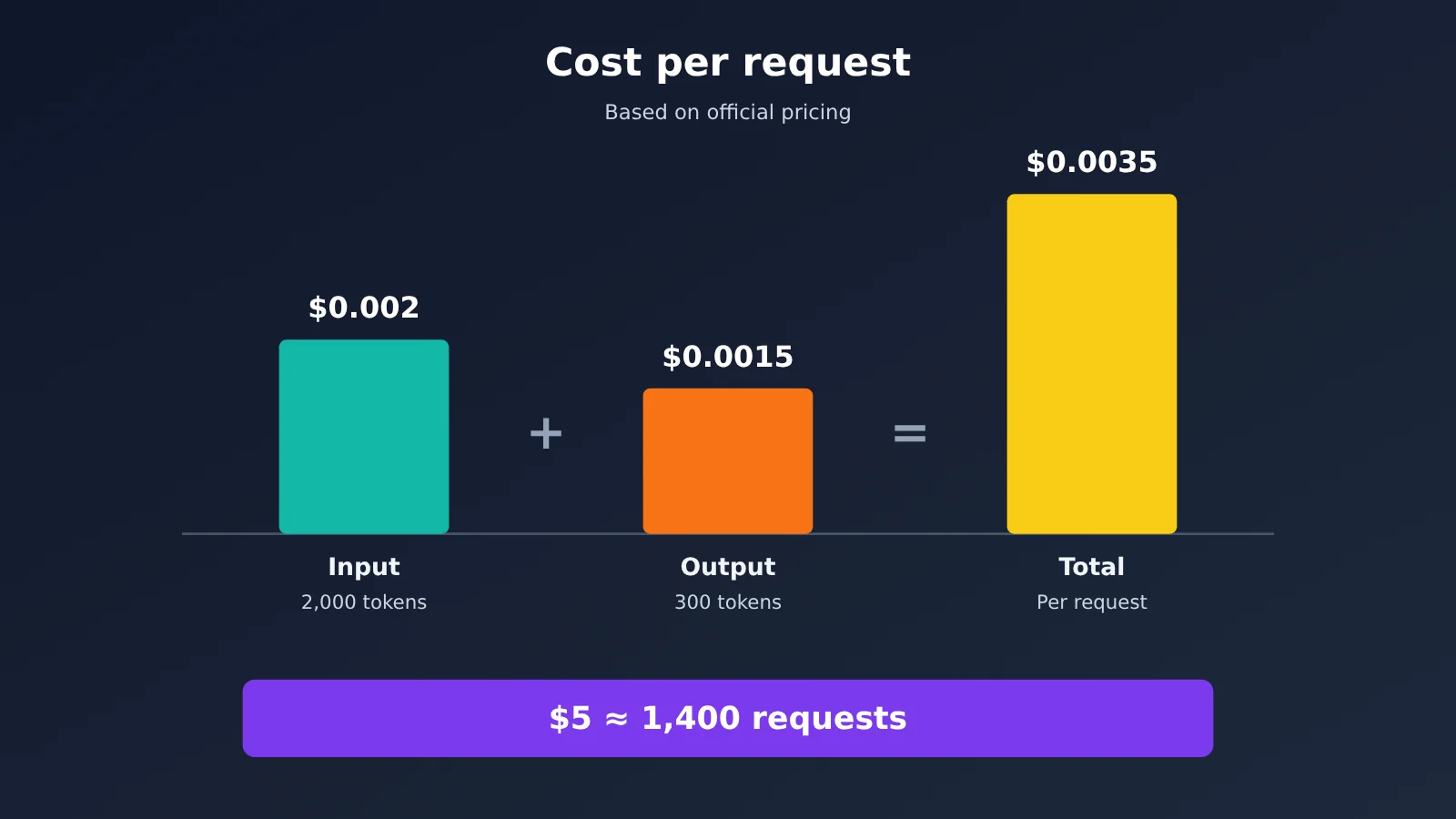
First, let’s do the math. Official pricing is $1 per million input tokens and $5 per million output tokens. Here’s what a request with 2,000 input tokens and 300 output tokens costs:
| Item | Calculation | Cost |
|---|---|---|
| Input | 2,000 × 1 ÷ 1,000,000 | $0.002 |
| Output | 300 × 5 ÷ 1,000,000 | $0.0015 |
| Total | — | About $0.0035 |
At that rate, $5 covers about 1,400 similar requests. For requests that include images, you’ll need to account for the additional input tokens associated with those images.
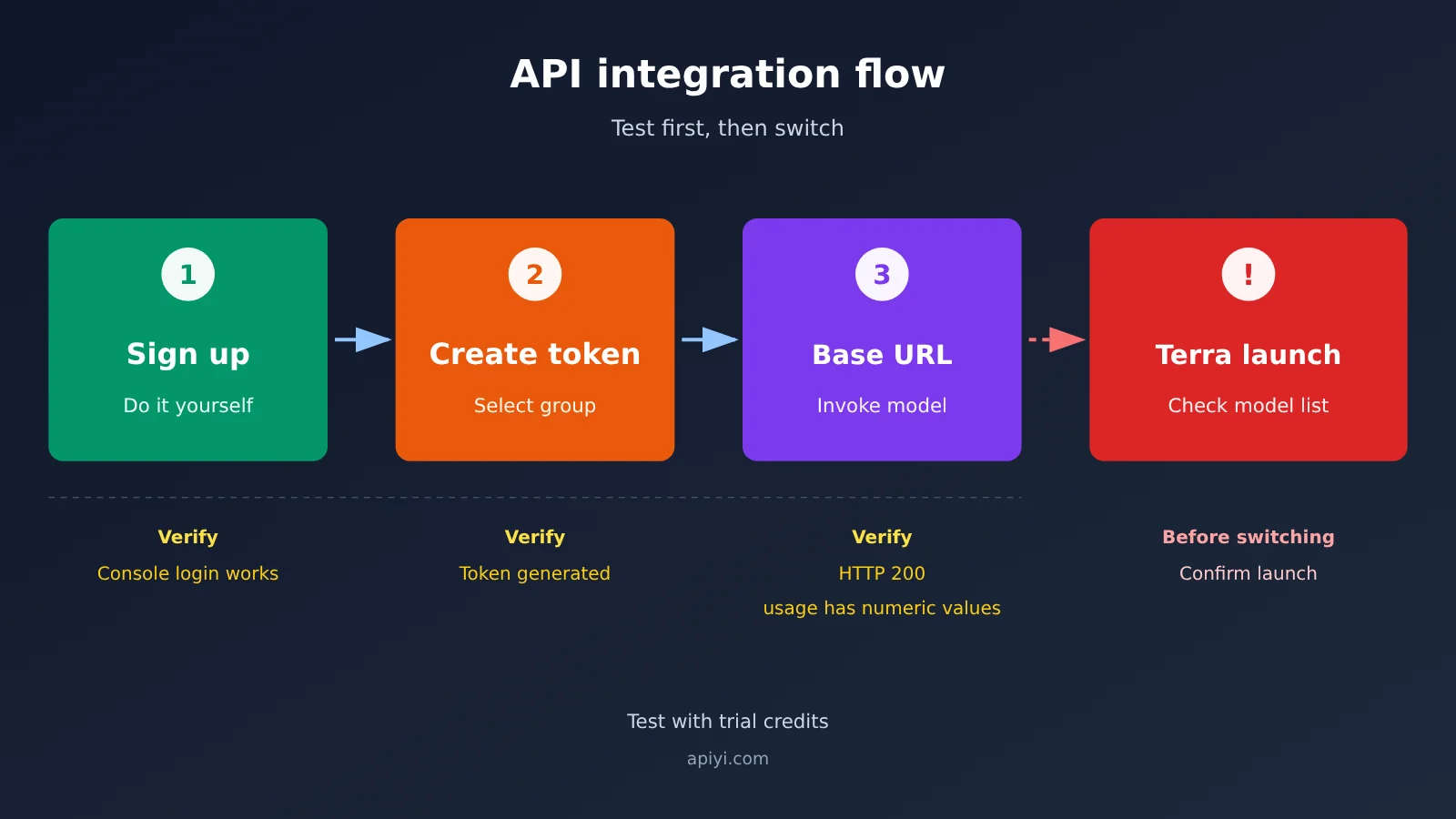
Here’s a validation path for developers in China, with a success criterion for each step:
- Register an account: Sign up at apiyi.com yourself. Success criterion: After logging in to the console, you can see the $0.05 trial credit for your new account.
- Create a token: Create a token at
api.apiyi.com/tokenand select a group. Success criterion: The key appears in the token list and you can copy it. - Configure the API: Set
base_urltohttps://api.apiyi.com/v1, enter the key from the previous step asapi_key, and initially setmodeltogpt-5.4-mini. Success criterion: Both settings are active in your environment variables or configuration file. - Send your first request: Use the OpenAI SDK to call
chat.completions.create, put a single short question inmessages, and setmax_tokensto300. Success criterion: You receive HTTP 200, and bothprompt_tokensandcompletion_tokensinusagecontain numbers. - Switch to Terra: Once you’ve confirmed that
gpt-6.1-terrais available in the platform’s model list, changemodelto it. Success criterion: Your usage charges roughly match the cost estimated fromusage.
🚀 Quick start: You can complete steps 1–4 using the trial credit from APIYI at apiyi.com to get your integration working. As of October 27, 2026, the platform’s model list includes gpt-6-astra, gpt-6-sol, gpt-6.1-sol, and gpt-6-luna. gpt-6.1-terra is also available, at $1 per million input tokens and $5 per million output tokens. Check the platform’s model list for current availability and pricing.
The official route is: register an OpenAI account → add a payment method → add at least $5 in credit → create a key on the API Keys settings page → call gpt-6.1-terra. Your network location must be in a supported region.
GPT-6.1 Terra Free Trial FAQ
Q1: Does GPT-6.1 Terra have a free API credit?
No. The official API has only three paid tiers—Build, Launch, and Grow—and requires at least $5 in cumulative top-ups.
Q2: Can I use GPT-6.1 Terra with the free version of ChatGPT?
There’s no official information on this. For now, access is confirmed for Plus, Pro, Enterprise, and Edu users, and only in Work and Codex—not in Chat.
Q3: Can I register for the official API directly from China?
Mainland China, Hong Kong, and Macau aren’t on the official list of supported regions. Accessing the service from outside that list could result in an account ban, so it’s not recommended. A compliant alternative is to use a third-party API proxy service.
Q4: Can I use a proxy platform’s trial credit to try Terra?
Yes. As of October 27, 2026, `gpt-6.1-terra` is listed among the platform’s models. The $0.05 trial credit is enough to make a real API call and verify your integration end to end.
Q5: What top-up promotions does APIYI offer?
According to the official APIYI documentation at apiyi.com, your first top-up comes with a $1 bonus, and users who verify an education email address receive an additional $2. To claim the bonus, add customer support on WeCom and include “first top-up bonus” in your message. The bonus is issued manually. Top-ups also qualify for tiered bonuses of 10%, 12%, 15%, or 20%, and credits are valid for 365 days. The platform doesn’t offer free model routing; check its model list for current models and pricing.
Q6: What should I do if I get a 429 error as soon as I increase traffic?
First, check the cause. For slow_down and rate limit errors, reduce your request rate and retry. If you’ve run out of credit or exceeded your spending limit, retrying won’t help.
GPT-6.1 Terra Free Trial: Key Takeaways
- No free API tier: A minimum $5 top-up is required to enter the Build tier.
- Available through subscriptions: Usage is limited to Work and Codex and counts toward your plan’s overall limits.
- Regional restrictions: Mainland China, Hong Kong, and Macau aren’t on the supported regions list. Accessing the service from outside the list may put your account at risk of suspension.
- Rate limits: The Build tier allows 5,000 RPM / 1 million TPM. When scaling up, usage can increase by no more than 50% every 15 minutes.
- Minimum cost: 2,000 input tokens plus 300 output tokens costs approximately $0.0035.
- Option for developers in China: Use APIYI’s trial credits to test the integration, then switch to paid credits or a plan once it’s working.
Conclusion
The only “free” access to GPT-6.1 Terra is through a subscription’s included usage, and it’s limited to Work and Codex. The API has no free tier, but you can complete a real-world test for a few cents. Developers in China should avoid regional risks by using an API proxy service.
We recommend using trial credits at APIYI, apiyi.com, to test the API integration. Check the platform’s model list for available models and current pricing.
📚 References
- OpenAI Model and Pricing Pages: GPT-6.1 Terra specifications and pricing
- Link:
platform.openai.com/docs/models/gpt-6.1-terra -
Details: Input, output, and cached pricing
-
OpenAI Rate Limits Documentation: Tiers and causes of 429 errors
- Link:
platform.openai.com/docs/guides/rate-limits -
Details: RPM, TPM, and slow_down rules
-
OpenAI Supported Countries and Territories: List of supported countries and territories
- Link:
platform.openai.com/docs/supported-countries -
Details: Risk of account suspension when accessing from outside the list
-
APIYI Documentation Center: Getting started and top-up offers
- Link:
docs.apiyi.com/getting-started - Details: Trial credits and first top-up bonus rules
Author: APIYI Technical Team
Technical Discussions: Contact us through the APIYI homepage. For more resources, visit the documentation center at docs.apiyi.com.