Author's Note: A deep dive into the application of Sora 2 in the AI Comic Drama industry, covering character consistency maintenance, API batch generation workflows, and the technical limitations and best practices of comic drama production.
AI Comic Drama is quickly becoming a hot new track in the content creation world. How to leverage Sora 2's Character Cameo feature to maintain character consistency and use API interfaces for batch scene generation are the top technical challenges creators are facing today.
Core Value: By the end of this article, you'll know how to use Sora 2's character features to create reusable characters, implement batch generation for comic scenes via API, and understand the technical constraints and optimization strategies of AI comic drama production.
Key Points of Sora 2 Comic Drama Production
| Point | Description | Value |
|---|---|---|
| Character Cameo | Create reusable characters and get a unique Character ID | Maintain consistent character appearance across multiple videos |
| API Batch Generation | Call Sora 2 API through a unified interface | Achieve automated batch generation of comic scenes |
| 95%+ Character Consistency | Advanced diffusion models ensure cross-shot consistency | Reduces character flickering and morphing issues |
| Multi-Character Support | Supports up to 2 characters in the same frame | Ideal for dialogue and interaction scenes |
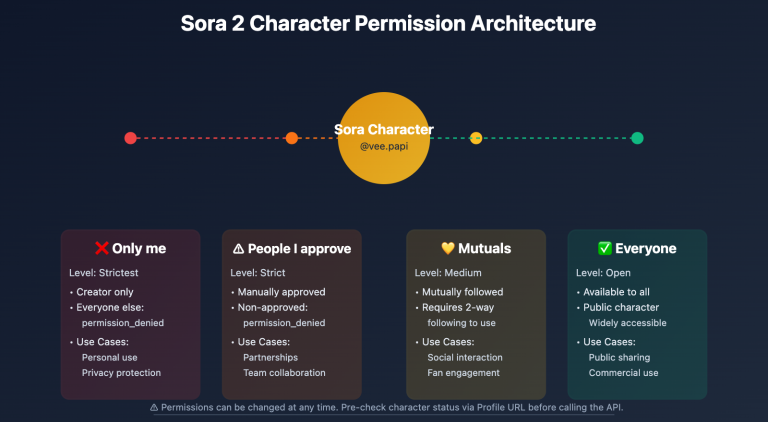
| Permission Control System | Characters can be set to Private/Friends Only/Public | Protects original character IP rights |
Deep Dive into Sora 2 Comic Drama Production
What exactly is AI Comic Drama?
AI Comic Drama refers to short video series produced using AI video generation models (like Sora 2). They typically feature a comic-book visual style combined with subtitles and voiceovers to tell a story. Traditional manga or comic production requires a long chain: story planning, scripting, character design, storyboarding, line art, coloring, special effects, and typesetting. A single episode could take days or even weeks.
With generative models like Sora 2, this workflow can be compressed into a few hours. Creators just need to prepare the script, design the character's look, and then use prompts and character features to batch-generate scenes. A bit of simple editing and dubbing later, and you've got a finished product.
Why is character consistency such a hurdle?
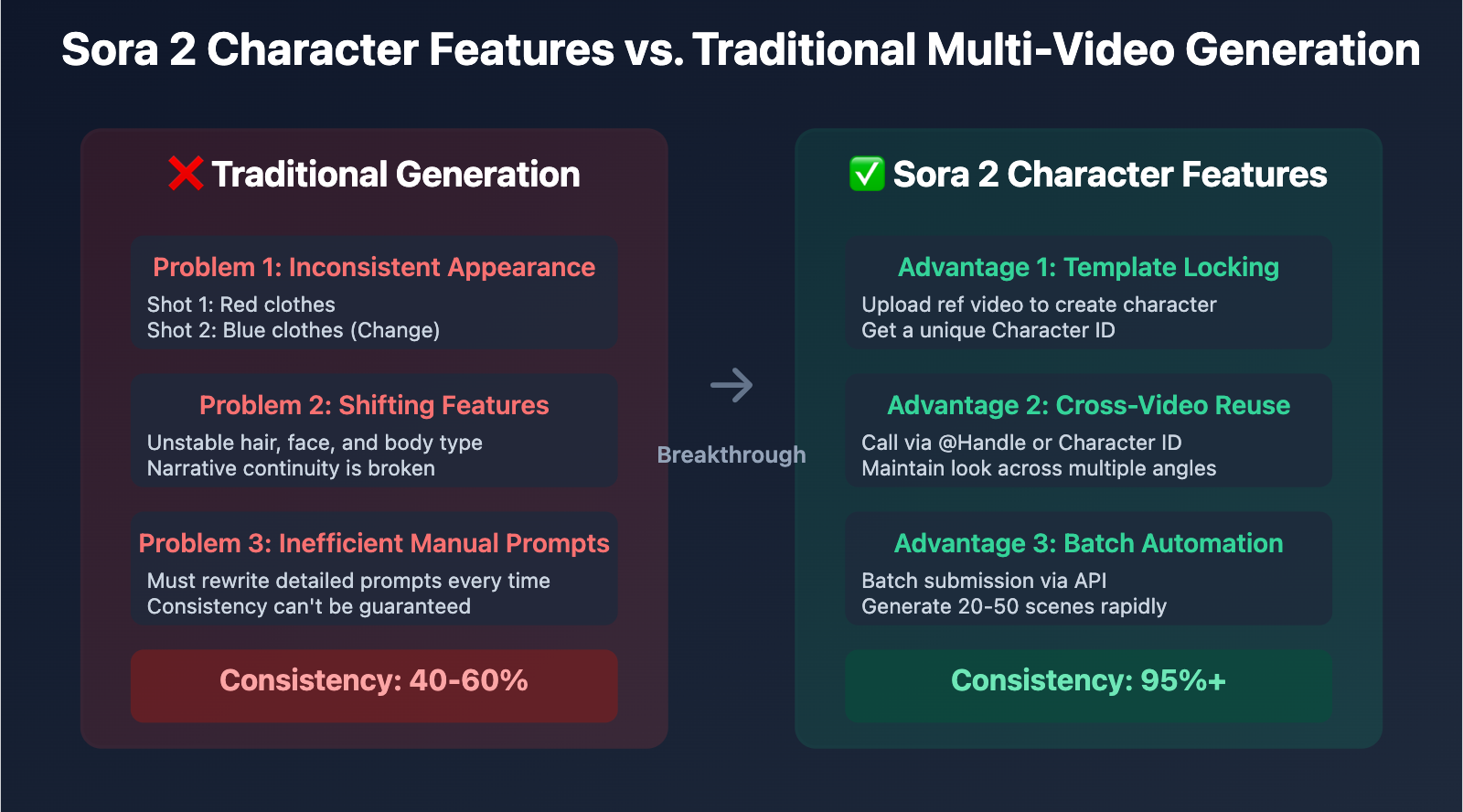
In traditional AI video generation, the biggest pain point is visual inconsistency across different scenes. For example, a character might wear a red shirt in the first shot, but it turns blue in the second. Their hairstyle, facial features, or body type might shift unexpectedly. This lack of consistency completely breaks the narrative flow.
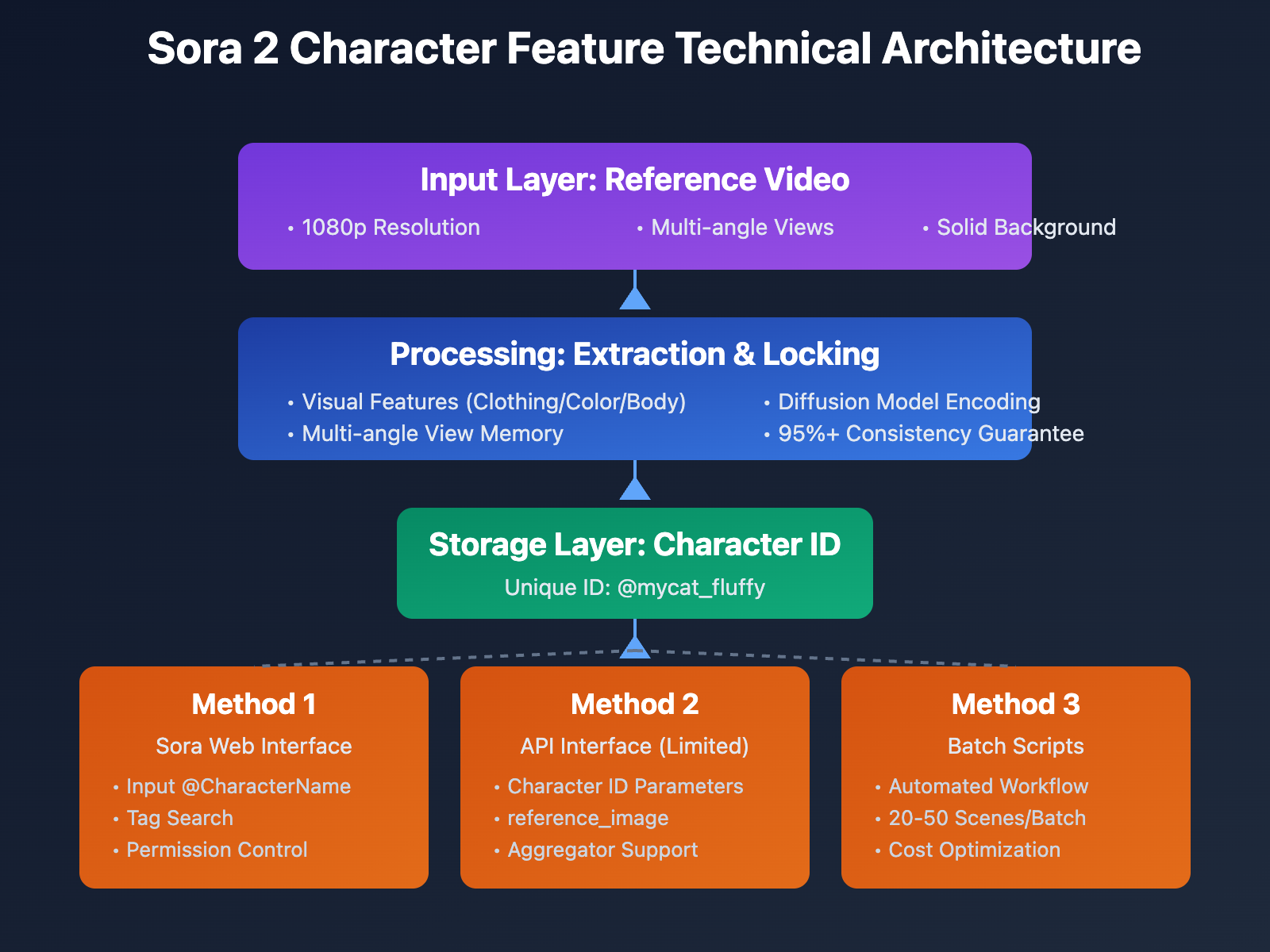
Sora 2’s Character Cameo feature solves this through several mechanisms:
- Character Template Locking: Upload a reference video to create a template. The system extracts visual traits (appearance, clothing, build, etc.) and saves them as a Character ID.
- Cross-Video Reuse: In any new video request, you can call the template using the
@CharacterNameor a Character ID tag. - Multi-Angle Persistence: The system remembers what the character looks like from different camera angles, maintaining over 95% consistency.
- Multi-Shot Coherence: It supports building multi-shot sequences where the character transitions smoothly between different angles and actions.
The Role of API in Production
A single multi-minute comic drama episode might require 20 to 50 scenes. Manually generating these one-by-one in ChatGPT Plus or the Sora web interface is incredibly inefficient. By using API calls, creators can:
- Submit Batch Requests: Push multiple scene generation tasks all at once.
- Automate Workflows: Integrate script parsing, prompt generation, API calls, and video downloading into a single automated script.
- Optimize Costs: API pricing is often lower than fixed subscriptions, and paying for what you use is more economical.
- Compare Platforms: Use API aggregation platforms to quickly compare results across different models.
Sora 2 Character Features: A Quick Start Guide
Creating Reusable Characters (Character Cameo)
Sora 2 lets you create character templates from videos. Here's the full workflow:
Step 1: Prepare your character reference video
- You can use a video generated by Sora or upload one you've filmed yourself from your camera roll.
- The video should clearly show the character's full or upper body.
- Supported character types: Pets, toys, hand-drawn characters, and avatars (unauthorized real people are prohibited).
Step 2: Create the character
In the Sora app:
- Click the
⋯button in the top right corner of a video or draft. - Select
Create character. - Enter a Display Name and a Handle (username) for the character.
- Set permissions:
Only me– Only accessible by you.People I approve– Only accessible by approved users.Mutuals– Only accessible by users who follow each other.Everyone– Accessible by everyone.
Step 3: Use the character in a new video
Reference the character in your prompt using these methods:
@character_handle(e.g.,@mycat_fluffy)- Or simply type the character's display name (e.g.,
Fluffy the cat)
Important Limitations:
- A single video supports a maximum of 2 characters in the same frame.
- Characters must be non-human objects (pets, toys, sketches, etc.).
- For real human characters, you'll need to use the separate Personal Character workflow and obtain explicit authorization.
Sora 2 API: Practical Guide for Batch Generating Video Comics
Simple Example: Generating a Single Scene
Here's the minimal code to call the Sora 2 API using the official OpenAI SDK:
import openai

client = openai.OpenAI(
    api_key="YOUR_API_KEY",
    base_url="https://vip.apiyi.com/v1"
)

# Generate a single video comic scene
response = client.videos.generate(
    model="sora-2-1080p",
    prompt="A cartoon cat wearing a red scarf walks into a cozy living room, animated style",
    duration=5
)

print(f"Video generation task submitted: {response.id}")
View Full Batch Generation Code
import openai
import time
from typing import List, Dict

client = openai.OpenAI(
    api_key="YOUR_API_KEY",
    base_url="https://vip.apiyi.com/v1"
)

def batch_generate_scenes(
    scenes: List[Dict[str, str]],
    model: str = "sora-2-1080p",
    character_id: str = None
) -> List[str]:
    """
    Batch generate scenes for a video comic

    Args:
        scenes: List of scenes, each containing a prompt and duration
        model: Model name
        character_id: Optional character ID

    Returns:
        List of video task IDs
    """
    task_ids = []

    for i, scene in enumerate(scenes):
        prompt = scene["prompt"]

        # If a character ID is provided, reference it in the prompt
        if character_id:
            prompt = f"{prompt} @{character_id}"

        try:
            response = client.videos.generate(
                model=model,
                prompt=prompt,
                duration=scene.get("duration", 5)
            )
            task_ids.append(response.id)
            print(f"✅ Scene {i+1} submitted successfully: {response.id}")

            # Avoid hitting rate limits
            time.sleep(1)

        except Exception as e:
            print(f"❌ Scene {i+1} failed to submit: {str(e)}")

    return task_ids

# Usage Example: Define video comic scenes
scenes = [
    {
        "prompt": "A cartoon cat with red scarf enters a living room, excited expression",
        "duration": 5
    },
    {
        "prompt": "The cat discovers a mysterious gift box on the table, curious",
        "duration": 5
    },
    {
        "prompt": "The cat opens the box, surprised expression, sparkles emerge",
        "duration": 6
    }
]

# Batch generate (assuming you've created a character ID)
task_ids = batch_generate_scenes(
    scenes=scenes,
    model="sora-2-1080p",
    character_id="mycat_fluffy"
)

print(f"\nSubmitted {len(task_ids)} generation tasks in total")
Tech Tip: For actual production, I'd recommend testing your interface calls via the APIYI (apiyi.com) platform. It provides a unified API interface that supports Sora 2 and many other mainstream video generation models, making it easy to quickly validate your technical solution's feasibility and cost-effectiveness.
Sora 2 Technical Limitations & Optimizations for Comic Production
Core Limitations
| Limitation Type | Details | Impact | Strategy |
|---|---|---|---|
| Character Count | Max 2 characters per video | Can't generate group scenes | Split shots, then edit after multiple generations |
| Character Type | Supports non-human subjects only | Can't use real people directly | Use manga-style avatars |
| Generation Length | 5-20 seconds per generation | Long shots need segmenting | Use the "Stitch" feature to join segments |
| API Availability | Character Cameo feature may be restricted in API | Need to use reference_image instead |
Test availability via aggregation platforms |
| Content Moderation | Real person images are flagged by moderation | Can't use real photos as references | Use only illustrations or 3D characters |
Tips for Optimizing Character Consistency
1. Optimizing Reference Video Quality
When you're creating a character template, the quality of your reference video directly impacts the consistency of your future generations:
- Resolution: Stick to 1080p or higher.
- Angle Variety: Provide front, side, and back angles (you can generate 3-5 reference videos for this).
- Stable Lighting: Avoid harsh contrast or complex lighting effects.
- Simple Background: Solid colors or simple backgrounds help the system extract character features more accurately.
2. Prompt Optimization Strategy
How you write your prompt when calling a character affects how well that character is reproduced:
- Explicit References: Always use
@CharacterNameto reference them clearly; don't just describe their appearance. - Refine Actions: Be specific with actions and expressions—for example,
walks slowlyis much more precise than justmoves. - Lock the Style: Repeat the style in your prompt, like
cartoon style, 2D animation. - Avoid Conflicts: Don't describe features in the prompt that clash with the character template (like different colors or clothing).
3. Handling Multi-Character Scenes
Since a single video only supports two characters max, you'll need to handle group scenes with some workarounds:
- Split the Shots: Break group scenes down into several single or duo shots.
- Cross-cutting: Use editing techniques to simulate multiple people being in the same scene.
- Background Overlay: Use video editing software to overlay characters from multiple generations onto the same background.
Comparison of Sora 2 API Solutions
| Solution | Key Features | Use Case | Character Feature Support |
|---|---|---|---|
| Official OpenAI API | Official interface, high stability | Enterprise apps with a healthy budget | Full support (requires Plus subscription) |
| API Aggregation Platforms | Unified interface, multi-model comparison | SMB teams needing to switch models flexibly | Partial support, depends on the platform's implementation |
| Third-party Mirror APIs | Great pricing, pay-as-you-go | Individual creators who are cost-sensitive | Limited support; might only support reference_image |
Note on Comparison: Every solution has its pros and cons. We recommend starting your tests on the APIYI (apiyi.com) platform. It supports a unified interface for Sora 2 and various other video generation models, making it easy to compare results and costs quickly.
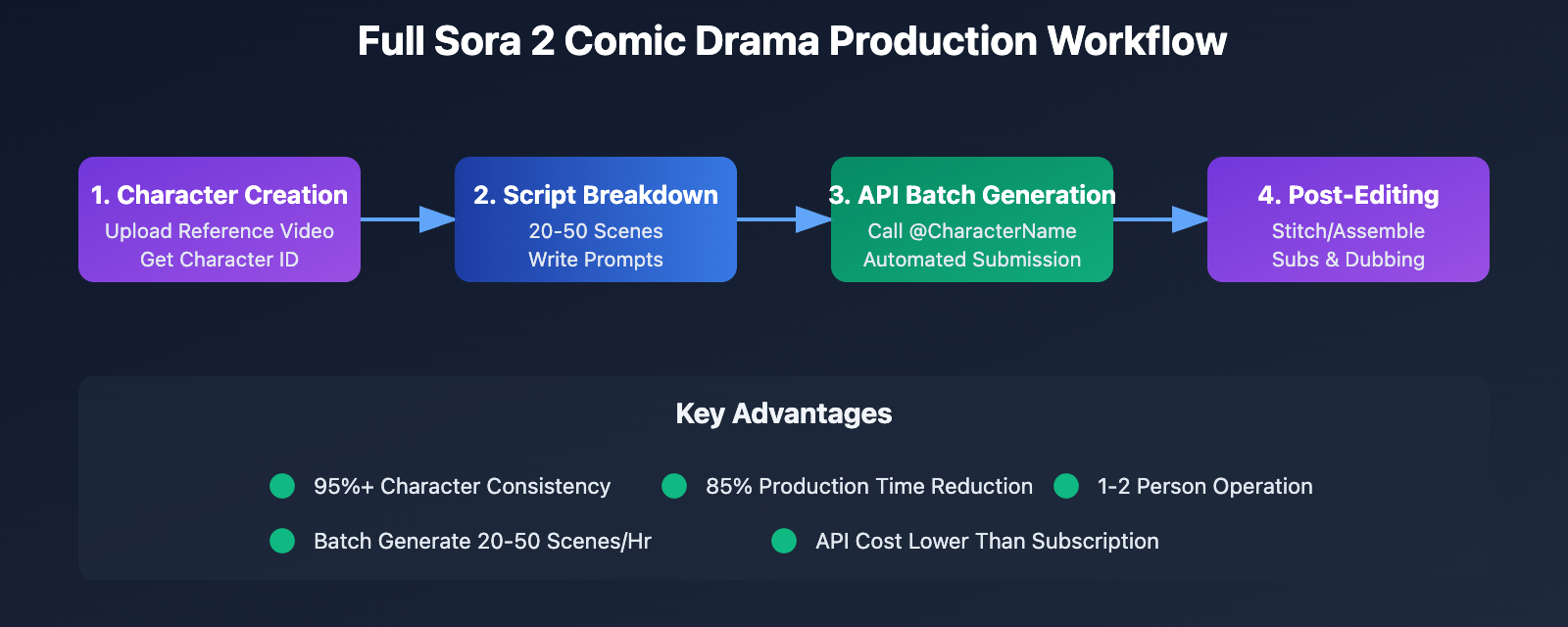
Sora 2 Comic Drama Production: The Complete Workflow
Workflow Stages
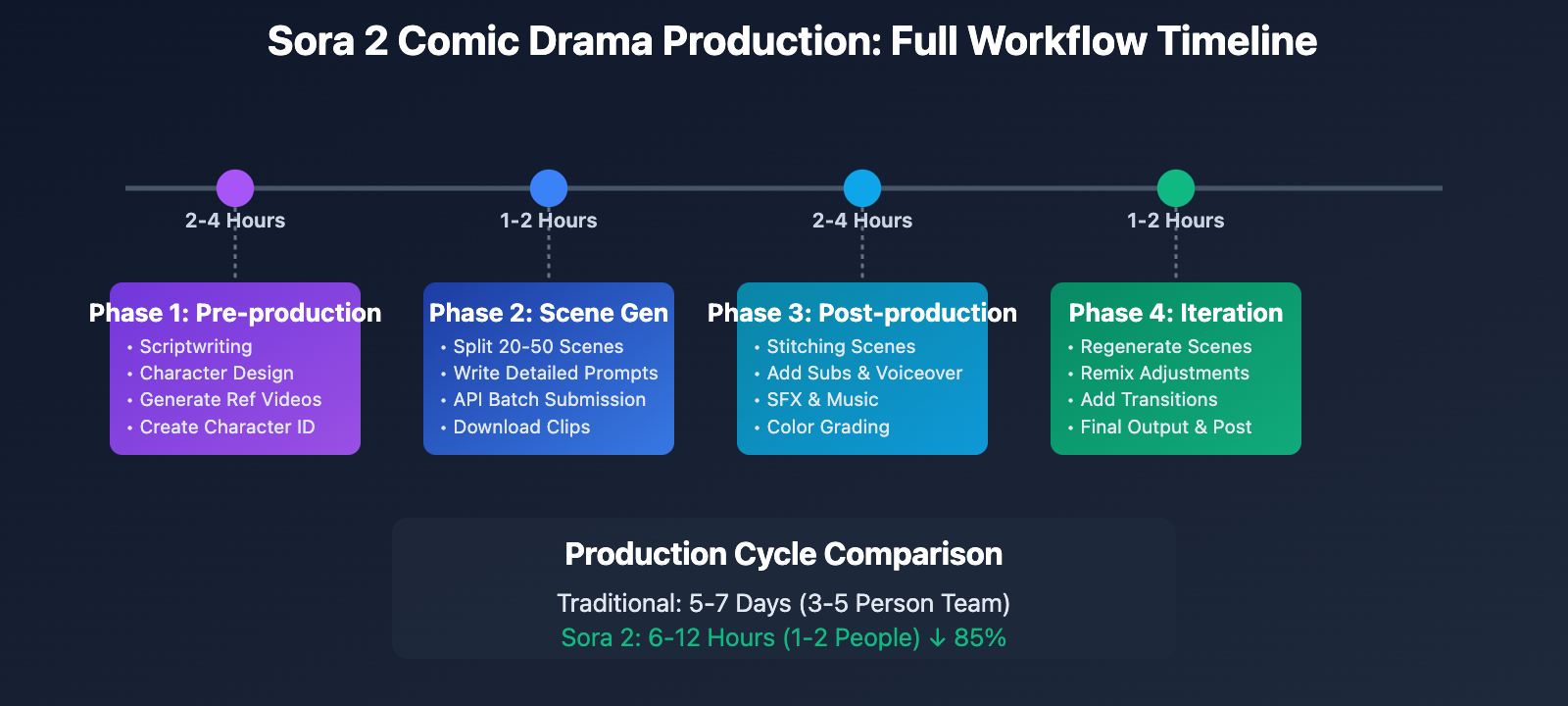
Stage 1: Pre-production
- Write a complete script, including dialogue, scene descriptions, and character actions.
- Design character concepts and draw or generate character reference images.
- Use Sora 2 to generate character reference videos (3-5 different angles).
- Create a Character Cameo to obtain a Character ID.
Stage 2: Scene Generation
- Break the script down into short scenes of 5-10 seconds each.
- Write a detailed prompt for each scene (including character references, actions, expressions, and camera work).
- Batch submit generation tasks via API.
- Download the generated video clips.
Stage 3: Post-production
- Use Sora's Stitch feature or video editing software to join the scenes.
- Add subtitles and voiceovers.
- Adjust sound effects and background music.
- Perform color grading and optimize special effects.
Stage 4: Iteration & Optimization
- Regenerate any unsatisfactory scenes (by adjusting the prompt or using the Remix feature).
- Add transitional shots where needed.
- Final export and publishing.
Cost and Efficiency Estimation
| Metric | Traditional Production | Sora 2 Production | Efficiency Gain |
|---|---|---|---|
| Character Design | 1-3 Days | 2-4 Hours | 80% ↓ |
| Episode Production | 5-7 Days | 6-12 Hours | 85% ↓ |
| Labor Cost | 3-5 Person Team | 1-2 People | 60% ↓ |
| Tooling Cost | Software + Hardware | Sora Sub + API | Comparable |
| Quality Consistency | Relies on manual skill | 95%+ Algorithm-based | Improved Consistency |
Cost Optimization: For individual creators on a tight budget, consider using the APIYI (apiyi.com) platform to access the Sora 2 API. They offer a flexible pay-as-you-go model, which means you don't need a ChatGPT Plus subscription—perfect for small-scale testing and production.
FAQ
Q1: Does Sora 2’s character feature support real people?
Sora 2's Character Cameo feature currently only supports non-human subjects, such as pets, toys, hand-drawn characters, and 3D avatars. For real human characters, you'll need to use the separate Personal Character workflow, which requires explicit authorization from the individual. If you try to use a real person's reference image via the API, it will likely be blocked by the content moderation system.
Solution: For comic drama production, it's best to use illustrative styles or 3D avatars. This bypasses moderation hurdles and fits the visual aesthetic of the medium perfectly.
Q2: How do I handle the limit of 2 characters per video?
This is a current technical limitation of Sora 2. For scenes that require more people, try these strategies:
- Scene Splitting: Break group scenes into multiple two-person dialogue shots and join them in editing.
- Varying Shot Sizes: Use close-ups to focus on only a few characters at a time.
- Post-production Compositing: Generate characters separately and overlay them onto the same background using video editing software.
Interestingly, this limitation pushes creators toward more cinematic storytelling techniques—focusing on intentional shot changes rather than static group shots.
Q3: How do I use character features in API calls?
Currently, official OpenAI API support for the Character Cameo feature is a bit unclear. Some reports suggest the API only supports the reference_image and reference_video parameters, and using real human images will trigger moderation blocks.
Recommended Approach:
- Visit APIYI (apiyi.com) to register and get an API Key.
- Test if the platform supports passing
Character IDas a parameter. - If not supported, use the
reference_imageparameter to pass a static reference image of your character. - Provide a detailed description of the character's appearance in the prompt to boost consistency.
Summary
Key takeaways for producing AI manga dramas with Sora 2:
- Character features are at the core: The Character Cameo feature uses reusable character templates to achieve 95%+ consistency across different videos, solving the biggest headache in AI manga production.
- API batch generation boosts efficiency: By writing automation scripts, you can shrink the generation time for 20-50 scenes per episode from several hours to under an hour.
- Understanding technical limits: Constraints like a maximum of 2 characters per video, support for non-human objects only, and limited API availability need to be bypassed through creative direction and post-production techniques.
- Workflow optimization: A standardized process—from script and character design to batch generation and post-production—can cut the production cycle for a single episode from 5-7 days down to just 6-12 hours.
AI manga drama is a major application for AI video generation technology. As Sora 2's character features mature and API access improves, we're going to see explosive growth in this niche. I recommend using APIYI (apiyi.com) to quickly validate your manga drama ideas. The platform offers free credits and a unified interface for multiple models, supporting Sora 2, Kling, Runway, and other leading Large Language Models.
📚 References
⚠️ Link Format Note: All external links use the
Resource Name: domain.comformat. This makes them easy to copy while avoiding SEO weight loss.
-
OpenAI Sora Official Documentation: Character Feature User Guide
- Link:
help.openai.com/en/articles/12435986-generating-content-with-characters - Description: Official guide on the Character Cameo creation process, permission settings, and usage limits.
- Link:
-
Sora Release Notes: Feature Update Logs
- Link:
help.openai.com/en/articles/12593142-sora-release-notes - Description: Records Sora 2 updates, including the release dates for Character Cameo and Stitch features.
- Link:
-
AI Manga Maker Industry Report: How AI is Revolutionizing Manga Production
- Link:
aimangamaker.com/blog/how-ai-revolutionizes-manga-manhwa-production-in-2025 - Description: In-depth analysis of AI tools in manga and drama production, including data on efficiency gains and cost savings.
- Link:
-
Tooning AI Platform: Solutions for Manga Character Consistency
- Link:
skywork.ai/skypage/en/Tooning-Your-AI-Co-Pilot-for-Creating-Webtoons-and-Comics - Description: An alternative approach using 3D modeling for character consistency—great for comparative study.
- Link:
Author: Tech Team
Tech Exchange: Feel free to discuss your AI manga drama production experiences in the comments. For more Sora 2 technical resources, visit the APIYI (apiyi.com) technical community.