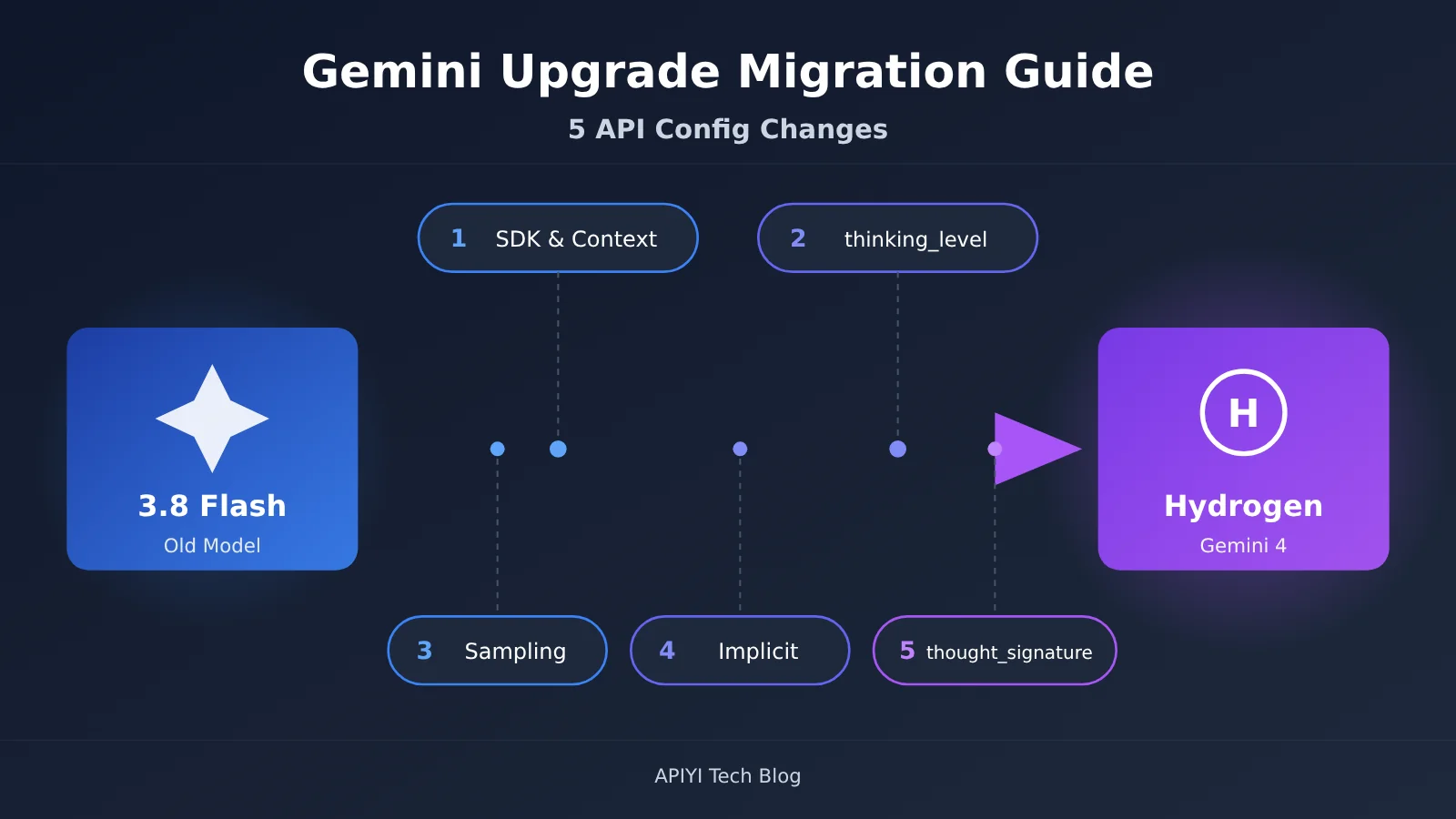
Author’s note: Moving from Gemini 3.8 Flash to Hydrogen means you’ll need to adjust the SDK and context handling, thinking parameters, sampling configuration, caching, and signature management for multi-turn tool calls—all at the same time.
Google officially released Gemini 4 Hydrogen on November 12, 2026. Its API model ID is gemini-4-hydrogen, and it’s positioned for everyday coding and AI agent execution. Many teams’ first instinct is to swap the model name in their code and ship it—only to hit HTTP 400 errors, parameters that have no effect, multi-turn tool-call failures, and truncated long outputs. This article walks through the 5 API configuration changes you must make when upgrading from Gemini 3.8 Flash to Hydrogen, each covered in the order “old behavior → new behavior → how to change it → typical impact.”
This is not a launch-event recap. The parameter names, valid values, SDK version numbers, and error types in this article all come from Google Cloud’s official migration guide and model spec documentation. Third-party benchmarks and community feedback are sourced separately.
Key takeaway: After reading this, you’ll have a checklist you can work through item by item to update your existing Gemini 3.8 Flash call code and migrate your agent and batch workloads to Hydrogen smoothly.
5 Terms You Need to Know Before Migrating to Hydrogen
Before you start changing code, let’s get aligned on a few concepts that come up again and again in the migration guide:
- thinking_level: a thinking-level parameter that controls how deeply the model reasons. Hydrogen uses it in place of the old
thinking_budget. The valid settings are Low, Medium, High, and XHigh. - thought_signature: a thinking signature the model returns in its response. You must preserve it exactly and send it back during multi-turn conversations and tool calls, otherwise the model can’t pick up the reasoning state from earlier.
- continuation_token: a continuation marker that links to the next segment of a long output. Once a single segment hits its limit, you can use it to keep generating.
- Implicit caching: the platform automatically reuses qualifying input prefixes, and the matched portion is billed at the cache price. You don’t need to create cache objects manually.
- Context window: the range of information a single model invocation can hold. On Hydrogen, input, output, thinking, and tool calls all share a unified budget of 1,048,576 tokens.
1. Why Upgrading to Hydrogen Isn’t Just Swapping the Model ID
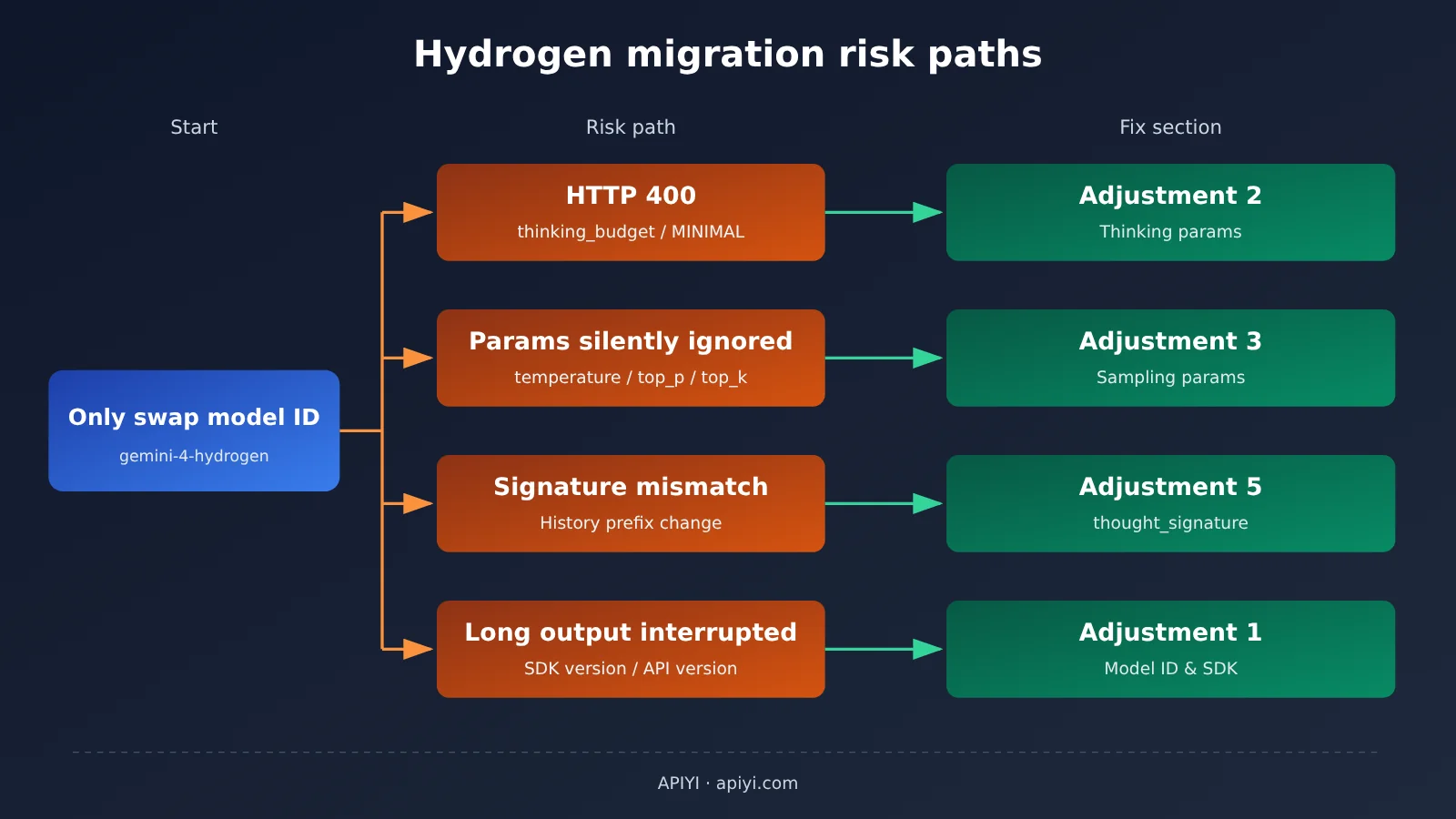
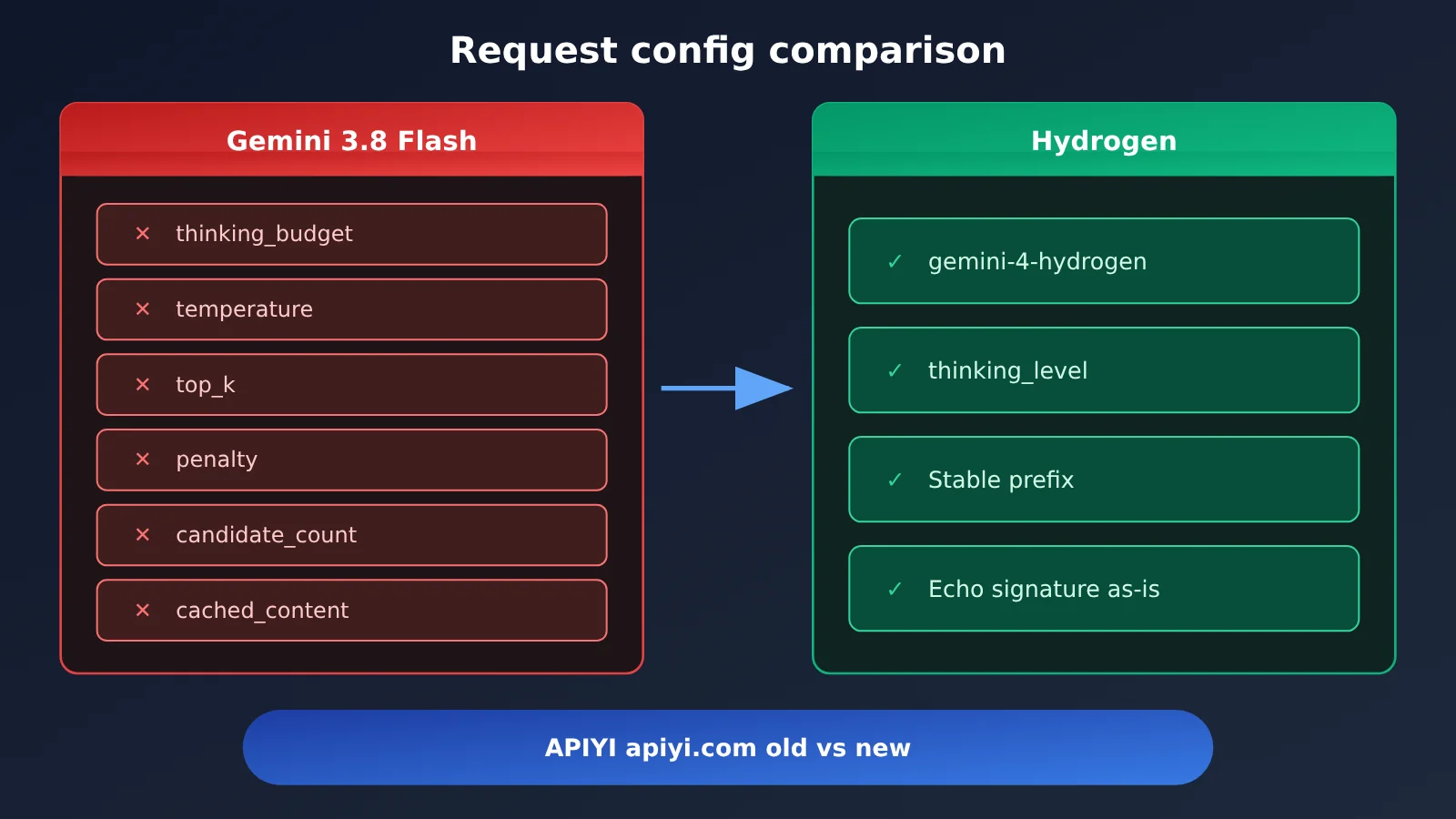
Gemini 3.8 Flash and Hydrogen may both be in the Gemini family, but their API behavior has quite a few incompatibilities. Per the official migration guide, thinking_budget and the MINIMAL thinking level aren’t supported on Hydrogen — the request just returns HTTP 400. Sampling parameters like temperature, top_p, and top_k don’t throw errors; they’re silently ignored. The first kind of problem shows up during testing. The second kind can leave you thinking “the parameters are still taking effect.”
The other two risks are sneakier. First, signature handling for multi-turn tool calls is stricter. Once the conversation history has been compressed or trimmed, a signature that no longer matches the prefix can trigger HTTP 400. Second, the default thinking level moves from Medium to High. If you don’t set it explicitly, the same request burns more thinking tokens and takes longer. The table below gives an overview of the five adjustments:
| Adjustment | Old behavior (3.8 Flash) | New behavior (Hydrogen) | What happens if you don’t change it |
|---|---|---|---|
| Model ID, SDK, and context | Old model ID, older SDK works | gemini-4-hydrogen, long-output continuation has a minimum SDK version requirement |
Long output gets cut off, continuation unavailable |
| Thinking parameters | thinking_budget, default Medium |
thinking_level, default High |
HTTP 400, or higher cost and latency |
| Sampling and generation parameters | temperature, top_p, top_k, etc. are adjustable | Fixed values, custom ones ignored; some fields must be removed | Output style is out of your control, some requests fail validation |
| Caching | Explicit caching with cached_content supported |
Implicit caching only, 4,096-token threshold | Cache references break, cost estimates go off |
| thought_signature | Signature rules are relatively loose | Strict rules for parallel calls and prefix changes | Multi-turn agents throw errors or reasoning breaks |
Part 2: Adjustment 1 — Hydrogen’s Model ID, SDK Version, and Context Limits
Old behavior → new behavior: Back in the 3.8 Flash era, most projects didn’t care much about SDK versions. After migrating to Hydrogen, the model ID has to become gemini-4-hydrogen; and if you need ultra-long output, the SDK version turns into a hard requirement. The minimum versions listed in Google’s official migration guide are:
| Language | GenerateContent auto-continuation | Interactions API auto-continuation |
|---|---|---|
| Python | google-genai >= 2.30.1 | google-genai >= 2.34.0 |
| JavaScript / TypeScript | @google/genai >= 2.29.1 | @google/genai >= 2.32.0 |
| Go | Not listed separately by Google | >= 1.77.0 |
| Java | Not listed separately by Google | >= 1.80.0 |
How to adjust Hydrogen context and long output
Hydrogen’s 1,048,576 tokens is a unified budget — input and conversation history, thinking tokens, tool-call-related tokens, and the final output all get deducted from that single pool. In other words, you can’t feed in 1 million tokens and then get another 1 million tokens of output on top. For long-document analysis agents, you need to proactively reserve room on the input side for thinking and tool calls.
A single foreground generation segment typically caps out at 65,536 tokens. Once you go past that, there are three options: use auto-continuation with a supported SDK, set background=true in the Interactions API for background long generation, or maintain your own continuation_token and stitch the segments together manually. One thing to watch out for: the official getting-started docs state that long-output continuation currently requires the v1beta1 API — Agent Platform’s v1 doesn’t support it.
Typical impact: Businesses that batch-generate long reports and long code files are the most likely to get burned. Our recommendation: upgrade the SDK first, then switch the API version to v1beta1, and finally run a regression test with a request that exceeds 65,536 tokens.
pip install -U "google-genai>=2.34.0"
npm install @google/genai@^2.32.0
III. Adjustment 2: Hydrogen’s thinking_budget Becomes thinking_level
Old behavior: 3.8 Flash used thinking_budget to control thinking length by token count and could also select the MINIMAL level, with Medium as the default.
New behavior: Hydrogen only accepts thinking_level, and the valid values are the four levels Low, Medium, High, and XHigh, with High as the default. Continuing to pass thinking_budget or MINIMAL will return HTTP 400. The official recommended uses are: Low for classification, Medium for routine coding, High for multi-step agents, and XHigh for complex, deep reasoning.
The third-party organization Artificial Analysis completed an independent evaluation of all four levels on November 12 (Intelligence Index v5.0.1), which helps illustrate the differences between levels. The time and cost values in the table below are averages across its standardized benchmark tasks; they don’t represent the actual cost of a single conversation for an ordinary user:
| Thinking level | Official recommended use case | Intelligence Index (AA) | Avg evaluation time | Avg evaluation cost |
|---|---|---|---|---|
| Low | Classification, simple extraction | 27 | 1.3 minutes | $0.29 |
| Medium | Routine coding | 41 | 3.7 minutes | $0.80 |
| High (default) | Multi-step agent | 51 | 8.3 minutes | $1.87 |
| XHigh | Complex, deep reasoning | 54 | 13.5 minutes | $3.16 |
Looking at the data, High scores 10 points higher than Medium, while XHigh scores only 3 points higher than High, yet the evaluation cost jumps from $1.87 to $3.16. This shows that the highest level isn’t necessarily the best value, and the same model name can also differ greatly in capability across different levels.
Hydrogen thinking_level modification example
The following examples use the official Google Gen AI SDK syntax. For the casing of enum values, refer to the type definitions in the SDK version you have installed:
from google import genai
from google.genai import types

client = genai.Client()

# Old approach (3.8 Flash): returns HTTP 400 on Hydrogen
# thinking_config=types.ThinkingConfig(thinking_budget=2048)

# New approach: choose Medium for routine coding tasks
coding_config = types.GenerateContentConfig(
    thinking_config=types.ThinkingConfig(thinking_level="medium"),
)

# Multi-step agent: choose High (also the default, but explicitly setting it is recommended)
agent_config = types.GenerateContentConfig(
    thinking_config=types.ThinkingConfig(thinking_level="high"),
)

resp = client.models.generate_content(
    model="gemini-4-hydrogen",
    contents="修复这个函数中的空指针问题:...",
    config=coding_config,
)
print(resp.text)
Typical impact: Because thinking tokens are billed at output rates, projects that don’t explicitly set a level will automatically fall back to High after migration, and both bills and latency will increase. We recommend mapping the old thinking_budget ranges to levels: smaller budgets to Low or Medium, larger budgets to High.
4. Adjustment 3: Clean Up the Deprecated Generation Parameters in Hydrogen
Old behavior: 3.8 Flash let you tune output randomness with temperature, top_p, and top_k, and it also supported penalty parameters and multiple candidates.
New behavior: Hydrogen’s default temperature is 1.0, custom values don’t take effect, top_p is fixed at 0.95, and top_k is fixed at 64. All three are ignored once passed in. The official migration checklist also asks you to handle the following fields:
| Field or behavior | Hydrogen migration requirement | Troubleshooting tip |
|---|---|---|
| temperature / top_p / top_k | Custom values are ignored | No error is raised, so you’ll need to control style through the prompt |
| frequency_penalty / presence_penalty | Remove | Go by the actual error; deleting them all is the safest bet |
| candidate_count > 1 | Remove the multi-candidate setting | When you need variety, switch to making multiple requests |
| Prefilled model turns in history | Remove | You can no longer “prime” the model to steer the format |
| cached_content | Stop referencing explicit caching | See Adjustment 4 |
| thinking_budget | Switch to a valid thinking_level | Returns HTTP 400 |
The official guidance notes that some legacy parameters are simply ignored, while others cause request validation to fail. So troubleshooting can’t be one-size-fits-all: on a 400, check thinking_budget, MINIMAL, and the fields that need removing first; if the output style doesn’t match expectations, then check whether you’re still relying on temperature parameters.
Simplified request config for Hydrogen
config = types.GenerateContentConfig(
    system_instruction=STABLE_SYSTEM_PROMPT,   # Put stable content first — helps implicit caching
    thinking_config=types.ThinkingConfig(thinking_level="medium"),
    response_mime_type="application/json",      # Structured output is still supported
    max_output_tokens=8192,
)
Typical impact: Projects that used to rely on low temperature to keep JSON output stable should switch to structured output instead; projects that relied on prefilled model turns to control format need to move the formatting requirements into the system prompt.
5. Adjustment 4: Hydrogen Moves from Explicit to Implicit Caching
Old behavior: On 3.8 Flash, you could create a cache object first, then reference it in a request with cached_content="cachedContents/xxx".
New behavior: Hydrogen doesn’t support explicit context caching — only implicit caching, and persistent implicit caching is on by default. The minimum cacheable prefix length drops from 6,144 tokens on 3.8 Flash to 4,096 tokens, so relatively short shared system prompts and fixed reference material are much more likely to hit the cache.
How to adapt: Remove every caches.create call and every cached_content reference, and instead optimize the order in which you assemble your prompt. Google recommends putting stable shared content at the front of the input and the ever-changing user question at the end:
- System prompt and role definition (almost never changes)
- Shared knowledge base, API docs, coding standards (changes rarely)
- Conversation history (appended turn by turn)
- Current user question (changes every time)
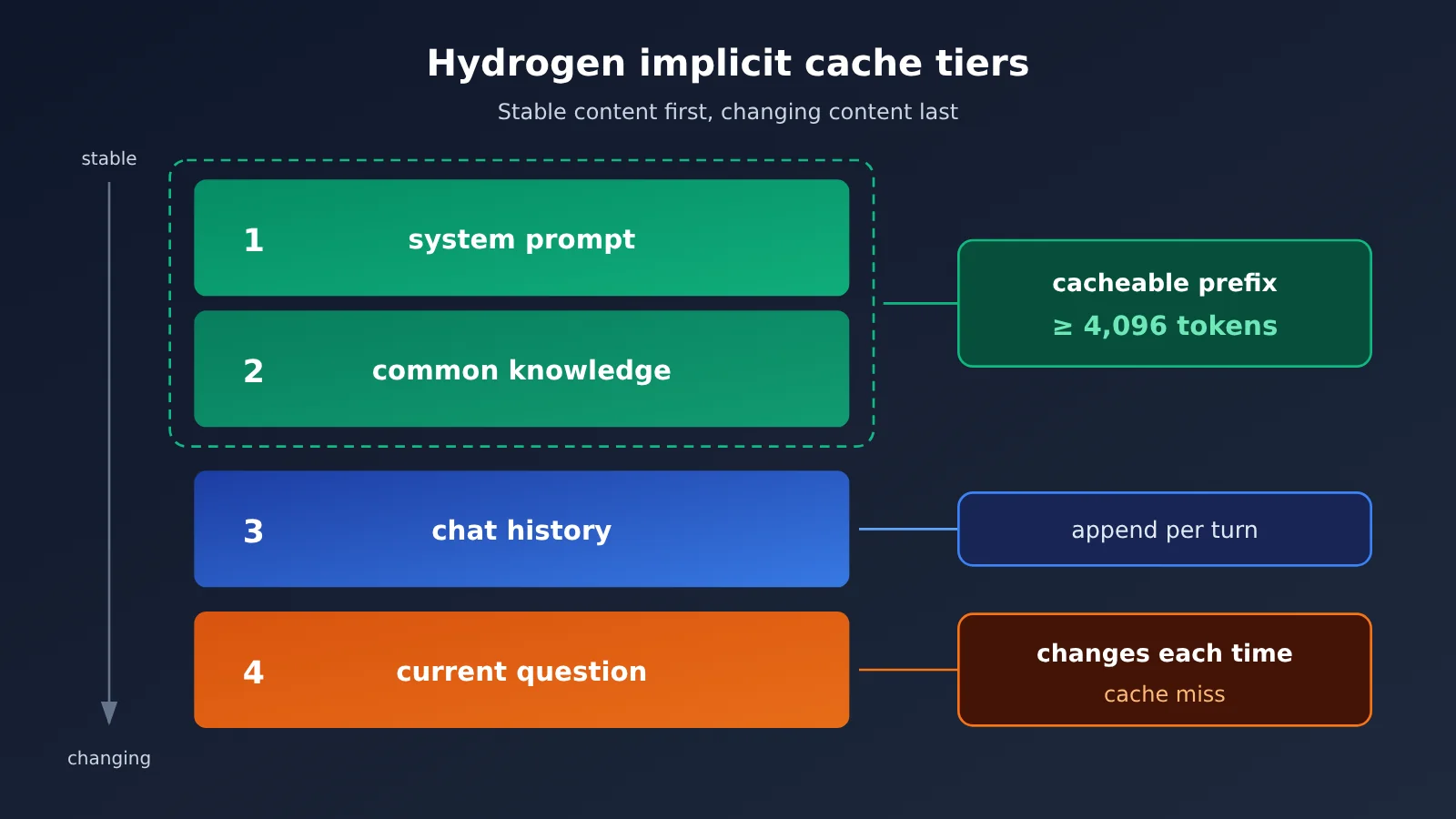
Typical impact: On pricing — per the official Google AI Studio pricing page (verified November 13, 2026, in USD per million tokens) — implicit cache hit input for standard Hydrogen calls is $0.075, and $0.0375 in Batch and Flex modes, far below the standard input rate of $1.50. If you drop dynamic variables (timestamps, user IDs, and the like) at the start of the prompt, the prefix is different every time and the cache will never hit.
6. Adjustment 5: Maintaining thought_signature correctly in Hydrogen
Old behavior: On 3.8 Flash, plenty of agent frameworks rebuild the conversation history themselves, keeping only the text and the tool call results — so when the signatures got dropped, there was usually no visible impact.
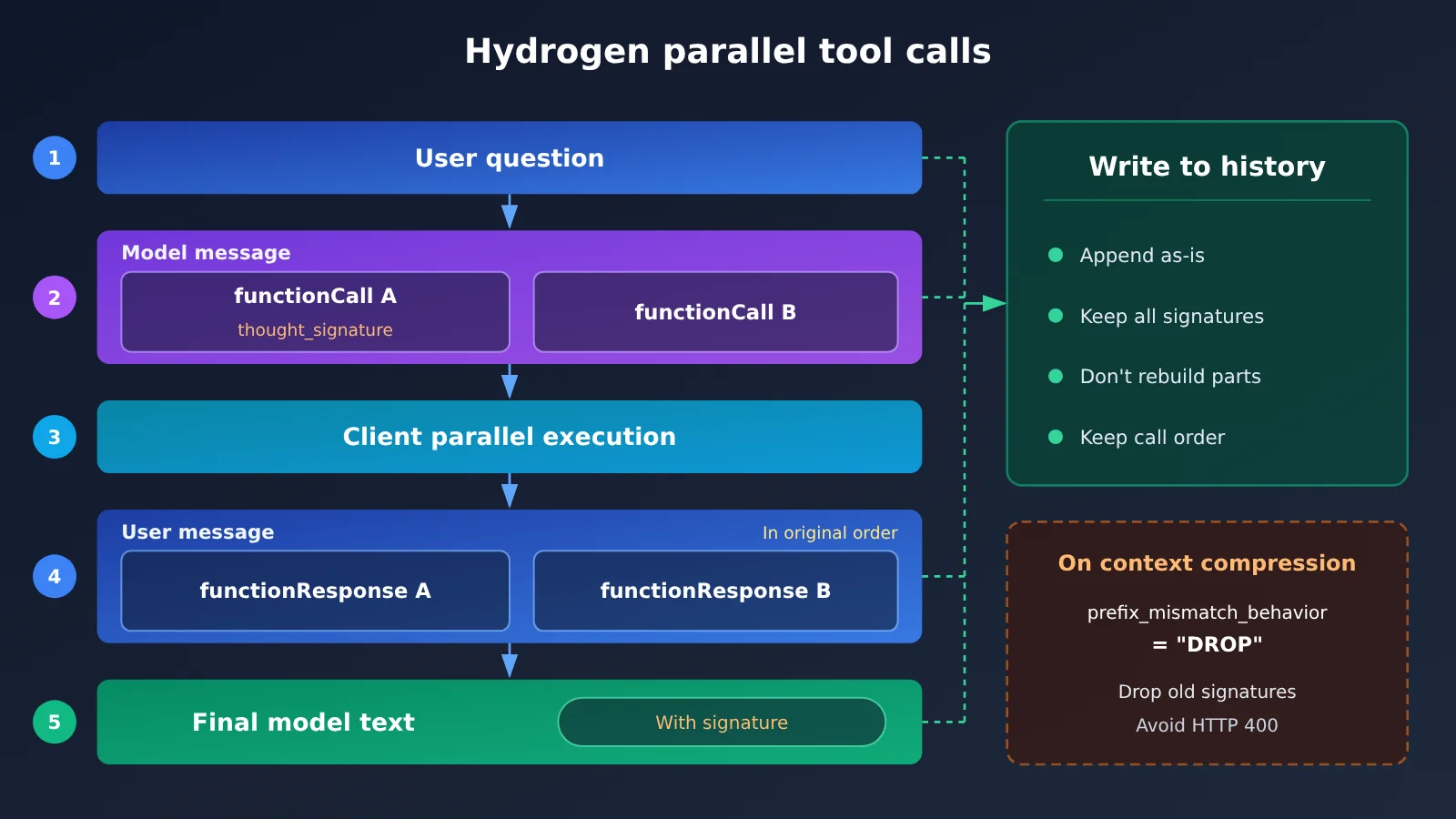
New behavior: In Hydrogen, multi-turn conversations need to keep the signatures of all relevant parts from earlier turns, including the signature carried by the final text part. The official migration guide lays out the rules for parallel tool calls like this:
- Multiple parallel
functionCalls must live in the same model message; thought_signaturegoes only on the first parallelfunctionCallpart;- Subsequent
functionResponses must come back with the matching call ID, name, and order; - When the same model reuses a signature and the history prefix has changed, you may get an HTTP 400 by default.
How to update signature handling in Hydrogen
The safest approach is not to rebuild the parts by hand, but to append the content object returned by the model to the history as-is:
history = [types.Content(role="user", parts=[types.Part(text=question)])]
resp = client.models.generate_content(
    model="gemini-4-hydrogen", contents=history, config=agent_config
)
model_content = resp.candidates[0].content
history.append(model_content)          # append it as-is, and the signature comes along with it

calls = [p.function_call for p in model_content.parts if p.function_call]
responses = [
    types.Part.from_function_response(name=c.name, response=run_tool(c))
    for c in calls                      # keep the same order as the functionCall parts
]
history.append(types.Content(role="user", parts=responses))
For agents that compact or trim history (sliding windows, summary replacement, and so on), the history prefix is bound to change. In that case you can configure prefix_mismatch_behavior="DROP" as described in the migration guide, so the model drops the old signature when the prefix doesn’t match instead of throwing an error. For exactly where this field goes in the request, defer to the official migration guide.
Typical impact: custom agent harnesses, coding assistants that retrieve files in parallel, and long-running chat bots with context compaction are hit the hardest — it’s worth writing a dedicated integration test for signature round-tripping.
7. Hydrogen Migration Checklist and Minimal Invocation Example
| Check item | Before migration (3.8 Flash) | After migration (Hydrogen) | Done |
|---|---|---|---|
| Model ID | Old model ID | gemini-4-hydrogen |
☐ |
| SDK | Any version | Python >= 2.34.0, JS >= 2.32.0 (Interactions) | ☐ |
| API version | v1 | Use v1beta1 when you need long-output continuation | ☐ |
| Thinking parameters | thinking_budget / MINIMAL | Set thinking_level explicitly | ☐ |
| Generation parameters | temperature and others are adjustable | Remove penalty, candidate_count, and prefill turns | ☐ |
| Caching | cached_content | Put stable content first, with a prefix ≥ 4,096 tokens | ☐ |
| Tool calling | Rebuild history yourself | Keep signatures as-is; parallel responses are returned in order | ☐ |
| Error handling | Generic retries | Distinguish HTTP 400 validation errors from silent ignores | ☐ |
Quick validation through the OpenAI-compatible endpoint
If your team’s production code runs on the OpenAI SDK, start by validating Hydrogen’s output quality through the compatible endpoint before deciding whether to migrate to the native SDK. Whether a model is listed and which parameters can be passed through depends on the platform’s model list and docs:
from openai import OpenAI

client = OpenAI(
    api_key="YOUR_API_KEY",
    base_url="https://api.apiyi.com/v1"  # APIYI OpenAI-compatible endpoint
)

resp = client.chat.completions.create(
    model="gemini-4-hydrogen",
    messages=[{"role": "user", "content": "用 Python 写一个带重试的 HTTP 请求函数"}],
)
print(resp.choices[0].message.content)
View the full implementation (with tool calling and history preservation)
import json
from openai import OpenAI

client = OpenAI(
    api_key="YOUR_API_KEY",
    base_url="https://api.apiyi.com/v1"  # One unified endpoint, makes old-vs-new model comparison easy
)

TOOLS = [{
    "type": "function",
    "function": {
        "name": "read_file",
        "description": "读取仓库中的文件内容",
        "parameters": {
            "type": "object",
            "properties": {"path": {"type": "string"}},
            "required": ["path"],
        },
    },
}]

STABLE_SYSTEM_PROMPT = "你是代码修复助手。只修改与问题相关的代码。"

def read_file(path: str) -> str:
    with open(path, encoding="utf-8") as f:
        return f.read()

def run_agent(question: str, model: str = "gemini-4-hydrogen", max_steps: int = 8) -> str:
    # Keep the stable system prompt at the front to help with implicit cache hits
    messages = [
        {"role": "system", "content": STABLE_SYSTEM_PROMPT},
        {"role": "user", "content": question},
    ]
    for _ in range(max_steps):
        resp = client.chat.completions.create(
            model=model, messages=messages, tools=TOOLS
        )
        msg = resp.choices[0].message
        # Write the entire assistant message back into history as-is, without trimming any fields
        messages.append(msg.model_dump(exclude_none=True))

        if not msg.tool_calls:
            return msg.content

        # Return each result one by one, following the original order of tool_calls
        for call in msg.tool_calls:
            args = json.loads(call.function.arguments)
            result = read_file(**args) if call.function.name == "read_file" else ""
            messages.append({
                "role": "tool",
                "tool_call_id": call.id,
                "content": result,
            })
    return "达到最大步数,任务未完成"

if __name__ == "__main__":
    print(run_agent("检查 utils.py 中的 parse_date 函数是否有时区问题"))
🚀 Getting-started tip: While you’re migrating, keep 3.8 Flash around as a control group and send the same batch of real requests to both the old and new models. With APIYI apiyi.com you can call both models using a single API key, and new users get free test credits — perfect for running a small-traffic comparison before switching everything over.
Frequently Asked Questions (FAQ)
Q1: What is Gemini 4 Hydrogen?
Gemini 4 Hydrogen is a model released by Google DeepMind on November 12, 2026, with the API ID `gemini-4-hydrogen`. It’s adapted from Gemini 4 Carbon and focuses on speed, everyday coding, multi-tool invocation, and automated task execution. It can be used on its own, or as an executor or verifier in a multi-model system.
Q2: How big is the capability gap between Hydrogen and Gemini 3.8 Flash?
According to figures published by Google, Hydrogen scores 57.0% on Terminal-Bench 4.1, while 3.8 Flash scores 18.2%; under the same test conditions, it completes tasks roughly 2.5× faster. These are official or partner test results, and they shouldn’t be extrapolated directly to every real-world task.
Q3: Will costs go down after migrating to Hydrogen?
Not necessarily. According to the official Google AI Studio pricing page (verified November 13, 2026), standard Hydrogen invocation is $1.50 input / $7.50 output (USD per million tokens), whereas 3.8 Flash is $0.75 / $3.75 until December 31, 2026, and adjusts to $1.50 / $7.50 starting January 1, 2027. The per-unit price is currently twice that of 3.8 Flash; total cost depends on thinking length, number of retries, and how efficiently tasks get completed.
Q4: Which projects should prioritize compatibility checks?
Mainly these categories:
– **Agents that call multiple tools in parallel**: signature placement and response ordering are the easiest places to break;
– **Long-session systems with context compression**: you’ll need to handle prefix mismatches;
– **Long report and long code generation**: upgrade the SDK and switch to v1beta1;
– **Batch systems that rely on explicit cache control for cost management**: switch to an implicit caching strategy.
Q5: How can I quickly compare the old and new models via the API?
The recommended approach:
1. Visit APIYI apiyi.com to register an account and get an API key;
2. Use the OpenAI-compatible example in this article, setting `model` to the old and new model IDs respectively;
3. Run the same batch of business requests to compare output quality, latency, and Token usage.
A unified interface saves you from maintaining separate auth and request code for each model.
Q6: What are the known limitations of Hydrogen?
The official model card notes: it can still hallucinate; high thinking levels noticeably increase time and cost, with occasional delays or timeouts; knowledge cutoff is March 2026; and compared with 3.8 Flash, the unwarranted-refusal metric worsens by 5.57 percentage points. In addition, Hydrogen doesn’t support the Live API or fine-tuning. Early community feedback also includes users reporting over-execution on agent tasks, though that’s individual experience.
Q7: How do I control cost risk during the early migration phase?
Start by explicitly setting `thinking_level=”medium”` to establish a baseline, then enable High only for multi-step agents. At the same time, check the implicit cache hit rate and the share of thinking Tokens. If you want usage-based billing and a centralized view of multi-model consumption, you can also compare figures using the unified billing at APIYI apiyi.com.
Hydrogen Migration Key Takeaways
- It’s more than a rename: Switching the model ID to
gemini-4-hydrogenis only step one — four other configuration items need to be adjusted in tandem. - The SDK is a hard requirement: Long-output continuation requires Python >= 2.34.0 and JS >= 2.32.0 (Interactions API), and you must use v1beta1.
- Thinking parameters get an upgrade:
thinking_budgetandMINIMALreturn HTTP 400, and the default tier is now High. - Sampling parameters stop working: temperature, top_p, and top_k are ignored; penalty, multiple candidates, and prefill turns need to be removed.
- Caching depends on structure: Explicit caching is gone — a stable prefix has to reach 4,096 tokens before it hits implicit caching.
- Signatures must be complete: Parallel call signatures appear only on the first functionCall, responses come back in order, and compressed history can be set to DROP.
- Compare before switching: Call the old and new models with the same key through APIYI apiyi.com, validate with a small amount of traffic, then migrate everything.
Summary
Key points for upgrading from Gemini 3.8 Flash to Hydrogen:
- Foundation layer: Update the model ID and SDK, and get a handle on the unified 1,048,576-token quota and the 65,536-token output limit per segment;
- Parameter layer: Replace
thinking_budgetwiththinking_level, and clean up the deprecated sampling and generation fields; - State layer: Redesign your prompt structure so it hits implicit caching, and preserve and return
thought_signatureexactly as-is.
Work through the checklist in this article item by item, write regression tests for tool calls and long outputs, and then switch real traffic over to the new model. To quickly compare how the old and new models perform, APIYI apiyi.com offers an OpenAI-compatible interface plus free test credit for new users.
📚 References
- Gemini 4 Hydrogen Developer Migration Guide: Official compatibility changes and migration checklist
- Link:
docs.cloud.google.com/gemini-enterprise-agent-platform/models/guides/gemini-4-hydrogen -
Description: The primary source for details like the minimum SDK version, signing rules, and
prefix_mismatch_behavior -
Getting Started with Gemini 4 & Migration Differences: Notes on long output and API versions
- Link:
docs.cloud.google.com/gemini-enterprise-agent-platform/models/start/get-started-with-gemini-4 -
Description: Explains that the continuation feature requires the v1beta1 API
-
Google Cloud Hydrogen Model Specs: Table of context, parameters, and feature support
- Link:
docs.cloud.google.com/gemini-enterprise-agent-platform/models/gemini/4-hydrogen -
Description: Fixed values for temperature, top_p, and top_k, plus cache support details
-
Official Google Launch Blog: Gemini 4 Hydrogen announcement
- Link:
blog.google/innovation-and-ai/models-and-research/gemini-models/introducing-gemini-4-hydrogen/ -
Description: Product positioning and official comparison data against 3.8 Flash
-
Google AI Studio Pricing Page: Official API pricing
- Link:
aistudio.google.com/docs/pricing -
Description: Standard, Batch, Flex, and Priority pricing, plus cache-hit pricing
-
Artificial Analysis Independent Benchmark: Evaluation across four thinking levels
- Link:
artificialanalysis.ai/models/gemini-4-hydrogen -
Description: Third-party intelligence index, benchmark duration, and cost data
-
Google DeepMind Model Card: Capabilities, limitations, and safety evaluation
- Link:
deepmind.google/models/model-cards/gemini-4-hydrogen/ - Description: Known limitations and official cross-model benchmarks
Author: APIYI Technical Team
Technical Discussion: If you run into compatibility issues during migration, feel free to reach out to us through the APIYI website. For more integration resources, check out the docs.apiyi.com documentation center.