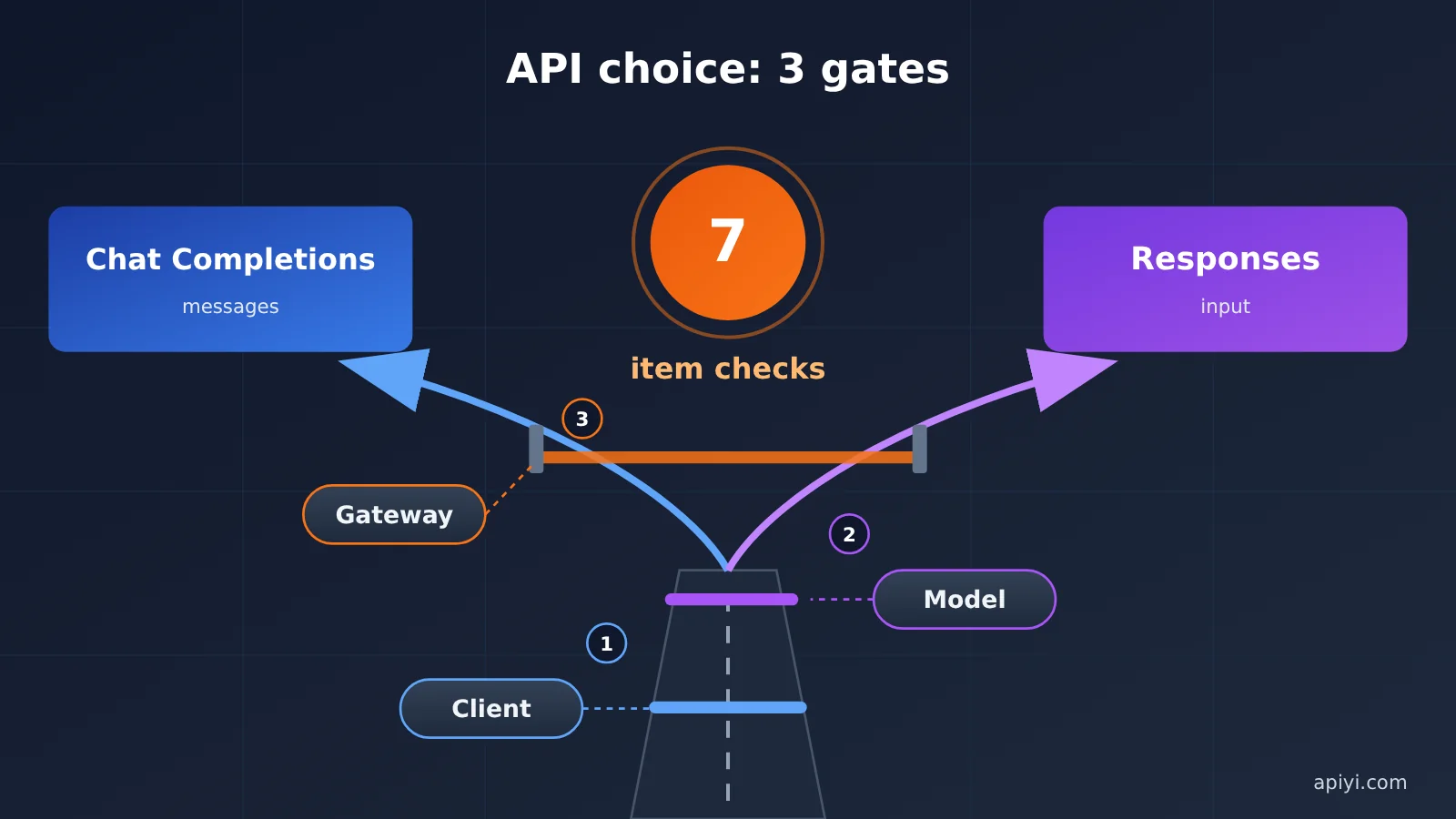
Here’s the bottom line: choosing between Responses and Chat Completions isn’t about which API is newer. It’s determined by the client, the model, and the gateway together. The client determines what requests you can send, the model determines which endpoint provides the capabilities you need, and the gateway determines whether the request reaches the upstream provider unchanged.
So don’t force an API switch just to connect a new model. Remember this rule: If your client doesn’t support an API, don’t use it just because it’s newer. If a model supports only one endpoint, don’t force it onto another. The seven checks, scenario-based decision table, and rollback checklist below will help you catch incompatibilities with tool calls, reasoning parameters, and streaming events before launch.
What’s the Difference Between Responses and Chat Completions?
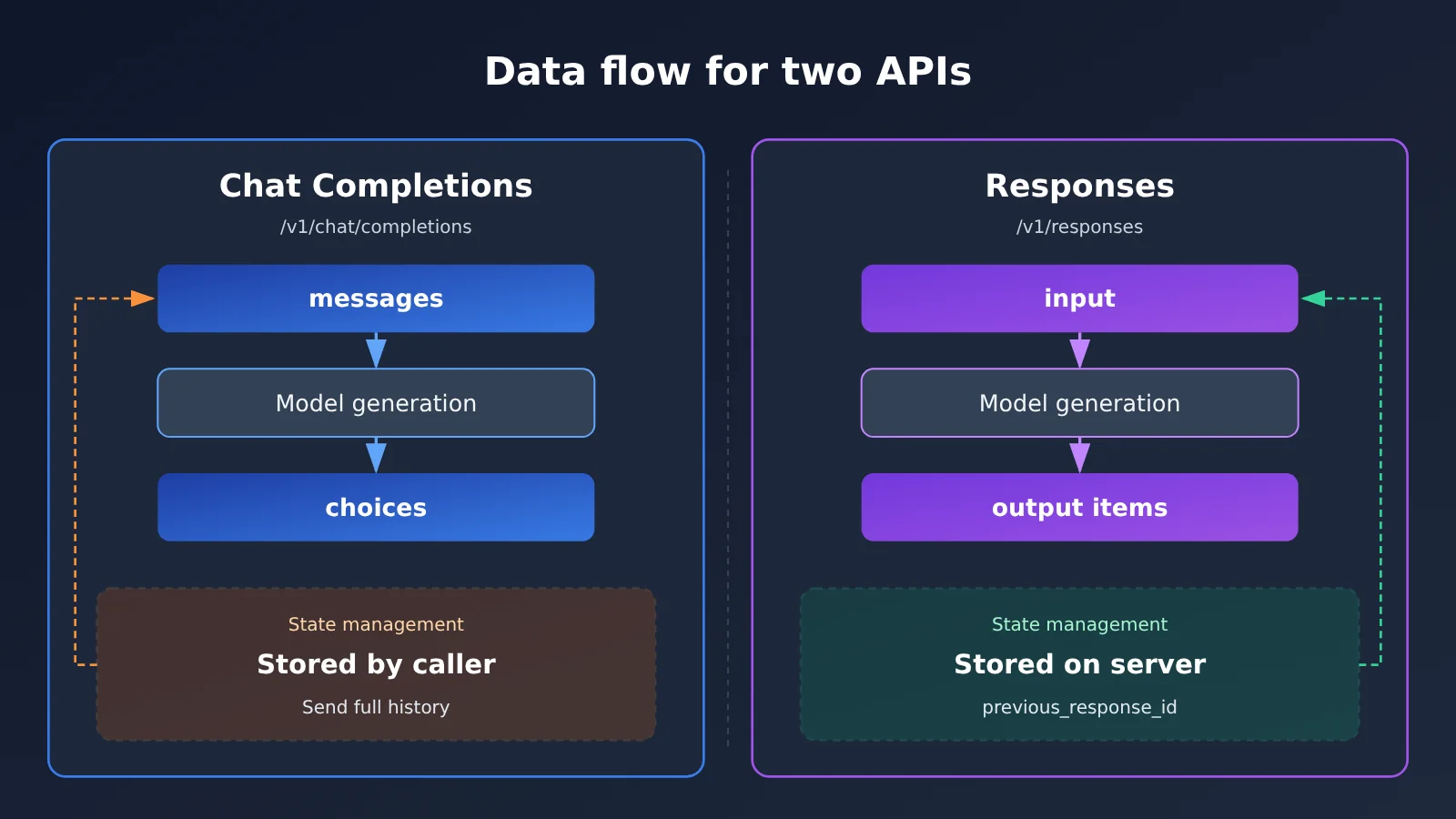
The core difference is the data model: Chat Completions revolves around an array of messages, while Responses revolves around a response object.
Chat Completions requests center on messages, with each message containing a role and content. Other common fields include temperature, max_tokens, tools, and stream. It’s stateless, so the caller maintains the conversation history. In the response, you retrieve message and finish_reason from choices and token usage from usage. It has the broadest SDK and client support.
Responses requests center on input and can include tools, reasoning, and previous_response_id. The response contains an output array, output_text, status, id, and usage. Some newer reasoning models and tool capabilities are available only through Responses, but not every model, SDK, client, or gateway supports it.
| Check | Chat Completions | Responses | Migration risk |
|---|---|---|---|
| Endpoint and request shape | /v1/chat/completions, using messages |
/v1/responses, using input |
Mismatched paths or request bodies break parsing code |
| Multi-turn state | Caller passes the full history | Can use previous_response_id to reference the previous turn |
Expired state or inconsistent context |
| Reasoning and token parameters | max_tokens or max_completion_tokens |
Reasoning configured through reasoning |
Parameters are ignored or cause errors |
| Tool calls | tools plus tool results in messages |
Tool items in output plus corresponding result items |
Mismatched call IDs interrupt the agent loop |
| Streaming events | SSE incremental chunks | Typed SSE events | Premature termination or incorrect text concatenation |
| Multimodal input | Commonly uses image_url content parts |
Commonly uses input items such as input_image |
Images or files are rejected |
| Compatibility | Broad client and gateway support | Depends on the client, gateway, and model | You can set the Base URL but still can’t call the endpoint |
When choosing an interface, work through these checks in order. If they conflict, prioritize getting the client and model working together:
- Check the client first: Does it support Chat Completions, Responses, or the provider’s native format?
- Check the model next: Is the target model available only through a particular endpoint? Does it depend on built-in tools or reasoning options?
- Check the gateway: Does it proxy the target endpoint? Can it handle model mapping and logging?
- Check costs last: For the same task, do token, caching, and retry costs differ between the two interfaces?
Integration tip: The comparison table can help you spot risks, but you’ll still need to confirm endpoint support for your specific model in your actual environment. Start by checking the target model in the APIYI apiyi.com console, then decide how to validate your setup.
How to Check the Request Layer: Responses Integration Checks 1–3
The request-layer takeaway is simple: if the endpoint, state, and parameters aren’t aligned, there’s no point testing tools or streaming yet.
Check 1: Endpoints and Request Shapes for Responses and Chat Completions
Make sure requests go to the right path, and that both the request body and response parsing match the endpoint.
- The difference: One uses
/v1/chat/completions, the other/v1/responses. The former sendsmessagesand readschoices; the latter sendsinputand readsoutput. - Common pitfall: Changing the path without changing the parsing. The request may succeed, but the application can’t find
choices[0].message, making it look like the model returned no content. - How to verify: Send a minimal text request to each endpoint and record the status code, top-level response fields, and
usage. When using APIYI’s OpenAI-compatible interface, usehttps://api.apiyi.com/v1as the Base URL. Check the console and documentation for endpoint and model availability. - How to choose: If the model supports both and your application only needs text, keep using your existing interface. If the model is available through only one endpoint, adapt to that endpoint.
Check 2: Multi-Turn State Management in Chat Completions and Responses
Where you store state determines how you troubleshoot and how much control you have over the context.
- The difference: Chat Completions sends the full
messageshistory on every turn. Responses can useprevious_response_idto reference the previous response and leave some state management to the server. - Common pitfalls: Assuming that sending less content means lower charges. Check the official documentation and actual billing to see whether historical context still counts toward input tokens. State can also expire, so an old response ID may no longer work when you resume a long-running task.
- How to verify: Run a three-turn conversation and confirm that the third turn can reference information from the first. Then test the failure path with an older ID and check whether the error is recognizable. If the gateway has multiple upstream routes, also check whether an ID can be reused across requests, subject to gateway support.
- How to choose: If you need full control over context, auditing, and trimming, sending the complete history is more straightforward. Consider Responses when server-side state would genuinely benefit a long conversation or Agent loop.
Check 3: Reasoning and Token Parameters When Migrating to Responses
The biggest parameter risk often isn’t an error—it’s a parameter being silently ignored. The request succeeds, but the reasoning configuration doesn’t take effect.
- The difference:
max_tokenshas been replaced bymax_completion_tokensfor some newer models; the old field may be ignored or cause an error. Reasoning controls also have different names across providers and interfaces, with common forms including reasoning effort andthinking. - Common pitfall: Using one parameter template for every model. If the client or gateway drops unknown fields, the response may look normal even though the reasoning depth and output limit don’t match your settings.
- How to verify: Change the output limit and reasoning intensity one at a time, then compare response length,
usage, and error messages. If there’s no difference, first check whether the parameter was passed through or supported by the model, then consult the official documentation and gateway guidance. - How to choose: Maintain a parameter mapping for each “model + endpoint” combination rather than grouping broadly by provider. If your application depends on a
reasoningconfiguration, prioritize an interface path that passes the field through unchanged.
How to Check the Capability Layer: Chat Completions Migration Checks 4–6
The takeaway at the capability layer is that both APIs may support the same functionality, but their parsing code generally can’t be reused as-is.
Check 4: Tool Calls in Chat Completions and Responses
Chat Completions supports tool calls. What you need to migrate is the tool schema, call IDs, and how results are returned.
- Difference: Both APIs have tool definitions, but their structures differ. Chat Completions calls usually appear in
tool_callswithin an assistant message; Responses returns calls asoutputitems, and results must be returned using corresponding input items. Check the official documentation for the exact fields. - Common pitfalls: Processing only the first tool in a parallel call, or modifying a call ID before returning it. The model may throw an error on the next turn, or it may continue reasoning with the wrong result—which is harder to debug.
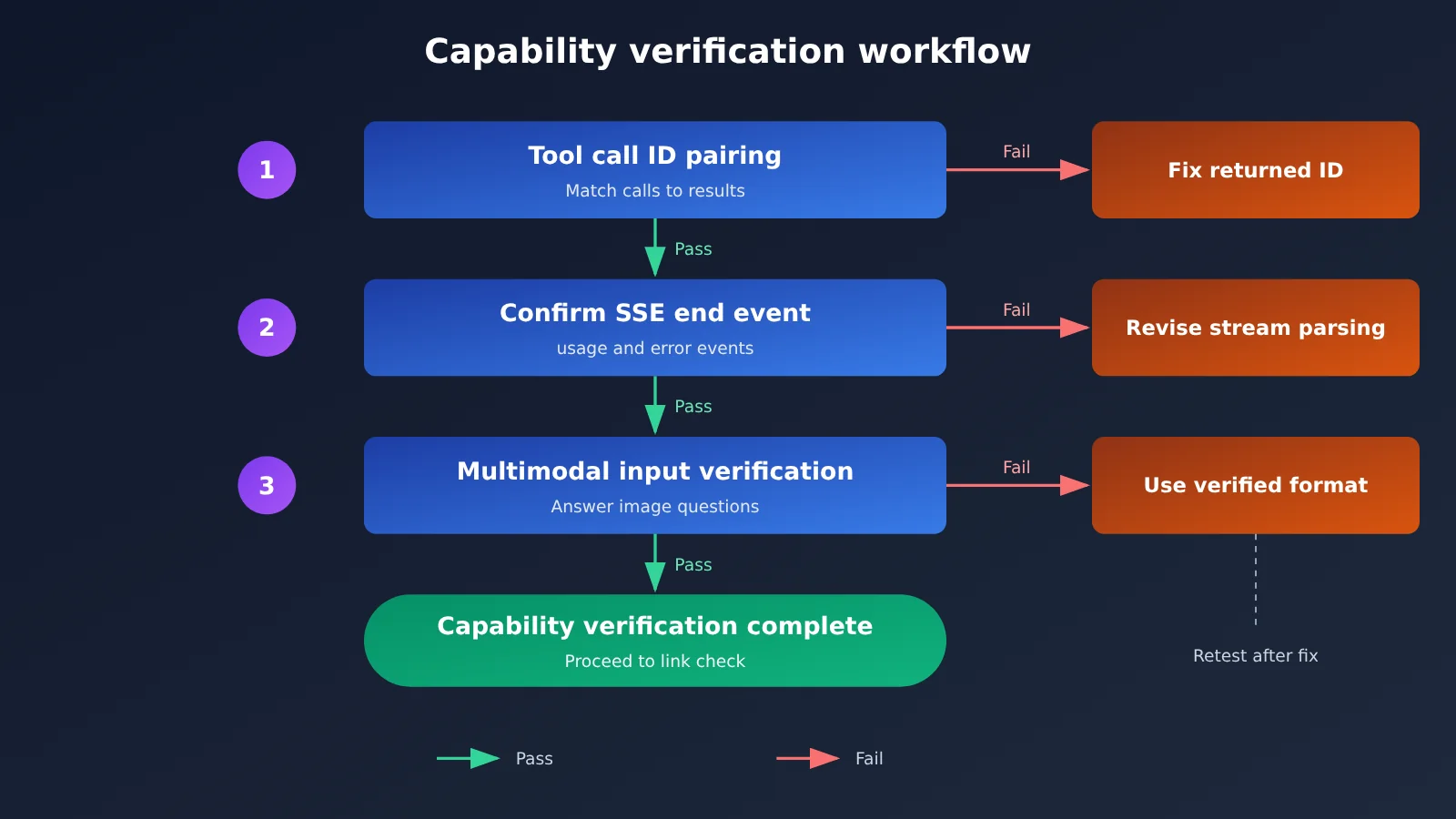
- How to verify: Prepare a single-tool test case and a parallel-tool test case. Check that every call ID is returned unchanged and each result is matched to the right call. Then deliberately make a tool fail and confirm that the agent loop handles the failure and exits cleanly.
- How to choose: If your existing toolchain is stable and you don’t need built-in tools, stay with Chat Completions. If the target model’s built-in tools are only available through Responses, migrate and rewrite the parsing layer.
Check 5: Streaming Events in Responses and Chat Completions
For streaming, it’s not enough to check whether text appears. You also need to verify completion and error handling.
- Difference: Both use SSE, but their event types and completion markers differ. Chat Completions primarily uses incremental chunks, while Responses uses different event types to distinguish text, tools, and completion status.
- Common pitfalls: Treating “received
data” as a sign that the stream is complete, or only concatenating text deltas without handling tool argument deltas and error events. The result may be a truncated response or incomplete tool arguments. - How to verify: Capture a complete raw SSE stream and check the order of deltas, the completion event, where
usageappears, and what happens when an error occurs mid-stream. If a gateway transforms or buffers events, capture the stream again through the gateway. - How to choose: If your client’s streaming parser only understands the Chat Completions format, don’t switch directly to Responses. To make the switch, upgrade the SDK or update the parsing layer first.
Check 6: Multimodal Input When Integrating Responses
Multimodal fields depend on both the API and the provider. A successful text request doesn’t mean images and files will work too.
- Difference: Image fields may use
image_url,input_image, or base64. File and audio input methods also vary by API and provider. - Common pitfalls: Reusing an old content-part structure or assuming both URLs and base64 are supported. Gateway format conversion can also introduce differences in size limits, encoding, or file types.
- How to verify: Send separate minimal requests using an image URL, a base64 image, and your target file type. Confirm that the model actually reads the content. Asking a question that can only be answered by seeing the image is more reliable than checking the status code alone.
- How to choose: If you only need image understanding, start with a format already verified in your current client. If file or audio capabilities depend on a specific endpoint, check the official documentation and gateway support.
How to Check Your Integration: Responses Compatibility, Check 7
The takeaway: being able to configure a Base URL doesn’t mean the client, SDK, and gateway all support Responses.
Check 7: Responses Compatibility Across SDKs, Clients, and Gateways
A request passes through four layers: the client, SDK, gateway, and model. If any layer doesn’t support the new API, you can’t use it.
| Layer | What to check | Common misconception |
|---|---|---|
| Client | Whether it supports the target endpoint and is on a recent enough version | Assuming a Base URL setting means it supports Responses |
| SDK | Whether it provides the target method and event types | Assuming that sending a request means it can also parse streaming responses and tools |
| Gateway | Whether it proxies the target endpoint and requires separate activation | Assuming OpenAI compatibility covers every OpenAI endpoint |
| Model mapping | Whether the model ID is listed and needs mapping | Assuming a model has the same name in the gateway as it does with the official provider |
- The difference: Chat Completions has the broadest compatibility. Responses availability depends on the combination of client, SDK, gateway, and model.
- Common pitfall: The client silently builds the path as
/chat/completions, or the gateway proxies only some fields. If you check only the model name, it’s easy to mistake the issue for a limitation in the model. - How to verify: First, bypass your application code and send a minimal request using an API testing tool. Then send the same request from the client and compare the actual path, request body, and response.
- How to choose: If any layer in the chain doesn’t support the target endpoint, stick with the existing API for now or switch to a format it actually supports.
When working with multiple models, a gateway should ideally minimize changes to the client. APIYI apiyi.com lets you call models from OpenAI, Claude, Gemini, and others with one key. It supports the OpenAI API standard as well as native Claude and Gemini formats, so clients can connect using a protocol they support without a separate integration configuration for each model.
Don’t enter model IDs from memory or copy names directly from another platform. Before migrating, check the model list in the APIYI apiyi.com console for model IDs and available endpoints. Refer to the console and documentation for current pricing and availability, too. This takes very little time and can rule out a wide range of “model not found” and “endpoint not supported” errors.
Responses or Chat Completions: Which Should You Choose?
For most simple tasks, Chat Completions is enough. Switch to Responses when you need capabilities it specifically provides.
| Scenario | Recommended API | Why | What else to check |
|---|---|---|---|
| Coding agents (Claude Code, Codex CLI, Cline, etc.) | Choose a format supported by the client | The client’s protocol implementation determines which options are available; most still primarily use Chat Completions or Anthropic Messages | Protocol configuration, tool calls, and streaming parsing in the current version |
| New OpenAI reasoning models with built-in tools | Prefer Responses | Some reasoning and tool capabilities are only available through Responses | Whether the gateway proxies the endpoint and whether built-in tools are available |
| Long conversations or agent loops | Consider Responses | Server-side state may reduce repeated data transfers | State expiration, consistency, and actual token costs |
| Custom tool calls | Stick with your existing stable API | Chat Completions also supports tool calls; migration costs mainly come from changes to parsing | Parallel calls, call ID matching, and error reporting |
| Unified access to multiple models | Prefer a gateway that supports multiple formats | Avoid changing the client for every model | Model mapping, logs, and parameter differences between models |
| Read-only Q&A or simple classification | Chat Completions | It has sufficient capabilities, broad compatibility, and low migration costs | Whether the output limit parameter is compatible with the target model |
To use this table, find your scenario first, then check the last column. For example, if your target model only offers Responses but your client only supports Chat Completions, don’t force the fields to fit. Upgrade or switch clients, or choose a model available through the supported API.
Consider cost last. Responses isn’t necessarily cheaper: cache hits, retries, and actual token usage all affect the result. A cost comparison is only meaningful when you compare bills for the same task.
Recommendation: If you have several candidate models, compare them using the same set of prompts and tool use cases. With APIYI at apiyi.com, you can switch between models using the same API key and use the free testing credits for new users to run a small-scale evaluation. This can reduce initial integration and configuration work.
Responses and Chat Completions FAQ
The common answer to these questions: check the actual request path before drawing conclusions.
Q1: Do new models only work with Responses?
Not necessarily. It depends on the model and gateway. Some new reasoning models or tool capabilities are only available through Responses, while other models continue to support Chat Completions. Check the official documentation and your gateway’s model documentation before integrating.
Q2: Can Chat Completions still use tool calling?
Yes. Chat Completions supports tool calling. The differences are in the field structure, how tool results are returned, and state management. When migrating to Responses, you’ll usually need to adjust your tool-parsing code rather than reuse it as-is.
Q3: What if my gateway doesn’t support Responses?
First, check whether the target model also supports Chat Completions or the provider’s native format. If it does, keep your existing path. If the model only offers Responses, switch to a gateway that supports the endpoint or connect directly. If you use APIYI apiyi.com, you can check endpoint support for the target model in the console and documentation.
Q4: Why did billing change after migration?
Common reasons include changes in how context is passed, reasoning token usage, cache hit rates, extra rounds from tool calls, and retries after failures. Compare `usage` for the same task, then check the model, request count, and token consumption in the APIYI apiyi.com usage logs.
Q5: When should I roll back?
Roll back if a critical workflow fails, tool results are mismatched, streaming is frequently cut off, or the pass rate, latency, or cost deviates significantly from the baseline without a short-term explanation. Set rollback criteria before migrating so you don’t have to debate them after launch.
Responses Migration and Rollback Checklist
The takeaway: validate in small steps, keep the old path available, and use your baseline to decide whether to proceed.
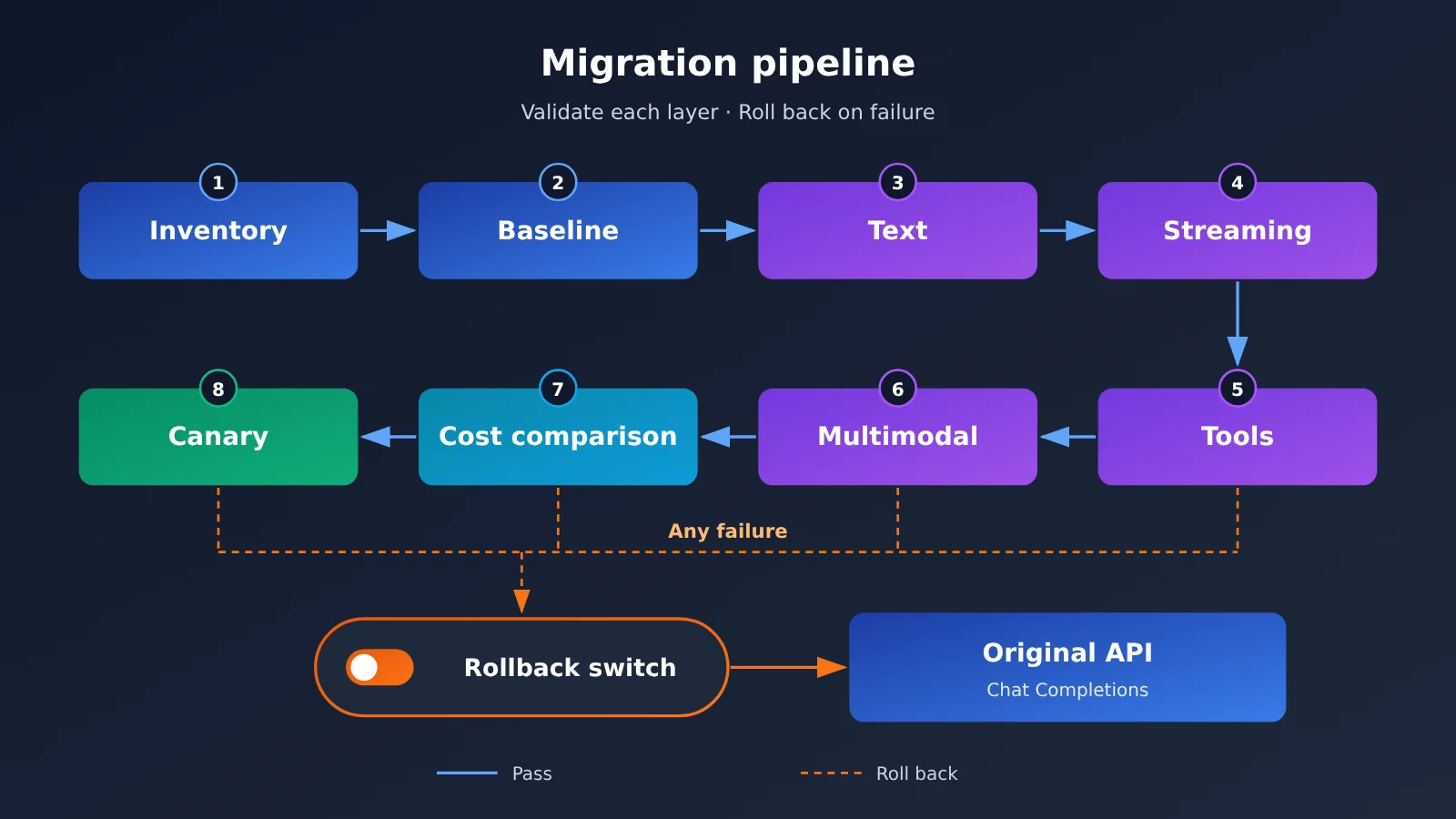
Responses Migration Validation Checklist
- Inventory versions: List your client, SDK, and gateway versions, and confirm they support the target endpoint.
- Check mappings: Verify the endpoint, model ID, reasoning parameters, and token parameters.
- Record a baseline: Save the original API’s success rate, latency, and token costs.
- Keep the old path: Retain the original API configuration and model ID. Use a switch or environment variable to change between them; don’t hard-code the choice.
- Validate text first: Make sure a minimal text request succeeds and the response is parsed correctly.
- Validate streaming next: Confirm that incremental chunks are assembled completely and that completion and error events are handled correctly.
- Validate tools: Make sure both single and parallel tool calls work, with call IDs matched to the correct results.
- Validate multimodal inputs last: Confirm that the model can correctly read the images, files, and other inputs you actually use.
- Explain billing differences: Compare token charges and caching, and account for any differences.
- Roll out to a small percentage of traffic: Start with a small amount of noncritical traffic, and record differences and failure cases.
During validation, compare results from the old and new requests side by side. The APIYI apiyi.com console provides usage and billing views, so you can check logs to see whether the model and consumption for rollout requests match expectations. If anything looks wrong, switch back to the original API configuration and use the failure cases to reproduce the issue.
When to Roll Back to Chat Completions
| What to watch | Recommended action | When to roll back |
|---|---|---|
| Text requests fail | Pause the rollout and check the endpoint and parsing | Roll back if it can’t be fixed quickly |
| Streams are truncated or don’t end | Compare the raw SSE events | Roll back immediately if user-facing output is affected |
| Tool calls are mismatched | Check call IDs and the format of returned results | Roll back immediately if incorrect actions could result |
| Reasoning parameters don’t take effect | Check parameter forwarding and model support | Roll back if output quality is affected and there’s no alternative configuration |
| Costs deviate from the baseline | Analyze tokens, caching, and retries | Roll back if costs exceed the team’s preset threshold and the difference can’t be explained |
Responses or Chat Completions: Key Takeaways
- Selection order: Check the client first, then the model, then the gateway, and finally compare costs.
- Capability boundaries: Responses is suited to models that rely on its exclusive capabilities, but not every model supports it.
- Tool calls: Chat Completions supports tool calls too. Migration mainly involves mapping fields and matching calls to results.
- Validation order: Start with text, then streaming, then tools, and finally multimodal inputs.
- Rollback prerequisites: Keep the old configuration, record a baseline beforehand, and use a switch to change between APIs.
Conclusion: Choosing Between Responses and Chat Completions
If your existing Chat Completions setup is stable and meets your needs, there’s no reason to switch APIs just for the sake of it when it can connect to the new model. If your target model or built-in tools depend on Responses, work through the seven checks step by step. Above all, remember: If your client doesn’t support an API, don’t use it, however new it is. If a model supports only one endpoint, don’t force it to use the other.
When you’re ready to get started, you can use APIYI apiyi.com to confirm model IDs and endpoint support, work through the checklist with minimal requests, and then decide whether to increase traffic.
Author: APIYI Technical Team
Technical discussions: Contact us via the APIYI website homepage. For more integration resources, visit the documentation center at docs.apiyi.com.