Author’s note: Starting with GitHub Desktop’s introduction of short-lived, automatically refreshed tokens, this article breaks down what determines an AI application’s API key exposure window and offers six practical key management actions to take before launch.
When launching a Large Language Model application, many teams first worry about model performance and invocation costs. But the thing that often causes trouble is a long-lived API key: it might be committed to a repository, bundled into frontend scripts, or captured in a debugging screenshot. This article explores the API key exposure window and how to shift from simply “preventing leaks” to “limiting how long a leaked key remains usable.”
This isn’t a generic security primer. We’ll start with a recent GitHub credential update, then turn to a practical checklist for AI application developers. Along the way, we’ll distinguish general security principles from features that depend on the platform you use.
What you’ll learn: By the end, you’ll be able to estimate your application’s API key exposure window and know how to shorten it through storage, scope, monitoring, and rotation.
What Is an API Key Exposure Window? A Look at GitHub’s Short-Lived Tokens
On November 2, 2026, GitHub announced in its changelog that eligible accounts could use short-lived, automatically refreshed authentication tokens when signing in to GitHub Desktop 3.6.10 or later. The reason was straightforward: short-lived access tokens reduce the amount of time a leaked token can be exploited. GitHub Desktop also refreshes the tokens automatically for GitHub API requests and Git operations, so users don’t need to renew them manually.
A few details are worth noting. The feature is rolling out gradually on github.com, including GitHub Enterprise Cloud, so it isn’t available to everyone yet. It doesn’t include GitHub Enterprise Server. Existing sessions remain signed in after upgrading, and existing tokens aren’t automatically migrated. Short-lived tokens are issued when you sign in after the rollout reaches your installation. In other words, old long-lived tokens still exist, and the security benefits only begin to take effect after you sign in again.
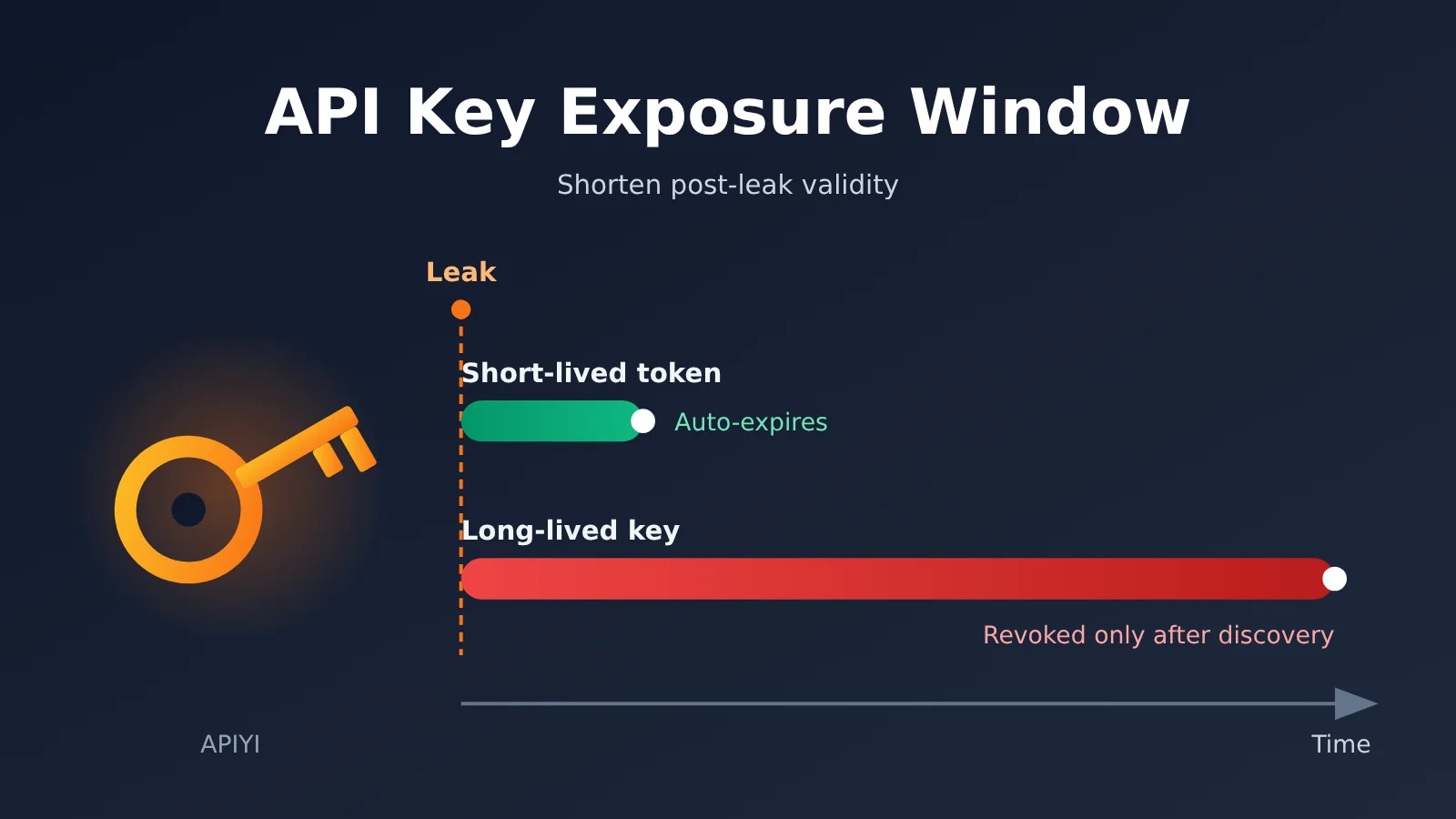
This update highlights a security principle: credential leaks are nearly impossible to prevent completely, but you can design how long a leaked credential remains usable. We call the period from when a key is exposed until it becomes completely invalid the API Key exposure window. The longer the window, the more time attackers have to exploit the key and the more damage they can cause.
How the API Key Exposure Window Differs From the GitHub Scenario
First, there’s an important limit to this analogy. GitHub Desktop tokens are user login credentials held and automatically refreshed by the client. In AI applications, a Large Language Model API key is usually a server-side credential held long-term by the backend, and many platforms don’t make it expire automatically by default. The two have different risk models, so you can’t simply apply the same automatic refresh approach to both.
| Comparison | GitHub Desktop Short-Lived Token | AI Application Server-Side API Key |
|---|---|---|
| Credential type | Access token issued after a user signs in | API key generated by a platform for an account or project |
| Held by | Desktop client | Application backend, CI pipelines, operations environments |
| Lifetime | Short-lived and automatically refreshed by the client | Usually long-lived; expiration support depends on the platform |
| Renewal | Automatic and transparent to the user | Generally requires manual replacement and redeployment |
| Duration of impact after a leak | Limited by the token’s validity period | Continues until the leak is discovered and the key is revoked |
The last row gets to the heart of the problem. For a server-side API key, if the platform doesn’t offer an expiration mechanism, the exposure window depends almost entirely on how quickly you discover the leak and replace the key.
Key Takeaways on the API Key Exposure Window
Before you start taking inventory, establish three ways to think about the problem. They’ll help you decide where to focus your efforts.
| Key point | Explanation | Why it matters |
|---|---|---|
| Window = detection time + response time | Long-lived keys have no inherent upper limit on their exposure window | Shortening the window requires both monitoring and key rotation |
| Blast radius = what the key can access + how much it can spend | The more resources a key can access, the greater the potential loss from a single leak | Encourages separate keys for each application and environment |
| Short-lived credentials need automatic renewal | Shorter lifetimes are safer, but manual renewal can overwhelm a team | Security and efficiency need to be designed together |
| The principles are universal, but capabilities vary by platform | Features such as expiration, spending limits, and IP restrictions vary by platform | Helps you avoid mistaking assumptions for existing protections |
The Four Stages of an API Key Exposure Window
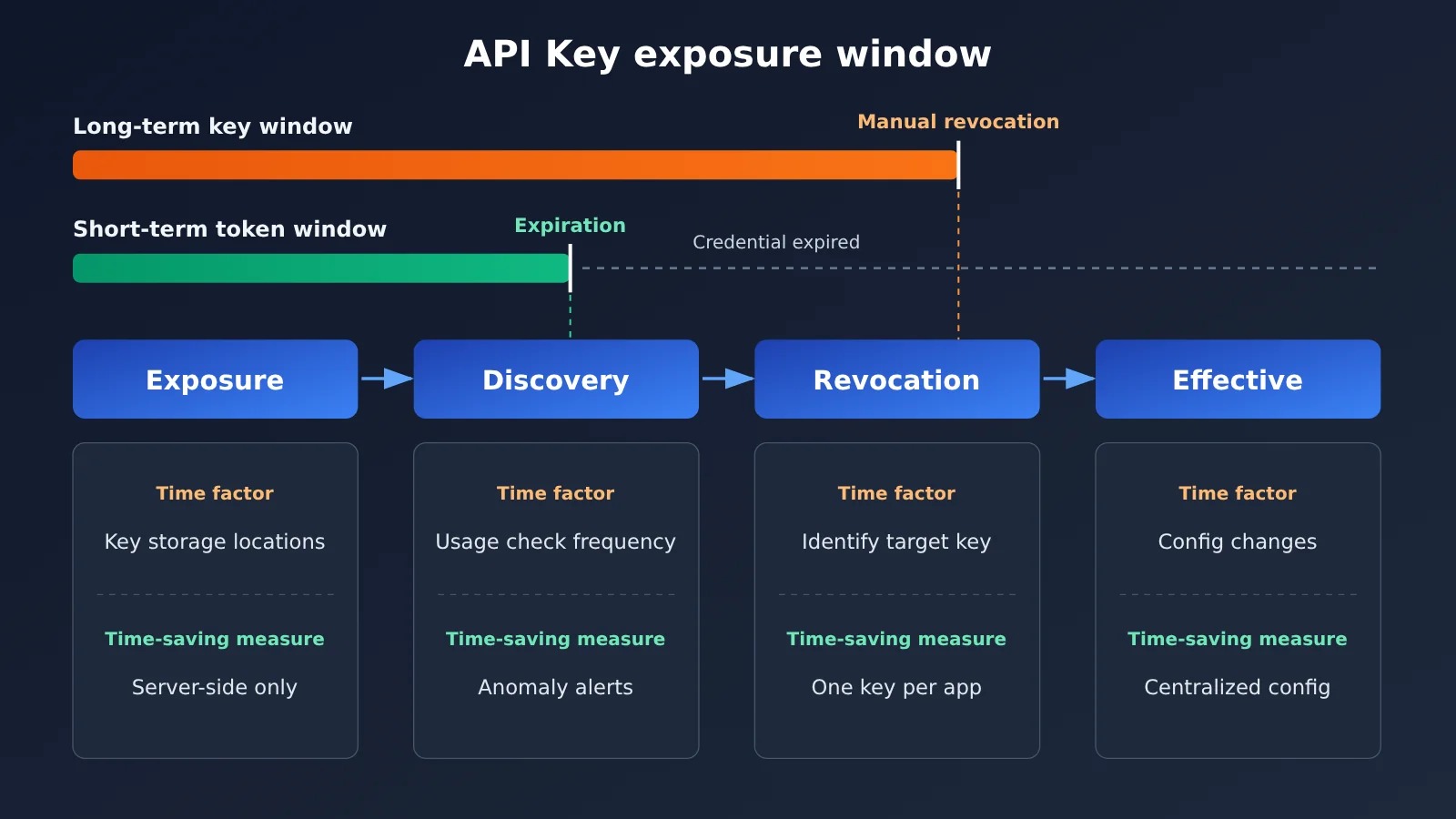
A leak can be broken down into four stages: the key is exposed, the anomaly is detected, the key is revoked or rotated, and the new key takes effect across all services. Each stage has its own factors that affect how long it takes. A delay in any one of them extends the overall window.
| Stage | What affects the time required | How to shorten it (general principles) |
|---|---|---|
| Exposure | How many places the key appears in | Store it only in server-side environment variables or a secrets management service |
| Detection | Whether anyone monitors usage and billing | Review usage statistics regularly and set up anomaly alerts |
| Revocation | Whether you know which key to remove | Use one key per application, with clear, traceable names |
| Activation | How many configurations need updating after rotation | Manage configuration centrally and maintain a rotation process you can rehearse |
Short-lived tokens address the “revocation” step: even if no one detects the leak, the credentials expire on their own. If your platform doesn’t currently support expiration times, you’ll need to focus on “detection” and “activation” to make manual response as fast as possible.
Why Unified Keys Make the API Key Blast Radius More Important
More and more teams now access Large Language Models through aggregation platforms. Take APIYI, for example: a single API key can access all models on the platform, making development and model switching convenient. But from a security perspective, that also means that if the key leaks, an attacker can access not just the model you’re using, but every available model—including more expensive ones.
With a unified interface, it’s especially important to plan ahead for what a key can do, rather than focus only on whether it might leak. A sensible approach is to avoid using one key for everything: use separate keys for production, testing, internal tools, and third-party collaboration, so a problem affects only one area. APIYI supports API key (token) management in its console, so you can plan key allocation by purpose before launch instead of splitting keys after an incident.
How to Shorten the API Key Exposure Window: 6 Steps Before Launch
These six steps follow a simple order: contain the risk, set up monitoring, then run drills. They don’t rely on advanced features from any particular platform, and most teams can complete an initial review in an afternoon.
Step 1: Make Sure API Keys Stay on the Server
The most common—and most serious—exposure path is putting keys directly in browser-side scripts or mobile app packages. Treat anything shipped to a user’s device as public; bundling and minification don’t protect it.
- Check frontend build artifacts for long strings that look like keys.
- Always route frontend calls to a Large Language Model through your own backend.
- Have the backend read keys from environment variables (such as
LLM_API_KEY) or a secrets management service, rather than putting them in source code.
Step 2: Protect Your Code Repositories and Logs
Code repositories and logs are another major source of leaks. Keys temporarily hardcoded during debugging, accidentally committed .env files, and logs that print complete request headers can all be exposed later.
- Exclude
.envand other local configuration files in.gitignore - Enable your code hosting platform’s secret scanning feature (check its documentation for supported capabilities)
- Redact fields such as
Authorizationbefore logging, keeping only the last few characters for troubleshooting
Step 3: Use Separate API Keys for Each Application and Environment
Separate keys limit the exposure from a leak and make it clear which key to revoke. A useful naming convention is “application-environment-purpose,” such as chatbot-prod-backend or chatbot-staging-ci.
When creating tokens in the APIYI console, use this naming convention and check usage statistics for each token. That way, if a token shows unusual activity, you can immediately identify the application and environment involved.
Action 4: Set Up Usage and Billing Anomaly Detection
For keys that don’t expire automatically, the time it takes to discover a leak is often the longest part of the exposure window. Many leaks aren’t caught by security tools—they’re only noticed when the bill arrives at the end of the month.
- Review usage and spending trends daily or weekly, rather than waiting for the monthly bill
- Watch for spikes outside working hours and invocation records for unfamiliar models
- If the platform supports spending limits or alerts, enable them first; if it doesn’t, use your own backend to count calls and implement a circuit breaker
The APIYI console provides usage statistics and billing information. Include both in your routine post-launch checks so you can spot anomalies within hours, not weeks.
Action 5: Build Your Own “Short-Lived Tokens” at the Application Layer
Even if your upstream provider’s API key is long-lived, you can still borrow GitHub’s approach in your own system. Keep the long-lived key only on your backend, and have the backend issue its own short-lived session tokens to your frontend or downstream services, renewing them automatically before they expire.
That way, even if a user’s device or a downstream service is compromised, the leaked credential is just a session token that expires quickly—not an upstream key that can invoke every model. That’s the essence of GitHub Desktop’s point: shorten the window in which a leaked credential can be used, while taking renewal out of the daily workflow.
Step 6: Run a Full API Key Rotation Drill
Many teams don’t realize that rotating a key means updating five or six places and coordinating multiple deployments until a key actually leaks. Before launch, run through the entire process: create a new token, update every configuration, confirm the service is working, delete the old token, and record how long it all takes.
That duration is the actual length of your “activation” phase. If the platform supports multiple valid keys at once, deploy the new key before revoking the old one for a seamless transition. If it doesn’t, reserve a short maintenance window.
| Check | Warning sign | Recommended action |
|---|---|---|
| Storage | A key appears in frontend code or an installation package | Route requests through the backend so the frontend never handles the key |
| Repositories and logs | Keys appear in commit history, or logs print complete request headers | Rotate the keys immediately, add ignore rules, and redact sensitive data |
| Key granularity | All environments share one key | Use separate keys for each application, environment, and purpose, with consistent naming |
| Detection | You only check the bill at the end of the month | Review usage statistics regularly and configure alerts |
| Frontend credentials | Upstream keys are sent directly to the frontend | Create short-lived session tokens and renew them automatically |
| Rotation process | You’ve never practiced and don’t know what needs updating | Run a drill and record the steps and time taken |
🚀 Getting started: If you access multiple models through APIYI apiyi.com, use the time before launch to reorganize your tokens by application and environment. Add the usage statistics page to your team’s routine checks—it’s the lowest-cost step you can take for quick results.
API Key Exposure Window: General Principles vs. Platform Capabilities
The easiest mistake to make when writing a security plan is treating features a platform should have as features it does have. The table below separates actions you can take right away from those that depend on platform support.
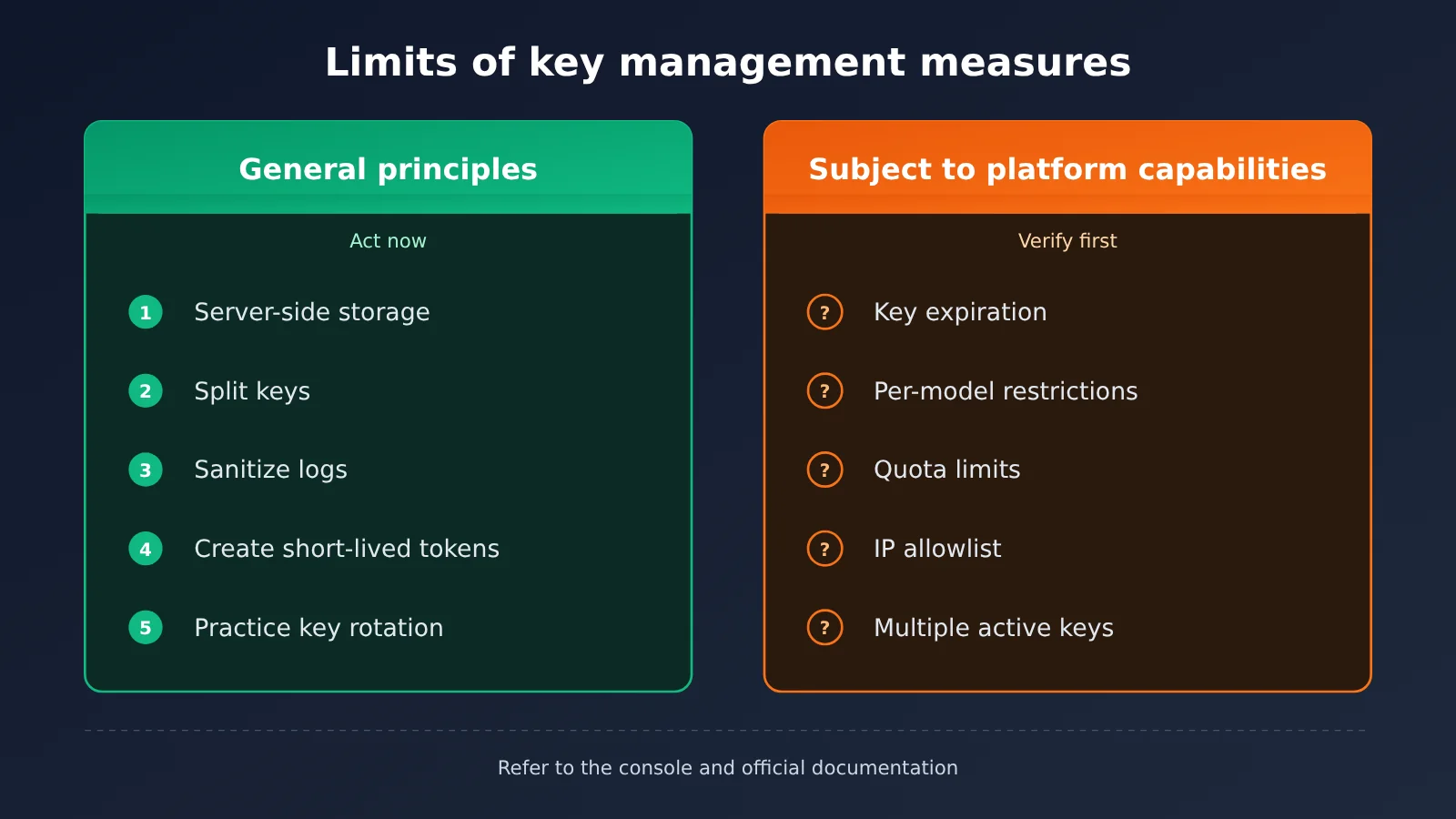
| Measure | Type | Description |
|---|---|---|
| Store keys only on the server | General principle | Applies regardless of platform |
| Use separate keys for each application and environment | General principle | Requires the platform to support multiple keys |
| Redact logs and scan repositories | General principle | Depends on your own engineering processes |
| Use short-lived application tokens | General principle | Implemented in your backend, independent of the upstream provider |
| Set key expiration times | Subject to platform support | Check the console or ask platform support |
| Restrict by model or spending limit | Subject to platform support | If unsupported, enforce limits in your own backend |
| Use an IP allowlist | Subject to platform support | If unsupported, you can enforce access indirectly through a fixed-egress gateway |
If your platform doesn’t support the capabilities in the right-hand category yet, don’t worry. The general measures can already close off most exposure paths and significantly reduce the time it takes to detect and respond to a leak. Before going live, check specific features directly in the APIYI console or contact platform support for an accurate answer.
Frequently Asked Questions
Q1: What is an API key exposure window?
It’s the period between a key being exposed and becoming completely invalid. For a long-lived key, this window equals the time it takes to discover the exposure plus the time it takes to complete the replacement. There’s no built-in upper limit. Short-lived tokens add a hard limit to that window.
Q2: How are GitHub Desktop’s short-lived tokens different from Large Language Model API keys?
GitHub Desktop’s short-lived tokens are access credentials issued after a user signs in and automatically refreshed by the client. Large Language Model API keys are usually held by a server for long periods, and expiration support depends on the platform. Both can follow the principle of shortening credential lifetimes, but you can’t apply the same implementation directly to both.
Q3: When can I use GitHub Desktop’s short-lived tokens?
According to GitHub’s changelog published on November 2, 2026, you’ll need GitHub Desktop 3.6.10 or later, and only eligible accounts can use the feature. It’s rolling out gradually on github.com and GitHub Enterprise Cloud, but not on GitHub Enterprise Server. Existing tokens aren’t migrated automatically.
Q4: What security precautions should I take if one key can access all models?
A unified key is convenient, but it also increases your exposure: if it’s leaked, an attacker can call any available model. Use separate keys for each application and environment, and review usage regularly. With a unified interface platform like APIYI, you can manage multiple tokens in the console and use usage statistics to trace unusual activity to its source.
Q5: What should I do first if I suspect an API key has leaked?
First, create a new key and update your service to use it. Once you’ve confirmed everything works, revoke the old key immediately. Then investigate the source of the leak, such as commit history, logs, or frontend build artifacts. If you’re calling models through APIYI, you can create and delete tokens in the console, then use usage statistics and billing records to assess activity during the exposure.
Q6: Can I still shorten the exposure window if the platform doesn’t support key expiration?
Yes. You can issue short-lived session tokens from your own backend so the upstream key never leaves the server. You can also speed up detection and response by regularly reviewing usage and practicing your key replacement process in advance. These measures don’t depend on platform features, so you can put them in place right away.
Q7: Do short-lived tokens make development and operations more difficult?
They can if you have to renew them manually. GitHub Desktop offers a useful example: tokens refresh automatically in the background without the user noticing. When implementing short-lived tokens in your own system, automate renewal too. Otherwise, your team may switch back to long-lived credentials for convenience.
API Key Exposure Window: Key Takeaways
- You can design for a shorter exposure window: Key leaks are hard to eliminate, but you can limit how long a leaked key remains usable.
- The window has four stages: Exposure, detection, revocation, and enforcement. Delays in any stage can increase the damage.
- Unified keys need extra attention to exposure: When one key can access every model, splitting keys and monitoring usage become even more important.
- Short-lived tokens need automatic renewal: Simply shortening token lifetimes without automation is hard for teams to sustain.
- Separate principles from capabilities: Features such as expiration, spending limits, and IP restrictions depend on what the platform supports.
- Start with an audit: In the APIYI console, plan token allocation by application and environment, and include usage statistics in routine checks.
Summary
The key takeaways for managing API key exposure windows:
- Shift your thinking: Move from “only prevent leaks” to “reduce how long a leaked key remains usable.” That’s the logic behind GitHub Desktop’s introduction of short-lived, automatically refreshed tokens.
- Work on both ends: When long-lived server-side keys don’t expire automatically, shorten the window by detecting leaks faster and making keys easier to replace.
- Control the exposure surface: When using a unified interface, split keys by application and environment to limit the impact of any single leak.
Spending an afternoon on the six audit items in this article before launch is much easier than investigating unexpected bills afterward. If you’re using APIYI at apiyi.com to invoke multiple Large Language Models, open the console now, check token allocation and usage statistics, and make key management a required item on your launch checklist.
📚 References
- GitHub Changelog – GitHub Desktop adds short-lived authentication tokens: Official announcement of GitHub Desktop’s short-lived, automatically refreshed tokens
- Link:
github.blog/changelog/2026-11-02-github-desktop-adds-short-lived-authentication-tokens/ - Details: Covers supported versions, rollout scope, and migration rules for existing tokens. It’s the factual source for this article’s introduction.
Author: APIYI Technical Team
Technical inquiries: For details about features such as token management and usage statistics, visit the APIYI website at apiyi.com and contact us.