Author’s note: Starting with an opencode user’s discovery that “memory only lasts within a session,” this article explains what session-level memory means, where it falls short, and six criteria for choosing a cross-session memory solution.
If you regularly use AI coding tools like opencode, you may have run into this: yesterday, you spent hours discussing project conventions with the AI. Today, you start a new session, and it asks the same questions as if you’d never met. In November 2026, a V2EX user posted that, after reading another discussion, they’d discovered that opencode’s memory is session-level and wanted to know which memory plugin people use.
This isn’t just one user’s misunderstanding, and it isn’t limited to a single tool. Session-level memory is the default way many AI coding tools work. That said, the original post was only one sentence long, and the discussion it referenced isn’t part of our source material. For a complete explanation of opencode’s memory mechanism, consult the official documentation. So rather than recommend specific plugins, this article lays out the questions to ask when choosing a cross-session memory solution.
What you’ll learn: By the end, you’ll be able to decide whether you really need cross-session memory and use six criteria to evaluate any memory plugin or alternative approach—without installing a plugin that makes your context messier.
What Is Session-Level Memory in AI Coding Tools?
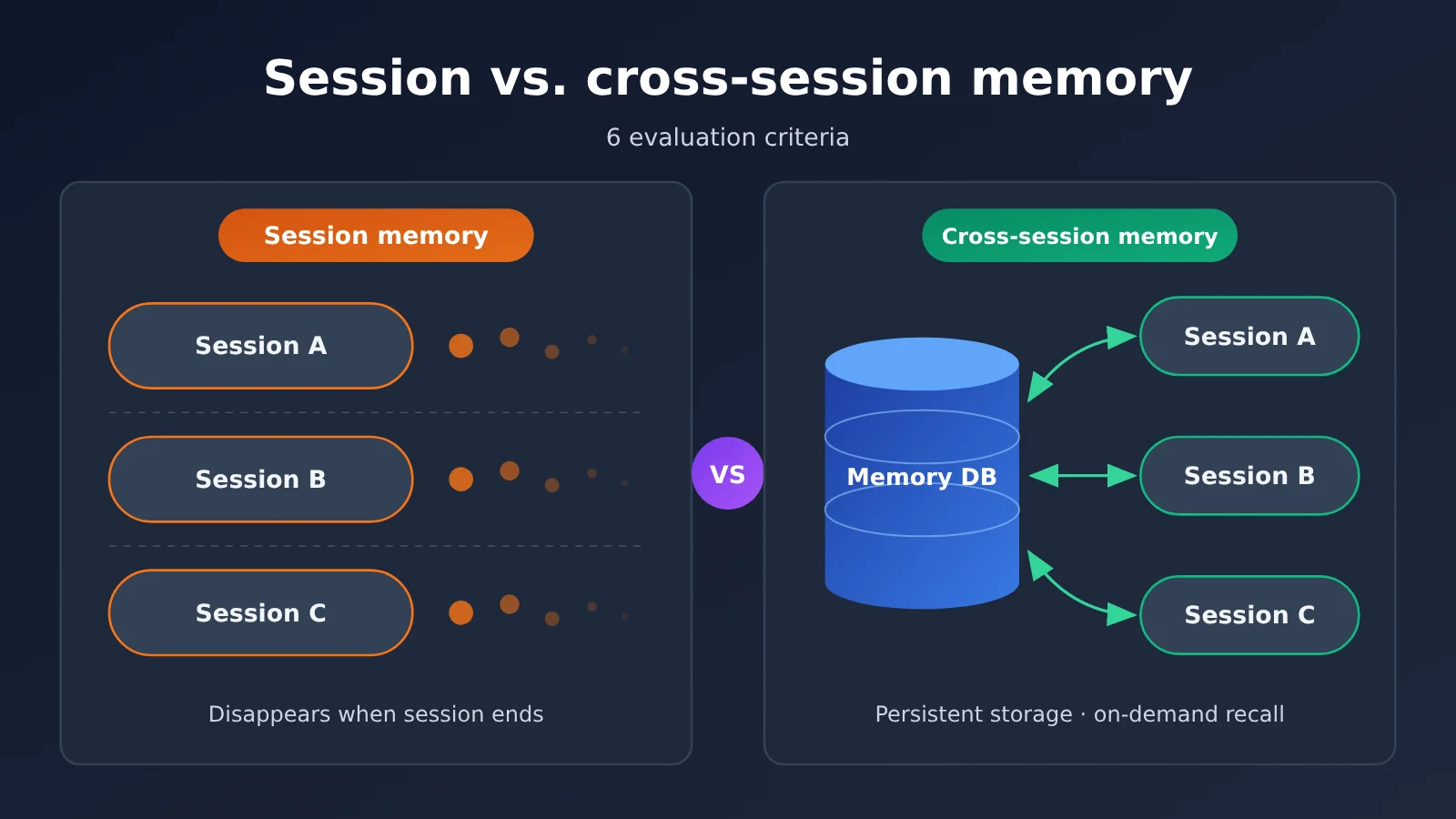
“Session-level memory” isn’t a strict technical term. The community generally uses it to describe a familiar behavior: AI remembers what you’ve said within a conversation, but that information doesn’t automatically carry over when you start a new one. To understand why, it helps to distinguish between several types of “memory” that are often confused.
| Memory layer | Description | What it means for users |
|---|---|---|
| Context window | Everything the model can see in a single request, including message history and files it has read | The underlying source of what the AI “remembers” within a session, with a fixed size limit |
| Session history | Messages saved by the tool within a session, which you can review or resume | You can restore a session, but it won’t automatically affect new ones |
| Project-level instructions | Rule files stored in the project and read by the tool at startup | The most reliable form of “long-term agreement,” but it requires manual maintenance |
| Cross-session memory | Information extracted, stored, and recalled automatically or semi-automatically | Brings past experience into new sessions, but requires choosing and managing a solution |
How Session-Level Memory Works
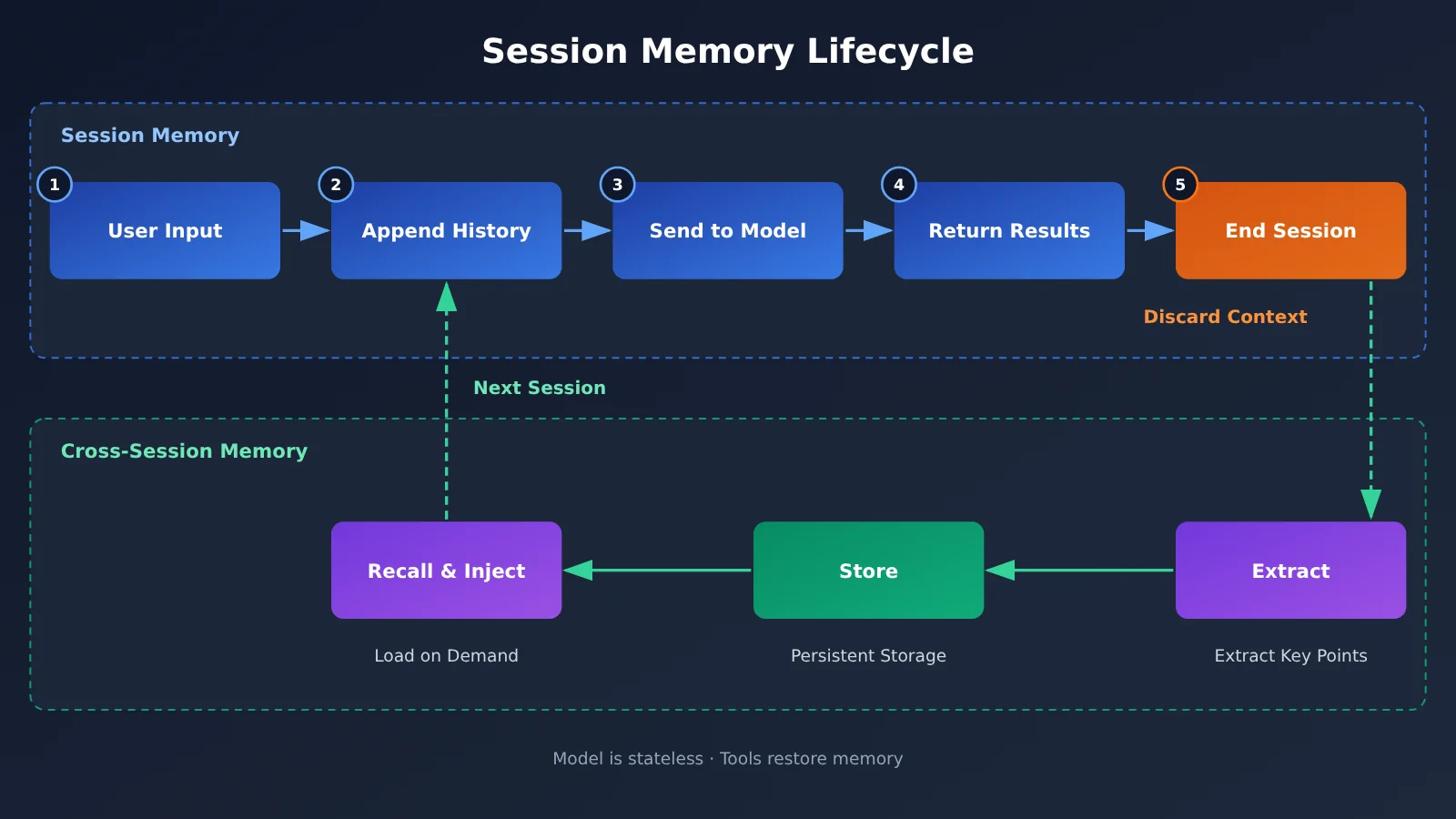
Large Language Models are stateless. For each request, the tool packages the conversation history, system prompt, and relevant file contents together and sends them to the model. That’s how the model “knows” what happened before. In other words, remembering within a session comes down to the tool continually putting history back into the context window.
Once a session ends, a new one starts with a blank slate—unless the tool actively stores some information elsewhere and retrieves it at the start of the next session. As a session grows longer and its history expands, the tool may also compress or truncate that history. Early details can be “forgotten” even within the same session.
The Limitations of Session-Level Memory
Session-level memory has three main drawbacks. First, there’s repeated communication: in every new session, you have to explain your tech stack, naming conventions, and prohibited dependencies again. Second, experience doesn’t carry over. If you work out a solution after hitting a snag, the AI won’t know about it the next time you encounter a similar problem. Third, switching between tasks is more costly. When you open multiple sessions to work on different modules in the same project, they don’t share background information.
Session-level memory does have advantages, though: the context stays clean, old incorrect assumptions can’t contaminate new tasks, and privacy boundaries are clearer. Those are important trade-offs to consider when choosing a solution.
Why You Might Need Cross-Session Memory: First, Decide Whether You Actually Need It
Not everyone needs a cross-session memory plugin. Many people hear that “memory is session-scoped” and rush to install one, only to end up with another system to maintain and little to show for it. Start by checking the signals below.
| Usage signal | Do you need cross-session memory? | A better approach |
|---|---|---|
| You have to explain project conventions in every new session | Not necessarily | Start with a project-level instructions file |
| You maintain the same large project over time and have accumulated lessons from past issues | Yes | Consider a searchable memory solution |
| Most tasks are one-off scripts or small, independent problems | No | Stick with session-scoped memory |
| Multiple team members share the same AI conventions | Partly | Put the conventions in the repository under version control |
| You work with sensitive information such as client code or keys | Use caution | Prefer local storage, or record only sanitized information |
| You want AI to remember your personal coding preferences | Yes | Keep user-level memory separate from project memory |
In practice, having to repeat project conventions is the most common pain point, but a well-maintained instructions file can solve much of it. Automated cross-session memory is most useful for scattered lessons from long-running projects that are hard to document in advance—like an API’s unexpected behavior or the real cause of a build failure.
There’s another easily overlooked issue: the more memories you have, the more content gets added to the context each time, and the more tokens you use. Recalling and summarizing cross-session memories often requires additional model calls. If you’d like to compare the quality and cost of summarization across models first, you can use APIYI’s unified interface at apiyi.com to compare several mainstream models using the same invocation method.
4 Approaches to Cross-Session Memory
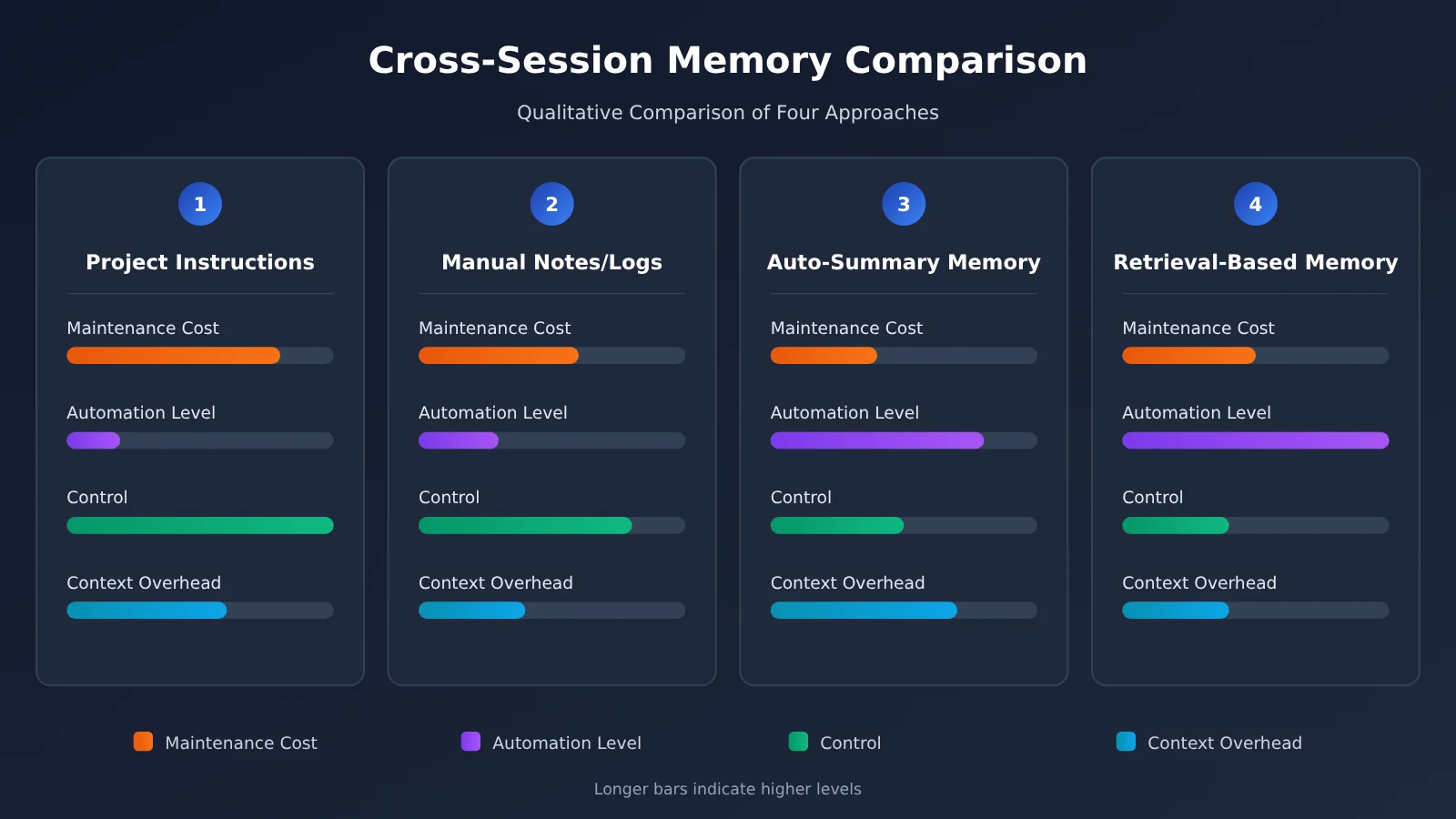
The community replies to the original post and details about specific plugins are outside the scope of this article, so we’ll group common solutions into four categories based on how they’re implemented. When evaluating a memory plugin, start by identifying its category, then consider the trade-offs it makes within that category.
| Solution Type | Key Characteristics | Best For | Requirements |
|---|---|---|---|
| Project instruction files | Rules written by hand and loaded in full at startup | Stable conventions, team sharing | Tool support for reading rules files |
| Manual notes / work logs | AI writes a summary at the end of a session, which you manually reference next time | Personal projects, lightweight needs | Model’s summarization capabilities |
| Automatic summary memory | A tool or plugin automatically extracts and persists key points | Frequent use, minimal manual maintenance | A summarization model, accessible through platforms such as APIYI |
| Retrieval-based memory store | Memories are stored as vectors and retrieved by relevance | Large, long-term projects with lots of accumulated knowledge | Embedding model and storage, often integrated through extensions such as MCP |
Chart note: The chart above is a qualitative comparison of approaches, not benchmark data for any specific plugin. If you want to test models used for automatic summarization or retrieval, you can use APIYI apiyi.com to switch between models and compare their results.
Comparing Cross-Session Memory Solutions
Project instruction files: These lead in control and transparency. The content lives in your repository, so you can review it, roll it back, and share it with your team. But someone has to maintain it, and it can’t capture bits of experience that nobody thinks to write down. Automated memory is better suited to accumulating information you didn’t know you’d need in advance.
Manual notes: Having AI write a work log at the end of a session and referencing it in the next one is the lowest-cost option, with no additional dependencies. But it relies on you remembering to do it, and logs need organizing as they accumulate. If you’ve just discovered the limits of session-level memory and aren’t sure how much you need, this is the safest place to start.
Automatic summary and retrieval-based memory: These are more automated and better suited to heavy users. But retrieval quality varies, and they may inject outdated or incorrect memories into new sessions. Troubleshooting can also be harder than with instruction files. When choosing one of these solutions, the ability to view and delete memories, discussed later, is especially important.
How to Choose a Cross-Session Memory Solution: 6 Criteria
Whatever plugin the community recommends, you can evaluate it against these six criteria. The plugin ecosystem changes quickly, so check each project’s latest documentation for current features.
| Criterion | Questions to Ask | Ideal State |
|---|---|---|
| 1. Storage location | Are memories stored locally, in the project directory, or in a remote service? | Local storage is available for sensitive projects, and it’s clear where data goes |
| 2. How memories are written | Are memories extracted automatically, written when the AI invokes a tool, or confirmed manually? | Important memories can be confirmed manually |
| 3. Recall mechanism | Are all memories injected, or are they retrieved by relevance? Can you control how many are recalled? | Memories are recalled as needed without filling up the context window |
| 4. Observability | Can you view, edit, and delete existing memories? | Memories are readable text that can be corrected at any time |
| 5. Scope | Does it distinguish between user-level, project-level, and session-level memories? | Memories from different projects don’t interfere with one another |
| 6. Cost and compatibility | Does it make additional model invocations? Could tool updates cause it to stop working? | Costs can be estimated, and the project is actively maintained |
Cross-Session Memory Storage and Writing
Storage location determines your privacy boundaries. If you work with company or client code, memories may contain business logic, internal paths, or even configuration details. Storing them in a remote service without knowing where the data goes is risky. How memories are written determines their quality: fully automatic writing is convenient, but it’s also the most likely to accumulate noise.
Cross-Session Memory Recall and Governance
The recall mechanism is key to a good experience. Injecting all memories works well when there are only a few, but as they accumulate, they take up space in the context window and can interfere with the current task. Observability is essential for governance: if you can’t find and delete an incorrect memory, it can repeatedly mislead the AI in every new session.
Cost is often underestimated. Automatic summarization and vector search can both involve additional model invocations. When evaluating a solution, try it on a small scale first and track the extra token usage over a week. With an aggregator such as APIYI apiyi.com, you can compare the cost of different summarization models under the same account and decide which combination offers better value.
Getting Started With Cross-Session Memory: No Tool Changes Required
Before choosing a memory plugin, try the gradual approach below. It doesn’t require coding or depend on a specific plugin, and it works with most AI coding tools.
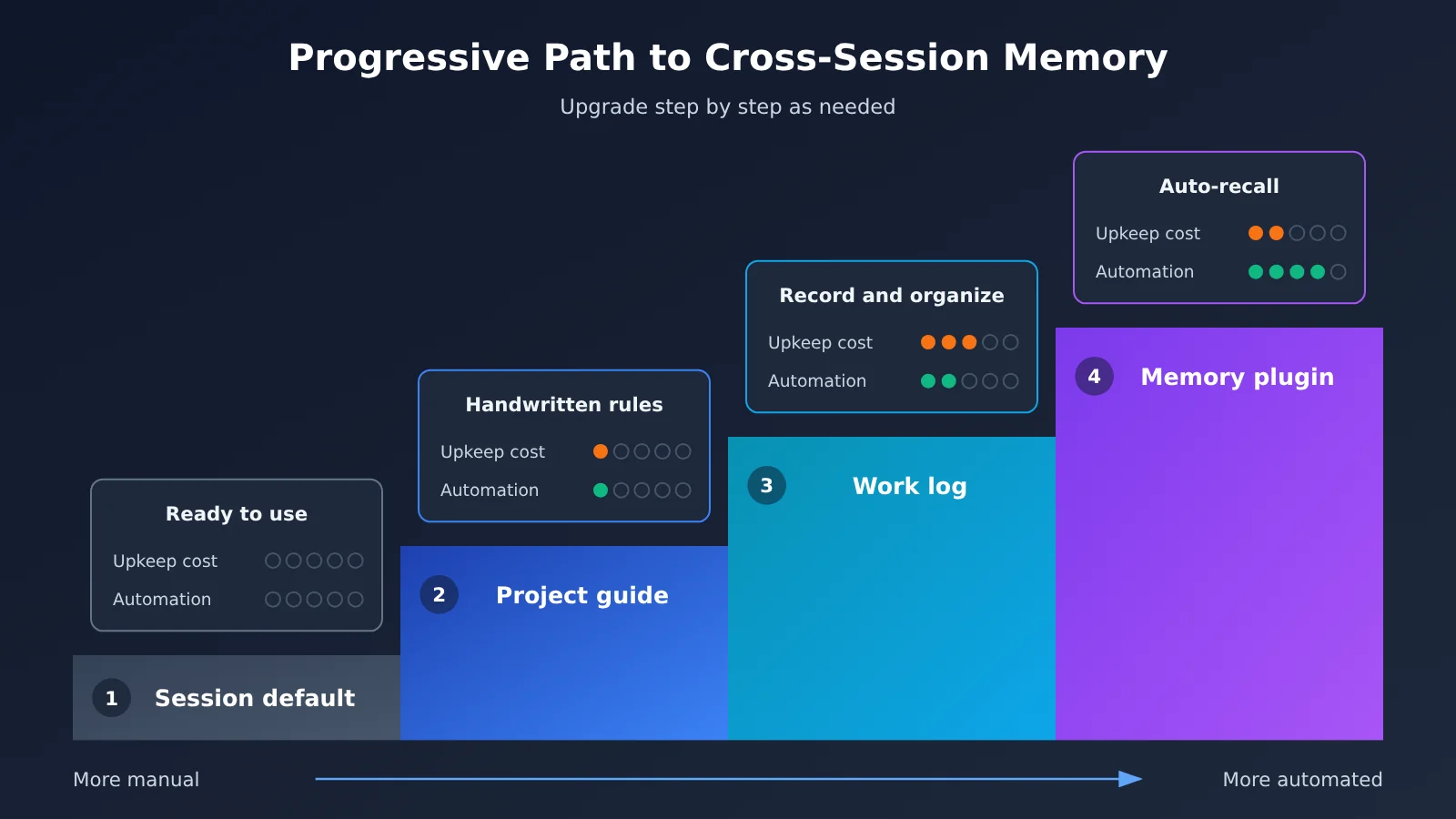
- Check what your tool already supports: Consult its official documentation to see whether it supports project-level rules files, session restoration, MCP, or other extensions. There’s no need to reinvent the wheel.
- Create a project guide: Write a concise guide covering your tech stack, directory structure, naming conventions, and things to avoid. Keep it in the project and under version control.
- Make session wrap-ups a habit: After completing a worthwhile task, ask the AI to summarize decisions, pitfalls, and unfinished work in a consistent format, then append the summary to a work log.
- Review regularly: Periodically move recurring, durable information from the log into the project guide, and delete outdated content.
- Revisit plugins: After a week or two, if manual maintenance is becoming a burden, use the six criteria discussed earlier to choose an automated memory plugin.
The table below suggests a structure for the work log that’s easy for both people and AI to read at the start of a new session.
| Entry | Example | Suitable for the project guide? |
|---|---|---|
| Decision | Choice of state management solution and the reasons behind it | Yes, if it remains relevant long-term |
| Pitfall | A dependency fails to build in a particular version, and how to fix it | It depends; move it over once the solution is stable |
| Convention | A standard format for API error responses | Yes |
| To-do | Unit tests for a module are still incomplete | No, keep it in the log |
| Sensitive information | Keys, internal addresses | Never record it; use placeholder descriptions instead |
🚀 Quick-start tip: Lower-cost models are well suited to both the session summaries in step 3 and the log reviews in step 4. Try a few models through the unified interface at APIYI apiyi.com, compare the quality of their summaries, and then decide which one to configure for your coding tool or memory plugin.
Frequently Asked Questions
Q1: What is session-level memory in AI coding tools?
It means the AI remembers earlier conversations and content it has read only within the current session. When you start a new session, that information doesn’t automatically carry over. The model itself is stateless, so the tool creates the effect of “remembering” by putting the conversation history back into the context window.
Q2: How does session-level memory differ from cross-session memory?
Session-level memory keeps the context clean and privacy boundaries clear, but it can’t retain experience over time. Cross-session memory brings past experience into new sessions, but you need to choose and maintain a solution—and accept the risk of incorrect memories being recalled repeatedly.
Q3: Is opencode’s memory really limited to a single session?
In a November 2026 V2EX post, a user said they discovered that opencode’s memory was session-level after reading another discussion. However, the original discussion isn’t part of the source material for this article, and the tool is continually updated. Check the official opencode documentation and how your current version actually behaves.
Q4: What scenarios are best suited to cross-session memory?
It’s mainly useful for:
– **Large, long-term projects**: Lessons learned from troubleshooting are numerous and scattered, making them hard to capture in rules upfront
– **Persistent personal preferences**: You want the AI to remember your coding style and habits over time
– **Parallel development across sessions**: Multiple modules in the same project are being developed at once and need shared context
You usually don’t need it for one-off scripts or small, standalone problems.
Q5: How can I easily test and switch between summarization or embedding models used by memory plugins?
Many memory solutions need additional models for summarization or vectorization. A multi-model aggregation platform such as APIYI apiyi.com lets you compare the results and costs of different models through a unified interface, then configure the one that works best in your plugin. Check the platform documentation at docs.apiyi.com and the plugin’s instructions for specific integration parameters.
Q6: Does cross-session memory significantly increase token costs?
It can. Retrieved memories take up context each time they’re used, and automatic summarization requires additional calls. Start by limiting the number of memories retrieved and tracking the extra usage during your trial. APIYI apiyi.com’s unified billing view can also make it easier to compare the costs of different model combinations.
Q7: What are the known risks or limitations of cross-session memory?
There are three main concerns: incorrect or outdated memories can keep misleading new sessions; memories may contain sensitive information such as keys or internal paths; and plugins may stop working after tool updates. Choose a solution that lets you inspect and delete memories, clean them up regularly, and avoid storing sensitive information.
Session-Level and Cross-Session Memory: Key Takeaways
- How session-level memory works: Models are stateless; tools make them “remember” within a session by replaying the conversation history.
- Assess before installing: If you’re tired of repeatedly explaining project conventions, an instruction file may be enough.
- Four approaches: Instruction files, manual logs, automatic summaries, and retrieval-based memory stores each involve trade-offs.
- Six evaluation criteria: Storage location, write method, retrieval mechanism, observability, scope, and cost and compatibility.
- Deletability matters more than full automation: Incorrect memories you can’t fix will cause the same errors in every new session.
- Start small: Begin with an instruction file, add a work log, and upgrade to a memory plugin if needed.
- Test models before committing: Compare summarization and embedding models through APIYI’s unified interface at apiyi.com.
Summary
Here are the key takeaways on session-level memory in AI coding tools:
- Understand the limitation: Session-level memory isn’t a flaw; it’s the default design. It gives you a clean context, but experience doesn’t carry over automatically.
- Start with a low-cost approach: A project instruction file and a work log can address most situations where you have to explain things again and again.
- Evaluate plugins by criteria: If you need automated cross-session memory, assess plugins based on storage, writing, retrieval, observability, scope, and cost.
If you’re using a tool like opencode and wondering which memory plugin to install, it’s more important to decide what you want to remember, where to store it, and how to delete it than to have a list of plugins. The plugin ecosystem changes quickly, so check the official documentation and real-world community feedback before making a choice.
If your memory setup needs a summarization or embedding model, try a small comparison test through APIYI at apiyi.com before settling on a configuration.
📚 References
- V2EX Q&A: Which memory plugin are you using with opencode?: The question that inspired this article
- Link:
v2ex.com/t/1254245 -
Note: The user asks about opencode’s session-level memory. The original post contains only the question; check the thread for community replies.
-
opencode official documentation: Information on memory, rules files, and extensibility
- Link: Refer to the latest documentation on the official opencode site or in its open-source repository.
- Note: This article doesn’t cover the full official explanation of the memory mechanism. We recommend reviewing it before choosing a solution.
Author: APIYI Technical Team
Technical discussion: Contact us through the APIYI apiyi.com homepage to discuss AI coding tools and model selection. For more resources, visit the documentation center at docs.apiyi.com.