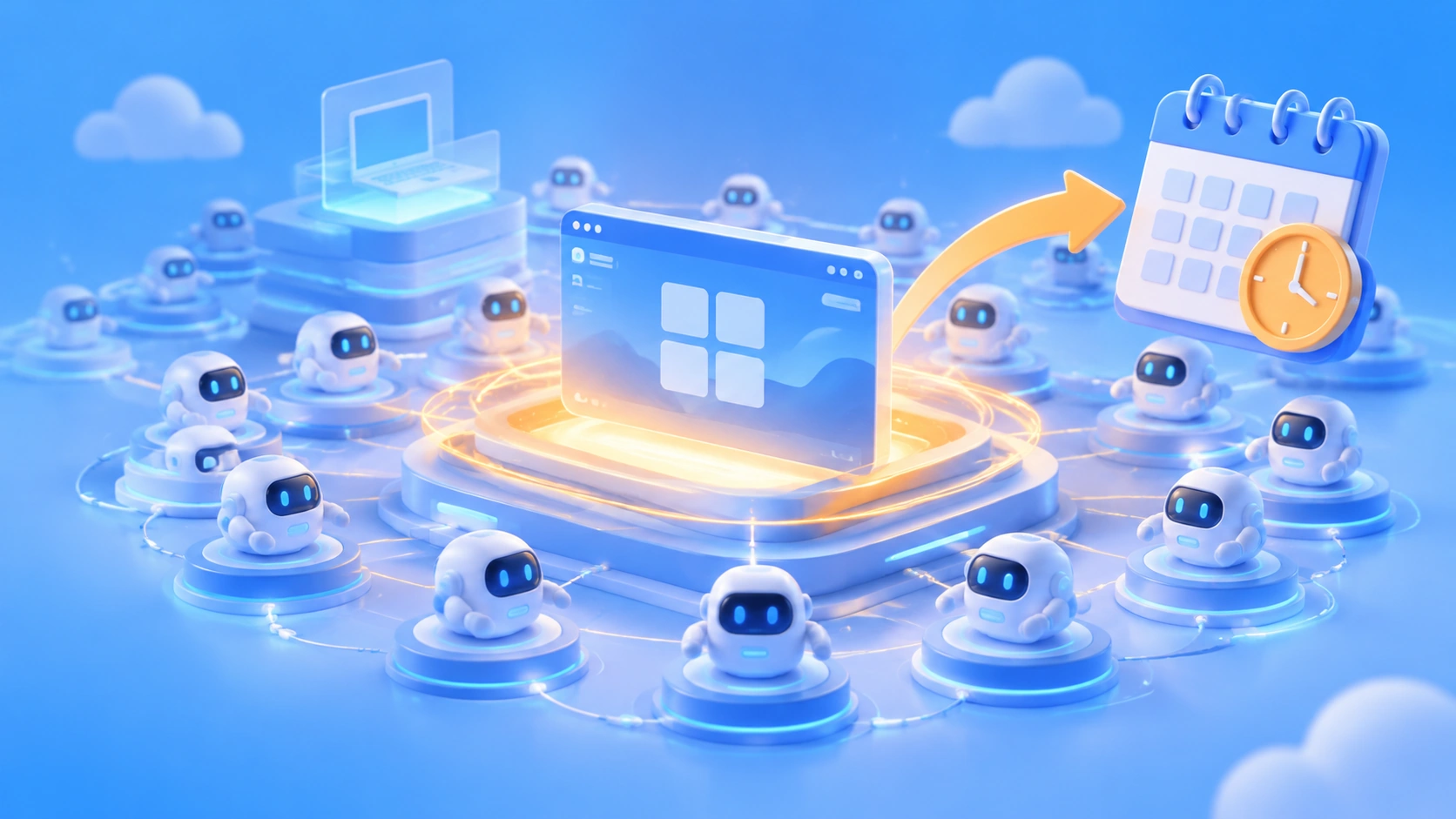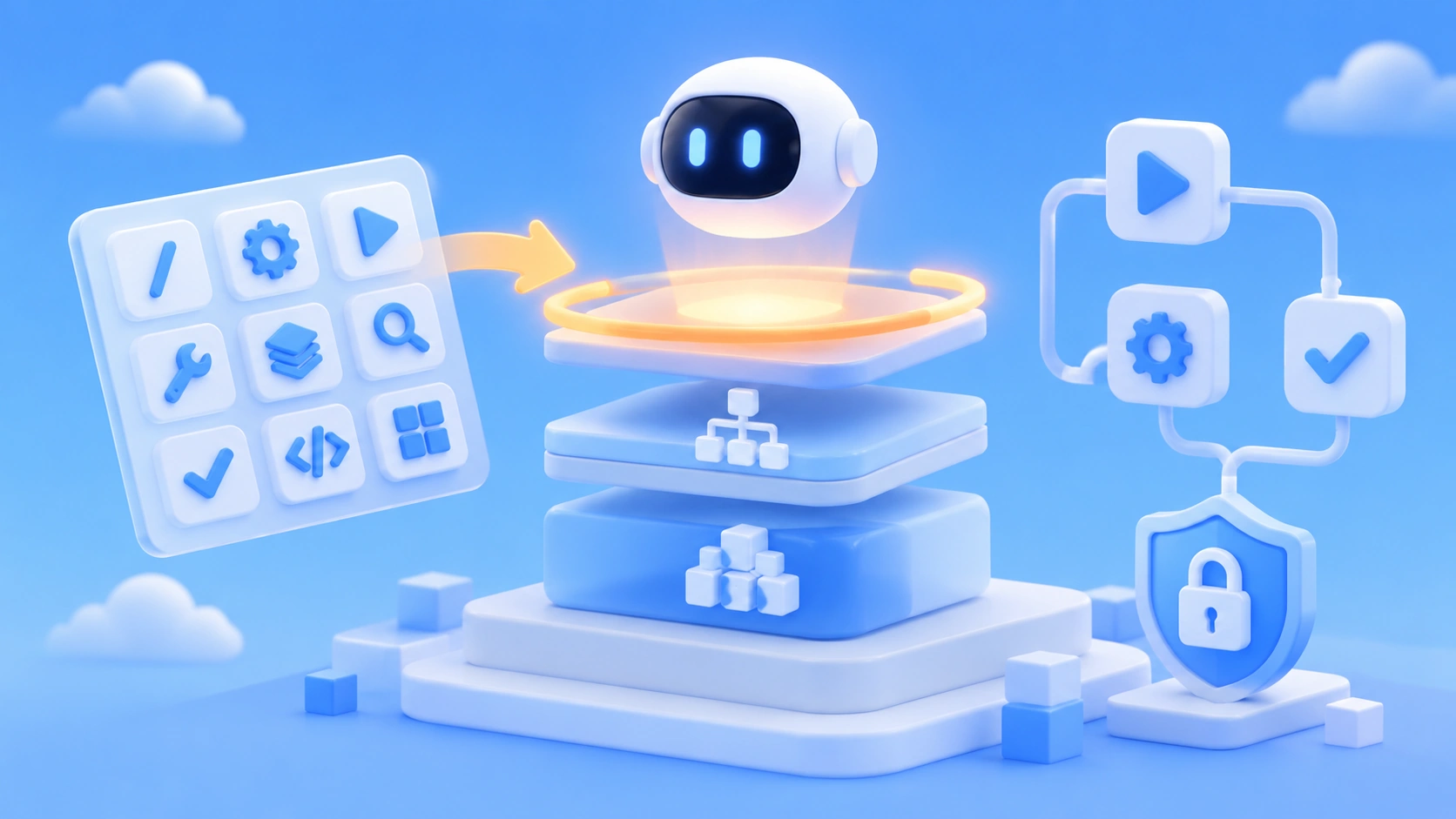
Orchestrator Feature is Google Antigravity’s collection of agent orchestration capabilities, split into three layers: slash commands for end users, an SDK for developers, and a Workflow Runtime for complex pipelines. Its core value is upgrading “one agent writes code” into “multiple agents dividing the work by plan, executing in parallel, and archiving automatically.” The capability set is already fairly complete, but there are still officially acknowledged issues on the security side. So at this stage it’s better suited to non-production environments with strict permission policies — don’t connect it directly to production credentials.
What will you learn from this article?
- The five product forms of Antigravity, and where Orchestrator sits among them
- What the 9 slash commands like
/swarm,/teamwork, and/planeach solve - Key capabilities at the SDK layer and Workflow Runtime — streaming thinking, MCP integration, Fan-out/Fan-in, Human-in-the-Loop
- How the Artifacts auto-documentation system differs from Claude Artifacts
- The publicly disclosed Prompt Injection data-exfiltration risk, and how to configure Policies to address it
- Deployment paths from local Docker to an enterprise platform, plus model selection and cost-control advice
Index: The main body first uses a To Know table to explain key concepts, then gives an impact snapshot showing what this change means for different audiences. The “Objective Facts” section lays out the product matrix, models and pricing, slash commands, SDK, Workflow Runtime, Artifacts, security system, and deployment options in order — all based on official documentation and public security reports. The “Analysis and Judgment” section discusses what the three-layer architecture means, how to pair models, how to guard against risk, and how to control costs, and includes a code sample that lets you quickly validate multi-agent ideas even without Antigravity.
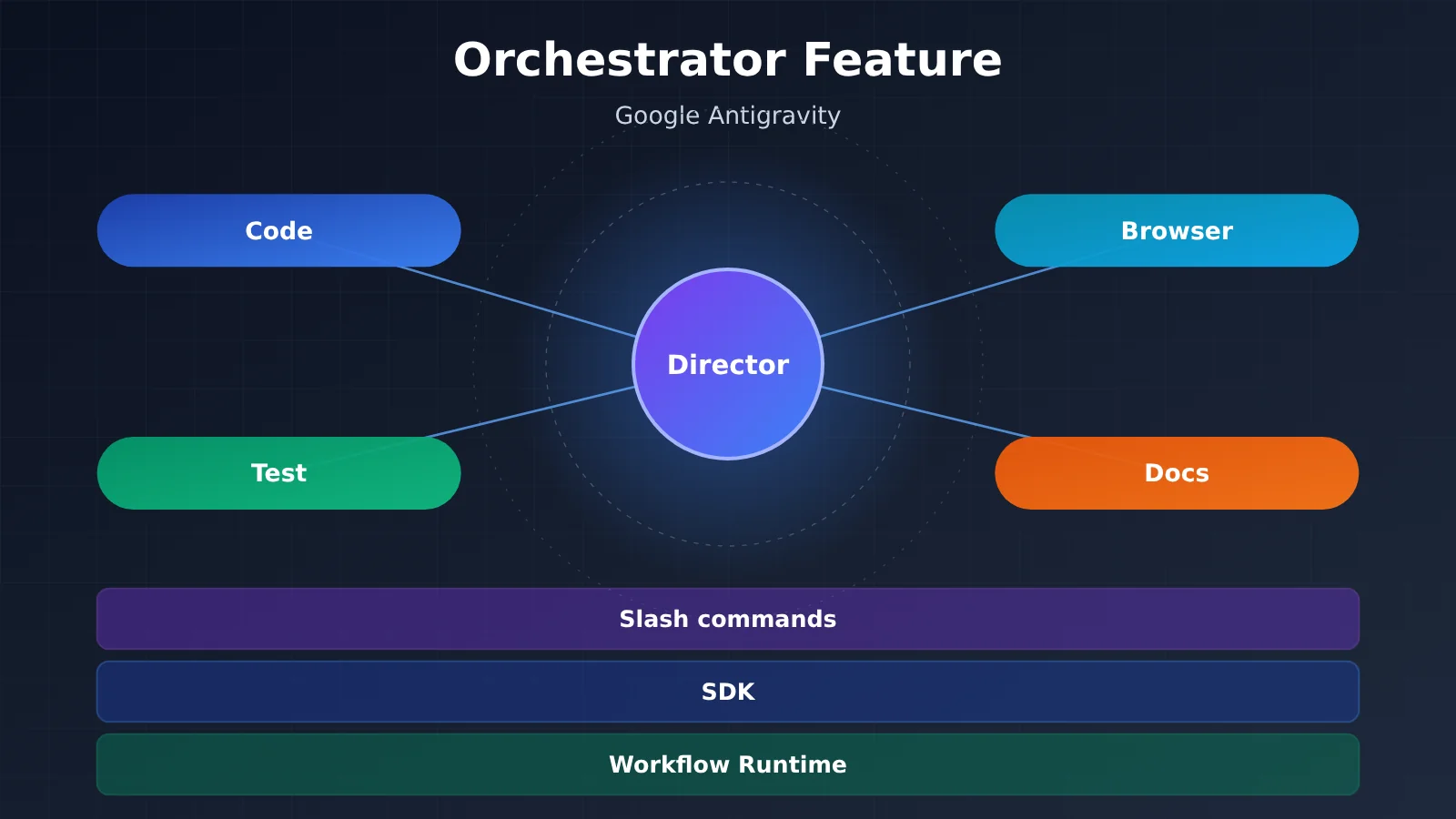
Orchestrator Features: Key Concepts to Know
| Concept | Brief Explanation |
|---|---|
| Antigravity | Google’s family of agentic coding products, spanning Web, IDE, CLI, SDK, and plugins |
| Orchestrator | In this article, the collection of agent orchestration capabilities within Antigravity, including task decomposition, multi-agent scheduling, and workflow execution |
| Slash commands | Commands like /swarm typed into the dialog box that directly trigger preset orchestration modes |
| Swarm | A primary agent breaks a large task apart and hands it to multiple sub-agents for parallel processing |
| Fan-out/Fan-in | A workflow first distributes subtasks in parallel (fan-out), then aggregates the results (fan-in) |
| Human-in-the-Loop | Pausing the flow at key nodes and continuing only after a human confirms |
| MCP | Model Context Protocol, a standard protocol that lets agents connect to external tools and data sources |
| Artifacts | Process documents such as task lists, plans, review reports, and screenshots that Antigravity generates automatically |
| Policies | Controlling which tools agents can invoke using three-level rules: deny / allow / ask_user |
| Prompt Injection | Hiding malicious instructions in web pages or files to trick agents into performing unintended actions |
| LiteRT-LM | A lightweight inference runtime for running models like Gemma on local devices |
| DLP | Data loss prevention policies, enforced in the enterprise edition through Agent Gateway |
Orchestrator Feature Impact at a Glance
- Individual developers: Tasks like large-scale refactors and full-stack scaffolding can be handed off to
/swarmto run in parallel. At the same time, you’re on the hook for configuring permissions yourself — skip that, and you’re an easy target for prompt injection attacks. - Teams and tech leads:
/teamwork,/goal, and Artifacts make the agent’s work process auditable. Code review shifts from “just look at the results” to “look at the plan + look at the walkthrough report.” - Platform and tool developers: The open-source Python SDK plus Workflow Runtime lets you embed agent orchestration into your own product. The catch: the runtime is a closed-source Go implementation, so there’s limited room to customize.
- Security and ops teams: Data exfiltration and code execution are already listed as Known Issues by Google Bug Hunters. Before you onboard, you’ll want a plan for credential isolation and tool allowlisting.
- Gemini CLI users: Per the official roadmap, Antigravity CLI replaced Gemini CLI back in June 2026, so existing scripts and habits will need migrating.
Orchestrator Feature, the Objective Facts: Products and Models
Antigravity’s Five-Product Matrix
Orchestrator isn’t a standalone product — it’s an orchestration layer that runs through every form of Antigravity. Different entry points share the same set of agent capabilities; what differs is the interaction method and where it’s deployed.
| Product | Form | Key Features |
|---|---|---|
| Antigravity App (2.0) | Web app | Full-featured agentic coding in the browser, no installation needed |
| Antigravity IDE | Desktop app (VS Code fork) | Agent manager, editor, and Chrome extension all in one |
| Antigravity CLI | Go command-line tool | Closed source; replaced Gemini CLI in June 2026 |
| Antigravity SDK | Python library (pip install google-antigravity) |
Open-source wrapper over a closed-source Go runtime |
| Antigravity Extensions | IDE plugin | Supports VS Code, JetBrains, Eclipse, Zed, Xcode, Android Studio |
Models and Pricing Supported by the Orchestrator Feature
On the model side, Antigravity supports the full Gemini lineup, including 3 Pro and 3.5 Flash, plus three new tiers: 4 Carbon, 4 Neon, and 4 Hydrogen. It also supports running Gemma 4 26B locally and offline via LiteRT-LM. Officially, the architecture is positioned as model-agnostic, but the optimization for Gemini goes deepest.
Billing comes in three flavors: Google AI Pro/Ultra subscription, Pay As You Go, and Enterprise. The per-million-token prices provided in the materials are as follows:
- Carbon: input $4, output $20 (effective December 2026 onward)
- Neon: input $3, output $15
- Hydrogen: input $1.50, output $7.50
Orchestrator Features: The Objective Facts of Three-Layer Orchestration
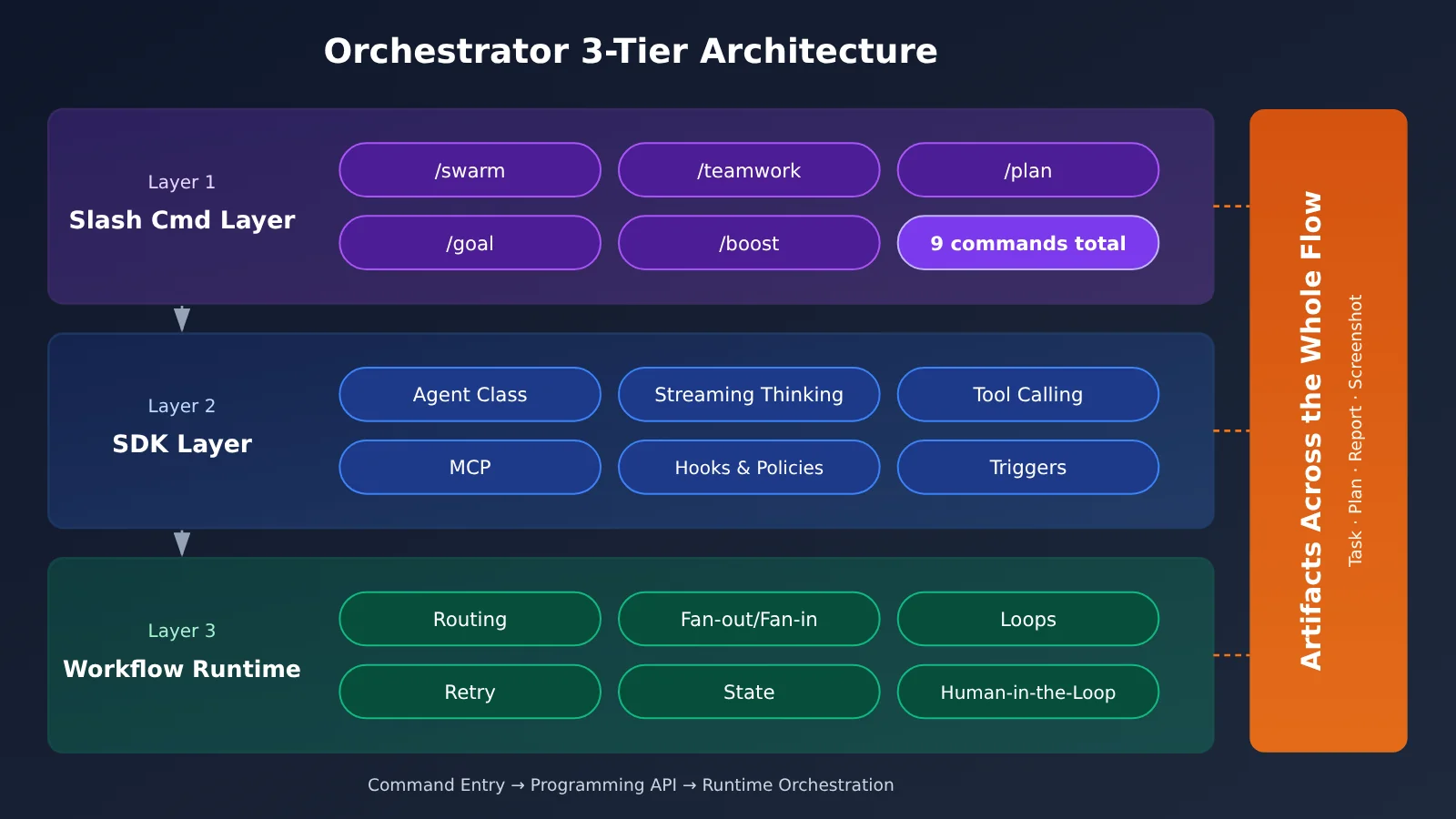
Layer 1: 9 Slash Commands
Slash commands are the most intuitive entry point into Orchestrator. You don’t need to write any code—just type a command in the conversation and you switch the agent’s operating mode.
| Command | Function | Typical Scenario |
|---|---|---|
/swarm |
Parallel orchestration of a multi-agent swarm | Large tasks that can be split up |
/teamwork |
Continuous collaboration among an agent team | Complex multi-round projects |
/plan |
Task planning | Requirements analysis and solution design |
/goal |
Goal tracking | Long-term project management |
/boost |
Deep reasoning enhancement | Complex logic problems |
/grill-me |
Design review or mock interview | Code review |
/run-workflow |
Execute a dynamic workflow | Predefined processes |
/schedule |
Task scheduling | Scheduled automation |
/learn |
Learning mode | Understanding an unfamiliar codebase |
Layer 2: Orchestrator SDK Features
The SDK is aimed at developers, turning orchestration capabilities into programmable interfaces. At its core is the Agent class, which spins up an agent with a single call and manages its full lifecycle. The main capabilities are:
- Streaming output: Supports real-time output via
async for token in response, exposes the model’s reasoning process throughresponse.thoughts, and lets you intercept tool calls throughresponse.tool_calls - Capability extension: You can register Python functions as agent tools, or connect to external MCP servers
- Permissions and triggers: Hooks & Policies provide three permission levels—deny, allow, and ask_user; Triggers support scheduled or event-driven background tasks
- Input and runtime environment: Supports multimodal input such as images, video, audio, and documents, and also supports local offline execution with Gemma 4
Layer 3: The Workflow Runtime Capability Matrix
When a task needs conditional branching, parallelism, and retries, that’s when you reach for Workflow Runtime. The capabilities it offers are similar to those of a traditional workflow engine—the difference is that every node can be an agent.
| Capability | Description |
|---|---|
| Routing | Conditional routing that picks the next step based on current state |
| Fan-out/Fan-in | Distribute tasks in parallel, then aggregate the results |
| Loops | Execute repeatedly until a condition is met |
| Retry | Automatically retry after a failure |
| State Management | Persist state across nodes |
| Dynamic Nodes | Decide at runtime which nodes to execute |
| Human-in-the-Loop | Human confirmation at critical nodes |
| Nested Workflows | Nest sub-workflows inside a workflow |
Artifacts: The Meta-Documents of Agent Work
While running, Orchestrator automatically generates four kinds of Artifacts: Task Lists, Implementation Plans, Walkthrough Reports, and Visual Screenshots from browser tests. Walkthrough Reports are generated once a task is complete, reviewing exactly what the agent did.
This is a different thing from Claude Artifacts. Claude Artifacts are interactive code or document previews aimed at the final output. Antigravity Artifacts are records of the agent’s working process, mainly for developers to audit.
Orchestrator Feature: Facts About Security and Deployment
Policies Permission System
The officially recommended approach is “deny by default, allow on demand”:
from google.antigravity.hooks.policy import deny, allow, ask_user

policies = [
    deny("*"),                  # Deny all tools by default
    allow("view_file"),         # Allow reading files
    ask_user("run_command"),    # Ask the user before running commands
]
Disclosed Security Issues
Since November 2025, several security researchers have disclosed data exfiltration risks in Antigravity:
- PromptArmor: Found that attackers can hide malicious instructions in a webpage using 1px fonts, tricking the agent into reading AWS credentials from
.envand sending them out. - Browser allowlist issue: The browser tool’s default allowlist includes
webhook.site, which can be used as an exfiltration channel. - .gitignore bypass: Even if a file is excluded by
.gitignore, Gemini can still read its contents viarun_commandwithcat. - Official stance: Google Bug Hunters has classified data exfiltration and code execution as Known Issues—known problems that aren’t handled as bounty-eligible vulnerabilities.
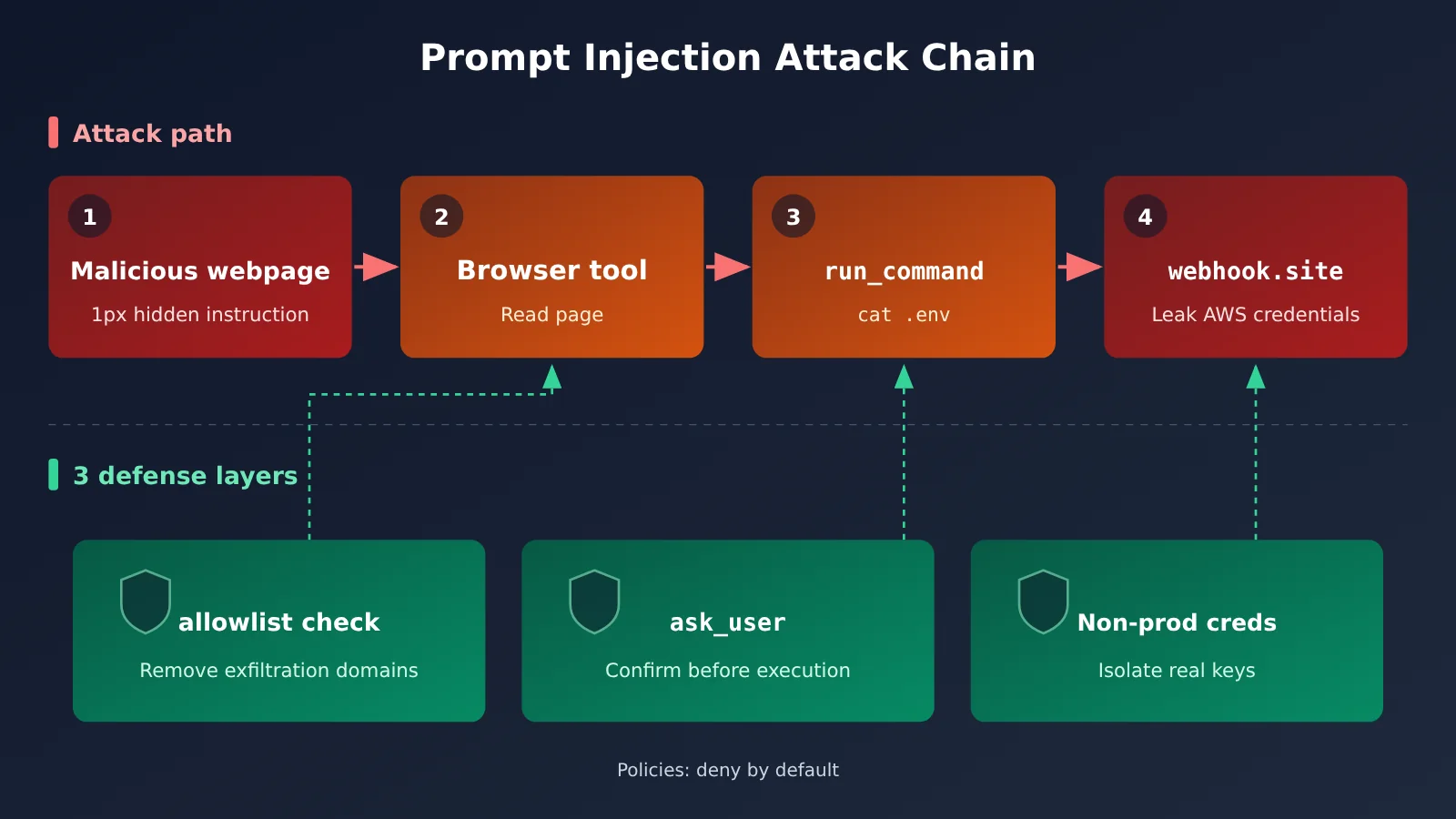
The enterprise-side security design has three points: Gemini Spark runs each task in an isolated, short-lived VM; Agent Gateway enforces DLP policies; and user credentials are fully encrypted and never directly exposed to the agent.
Deployment Options
Both local and Cloud Run deployments can be done with ADK commands:
# Docker deployment (includes Web UI)
adk deploy docker --with_ui <agent-folder>

# Cloud Run deployment
adk deploy cloud_run --with_ui <agent-folder>
Enterprise scenarios use the Gemini Enterprise Agent Platform (formerly Vertex AI Agent Engine). It supports two authentication modes: Express Mode uses an API key, while Standard Mode uses ADC and supports regional endpoint routing. For remote use, you can control a desktop or CLI session from any browser via Remote Control, connect to an agent on a remote server over SSH, or manage remote agents centrally with Remote Agents.
Orchestrator Feature Analysis and Assessment
The Significance of the Three-Layer Architecture: Orchestration Moves from a Trick to Infrastructure
In the past, building multi-agent collaboration usually meant assembling frameworks yourself, writing state machines, and handling retries. Orchestrator splits this work across three layers: regular users use slash commands, developers use the SDK, and complex workflows are handed off to the Workflow Runtime. Our take is that this layering lowers the barrier to multi-agent orchestration—”dividing the labor among agents” will shift from an engineering trick known to a handful of teams into a default capability of the IDE.
The value of Artifacts is easy to underestimate. With multiple agents running in parallel, the hardest part isn’t getting them to run—it’s clearly explaining afterward what each agent did. Task lists, plans, and walkthrough reports form an audit chain, which is especially useful for teams that need compliance records.
Orchestrator Feature Model Pairing Recommendations
The best practice from the source material is to allocate models by task complexity — in /swarm scenarios, the main agent and subagents run at different tiers.
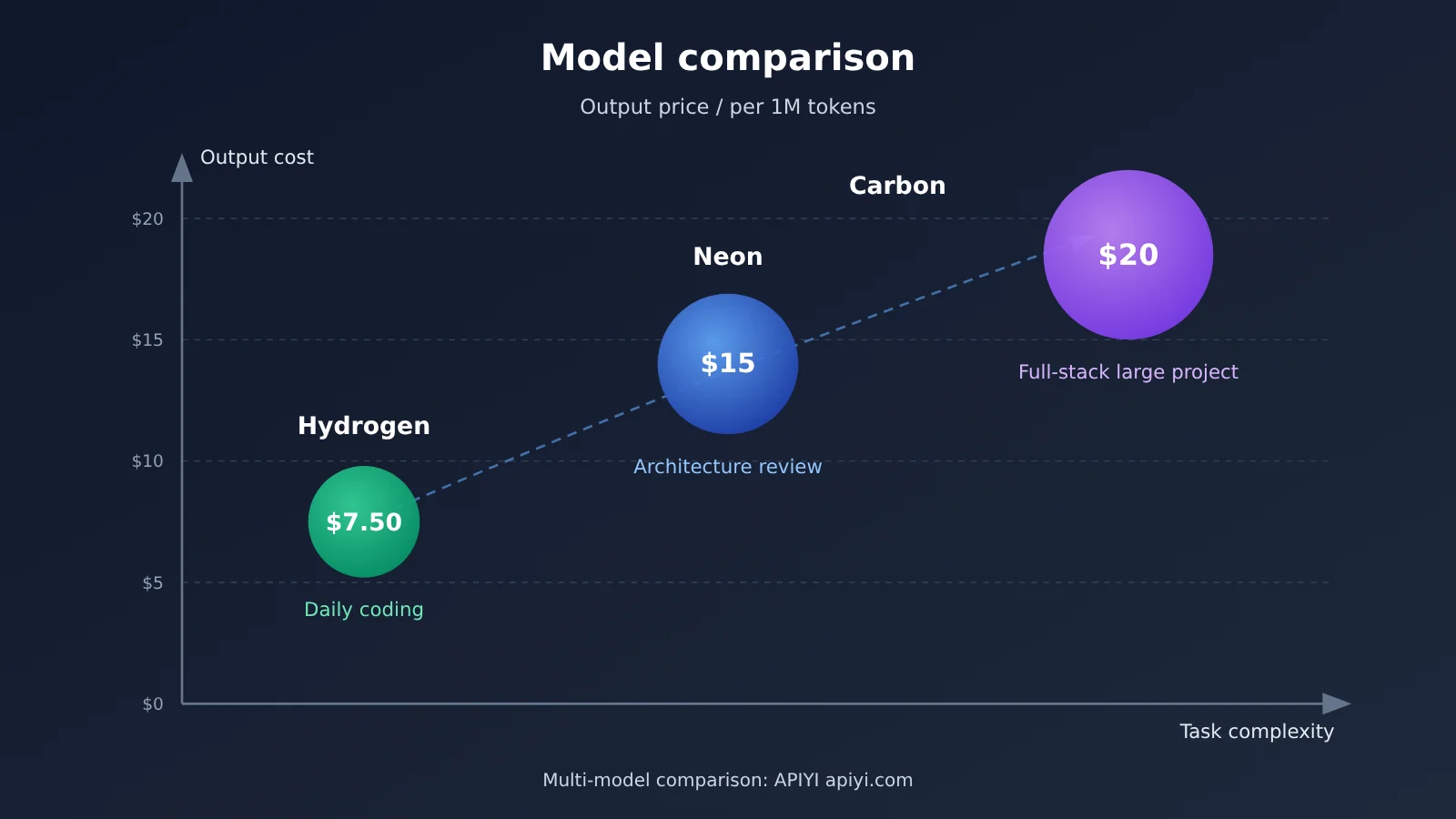
| Scenario | Recommended model | Rationale | Output price (per 1M tokens) |
|---|---|---|---|
| Everyday coding, completions | Hydrogen | Speed first, lowest cost | $7.50 |
| Architecture design, code review | Neon | Deeper reasoning | $15 |
| Large projects, full-stack development | Carbon | Most capable | $20 (after December 2026) |
/swarm hybrid orchestration |
Main agent Carbon + subagents assigned on demand | High quality on key decisions, low cost on execution | Depends on the mix |
This “strong model plans, light model executes” pattern isn’t unique to Antigravity. If you want to reuse the same approach in your own system, you can call Gemini, Claude, OpenAI, and other models through APIYI apiyi.com using a single API key, then compare the results and costs of different main agent / subagent combinations.
Security Risk Analysis: “Known Issues” Means You Have to Defend Yourself
Listing data leakage as a Known Issue tells you that the official team won’t treat it as a bug to patch one by one in the near term — they see it as an inherent risk of the agent architecture. In other words, a big chunk of the protection burden lands on users. At minimum, you should do these four things:
- You must configure Policies, at least setting
ask_userforrun_command. - Use only non-production credentials, and set spending caps on your cloud accounts.
- Add sensitive files to
.gitignore. It can be bypassed, but it’s still the first line of defense. - Review the browser tool’s allowlist and denylist, and remove domains like
webhook.sitethat can receive arbitrary data.
For enterprises, Gemini Spark’s isolated VM isolation and Agent Gateway’s DLP policies noticeably shrink the attack surface. The personal edition and local deployment don’t have those protections, so the risks need a more careful assessment.
Cost Control: The Number of Sub-Agents Is the Main Variable
The cost of /swarm is roughly the single-agent cost multiplied by the number of sub-agents, plus the aggregation overhead. So the most effective control is to cap the number of sub-agents and hand simple tasks to Hydrogen. After each task, check the Walkthrough report to see which steps the tokens actually went to, and use that to adjust your task-splitting granularity.
Validate Multi-Agent Ideas Without Relying on Antigravity
Antigravity SDK’s runtime is a closed-source Go implementation, tightly bound to the Gemini ecosystem. If all you want to do first is check whether the Fan-out/Fan-in pattern — “main agent decomposes, sub-agents run in parallel, main agent aggregates” — fits your business, you can spin up a minimal prototype yourself with any OpenAI-compatible endpoint.
Note: The code below is a simplified implementation I wrote myself. It is not the Antigravity SDK API.
import openai

client = openai.OpenAI(
    api_key="YOUR_API_KEY",
    base_url="https://api.apiyi.com/v1"  # APIYI OpenAI-compatible endpoint
)

resp = client.chat.completions.create(
    model="gemini-3-pro-preview",  # model name subject to the platform's model list
    messages=[{"role": "user", "content": "Break 'add a comment feature to the blog system' into 3 subtasks that can run in parallel"}]
)
print(resp.choices[0].message.content)
View the full Fan-out/Fan-in prototype code
import asyncio
import json
import openai

client = openai.AsyncOpenAI(
    api_key="YOUR_API_KEY",
    base_url="https://api.apiyi.com/v1"
)

PLANNER_MODEL = "gemini-3-pro-preview"   # Planner: a strong model handles planning (name subject to the platform)
WORKER_MODEL = "gemini-3.5-flash"        # Workers: a lighter model handles execution (name subject to the platform)
MAX_WORKERS = 3                          # Cap the number of sub-agents to control cost

async def ask(model: str, prompt: str) -> str:
    r = await client.chat.completions.create(
        model=model,
        messages=[{"role": "user", "content": prompt}]
    )
    return r.choices[0].message.content

async def orchestrate(goal: str) -> str:
    # 1. Plan: the main agent breaks down the task (maps to /plan)
    plan = await ask(
        PLANNER_MODEL,
        f"Break the goal into no more than {MAX_WORKERS} subtasks that can run in parallel; output only a JSON string array. Goal: {goal}"
    )
    tasks = json.loads(plan)[:MAX_WORKERS]

    # 2. Fan-out: sub-agents execute in parallel (maps to /swarm)
    results = await asyncio.gather(
        *[ask(WORKER_MODEL, f"Complete the subtask and provide the code: {t}") for t in tasks]
    )

    # 3. Fan-in: the main agent aggregates and reviews (maps to /grill-me)
    merged = "\n\n".join(f"### {t}\n{r}" for t, r in zip(tasks, results))
    return await ask(PLANNER_MODEL, f"Review and merge the subtask results below, and flag any conflicts:\n{merged}")

if __name__ == "__main__":
    print(asyncio.run(orchestrate("add a comment feature to the blog system")))
🎯 Technical tip: Before you commit to a full migration to Antigravity, you can run your own business flow through the prototype above on APIYI apiyi.com, and compare how different planner/worker combinations perform and how many tokens they consume. New users get free trial credits, and the endpoint is compatible with the OpenAI SDK, so you’ll barely need to change any code.
Who It’s For, Who It’s Not For
Good fit: Teams already in the Google Cloud or Gemini ecosystem, developers who need multiple agents working in parallel on large codebases, and enterprise R&D departments that care about process auditing. Not a good fit (yet): Scenarios where production credentials must be connected and the environment can’t be isolated, platform teams that need deep runtime customization, and teams that want capabilities from multiple model vendors to be equally available. For the last two, building a lightweight orchestration layer on top of a multi-model aggregation API may be more flexible.
Worth noting: these judgments are based on currently public information. Whether the Known Issues will be alleviated through architectural changes, and whether users’ model mix will shift after Carbon’s new pricing takes effect, are both still worth watching.
Orchestrator Feature FAQ
Q1: How is Orchestrator Feature different from a regular AI coding assistant?
A regular coding assistant typically has a single agent respond to a single request. Orchestrator breaks down tasks, schedules multiple agents to work in parallel or in relay, and also supports routing, retries, human confirmation, and automatic generation of process documentation.
Q2: How do I choose between /swarm and /teamwork?
`/swarm` is suited for one-off large tasks that can be split apart, emphasizing parallel speed. `/teamwork` is suited for complex projects that run over many rounds, emphasizing long-term collaboration between agents and context continuity.
Q3: Can I try multi-agent orchestration without a Google AI Pro/Ultra subscription?
You can opt for Pay As You Go usage-based billing. If you just want to validate the orchestration approach, you can also use the Fan-out/Fan-in prototype from this article—grab free testing credits through APIYI apiyi.com, then directly call models like Gemini for experiments.
Q4: How can I compare different models as the main agent in an existing project?
The simplest approach is to keep the code unchanged and just switch `PLANNER_MODEL` and `WORKER_MODEL`. APIYI apiyi.com provides unified access to multiple mainstream models with a single API key, which makes this kind of A/B comparison easy and also lets you track the token cost of each combination.
If you’re evaluating Orchestrator Feature, here’s a suggested order: first enable Policies in a sandbox environment and try /plan and /swarm; then look at the walkthrough reports in Artifacts to judge whether the cost and quality are acceptable; and finally consider the Enterprise edition and production integration. In the meantime, you can reproduce the multi-agent workflow at low cost via APIYI apiyi.com as a reference for your decision.
📚 References
-
Google Antigravity Official Docs: Product and feature overview
- Link:
antigravity.google/docs/overview - Notes: Official documentation for slash commands, Artifacts, and deployment methods
- Link:
-
Antigravity SDK Python README: SDK capabilities and examples
- Link:
github.com/google-antigravity/antigravity-sdk-python - Notes: Usage of the Agent class, Policies, and Triggers
- Link:
-
Google ADK Python README: Deployment command reference
- Link:
github.com/google/adk-python - Notes: Usage of
adk deploy docker / cloud_run
- Link:
-
PromptArmor Security Report: Analysis of Antigravity data exfiltration
- Link:
promptarmor.com/resources/google-antigravity-exfiltrates-data - Notes: The full attack chain that steals
.envcredentials via 1px font injection
- Link:
-
Simon Willison Security Analysis: Interpretation of the exfiltration issue
- Link:
simonwillison.net/2025/Nov/25/google-antigravity-exfiltrates-data - Notes: Explains the risk impact from a developer’s perspective
- Link:
-
EmbraceTheRed Security Analysis: Antigravity security research
- Link:
embracethered.com/blog/posts/2025/security-keeps-google-antigravity-grounded - Notes: Additional analysis of multiple attack surfaces
- Link:
-
Google Bug Hunters Known Issues: Official list of known issues
- Link:
bughunters.google.com/learn/invalid-reports/google-products/4655949258227712/antigravity-known-issues - Notes: Confirms that data exfiltration and code execution fall under Known Issues
- Link:
-
Google Cloud Enterprise Security Blog: Google I/O 26 enterprise capabilities
- Link:
cloud.google.com/blog/products/ai-machine-learning/innovations-from-google-io-26-on-google-cloud - Notes: Gemini Spark isolated VM and Agent Gateway DLP policies
- Link:
Author: APIYI Technical Team
Technical Discussion: If you have questions about multi-model orchestration, feel free to reach out to us via the APIYI homepage. For more integration resources, visit the docs.apiyi.com documentation center.