Author’s note: This article covers Gemini 4 Neon’s context window, four thinking levels, and pricing; explains how to configure both the native and compatible entry points in APIYI; and uses the same minimal request to pinpoint common integration errors.
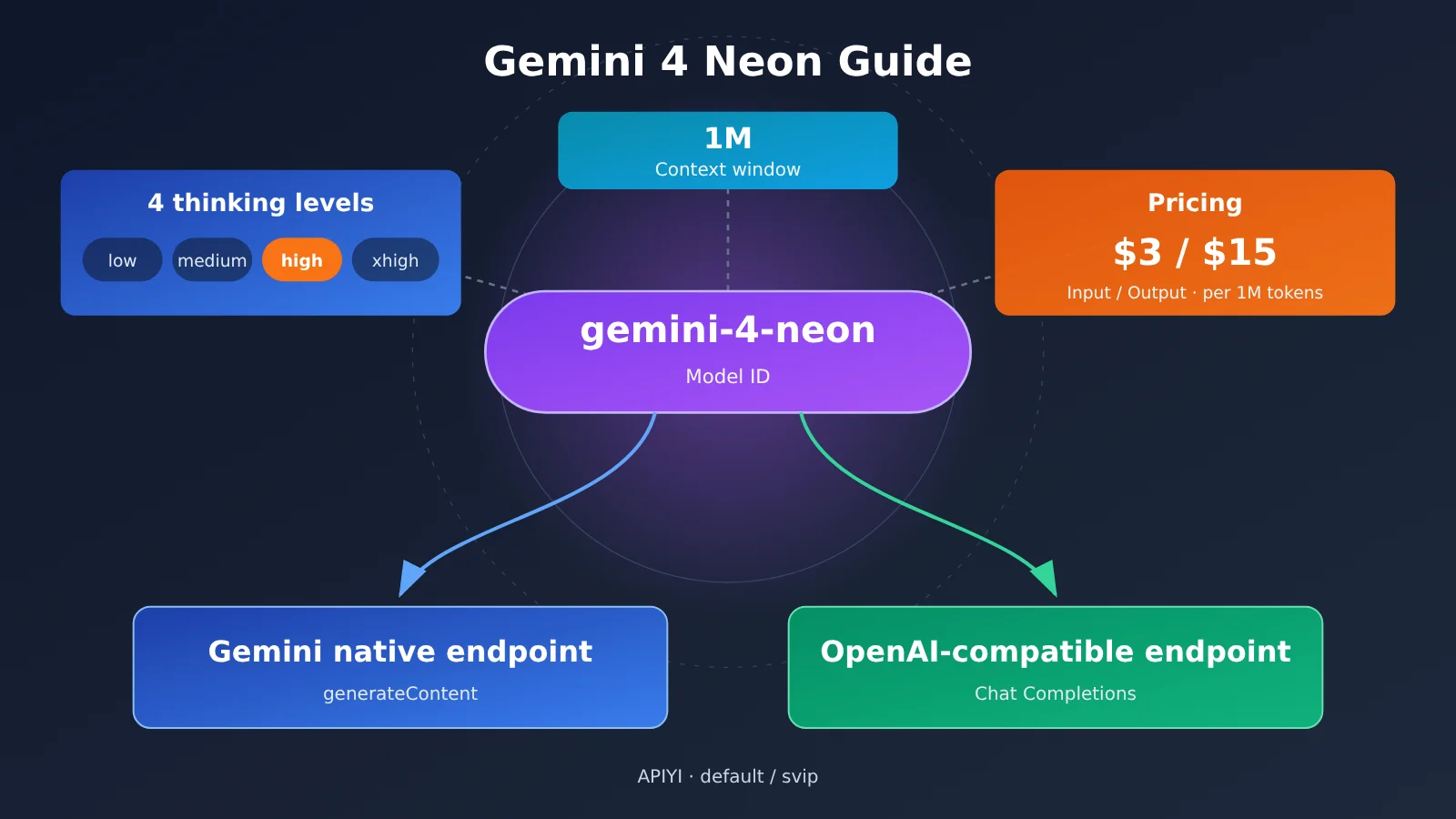
In one sentence: Gemini 4 Neon was released by Google on November 18, 2026. APIYI launched it on November 20 in the default/svip groups, with the model ID gemini-4-neon and list pricing of $3 per million input tokens, $15 per million output tokens, and $0.15 per million cached reads. If you need native thinking-level control, go with the Gemini native endpoint first; if you’re just swapping an existing OpenAI client over to a different model, the compatible endpoint is less work. Either way, you should first get the shortest possible request working, then enable streaming, tool calling, and higher thinking levels one at a time.
This isn’t a news story that just paraphrases a launch announcement. The specs, pricing, benchmark scores, and troubleshooting paths below each note their sources and conditions of applicability, and the code examples are built from the official documentation. APIYI’s launch notes say that before launch it only checked the pricing endpoint and made no actual calls, so this article won’t claim that both endpoints or tool calling have been “tested and verified.”
Core value: After reading this, you’ll be able to confirm Neon’s specs and billing rules, write minimal requests for both the native and compatible paths, choose a thinking level based on test results, and quickly pinpoint issues from error symptoms.
Terminology You Need to Know Before Integrating Gemini 4 Neon
These concepts come up again and again later on. Getting the terminology straight first makes troubleshooting a lot less confusing.
- Model ID: The full string that specifies the model in a request — in this case,
gemini-4-neon. Copy the casing and hyphens exactly; don’t abbreviate it on your own. - Base URL: The root address a client uses to build request paths. Whether it includes a version prefix like
/v1depends on the SDK you’re using — getting this wrong is a very common cause of 404s. - Gemini native endpoint: Accepts the
generateContentprotocol, which fits scenarios that need native thinking parameters. - OpenAI-compatible endpoint: Uses the Chat Completions format, so existing OpenAI clients can reuse the basic message structure directly.
- Thinking level: An enum value for the model’s reasoning intensity. Neon natively supports
low,medium,high, andxhigh; APIYI’s live dynamic annotation lists the default ashigh. - Thinking signature
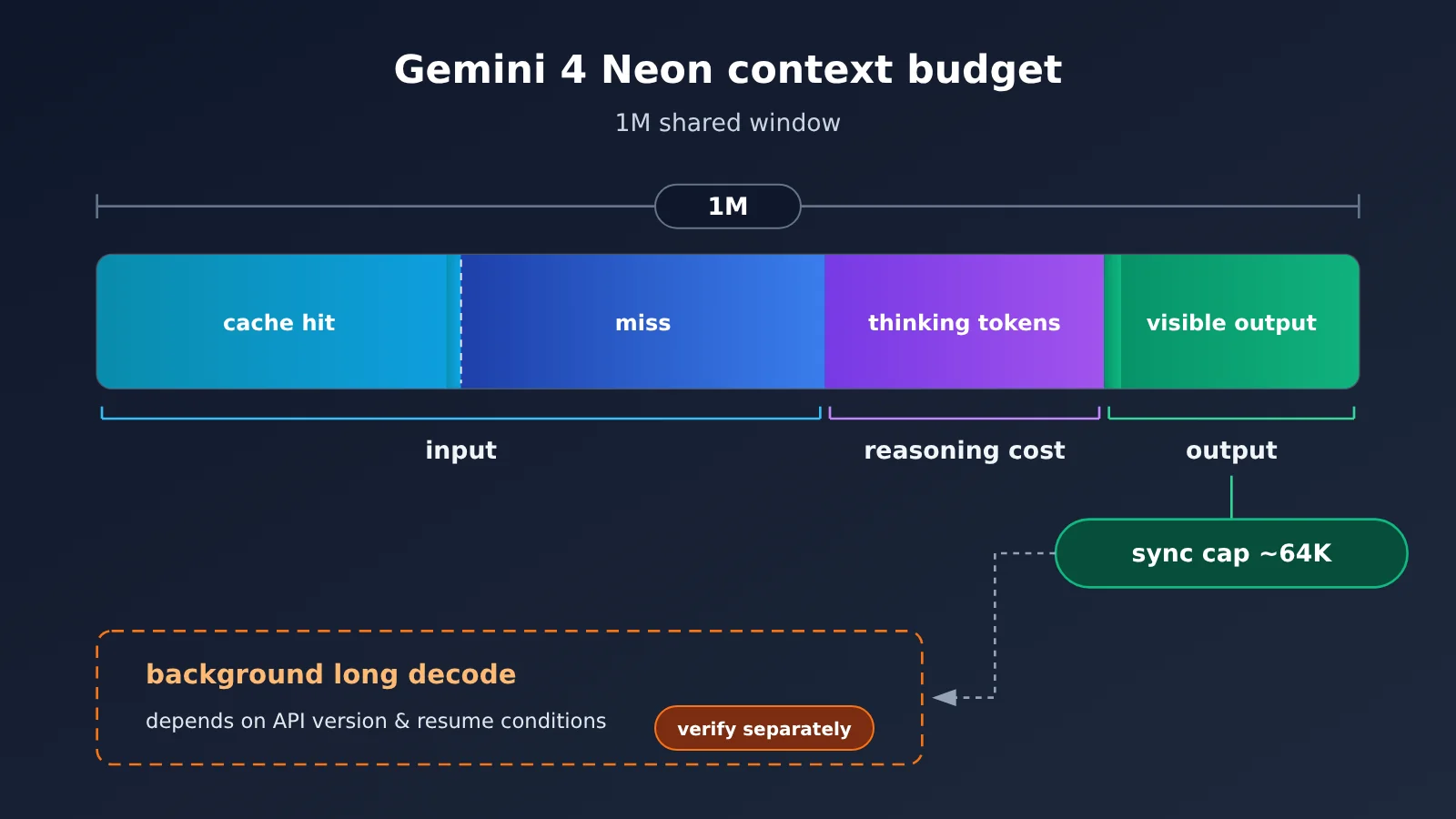
thoughtSignature: A context marker returned by the model. During multi-turn tool calls, you must preserve it and send it back per the original protocol. - Context window: The total budget shared by input, thinking, and output. How much a single synchronous generation can output has to be checked separately against its own cap.
- Cache read price: The billing rate that applies when reusing qualifying existing input — far lower than the standard input price.
Gemini 4 Neon Key Points: Parameters, Pricing, and Groups
According to APIYI’s launch updates, Neon is the mid-tier model in the Gemini 4 lineup, sitting between Carbon (built for the hardest tasks) and Hydrogen (built for everyday execution). Google announced it on November 18 and made it GA the same day; APIYI integrated it on November 20.
| Item | Details | Source and Conditions |
|---|---|---|
| Model ID | gemini-4-neon |
APIYI model registry (generated 2026-11-20) |
| Available groups | default, svip |
APIYI launch updates (2026-11-20) |
| Integration endpoints | Gemini native + OpenAI-compatible | APIYI launch updates; not actually called before launch |
| Context window | 1M, shared across input / thinking / output | Both Google’s announcement and Artificial Analysis list it as 1M |
| Synchronous generation cap | About 64K tokens | APIYI launch docs |
| Thinking levels | low / medium / high / xhigh, default high | APIYI launch updates |
| List price (per million tokens) | Input $3, output $15, cache read $0.15 | APIYI registry; the announcement says it matches the official site item by item, with no expiry date |
How Gemini 4 Neon’s Context Window and Output Cap Relate
A 1M context is often misread as “can output 1M in one go.” In reality, that 1M is a window shared by input, thinking, and output. According to the APIYI launch docs, the generation cap for a synchronous call is around 64K tokens — meaning long input is fine, but don’t expect a single synchronous request to output more than that order of magnitude.
Google Cloud documentation mentions a background long-decode capability that can reach up to 1M. But it depends on a specific cloud API version and resume conditions, and it’s not the same thing as a regular synchronous call. For APIYI’s OpenAI-compatible Chat Completions endpoint, there are currently no verifiable real-world results from long-decode calls. If your workload needs ultra-long output, it’s best to design for segmented generation first, then validate long decode separately.
How to Estimate Gemini 4 Neon Pricing
Here’s an example based on list price — it doesn’t represent an actual bill. Say a request has 100K input tokens and 5K visible output tokens: input costs about $0.30, output about $0.075, for a total of roughly $0.375. If 80K of that input hits the cache, that portion comes to about $0.012 at $0.15, and the remaining 20K comes to about $0.06 at $3 — so the input cost drops noticeably.
How tokens consumed during thinking get counted, and under what conditions caching takes effect, should both be judged by your actual bill. APIYI’s launch update also notes that starting December 1, once Carbon/Argon’s limited-time pricing expires and reverts to $4/$20, Neon’s list price will be 25% lower than theirs. This is a price comparison from the platform announcement — it says nothing about performance.
Gemini 4 Neon Quick Start: Two Minimal Requests for Native and Compatible Endpoints
Start by sending one minimal request down each path. Once you’ve confirmed the model ID, group, and routing are all correct, add the other features. The examples below follow the official docs for the Google GenAI SDK and the OpenAI SDK, and the Key is always a placeholder.
| Comparison | Gemini native endpoint | OpenAI-compatible endpoint |
|---|---|---|
| Recommended SDK | Google GenAI SDK | OpenAI SDK |
| Base URL format | Platform root address, plus api_version="v1beta" |
Root address with /v1 |
| Request structure | contents[].parts[] |
messages[] |
| Thinking level | generationConfig.thinkingConfig.thinkingLevel |
Cross-endpoint parameter mapping needs separate validation |
| Best for | Fine-grained control over thinking, multi-turn tool calls | Quick switching for existing OpenAI code |
Gemini 4 Neon Native Endpoint Example
The native endpoint uses the platform root address, and the version prefix is handled by the SDK’s api_version. Don’t write v1beta again in the Base URL, or you’ll end up with a duplicated path.
from google import genai
from google.genai import types

client = genai.Client(
    api_key="YOUR_API_KEY",
    http_options=types.HttpOptions(
        base_url="https://api.apiyi.com",  # APIYI platform root address; the version is specified by api_version
        api_version="v1beta",
    ),
)

resp = client.models.generate_content(
    model="gemini-4-neon",
    contents="用三句话解释什么是上下文窗口",
    config=types.GenerateContentConfig(
        thinking_config=types.ThinkingConfig(thinking_level="medium")
    ),
)
print(resp.text)
The SDK’s snake_case naming ultimately maps to camelCase fields in the REST request body. If you send the HTTP request directly, the body structure looks roughly like this—pay attention to the two levels:
{
  "contents": [
    { "role": "user", "parts": [ { "text": "用三句话解释什么是上下文窗口" } ] }
  ],
  "generationConfig": {
    "thinkingConfig": { "thinkingLevel": "medium" }
  }
}
Two things to note. First, the older thinkingBudget and minimal levels don’t apply to Gemini 4—remove them when migrating code. Second, Google’s docs note that Gemini 4 ignores temperature and topP, so seeing no effect when you tweak these two parameters is expected behavior.
Gemini 4 Neon Compatible Endpoint Example
The compatible endpoint is ideal for projects already using the OpenAI SDK. Below we’ll use only the most basic messages to first confirm that routing and grouping are working.
from openai import OpenAI

client = OpenAI(
    api_key="YOUR_API_KEY",
    base_url="https://api.apiyi.com/v1",  # APIYI OpenAI-compatible endpoint
)

resp = client.chat.completions.create(
    model="gemini-4-neon",
    messages=[{"role": "user", "content": "用三句话解释什么是上下文窗口"}],
)
print(resp.choices[0].message.content)
print(resp.choices[0].finish_reason)
Besides the main content, it’s worth also logging finish_reason in the response. When the content is empty, it’s your first clue. On the native endpoint, this corresponds to the finish reason and safety rating fields in the candidate results — keep those too when you’re troubleshooting.
View the wrapper code with diagnostic info
import os
import time
import random
from openai import OpenAI, APIStatusError

client = OpenAI(
    api_key=os.environ["APIYI_API_KEY"],
    base_url=os.environ["APIYI_BASE_URL"],  # Fill in the compatible endpoint address from above
)

def ask_neon(prompt: str, max_retries: int = 3) -> str:
    """Call gemini-4-neon, print the finish reason and usage for easier troubleshooting"""
    for attempt in range(max_retries + 1):
        try:
            resp = client.chat.completions.create(
                model="gemini-4-neon",
                messages=[{"role": "user", "content": prompt}],
            )
            choice = resp.choices[0]
            print("finish_reason:", choice.finish_reason)
            print("usage:", resp.usage)
            if not choice.message.content:
                print("正文为空:检查结束原因、安全状态与输出预算")
            return choice.message.content or ""
        except APIStatusError as e:
            print("status:", e.status_code, "body:", e.response.text)
            # Only retry on rate limiting and short-term unavailability; raise other errors directly
            if e.status_code in (429, 503) and attempt < max_retries:
                delay = (2 ** attempt) + random.uniform(0, 1)
                time.sleep(delay)
                continue
            raise
    return ""

if __name__ == "__main__":
    print(ask_neon("列出三个适合用长上下文的任务"))
🚀 Quick start: When creating a token in the APIYI apiyi.com console, make sure the token group is
defaultorsvip. New users can use the free trial quota to run each of the two minimal requests above once. The native and compatible endpoints share the same key — switching endpoints only requires adjusting the Base URL and request structure.
How to Choose a Thinking Level for Gemini 4 Neon
The higher the level, the more thorough the reasoning — but it also takes longer and costs more. Artificial Analysis (AA) tested all four Neon levels individually in Intelligence Index v5.0.1. Here’s what came back.
| Thinking level | AA Intelligence Index | Average time per task | Notes |
|---|---|---|---|
low |
44 | about 3.7 minutes | Speed first |
medium |
55 | about 8.3 minutes | 11 points above low |
high (default) |
60 | about 14.8 minutes | 5 points above medium |
xhigh |
61 | about 21.5 minutes | Weighted cost of about $6.44 per eval task |
Looking at this data, medium to high still delivers a clear gain, while high to xhigh adds just 1 index point but takes roughly 6.7 more minutes per task on average. These numbers come from AA’s evaluation pipeline, and task costs are weighted across the nine tests. Time and billing for scenarios like document reading and interactive Q&A need to be measured yourself, and APIYI’s end-to-end latency, success rate, and actual billing also need separate testing.
Here’s a way to settle on a level: for latency-sensitive Q&A tasks, start with low or medium. When you need multi-step reasoning, stay on the default high. Only spend the extra time and money on xhigh once you’ve confirmed on your own fixed test set that it gives you a meaningful improvement.
Gemini 4 Neon vs Similarly Positioned Models
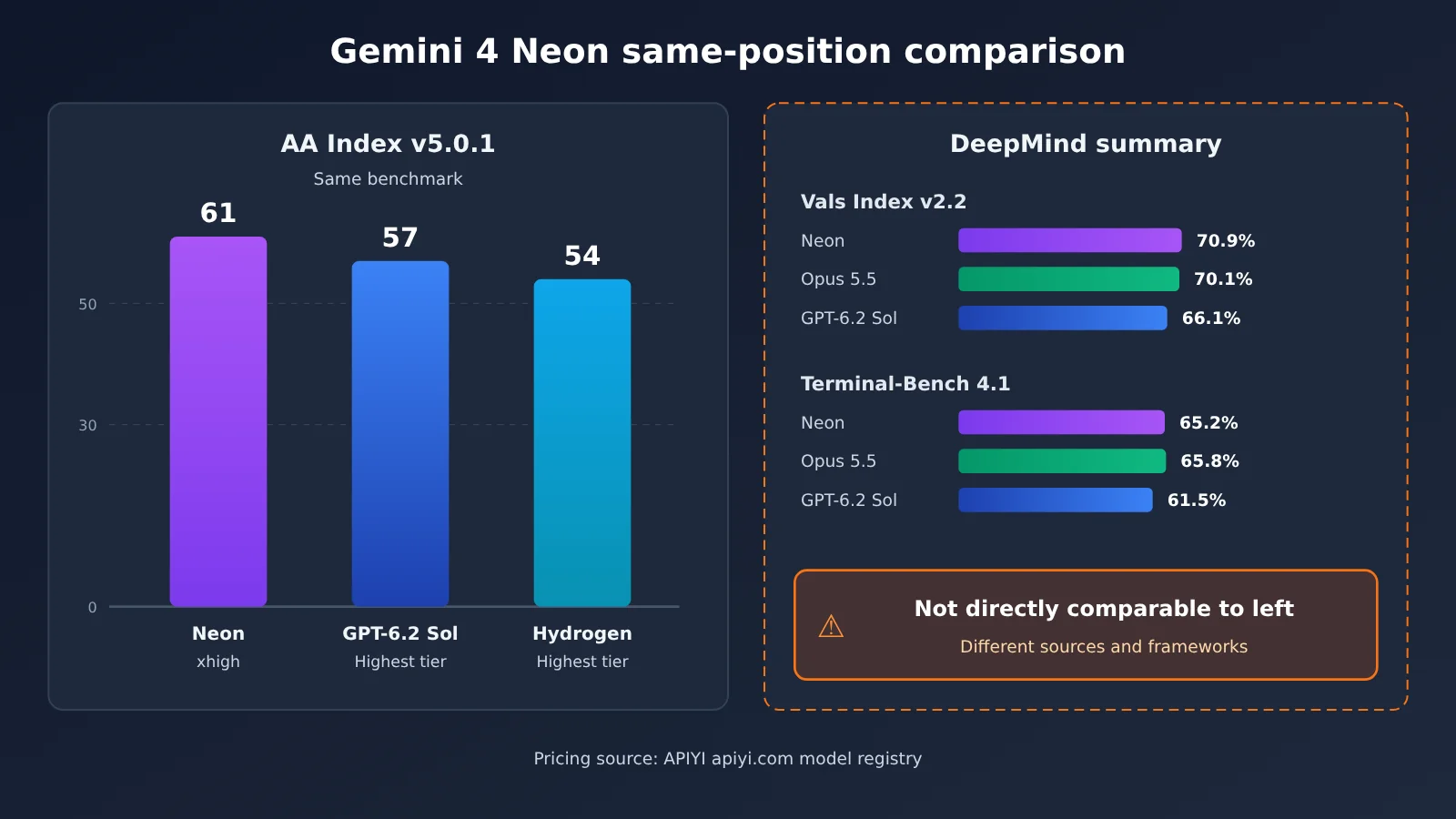
When comparing across models, try to use the same benchmark and comparable settings. The first two columns in the table below come from the same version of AA, and prices come from the APIYI registry.
| Model | AA Index v5.0.1 (highest setting) | Standard input/output (per million tokens) | Available platforms |
|---|---|---|---|
| Gemini 4 Neon | 61 (xhigh) | $3/$15 | APIYI apiyi.com, etc. |
| GPT-6.2 Sol | 57 | $2/$10 | APIYI, etc. |
| Gemini 4 Hydrogen | 54 | See registry | APIYI, etc. |
GPT-6.2 Sol has a lower list price: both input and output cost one-third less than Neon. But on the same AA benchmark, Neon at xhigh scores 4 points higher than Sol at its highest setting. Keep in mind that a score gap doesn’t translate directly into a difference in business accuracy, and you also need to measure latency and actual token consumption separately for each.
Another reference point is the evaluation summary published by Google DeepMind: in Vals Index v2.2, Neon is at 70.9%, Claude Opus 5.5 at 70.1%, and GPT-6.2 Sol at 66.1%; on Terminal-Bench 4.1, adjusted accuracy is 65.2%, 65.8%, and 61.5%, respectively. This summary explicitly uses different evaluation sources and runtime frameworks, and on Terminal-Bench, Opus 5.5 is actually slightly higher than Neon. It can serve as a directional reference, but model selection should be based on the same batch of tasks in your own toolchain.
💡 Recommendation: Prepare a fixed set of 20–50 test prompts that represent your real business. On APIYI apiyi.com, use the same API key to call Neon at each setting and the candidate models in sequence, then record accuracy, latency, and billing before making a decision.
Troubleshooting Common Gemini 4 Neon Integration Errors
When something goes wrong, start by going back to the shortest request from the previous section as a baseline. Confirm the basic path is working, then troubleshoot the newly added features one at a time.
| Symptom | Check first | How to fix |
|---|---|---|
| 404 / Model unavailable | Model ID, token group, routing, version prefix | Copy gemini-4-neon exactly as-is; for the OpenAI SDK, use the compatibility endpoint with /v1; for the GenAI SDK, use the root URL plus v1beta; don’t stack version prefixes. |
| 400 / Behavior doesn’t match after switching levels | Native thinking parameters, compatibility request body fields | On the native endpoint, use thinkingLevel to confirm whether the level is taking effect; remove thinkingBudget and minimal; don’t mix fields from the two protocols. |
| 200 but empty body | Finish reason, safety status, output budget | Make sure the output budget can hold both thinking and visible output; check the safety filter information. |
| Tool call fails on the second turn | thoughtSignature, tool call and response pairing |
Pass the thinking signature back exactly as-is, and make each tool response match the correct call. |
| 429 / Brief upstream 503 | Error body, token quota, concurrency limits | For brief rate limiting or unavailability, use exponential backoff with jitter and a limited number of retries; for balance or permission issues, fix the configuration before retrying. |
Gemini 4 Neon: Distinguishing 404 and 400
A 404 usually means the request wasn’t routed to this model at all—the problem is “not found”: the ID is misspelled, the token group doesn’t include this model, or the URL was built with a repeated path like /v1/v1/... or /v1beta/v1beta/.... A 400 means the request did arrive, but the request body doesn’t conform to the protocol. The most common causes are stuffing native fields into a compatibility request or carrying over old parameters from the Gemini 2.x era.
Parameter mapping across endpoints needs to be validated separately. If you try to control thinking level on a compatibility endpoint and don’t get the expected result, go back to the native endpoint first and confirm the setting is actually taking effect. Then you can tell whether it’s a parameter problem or a mapping problem.
Gemini 4 Neon: Empty Response Body and Tool Call Failures
When you get HTTP 200 but no response body, the first step is to check the finish reason. If it was truncated due to length, that means the thinking process has already consumed the output budget, leaving no room for visible text. If it was due to safety, you’ll need to adjust the input content. The first case is more likely at a high thinking level.
Failures in multi-turn tool calling are mostly related to thoughtSignature. According to Google’s Thought signatures documentation, the signature returned by the model needs to be passed back as-is in subsequent turns following the original protocol, and each tool call needs a one-to-one tool response. When troubleshooting, you can first remove the tools and use a minimal tool-free request as a control, then add the tools back step by step.
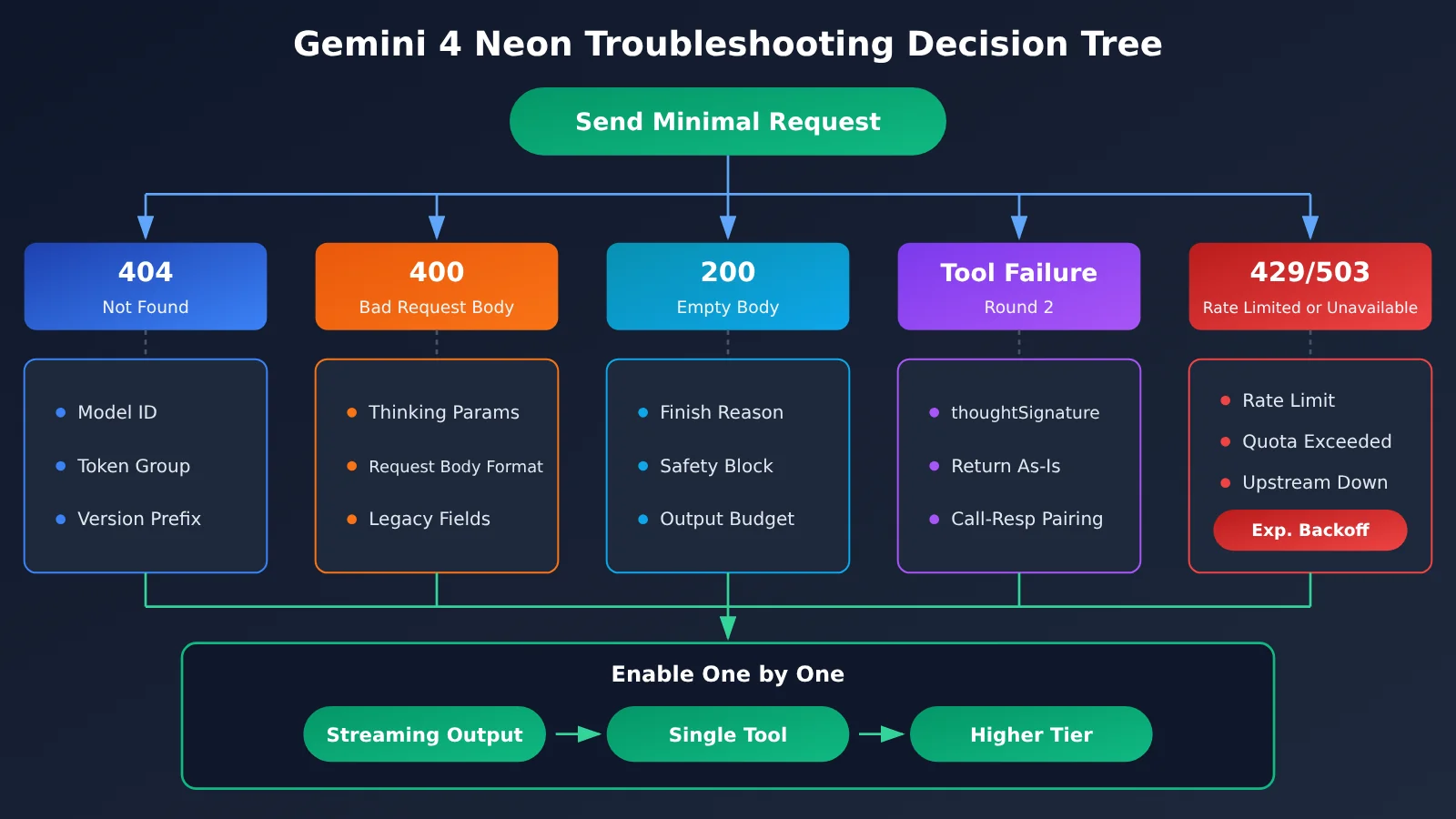
Gemini 4 Neon Recommended Validation Order
Once the minimal request succeeds, it’s best to turn on features one at a time in the order below, confirming the result of each step separately:
- A pure text request that’s non-streaming, has no tools, and uses the default tier — confirm the ID, grouping, and routing are all normal.
- Turn on streaming output and confirm that chunk concatenation and finish-reason reading work correctly.
- Add a single tool and run the full two rounds of “call → return result → final answer,” checking whether
thoughtSignatureis preserved. - Switch between
low/medium/xhighon the native endpoint, and compare quality, latency, and billing using a fixed test set. - Only at the end add cost-related optimizations like long input and cache reuse.
FAQ
Q1: What is Gemini 4 Neon?
Gemini 4 Neon is the mid-tier Gemini 4 model that Google released and brought to GA on the same day, November 18, 2026. It sits between Carbon and Hydrogen. It offers a 1M shared context window and four thinking-intensity tiers, and its model ID is `gemini-4-neon`.
Q2: How do I choose between Gemini 4 Neon and GPT-6.2 Sol?
On the same AA Intelligence Index v5.0.1 benchmark, Neon at `xhigh` scores 61 while Sol’s top tier scores 57. That said, Sol is list-priced at $2/$10, lower than Neon’s $3/$15. A score gap doesn’t equal a business accuracy gap — it’s best to compare quality, latency, and actual token consumption on your own test set before deciding.
Q3: When will Gemini 4 Neon be available on APIYI?
APIYI launched the model on November 20, 2026, opening up the `default` and `svip` groups. According to the launch announcement, the standard price has no expiration date.
Q4: What scenarios is Gemini 4 Neon good for?
– **Long document analysis**: the 1M window lets you load a large amount of material at once, but the single synchronous output limit is around 64K.
– **Multi-step reasoning and agent tasks**: the default `high` tier balances quality and latency; for tool calls, the native endpoint is recommended.
– **Cost-controlled batch processing**: use `low`/`medium` plus cache reuse to lower the per-call cost.
Q5: How do I call Gemini 4 Neon quickly via the API?
1. Sign up at APIYI apiyi.com and claim your free trial quota.
2. Create a token that belongs to the `default` or `svip` group.
3. For existing OpenAI code, use the compatible endpoint; if you need thinking-tier control, use the Google GenAI SDK to connect to the native endpoint.
Either path should start with the minimal request from this article — confirm the pipeline works before adding features.
Q6: What known limitations does Gemini 4 Neon have?
– **Output limit**: 1M is a shared window, and synchronous generation is capped at about 64K; long decoding depends on specific cloud interfaces and resume conditions.
– **Parameter changes**: `thinkingBudget` and `minimal` no longer apply, and `temperature` and `topP` are ignored.
– **Validation status**: before launch, APIYI only checked the pricing interface. For the dual endpoints and tool calls, it’s best to validate with your own requests on APIYI apiyi.com first.
Gemini 4 Neon Key Takeaways
- Model identity:
gemini-4-neon, the mid-tier Gemini 4 model, released by Google on November 18. - Spec limits: 1M shared context, with synchronous generation capped at around 64K; long decoding needs separate validation.
- List pricing: $3 per million input tokens, $15 for output, $0.15 for cached reads; actual charges are based on your bill.
- Tier trade-offs: In AA testing, moving from
hightoxhighadds only 1 point but takes about 6.7 minutes longer per task. - Endpoint choice: Use the native endpoint when you need to control the thinking tier; use the compatible endpoint when reusing existing code.
- Troubleshooting order: Start with the smallest request, then enable streaming, tools, and higher tiers in sequence.
Summary
The key points for integrating Gemini 4 Neon come down to three things:
- Check the specs first: 1M is a shared window, synchronous output is about 64K, list pricing is $3/$15, and cached reads are $0.15.
- Run both endpoints once: the native endpoint uses the root address plus
v1beta; the compatible endpoint uses an address with/v1; don’t mix fields. - Choose the tier with data: AA benchmark scores are just a reference; in the end, rely on results, latency, and billing on your own fixed test set.
Once you’ve confirmed the integration approach, we recommend comparing Neon tiers with other candidate models using the same API key on APIYI (apiyi.com), then deciding the default production configuration.
📚 References
-
APIYI Gemini 4 Neon Launch Update: Groups, endpoints, pricing, and output limits
- Link:
docs.apiyi.com/live/2026-11/gemini-4-neon-launch - Description: Published 2026-11-20, includes info on the four thinking tiers and the default tier
- Link:
-
Google Gemini 4 Neon Announcement: Official release information
- Link:
blog.google/innovation-and-ai/models-and-research/gemini-models/introducing-gemini-4-neon/ - Description: Published 2026-11-18, includes details on context and positioning
- Link:
-
Artificial Analysis Gemini 4 Neon Model Page: Independent evaluation of the four tiers
- Link:
artificialanalysis.ai/models/gemini-4-neon - Description: Intelligence Index v5.0.1 scores and latency; metrics are updated dynamically
- Link:
-
Google Gemini API Troubleshooting and Thought Signatures: Troubleshooting and thought signature docs
- Link:
aistudio.google.com/docs/troubleshooting,aistudio.google.com/docs/thought-signatures - Description: What the error codes mean, plus the signature return rules for multi-turn tool calls
- Link:
-
Gemini 4 Neon Model Evaluation: DeepMind evaluation summary
- Link:
storage.googleapis.com/deepmind-media/gemini/gemini_4_neon_model_evaluation.pdf - Description: Evaluation results across multiple sources and frameworks; note the settings when citing
- Link:
Author: APIYI Technical Team
Technical Support: If you run into problems during integration, feel free to reach out through the APIYI official website. For more API documentation, check the docs.apiyi.com documentation center.