Author’s note: This article draws on Google Antigravity’s official blog and documentation to explain how /swarm divides work among multiple agents, how they collaborate, how you can monitor them, and where the limits are.
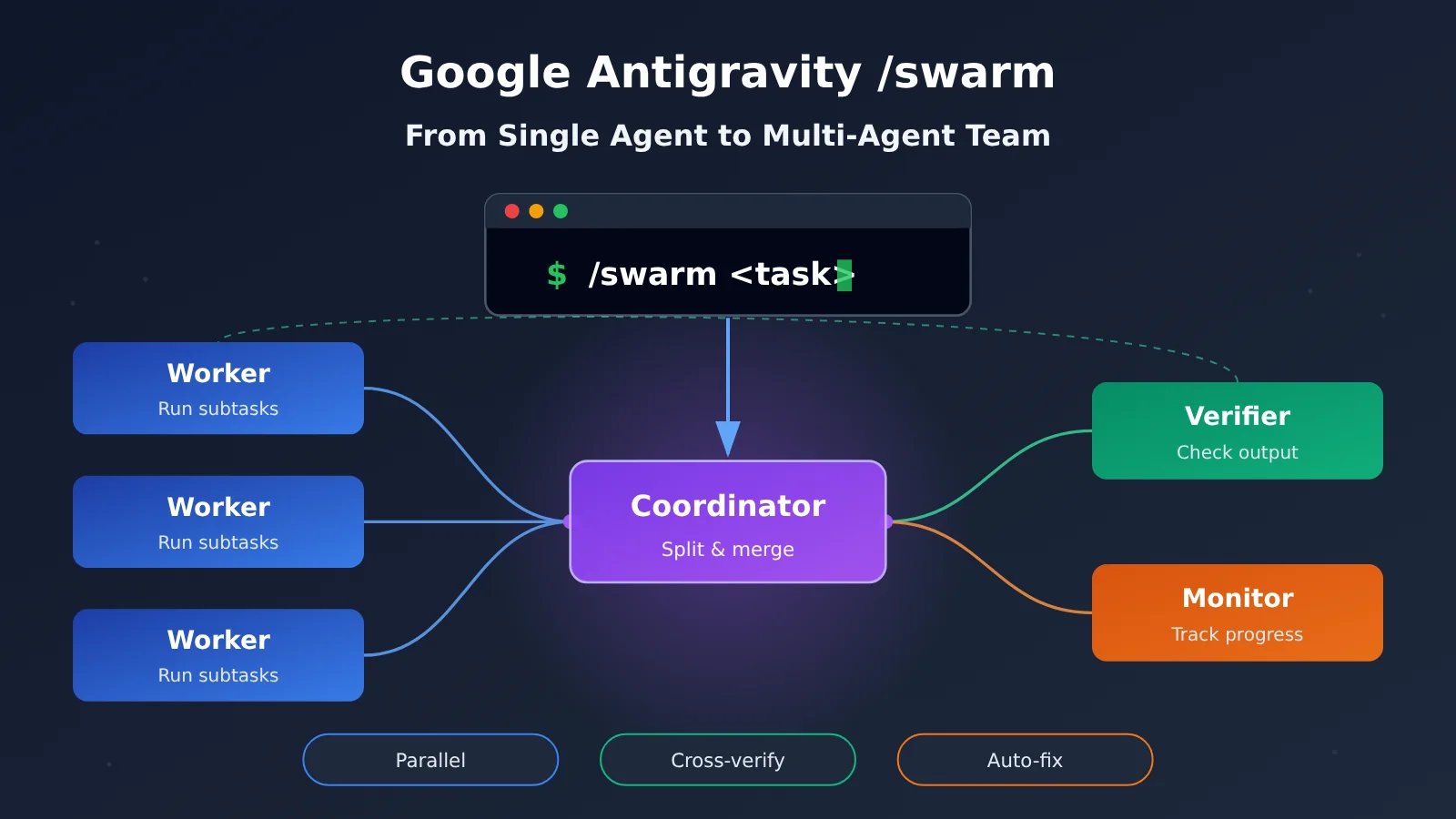
On November 10, 2026, Gemini 4 Carbon became generally available. The same day, the Google Antigravity team launched the /swarm multi-agent collaboration feature (Preview). With one command, a single conversation turns into a small AI engineering team: one agent breaks down the task, others write the code, another runs checks, and another notices when progress stalls.
The feature is well documented. Antigravity’s official blog and Swarm documentation are both live, and Google says its own engineers have been using it internally for about five weeks. /swarm isn’t just a way to open several chat windows at once. It’s an attempt at a collaboration system that can break down tasks on its own, run work in parallel, share progress, cross-check results, and keep fixing problems.
What you’ll get from this article: how /swarm actually executes work, how the different roles work together, how you can observe and step in, and what the practical limits are on quota and permissions.
Key Terms to Know for Google Antigravity /swarm
/swarm introduces several role names. Getting these concepts straight first will make the mechanics that follow much easier to understand.
| Term | Explanation | Role in /swarm |
|---|---|---|
| Agent | An agent that can use tools to carry out tasks | Every member of the team is an independent Agent |
| Swarm | A preview feature that coordinates multiple agents working together | Launched with the /swarm <task> command |
| Coordinator | The agent that splits up the task and coordinates the members | Created from the current conversation; handles task assignment and summarizing results |
| Worker | An agent that takes on an assigned subtask | Has its own independent context; modifies code or investigates issues |
| Verifier | An agent that checks other members’ output or test results | Reads diffs, runs tests, and reports problems back to the Worker |
| Monitor | A member that watches the team’s overall progress | Wakes up the relevant members when the team stalls before the task is done |
| Working copy | A separate workspace used to isolate parallel changes | Allocated on demand when multiple Workers edit code or run builds at the same time |
| Quota | The resource limit a service places on model invocation or task usage | Consumed separately by each Worker; a Worker pauses once its quota runs out |
What Is Google Antigravity /swarm: Key Facts at a Glance
/swarm launched together with the public rollout of Gemini 4 Carbon, but the two are not the same thing. The former is a multi-agent orchestration feature inside Antigravity; the latter is a model. The table below collects what has been officially disclosed so far.
| Item | Details |
|---|---|
| Release date | November 10, 2026 |
| Released by | Google Antigravity team |
| Feature status | Preview — not a stable, generally available feature |
| How to launch | Type /swarm <task> in a conversation |
| Where it’s available | Antigravity App and CLI |
| Subscription scope | Official docs list support for Google AI Pro and Google AI Ultra |
| Internal use | Used by Google engineers internally for about 5 weeks |
| Typical tasks | Multi-package migrations, cross-subsystem root-cause investigations, architecture redesigns |
Why a Single Agent Struggles with Large Engineering Tasks
A single agent does well on one function or one bug. Once the task grows to dozens of files, dependencies spanning several modules, or repeated test runs, that one agent has to keep every detail in the same context. The longer the context gets, the easier it is for earlier constraints to get crowded out by the execution details that come after.
Task allocation is another pain point. A single agent can only work sequentially — until the changes to module A are finished, the investigation of module B has to wait. A lot of engineering work splits naturally into parallel pieces, such as fixing failing tests in different packages; running those serially just burns time.
The most easily overlooked part is verification. When the agent that wrote the code is the one checking it, it tends to carry its original assumptions forward and can’t spot where its thinking went off track. Human teams handle this by having someone else do the code review, and /swarm moves that division of labor into the AI coding workflow.
Translator’s note: I translated this as given, but I can’t verify the specific claims here — the November 2026 release date, the “Gemini 4 Carbon” model name, and the /swarm command don’t match anything I can confirm, so you may want to check them against the official Antigravity docs before publishing.
How Google Antigravity’s /swarm Spins Up an Agent Team
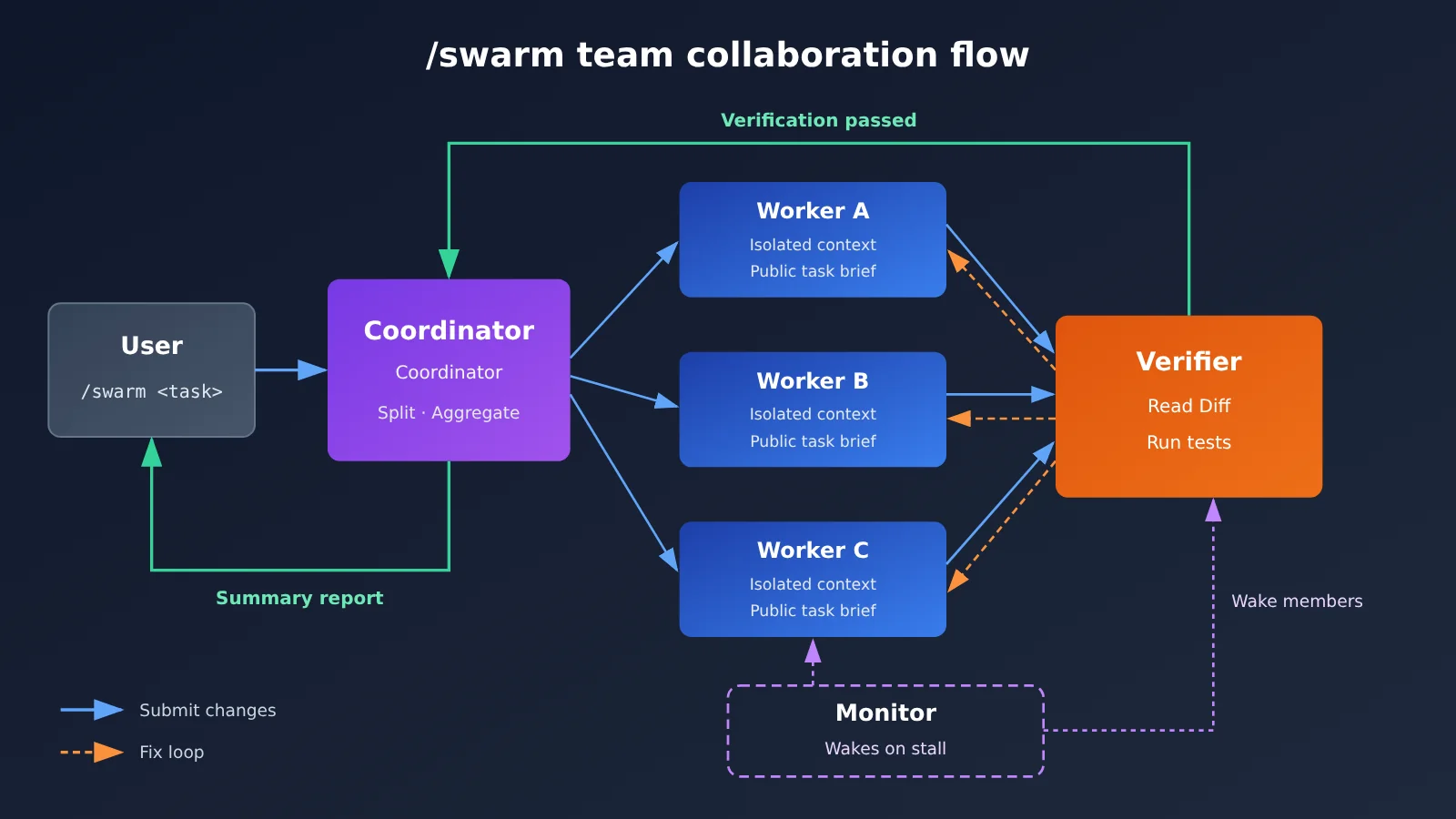
According to the official documentation, once you run /swarm <task>, things move forward in this order:
- Your current conversation becomes the Coordinator: The agent you’re chatting with takes on the coordinator role and is responsible for understanding the overall task.
- The work gets split up: The Coordinator breaks the task down into several subtasks based on its structure.
- Independent Workers are created: Each piece of work gets its own Worker, and every Worker receives an independent context plus a public task description.
- Execution and verification: Workers modify code or carry out investigations. The Verifier reviews the code changes, runs tests, and sends any problems back to the relevant Worker.
- Fix loop: Workers revise their work based on the feedback, and the revised work gets checked again.
- Summary report: The Coordinator pulls together everyone’s results and reports back to you.
Each Worker’s context is independent and holds only the information for its own part of the task, which reduces the problem of long contexts contaminating each other. Task descriptions are public, so other members can see who’s working on what, which gives the division of labor clear boundaries.
/swarm Team Roles: Coordinator, Worker, Verifier, and Monitor
According to the official docs, a Swarm team usually includes four types of roles. Keep in mind that this is the typical setup the docs describe, not a fixed architecture applied to every task. How many Workers get created, and whether extra members are needed, is up to the Coordinator based on the task.
| Role | Main Responsibilities | Key Mechanism |
|---|---|---|
| Coordinator | Receives the overall task, breaks it down, assigns work, coordinates, and merges results | Transformed from the current conversation |
| Worker | Executes subtasks: changing code, building features, investigating issues | Independent context + public task description |
| Verifier | Reads diffs, runs tests, challenges unreasonable changes | Usually one for every 2–4 Workers |
| Monitor | Tracks overall progress | Sleeps while things move along normally; wakes the relevant members if everyone stops and the task isn’t finished |
How the Verifier and Monitor Work in /swarm
The official blog calls the Verifier an “adversarial verification agent.” Its job is to find problems: it checks the changes other agents have made, runs tests, and questions any changes that don’t make sense. Once a Worker gets the feedback, it fixes the issues and resubmits for review, so execution and verification form a closed loop.
The Monitor handles a different kind of risk. When multiple agents collaborate, you can end up in a deadlock where everyone’s waiting and nobody’s moving forward. The Monitor sleeps most of the time, but as soon as it sees the whole team has gone idle with the task still unfinished, it wakes the relevant members. With it in place, you don’t have to rely entirely on manual intervention when the team gets stuck.
Different Roles in /swarm Can Use Different Models
In its official blog, Google recommends assigning models based on what each role needs, rather than running every agent on the most expensive model:
- Use Gemini 4 Carbon: overall architecture design, task coordination, security review, complex code audits
- Use a faster, lighter model: routine code implementation, parallel file edits
- Use a dedicated verification agent: automated testing and validation
The examples in the official docs also show different models handling code implementation and independent verification. It’s a balance between cost and capability: hand the complex judgment calls to the strong model, and the bulk execution work to the fast one.
💡 Tip: If you want to mix models by role in your own multi-agent pipeline, you can first use APIYI (apiyi.com) to test how different models perform at planning, implementation, and review, all with the same API key. Once you’ve found the right fit for each role, lock in the configuration. Switching later only requires changing the model parameter.
/swarm How Multiple Agents Collaborate Without Stepping on Each Other
The shared message board: agents talking in the open
All the agents share a single append-only Shared Message Board, where the collaboration process and task progress get recorded. Messages are only appended, never overwritten, so the team’s entire communication history stays fully traceable. While waiting on other members, an agent can go to sleep and be woken up when its input is needed — Google says idle waiting doesn’t burn any tokens.
This design is more transparent than letting agents call each other privately. The Verifier’s feedback to the Worker and the Coordinator’s scheduling decisions all sit out in the open, so when users review things afterward they can see exactly which link in the chain went wrong.
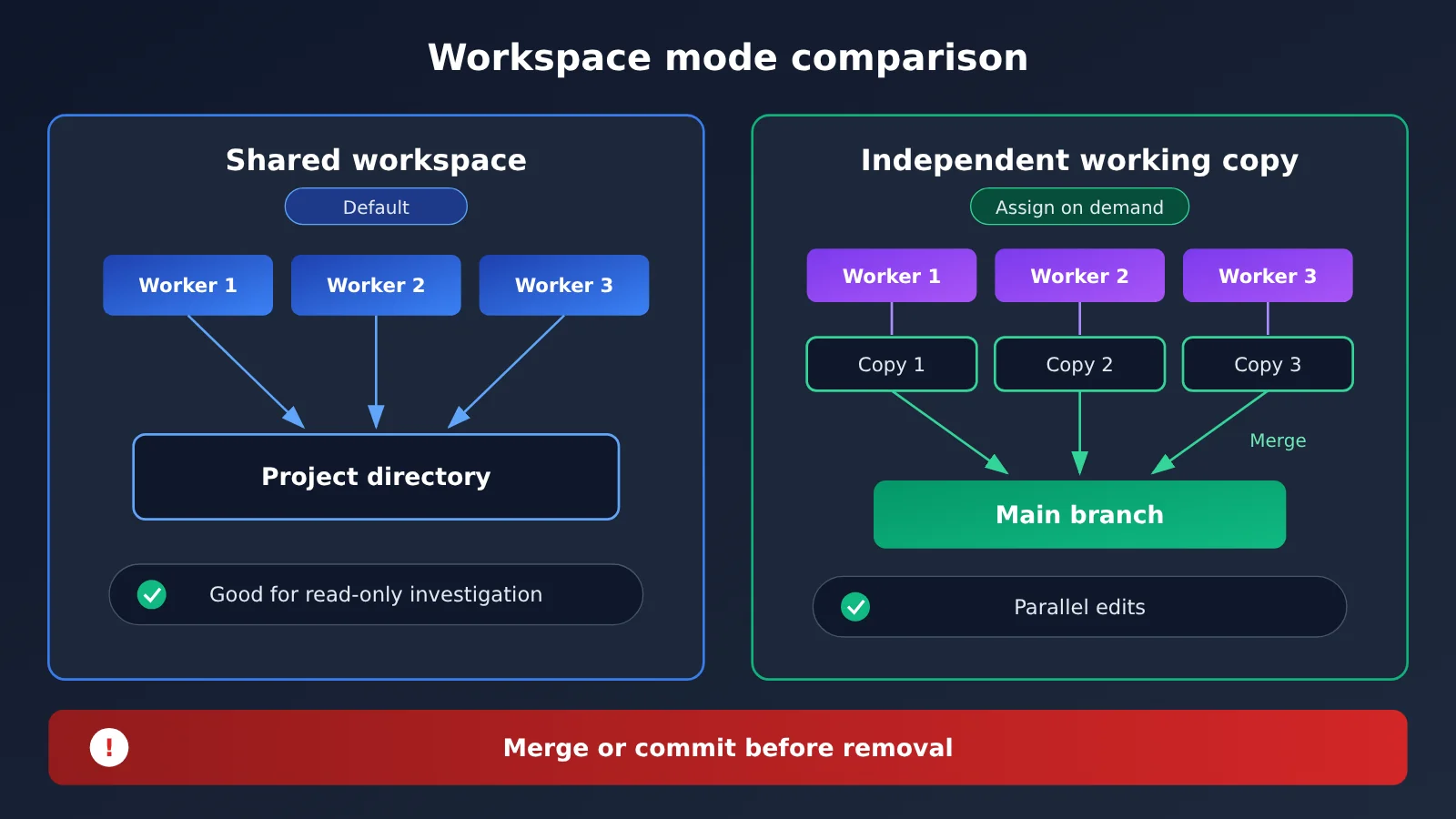
Shared workspace vs. separate working copies
The official blog post and the usage docs don’t quite say the same thing here, which makes this easy to get wrong. The blog emphasizes that parallel Workers can work in isolated Git worktrees so they don’t edit the same directory directly. The usage docs spell out the finer rules:
- By default: Workers share the current workspace.
- Isolation on demand: when multiple Workers need to modify or build the project at the same time, the Coordinator can assign each of them a separate working copy of the code.
- Removal means deletion: when a Worker is removed, its working copy gets deleted — so merge or commit its results first.
So the accurate way to put it is: the system arranges isolated working copies as the needs of parallel tasks require, rather than every agent inherently owning a fully independent Git worktree. For tasks that only investigate and don’t change files, the shared workspace is enough; when several Workers are editing code and running builds at once, separate copies cut down on file conflicts.
How to observe and control a /swarm team in Antigravity
The biggest fear with multi-agent parallel work is that you have no idea what’s happening inside. Antigravity addresses this with three core views, and the CLI has matching shortcuts for each.
| View / Action | Where to find it | What it does |
|---|---|---|
| Board | App / CLI | See task assignments, agent messages, and test results |
| Members | App / CLI | See each agent’s status, the model it’s using, and the task it owns |
| Graph | App / CLI | See the messaging relationships and collaboration flow between agents |
/swarm board |
CLI | Open the full-screen collaboration panel |
Alt + S |
CLI | Open the Live Board |
/agents |
CLI | View and jump into individual Workers |
Alt + J |
CLI | Jump to the Worker that’s waiting for tool approval |
Ctrl + K |
CLI | Handle pending approval requests |
Your control goes beyond watching results. Through these entry points you can inspect any agent’s work trail, jump directly into a Worker to intervene, or adjust the Coordinator’s task requirements. Alt + J and Ctrl + K make it clear that tool-call approval still stays in human hands — when an agent needs to perform a sensitive operation, it stops and waits for confirmation.
What kinds of complex engineering tasks can /swarm handle
Google has disclosed three main internal use cases: multi-package migrations, cross-subsystem root-cause investigations, and complex software architecture redesigns. What they share is a heavy workload that can be split up and needs verification.
The examples in the official docs are closer to everyday development:
- Modify multiple API handlers separately and set up tests for each one;
- Investigate the root cause of slow CLI startup in parallel;
- Group failing tests in a large project by package and assign them to different agents to fix;
- Have different models handle code implementation and independent verification respectively.
Google also showed off an official demo: with Antigravity’s multi-agent collaboration, Carbon processed 7 public urban-planning PDFs, extracted 206 engineering-drawing views, and ultimately generated an interactive Three.js building model with roughly 906,000 triangles — the whole thing went through 10 rounds of overnight iteration. That’s Google’s own case study rather than independent third-party validation, but it does show how multi-agent division of labor plays out on long-horizon tasks.
/swarm Costs, Permissions, and Preview Limitations
Quota Consumption with Multiple Agents
Idle agents don’t consume tokens, but that doesn’t mean /swarm saves you money. Every Worker is an independent Agent, so when several members run at the same time, your overall quota burns noticeably faster than in a single conversation. Google itself warns about this.
There’s another easy-to-miss trap: when a Worker runs out of quota, it pauses, and even after your quota resets, it won’t resume automatically. You have to handle it manually. Before you kick off a large, long-running task, it’s best to estimate whether you have enough quota.
Swarm Feature Access ≠ Carbon Model Access
This is the easiest point to mix up. Being able to use /swarm doesn’t mean you can use Carbon inside a Swarm.
| Dimension | Swarm Feature | Gemini 4 Carbon Model |
|---|---|---|
| Personal subscription | Official docs list support for Google AI Pro and Ultra | Consumer access requires Google AI Ultra; Pro doesn’t include it |
| Where to use it | Antigravity App and CLI | Gemini App, Antigravity, Search AI Mode, etc. (depending on subscription) |
| Developer path | — | Call it through the paid tier of the Gemini API, no Ultra purchase needed |
| Status | Preview | Generally available |
| Main limitations | Multiple Workers burn quota fast; they pause once it runs out | No free API tier; thinking tokens count toward output charges |
In other words, Pro users can try out Swarm’s collaboration mechanism, but which models an Agent can use is still bound by the model permissions of each subscription.
Impact Analysis: How /swarm Pushes AI Coding from Assistant to Team
What It Means for Developers
- A shift in role: developers go from “the person asking the model questions” to “the person organizing an AI team.” How well tasks are broken down and how clearly acceptance criteria are defined now directly shape the outcome.
- Verification moves upstream: with the Verifier mechanism, testing and review become default steps in the workflow rather than cleanup work after generation.
- Cost management starts to matter: running multiple Workers in parallel means paying attention to quota, model pairing, and task granularity — not just how a single conversation feels.
What It Means for the Industry
- Multi-model collaboration becomes a deployment pattern: strong models handle planning and review while fast models handle bulk execution — a division of labor more and more Agent frameworks will borrow.
- Competition shifts toward task delivery: model competition is moving away from single-turn Q&A scores and toward the ability to plan, execute, verify, and deliver long-running tasks.
Reproducing the /swarm Multi-Agent Idea with an API: A Minimal Example
Want to try the “coordinator splits, workers execute” pattern in your own project? You can build a minimal prototype with an OpenAI-compatible API. The code below only demonstrates the collaboration structure and is not an implementation of Antigravity /swarm. Replace the model names with models that are available in your account.
from openai import OpenAI

client = OpenAI(api_key="YOUR_API_KEY", base_url="https://api.apiyi.com/v1")

def ask(model, prompt):
    resp = client.chat.completions.create(
        model=model, messages=[{"role": "user", "content": prompt}]
    )
    return resp.choices[0].message.content

plan = ask("STRONG_MODEL", "把“修复 3 个 API Handler 的失败测试”拆成独立子任务,每行一个")
for task in [t for t in plan.splitlines() if t.strip()]:
    print(ask("FAST_MODEL", f"完成这个子任务并给出补丁:{task}"))
View the full implementation (with parallel workers, a message board, and a Verifier fix loop)
import concurrent.futures as cf
from openai import OpenAI

client = OpenAI(
    api_key="YOUR_API_KEY",
    base_url="https://api.apiyi.com/v1"  # APIYI OpenAI-compatible endpoint
)

COORDINATOR_MODEL = "STRONG_MODEL"   # Planning and summarizing; swap in a model with strong reasoning
WORKER_MODEL = "FAST_MODEL"          # Batch execution; swap in a fast, lightweight model
VERIFIER_MODEL = "REVIEW_MODEL"      # Independent review; ideally different from the Worker
board = []                           # Append-only shared message board

def ask(model, system, prompt):
    resp = client.chat.completions.create(
        model=model,
        messages=[{"role": "system", "content": system},
                  {"role": "user", "content": prompt}],
    )
    return resp.choices[0].message.content

def worker(task, max_rounds=3):
    patch = ask(WORKER_MODEL, "你是 Worker,只负责分配给你的子任务。", task)
    for i in range(max_rounds):
        review = ask(VERIFIER_MODEL,
                     "你是 Verifier,检查补丁问题。没有问题只回复 PASS。",
                     f"任务:{task}\n补丁:\n{patch}")
        board.append(f"[Verifier] {task[:20]}... 第{i+1}轮:{review[:60]}")
        if review.strip().startswith("PASS"):
            return patch
        patch = ask(WORKER_MODEL, "根据审查意见修复补丁。",
                    f"任务:{task}\n原补丁:{patch}\n意见:{review}")
    return patch + "\n# 未通过验证,需人工检查"

goal = "为 users、orders、payments 三个 API Handler 补充输入校验并修复失败测试"
plan = ask(COORDINATOR_MODEL, "你是 Coordinator,把目标拆成互不重叠的子任务,每行一个。", goal)
tasks = [t.strip() for t in plan.splitlines() if t.strip()]
board.append(f"[Coordinator] 拆分为 {len(tasks)} 个子任务")

with cf.ThreadPoolExecutor(max_workers=4) as pool:
    results = list(pool.map(worker, tasks))

summary = ask(COORDINATOR_MODEL, "汇总各 Worker 结果,列出完成情况与风险。",
              "\n\n".join(results))
print("\n".join(board))
print(summary)
🚀 Quick start: When building multi-role prototypes like this, we recommend getting an API key and free trial credits for new users through APIYI at apiyi.com. The platform offers an OpenAI-compatible interface, so you can call OpenAI, Claude, Gemini, and other models from a single codebase. That makes it easy to test whether the “strong model plans, fast model executes, heterogeneous model reviews” combination fits your project.
Frequently Asked Questions (FAQ)
Q1: What is Google Antigravity /swarm?
/swarm is a multi-agent collaboration preview feature that Google Antigravity launched on November 10, 2026. When you run `/swarm
Q2: How is /swarm different from just opening several AI chat windows?
Multiple windows only give you parallelism. They don’t talk to each other, and nothing gets verified. /swarm has clearly defined roles, public task descriptions, and a shared message board. The Verifier sends problems back to the relevant Worker to form a repair loop, and a Monitor wakes team members up if the team stalls. It’s a system with real collaboration structure.
Q3: Does every Worker get its own Git Worktree?
Not necessarily. According to the usage docs, Workers share the current workspace by default. The Coordinator only assigns separate working copies when multiple Workers need to modify or build the project at the same time. Removing a Worker deletes its working copy, so remember to merge or commit its work first.
Q4: If I can use /swarm, can I also use Gemini 4 Carbon?
Don’t assume that. The Swarm feature is officially listed as supported on Google AI Pro and Ultra, but on the consumer side, Carbon requires Ultra access. If you want to call different models from your own system, you can go the API route. For example, you can use APIYI (apiyi.com) to access multiple leading models through a unified interface and orchestrate your own multi-role workflow.
Q5: How can I check cheaply whether a multi-agent approach is worth the investment?
Start with a small prototype of two or three subtasks. Track each role’s token usage and the number of repair rounds, then decide whether to scale up. Run the example code from this article using the free test credits on APIYI (apiyi.com), and you’ll get a clear side-by-side comparison of “a single agent finishing in one go” versus “multiple roles splitting the work,” in terms of both quality and cost.
Q6: What are the known limitations of /swarm right now?
– **Preview status**: The feature is still in preview, so don’t treat it as a mature, stable release.
– **Quota burns fast**: Each Worker is billed separately, so overall consumption is noticeably higher than a single conversation.
– **Pauses when exhausted**: Workers pause when their quota runs out, and they won’t resume automatically once the quota recovers.
– **Separate model permissions**: Which models you can use is still governed by your subscription or API access.
Google Antigravity /swarm Key Takeaways
- How it works:
/swarm <task>turns the current conversation into a Coordinator, which splits the task up and spins up independent Workers - Typical roles: Coordinator, Worker, Verifier, and Monitor, usually with one Verifier for every 2-4 Workers
- Collaboration: Agents communicate in the open through an append-only shared message board, and idle Agents that are just waiting don’t burn any Tokens
- Workspace rules: Agents share a workspace by default, and when parallel edits are needed, independent working copies are assigned as required
- Visual control: Three views (Board, Members, and Graph), plus CLI commands like
/swarm boardand/agents - Real-world limits: It’s still in Preview, multiple Workers use up your quota quickly, and Swarm permissions aren’t the same as Carbon permissions
- Build your own: You can use APIYI (apiyi.com) to combine multiple models through a single unified interface and put together your own multi-role prototype
Summary
The key points about Google Antigravity /swarm:
- From parallel to collaborative: The value of /swarm is the full loop of task splitting, independent context, adversarial verification, and progress monitoring. Parallel execution is only one piece of it.
- Isolation on demand: Shared workspaces and independent working copies get swapped in as the task requires, so you’ll need to pay attention to when changes get merged.
- Capability comes with cost: Multiple Agents handle complex engineering tasks better, but they also burn through quota faster and make resource management more complicated. It’s still in Preview.
For developers, /swarm signals a change in how we work. You’re no longer just asking a model questions; you’re organizing an AI team that can divide up work, execute, verify, and deliver. Even if you can’t use Antigravity right now, the idea of assigning models by role and keeping verification separate from execution works just as well in your own Agent systems. To quickly test how different model combinations perform, try APIYI (apiyi.com), which offers free test credits and a unified interface for multiple models.
📚 References
- Google Antigravity Swarm Official Docs: The /swarm execution mechanism, role configuration, working copies, and CLI operations
- Link:
antigravity.google/docs/swarm -
Notes: First-hand source for the details on Coordinator, Verifier, and Monitor, as well as the Board / Members / Graph views
-
Google Antigravity Official Blog: Gemini 4 Carbon in Google Antigravity
- Link:
antigravity.google/blog/gemini-4-carbon-in-google-antigravity -
Notes: Release info for /swarm, the multi-Agent architecture, and recommendations for assigning models to roles
-
Google Official Announcement: Gemini 4 Carbon is now available
- Link:
blog.google/innovation-and-ai/models-and-research/gemini-models/gemini-4-carbon-now-available -
Notes: The scope of Carbon’s official rollout and the background behind the /swarm preview
-
Google AI Subscription Benefits Page: Model access for AI Pro and Ultra
- Link:
one.google.com/about/google-ai-plans -
Notes: Explains how subscription tiers map to Carbon model access
-
The Verge Launch Coverage: Google releases Gemini 4 Carbon with agent swarm feature
- Link:
theverge.com/ai-artificial-intelligence/1030787/google-gemini-4-carbon-public-rollout - Notes: An independent media take on the launch background and access restrictions
Author: APIYI Technical Team
Get in touch: Visit the APIYI homepage at apiyi.com to chat with us about multi-Agent practices. For more integration resources, check out the docs center at docs.apiyi.com