Author’s note: With reasoning set to Max in DeepSeek Harness, how should you choose between V4.1-Flash and V4-Pro? This article compares them across three dimensions—intelligence, price, and speed—and explains why Flash is the default choice for coding and which scenarios are better suited to Pro.
Open the model dropdown in DeepSeek Harness, and you’ll see two options: DeepSeek-V4.1-Flash and DeepSeek-V4-Pro. By conventional wisdom, the model with “Pro” in its name and more parameters should be smarter. Once you’ve set reasoning to Max, though, what many developers really want to know is: Which one is smarter at coding? And how much do they differ in price and speed?
This isn’t a “they each have their strengths” kind of comparison. We checked DeepSeek’s official pricing page, changelog, official benchmarks, and third-party tests. The conclusion is clear: For coding in DeepSeek Harness, choose Flash by default; Pro is best used as a secondary model for looking up knowledge and facts or reading long documents.
What you’ll learn: By the end of this article, you’ll know which versions Pro and Flash correspond to in DeepSeek Harness, which one has stronger coding capabilities at Max reasoning, how much they differ in cost and speed, and how to switch between them for different tasks.
Which Versions Are Pro and Flash in DeepSeek Harness?
Before discussing “which one is smarter,” it’s worth clarifying which checkpoints the two entries in the DeepSeek Harness list actually refer to. Many people still think of Pro as an earlier version, but model names and actual versions don’t always get updated in sync.
| Harness listing | API ID | Actual checkpoint | Release status |
|---|---|---|---|
| DeepSeek-V4.1-Flash | deepseek-flash |
V4.1-Flash-1017 (updated October 17) | Current workhorse, specially optimized for Harness |
| DeepSeek-V4-Pro | deepseek-v4-pro |
V4-Pro-0813 (GA on August 13) | Still available, now positioned as a transitional model |
Is DeepSeek V4 Pro Being Discontinued?
There’s been ongoing speculation in the community that “Pro is being discontinued,” and it didn’t come out of nowhere. When V4.1 Flash launched on September 10, the official announcement did say that V4 Pro service would end after September 14. However, the same changelog immediately clarified that, in response to user demand, API service for DeepSeek V4 Pro would continue after September 14, 2026, with no change to its pricing.
So Pro is still available as usual, but it’s now positioned as a transitional product. V4.1 Pro still hasn’t been officially released. At the end of October, there was only speculation based on a change to the model label on the official website. Also, early claims that “Pro isn’t good” were mainly about overfitting in the V4-Pro preview version. The August GA version improved noticeably, but its overall coding ability still hasn’t surpassed Flash.
Parameter Scale: DeepSeek Pro vs. Flash
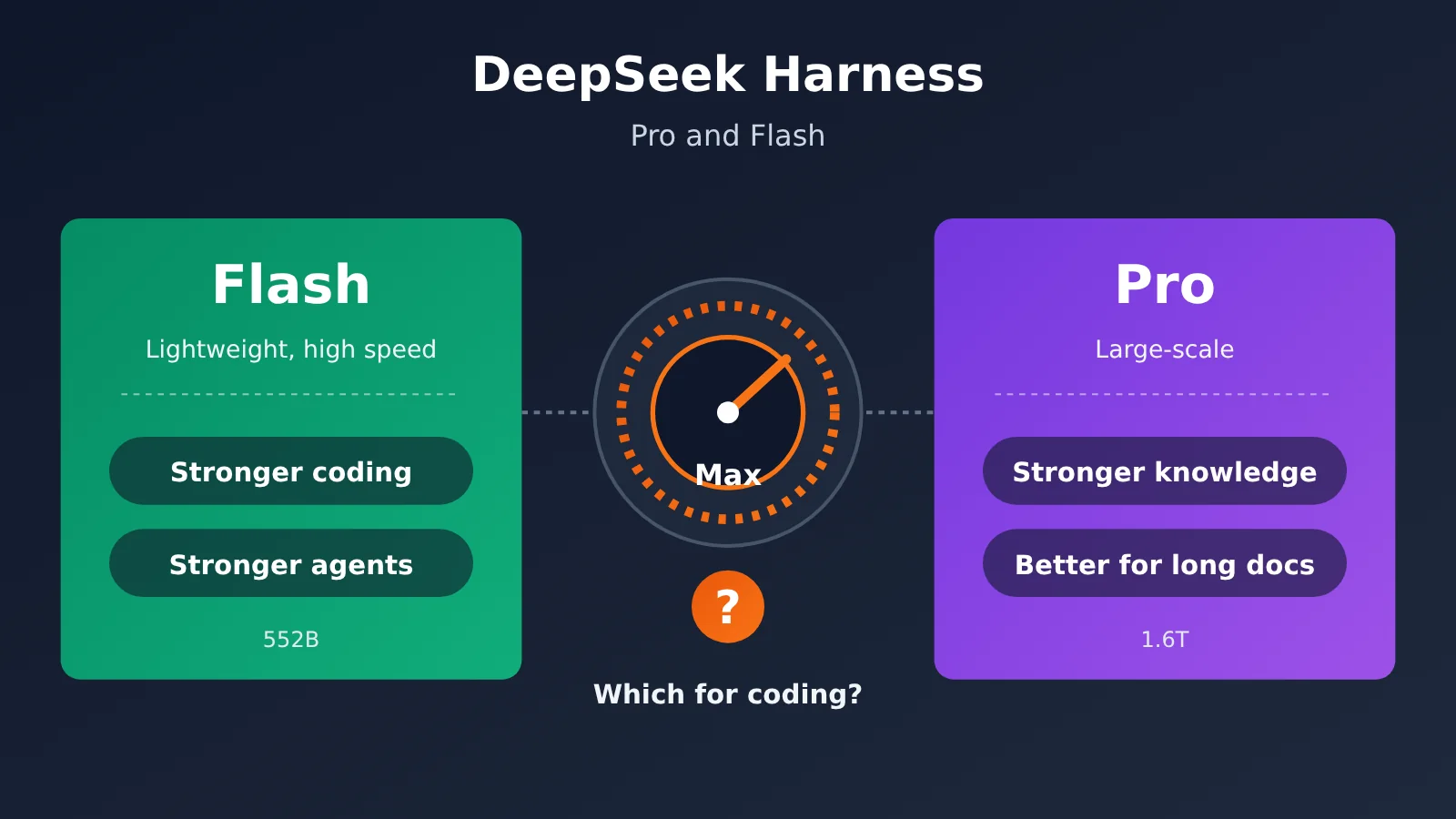
The two models differ considerably in size, which is why many people assume Pro is stronger by default:
- Flash: 552B total parameters with a MoE architecture; about 8B active parameters on input and 16B on output; supports a 1M context window
- Pro: 1.6T total parameters, with about 49B active parameters
V4.1 Flash belongs to a new architecture family (CSA+HCA) and is the smallest model in that family. It wasn’t distilled from Pro. Instead, its new architecture and more extensive post-training have helped it catch up with—and surpass—Pro on coding and Agent tasks. More parameters don’t necessarily mean better coding ability; that’s the premise behind all the conclusions in the rest of this article.
DeepSeek Pro vs. Flash: Which Model Is Smarter at Coding?
Intelligence is the most important factor when choosing a model—and the one most easily misjudged based on parameter count. Here’s how the two models compare on official and public benchmarks:
| Benchmark | Capability Tested | V4.1-Flash-1017 | V4-Pro-0813 | Winner |
|---|---|---|---|---|
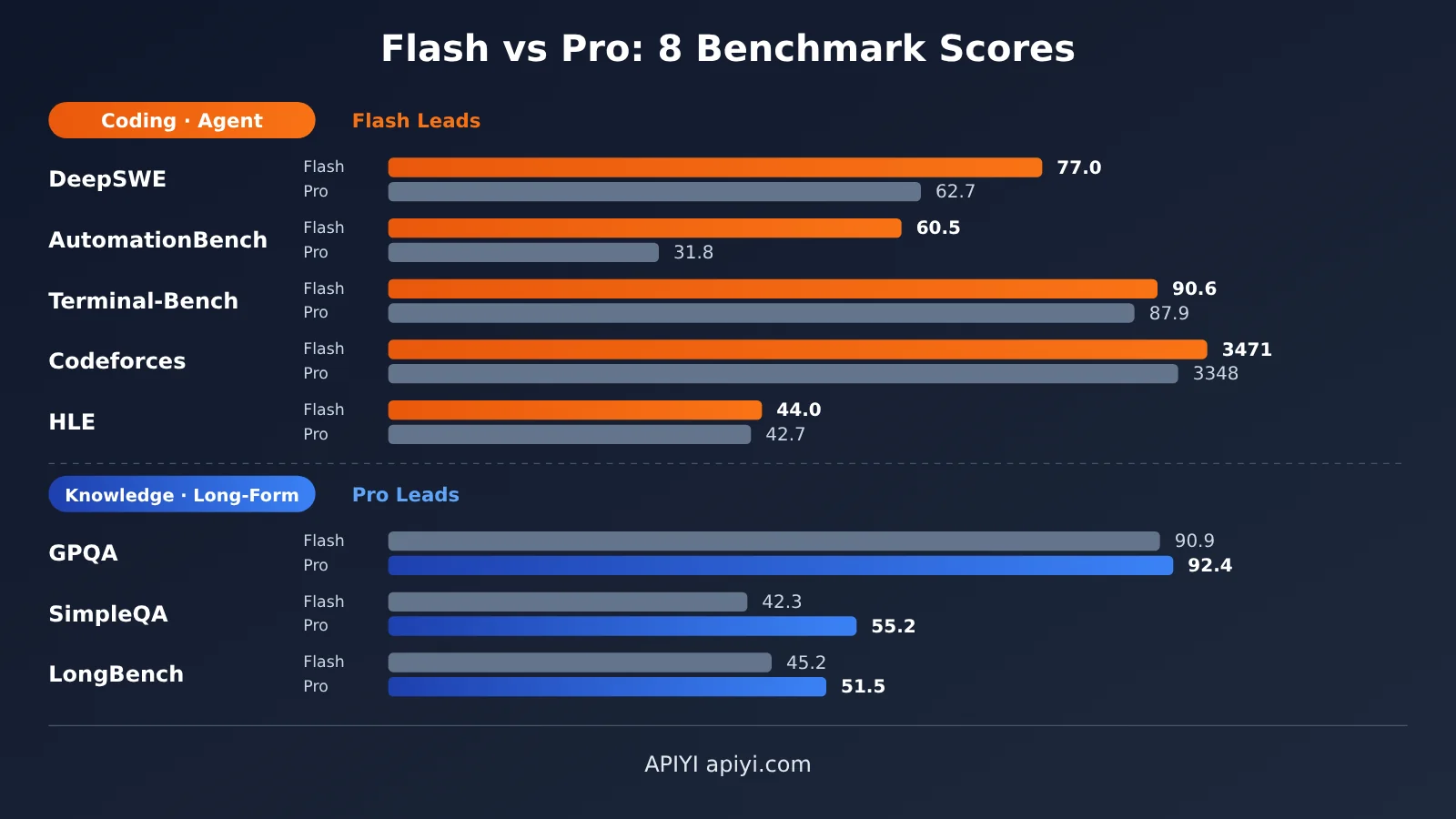
| DeepSWE v1.1 | Software engineering in real-world repositories | 77.0 | 62.7 | Flash (+14.3) |
| AutomationBench | Automation and agent workflows | 60.5 | 31.8 (43.2 by another measurement) | Flash by a wide margin |
| Terminal-Bench 2.1 | Terminal and toolchain operations | 90.6 | 87.9 | Flash |
| Codeforces | Competitive programming | 3471 | 3348 | Flash |
| HLE (text only) | Challenging general reasoning | 44.0 | 42.7 | Flash, narrowly |
| GPQA Diamond | Graduate-level science questions | 90.9 | 92.4 | Pro |
| SimpleQA-Verified | Factual recall and hallucination rate | 42.3 | 55.2 | Pro (+12.9) |
| LongBench-V2 | Long-document comprehension | 45.2 | 51.5 | Pro |
DeepSeek Flash leads across coding and agent tasks
As the table shows, Flash generally comes out ahead on anything involving coding, tool use, or agent loops. Its lead of more than 14 points on DeepSWE suggests it’s much better at finding issues in real-world repositories, making changes across multiple files, and passing tests. Its larger lead on AutomationBench reflects the multi-step tool-calling workflows used in Harness.
The gap on Terminal-Bench and Codeforces is smaller, but the trend is the same. Third-party comparisons reach a similar conclusion: in DeepSeek’s own benchmarks, the cheaper model beats the larger one on most coding and agent tasks.
DeepSeek Pro retains an edge in knowledge and long documents
Pro still has its uses. Its larger total parameter count gives it a broader store of world knowledge. Its roughly 13-point lead on SimpleQA-Verified suggests it’s less likely to hallucinate when answering questions about obscure facts, people’s names, version numbers, and API details. It’s also ahead by about 6 points on LongBench-V2 and edges out Flash on GPQA Diamond, making it stronger at close reading of long documents and academically oriented Q&A.
There’s another difference that’s easy to overlook: Flash is the only one of the two models that supports visual input. Pro can’t read images, so when you need to share screenshots, error screens, or design mockups in Harness, you’ll have to use Flash.
DeepSeek Harness is optimized specifically for Flash
In the update notes for version 1017, DeepSeek explicitly says the update was optimized specifically for DeepSeek Harness and recommends upgrading to Harness 0.2.1-rc.1 or later. In other words, Flash’s tool-calling format, context management, and end-of-task behavior have been specially adapted for this GUI. Pro hasn’t received the same treatment.
DeepSeek Pro vs. Flash Pricing: The Gap Widens with Max Reasoning
The following per-million-token prices are listed on the official pricing page. Prices before the slash are peak-hour rates; prices after it are off-peak rates:
| Billing item | Flash | Pro | Pro/Flash ratio |
|---|---|---|---|
| Input (cache hit) | 0.006 / 0.003 | 0.044 / 0.022 | About 7.3× |
| Input (cache miss) | 0.30 / 0.15 | 1.32 / 0.66 | About 4.4× |
| Output | 1.20 / 0.60 | 3.96 / 1.98 | About 3.3× |
| Concurrency limit | 2500 | 500 | Flash is 5× Pro |
Off-peak rates are half the peak-hour rates. Peak hours are 01:00–04:00 and 06:00–10:00 UTC on weekdays, which is 09:00–12:00 and 14:00–18:00 Beijing time. All weekend usage is billed at off-peak rates. If you have non-urgent tasks like large-scale refactoring or generating tests in bulk, running them at night or on the weekend can cut costs in half.
Why Pro Costs More with Max Enabled
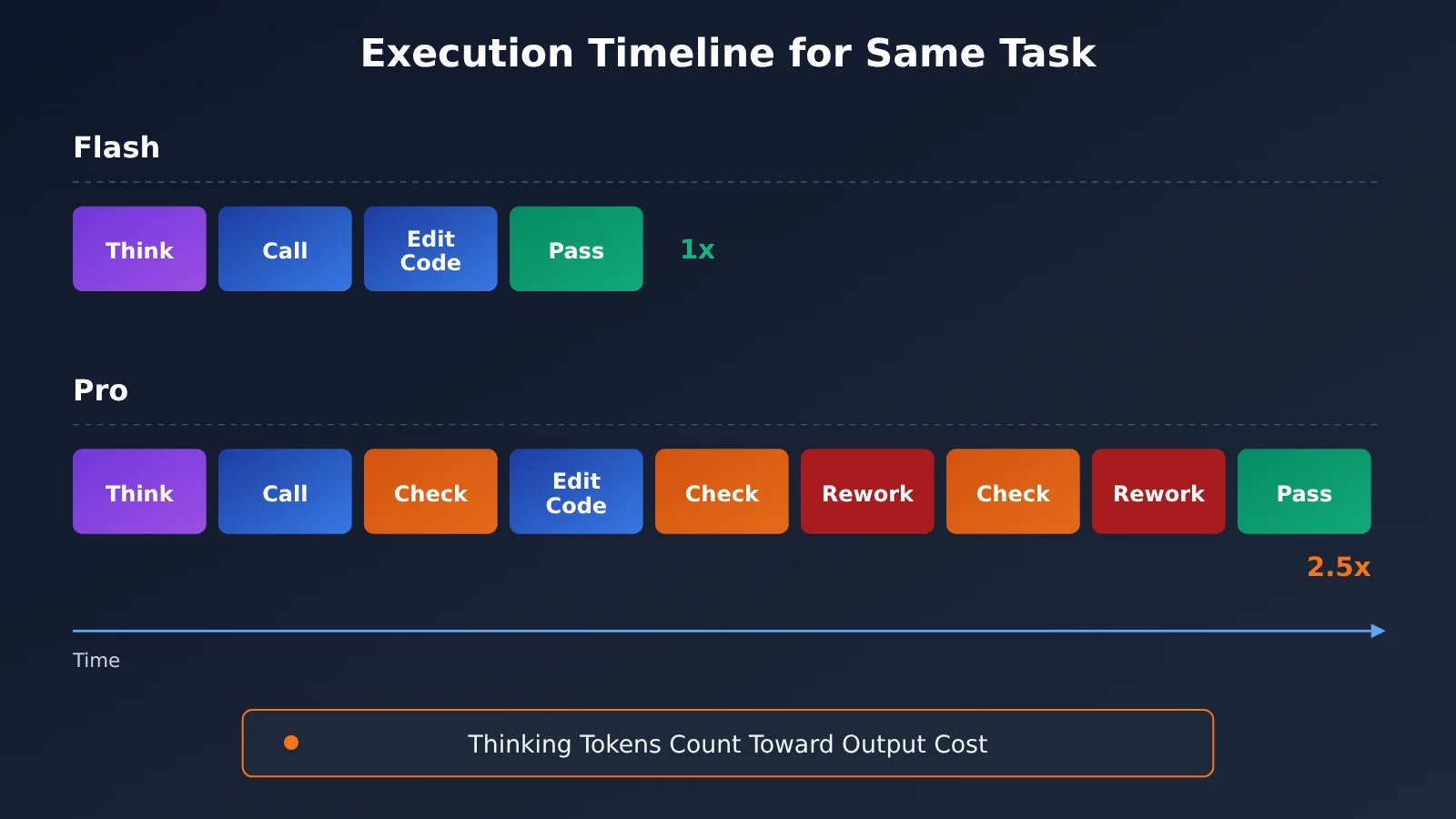
The price table only tells part of the story. At the Max reasoning level, tokens generated during the thinking process are also billed as output. Pro is more likely to think through things repeatedly and recheck its work at the Max level, delaying the final result. In third-party tests, Pro took more than 2.5 times as long as Flash on the same task and also required more rework.
As a result, the actual bill is usually more than 3.3 times the output price shown in the table: Pro not only costs more per token, it also generates more tokens. In Harness workflows with tool loops that can easily run dozens of rounds, these costs keep adding up.
💰 Cost optimization: If you use DeepSeek alongside other models like Claude, GPT, and Gemini across multiple projects, you can manage model invocations and billing in one place with APIYI at apiyi.com. The platform offers an OpenAI-compatible API and pay-as-you-go pricing, making it easier to assign models by task type and control overall costs.
DeepSeek Flash vs. Pro: Speed Comparison
Flash has roughly an order of magnitude fewer active parameters than Pro, and its concurrency limit is five times higher. That means both first-token latency and total task time are significantly shorter. In tests, it reached around 363 tok/s. In Harness workflows that involve repeated tool calls and multiple rounds of iteration, saving a little time on each round adds up to a much faster task overall.
Keep in mind that Pro is slower mainly because it takes longer to think, not because it lacks compute. Max mode amplifies its tendency to deliberate, so in tool-use loops, it’s often both slower and no better in terms of results.
The table below brings together three dimensions for a quick comparison:
| Comparison dimension | DeepSeek V4.1 Flash | DeepSeek V4 Pro | Winner |
|---|---|---|---|
| Coding / multi-file refactoring | DeepSWE 77.0 | DeepSWE 62.7 | Flash |
| Agents / toolchains | AutomationBench 60.5 | AutomationBench 31.8 | Flash |
| Factual knowledge / low hallucination rate | SimpleQA 42.3 | SimpleQA 55.2 | Pro |
| Long-document understanding | LongBench 45.2 | LongBench 51.5 | Pro |
| Visual input | Supported | Not supported | Flash |
| Price | Output costs about one-third of Pro | Higher per-token price and longer thinking time | Flash |
| Speed and concurrency | Fast, concurrency limit of 2500 | Slow, concurrency limit of 500 | Flash |
| Harness compatibility | Specifically optimized by the official team | No specific optimization | Flash |
DeepSeek Harness Recommendations: When to Use Pro vs. Flash
When to Choose DeepSeek Flash + Max
- Everyday coding and bug fixes: DeepSWE leads by 14 points, making this the clearest reason to choose Flash
- Multi-file refactoring and cross-module changes: These tasks require reliable code understanding and longer tool loops
- Terminal operations, running tests, and executing scripts: Flash leads on both Terminal-Bench and AutomationBench
- Image-based questions: For debugging screenshots, recreating UIs, or reviewing design mockups, only Flash supports image input
- Everyday Q&A and rapid iteration: It’s faster and cheaper, and the Max tier delivers the most noticeable gains on Flash
When to Choose DeepSeek Pro + Max
- Looking up obscure facts: Names, library version numbers, specific API parameters, and historical events
- In-depth reading of long documents and research papers: Pro leads on LongBench-V2 by about 6 points
- Knowledge-focused, non-code writing: When you want broader citations and fewer factual errors
- Cross-checking factual answers from Flash
When Not to Use Pro
Don’t use Pro for long tool loops. At the Max tier, it’s only slower and more expensive, with no advantage on either Terminal-Bench or DeepSWE. This is the most common misconception: assuming a complex task calls for a larger model, only to double the time and get worse results.
How to Switch Between DeepSeek Pro and Flash by Task via API
In Harness, switching models midway through the same session doesn’t incur any extra cost. Both models use the same OpenAI-compatible interface. If you’re building your own coding agent outside Harness, you can implement the same routing logic in code. Here’s the simplest example:
import openai

client = openai.OpenAI(
    api_key="YOUR_API_KEY",
    base_url="https://api.apiyi.com/v1"  # APIYI OpenAI-compatible interface
)

response = client.chat.completions.create(
    model="deepseek-flash",  # Use Flash by default for coding; check the platform's model list for the exact model name
    messages=[{"role": "user", "content": "用 Python 写一个带重试机制的 HTTP 请求函数"}]
)
print(response.choices[0].message.content)
View the full implementation: Automatically choose Pro or Flash by task type
import openai
from typing import Optional

client = openai.OpenAI(
    api_key="YOUR_API_KEY",
    base_url="https://api.apiyi.com/v1"
)

# Map task types to models: use Flash for coding / agents / vision, and Pro for knowledge / long documents
TASK_MODEL_MAP = {
    "code": "deepseek-flash",
    "agent": "deepseek-flash",
    "vision": "deepseek-flash",      # Pro doesn't support image input
    "knowledge": "deepseek-v4-pro",  # More accurate factual recall, fewer hallucinations
    "long_doc": "deepseek-v4-pro",   # Stronger long-document comprehension
}

def ask_deepseek(
    prompt: str,
    task_type: str = "code",
    system_prompt: Optional[str] = None,
    max_tokens: int = 4000,
) -> str:
    """Select and call a DeepSeek model based on the task type."""
    model = TASK_MODEL_MAP.get(task_type, "deepseek-flash")

    messages = []
    if system_prompt:
        messages.append({"role": "system", "content": system_prompt})
    messages.append({"role": "user", "content": prompt})

    try:
        resp = client.chat.completions.create(
            model=model,
            messages=messages,
            max_tokens=max_tokens,
        )
        return resp.choices[0].message.content
    except Exception as e:
        return f"Error ({model}): {e}"

# For coding: use Flash
print(ask_deepseek("重构这段函数,拆分为三个职责单一的方法:...", task_type="code"))

# For API details: use Pro
print(ask_deepseek("requests 库 Session 对象的 mount 方法有哪些参数?", task_type="knowledge"))
This routing approach matches the conclusion of this article: use Flash as your workhorse, and bring in Pro only for knowledge-focused tasks. If V4.1 Pro is released later, you’ll only need to update one line in the mapping table.
🚀 Get started quickly: We recommend getting an API key and free trial credits for new users through APIYI at apiyi.com. A single key lets you call DeepSeek, OpenAI, Claude, Gemini, and other leading models. You can use the code above to compare Flash and Pro on your own codebase.
DeepSeek Pro or Flash: How to Choose
When weighing intelligence, price, and speed, you can boil down the choices in DeepSeek Harness to a few recommendations:
- Use Flash + Max by default: Use it for coding, multi-file refactoring, running tools, reading images, and everyday Q&A. It’s also the best default configuration for Harness.
- Switch to Pro for knowledge-heavy tasks: It’s a good fit for obscure facts, version numbers, API details, historical facts, and close reading of long documents—the kinds of tasks where it leads by 13 points on SimpleQA and 6 points on LongBench.
- Don’t use Pro for long tool loops: At the Max tier, it’s slower and more expensive, with no advantage on coding benchmarks.
- Use Flash for any turn that includes an image: Pro doesn’t support vision.
- Keep Pro as a backup option: Until V4.1 Pro is officially released, use the Pro entry only as a supplementary tool for knowledge queries. Reassess once the new version is available.
💡 Recommendation: Benchmarks only show broad trends. On your specific codebase and business logic, the gap could be bigger or smaller. We recommend using the same interface through APIYI at apiyi.com to run a few real tasks from your project on both Flash and Pro. Compare pass rates, latency, and token usage, then choose your team’s default configuration.
Frequently Asked Questions
Q1: Which models do Pro and Flash refer to in DeepSeek Harness?
Flash refers to `deepseek-flash`, which is V4.1-Flash-1017: a 552B-total-parameter MoE model that supports vision and a 1M context window. Pro refers to `deepseek-v4-pro`, which is the V4-Pro-0813 GA version. It has 1.6T total parameters, with about 49B activated, and doesn’t support image input.
Q2: Pro has more parameters, so why is Flash better at coding?
Flash belongs to a newer architecture family and has undergone more extensive post-training. The 1017 version was also specifically optimized for Harness. Pro’s strength is its broader knowledge from having more parameters, not coding or tool use. That’s why Flash leads on DeepSWE, AutomationBench, and Terminal-Bench, while Pro leads on SimpleQA and LongBench.
Q3: Will DeepSeek V4 Pro be discontinued? When will V4.1 Pro be released?
DeepSeek initially announced that V4 Pro service would end after September 14. It later updated the same changelog to say that API service would continue with no change to pricing, so the model is currently available as usual. V4.1 Pro hasn’t been officially released yet. Speculation about changes to the model labels on the official website surfaced only in late October, so check the official changelog for updates.
Q4: With reasoning set to Max, how much more does Pro cost than Flash?
Per token, Pro’s output costs about 3.3 times as much as Flash’s. Uncached input costs about 4.4 times as much, and cached input about 7.3 times as much. At the Max setting, reasoning tokens are billed as output tokens. Pro also tends to spend more time thinking and self-checking: in tests, it took more than 2.5 times as long as Flash. As a result, the actual bill is usually more than the per-token price difference would suggest.
Q5: How can I call DeepSeek Flash and Pro through the API outside Harness?
Both use an OpenAI-compatible interface, so you can switch between them by changing the `model` parameter:
1. Visit APIYI at apiyi.com and create an account.
2. Get an API key and free credits for testing as a new user.
3. Use the code in this article, set `base_url` to `https://api.apiyi.com/v1`, and enter the model name for Flash or Pro.
Check the platform’s model list for the currently available model names.
Q6: Can I switch from Flash to Pro partway through a conversation?
Yes. Switching doesn’t involve any extra cost, and both models use the same interface. A common approach is to use Flash for coding, switch to Pro to verify uncertain API details or version numbers, then switch back to Flash to continue coding. Just note that you can’t use Pro for a turn that includes an image.
Q7: What are DeepSeek Flash’s weaknesses?
Flash’s main weakness is its knowledge. It scores only 42.3 on SimpleQA-Verified, about 13 points below Pro, and is more prone to hallucinations on obscure facts and specific version numbers. It’s also slightly weaker than Pro at understanding long documents. To address this, cross-check important facts with Pro or include content from the official documentation directly in your prompt. If you also want to compare models from other providers, you can use the same API key to switch between them on APIYI at apiyi.com.
DeepSeek Pro vs. Flash: Key Takeaways
- Choose Flash by default for coding: It leads across coding and agent capabilities, scoring 77.0 on DeepSWE versus 62.7.
- Pro excels at knowledge tasks: It leads by about 13 points on SimpleQA and 6 points on LongBench, making it a better fit for fact-checking and reading long documents.
- More parameters don’t mean better coding: Flash pulls ahead with a new architecture and post-training; it isn’t a distilled version of Pro.
- The Max tier widens the cost gap: Pro spends more time reasoning, so the actual bill is more than 3.3 times the difference in output prices.
- Flash has the edge in speed and concurrency: It uses an order of magnitude fewer active parameters, and its concurrency limit is five times Pro’s.
- Only Flash supports image input: Pro doesn’t support visual input.
- Test with real tasks: Use APIYI’s unified interface to compare the two models on your own projects.
Summary
In DeepSeek Harness, when both models are set to Max reasoning, choosing between Pro and Flash is straightforward:
- Capability: Flash is stronger at coding, running agents, and using tools; Pro is better at knowledge tasks and reading long documents.
- Price: Flash’s unit price is about one-third to one-seventh of Pro’s. The gap is even wider at the Max tier, and off-peak pricing can cut costs in half again.
- Speed: Flash has significantly lower time to first token and overall latency, a concurrency limit five times higher than Pro’s, and dedicated Harness optimizations.
The takeaway: Use Flash as your default workhorse and Pro as a supplementary option for knowledge tasks. Reassess once V4.1 Pro is officially released. To validate this on your own codebase, use APIYI at apiyi.com to call both models with a single API key, compare them on real tasks, and then choose the default configuration for your team.
📚 References
- DeepSeek official changelog: V4.1 Flash launch, continued service for V4 Pro, and optimization notes for the 1017 version targeting Harness
- Link:
api-docs.deepseek.com/updates -
Note: A primary source for confirming model versions, release status, and recommended Harness versions
-
DeepSeek official pricing page: Flash and Pro input and output prices, peak and off-peak hours, and concurrency limits
- Link:
api-docs.deepseek.com/quick_start/pricing -
Note: A basis for calculating actual invocation costs and scheduling batch jobs during off-peak hours
-
Respan 2026 DeepSeek model comparison: A third-party comparative evaluation
- Link:
respan.ai/articles/deepseek-model-comparison - Note: An independent perspective validating the claim that “less expensive models outperform on most coding and agent tasks”
Author: APIYI Technical Team
Technical discussions: Feel free to contact us on the APIYI homepage. For more information on model integrations, visit the docs center at docs.apiyi.com.