Author’s note: This article compares Krea 3, the Nano Banana family, and GPT Image 2/2.5 across image quality, text rendering, speed, and price. All conclusions are based on official specifications and third-party blind-test leaderboards; we didn’t run our own tests using the same prompts.
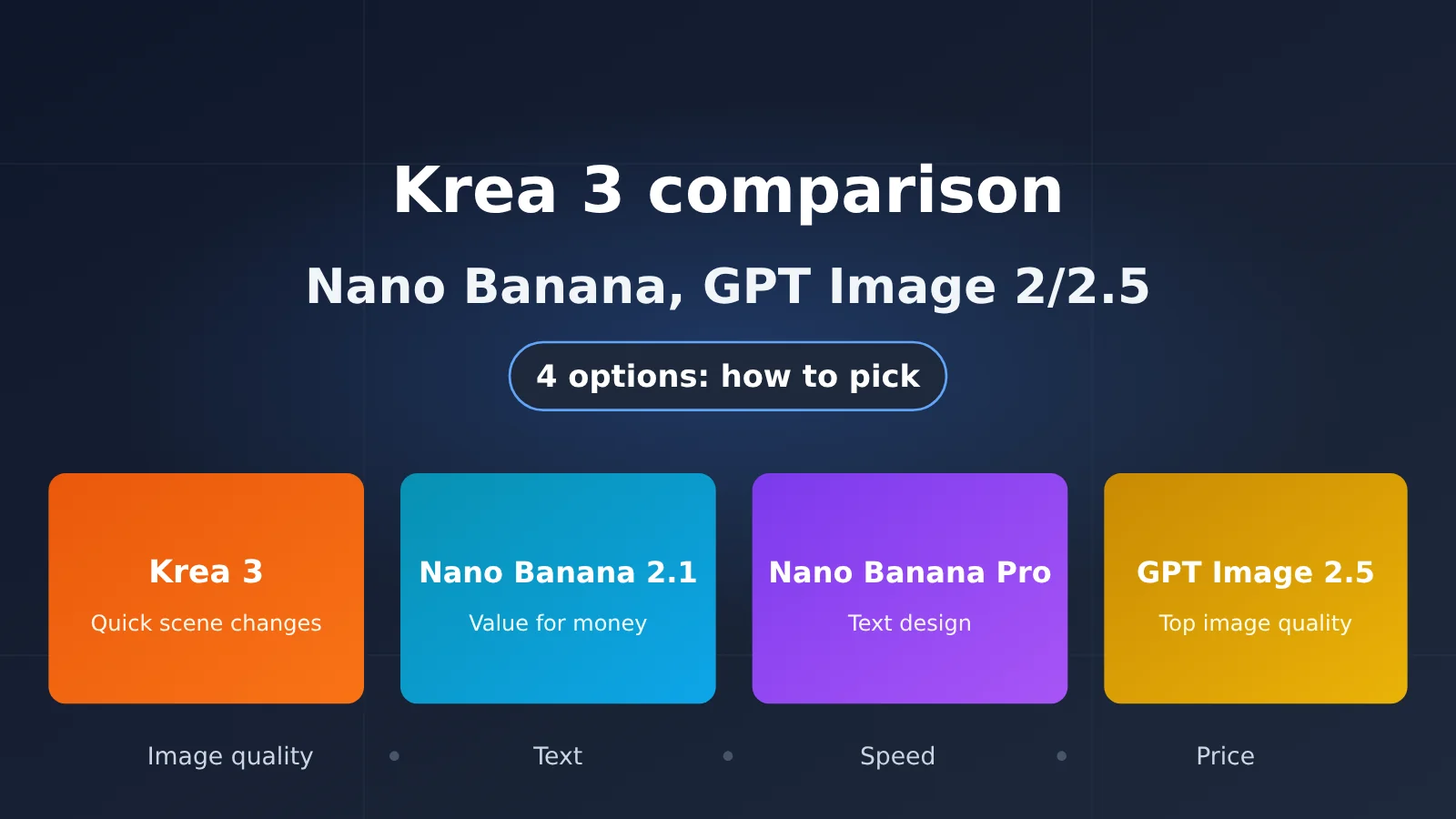
Here’s the bottom line: There’s no all-around winner among these four image models. For image quality, GPT Image 2.5 comes out on top. For everyday value, Nano Banana 2.1 is the most reliable choice. Nano Banana Pro still has a place for complex designs and text, while Krea 3 Fast offers the best value for quickly changing product-image backgrounds.
Krea 3 launched on October 15, 2026, with its official marketing highlighting an 8-second generation time, native 2K resolution, and a price of $0.06 per image. It also claims second place on CPI-Bench. But Fast and Ultra don’t cost the same: the advertised speed, price, and high benchmark score belong to different tiers. We’ll break them down across image quality, text rendering, speed, and price.
Krea 3 vs. Nano Banana and GPT Image 2/2.5: Comparison Table
Here’s a quick look at where each model fits. Note the dates: November 2025, February 2026, and October 2026 for the Nano Banana series are Google model page update dates, not release dates. The dates for GPT Image 2 and 2.5 come from third-party sources.
| Model | Date (type) | Official positioning | Resolution | Reference images | Bottom line |
|---|---|---|---|---|---|
| Krea 3 Fast | Released October 15, 2026 | Fast image editing that preserves product and human proportions | Native 2K | Up to 8 | Cheap and fast, with above-average image quality |
| Krea 3 Ultra | Released October 15, 2026 | Highest thinking tier, focused on image quality | 2K only | Up to 8 | Image quality reaches the second tier, but costs several times more |
| Nano Banana Pro | Model page updated November 2025 | Complex design, accurate text, and grounding | 1K/2K/4K | Multiple reference images | A specialist for complex posters and infographics |
| Nano Banana 2 | Model page updated February 2026 | High efficiency, low latency, and high throughput | 0.5K–4K | Multiple reference images | 2.1 has already beaten it on price |
| Nano Banana 2.1 | Model page updated October 2026 | Latest efficient version, with improved text rendering | 1K/2K/4K | Up to 14 | Best value for everyday use |
| GPT Image 2 | April 21, 2026 (third-party source) | Previous-generation OpenAI image model | Up to 4K | Multiple image inputs | Generally not the first choice for new projects |
| GPT Image 2.5 | September 8, 2026 (third-party source) | Sunburst for precision / Flare for everyday use | Up to 4K | Multiple image inputs | Best image quality, with tier-based pricing |
Krea 3 vs. Nano Banana and GPT Image: 4 Key Differences
Image Quality: GPT Image 2.5 Takes First Place, Krea 3 Ultra and Nano Banana 2.1 Tie
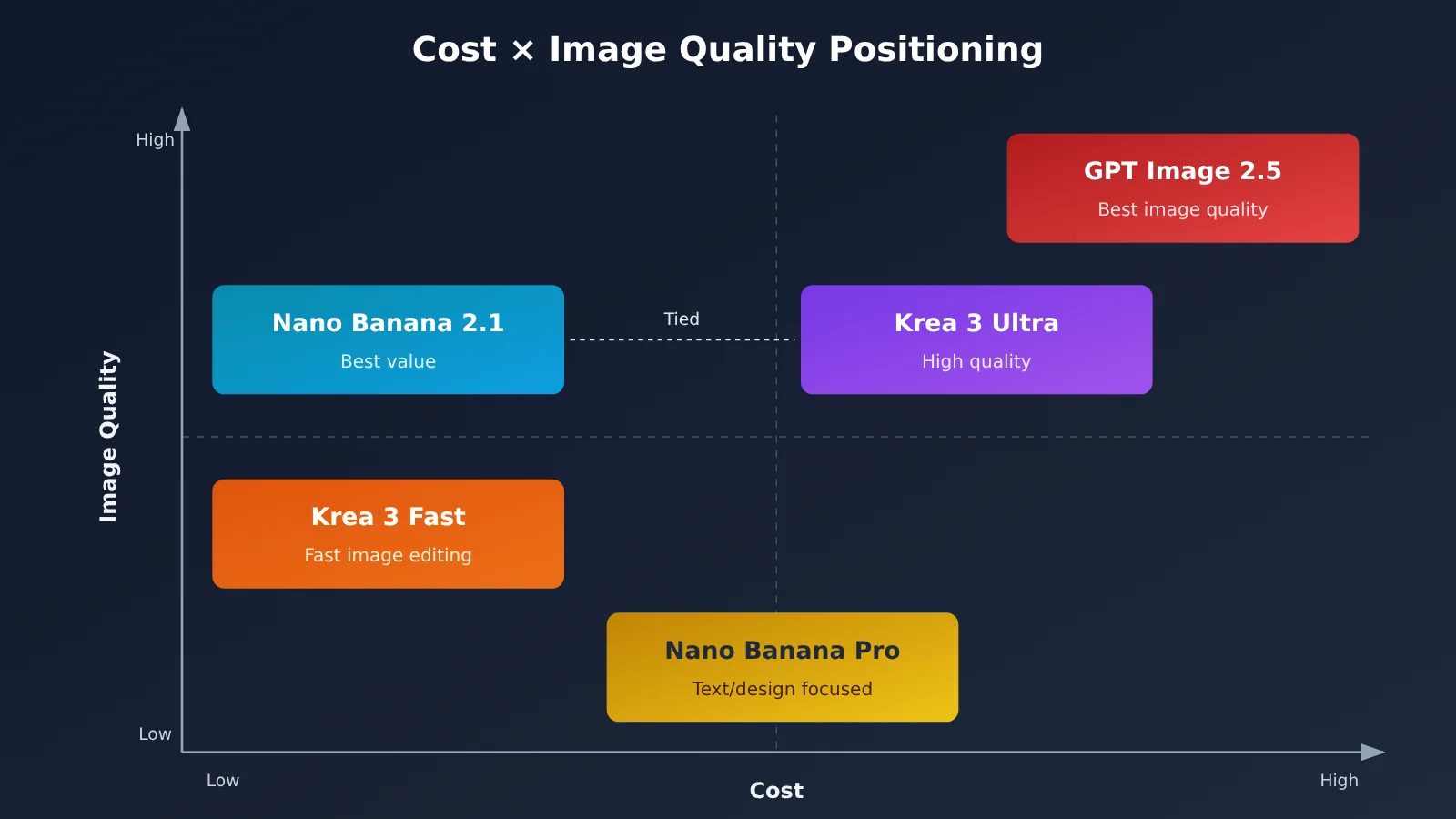
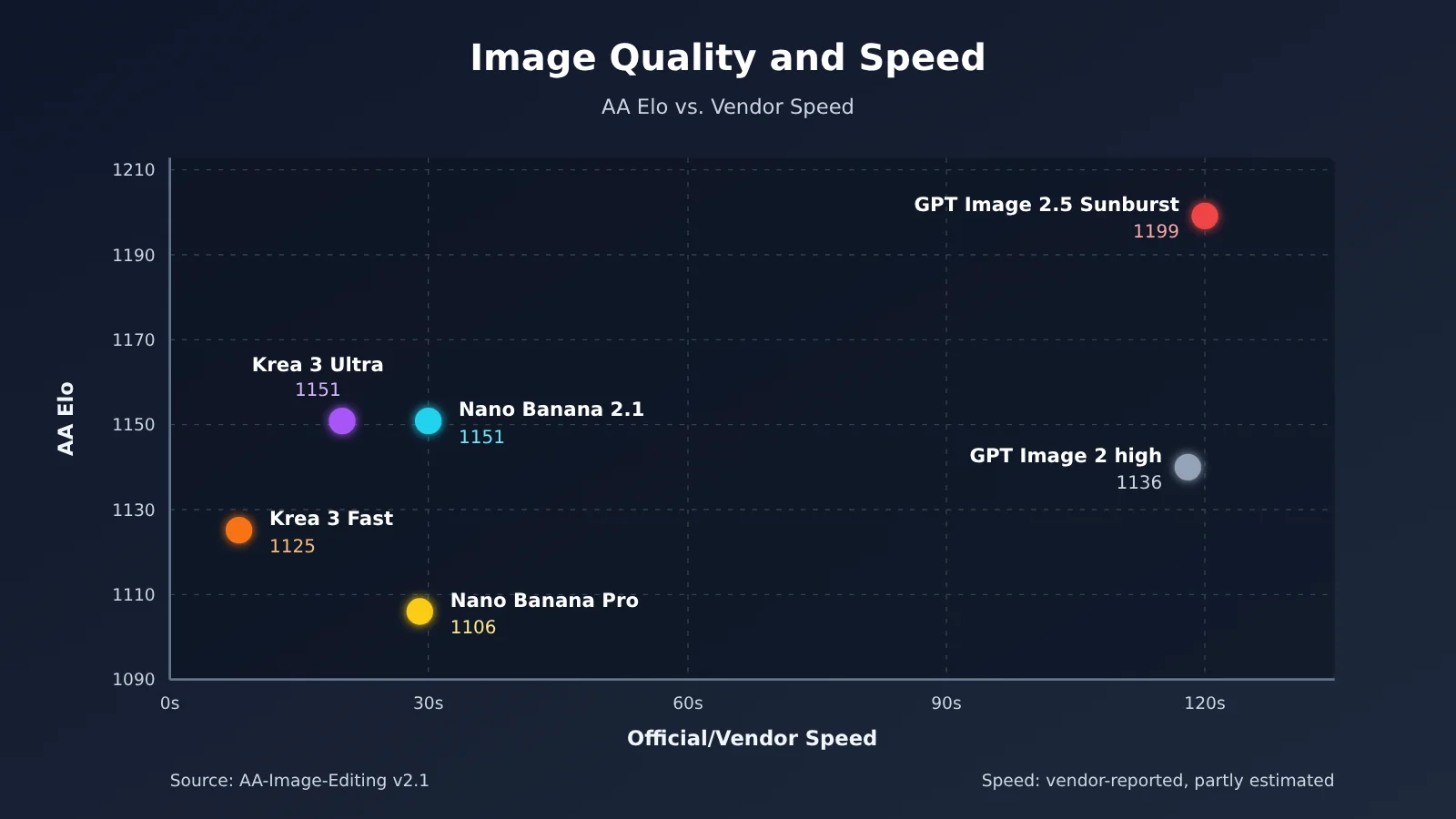
On Artificial Analysis’s AA-Image-Editing v2.1 leaderboard (2026-10-26/29), GPT Image 2.5 Sunburst (max) ranks first with an Elo score of 1199, while Flare (max) ranks third with 1182. Krea 3 Ultra ranks fifth with 1151, tied with Nano Banana 2.1. GPT Image 2 high ranks eighth with 1136, Krea 3 Fast ranks 11th with 1125, and Nano Banana Pro ranks 16th with 1106.
Other leaderboards show broadly similar results. On LMArena’s image editing leaderboard, GPT Image 2.5 Sunburst ranks first, Nano Banana 2.1 sixth, and Nano Banana Pro 14th. On Arena’s multi-image editing leaderboard (Preliminary), Krea 3 Ultra ranks #4 (1435±11), tied with Nano Banana 2.1. It ranks #8 (1411) for single-image editing.
The differences between leaderboards are worth a closer look. Krea says Ultra scored 4.81/5 on CPI-Bench, a benchmark from an Alibaba team, placing second behind GPT Image 2.5. That’s a vendor-cited result; on AA, it ranks fifth. Ultra doesn’t outperform Fast in every category, either: in Arena’s Scene & Style category, Ultra ranks #18, while Fast ranks #11.
Text: Nano Banana Pro Has the Clearest Focus, While Krea 3 Excels at Preserving Small Text
Differences in text rendering come down more to each model’s design goals than to any single score. Google positions Nano Banana Pro for accurate text rendering, factual data visualization, and grounding with Google Search, making it a good fit for complex posters and infographics. Nano Banana 2.1 specifically improves text rendering and infographic layouts, making it suitable for everyday visuals that include text.
GPT Image 2.5 handles text better than its predecessor, but OpenAI still cautions that exact text placement and clarity can be unreliable. Krea 3’s strength is preserving existing small text on product labels during edits. That’s a different skill from laying out complex text from scratch, so don’t treat it as a dedicated text-rendering model.
Speed: Krea Says the Fast Tier Takes Under 8 Seconds; Most Other Figures Come From Vendor Tests
Krea says most Krea 3 edits finish within 8 seconds. That figure applies to the Fast tier; Ultra is slower and more expensive. Krea’s comparison lists Nano Banana Pro at 29 seconds, Nano Banana 2 at 33 seconds, and GPT Image 2 at 118 seconds. These are Krea’s own measurements, not independent third-party tests.
OpenAI says GPT Image 2.5 can take up to about 2 minutes with complex prompts. So if you need edits in seconds, look first at Krea 3 Fast. If image quality is your priority, you’ll need to accept a longer wait for GPT Image 2.5. The details behind the 8-second figure are outside the scope of this article.
Pricing: Official per-image rates vs. APIYI per-call rates
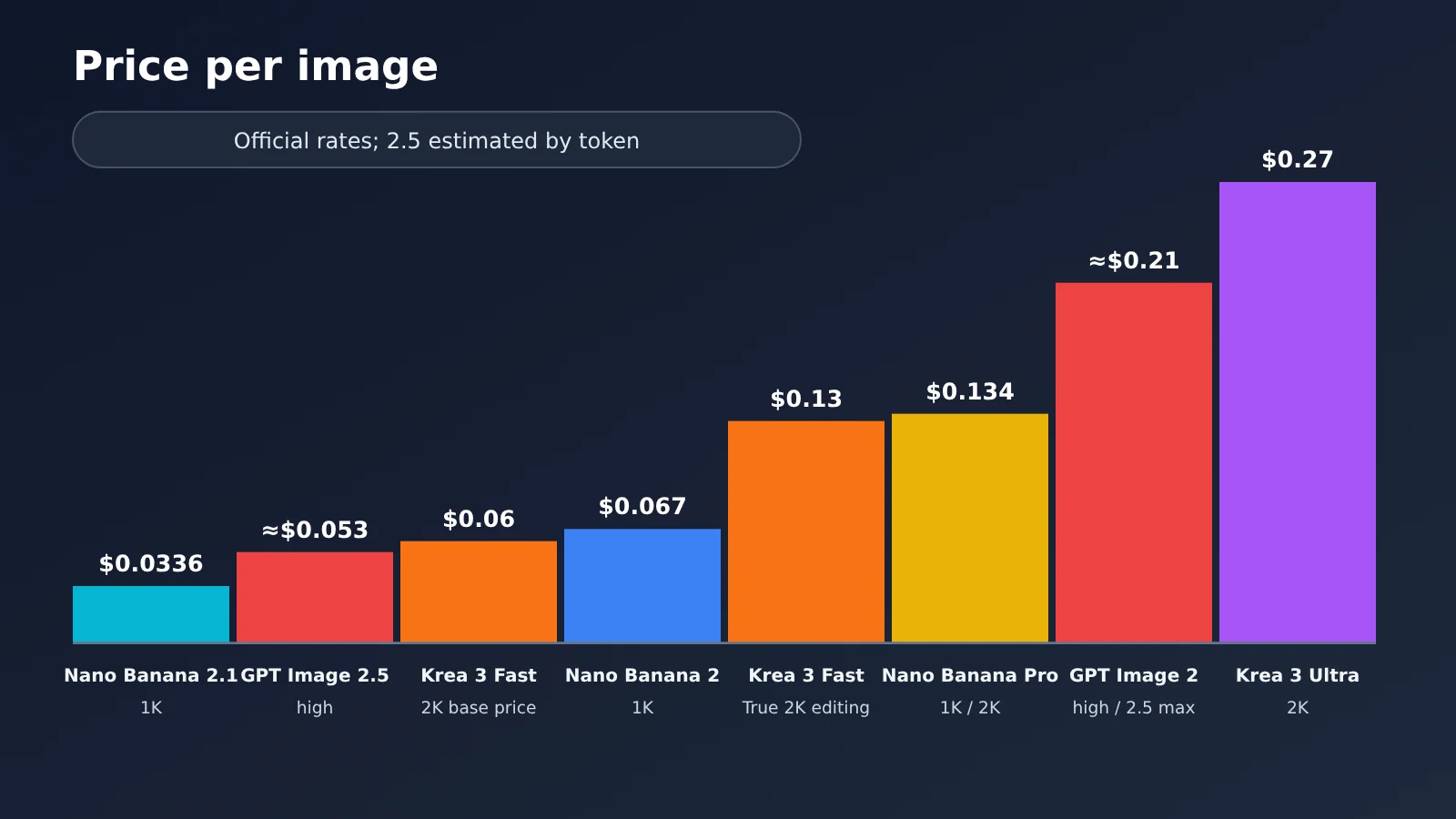
The table below shows official per-image prices for the standard tier. GPT Image 2.5 uses token-based pricing ($30 per 1 million image output tokens), so its per-image prices are third-party estimates based on token usage. Quality settings and dimensions can significantly affect the actual cost.
| Model | 1K | 2K | 4K / higher tier | Pricing basis |
|---|---|---|---|---|
| Nano Banana 2.1 | $0.0336 | $0.0504 | 4K $0.113 | Official per-image price |
| Krea 3 Fast | $0.03 | $0.06 (base price) | 2K + 2K reference image approx. $0.13 | Official per-image price; reference images billed separately |
| Krea 3 Ultra | — | Starting at $0.26 | 2K + 1K reference image approx. $0.27–0.28 | Official pricing + AA measurements |
| Nano Banana 2 | $0.067 | $0.101 | 4K $0.151 | Official per-image price |
| Nano Banana Pro | $0.134 | $0.134 | 4K $0.24 | Official per-image price |
| GPT Image 2 | high $0.211 (1024) | — | — | Official per-image price |
| GPT Image 2.5 | low ≈$0.00588 / high ≈$0.053 | — | max ≈$0.211 | Estimated from token pricing |
If your team wants to use a single API key to call both the Nano Banana and GPT Image families, you can use APIYI’s unified interface at apiyi.com. The table below lists the per-call prices in APIYI’s official documentation (October 27, 2026):
| APIYI model ID | Corresponding model | Per-call price | Notes |
|---|---|---|---|
nano-banana-pro |
Nano Banana Pro | $0.09/call | Official 1K/2K $0.134 |
nano-banana-2 |
Nano Banana 2 | $0.055/call | Official 1K $0.067 |
gemini-nano-banana-2.1 |
Nano Banana 2.1 | $0.045/call | Official 1K $0.0336 |
gpt-image-2-all |
GPT Image 2 | $0.025/call | Official high $0.211 |
gpt-image-2.5-all |
GPT Image 2.5 | $0.025/call | Official high ≈$0.053 |
Note that per-call pricing and official token-based pricing aren’t directly comparable. Check the model documentation and console for the quality tiers associated with channels such as -all and -vip; they shouldn’t be assumed to match the official high or max settings. Account top-ups are settled at a fixed 1:7 exchange rate, and top-up promotions can be combined with group discounts. Check the console for actual charges. As of October 30, 2026, Krea 3 isn’t yet available on APIYI; we’ll add it as soon as possible.
💰 Cost tip: Before generating images in bulk, run the same batch of prompts through
gemini-nano-banana-2.1andgpt-image-2.5-allon APIYI at apiyi.com. Compare image quality and per-image costs before choosing your primary model. Thebase_urlfor the OpenAI-compatible interface ishttps://api.apiyi.com/v1, and new users get free test credits.
Krea 3 Fast vs. Krea 3 Ultra: 8 Seconds/$0.06 and a 4.81 Score Belong to Different Tiers
Here’s the detail that’s easiest to miss in Krea 3’s marketing: 8 seconds and $0.06 apply to Fast, while the 4.81 score belongs to Ultra. They appear on the same promotional page, but you can’t get all three in a single invocation.
| Comparison | Krea 3 Fast | Krea 3 Ultra |
|---|---|---|
| Official speed | Most edits <8 seconds | Slower |
| Base price at 2K | $0.06 | $0.06 + $0.20 Ultra surcharge |
| Actual price with a reference image | 2K + 2K reference: about $0.13 | 2K + 1K reference: about $0.27–0.28 |
| AA-Image-Editing v2.1 | 11th (1125) | 5th (1151) |
| Arena Scene & Style | #11 | #18 |
| Plan and resolution | Default tier, native 2K | Max plan or higher required, 2K only |
The $0.06 figure is the base price without a reference image. A typical 2K edit uses a 2K reference image, bringing the price to $0.06 + $0.07 = $0.13 per image—about twice the headline price. Ultra with a 1K reference image already costs around $0.27–0.28, more than four times Fast’s base price, and its image quality only reaches the second tier.
So you can’t get low cost, speed, and top-tier image quality all at once. Ultra has a higher overall score, but Fast actually ranks higher on Scene & Style tasks, such as changing a scene or style. Before paying extra for Ultra, make sure you know which category your task falls into.
Nano Banana Pro, Nano Banana 2, and 2.1: Which One Should You Choose?
The Nano Banana family has three models available, each designed for different needs. You can’t judge which is best by version number alone.
- Nano Banana Pro (Gemini 3 Pro Image): A reasoning-driven professional model built for complex graphic design, product mockups, data visualization, accurate text, and Search grounding. It costs $0.134 per 1K or 2K image and $0.24 per 4K image, making it the most expensive in the family.
- Nano Banana 2 (Gemini 3.1 Flash Image): A high-efficiency, low-latency model that supports resolutions from 0.5K to 4K and extreme aspect ratios such as 1:8 and 8:1. It costs $0.067 at 1K, $0.101 at 2K, and $0.151 at 4K.
- Nano Banana 2.1: The latest high-efficiency version supports up to 14 reference images (4 characters + 10 objects) and offers minimal, medium, and high thinking levels. It costs $0.0336 at 1K, $0.0504 at 2K, and $0.113 at 4K. It scores 1151 on AA, tying with Krea 3 Ultra.
In blind-test rankings, 2.1 ranks higher than Pro and costs roughly a quarter as much, making it the first choice for everyday batch image generation. But that doesn’t mean 2.1 beats Pro across the board: Pro is still the more targeted choice for tasks requiring reasoning, complex layouts, fact-based infographics, and Search grounding.
GPT Image 2 vs. GPT Image 2.5: The New Generation Isn’t Always Cheaper
GPT Image 2 is the previous-generation model, with three quality tiers: low, medium, and high. A 1024 high-quality image costs $0.211, and its high tier ranks 8th on AA (1136). If your existing workflow is stable, you can keep using it, but it generally isn’t the first choice for new projects.
GPT Image 2.5 offers two snapshots: Sunburst focuses on editing precision and ranks 1st on AA; Flare focuses on fast, everyday generation and ranks 3rd on AA. The quality tiers have expanded to low / medium / high / xhigh / max, with custom sizes up to 4K. Based on token estimates, a 1024 image costs about $0.00588 at low, $0.053 at high, and $0.211 at max.
As you can see, 2.5’s high tier is much cheaper than 2’s high tier, but its max tier costs about the same as 2’s high tier. So it isn’t accurate to say 2.5 is always cheaper. The official guidance also notes that complex prompts may take around 2 minutes, and results can still be inconsistent with text, character/brand consistency, and structured compositions. Choose the tier that fits the task.
Krea 3 vs. Nano Banana vs. GPT Image: Which to Choose
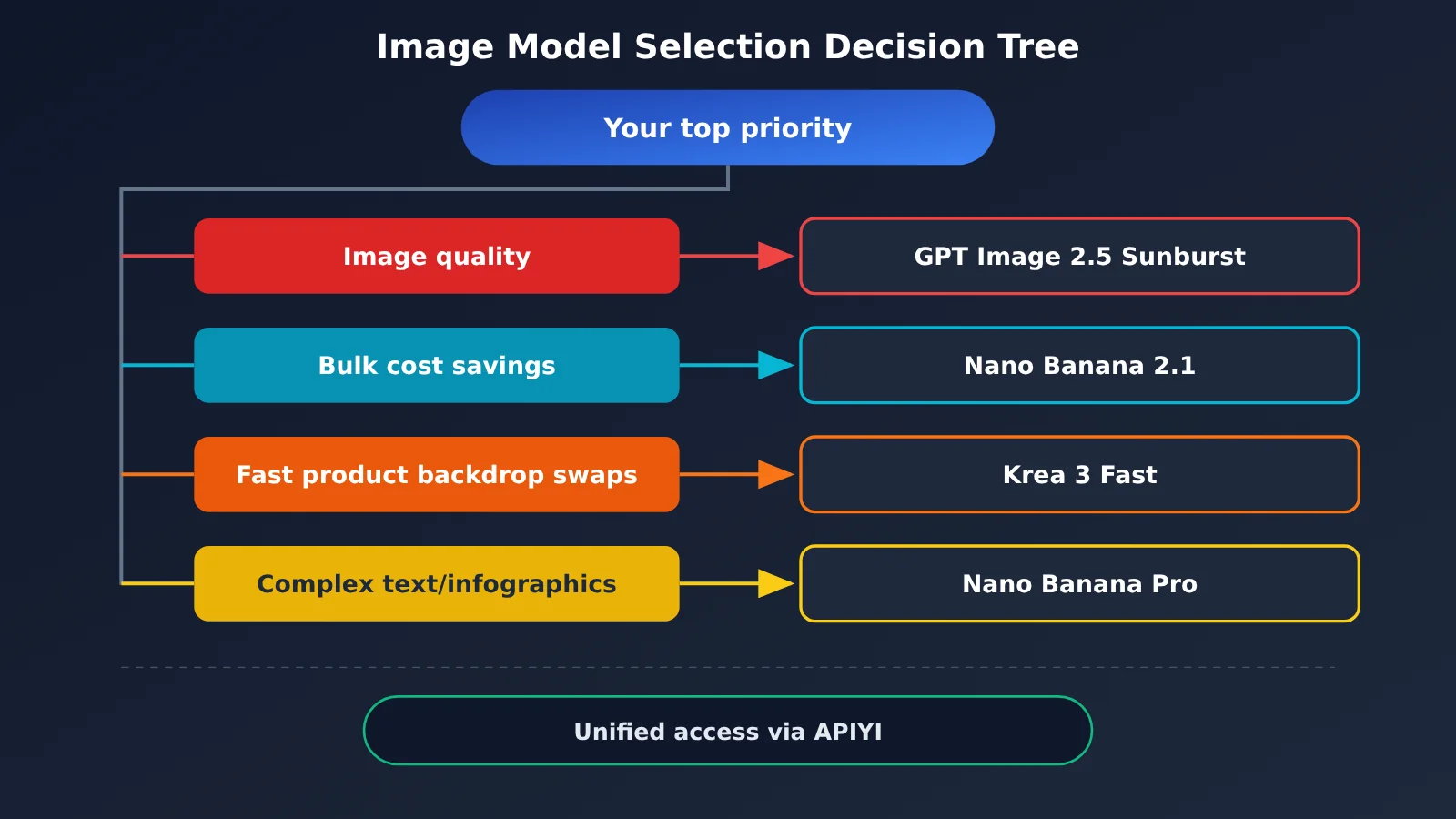
The table below lists the first choice, alternative, and model to avoid for each need, so you can find the right fit quickly.
| Your needs | First choice | Alternative | Not recommended |
|---|---|---|---|
| Highest image quality, complex compositions, polishing a single image | GPT Image 2.5 Sunburst | GPT Image 2.5 Flare | Krea 3 Fast (insufficient image quality) |
| Dozens to hundreds of images a day, cost-sensitive | Nano Banana 2.1 | Krea 3 Fast | GPT Image 2.5 max (too expensive) |
| Quickly change product image backgrounds while preserving labels/people | Krea 3 Fast | Nano Banana 2.1 | GPT Image 2 (slow and expensive) |
| Complex posters, infographics, text, grounding | Nano Banana Pro | GPT Image 2.5 high | Krea 3 Fast |
| 4K printing, combining multiple reference images | Nano Banana Pro / 2.1 | GPT Image 2.5 | Krea 3 (too many 4K limitations) |
| Switch between models through a unified API | APIYI apiyi.com (full NB/GPT lineup) | Official APIs | Krea 3 (not yet available on APIYI) |
Krea 3, Nano Banana, or GPT Image 2.5: Which Should You Choose?
Small teams and independent developers often use a “primary plus backup” approach: one model handles bulk work, while another takes on the occasional demanding task. Based on the comparisons in this article, three combinations are worth considering:
- Bulk e-commerce images: Use Nano Banana 2.1 as the primary model, and hand complex hero images to GPT Image 2.5 Sunburst.
- Mostly product background changes: Use Krea 3 Fast as the primary model, budgeting around $0.13 per image for actual costs. Use Nano Banana Pro for posters with text.
- Brand design and infographics: Use Nano Banana Pro as the primary model, and switch to GPT Image 2.5 high when you need the best possible image quality.
💡 How to choose: The right model depends on your image volume, quality requirements, and whether your images include text. We recommend using APIYI apiyi.com to compare the full Nano Banana and GPT Image lineups with the same set of prompts before choosing your primary model. Krea 3 currently requires the official Krea API or a partner channel.
Krea 3 vs. Nano Banana and GPT Image: When Not to Switch
A new model release doesn’t mean you have to migrate. In these situations, it may be better to stick with what you have or switch cautiously:
- Your GPT Image 2 high workflow is already stable: If the quality meets your needs, there’s no need to move to 2.5 right away. You’d have to retune your prompts and quality settings, and the price of the max tier hasn’t dropped.
- You need 4K printing, complex text, or search grounding: Don’t try to force Krea 3 Fast to do the job. Nano Banana Pro or GPT Image 2.5 high is a better fit.
- You need batch image edits in seconds: Skip GPT Image 2.5 max and Nano Banana Pro. Choose Krea 3 Fast or Nano Banana 2.1 instead.
- You need Chinese or multilingual posters: Test text rendering with a small sample using Nano Banana 2.1 and Pro before scaling up. Krea 3’s strength is preserving existing small text.
Frequently Asked Questions
Q1: Is Krea 3 ranked first for image quality?
No. GPT Image 2.5 Sunburst ranks first on AA-Image-Editing v2.1 with a score of 1199. Krea 3 Ultra ranks fifth with 1151, and Fast ranks 11th. Krea cites a second-place CPI-Bench score of 4.81, but that result doesn’t match the AA rankings.
Q2: Krea 3 vs. Nano Banana 2.1: Which is better for generating images in bulk?
For most bulk image generation tasks, choose Nano Banana 2.1. Its official 2K price is $0.0504, compared with about $0.13 for Krea 3 Fast with a reference image, and its AA score is on par with Krea 3 Ultra. If your tasks mainly involve changing product backgrounds while preserving labels, and you need results in seconds, Krea 3 Fast has the edge.
Q3: Does Nano Banana 2.1 outperform Nano Banana Pro across the board?
No. Version 2.1 ranks higher on the blind-test leaderboard and costs less, but Pro is positioned for reasoning-driven complex design, accurate text, and grounding. It’s still a better fit for infographics and branded materials.
Q4: Is GPT Image 2.5 always cheaper than GPT Image 2?
Not necessarily. Based on token estimates, the high quality tier for 2.5 costs about $0.053, well below the $0.211 for the high tier on 2. But the max tier for 2.5 costs about $0.211, roughly the same as the high tier on 2. Your actual cost depends on the quality tier and image size you choose.
Q5: How can I call Nano Banana and GPT Image 2.5 through a single interface?
Register at APIYI apiyi.com to get an API key, then use the OpenAI-compatible interface to call models such as `gemini-nano-banana-2.1`, `nano-banana-pro`, and `gpt-image-2.5-all` directly. New users get free testing credits. Check the platform’s model list for available models and prices, and the console for actual charges.
Q6: Is Krea 3 available on APIYI yet?
Not as of October 30, 2026. Krea 3 isn’t listed on APIYI yet, but we’ll add it as soon as possible. For now, you can use it through the Krea API or official partners such as fal, Together AI, OpenRouter, and Replicate.
Krea 3 vs. Nano Banana and GPT Image 2.5: Key Takeaways
- There’s no all-around winner: Different models lead on image quality, value, text rendering, and speed.
- Keep Krea 3’s two tiers separate: 8 seconds and $0.06 refer to Fast; the 4.81 score and AA’s fifth-place ranking refer to Ultra.
- Factor reference images into the real cost: A 2K edit costs about $0.13 with Krea 3 Fast and $0.27–$0.28 with Ultra.
- Nano Banana 2.1 is the go-to for everyday use: It costs $0.0504 at 2K and matches Krea 3 Ultra’s AA score.
- Choose Nano Banana Pro for complex text: Accurate text, infographics, and grounding remain its strengths.
- Choose the right GPT Image 2.5 tier: High is cheaper than the previous generation, but max still isn’t cheap.
- A unified API makes testing easier: APIYI apiyi.com already supports the full Nano Banana and GPT Image lineups.
Summary
Here’s the bottom line when comparing Krea 3 with Nano Banana and GPT Image 2/2.5:
- Image quality: GPT Image 2.5 Sunburst ranks first, with Krea 3 Ultra and Nano Banana 2.1 in the next tier.
- Value: Nano Banana 2.1 is the most dependable choice, while Krea 3 Fast is well suited to quickly changing product image backgrounds.
- Text and design: Nano Banana Pro remains the top choice for complex posters and infographics.
- Krea 3’s tiers: The advertised speed, price, and high score refer to different Fast and Ultra tiers. When budgeting, use the actual price including reference images.
Start by deciding how many images you need and the minimum quality you’ll accept, then compare a small batch using the same prompts. You can use a single API key through APIYI apiyi.com to compare the full Nano Banana and GPT Image lineups, and add Krea 3 to the same workflow once it’s available.
📚 References
- Krea 3 Official Page and Launch Blog: Krea 3 speed, pricing, and CPI-Bench references
- Links:
krea.ai/krea-3,krea.ai/blog/introducing-krea-3 -
Notes: Vendor-reported speed, pricing, and quality charts
-
Krea API Documentation and Pricing: Billing details for Fast and Ultra
- Links:
krea.ai/docs/developers/krea-3/overview.md,krea.ai/pricing -
Notes: Reference image surcharges, Ultra surcharges, and plan requirements
-
Google Gemini Pricing and Model Pages: Nano Banana Pro, 2, and 2.1 specifications
- Link:
ai.google.dev/gemini-api/docs/pricing -
Notes: Per-image pricing by resolution, reference image limits, and grounding capabilities
-
OpenAI Image Generation Guide and Pricing: GPT Image 2.5 quality tiers and token pricing
- Link:
developers.openai.com/api/docs/guides/image-generation -
Notes: Official limits and billing details
-
Artificial Analysis Image Editing Leaderboard: AA-Image-Editing v2.1
- Link:
artificialanalysis.ai/image/leaderboard/editing -
Notes: The main third-party source for the image quality rankings in this article
-
LMArena Image Editing Leaderboard: Rankings based on blind-test votes
- Link:
arena.ai/leaderboard/image/image-edit/single-image -
Notes: Used to cross-check the image quality findings against AA
-
APIYI Model Pricing: Available models and per-call pricing
- Link:
docs.apiyi.com/models - Notes: Refer here for model availability and pricing
Author: APIYI Technical Team
Technical discussions: Contact us through the APIYI homepage. For more model details, visit the documentation center at docs.apiyi.com.