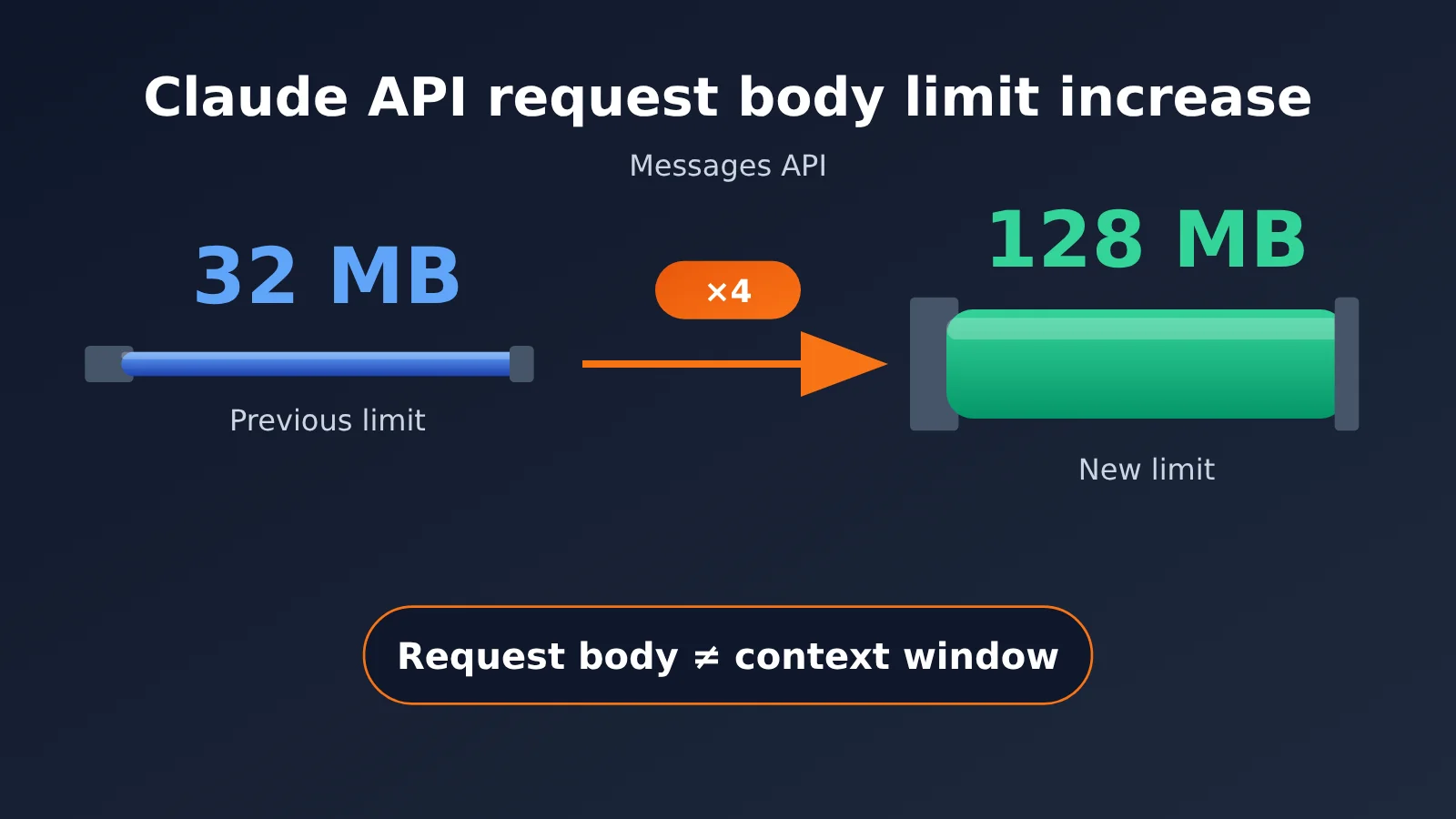
On October 28, 2026, Anthropic announced an update in its official release notes: the maximum request body size for the first-party Claude API’s Messages API and Token Counting API increased from 32 MB to 128 MB—four times the previous limit. The announcement prompted a practical question for many enterprise technology leaders: should they redesign the large-file splitting, uploading, and preprocessing workflows they built to work around the 32 MB limit?
This update doesn’t make the model more capable. It changes the HTTP request body size limit, not the model’s context window or output length. Much of the confusion comes from mixing up 128 MB with 128K tokens or 1M tokens.
What you’ll get from this article: We’ll first clarify exactly which limit changed, then walk through three categories—A, B, and C—for evaluating different business scenarios. Finally, we’ll provide an actionable, low-cost validation plan and checklist. The architecture recommendations are technical analysis based on official information; they’re not official migration instructions from Anthropic.
Claude API Request Body Size Increase: Key Facts
Let’s start with the facts behind the Claude API request body update. The analysis that follows builds on this table.
| Item | Details | Source |
|---|---|---|
| Release date | October 28, 2026 | Official release notes (S1) |
| Released by | Anthropic | Official release notes (S1) |
| Affected endpoints | Messages API and Token Counting API in the first-party Claude API | S1, S2 |
| Key change | Maximum request body size increased from 32 MB to 128 MB | S1, S2 |
| What hasn’t changed | Model context windows and output length limits haven’t increased | S2, S5 |
| When the limit is exceeded | Returns an HTTP 413 request_too_large error |
S2 |
| Pricing | Still based on token usage; a larger request body doesn’t mean file processing is free | S6 |
Claude API Request Size Limits Vary by Endpoint
One important detail: the first-party Claude API doesn’t have a single request size limit across all endpoints. This update only affects the Messages and Token Counting endpoints. Other endpoints keep their own limits, so businesses shouldn’t base architecture decisions on a single number.
| Endpoint | Current request size limit | Notes |
|---|---|---|
| Messages API | 128 MB | Increased from 32 MB in this update |
| Token Counting API | 128 MB | Increased from 32 MB in this update, matching Messages |
| Batch API | 256 MB | For asynchronous batch processing |
| Files API | 500 MB | 500 MB storage limit per file |
| Sessions / Agents / Environments | 32 MB | Existing limit remains unchanged |
The data comes from the official API overview documentation (S2). If your application uses both Messages and Agents endpoints, you’ll still need to plan separate size budgets for each—you can’t apply the 128 MB limit across the board.
Which Limit Does the Larger Claude API Request Body Actually Change?
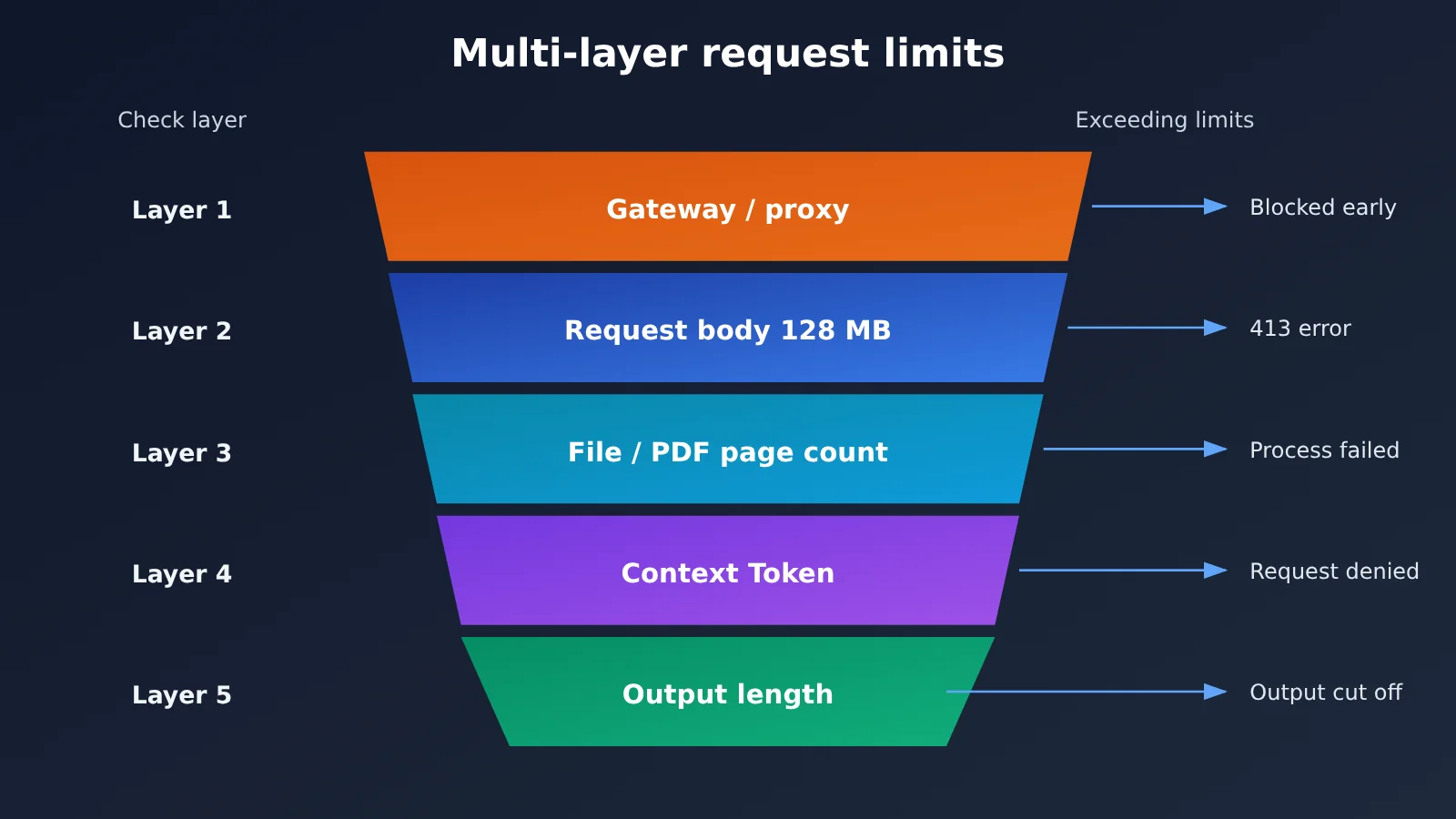
A Claude API call has to pass through several “gates,” and request body size is just the outermost one. Understanding each limit is the first step in deciding whether you need to change your architecture.
| Limit type | Unit | Changed in this update? | What happens when exceeded |
|---|---|---|---|
| HTTP request body size | Bytes (MB) | Yes, Messages / Token Counting increased to 128 MB | HTTP 413 request_too_large |
| Model context window | Tokens | No | Request is rejected or must be truncated |
| File and PDF limits | File size, page count | PDF request body limit is 128 MB; page count has a separate limit | File can’t be processed in full |
| Output length | Tokens | No | Output is truncated |
A 128 MB Request Body Doesn’t Mean the Model Can “Understand” 128 MB
Request body size measures the bytes sent over the network, while the context window measures how many tokens the model can process at once. A high-resolution image may take up several MB but not necessarily use many tokens. Meanwhile, a few hundred KB of plain text could bring you close to the context window limit. In other words, “sending more bytes” and “having the model understand more content” are two different things.
Binary content such as images and PDFs also typically needs base64 encoding in a JSON request, which increases its size to roughly 4/3 of the original. That means a 128 MB request body can hold significantly less than 128 MB of raw binary files. Be sure to account for this overhead when estimating your budget.
How the Claude API Request Body Limit Relates to PDF Page Limits
The official PDF documentation (S3) states that first-party API requests containing PDFs have a 128 MB body limit, but page counts are limited separately depending on the model’s context window. So even if a 100 MB scanned contract passes through the HTTP layer, it may still be too large to process in full because its page count or token count exceeds the context window.
Which Enterprise Applications Could Benefit from the Larger Claude API Request Body Limit?
The analysis below is speculative and assumes the application was actually constrained by the previous 32 MB request body limit. Even then, these use cases may still require chunking.
- Large PDF and contract analysis: Legal and audit teams often need to submit scanned contracts or reports with multiple attachments. Scanned documents can be large despite containing relatively little text. If the main obstacle was a file size over 32 MB, the larger limit may make it possible to submit the file in a single request. If the bottleneck was page count or context tokens, the improvement may be limited.
- Submitting multiple images or pages: Insurance claims and quality inspections often involve attaching many on-site photos to a single request. Combined, those images can easily exceed the old limit. The increase may reduce the likelihood of a 413 error, but the number of images is still constrained by the model and its context window.
- AI applications with lengthy structured data: Some systems put large amounts of JSON, logs, or tabular data directly into requests. There’s now more room in terms of bytes, but this kind of data is often token-dense and may hit the context window limit well before reaching 128 MB.
- Applications that split inputs solely because of the 32 MB limit: These are the most direct beneficiaries. If the only reason for splitting inputs was to work around the request body limit, it’s worth reassessing whether that’s still necessary.
🎯 Technical tip: When evaluating these scenarios, use real samples to measure both byte size and token count first, then identify where the bottleneck lies. With APIYI at apiyi.com, you can use the same API key to test Claude against other leading models. However, a third-party platform’s request body limit may differ from the official first-party API, so confirm its current limit before going live.
Should You Change Your Architecture After the Claude API Request Body Limit Increase? An A/B/C Framework
This is the article’s central decision framework. Whether you need to change your architecture doesn’t depend on the higher official limit—it depends on what problem your original design was meant to solve.
| Situation | Typical signs | Recommended action | Priority |
|---|---|---|---|
| A. Never close to 32 MB | Request bodies are usually only a few MB, with no 413 errors in the logs | Keep the current design and document the change | Low |
| B. Frequent 413 errors due to request size | Monitoring shows a significant proportion of 413 request_too_large errors |
Test and optimize the upload path; consider splitting requests less often | High |
| C. Chunking driven by context, accuracy, performance, or cost | Content is split to improve retrieval accuracy, control costs, or reduce latency | Keep the chunking, retrieval, and caching design | Unchanged |
Situation A: Systems That Never Come Close to 32 MB
For most text-only chat, customer support Q&A, and coding assistant applications, individual request bodies are well below 32 MB. These systems usually have no immediate reason to change, and unnecessary modifications would only introduce new risks. Just update the endpoint limit in your technical documentation so it’s available for future troubleshooting.
Situation B: Systems That Frequently Hit 413 Errors Due to Request Size
If monitoring shows frequent 413 errors and you’ve confirmed that they’re caused by exceeding the Messages endpoint’s request body limit, this update is worth testing. You could assess whether some requests can be submitted in one piece instead of being split, or switch to referencing files through the Files API using file_id to reduce repeated transfers.
Situation C: Chunking for Quality, Cost, or Performance
Many RAG systems use chunking not because requests are too large to send, but to improve retrieval accuracy, reduce the number of tokens per call, and speed up responses. The larger request body limit doesn’t change those reasons. Removing chunking could increase costs and reduce answer quality. These systems should keep the chunking, retrieval, and caching designs they need.
5 Architecture Checks Before Increasing Claude API Request Size
Even if you’re in scenario B, it’s worth checking each layer in the following order. Many teams still run into errors after the official limit increases because a component in the middle of the request path has its own limit.
- Confirm the official limit for your target Anthropic endpoint: Messages allows 128 MB, while Sessions / Agents / Environments remain at 32 MB, Batch allows 256 MB, and Files allows 500 MB (S2).
- Check request limits on API gateways and reverse proxies: In-house gateways, Nginx, load balancers, and WAFs often have their own default limits, which may be much lower than 128 MB. Check each one.
- Check your client, SDK, and transfer method: HTTP client timeouts, memory buffering, and upload methods all affect whether large requests can be sent. Account for the size increase from base64 encoding, too.
- Verify separate token, context, and file constraints: Use the Token Counting API to estimate the token count, and check whether the PDF page count and context window allow the request (S3, S5).
- Evaluate latency, timeouts, cost, and error handling: Large requests take longer to upload, and retries are more expensive. Charges are still based on tokens (S6), so you may need to redesign your timeout and retry strategies.
Alternatives to Sending Files in the Claude API Request Body
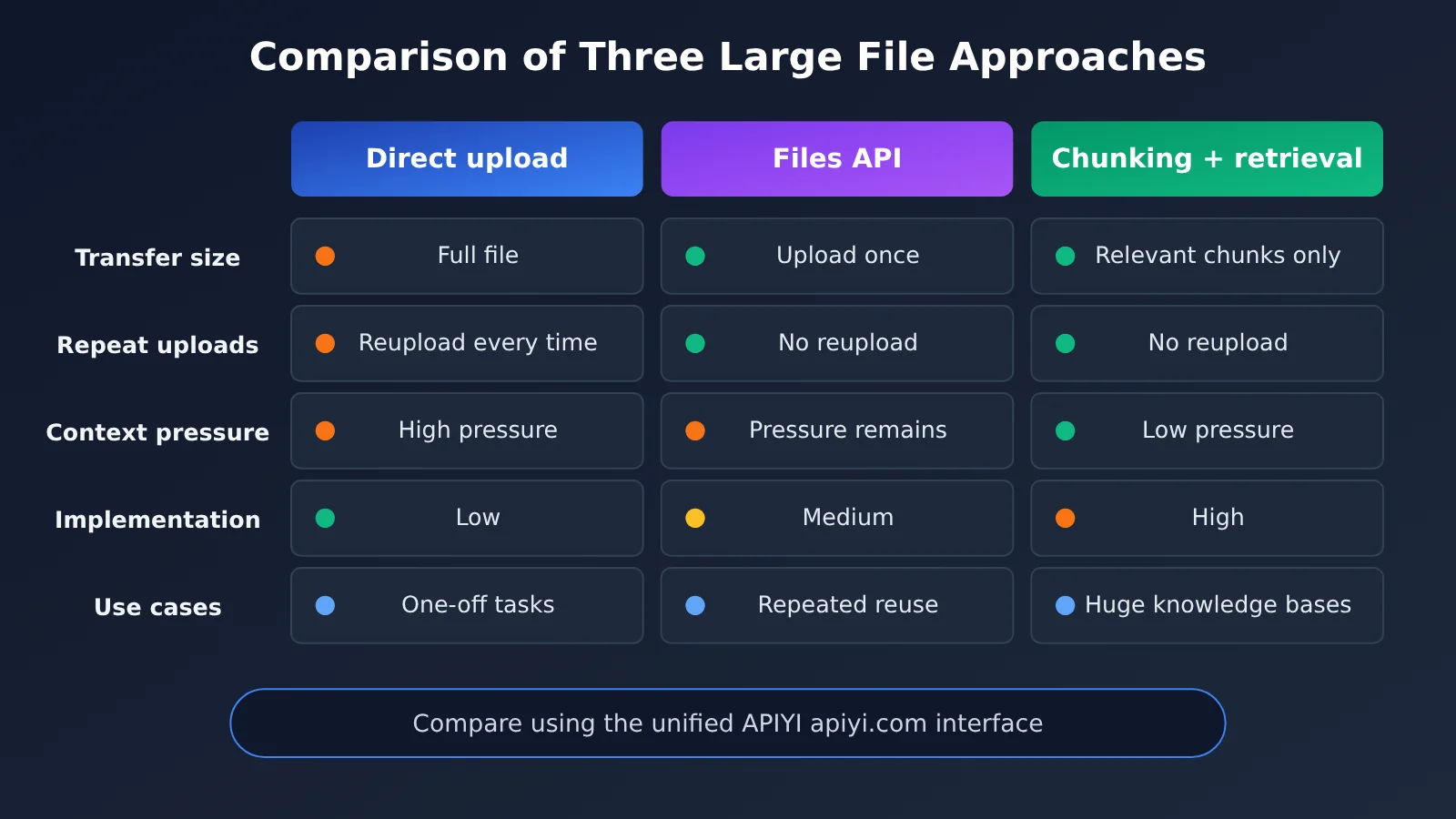
Instead of putting large files directly in the request body, consider these options:
- Files API and
file_idreferences: Upload a file once, then reference it in messages using itsfile_idto avoid transferring the same file repeatedly across requests (S4). The storage limit is 500 MB per file, but model processing is still subject to constraints such as context capacity. - Prompt caching: Enabling caching for long document prefixes that are reused across requests may help control the cost of repeated input. Check the official pricing page (S6) for billing details.
- Keep chunking + retrieval: For very large document collections, retrieving and sending only relevant excerpts is often still a good balance between quality and cost.
File isolation risks in multi-tenant systems also deserve attention. Files uploaded through the Files API are stored at the API account level. If multiple customers share an account, you need to strictly isolate access to file_id values at the application layer to prevent one tenant’s requests from referencing another tenant’s files.
How to Test the Benefits of Claude API’s Larger Request Body Limit on a Budget
There’s currently no publicly citable test data showing that the higher limit improves processing speed or reduces costs. The most reliable approach is to test it with samples from your own workload. The following is a test plan, not a set of test results.
| Test tier | Request body size | What to watch |
|---|---|---|
| Tier 1 | Well below 32 MB | Establish a baseline for latency and token usage |
| Tier 2 | Close to 32 MB | Check whether the request path is stable near the old limit |
| Tier 3 | Above 32 MB | Verify that the gateway and SDK allow the request through, and check for 413 errors |
| Tier 4 | Close to 128 MB | Check for timeouts, memory usage, and the cost of retrying failed requests |
Keep every test within the applicable model and file limits, and record the HTTP request body size, token count, status code, latency, cost, and output quality for each tier. Then run the same samples through three approaches—direct upload, Files API references, and chunked processing—and use the data to decide whether to adjust your existing workflow.
A Minimal Claude API Request Body Measurement Example
The code below measures the request body size before sending it and catches 413 errors, making it easier to record data during testing:
import json, openai

client = openai.OpenAI(
    api_key="YOUR_API_KEY",
    base_url="https://api.apiyi.com/v1"  # APIYI OpenAI-compatible endpoint
)

messages = [{"role": "user", "content": "请总结这份长文档的要点:" + open("doc.txt").read()}]
body_mb = len(json.dumps({"messages": messages}).encode("utf-8")) / 1024 / 1024
print(f"请求体约 {body_mb:.2f} MB")

resp = client.chat.completions.create(model="YOUR_CLAUDE_MODEL", messages=messages)
print(resp.usage)  # Record token usage
View the full test logging script
import json
import time
import openai

client = openai.OpenAI(
    api_key="YOUR_API_KEY",
    base_url="https://api.apiyi.com/v1"  # Invoke through the unified APIYI endpoint
)

MODEL = "YOUR_CLAUDE_MODEL"  # Replace with a Claude model name from the platform's model list

def run_case(case_name: str, messages: list) -> dict:
    """Record the size, tokens, status, and latency of one request for comparison"""
    body = json.dumps({"model": MODEL, "messages": messages}).encode("utf-8")
    record = {
        "case": case_name,
        "body_mb": round(len(body) / 1024 / 1024, 2),
        "status": None,
        "latency_s": None,
        "prompt_tokens": None,
        "completion_tokens": None,
    }
    start = time.time()
    try:
        resp = client.chat.completions.create(model=MODEL, messages=messages)
        record["status"] = 200
        record["prompt_tokens"] = resp.usage.prompt_tokens
        record["completion_tokens"] = resp.usage.completion_tokens
    except openai.APIStatusError as e:
        record["status"] = e.status_code  # 413 means the request body exceeds the limit
    except Exception as e:
        record["status"] = f"error: {e}"
    record["latency_s"] = round(time.time() - start, 2)
    return record

if __name__ == "__main__":
    text = open("doc.txt", encoding="utf-8").read()
    cases = {
        "baseline": [{"role": "user", "content": "总结要点:" + text[:20000]}],
        "full_direct": [{"role": "user", "content": "总结要点:" + text}],
    }
    results = [run_case(name, msgs) for name, msgs in cases.items()]
    for r in results:
        print(r)
🚀 Quick start: If your team wants to get the testing workflow running first, you can register at APIYI apiyi.com to get testing credits and use the script above to record data for each tier. Note that when requests are routed through a third-party platform, its gateway’s request body limit may be lower than the official first-party limit of 128 MB. Check the platform documentation before testing larger request bodies.
Frequently Asked Questions (FAQ)
Q1: What does increasing the Claude API request body limit to 128 MB mean?
The maximum size of a single HTTP request to the first-party Claude API’s Messages API and Token Counting API has increased from 32 MB to 128 MB (S1, S2). This is not the context window or the output length.
Q2: How is a 128 MB request body different from a 128K-token or 1M-token context window?
The request body is measured in bytes and represents the amount of data transmitted over the network. The context window is measured in tokens and represents the model’s processing capacity. They’re completely different units. Sending a request successfully doesn’t mean all its content will fit in the context window; you’ll still need to estimate your token budget separately using the Token Counting API.
Q3: Will the increased limit make processing faster or lower costs?
There’s no official data or publicly available testing to support that claim. Costs are still calculated based on token usage (S6), and larger request bodies may take longer to upload. You’ll need to test with your own business workloads to determine whether there’s a benefit.
Q4: How can I quickly test the impact of the Claude API request body change on my workloads?
You can follow the four-tier testing plan in this article. Register with APIYI at apiyi.com to get an API key, set `base_url` to `https://api.apiyi.com/v1`, and use the test script to record request size, token count, status code, and elapsed time. Platform limits may differ from the official limits, so check the supported maximum before testing larger request sizes.
Q5: Do I need to dismantle my existing RAG chunking system?
Usually not. If you use chunking to improve retrieval accuracy, control token costs, or reduce latency, those reasons haven’t changed with the larger request body limit. It’s worth reevaluating only if the sole reason for chunking was to work around the 32 MB limit.
Q6: What are the known limitations of the increased Claude API request body limit?
There are three main limitations: Sessions / Agents / Environments endpoints still have a 32 MB limit; PDF page counts and context windows have separate constraints; and enterprise gateways, proxies, and third-party platforms may have lower limits. If you want to compare multiple models on large-document workloads, you can use APIYI’s unified interface at apiyi.com, but check the platform’s actual supported limits first.
Claude API Request Body Limit Increase: Key Takeaways
- What changed: The request body limit for Messages and Token Counting increased from 32 MB to 128 MB. This is an HTTP-layer change.
- What didn’t change: The context window, output length, and token billing remain the same.
- Endpoint differences: Batch allows 256 MB, Files allows 500 MB, and Agents endpoints remain at 32 MB.
- How to decide: Check whether you originally split requests to work around size limits or to manage quality, cost, and performance.
- Check the full request path: Limits in gateways, proxies, and SDKs often kick in before the official limit.
- How to validate: Compare direct upload, file references, and chunking across four payload sizes. You can use APIYI apiyi.com’s unified interface to run the tests.
Summary: A Larger Claude API Request Body Doesn’t Mean You Need to Dismantle Your Existing System
The significance of the Claude API request body limit increase comes down to three points:
- More room at the entry point: You can now send more bytes in a single request to the first-party Messages API, giving workflows that previously ran into 413 errors more room.
- Other limits haven’t changed: The context window, PDF page limits, token billing, and limits on other endpoints still need to be evaluated separately.
- Let the bottleneck guide changes: Architecture decisions should be based on actual business bottlenecks, output quality, cost, and security requirements—not the news alone.
For most enterprises, the safest approach is to check the logs first, test representative samples, and then decide how much to change. Here’s a checklist you can put to work right away:
- [ ] Measure the frequency of recent 413
request_too_largeerrors and identify which endpoints they came from - [ ] Confirm which endpoints your application uses and their official limits (Messages / Batch / Files / Agents)
- [ ] Check request body limits on your own gateways, reverse proxies, WAFs, and load balancers
- [ ] Check timeout and buffering settings in your SDKs and HTTP clients, accounting for base64 size overhead
- [ ] Use the Token Counting API to estimate token counts and remaining context window capacity for large requests
- [ ] Compare direct upload, Files API references, and chunking across four payload sizes
- [ ] Evaluate
file_idisolation and data security policies for multi-tenant environments - [ ] Use the results to decide whether to make changes, and update your internal technical documentation accordingly
You can use APIYI apiyi.com to quickly set up a comparison testing environment. One API key gives you access to multiple leading models, making it easier to evaluate your options with real-world samples.
📚 References
- Anthropic Official Release Notes: October 28, 2026 announcement of the request body size limit change
- Link:
platform.claude.com/docs/en/release-notes/overview -
Details: Original source for the increase from 32 MB to 128 MB (S1)
-
Claude API Overview and Endpoint Limits: Request size limits by endpoint and 413 errors
- Link:
platform.claude.com/docs/en/api/overview -
Details: Comparison of limits for the Messages, Batch, Files, and Agents endpoints (S2)
-
PDF Support Documentation: PDF request body and page count limits
- Link:
platform.claude.com/docs/en/build-with-claude/pdf-support -
Details: Essential reading before processing large PDFs (S3)
-
Files API Documentation: File uploads,
file_idreferences, storage, and permissions - Link:
platform.claude.com/docs/en/build-with-claude/files -
Details: Evaluating file reference options and multi-tenant isolation (S4)
-
Context Window Documentation: Model token capacity
- Link:
platform.claude.com/docs/en/build-with-claude/context-windows -
Details: Understanding the difference between byte limits and token limits (S5)
-
Official Pricing and Caching Documentation: Token billing and prompt caching
- Link:
platform.claude.com/docs/en/about-claude/pricing - Details: A guide to evaluating cost implications (S6)
Author: APIYI Technical Team
Technical discussions: Contact us through the APIYI homepage at apiyi.com. For more integration resources, visit the documentation center at docs.apiyi.com.