
Author’s note: On October 29, usage limits doubled for all three Pro tiers and Business Premium, and the planned Pro 200 reduction was canceled. This article walks you through three steps to check whether your Codex allowance stayed the same or increased, then shows you how to compare subscription and pay-as-you-go costs.
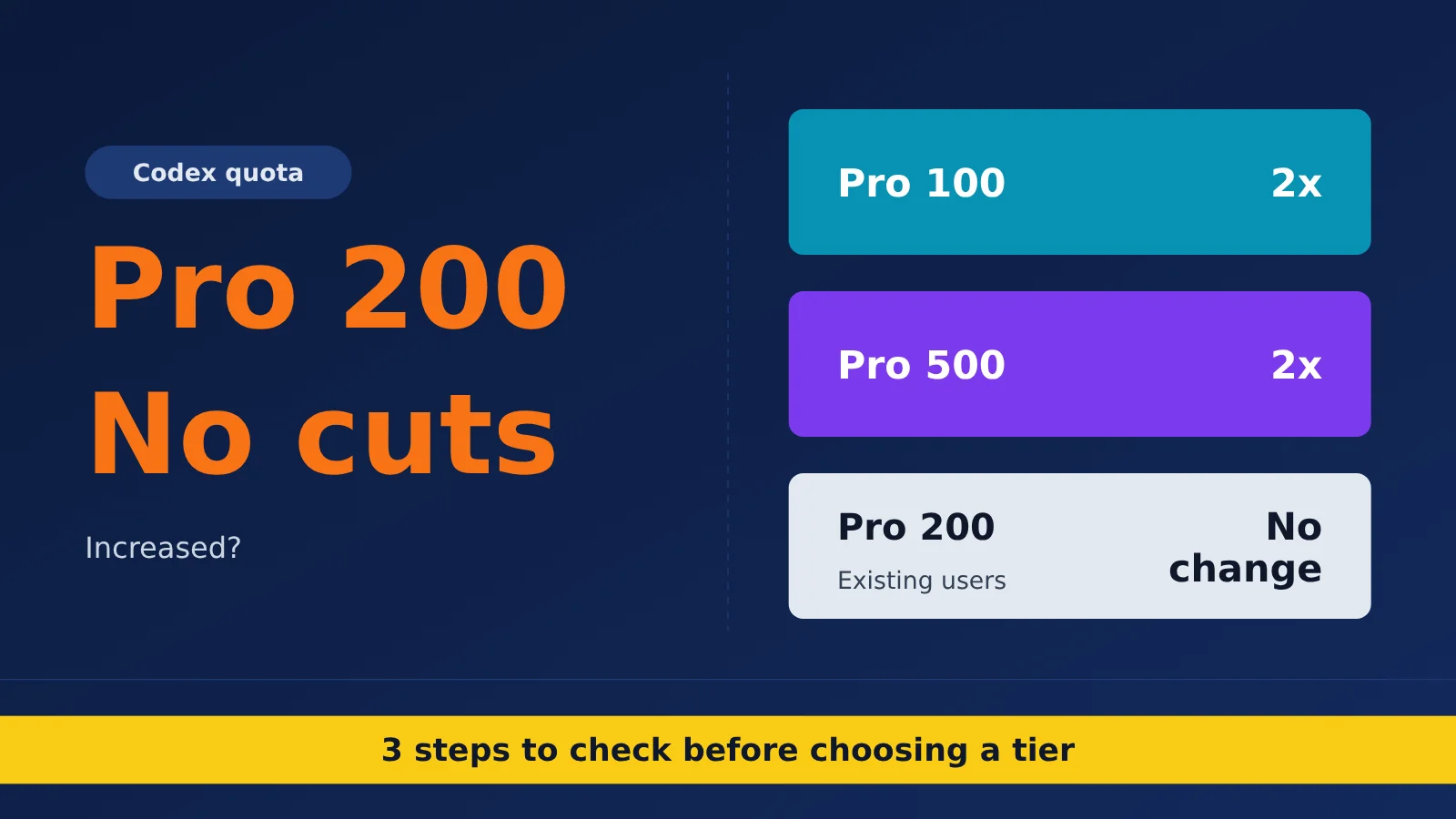
On October 29, 2026, OpenAI announced that usage limits for Pro 100 / 200 / 500 and Business Premium would double. It also canceled the Pro 200 allowance reduction announced in late September. The increase benefits Pro 100 and Pro 500 users, as well as Pro 200 users who previously had lower allowances and were brought up to the higher limit. For existing Pro 200 users already on the higher allowance and Plus users, Codex limits haven’t changed.
This isn’t another article claiming everyone’s limits doubled. One common misunderstanding in the community is treating the canceled reduction as an increase for existing users. We’ll separate what the official help center, OpenAI’s X posts, and media reports actually say, then look at your options by tier.
What you’ll get: By the end, you’ll know whether your Codex allowance has increased. You can also use a three-step check and a cost comparison table to decide whether to stay on your current tier, switch tiers, or move to pay-as-you-go usage.
Has the Pro 200 Codex Allowance Changed? The Key Differences
First, Separate the Information Into Three Sources
The news spread quickly. The original post passed 3 million views in about three hours, and some retellings became increasingly distorted. Before deciding how your Codex allowance has changed, it helps to separate the information by source:
- Official Help Center guidance (most authoritative): Work and Codex allowances for Pro 100 and Pro 500 have doubled. On Pro 200, only the lower tier has doubled. The reduction announced in the September 29 email has been canceled, and the subscription price remains $200/month. The changes apply automatically to existing subscribers; there’s no need to wait for renewal.
- Official X post: Tibo, who leads OpenAI Codex and ChatGPT, posted that limits across all three Pro tiers and Business Premium had doubled, effective that day. The post also said Pro 200 Work and Codex usage would “remain unchanged,” and that the expanded dots allowance would remain in place and be calculated separately from the default allowance.
- Media and user accounts (for reference only): Coverage from outlets such as the-decoder and 7minAI aligns with the official guidance. They also emphasize that doubling the allowance doesn’t mean you can complete twice as many tasks. Details from the late-September reduction email—such as a drop from 20x Plus to 10x Plus and compensation of 62,500 credits—aren’t listed in the Help Center article, so they can only be attributed to emails shared by users.
Codex Allowance Changes at a Glance
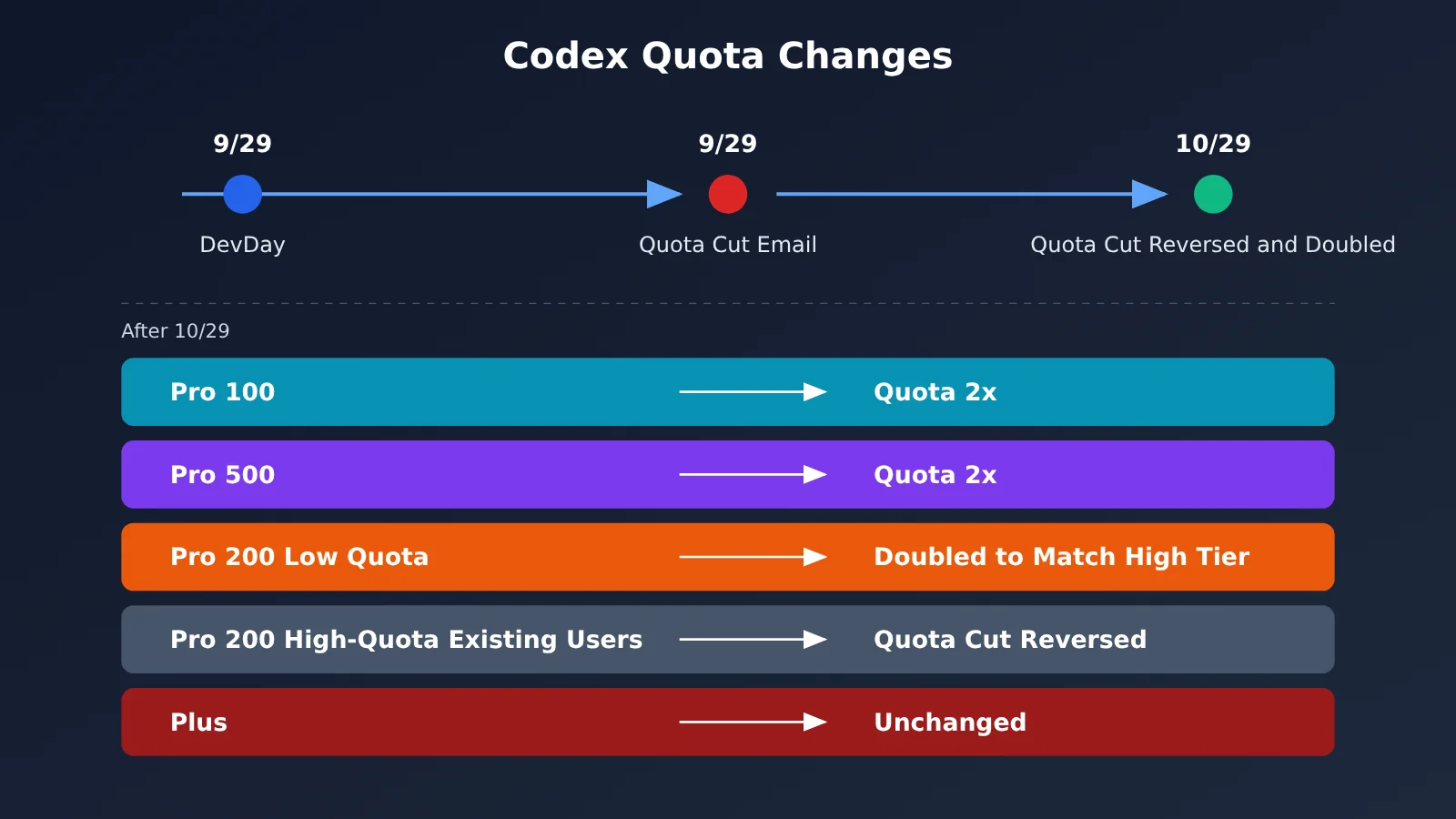
| User type | Before 10/29 | After 10/29 | Bottom line |
|---|---|---|---|
| Pro 100 | Original Work/Codex allowance | 2x Work/Codex allowance | Actual increase |
| Pro 500 | Original Work/Codex allowance | 2x Work/Codex allowance | Actual increase |
| Existing Pro 200 higher-allowance users | Faced an allowance reduction starting 10/30 (from 20x to 10x Plus, according to the email) | Reduction canceled; original allowance retained | No change |
| Pro 200 lower-allowance users | Lower allowance | Doubled to match the higher allowance | Increased to match |
| Business Premium | Original allowance | An X post says it doubled | Increased; check the admin console to confirm |
| Plus | Original allowance | Original allowance | No change |
Weekly GPT-6 Pro chat messages are a separate matter. The weekly limits for Pro 100 and Pro 500 remain unchanged, while the lower Pro 200 tier has been raised to match the higher tier. The official announcement specifically notes that chat message limits and Work/Codex allowances are counted separately. So if you mostly chat and rarely use Codex, the doubling won’t make much difference to you.
Pro Pricing Tiers and Ultrafast Access
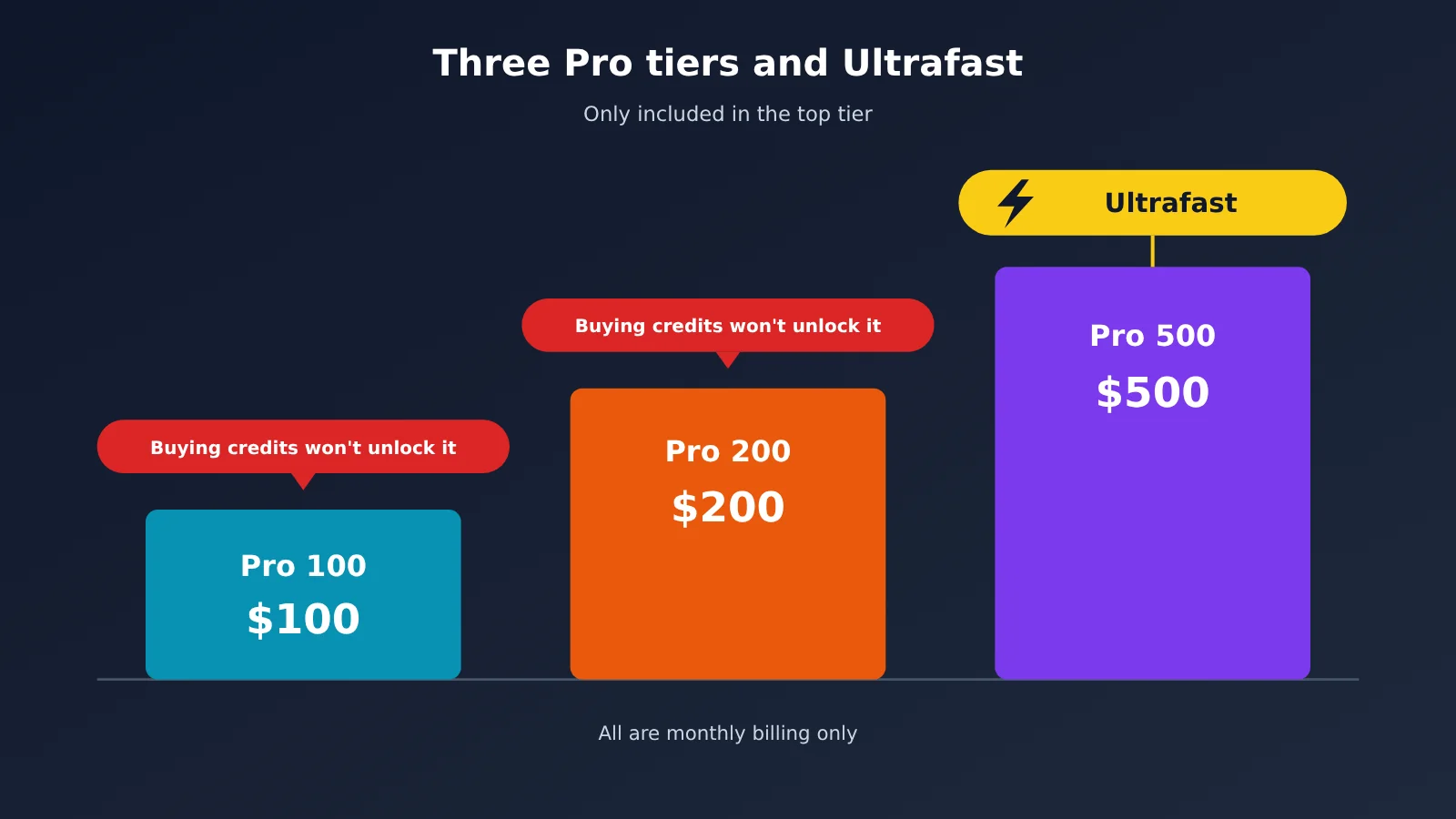
| Tier | Monthly price | Billing | Ultrafast | 5-hour limit |
|---|---|---|---|---|
| Pro 100 | $100 | Monthly only | Not included; buying credits won’t unlock it either | None currently |
| Pro 200 | $200 | Monthly only | Not included; buying credits won’t unlock it either | None currently |
| Pro 500 | $500 | Monthly only | Included; selectable in the model picker | None currently |
| Plus | Not affected by this change | — | Not included | Estimated usage per 5 hours |
Ultrafast is the clearest dividing line when choosing a tier. The Help Center is explicit: buying credits on Pro 100 or Pro 200 won’t unlock Ultrafast. If your workflow depends on Ultrafast for GPT-6 Astra or GPT-6.1 Sol, Pro 500 is your only option.
For Plus and Standard Business, the official figures for local messages per 5 hours are estimated ranges, not fixed caps: 5–45 for GPT-6 Astra, 15–160 for GPT-6.1 Sol, 35–285 for GPT-6.1 Terra, 15–150 for GPT-6 Sol, and 350–3,000 for GPT-6 Luna. Cloud tasks also typically consume more of your allowance than local tasks.
Codex Usage Multipliers
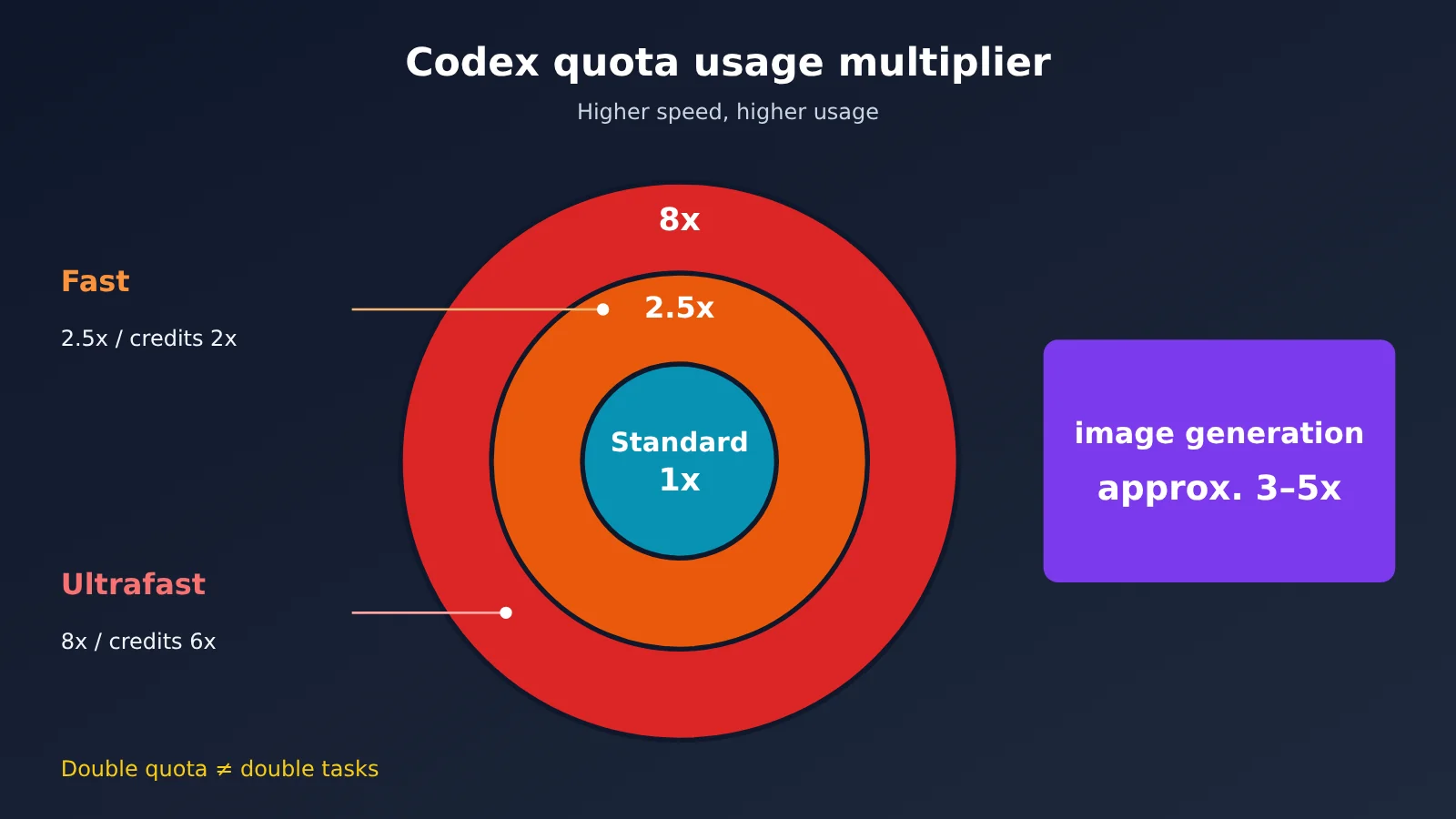
| Speed mode | Plan quota consumption | Purchased credits consumption | Applicable models |
|---|---|---|---|
| Standard | 1x | 1x (standard rate) | All |
| Fast | 2.5x | 2x | Same model |
| Ultrafast | 8x | 6x | GPT-6 Astra / GPT-6.1 Sol, Pro 500 only |
| Image generation | 3–5x on average | 3–5x on average | Compared with equivalent usage |
This table shows why the official guidance repeatedly warns that “a larger quota doesn’t guarantee twice as many completed tasks.” For example, if your quota doubles but you switch from Standard to Fast, you’ll actually be able to run fewer tasks than before. Ultrafast consumes eight times as much as Standard, so even with a doubled Pro 500 quota, long tasks in Ultrafast mode can still run it down quickly.
The official credit rates for Standard speed (per 1 million tokens, input / cached input / output) are: GPT-6 Astra 250 / 25 / 1250, GPT-6.1 Sol 50 / 2.5 / 250, GPT-6.1 Terra 25 / 1.25 / 125, GPT-6 Sol 50 / 5 / 250, and GPT-6 Luna 2.5 / 0.25 / 12.5. Note that these figures are in credits, not dollars. ChatGPT Work and Codex share the same quota.
Choosing a Codex Plan: Recommendations for 4 Types of Users
Scenario 1: Existing Pro 200 users with high usage
Your allowance hasn’t changed this time—it hasn’t been cut, but it hasn’t increased either. If you’re happy with it, there’s no need to switch. If you regularly hit the limit by midweek, consider upgrading to Pro 500: its allowance has doubled, and it includes Ultrafast.
When not to switch: If you’re hitting the limit mainly because you use Fast mode or generate lots of images, switching to standard speed and trimming your context may be enough. Rule out the higher consumption rate before spending another $300 a month.
Scenario 2: Pro 100 users, or anyone choosing between 100 and 200
Pro 100’s allowance has doubled, making it a much better value. If you’re a moderate-to-heavy Codex user who was deciding between 100 and 200, it’s now worth starting with Pro 100. Try it for a billing cycle or two, then upgrade if the allowance isn’t enough.
When not to switch: If you need a higher weekly GPT-6 Pro chat limit, or you’ve confirmed that you still hit the Pro 100 limit every week despite the increase, Pro 200 is still a reasonable choice. There’s no need to keep downgrading just to save $100.
Scenario 3: Extremely heavy users who rely on Ultrafast
If you need Ultrafast, Pro 500 is your only option—buying credits won’t get you around that. Pro 500 already has the highest allowance of the three tiers, and it has now doubled. It’s a good fit for team members who run multiple sessions in parallel and need fast responses.
When not to switch: If you only occasionally need faster responses, consider Fast mode instead (2.5x consumption, available on Pro 100/200). You can also schedule time-consuming tasks to run overnight at standard speed. Paying several hundred dollars more each month for an occasional speed boost usually isn’t worth it.
Scenario 4: Plus users and occasional users
Plus hasn’t changed at all, and its estimated five-hour range remains the same. If you only use Codex intensively a few days a week, or you rarely use up your allowance, a higher subscription tier would likely mean paying for unused capacity. Pay-as-you-go API usage is often a better fit.
When not to switch: If you max out your Plus five-hour window every day and it’s affecting your delivery schedule, upgrading to Pro 100 is simpler than paying as you go. At least your monthly budget will be fixed.
💡 Choosing a plan: Token consumption for the same task can vary widely across models, so test with real tasks before choosing a tier. With APIYI at apiyi.com, you can use the same API key to switch between models such as gpt-6.1-sol and gpt-6.1-terra, compare the actual cost per task, and then decide which subscription tier to choose.
Choosing a Codex Plan: Check These 3 Things First
Step 1: Confirm Your Previous Plan and Quota Category
- Open
chatgpt.com/codex/settings/usagein your browser to check your current quota period and remaining usage. - Run
/statusin the Codex CLI to check your remaining quota. - If you’re on Pro 200, compare your remaining quota before and after October 29. If it barely changed, you’re a long-time user with the higher quota. If it increased significantly, you were in the lower-quota group whose quota was brought into alignment.
- If you received a quota reduction email in late September, check your account for the compensation credits. According to emails shared by users, the compensation was 62,500 credits, expiring on December 31, 2026. Official public information doesn’t explain what happened to those credits after the quota reduction was reversed, so check your account for the actual balance.
Step 2: Figure Out Whether Your Bottleneck Is Chat or Work/Codex
This change only affects Work/Codex quotas and the weekly chat limit for Pro 200. Plus hasn’t changed at all. If you’re running into the GPT-6 Pro chat message limit, the weekly limits for Pro 100 and Pro 500 haven’t changed, so switching plans may not solve the problem. If Codex is the bottleneck, move on to Step 3.
Step 3: Figure Out Whether You Hit Your Limit Daily or Use It Occasionally
If you hit your limit every day, focus on whether your subscription tier is worth the cost. If you use it occasionally, pay-as-you-go pricing is usually cheaper. Once you’ve used up your quota, there are already two official options:
- Buy credits to keep using the service. Credits are valid for 12 months, don’t roll over after expiration, and are generally nonrefundable. Your plan quota is used before credits.
- Use an API key to run additional local sessions, billed at API rates.
Customer support can’t reset your quota, and account sharing and reselling quota violate the rules.
Subscription vs. Pay-as-You-Go: A Codex Usage Example
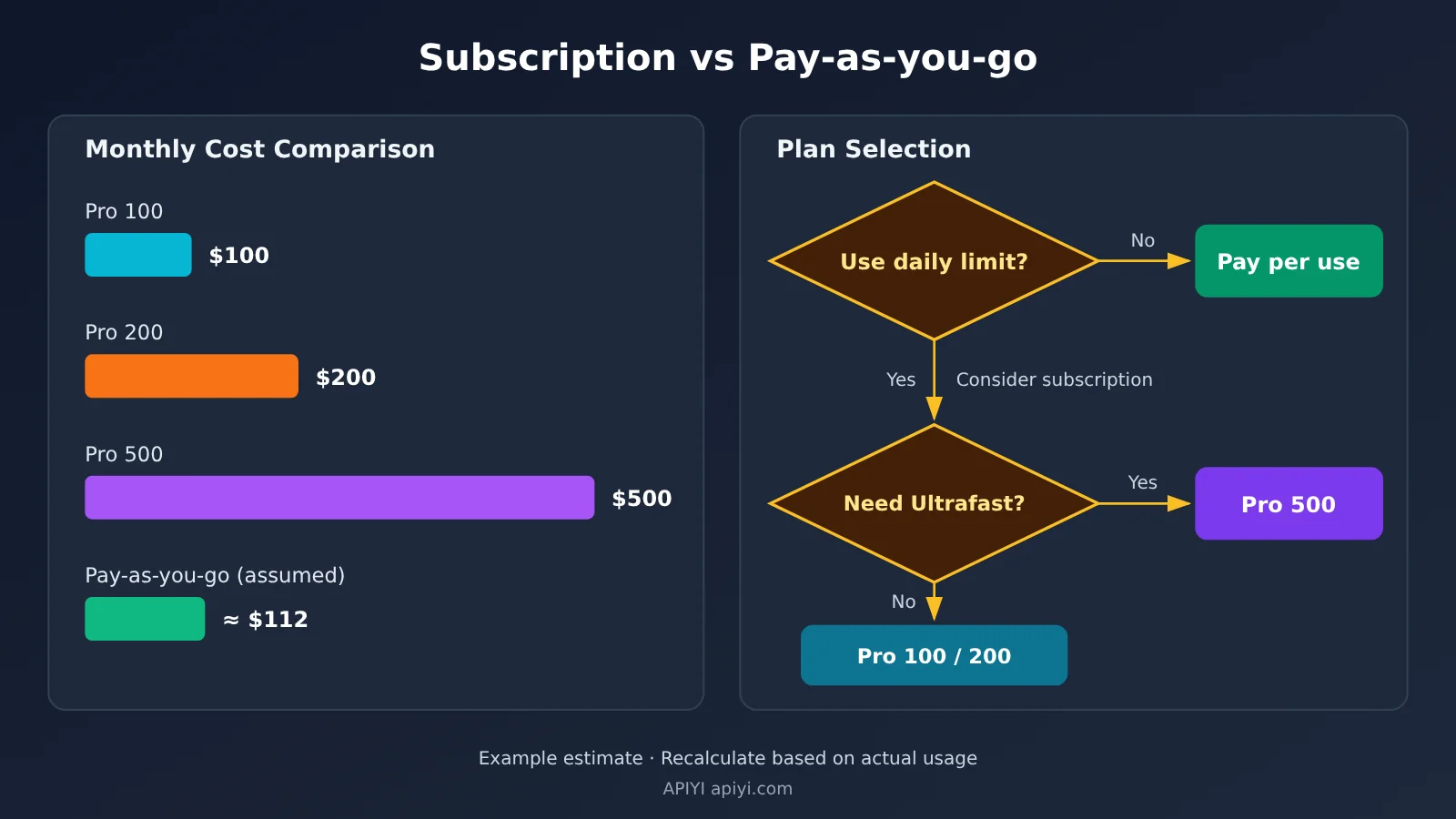
The following example is entirely hypothetical, not based on actual testing: you run Codex for 8 hours a day, mainly using GPT-6.1 Sol, with 2 million input tokens per day (1 million of which are cache hits) and 300,000 output tokens, over 22 working days per month.
| Plan | Calculation | Monthly cost (hypothetical) | Advantages | Risks |
|---|---|---|---|---|
| Pro 100 | Fixed monthly fee | $100 | Predictable budget; currently no 5-hour limit | Still has periodic usage caps you can hit |
| Pro 200 | Fixed monthly fee | $200 | Higher allowance and a higher weekly GPT-6 Pro chat limit | Wasted money if you don’t use the allowance |
| Pro 500 | Fixed monthly fee | $500 | Highest allowance; includes Ultrafast | High price; Ultrafast consumes allowance at 8× the rate |
| Pay-as-you-go gpt-6.1-sol | 1 million × $2 + 1 million × $0.1 + 300,000 × $10 ≈ $5.1/day | ≈ $112 | No usage windows to work around; pay only for what you use | No cap on spending |
| Pay-as-you-go gpt-6.1-terra | 1 million × $1 + 1 million × $0.05 + 300,000 × $5 ≈ $2.55/day | ≈ $56 | Half the cost | Less capable than Sol; you’ll need to verify the results |
Under these assumptions, pay-as-you-go usage with gpt-6.1-sol costs roughly the same as Pro 100—it’s not necessarily cheaper. The difference is how you manage usage: subscriptions have caps you can hit, while pay-as-you-go requires you to control your own budget. If you only use it for 5 working days a month, the same daily usage would cost about $25.5 on pay-as-you-go, making it clearly cheaper.
When Pay-as-You-Go Makes More Sense: Supplement Your Codex Allowance with APIYI
If you use Codex occasionally, or just need extra capacity for a short time after hitting your subscription limit, you can use the officially supported option of running additional local sessions with an API key. APIYI at apiyi.com offers an OpenAI-compatible interface that lets you call both GPT and Claude models with a single key. In a client that supports custom OpenAI-compatible endpoints, configure the following:
- Set
base_urltohttps://api.apiyi.com/v1 - Set
api_keyto the key generated in the APIYI console - Choose a
modelfor the task, such asgpt-6.1-solfor everyday coding orgpt-6-lunafor high-volume lightweight tasks - Check your client’s documentation for the exact configuration field names
| Model | Input $/1M tokens | Cache reads $/1M tokens | Output $/1M tokens | Long-context tier | Best for |
|---|---|---|---|---|---|
| gpt-6.1-sol | $2 | $0.1 | $10 | $4 for input over 272k tokens per request | Primary coding model |
| gpt-6-astra | $10 | $1 | $50 | $20 for 272,001–1,050,000 input tokens | Complex reasoning |
| gpt-6.1-terra | $1 | $0.05 | $5 | — | Cost-effective coding |
| gpt-6-luna | $0.1 | $0.01 | $0.5 | $0.2 for input over 272k tokens | High-volume lightweight tasks |
| claude-opus-5-5 | $4 | $0.2 | $20 | Uses chat / messages endpoints | Cross-provider comparisons |
Check the platform’s model list for current availability and pricing. The figures above were updated on October 27, 2026. APIYI top-ups are settled at a fixed exchange rate of 1:7 and can be combined with top-up bonuses and group discounts. Actual charges are shown in real time in the console.
🚀 Quick start: New users can claim free test credits at APIYI apiyi.com. Try running a day’s worth of real Codex tasks, see where your actual costs fall in the example table, and then decide whether to keep your subscription or switch to pay-as-you-go.
The official advice for saving usage applies to both subscriptions and pay-as-you-go: keep prompts concise, provide only relevant files, don’t let AGENTS.md grow too long, and connect fewer MCP servers. The higher your cache hit rate, the lower your pay-as-you-go bill.
Frequently Asked Questions
Q1: Should existing Pro 200 users upgrade to Pro 500?
First, check `/status` and your usage dashboard to see whether you frequently hit your limits. If you do and you need Ultrafast, upgrading to Pro 500 is reasonable—its allowance really did double this time. If you don’t need Ultrafast and only occasionally go over, buying credits or using the API for extra capacity is more flexible. There’s no need to pay an extra $300 every month.
Q2: Can buying credits unlock Ultrafast?
No. The Help Center explicitly says that buying credits on Pro 100 or Pro 200 won’t unlock Ultrafast. It’s only available on Pro 500. If Pro 500 users run Ultrafast with credits, they’re charged at six times the standard credit rate.
Q3: Did the five-hour limit return after the allowances doubled?
No. According to the official Codex billing documentation, none of the three Pro tiers currently have a five-hour limit. Plus and Standard Business still have estimated local message limits per five-hour window. “Currently” means the policy could change, so it’s worth checking the official billing page regularly.
Q4: What’s the difference between Pro 100 and Pro 200 now?
The monthly price differs by $100. Pro 100’s Work/Codex allowance doubled this time, while Pro 200’s lower-tier allowance was brought in line with its higher-tier allowance. Neither includes Ultrafast. Pro 200’s weekly GPT-6 Pro chat limit was also brought in line with the higher tier. OpenAI hasn’t published a consistent multiplier for the Codex allowances on the two plans, so the most reliable option is to check your account’s usage dashboard.
Q5: Is the dots allowance included in the plan?
According to the official post on X, the extended allowance for dots (always-on agents) will remain available “for now.” It’s counted separately from the default allowance and doesn’t use up your main Work/Codex allowance. “For now” means this could change, so defer to the Help Center if it’s updated.
Q6: Did Business Premium get an increase too?
Yes. The official post on X says Business Premium doubled along with the three Pro tiers, and outlets including 7minAI reported the same. However, the Pro tier Help Center page doesn’t go into detail about Business Premium, so team administrators should check the allowance shown in their enterprise dashboard.
Q7: What’s the fastest way to get more Codex capacity after hitting my subscription limit?
There are two officially supported options: buy credits, or use an API key to run additional local sessions. If you only need extra capacity for a short time, or want to compare the performance of the GPT and Claude families, you can make pay-as-you-go API calls through APIYI at apiyi.com. You only pay for what you use, making it a good fit for small-scale testing.
Pro 200 Codex Allowance: Key Takeaways
- Who gets more: Work/Codex allowances double for Pro 100 and Pro 500. Pro 200 users with lower allowances get an increase to match the higher tier.
- Who stays the same: Existing Pro 200 users with higher allowances simply keep what they had; Plus is unchanged.
- Ultrafast eligibility: Only Pro 500 offers it. Buying credits on Pro 100 or Pro 200 won’t unlock it.
- Consumption multipliers: Fast uses 2.5x the allowance, and Ultrafast uses 8x. Double the allowance doesn’t mean double the tasks.
- Check your usage: Use
/statusandchatgpt.com/codex/settings/usageto see your remaining allowance. - Pay-as-you-go example: Assuming daily use of GPT-6.1 Sol, pay-as-you-go costs around $112/month, in the same ballpark as Pro 100.
- Pay-as-you-go as a supplement: For occasional use or a short-term boost, you can switch between multiple models with the same key at APIYI apiyi.com.
Summary
Pro 200’s allowance is no longer being cut, but whether your Codex allowance increases depends on which tier you were already on:
- Allowance changes: Pro 100 and Pro 500 double; existing Pro 200 users with higher allowances see no change, while those with lower allowances get an increase to match; Plus stays the same.
- A hard requirement for choosing a plan: If you need Ultrafast, Pro 500 is your only option. For everything else, start by looking at how often you actually hit your limit.
- How to compare costs: If you use your allowance fully every day, look at subscriptions. If you use it occasionally, consider pay-as-you-go. Either way, factor in the Fast and Ultrafast consumption multipliers.
Take five minutes to complete the three self-check steps and use real data to decide whether to switch plans. Don’t let headlines claiming “everyone’s allowance doubles” steer your decision. If you want to compare pay-as-you-go costs, use the free trial credits at APIYI apiyi.com to run a day’s worth of real tasks, then plug the results into the example table above.
📚 References
- OpenAI Help Center – ChatGPT Pro Tiers: Official details on the three price tiers, which tier includes Ultrafast, and the removal of the limit reduction
- Link:
help.openai.com/en/articles/9793128-about-chatgpt-pro-tiers -
Notes: The main source for this article’s references to the official Help Center
-
OpenAI Codex Pricing and Limits: Usage multipliers, five-hour estimates, and credit rates
- Link:
developers.openai.com/codex/pricing -
Notes: Useful for checking Fast / Ultrafast usage and tips for conserving your allowance
-
OpenAI Credits: Credit expiration, deduction order, and refund policy
- Link:
help.openai.com/en/articles/12642688 -
Notes: Worth reading in full before buying credits
-
Tibo’s Official X Post: The original October 29 announcement of doubled limits and the reversal of the limit reduction
- Link:
x.com/thsottiaux/status/2115850175868727621 -
Notes: The source for information on dots allowances and Business Premium
-
the-decoder’s Coverage: A media summary of the changes
- Link:
the-decoder.com/openai-doubles-usage-limits-on-pro-plans-as-competition-with-anthropic-heats-up - Notes: Included for media coverage only
Author: APIYI Technical Team
Technical discussions: Feel free to contact us through the APIYI homepage. You can find model and pricing details in the documentation at docs.apiyi.com.