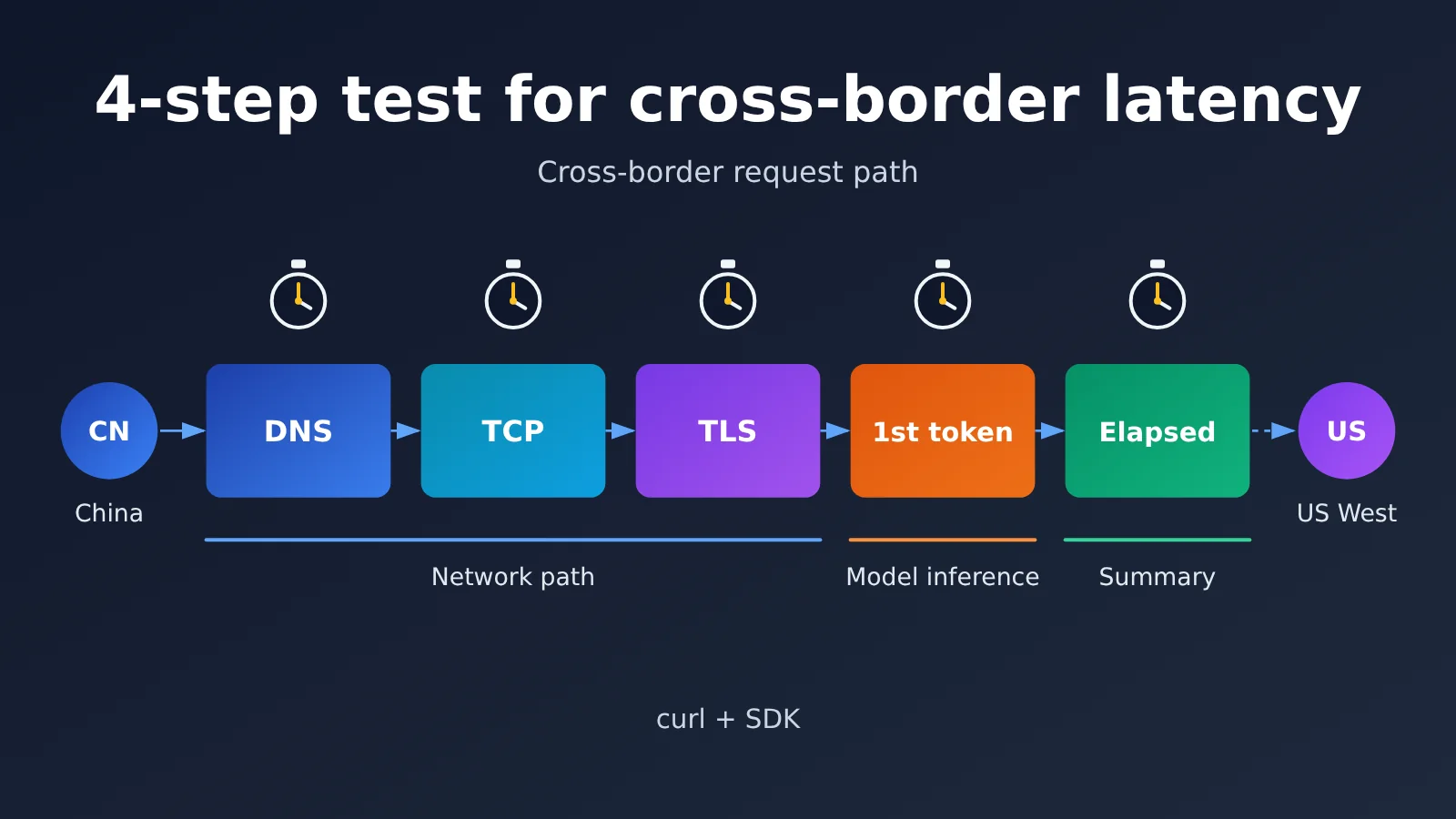
Author’s note: Use curl and the SDK to time DNS, TLS, first token, and total latency, then run through a 4-step method to figure out whether a slow Large Language Model API call from mainland China is bottlenecked by the “cross-border link” or by “model inference.”
“Why is this API so slow?” That’s the line developers in China say most often when they first integrate a Large Language Model API. The thing is, “slow” is only a symptom. It might come from DNS resolution, a cross-border TLS handshake, or model queuing — or it might just be the model thinking hard. This article walks you through a 4-step latency profiling method that splits a single request into its component parts, so you can pin down exactly why calling a Large Language Model API from mainland China is slow.
This isn’t a mystical “just try a different node” kind of guide. It’s a reproducible troubleshooting process assembled from real integration support tickets. We get asked all the time: if my service is deployed on a US server, what should I put in as the base URL? Will access from mainland China stutter because of the cross-border hop? Can large results like images and videos make it back in one piece? We’ll answer each of these below.
What you’ll get out of this: By the end, you’ll know how to time each phase with curl and the Python SDK, tell network-link cost apart from model-inference cost, and pick the right base_url for your deployment region.
Key Points: Why Large Language Model API Calls Are Slow from China
Before you start benchmarking, get one basic idea straight: the total time for a single Large Language Model API call is the sum of network time and model time. Cross-border latency only affects the former, and much of the “slowness” people perceive actually comes from the latter.
| Step | What You Measure | Tool | Question It Answers |
|---|---|---|---|
| Step 1 | DNS, TCP, and TLS connection setup time | curl -w flags |
Is the cross-border link itself healthy? |
| Step 2 | Time to first token (TTFT) | SDK streaming call | How long before the model starts responding? |
| Step 3 | End-to-end time and throughput | SDK non-streaming + multi-round stats | Are long outputs and large response bodies coming back reliably? |
| Step 4 | Comparative diagnosis | Diagnostic matrix | Is the bottleneck the network, the model, or your code? |
What Makes Up Cross-Border Latency
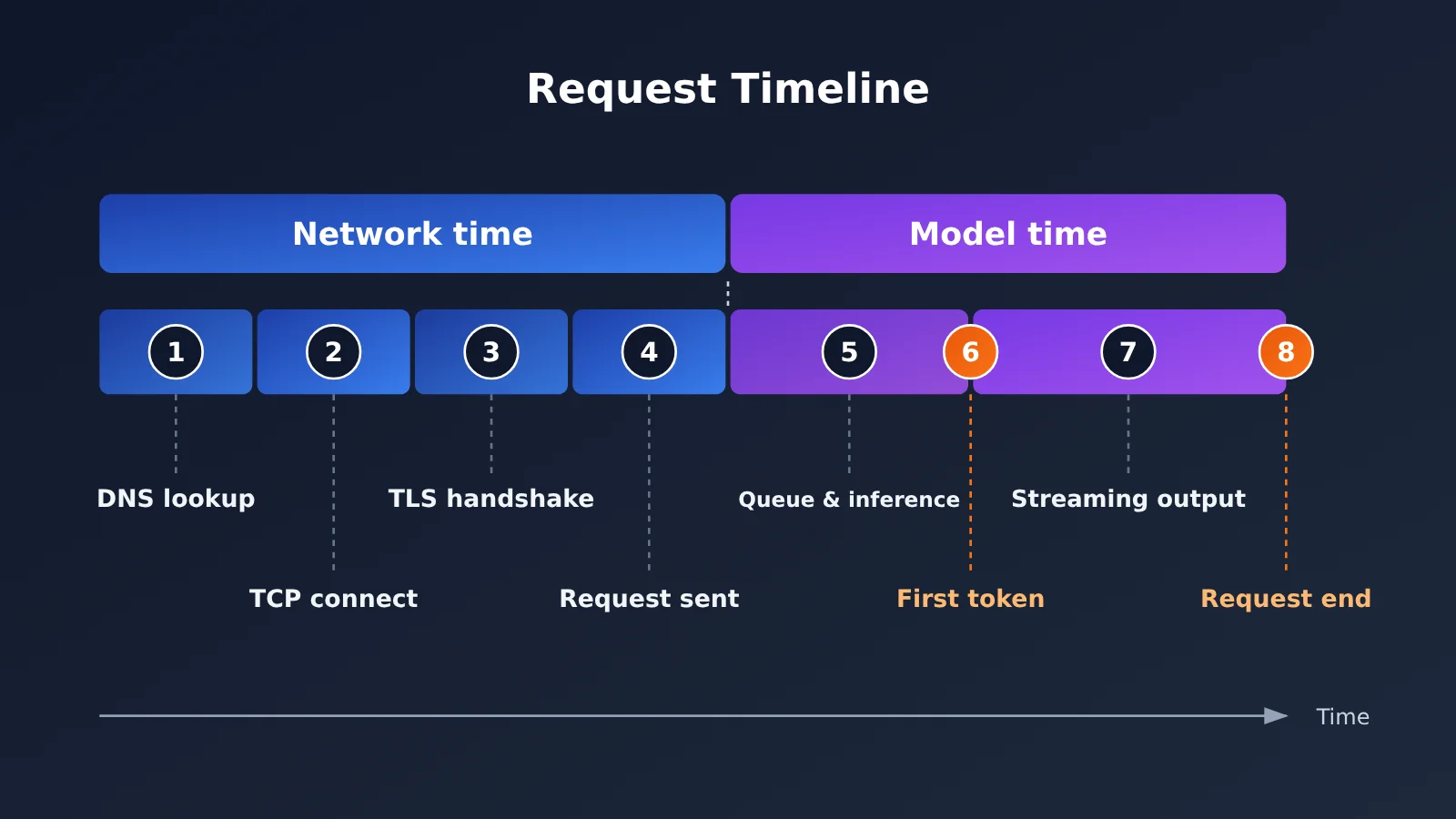
When an HTTPS request leaves your server, it goes through DNS resolution, the TCP three-way handshake, and the TLS handshake before the request body is even sent. In a cross-border scenario, both the TCP and TLS handshakes require multiple round trips, and the round-trip delay caused by physical distance gets multiplied several times over — that’s where “slow connection setup” comes from. The good news: connection setup usually happens only on the first request, and once the connection is reused, this cost drops sharply.
Once the request reaches the server, the model inference phase begins. For chat models, the wait before the first token appears depends on model size, input length, and current load; after the first token, output speed depends on the model’s generation rate. Image and video generation work differently — they typically return large results synchronously, so the bandwidth and stability of the return path directly determine whether the result arrives intact.
How to Tell Whether the Network or the Model Is Slow
The rule of thumb is simple: slow connection setup points to the network; slow time to first token points to the model and your input; slow and erratic output points to the return path and response body size. Measure these three sets of numbers, and most “slow” problems can be diagnosed in a matter of minutes.
4-Step Speed Test to Locate Cross-Border Latency and Get Started Fast
The examples below all use an OpenAI-compatible interface. Whether your service is deployed domestically or overseas, you only need to change the base_url to connect — the rest of the code stays the same.
Step 1: Break Down Cross-Border Connection Setup Time with curl
curl’s built-in -w parameter can output timing for each stage, making it the fastest tool for troubleshooting cross-border latency. I recommend hitting a lightweight endpoint like /v1/models to avoid model inference time interfering with network measurements.
export API_KEY="YOUR_API_KEY"

curl -o /dev/null -s \
  -H "Authorization: Bearer $API_KEY" \
  -w "DNS lookup:   %{time_namelookup}s\nTCP connect:   %{time_connect}s\nTLS handshake:   %{time_appconnect}s\nFirst byte:    %{time_starttransfer}s\nTotal time:    %{time_total}s\n" \
  https://api.apiyi.com/v1/models
One thing to watch out for: each value curl outputs is a cumulative timestamp measured from the start of the request, not the standalone duration of a single stage. Here’s what each field means and how to calculate it:
| curl field | Meaning | Single-stage calculation | Common causes when it’s high |
|---|---|---|---|
time_namelookup |
DNS resolution complete | Read directly | Slow local DNS, resolving to a distant node |
time_connect |
TCP connection established | connect − namelookup | High cross-border round-trip latency, packet loss |
time_appconnect |
TLS handshake complete | appconnect − connect | Link jitter, multiple handshake round trips |
time_starttransfer |
First byte received | starttransfer − appconnect | Server-side processing, queuing |
time_total |
Request finished | total − starttransfer | Large response body, insufficient return bandwidth |
I recommend running it 5 to 10 times in a row and checking whether the values are stable. If the TCP and TLS stage timings fluctuate a lot, the link quality is unstable. If the values are stable and within an acceptable range, the network is probably not the main bottleneck.
Step 2: Measure First Token Latency with SDK Streaming Calls
Once the connection is solid, the next thing to check is how fast the model starts responding. Time to first token (TTFT) is the most perceptible metric for chat-based applications—users stare at the screen waiting for that first character, and every second feels like forever.
import time
import openai

client = openai.OpenAI(
    api_key="YOUR_API_KEY",
    base_url="https://api.apiyi.com/v1"  # Works for both domestic and overseas deployments
)

start = time.perf_counter()
stream = client.chat.completions.create(
    model="gpt-4o-mini",
    messages=[{"role": "user", "content": "Introduce yourself in one sentence"}],
    stream=True,
)
for chunk in stream:
    if chunk.choices and chunk.choices[0].delta.content:
        print(f"First token latency: {time.perf_counter() - start:.2f}s")
        break
Once you have TTFT, subtract the connection time from Step 1. What’s left is basically the model’s queueing and inference time. If that part accounts for the vast majority, then network optimization won’t help much. You’re better off switching to a faster model, shortening the input context, or enabling streaming output.
Step 3: Multi-Round Statistics for Overall Latency and Large Response Body Delivery
A single measurement is easily thrown off by occasional fluctuations. For a production evaluation, you should run multiple rounds and pay attention to the median and max values. The complete script below automatically measures DNS, TCP, TLS, TTFT, and overall latency, then prints a summary.
View the full speed test script
import socket
import ssl
import statistics
import time
from urllib.parse import urlparse

import openai

BASE_URL = "https://api.apiyi.com/v1"  # Unified access endpoint
API_KEY = "YOUR_API_KEY"
MODEL = "gpt-4o-mini"
ROUNDS = 5


def measure_handshake(url: str) -> dict:
    """Measure DNS, TCP, and TLS latency in segments"""
    host = urlparse(url).hostname
    t0 = time.perf_counter()
    ip = socket.gethostbyname(host)
    t1 = time.perf_counter()
    sock = socket.create_connection((ip, 443), timeout=10)
    t2 = time.perf_counter()
    ctx = ssl.create_default_context()
    tls = ctx.wrap_socket(sock, server_hostname=host)
    t3 = time.perf_counter()
    tls.close()
    return {"dns": t1 - t0, "tcp": t2 - t1, "tls": t3 - t2}


def measure_llm(client: openai.OpenAI) -> dict:
    """Measure first token latency and overall latency"""
    start = time.perf_counter()
    ttft = None
    chars = 0
    stream = client.chat.completions.create(
        model=MODEL,
        messages=[{"role": "user", "content": "Write a ~200-word product introduction"}],
        stream=True,
    )
    for chunk in stream:
        if chunk.choices and chunk.choices[0].delta.content:
            if ttft is None:
                ttft = time.perf_counter() - start
            chars += len(chunk.choices[0].delta.content)
    total = time.perf_counter() - start
    return {"ttft": ttft or total, "total": total, "chars": chars}


def summarize(name: str, values: list) -> None:
    print(f"{name:<8} median {statistics.median(values):.3f}s  "
          f"max {max(values):.3f}s  min {min(values):.3f}s")


def main():
    client = openai.OpenAI(api_key=API_KEY, base_url=BASE_URL, timeout=120)
    records = {"dns": [], "tcp": [], "tls": [], "ttft": [], "total": []}

    for i in range(ROUNDS):
        hs = measure_handshake(BASE_URL)
        llm = measure_llm(client)
        for k in ("dns", "tcp", "tls"):
            records[k].append(hs[k])
        records["ttft"].append(llm["ttft"])
        records["total"].append(llm["total"])
        print(f"Round {i + 1} complete, output {llm['chars']} chars")

    print("\n===== Speed Test Summary =====")
    for k, v in records.items():
        summarize(k.upper(), v)


if __name__ == "__main__":
    main()
For image endpoints, there’s one extra thing to watch: image generation is typically a synchronous call, and the response body it returns is much larger than for text. If the total time is far longer than the time to first byte, or you get sporadic connection drops, the problem is usually in the return path rather than slow model generation. In that case, bump up the client timeout and add idempotent retries for interruptions.
Step 4: Use the Diagnostic Matrix to Identify the Bottleneck
Once you have the data from the first three steps, map it against the matrix below, and you’ll usually be able to pinpoint the problem.
| Symptom | Most likely bottleneck | First thing to try |
|---|---|---|
| DNS phase is noticeably slow | Local DNS resolution | Switch to a more reliable DNS service and enable DNS caching |
| TCP and TLS phases are high and fluctuate a lot | Cross-border link quality | Reuse connections and choose an access service with route optimization |
| Connection setup is normal, but TTFT is high | Model inference or overly long input | Switch to a faster model, trim the context, and enable streaming |
| TTFT is normal, but the overall request takes a long time | Output is too long or generation rate is low | Limit max_tokens and split tasks |
| Image or video requests occasionally fail | Large response bodies are unstable on the return path | Increase timeouts, add idempotent retries, and use async polling |
| First request is slow, later ones are fast | Cold start connection setup | Use persistent connections and reuse the client globally |
🚀 Quick start: If you want to run the speed test script above right away, we recommend signing up at APIYI apiyi.com to get an API key. New users get free test credits—enough to run multiple rounds of speed comparisons without deploying any proxy.
How to Choose a base_url Across Different Deployment Regions
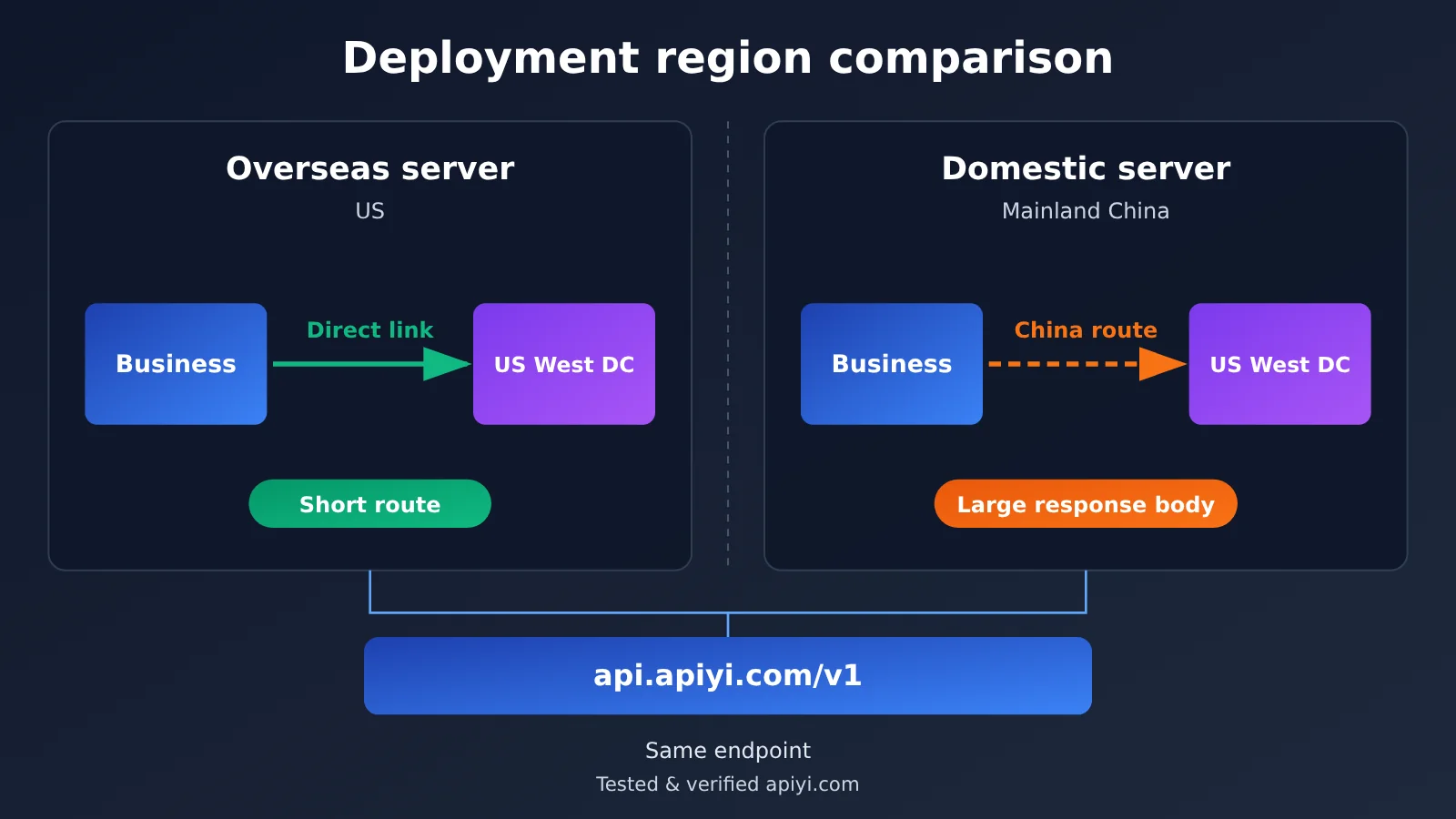
Lots of developers get hung up on this: if part of the business runs overseas and part runs in mainland China, do you need different endpoint addresses? The answer is no. APIYI’s servers are themselves located in the US West, so overseas services naturally get a shorter path. At the same time, the platform has added return-route acceleration for traffic from mainland China, specifically to keep large-response workloads like images and video stable on the way back. So no matter where you deploy, one shared base_url does the job.
| Deployment Location | Link Characteristics | What to Measure | Recommendation |
|---|---|---|---|
| US / US West | Same region as the servers, low round-trip latency | Focus on TTFT and model latency | Use the shared endpoint directly |
| Europe / Asia-Pacific (overseas) | Cross-ocean, but international links are usually stable | Watch TLS handshake and connection reuse | Shared endpoint + persistent connections |
| Mainland China | Cross-border link with return-route acceleration already in place | Watch connection-setup jitter and large-response transfers | Shared endpoint + sensible timeouts |
| Hybrid deployment | Multiple regions calling at the same time | Benchmark each region separately and compare | One codebase, no branching config |
The nice part of this design is that the same code moves seamlessly between a test environment (in China) and production (overseas) — no juggling multiple configs. What you actually need to do is run the four-step benchmark covered earlier inside each deployment environment and confirm the real-world numbers match what the business expects.
Optimization Tips for Large-Response Cross-Border Calls
Image and video endpoints are the most sensitive to cross-border links. Here’s what’s worth doing at the code level:
- Reuse the client globally: don’t re-establish a connection on every request — in a cross-border setup this saves a huge amount of handshake time.
- Set timeouts by workload type: text chat can be short, but image generation and video result retrieval need generous headroom.
- Retry idempotently on interruptions: use exponential backoff so you’re not resubmitting generation tasks in rapid succession.
- Poll video tasks asynchronously: submit the task, check status periodically, download once the result is ready — this lowers the risk of long-lived connection drops.
- Log segmented timings: feed TTFT and total duration into your monitoring so you can trace issues quickly when something goes wrong.
Frequently Asked Questions (FAQ)
Q1: What is cross-border latency, and how does it differ from model inference latency?
Cross-border latency is the network time spent transmitting requests between domestic and overseas servers, primarily during the TCP/TLS handshake and data return phases. Model inference latency, on the other hand, is the time the server spends generating content—reflected in the wait for the first token and the output speed. You need to measure these two separately to pinpoint where to optimize.
Q2: My service is deployed on US servers. Which endpoint should I use to call APIYI?
Just use `https://api.apiyi.com/v1`. APIYI’s servers are located in the US West, so services deployed in the US have a very short access path with no extra configuration needed. For detailed setup steps, check the Quick Start guide in the APIYI apiyi.com documentation center—you’ll be up and running in three steps.
Q3: The server is in US West, so why is domestic access still fairly smooth?
Because the platform has added return-path acceleration for domestic access, mainly to ensure reliable data return for heavy-response workloads like images and videos. You can verify this yourself using the curl command from Step 1 in this article on a domestic server, and observe the timing and fluctuations during the TCP and TLS phases.
Q4: First-token latency is very high—is it a network problem?
Not necessarily. First check the connection time measured by curl. If the connection is normal, then high TTFT is usually caused by a larger model, an overly long input context, or more complex inference. In that case, try switching to a lighter model, trimming your prompt, or enabling streaming output to improve the perceived experience.
Q5: How can I quickly compare the response speeds of different models?
We recommend testing with an aggregated endpoint that supports multiple models:
1. Register an account at APIYI apiyi.com and get your API key
2. Use the complete benchmarking script from this article—just change the `MODEL` variable
3. Run the same number of rounds for each model, and compare the median TTFT and overall latency
Since a single key lets you call OpenAI, Claude, Gemini, and many other models, network conditions stay consistent during comparison, making your conclusions more reliable.
Q6: The image API occasionally drops the connection—how do I troubleshoot?
The image API is a synchronous call with a large response body, so interruptions usually happen during the result return phase. First, increase the client timeout, then compare curl’s `time_total` and `time_starttransfer`. If the difference is large and unstable, the return path is the bottleneck—add idempotent retries and avoid submitting batches during peak hours.
Q7: What are the limitations of this benchmarking method?
The results reflect only the network conditions at the moment and location of measurement—different carriers and times of day can differ significantly. Also, model load varies over time, so a single TTFT measurement doesn’t represent long-term performance. We recommend continuously logging phase-by-phase timings in production and making decisions based on trends rather than single data points.
Key Takeaways: Speed Testing Large Language Model APIs from China
- Split first, optimize second: Total time equals network time plus model time, so you have to measure each segment separately.
- Use curl for connection setup: The
-wflag gives you cumulative timings for DNS, TCP, and TLS. - Use the SDK for TTFT: Record the first-token time during streaming calls to gauge how quickly the model responds.
- Check the median across multiple rounds: A single run is easily thrown off by fluctuations, so gather at least 5 rounds.
- Watch the return trip for large response bodies: For images and video, focus on the gap between total time and time-to-first-byte.
- One unified endpoint: Connect through APIYI apiyi.com, using the same base_url for both domestic and overseas traffic.
Summary
Core points for troubleshooting slow Large Language Model API calls from China:
- The 4-step localization method: Connection speed test, first-token speed test, total time measurement, and diagnostic matrix comparison—narrowing the scope layer by layer.
- Distinguish two types of latency: Cross-border latency is solved with connection reuse and route optimization; model latency is solved with model selection and leaner inputs.
- Treat large response bodies separately: Image and video workloads need sensible timeouts, idempotent retries, and async polling.
- No need to split base_url by region: Overseas traffic connects directly to the US West data center, while domestic traffic benefits from return-route acceleration—one config does it all.
Rather than guessing that something is “slow,” spend a few minutes running a speed test script and let the data show you where the bottleneck is. Get a free test quota through APIYI apiyi.com, run real measurements in your own deployment environment, and then decide on your model selection and timeout strategy.
📚 References
- APIYI Documentation Center: Connection endpoint and three-step onboarding guide
- Link:
docs.apiyi.com -
Details: Covers OpenAI-compatible mode configuration, image API invocation notes, and connection-interruption troubleshooting
-
curl Official Manual: Full documentation of
-wwrite-out variables - Link:
curl.se/docs/manpage.html -
Details: Authoritative definitions of timing fields like
time_namelookupandtime_appconnect -
OpenAI Python SDK: Official open-source repository
- Link:
github.com/openai/openai-python - Details: How to use streaming calls, timeouts, and retry parameters
Author: APIYI Technical Team
Technical Support: If you run into any issues during speed testing, feel free to reach out to us on the APIYI homepage. For more integration docs, visit the docs.apiyi.com documentation center.