Gemini 3.1 Pro Preview has added a medium thinking level, which is one of the biggest differences compared to the previous Gemini 3 Pro. You can now precisely control the model's reasoning depth across three levels—low, medium, and high—and the high mode even activates the Deep Think Mini capabilities.
Core Value: By the end of this post, you'll master the full configuration of the thinkingLevel parameter and learn how to strike the perfect balance between quality, speed, and cost.
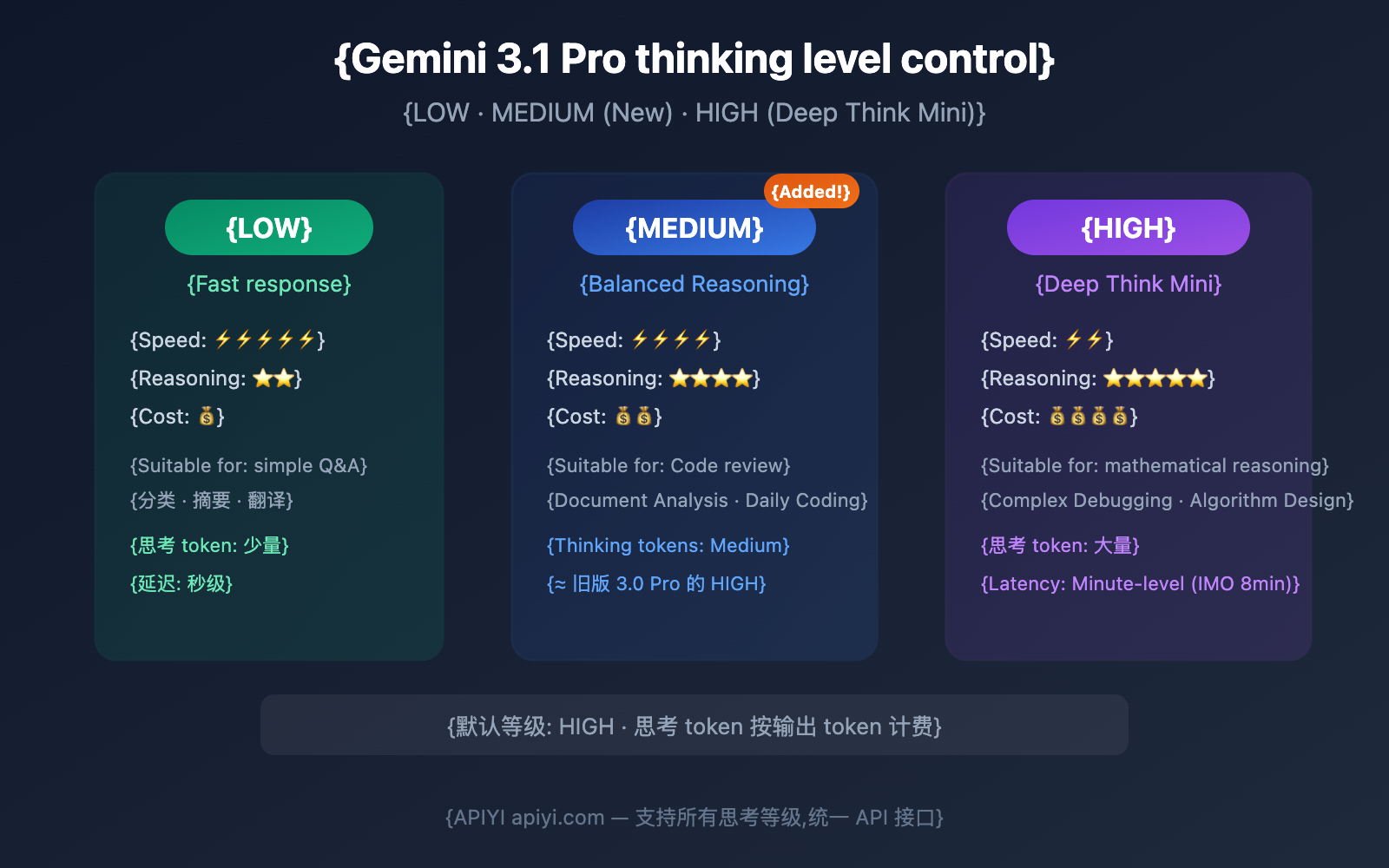
Gemini 3.1 Pro Thinking Level Support Matrix
Let's look at the big picture: different Gemini models support different thinking levels.
| Thinking Level | Gemini 3.1 Pro | Gemini 3 Pro | Gemini 3 Flash | Description |
|---|---|---|---|---|
| minimal | ❌ Not supported | ❌ Not supported | ✅ Supported | Near-zero thinking; only Flash supports this. |
| low | ✅ Supported | ✅ Supported | ✅ Supported | Fast response, lowest cost. |
| medium | ✅ New Support | ❌ Not supported | ✅ Supported | Balanced reasoning; the core upgrade for 3.1 Pro. |
| high | ✅ Supported (Default) | ✅ Supported (Default) | ✅ Supported (Default) | Deepest reasoning; activates Deep Think Mini. |
Key Changes: Thinking Level Upgrades from 3 Pro to 3.1 Pro
| Comparison | Gemini 3 Pro | Gemini 3.1 Pro |
|---|---|---|
| Available Levels | low, high (2 levels) | low, medium, high (3 levels) |
| Default Level | high | high |
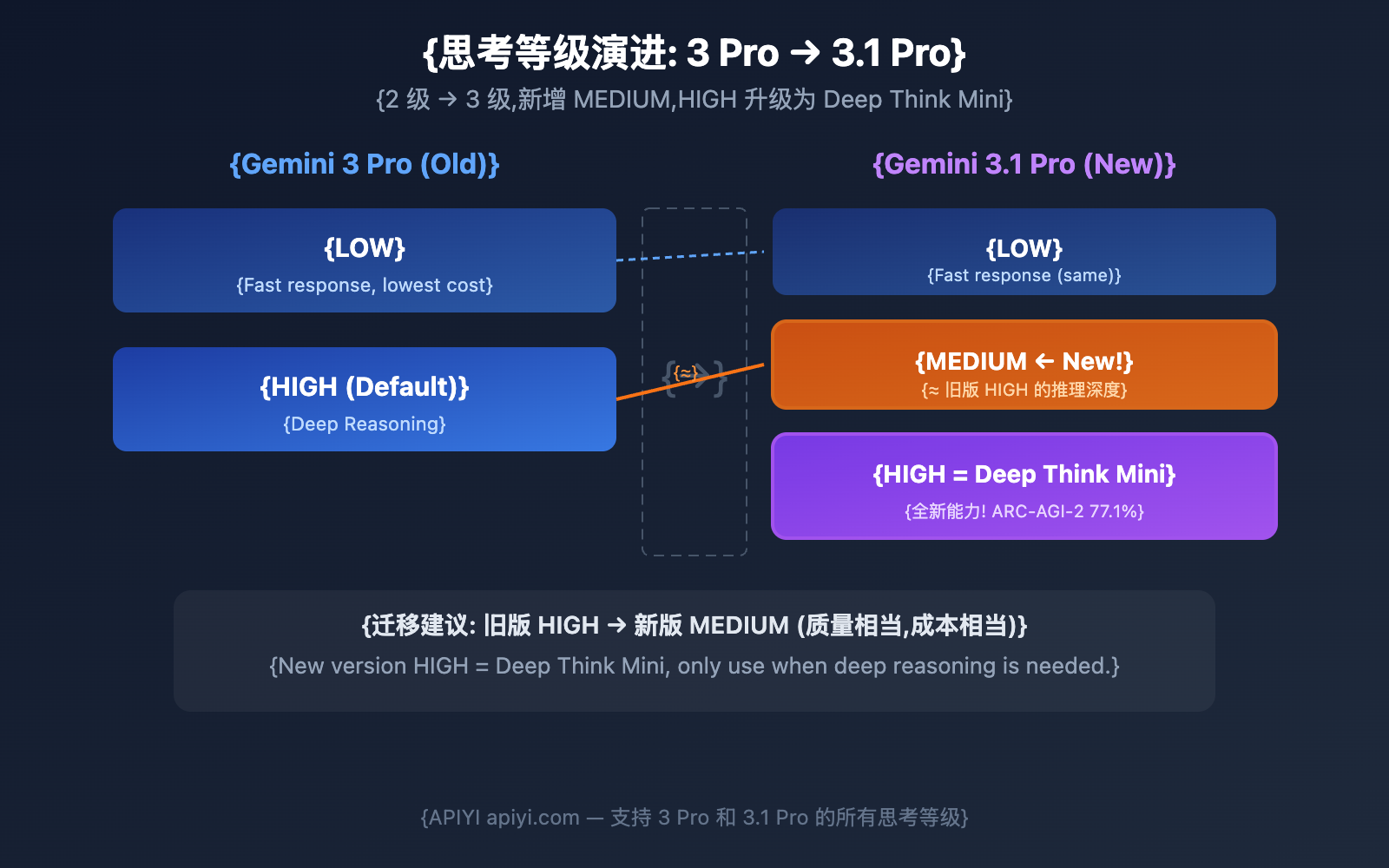
| Meaning of High Mode | Deep reasoning | Deep Think Mini (More powerful) |
| Can thinking be disabled? | No | No |
Core Insight: Gemini 3 Pro's high reasoning depth is roughly equivalent to Gemini 3.1 Pro's medium. Meanwhile, 3.1 Pro's high mode is the brand-new Deep Think Mini, which offers reasoning depth far exceeding the previous generation.
🎯 Migration Tip: If you've been using Gemini 3 Pro's high mode, we recommend starting with medium when you switch to 3.1 Pro to maintain similar quality and cost. Only bump it up to high when you really need that deep reasoning power. APIYI (apiyi.com) supports all Gemini models and thinking levels.
Gemini 3.1 Pro Thinking Level API Setup
Calling via APIYI (OpenAI Compatible Format)
import openai

client = openai.OpenAI(
    api_key="YOUR_API_KEY",
    base_url="https://api.apiyi.com/v1"  # APIYI Unified Interface
)

# LOW Mode: Fast response
response_low = client.chat.completions.create(
    model="gemini-3.1-pro-preview",
    messages=[{"role": "user", "content": "Translate this English text to Chinese: Hello World"}],
    extra_body={
        "thinking": {"type": "enabled", "budget_tokens": 1024}
    }
)

# MEDIUM Mode: Balanced reasoning (New!)
response_med = client.chat.completions.create(
    model="gemini-3.1-pro-preview",
    messages=[{"role": "user", "content": "Review this code for potential memory leak risks"}],
    extra_body={
        "thinking": {"type": "enabled", "budget_tokens": 8192}
    }
)

# HIGH Mode: Deep Think Mini
response_high = client.chat.completions.create(
    model="gemini-3.1-pro-preview",
    messages=[{"role": "user", "content": "Prove: For all positive integers n, n^3-n is divisible by 6"}],
    extra_body={
        "thinking": {"type": "enabled", "budget_tokens": 32768}
    }
)
Calling via Native Google SDK
from google import genai
from google.genai import types

client = genai.Client()

# Using the thinkingLevel parameter
response = client.models.generate_content(
    model="gemini-3.1-pro-preview",
    contents="Your prompt",
    config=types.GenerateContentConfig(
        thinking_config=types.ThinkingConfig(
            thinking_level="MEDIUM"  # "LOW" / "MEDIUM" / "HIGH"
        )
    ),
)

# Check thinking token consumption
print(f"Thinking tokens: {response.usage_metadata.thoughts_token_count}")
print(f"Output tokens: {response.usage_metadata.candidates_token_count}")
REST API Call
POST https://generativelanguage.googleapis.com/v1beta/models/gemini-3.1-pro-preview:generateContent

{
  "contents": [{"parts": [{"text": "Your prompt"}]}],
  "generationConfig": {
    "thinkingConfig": {
      "thinkingLevel": "MEDIUM"
    }
  }
}
⚠️ Important Reminder:
thinkingLevelandthinkingBudgetcannot be used at the same time, otherwise you'll get a 400 error. We recommend usingthinkingLevelfor Gemini 3+ models, while Gemini 2.5 models usethinkingBudget.
Detailed Comparison of Gemini 3.1 Pro's 3 Thinking Levels
LOW: Fastest and Cheapest
| Dimension | Details |
|---|---|
| Reasoning Depth | Minimal thinking tokens, but still outperforms non-thinking models |
| Response Speed | Seconds (Fastest) |
| Cost | Lowest (Fewer thinking tokens → fewer output tokens → lower cost) |
| Best For | Autocomplete, classification, structured data extraction, simple translation, summarization |
| Not Suitable For | Complex reasoning, mathematical proofs, multi-step debugging |
MEDIUM: The Balanced Choice (New)
| Dimension | Details |
|---|---|
| Reasoning Depth | Moderate thinking tokens, roughly equivalent to the "High" level in the old 3.0 Pro |
| Response Speed | Moderate latency |
| Cost | Medium |
| Best For | Code reviews, document analysis, daily coding, standard API calls, Q&A |
| Not Suitable For | IMO-level math, extremely complex multi-step reasoning |
HIGH: Deep Think Mini (Default)
| Dimension | Details |
|---|---|
| Reasoning Depth | Maximized reasoning, activates full Deep Think Mini capabilities |
| Response Speed | May take several minutes (around 8 minutes for IMO problems) |
| Cost | Highest (Large volume of thinking tokens billed at output rates) |
| Best For | Complex debugging, algorithm design, mathematical proofs, research tasks, Agent workflows |
| Special Ability | Thought signatures maintain reasoning continuity across API calls |
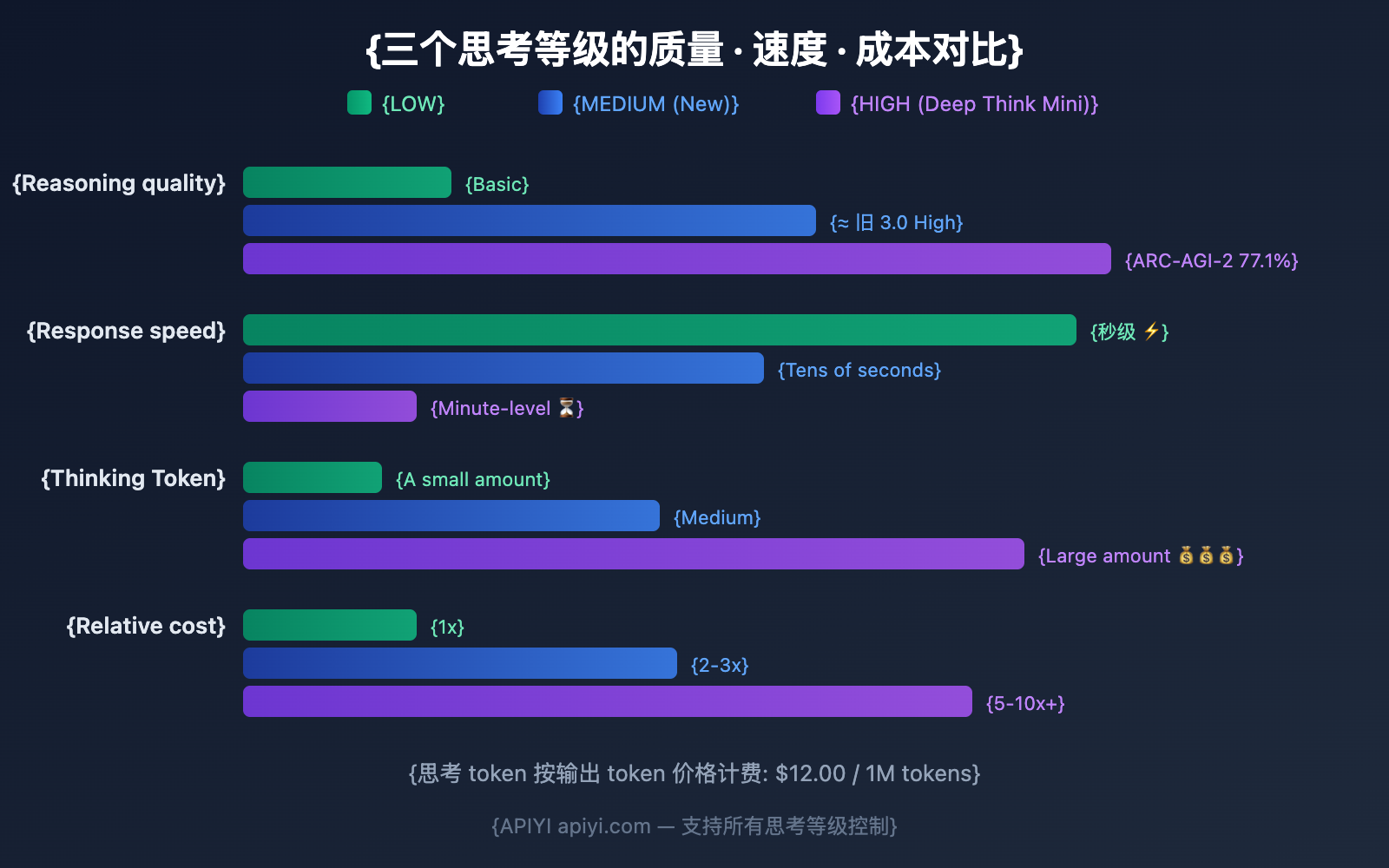
Gemini 3.1 Pro Thinking Token Billing Rules
Understanding how billing works is key to choosing the right thinking level for your needs.
Core Billing Principles
| Billing Item | Description |
|---|---|
| Are thinking tokens billed? | Yes, they're billed at the same price as output tokens. |
| Output token price | $12.00 / 1M tokens (includes thinking tokens). |
| Billing basis | Billed based on the full internal reasoning chain, not just the summary. |
| Thinking summary | The API only returns a thinking summary, but you're billed for the total number of thinking tokens generated. |
Official explanation from Google:
"Thinking models generate full thoughts to improve the quality of the final response, and then output summaries to provide insight into the thought process. Pricing is based on the full thought tokens the model needs to generate to create a summary, despite only the summary being output from the API."
Cost Estimates for the Three Levels
| Level | Estimated Thinking Tokens | Per 1,000 Calls | Monthly Cost Trend |
|---|---|---|---|
| LOW | ~500-2K / call | $6-24 | Lowest |
| MEDIUM | ~2K-8K / call | $24-96 | Medium |
| HIGH | ~8K-32K+ / call | $96-384+ | Higher; more for complex tasks |
💰 Cost Optimization: Not every request needs HIGH. By setting 80% of daily tasks to LOW or MEDIUM and only using HIGH for the 20% of truly complex tasks, you can slash your API spend by 50-70%. You can easily configure this through the APIYI (apiyi.com) platform.
Task Types and Gemini 3.1 Pro Thinking Level Matching Guide
Detailed Scenario Recommendations
| Task Type | Recommended Level | Reason | Expected Latency |
|---|---|---|---|
| Simple Translation | LOW | No reasoning required | <5 seconds |
| Text Classification | LOW | Pattern matching task | <5 seconds |
| Summary Extraction | LOW | Information compression, not reasoning | <10 seconds |
| Auto-completion | LOW | Latency sensitive | <3 seconds |
| Code Review | MEDIUM | Requires moderate analysis | 10-30 seconds |
| Document Q&A | MEDIUM | Understanding + Answering | 10-30 seconds |
| Daily Coding | MEDIUM | Standard code generation | 15-40 seconds |
| Bug Analysis | MEDIUM | Medium complexity reasoning | 20-40 seconds |
| Complex Debugging | HIGH | Multi-step reasoning chain | 1-5 minutes |
| Math Proof | HIGH | Deep Think Mini | 3-8 minutes |
| Algorithm Design | HIGH | Deep reasoning | 2-5 minutes |
| Research Analysis | HIGH | Multi-dimensional deep analysis | 2-5 minutes |
| Agent Workflow | HIGH | Thinking signatures maintain continuity | Depends on task |
Dynamic Level Selection: Best Practice Code
import openai

client = openai.OpenAI(
    api_key="YOUR_API_KEY",
    base_url="https://api.apiyi.com/v1"  # APIYI unified interface
)

# Automatically select thinking level based on task type
THINKING_CONFIG = {
    "simple":  {"type": "enabled", "budget_tokens": 1024},   # LOW
    "medium":  {"type": "enabled", "budget_tokens": 8192},   # MEDIUM
    "complex": {"type": "enabled", "budget_tokens": 32768},  # HIGH
}

def smart_think(prompt, complexity="medium"):
    """Automatically set thinking level based on task complexity"""
    return client.chat.completions.create(
        model="gemini-3.1-pro-preview",
        messages=[{"role": "user", "content": prompt}],
        extra_body={"thinking": THINKING_CONFIG[complexity]}
    )

# Simple translation → LOW
resp1 = smart_think("Translate: Good morning", "simple")

# Code review → MEDIUM
resp2 = smart_think("Review the security of this code: ...", "medium")

# Math proof → HIGH (Deep Think Mini)
resp3 = smart_think("Prove a specific case of the Riemann Hypothesis", "complex")
Gemini 3.1 Pro vs 3 Pro: Evolution of Thinking Levels
Where Deep Think Mini Truly Shines
The Deep Think Mini, activated via the HIGH mode in Gemini 3.1 Pro, is the absolute standout feature of this upgrade.
What is Deep Think Mini?
Deep Think Mini isn't a standalone model. Instead, it's a special reasoning mode within Gemini 3.1 Pro that's triggered when you set the thinking level to HIGH. Google describes it as a "mini version of Gemini Deep Think"—where Deep Think is Google's heavy-duty reasoning specialist (boasting an ARC-AGI-2 score of 84.6%).
Deep Think Mini Performance Benchmarks
| Test Item | Deep Think Mini (3.1 Pro HIGH) | Gemini 3 Pro HIGH | Improvement |
|---|---|---|---|
| ARC-AGI-2 | 77.1% | 31.1% | +148% |
| IMO Math Problems | Solved in ~8 mins | Failed to solve | From "Impossible" to "Possible" |
| Complex Planning Tasks | Benchmark up 40-60% | Compared to Gemini 2.5 Pro | Significant improvement |
Thought Signatures
Deep Think Mini introduces a unique technology called thought signatures. These are encrypted, tamper-proof representations of intermediate reasoning states.
In Agent workflows, a model's reasoning often spans multiple API calls. Thought signatures allow the reasoning context from a previous call to be passed seamlessly to the next, maintaining reasoning continuity. This is a game-changer for multi-step Agent tasks.
When is Deep Think Mini Worth It?
| Worth using HIGH (Deep Think Mini) | Not worth using HIGH |
|---|---|
| Competition-level math reasoning | Simple arithmetic |
| Complex cross-file bug debugging | Syntax error fixes |
| Algorithm design and optimization | CRUD code generation |
| Academic paper methodology analysis | Article summarization |
| Multi-step Agent long tasks | Single-turn Q&A |
| Deep security vulnerability analysis | Format conversion |
💡 Pro Tip: Deep Think Mini's power comes at a price—both latency and costs are high. I'd recommend using HIGH only for tasks that truly require "deep thinking"; MEDIUM is plenty for daily tasks. You can flexibly switch between them at the request level via APIYI (apiyi.com).
thinkingLevel vs thinkingBudget: Don't Mix Them Up
Google uses two different parameters to control reasoning, depending on the model series:
| Parameter | Applicable Models | Value Type | Description |
|---|---|---|---|
| thinkingLevel | Gemini 3+ (3 Flash, 3 Pro, 3.1 Pro) | Enum: MINIMAL/LOW/MEDIUM/HIGH | Recommended for the Gemini 3 series |
| thinkingBudget | Gemini 2.5 (Pro, Flash, Flash Lite) | Integer: 0-32768 | Applicable to the 2.5 series |
⚠️ You can't use both parameters at the same time! Sending both will return a 400 error.
| Scenario | Correct Approach | Incorrect Approach |
|---|---|---|
| Calling Gemini 3.1 Pro | Use thinkingLevel: "MEDIUM" |
Use thinkingBudget: 8192 |
| Calling Gemini 2.5 Pro | Use thinkingBudget: 8192 |
Use thinkingLevel: "MEDIUM" |
| Passing both parameters | — | 400 Error ❌ |
🎯 Quick Tip: Gemini 3 series → thinkingLevel (string levels), Gemini 2.5 series → thinkingBudget (numeric token count). APIYI (apiyi.com) supports both parameter formats.
FAQ
Q1: What is the default level if I don’t set thinkingLevel?
The default is HIGH. This means if you don't actively set it, every call will use the full reasoning power of Deep Think Mini, consuming the maximum amount of thinking tokens. We recommend setting an appropriate level based on your actual task needs to save on costs. You can flexibly control this at the request level via APIYI (apiyi.com).
Q2: How are thinking tokens billed? Are they expensive?
Thinking tokens are billed at the same price as output tokens ($12.00 / 1M tokens). In HIGH mode, a complex request might consume over 30,000 thinking tokens, costing about $0.36. Meanwhile, the same request in LOW mode might only consume 1,000 thinking tokens, costing about $0.012. That's a potential 30x difference in cost.
Q3: Is 3.1 Pro’s MEDIUM the same as 3.0 Pro’s HIGH?
They're essentially equivalent. Google describes 3.1 Pro's MEDIUM as providing "balanced thinking suitable for most tasks," which aligns with the positioning of 3.0 Pro's HIGH. If you're migrating from 3.0 Pro to 3.1 Pro, changing HIGH to MEDIUM will help you maintain similar quality and costs. You can use APIYI (apiyi.com) to call both versions simultaneously for comparison.
Q4: Can I turn off the thinking feature?
You cannot completely disable thinking in Gemini 3.1 Pro. The lowest setting is LOW, which still performs basic reasoning. If you need a response with absolutely no thinking involved, consider using the MINIMAL mode of Gemini 3 Flash.
Common Misconceptions About Gemini 3.1 Pro Thinking Levels
| Misconception | The Reality |
|---|---|
| "HIGH level has the best quality, so I should use it all the time." | For simple tasks, HIGH's quality is nearly identical to MEDIUM, but it costs 5-10x more. |
| "Reasoning capability at the LOW level is terrible." | LOW is still superior to models that don't think at all; it just uses fewer thinking tokens. |
| "MEDIUM is a new feature and might be unstable." | MEDIUM's reasoning depth is roughly equivalent to the old 3.0 Pro's HIGH and has been thoroughly validated. |
| "Thinking tokens aren't billed." | They are! They're billed at the same rate as output tokens ($12/MTok). |
| "I can turn off thinking in 3.1 Pro." | You can't. The lowest setting is LOW, which still performs basic reasoning. |
"I can use thinkingLevel and thinkingBudget together." |
Nope! Using both at the same time will trigger a 400 error. |
| "Higher levels just have a bit more latency before results return." | HIGH mode might take several minutes before it even starts responding—it's not just a slight delay. |
Summary: Gemini 3.1 Pro Thinking Level Quick Reference
| Level | In a Nutshell | Best For | Relative Cost |
|---|---|---|---|
| LOW | Fastest & Cheapest | Translation, classification, summarization, completion | 1x |
| MEDIUM | The Balanced Choice (New) | Coding, code reviews, analysis, Q&A | 2-3x |
| HIGH | Deep Think Mini | Math, debugging, research, Agents | 5-10x+ |
Core Recommendations:
- Use MEDIUM for daily development — It offers great quality at a reasonable cost and is equivalent to the old version's HIGH.
- Use LOW for simple tasks — You'll save over 70% on thinking token costs.
- Use HIGH for deep reasoning — Its "Deep Think Mini" capabilities are unique, but keep an eye on the cost.
- HIGH is the default — If you don't set a level, it defaults to the most expensive mode, so remember to adjust it manually.
We recommend dynamically switching thinking levels based on your task type via the APIYI (apiyi.com) platform to achieve the perfect balance between quality and cost.
References
-
Google AI Documentation: Gemini Thinking Configuration Guide
- Link:
ai.google.dev/gemini-api/docs/thinking - Description: Full documentation for the
thinkingLevelparameter.
- Link:
-
Google AI Documentation: Gemini 3.1 Pro Model Page
- Link:
ai.google.dev/gemini-api/docs/models/gemini-3.1-pro-preview - Description: Thinking level support matrix and key considerations.
- Link:
-
Gemini API Pricing Page: Thinking Token Billing
- Link:
ai.google.dev/gemini-api/docs/pricing - Description: Explains how thinking tokens are billed at the same rate as output tokens.
- Link:
-
VentureBeat: Deep Think Mini Deep Dive
- Link:
venturebeat.com/technology/google-gemini-3-1-pro-first-impressions - Description: Real-world test data showing an IMO problem solved in 8 minutes.
- Link:
-
Google Official Blog: Gemini 3.1 Pro Launch Announcement
- Link:
blog.google/innovation-and-ai/models-and-research/gemini-models/gemini-3-1-pro - Description: Official introduction to the three-tier thinking system and Deep Think Mini.
- Link:
📝 Author: APIYI Team | For technical discussions, visit APIYI at apiyi.com
📅 Updated: February 20, 2026
🏷️ Keywords: Gemini 3.1 Pro thinking levels, thinkingLevel, Deep Think Mini, LOW MEDIUM HIGH, API calls, reasoning control