After switching from gemini-3.1-pro-preview to Gemini 4 Argon, many developers have noticed a problem: with the same prompt, Argon sometimes seems to “think less deeply.” The likely reason is the default Gemini 4 Argon reasoning level. According to Google’s official documentation, Gemini 4 Argon defaults to a thinking_level of medium, not high; gemini-3.1-pro-preview defaults to the highest level, high. If you haven’t explicitly set the reasoning level in your code or client, switching models can quietly reduce the depth of the model’s reasoning by one level.
The situation gets more complicated because popular chat clients such as Cherry Studio often lag behind in supporting reasoning parameters for new models. The reasoning-level option may not even appear in the input box. This article explains Gemini 4 Argon’s available levels, defaults, and billing impact, then shows how to configure them in three ways: the native API, an OpenAI-compatible interface, and custom parameters in Cherry Studio.
What you’ll learn: By the end of this article, you’ll know how to set Gemini 4 Argon’s reasoning level to your preferred setting, regardless of how you call the model—and how to avoid migration pitfalls such as max_tokens truncation and 400 errors caused by unsupported parameters.
Gemini 4 Argon Reasoning Levels: Key Points
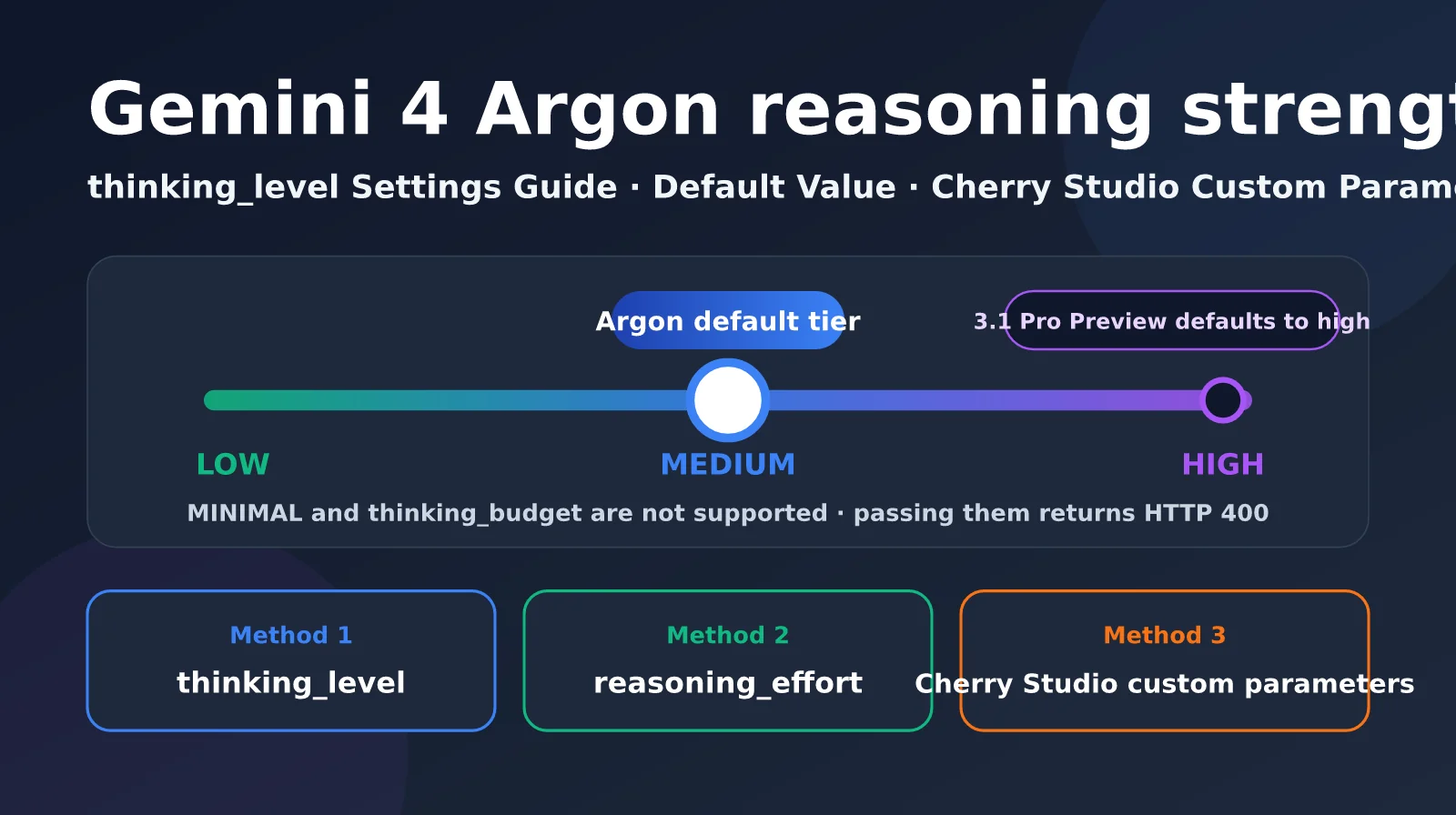
Gemini 4 Argon uses the thinking_level parameter to control reasoning depth. It supports three levels: low, medium, and high. Unlike its predecessors, it doesn’t support setting a thinking_budget by token count or the minimal level. Setting either will return an HTTP 400 error. The table below summarizes Google Cloud’s official descriptions of the three levels.
| Reasoning level | Default? | Recommended use cases | Characteristics |
|---|---|---|---|
| LOW | No | Classification, summarization, metadata extraction | Lowest latency; generates almost no thinking tokens |
| MEDIUM | ✅ Default for gemini-4-argon | General programming, tool calls, document Q&A, video understanding | A balance of speed, cost, and accuracy |
| HIGH | ✅ Default for the cyber-permissive version | Multi-file software engineering, formal proofs, architecture design, vulnerability research | Deepest reasoning, with noticeably higher time to first token and cost |
| MINIMAL | Not supported | — | Returns HTTP 400 when set |
| thinking_budget | Not supported | — | Silently mapped for earlier models; returns 400 for Argon |
One important detail: gemini-4-argon-cyber-permissive, intended for network defenders under the Fairwind program, defaults to HIGH. Only the standard gemini-4-argon defaults to MEDIUM. Also, Argon’s scores in Google’s evaluation tables were all achieved at the highest reasoning level. If you use the default medium setting, your results may not match the model’s advertised performance.
Gemini 4 Argon Reasoning Defaults Compared with Earlier Models
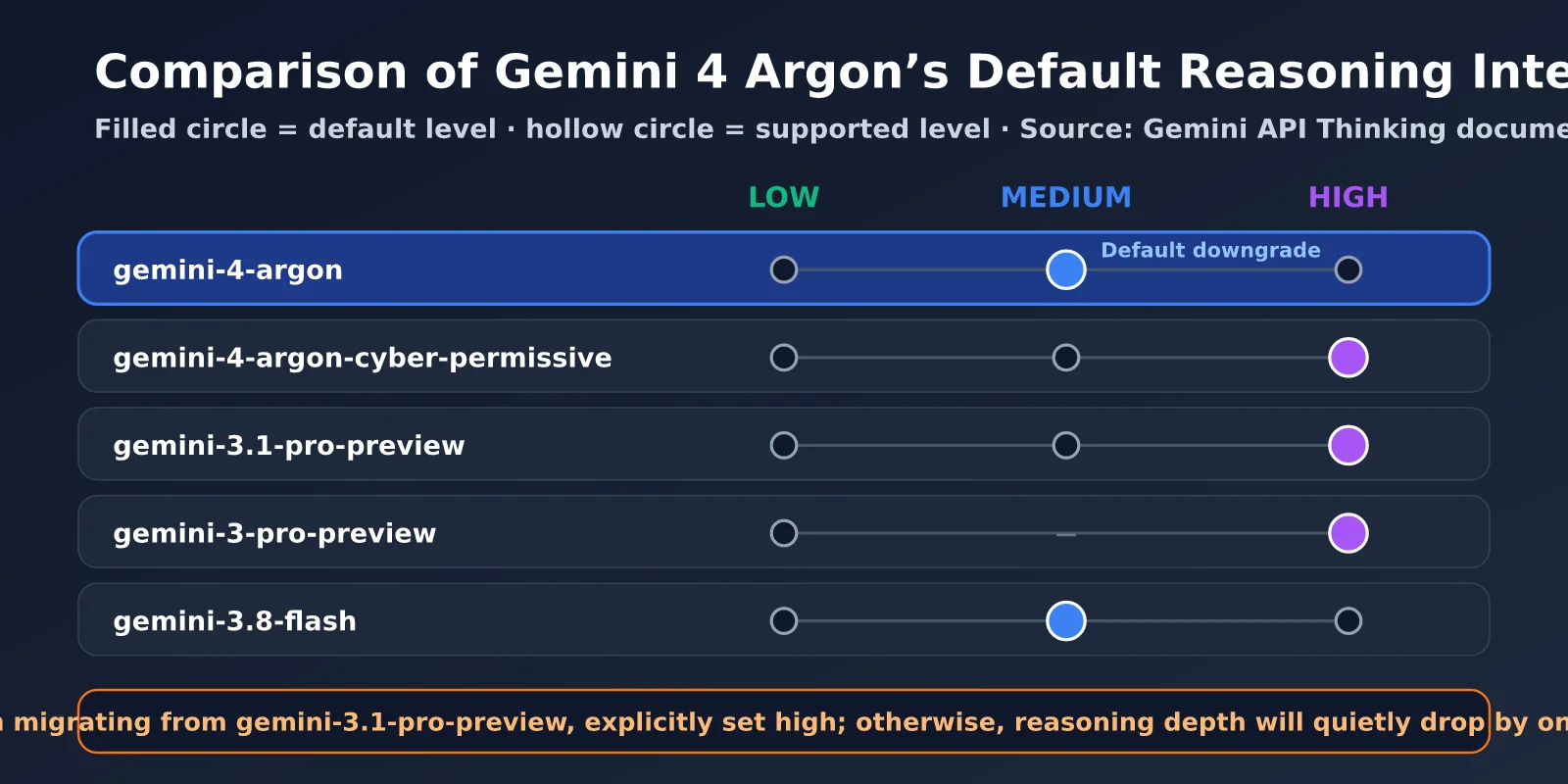
Comparing Gemini 4 Argon’s reasoning defaults with those of several recent Gemini models makes the migration risk clear. The following data comes from Google’s official Gemini API thinking documentation.
| Model | Default reasoning level | Supported levels |
|---|---|---|
| gemini-4-argon | medium | low, medium, high |
| gemini-4-argon-cyber-permissive | high | low, medium, high |
| gemini-3.1-pro-preview | high | low, medium, high |
| gemini-3-pro-preview | high | low, high |
| gemini-3.8-flash | medium | low, medium, high |
| gemini-3-flash-preview | high | minimal, low, medium, high |
As you can see, Google is lowering the default reasoning level for newer models from high to medium. Gemini 3.8 Flash and Gemini 4 Argon both follow this pattern. This reduces default latency and cost, but for users accustomed to 3.1 Pro “thinking at full capacity” by default, you’ll need to explicitly set high when migrating to Argon to maintain the same depth of reasoning.
🎯 Migration tip: When migrating from gemini-3.1-pro-preview to Gemini 4 Argon, explicitly set the reasoning level in your code first, then compare the output quality of both models. With APIYI’s unified interface at apiyi.com, you can call both the old and new Gemini models for A/B testing by changing only the
modelparameter.
How Gemini 4 Argon Reasoning Levels Affect Billing
Reasoning levels affect not just answer quality but also your bill. Argon’s thinking tokens are billed at the output-token rate: $10 per million tokens during the introductory period and $20 at the regular price. By default, the full reasoning process isn’t shown to users. In other words, the higher the level, the more you pay for “invisible thinking.”
As a rough estimate at the introductory rate, if a single high-level request generates 1,500 thinking tokens, the reasoning alone adds about $0.015. At 10,000 requests a day, that adds up to roughly $4,500 a month. This is one reason Google lowered Argon’s default to medium: most everyday requests don’t need the deepest reasoning, and defaulting to high would make many users pay for thinking they don’t need. A more sensible approach is to choose a level based on the task rather than setting everything to high.
3 Ways to Set Gemini 4 Argon’s Reasoning Effort
Depending on how you make requests, there are three ways to set Gemini 4 Argon’s reasoning effort: thinking_level in the Google native SDK, reasoning_effort in the OpenAI-compatible API, and passing Google’s native parameters through extra_body. Don’t use more than one at a time, or the request will fail.
| Setting method | Parameter location | Available values | Use case |
|---|---|---|---|
Native thinking_level |
thinking_config.thinking_level |
LOW / MEDIUM / HIGH | Google GenAI SDK, Vertex AI |
OpenAI-compatible reasoning_effort |
Top-level reasoning_effort in the request body |
minimal / low / medium / high | OpenAI SDK and other compatible clients |
Pass through with extra_body |
extra_body.google.thinking_config |
low / medium / high | When you also need native options such as thought summaries |
The OpenAI-compatible API maps reasoning_effort to Argon’s thinking_level. According to Google’s official mapping, both minimal and low map to low, medium maps to medium, and high maps to high. However, Argon doesn’t recognize higher settings such as xhigh and max, which are used by OpenAI and Anthropic. Passing one of these values returns a 400 error.
Method 1: Set thinking_level with the Native SDK
When using the Google GenAI SDK, specify the level directly in ThinkingConfig. Vertex AI endpoints support the global, us, and eu regions.
from google import genai
from google.genai import types

client = genai.Client(enterprise=True, project="YOUR_PROJECT", location="global")

resp = client.models.generate_content(
    model="gemini-4-argon",
    contents="Design a lock-free ring buffer for a multi-producer, single-consumer scenario",
    config=types.GenerateContentConfig(
        thinking_config=types.ThinkingConfig(thinking_level="HIGH"),
        max_output_tokens=32768,
    ),
)
print(resp.text)
Method 2: Set reasoning_effort with the OpenAI-Compatible API
If your project uses the OpenAI SDK, calling Argon through a compatible API is the easiest way to get started. Just add the reasoning_effort parameter.
from openai import OpenAI

client = OpenAI(api_key="YOUR_API_KEY", base_url="https://api.apiyi.com/v1")

resp = client.chat.completions.create(
    model="gemini-4-argon",
    reasoning_effort="high",      # Maps to thinking_level=high
    max_tokens=32000,             # Leave room for thinking tokens
    messages=[{"role": "user", "content": "Review this concurrent code for race conditions"}],
)
print(resp.choices[0].message.content)
print(resp.usage)
View Full Code: Passing Parameters with extra_body and Comparing the Three Levels
import time
from openai import OpenAI

client = OpenAI(api_key="YOUR_API_KEY", base_url="https://api.apiyi.com/v1")
PROMPT = "A Kubernetes Pod is stuck in CrashLoopBackOff. Provide systematic troubleshooting steps and commands."


def call_with_effort(level: str):
    """Method 2: OpenAI-compatible reasoning_effort"""
    start = time.time()
    resp = client.chat.completions.create(
        model="gemini-4-argon",
        reasoning_effort=level,
        max_tokens=32000,
        messages=[{"role": "user", "content": PROMPT}],
    )
    return resp, time.time() - start


def call_with_extra_body(level: str):
    """Method 3: Pass through Google's native thinking_config with extra_body
    Note: Don't use this together with reasoning_effort."""
    return client.chat.completions.create(
        model="gemini-4-argon",
        max_tokens=32000,
        messages=[{"role": "user", "content": PROMPT}],
        extra_body={
            "google": {
                "thinking_config": {
                    "thinking_level": level,
                    "include_thoughts": True,
                }
            }
        },
    )


if __name__ == "__main__":
    for level in ("low", "medium", "high"):
        resp, cost_time = call_with_effort(level)
        u = resp.usage
        print(f"[{level:6}] time {cost_time:5.1f}s | output {u.completion_tokens} tokens")
💡 Tip: The OpenAI-compatible API is the easiest way to connect to Gemini 4 Argon, and existing code built on the OpenAI SDK usually needs little or no changes. You can get test credits through APIYI at apiyi.com, then use the comparison script above to see how different reasoning levels affect your typical tasks.
Set Gemini 4 Argon’s Reasoning Effort in Cherry Studio
Cherry Studio has a reasoning-effort dropdown in the bottom-right corner of the input box, but it only appears for reasoning models the client recognizes. According to community issues, Cherry Studio determines whether a model supports reasoning effort using a built-in model catalog generated at build time from models.dev and OpenRouter. It doesn’t read capability information returned by the API at runtime. For a newly released model like Gemini 4 Argon, the dropdown may not appear until the client’s model catalog is updated. You may even see the option but find that it has no effect.
In this situation, the most reliable option is Cherry Studio’s Custom Parameters feature. According to the official documentation, custom parameters are added directly to the request body and take precedence over built-in parameters.
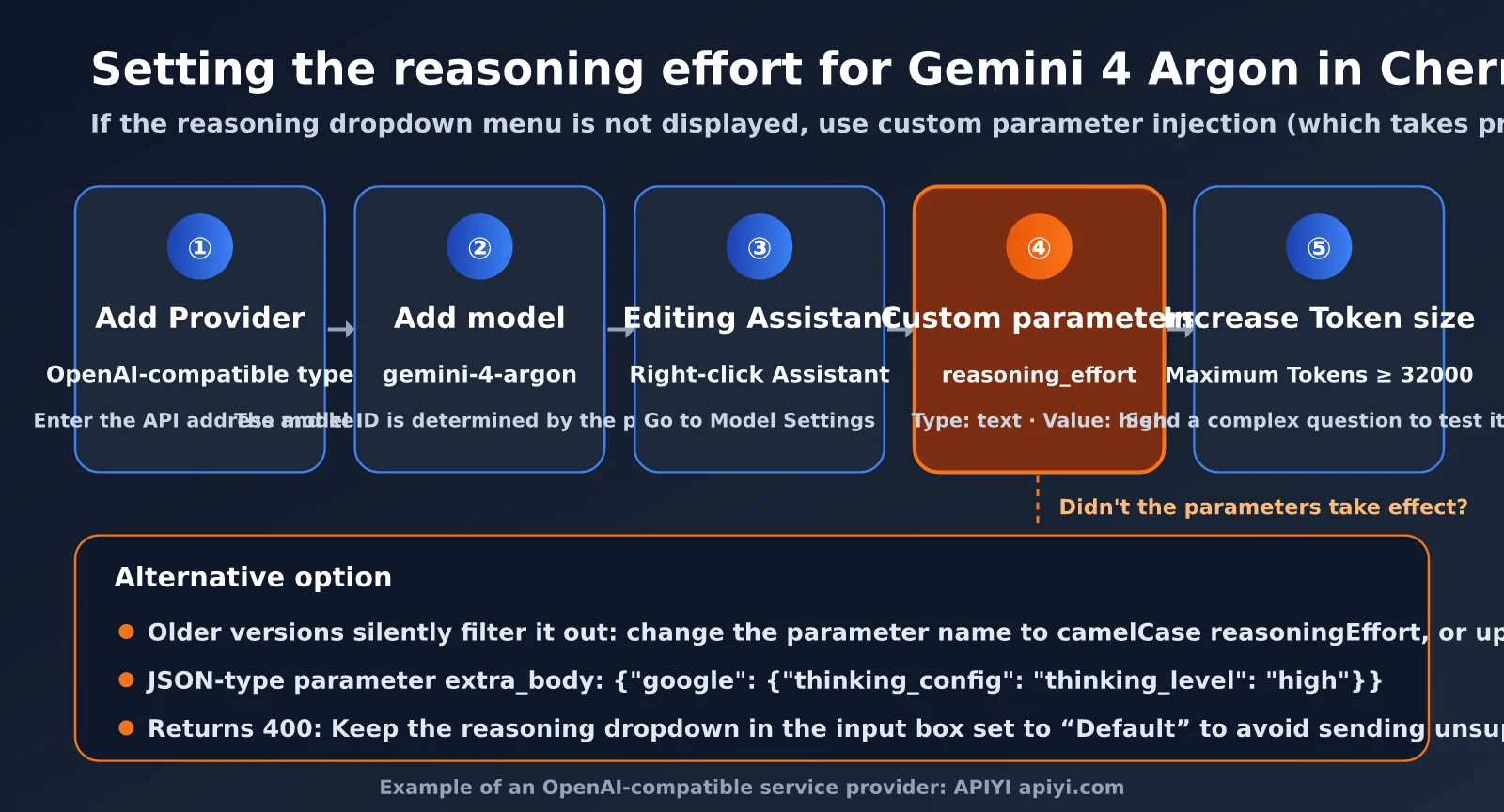
Cherry Studio Custom Parameter Setup
Here’s the full setup process using an OpenAI-compatible provider as an example:
- Add a provider: In Settings, add an OpenAI-compatible provider and enter the API URL and key, such as APIYI’s
https://api.apiyi.com. - Add the model: Add the model ID
gemini-4-argonunder the provider. - Open the assistant settings: In the assistant list, right-click the assistant you want to configure, select “Edit Assistant,” and switch to the “Model Settings” tab.
- Add a custom parameter: Set the parameter name to
reasoning_effort, choose “Text” as the type, and enterhigh(orlowormedium) as the value. - Increase the output limit: Enable and raise “Maximum Tokens.” We recommend setting it to at least 32000 to leave room for the thinking process.
- Test the setup: Try a question that requires multiple reasoning steps, then compare the response time and reasoning content with and without the setting.
If reasoning effort still doesn’t take effect after following these steps, check for these common issues:
| Symptom | Possible cause | Solution |
|---|---|---|
No change after setting reasoning_effort |
Older versions silently filter this parameter in OpenAI-compatible mode | Upgrade to the latest version, or use the parameter name reasoningEffort |
| The reasoning-effort dropdown doesn’t appear in the input box | Argon isn’t included in the built-in model catalog yet | Use a custom parameter; advanced users can add reasoning capability information to the model configuration |
| The request returns a 400 error | The client sent a level Argon doesn’t support, such as max or xhigh |
Leave the dropdown set to “Default” and use a custom parameter to specify low, medium, or high |
| The parameter is overridden by a built-in setting | The input-box reasoning option conflicts with the custom parameter | Leave the input-box option set to “Default” to avoid setting the parameter in both places |
| You need to pass through native parameters | You want to enable thought summaries as well | Add a JSON-type extra_body parameter with the value {"google": {"thinking_config": {"thinking_level": "high"}}} |
Cherry Studio fixed the issue where reasoning_effort was silently filtered in March 2026. Newer versions automatically convert it to the internal parameter reasoningEffort. If you’re using an older version, you can bypass the filter by entering the camelCase parameter name reasoningEffort directly.
The same approach works in other popular chat clients: find an entry such as “Custom Parameters,” “Extra Request Body,” or “Advanced Parameters,” then add reasoning_effort as a top-level field in the request body. If the client only supports JSON, use extra_body to pass through the native thinking_config. Once configured, test the same complex question and compare response time and token usage to confirm the parameter is taking effect.
🚀 Client recommendation: When connecting Gemini 4 Argon in Cherry Studio, we recommend choosing an OpenAI-compatible provider for the most reliable parameter pass-through. APIYI at apiyi.com provides a unified OpenAI-compatible API, so you can configure it once in Cherry Studio and use Gemini, Claude, GPT, and other model families.
Gemini 4 Argon Reasoning Effort: Benchmark Results and Pitfalls to Avoid
Reasoning effort directly affects latency, cost, and output quality. The third-party tech blog ComputingForGeeks ran a set of operations-focused tasks on Argon, and the results offer some useful insights.
| Test metric | Default (medium) | high | Difference |
|---|---|---|---|
| Average output tokens | 463 | 1,836 | About 4× |
| Average latency | 5.5 seconds | 15.3 seconds | About 2.8× |
| Time to first visible token | About 4.3 seconds | 12–13 seconds | About 1,400 reasoning tokens generated first |
| Cost for 9 calls (introductory pricing) | $0.045 | $0.169 | About 3.8× |
| low / medium vs. default | Nearly identical | — | Neither generated reasoning tokens on short tasks |
These results point to two things. First, on simple, short tasks, low, medium, and the default setting are nearly indistinguishable: none generates reasoning tokens. Only the high setting actually “thinks deeply.” Second, high comes with a clear trade-off: nearly 4× the cost and about 8 seconds more latency before the first token. Note that this test covered only short prompts; medium may also generate reasoning tokens on complex, longer tasks.
4 Common Pitfalls When Setting Gemini 4 Argon’s Reasoning Effort
Based on Google’s migration guide and community benchmarks, here are some of the most common pitfalls when setting reasoning effort for Gemini 4 Argon:
- A low
max_tokenslimit can result in an empty response:max_output_tokensincludes both reasoning tokens and response tokens. In one test, Argon with high and amax_tokenslimit of 1024 used all 1,021 tokens for reasoning and returned an empty string. The finish reason wasMAX_TOKENS. When using high, reserve at least 16K–32K tokens. - Keeping
thinking_budgetcan cause an error:gemini-3.1-pro-previewsilently mapsthinking_budgetto a reasoning level, but Argon returns a 400 error. Be sure to remove it during migration. - Sampling parameters like
temperatureare ignored: Google’s documentation says the Argon backend ignores customtemperaturevalues.frequency_penalty,presence_penalty, andcandidate_countalso return 400 errors. Use reasoning levels to control depth of thought andresponse_schemato control output format. - Using
max_tokensto cut costs can backfire: Google recommends lowering the reasoning level—notmax_tokens—to reduce cost and latency. Lowering the token limit can easily truncate the response.
📊 Choosing a reasoning level: For everyday Q&A and simple coding, the default medium setting is usually enough. Switch to high for complex architecture design, multi-file refactoring, or mathematical proofs. You can compare token usage across levels in the APIYI apiyi.com platform’s call logs to find the right balance between quality and cost.
Frequently Asked Questions
Q1: Is Gemini 4 Argon’s default reasoning level high?
No. The standard `gemini-4-argon` defaults to medium. Only `gemini-4-argon-cyber-permissive`, which is designed for cyber defenders, defaults to high. This differs from `gemini-3.1-pro-preview`, which defaults to the highest level, high. To get the strongest reasoning capability, explicitly set `thinking_level=”high”` or `reasoning_effort=”high”`.
Q2: Can I turn off reasoning or set it to minimal for Gemini 4 Argon?
No. Argon supports only three levels: low, medium, and high. Setting minimal or using `thinking_budget` returns an HTTP 400 error. When you pass `reasoning_effort=”minimal”` through the OpenAI-compatible API, it’s mapped to low. If you need very low latency, consider models that support the minimal level, such as the Gemini 3.x Flash series.
Q3: What should I do if I can’t find a reasoning-level option in Cherry Studio?
Cherry Studio’s built-in model directory doesn’t include Argon yet. You can add a custom parameter in “Edit Assistant → Model Settings”: set the parameter name to `reasoning_effort`, its type to text, and its value to `high`. Custom parameters take precedence over built-in parameters. OpenAI-compatible providers like APIYI apiyi.com are recommended because they reliably pass parameters through.
Q4: How can I confirm that the reasoning level is taking effect?
The easiest way is to check the output token count in the response’s usage data and measure the response time. With high, both the output token count and time to first token will be noticeably higher than with the default setting. You can also check whether reasoning content appears in Cherry Studio. Try the same complex question with the default and high settings, then compare the results.
Summary
The key takeaway about Gemini 4 Argon’s reasoning effort is this: the default is medium, not high. That’s different from gemini-3.1-pro-preview, which defaults to the highest level. If you’re migrating and don’t set the level explicitly, the model’s reasoning depth will quietly drop by one tier. Argon supports only three levels—low, medium, and high. Both thinking_budget and minimal trigger a 400 error, and when you use high, make sure to leave enough room for thinking tokens in max_tokens.
For API calls, the native SDK uses thinking_level, while the OpenAI-compatible interface uses reasoning_effort. Clients such as Cherry Studio that don’t yet support Argon reasoning options can inject them through custom parameters. We recommend keeping the default medium for everyday tasks and switching to high for complex tasks as needed. Use real-world measurements to choose the right level.
We recommend using APIYI apiyi.com to connect to Gemini 4 Argon through the OpenAI-compatible interface. This lets you use the same reasoning_effort parameter to adjust reasoning effort in both code and clients such as Cherry Studio.
References:
- Google Gemini API Thinking documentation: ai.google.dev/gemini-api/docs/thinking
- Google Gemini API OpenAI compatibility documentation: ai.google.dev/gemini-api/docs/openai
- Google Cloud Gemini 4 Argon Developer Guide: docs.cloud.google.com/gemini-enterprise-agent-platform/models/guides/gemini-4-argon
- Cherry Studio assistant settings documentation: docs.cherryai.com.cn
- Cherry Studio GitHub Issues #11987 and #19761: github.com/CherryHQ/cherry-studio
Author: APIYI Team | Sharing practical tips on Large Language Model integrations and parameter tuning. Visit APIYI apiyi.com for more AI model integration tutorials.