Author's Note: A deep dive into the Nano Banana 2 (gemini-3.1-flash-image-preview) development documentation, comparing the Google official API and the APIYI platform integration paths. Includes full code examples, parameter configurations, and cost-saving strategies.
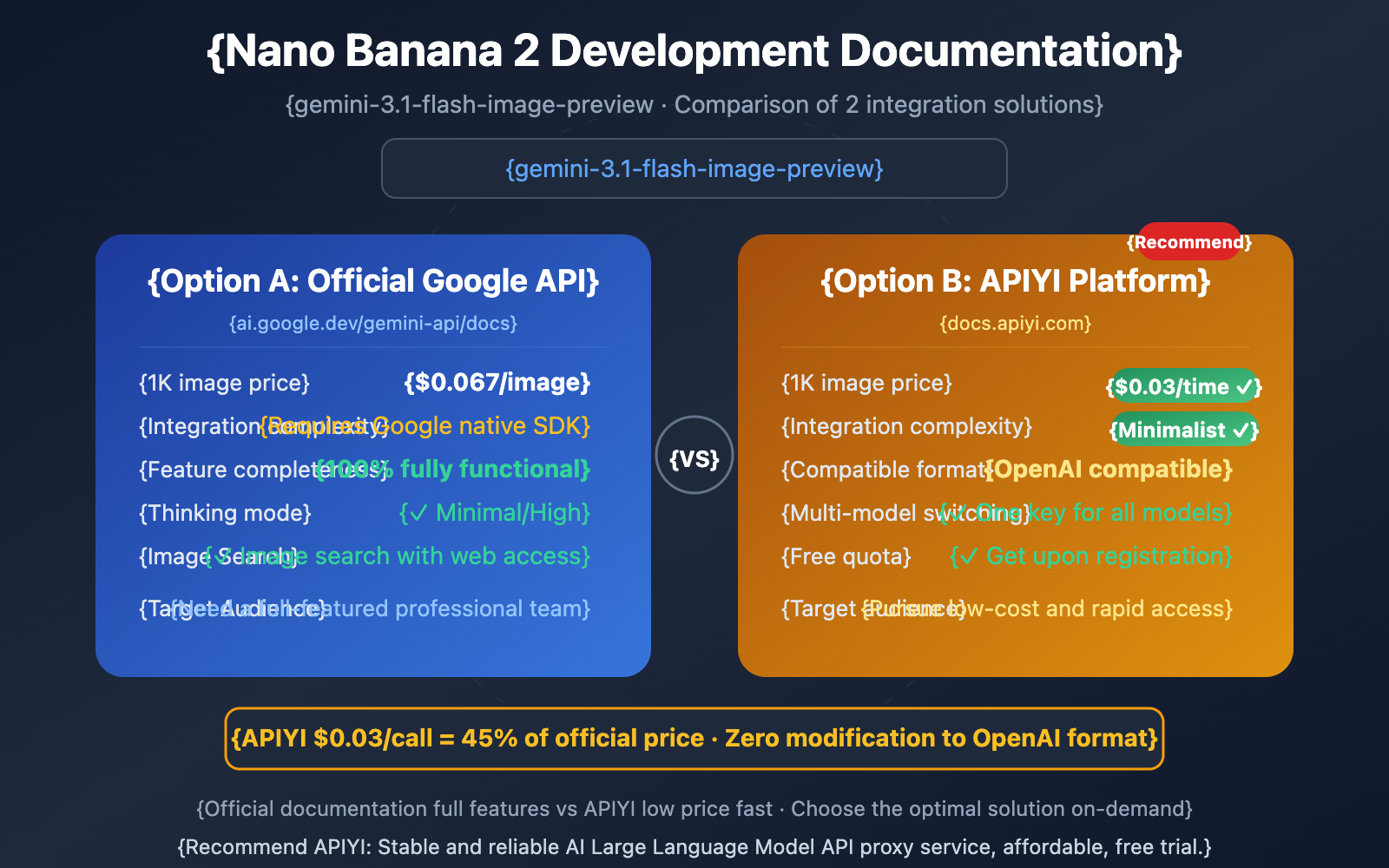
Developers looking to integrate Nano Banana 2 now have two sets of documentation to reference: the Google official docs (ai.google.dev/gemini-api/docs/image-generation) and the APIYI platform docs (docs.apiyi.com/api-capabilities/nano-banana-2-image).
Both options have their strengths—the official docs are the most comprehensive, while the APIYI docs offer the simplest integration with prices as low as $0.03 per call. This article consolidates and compares the core content of both documents to help you choose the best integration method for your needs.
Core Value: By the end of this post, you'll master the full API parameters for Nano Banana 2, see code examples for both integration paths, and know which option is best for different scenarios.
Nano Banana 2 Dev Doc: Core Parameter Quick Reference
Let's start with the most important parameter configurations. These are universal regardless of which integration path you choose:
| Parameter | Values | Default | Description |
|---|---|---|---|
| model | gemini-3.1-flash-image-preview |
— | Required, Model ID |
| imageSize | 512px, 1K, 2K, 4K |
1K |
Note the uppercase K |
| aspectRatio | 14 types (see full list below) | 1:1 |
Aspect ratio |
| responseModalities | ["IMAGE"] or ["TEXT","IMAGE"] |
— | Required, output type |
| thinkingLevel | minimal, high |
minimal |
Thinking reasoning depth |
| includeThoughts | true, false |
false |
Whether to return the reasoning process |
The 14 Aspect Ratios Supported by Nano Banana 2
| Category | Ratio | Typical Use Case |
|---|---|---|
| Square | 1:1 | Social media avatars, product hero images |
| Landscape | 3:2, 4:3, 16:9, 21:9 | Blog images, YouTube covers, cinematic frames |
| Portrait | 2:3, 3:4, 4:5, 9:16 | Phone wallpapers, Instagram Stories, social posts |
| Ultra-wide Banner | 4:1, 8:1 | Website banners, panoramas (New ✨) |
| Ultra-tall Portrait | 1:4, 1:8 | Infographics, long mobile screenshots (New ✨) |
| Widescreen | 5:4 | Desktop wallpapers, presentation use |
🎯 Dev Tip: 1:4, 4:1, 1:8, and 8:1 are new aspect ratios exclusive to Nano Banana 2; Nano Banana Pro doesn't support them. If your app needs long banners or infographics, gemini-3.1-flash-image-preview is your only choice.
Nano Banana 2 Integration Option A: Google Official API
Official API Basic Invocation
The Google Official API uses the Google Gen AI SDK, which supports Python, JavaScript, Go, Java, and REST.
from google import genai
from google.genai import types

client = genai.Client()

# Basic text-to-image
response = client.models.generate_content(
    model="gemini-3.1-flash-image-preview",
    contents="An orange cat rolling in autumn leaves, warm tones",
    config=types.GenerateContentConfig(
        response_modalities=['TEXT', 'IMAGE']
    )
)

# Extract the generated image
for part in response.candidates[0].content.parts:
    if part.inline_data:
        with open("output.png", "wb") as f:
            f.write(part.inline_data.data)
View official API call code with full parameters
from google import genai
from google.genai import types

client = genai.Client()

# Full parameter config: 2K resolution + 16:9 widescreen + High thinking mode
response = client.models.generate_content(
    model="gemini-3.1-flash-image-preview",
    contents="Tech company annual report cover, title 'AI Vision 2026', deep blue tones, minimalist style",
    config=types.GenerateContentConfig(
        response_modalities=['TEXT', 'IMAGE'],
        image_config=types.ImageConfig(
            aspect_ratio="16:9",
            image_size="2K"
        ),
        thinking_config=types.ThinkingConfig(
            thinking_level="High",
            include_thoughts=True
        )
    )
)

# Parse response (including Thinking process)
for part in response.parts:
    if part.thought and part.text:
        print(f"[Thinking Process] {part.text}")
    elif part.inline_data:
        with open("report_cover.png", "wb") as f:
            f.write(part.inline_data.data)
        print("Image saved")
Image Search Web-Connected Generation via Official API
This is a Nano Banana 2 exclusive—retrieving real visual references from Google Image Search before generating:
response = client.models.generate_content(
    model="gemini-3.1-flash-image-preview",
    contents="Latest 2026 Tesla Model Y, silver, parked on a city street",
    config=types.GenerateContentConfig(
        response_modalities=['TEXT', 'IMAGE'],
        tools=[
            types.

## Nano Banana 2 Price Comparison

| Model | Official Standard Price | Official Batch Price | APIYI Price | APIYI vs. Official |
|------|-----------|-------------|-----------|--------------|
| **Nano Banana 2** | $0.067/img (1K) | $0.034/img | **$0.03/req** | 55% cheaper |
| **Nano Banana Pro** | $0.134/img | $0.067/img | **$0.05/req** | 63% cheaper |
| **Nano Banana (Original)** | $0.039/img | — | **$0.025/req** | 36% cheaper |

<br>

### Nano Banana 2 Monthly Cost Comparison (1,000 images/day)

| Plan | Monthly Cost (1K Resolution) | Yearly Cost |
|------|-------------------|--------|
| **Official Standard** | $2,010 | $24,120 |
| **Official Batch** | $1,020 | $12,240 |
| **APIYI** | **$900** | **$10,800** |

<br>

At $0.03 per request, APIYI isn't just 55% cheaper than the official standard price—it's even lower than the official Batch half-price ($0.034). Plus, you get real-time responses without having to wait 24 hours for asynchronous processing.

> 🎯 **Money-Saving Tip**: Use APIYI (apiyi.com) for your Nano Banana 2 model invocations. Generating 1,000 images a day costs just $30, totaling $900 a month. Sign up now to get free test credits. One API key supports Nano Banana 2, Pro, and other mainstream models.

---

## Nano Banana 2 Advanced Developer Guide

### Multi-turn Image Editing

Nano Banana 2 supports continuous modification of the same image within a conversation:

```python
# Multi-turn editing using APIYI + OpenAI format
messages = [
    {"role": "user", "content": "Generate a minimalist brand logo in blue tones"},
    # Continue editing after the first round of generation
    {"role": "assistant", "content": "[First round generation result]"},
    {"role": "user", "content": "Change the color to gradient purple and add the company name 'TechFlow'"}
]

response = client.chat.completions.create(
    model="gemini-3.1-flash-image-preview",
    messages=messages
)
Nano Banana 2 Reference Image Generation
| Reference Type | Max Quantity | Use Case |
|---|---|---|
| Object Reference | 10 images | Maintain object detail consistency (product photos, props, etc.) |
| Person Reference | 4 images | Maintain face consistency (characters, virtual humans, etc.) |
| Total | 14 images | Up to 14 reference images per single call |
Nano Banana 2 Thinking Mode Selection
| Mode | Use Case | Speed | Quality | Extra Cost |
|---|---|---|---|---|
| Minimal (Default) | Daily generation, simple scenes | Fast | Standard | Few Thinking tokens |
| High | Complex compositions, precise text, multi-element scenes | Slower | Higher | More Thinking tokens |
🎯 Developer Tip: Thinking tokens are billed regardless of whether
includeThoughtsis set totrue. If you don't need to see the reasoning process, just keep it at the defaultfalse—it won't affect the generation quality; it just won't return the intermediate reasoning text.
Nano Banana 2 Generation Speed Reference
| Resolution | APIYI Tested Speed | Description |
|---|---|---|
| 0.5K | 3-8 seconds | Fastest, ideal for quick iterations |
| 1K (Default) | 5-10 seconds | Good experience for daily use |
| 2K | 10-15 seconds | Slightly slower but acceptable |
| 4K | 15-25 seconds | Slower, 120s timeout recommended |
| High Thinking | Adds a few extra seconds | Extra time for the reasoning phase |
Pro tip: When making a model invocation for Nano Banana 2, we recommend setting
timeout=300(300 seconds) to avoid failures due to network jitters or Google's computing power fluctuations. You'll get a more stable connection by using the APIYI API proxy service at apiyi.com.
FAQ
Q1: What resolutions are included in APIYI’s $0.03 price?
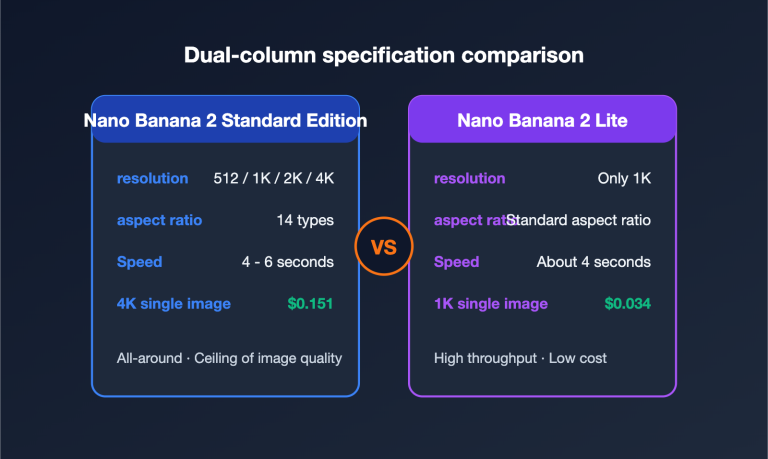
APIYI offers a flat rate of $0.03 per request, regardless of resolution. Whether you're generating 0.5K, 1K, 2K, or 4K images, it's always $0.03. Compared to Google's official tiered pricing ($0.045–$0.151), APIYI's pricing is a huge advantage for 2K and 4K resolutions.
Q2: Does APIYI support Image Search for web-connected generation?
Image Search is an advanced feature of Nano Banana 2 that requires calling the native Google API format. APIYI's REST native format supports this, while the OpenAI-compatible format currently doesn't. If your use case needs Image Search, we recommend using APIYI's native invocation method.
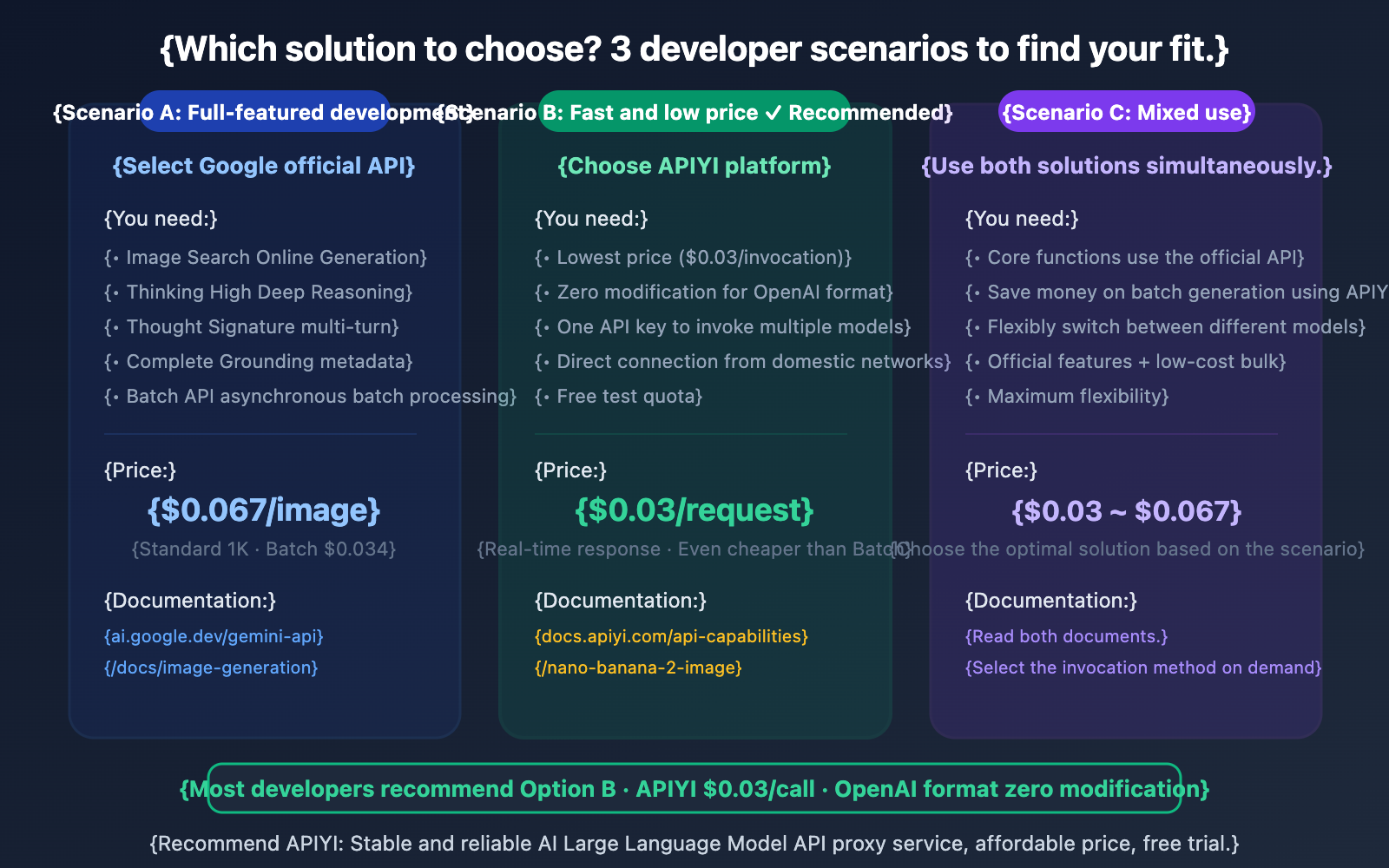
Q3: What’s the difference between the two sets of documentation, and which one should I read?
Google Official Docs (ai.google.dev): Most comprehensive, covering all parameters, Thinking mode, Image Search, Thought Signature, and other advanced features. Best for developers who need a deep dive into all capabilities.
APIYI Docs (docs.apiyi.com): More concise and practical, focusing on quick integration and code snippets. Perfect for developers who want to get Nano Banana 2 up and running fast at the lowest cost. We suggest starting with the APIYI docs for a quick start, then checking the Google docs for advanced features as needed.
Summary
Key takeaways from the Nano Banana 2 development docs:
- Two solutions, each with its own strengths: The official Google API offers the most comprehensive features (Image Search, Thinking, 14 reference images), while APIYI provides the lowest price ($0.03/invocation) and the simplest integration.
- APIYI's $0.03 = 45% of official pricing: You get real-time responses that are even cheaper than the official Batch half-price ($0.034), without the 24-hour wait.
- Universal core parameters: Parameters like the 4 resolution levels, 14 aspect ratios, and Thinking mode are available in both solutions.
For most developers, we recommend quickly integrating Nano Banana 2 via APIYI (apiyi.com)—with $0.03/invocation pricing, OpenAI-compatible format, and free credits upon registration, you'll generate your first image in under 5 minutes.
📚 References
-
Official Google Gemini Image Generation Docs: Full Nano Banana 2 API Reference
- Link:
ai.google.dev/gemini-api/docs/image-generation - Description: Official documentation for all parameters, features, and advanced capabilities.
- Link:
-
APIYI Nano Banana 2 Documentation: Quick Integration and Code Examples
- Link:
docs.apiyi.com/api-capabilities/nano-banana-2-image - Description: Integration guide for the APIYI platform, including pricing and invocation examples.
- Link:
-
Official Gemini API Pricing: Precise pricing for each resolution
- Link:
ai.google.dev/gemini-api/docs/pricing#gemini-3.1-flash-image-preview - Description: Standard and Batch pricing for 0.5K/1K/2K/4K.
- Link:
-
Gemini API Rate Limits: Invocation limits for Preview models
- Link:
ai.google.dev/gemini-api/docs/rate-limits - Description: Understand quota limits for Preview models.
- Link:
Author: APIYI Technical Team
Technical Discussion: Feel free to share your Nano Banana 2 development experience in the comments. For more AI model resources, visit the APIYI documentation center at docs.apiyi.com.