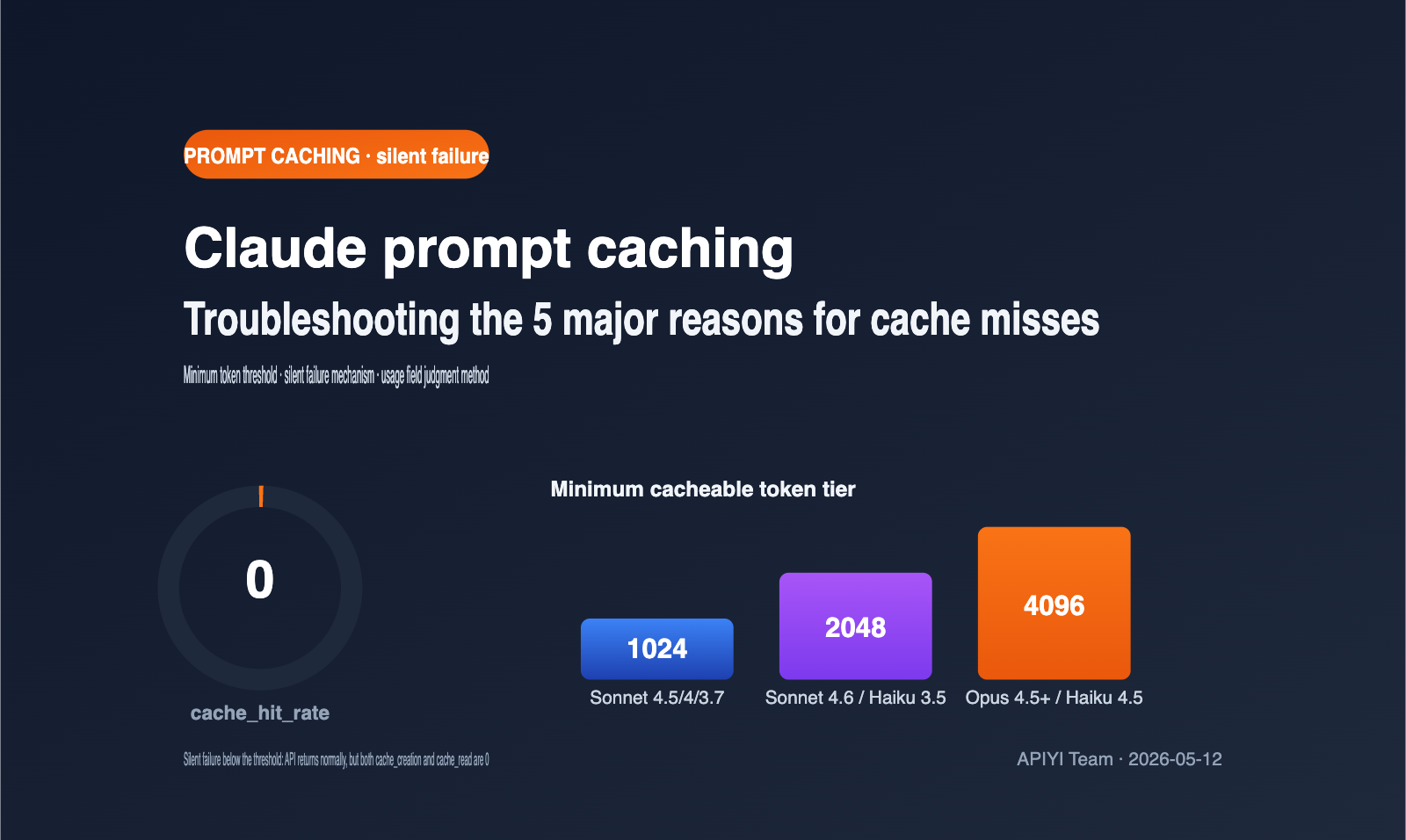
When using the Claude API for long-context calls, many developers run into the same confusion: even though they’ve declared caching in the cache_control field, the cache_creation_input_tokens and cache_read_input_tokens in the response remain 0, and no cache discounts appear on the bill. This article systematically breaks down the 5 major reasons for Claude prompt caching misses, focusing on the most overlooked "minimum token threshold" and the "silent failure" mechanism.
Core Value: After reading this, you’ll understand the minimum cache thresholds for various Anthropic models, why short prompts with cache_control don't trigger errors but also don't cache, and how to use 4 lines of code to verify if your cache actually hit.
Core Points of Claude Prompt Caching
Claude prompt caching is a feature provided by Anthropic: it stores frequently used system prompts, long documents, and tool definitions in a temporary cache. When hit, it's billed at a "read" rate, which is about 90% cheaper than standard input pricing. Its key characteristics are "prefix matching + explicit declaration + silent failure." These three points determine how you should troubleshoot most issues.
| Point | Description | Troubleshooting Value |
|---|---|---|
| Explicit Declaration | You must insert a cache_control block within system, messages, or tools |
Missing it or placing it incorrectly results in no cache |
| Prefix Matching | Requires byte-level consistency for all content before the cached block | Even an extra space will cause a miss |
| Silent Failure | Requests that don't meet conditions return normally without error or caching | You must proactively verify the usage field |
| TTL Limit | Default 5 minutes, max 1 hour | Long intervals between calls will cause natural expiration |
"Silent failure" is the part of this mechanism that trips people up the most. The Anthropic documentation clearly states: when your request doesn't meet the caching conditions (e.g., insufficient length, changed prefix), the API still returns a normal response, but it won't create a cache, won't read from the cache, and won't throw an error. This means you won't see any exceptions in your code; you have to proactively check the usage object in the response.
If you are using the APIYI (apiyi.com) platform to call Claude's Sonnet, Opus, or Haiku models, the caching logic is identical to the official Anthropic interface. We recommend printing the usage field before pushing to production to confirm that caching is actually working.
Quick Reference: Minimum Token Thresholds for Claude Prompt Caching by Model
The most overlooked reason for cache misses is that your prompt length hasn't hit the "minimum cacheable token" threshold set by Anthropic for that specific model. If you're below this length, even if you've included cache_control, the request will be treated as a standard, non-cached call. Thresholds vary significantly between models; here is the official data as of May 2026. I recommend bookmarking this.
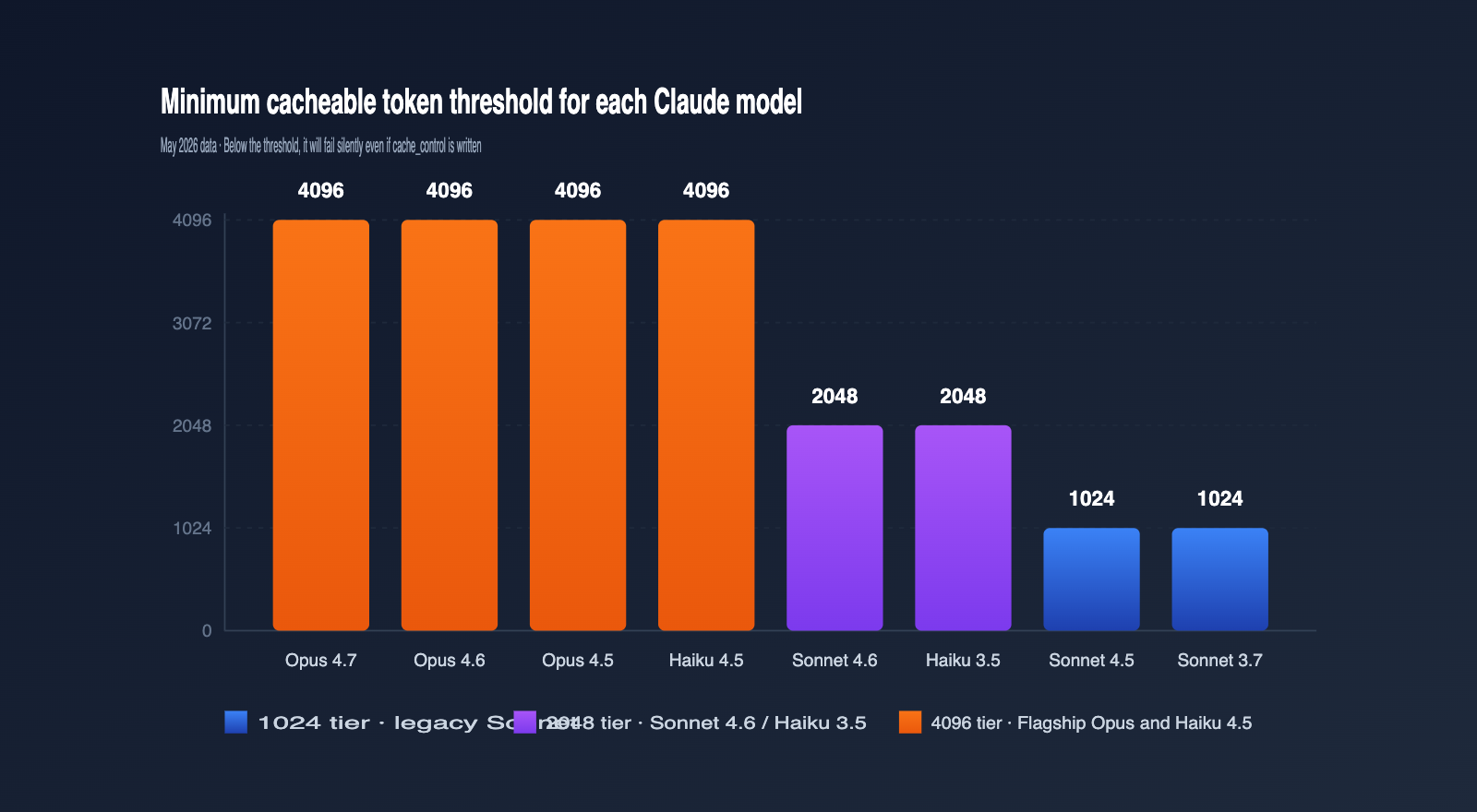
| Model | Min Cacheable Tokens | Notes |
|---|---|---|
| Claude Opus 4.7 / 4.6 / 4.5 | 4096 | Latest flagship, highest threshold |
| Claude Sonnet 4.6 | 2048 | Current primary Sonnet, threshold doubled |
| Claude Sonnet 4.5 / Sonnet 4 / Sonnet 3.7 | 1024 | Classic Sonnet series |
| Claude Opus 4.1 / Opus 4 | 1024 | Previous generation Opus |
| Claude Haiku 4.5 | 4096 | Haiku is actually higher than Sonnet |
| Claude Haiku 3.5 | 2048 | Long-standing, stable fast model |
Many people are surprised when they see this table: why is the threshold for a "small model" like Haiku 4.5 as high as Opus 4.7? The reason is that the new generation of Haiku uses a longer attention window; the engineering value of cache hits only becomes significant with longer prefixes, so Anthropic adjusted the strategy to push the threshold up.
In practice, the most common misjudgment is developers designing prompts based on the old Sonnet 3.7 1024-token habit, only to have it fail when switching to Sonnet 4.6, leading them to think there's a code bug. If you're using APIYI (apiyi.com) to invoke multiple generations of Claude models, I strongly recommend incorporating this table into your parameter checks and dynamically determining the threshold based on the model field.
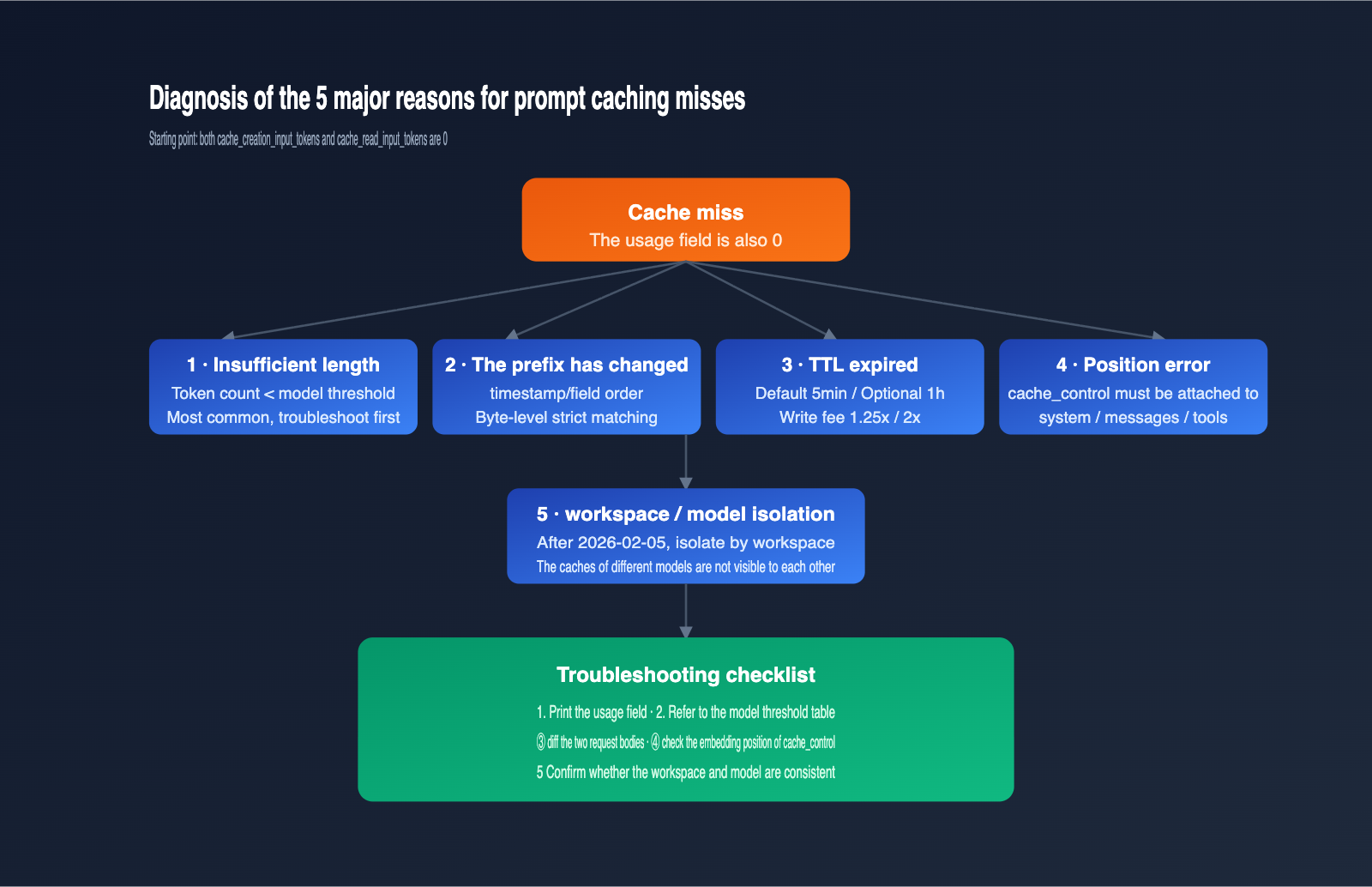
5 Common Reasons for Claude Prompt Caching Misses
Once you understand the "minimum token threshold" and "silent failures," you can systematically troubleshoot cache misses. Here are the top 5 reasons, ordered by frequency; the first two account for the vast majority of cases we encounter during daily debugging.
Reason 1: Prompt length below the minimum threshold
This is the absolute #1 killer. For example, if you declare caching on Sonnet 4.6, but your actual system prompt is only 1500 tokens, the cache will never be established. The diagnostic method is simple: use a local tokenizer to estimate the total tokens of your system prompt + tool definitions + cached message segments, then compare it against the thresholds in the table above.
A more subtle case is "overlapping multiple cache_control blocks." Anthropic's policy is that "each cache breakpoint must have enough cumulative content preceding it to meet the model's threshold," otherwise that breakpoint fails. I suggest beginners use only one cache_control block until you're familiar with the mechanism.
Reason 2: Any byte-level change in the cached prefix
Prompt caching is a strict prefix match, meaning if your system prompt, tool definitions, or message history differ by even a single character, the cache is considered invalid and must be rewritten. Common "pseudo-changes" include:
- Including rendering logic with timestamps in the system prompt, making every request different.
- Tool definitions being serialized in a way that causes field order drift due to Python's unordered dictionaries.
- Trimming or deduplicating historical messages, causing subtle differences in the same conversation.
The most direct way to troubleshoot this is to perform a diff comparison on the full payload of two requests. If you're using APIYI (apiyi.com) as a unified API proxy service in your custom gateway, you can hash the request body in your logs; if the hashes don't match, you've likely found the prefix drift.
Reason 3: TTL has expired
The default TTL is 5 minutes. After this interval, old cache entries are released, and the next request will trigger a rewrite. A 1-hour TTL costs twice the base input price, so weigh whether it's worth enabling based on your call frequency.
A sign of TTL expiration is when cache_creation_input_tokens suddenly becomes a non-zero value when you expected the request to read from the cache. If you see this, you can shorten the interval between requests or switch to "ttl": "1h".
Reason 4: Incorrect cache_control placement
cache_control must be attached to a specific content block within the system, messages, or tools arrays, and the type must be ephemeral. Common errors include:
- Placing
cache_controlat the top-level parameter ofmessages.create()instead of on a specific content block. - Declaring it on a user message in the
messagesarray when the prefix you actually want to cache is the system prompt. - Writing multiple
cache_controlblocks in the same message, none of which meet the 2048 threshold.
The correct approach is to embed cache_control directly inside the block where you want the cache to "stop," and the cache will lock everything from the beginning of the prompt to the end of that block.
Reason 5: Cache not shared across workspaces or models
As of February 5, 2026, Anthropic changed the isolation boundary for prompt caching to the "workspace level," meaning caches are invisible between different workspaces. If your two calls use different API keys or different workspaces, the cache cannot be reused.
The same logic applies to models. If you write a cache for a prompt on Sonnet 4.6, it will never hit when you switch to Sonnet 4.5. When scheduling across multiple models, it's best to maintain a cache warmup script for each model dimension, or use an aggregation platform like APIYI (apiyi.com) to reuse the same upstream workspace and avoid cache fragmentation.
Claude Prompt Caching Hit Verification Code and Logic
The first step in troubleshooting a cache miss is always to "print the usage field." Anthropic includes a usage object in every messages.create response, which contains four key fields that serve as the only reliable way to determine your cache status.
Minimal Verification Code
import anthropic

client = anthropic.Anthropic(
    api_key="YOUR_APIYI_KEY",
    base_url="https://api.apiyi.com"
)

response = client.messages.create(
    model="claude-sonnet-4-6",
    max_tokens=1024,
    system=[{
        "type": "text",
        "text": LONG_SYSTEM_PROMPT,   # Must be ≥ 2048 tokens
        "cache_control": {"type": "ephemeral"}
    }],
    messages=[{"role": "user", "content": "your question"}]
)

u = response.usage
print(f"Cache Write: {u.cache_creation_input_tokens}")
print(f"Cache Read: {u.cache_read_input_tokens}")
print(f"Uncached Input: {u.input_tokens}")
Use this snippet as your troubleshooting template. Whenever you suspect the cache isn't working, run this first; checking the returned fields will help you pinpoint the issue immediately.
View Full Wrapper Version
import anthropic
import logging

MIN_TOKENS = {
    "claude-opus-4-7": 4096,
    "claude-opus-4-6": 4096,
    "claude-opus-4-5": 4096,
    "claude-sonnet-4-6": 2048,
    "claude-sonnet-4-5": 1024,
    "claude-haiku-4-5": 4096,
    "claude-haiku-3-5": 2048,
}

def call_with_cache_check(model: str, system_text: str, user_msg: str):
    client = anthropic.Anthropic(
        api_key="YOUR_APIYI_KEY",
        base_url="https://api.apiyi.com"
    )
    response = client.messages.create(
        model=model,
        max_tokens=1024,
        system=[{
            "type": "text",
            "text": system_text,
            "cache_control": {"type": "ephemeral"}
        }],
        messages=[{"role": "user", "content": user_msg}]
    )
    u = response.usage
    if u.cache_creation_input_tokens == 0 and u.cache_read_input_tokens == 0:
        logging.warning(
            f"Cache not active, likely below the {MIN_TOKENS.get(model)} token threshold"
        )
    return response
Hit Status Judgment Table
cache_creation_input_tokens |
cache_read_input_tokens |
Conclusion |
|---|---|---|
| > 0 | = 0 | Initial cache write (Normal) |
| = 0 | > 0 | Cache hit (Ideal) |
| > 0 | > 0 | Partial hit, new content written |
| = 0 | = 0 | Not cached, check the 5 major causes |
The last row is the signature of a problem. When you see this, jump straight to "Cause 1" and work through the five potential issues. If your team requires high API stability, you can wrap this logic into middleware on your APIYI (apiyi.com) call chain to trigger alerts immediately when a miss occurs.
4 Practical Tips to Meet the Minimum Token Threshold
Once you've confirmed that a "length deficiency" is causing the miss, the next step is to pad your cache prefix to meet the threshold. Here are four tips, ranked by recommendation; the first three have almost no side effects.
| Technique | Use Case | Approx. Token Increase | Notes |
|---|---|---|---|
| Full Knowledge Base | System prompt too thin | +2000–4000 | Must be relevant to every call |
| Centralized Tool Definitions | Multi-tool applications | +500–2000 | tools field is also cacheable |
| Common Few-shot Examples | Task-oriented prompts | +1000–3000 | Examples should have generalization value |
| Padding with Irrelevant Text | Emergency only | Any | Not recommended; may affect output quality |
The "Full Knowledge Base" is the most robust approach. If your application already has an internal knowledge base—like product FAQs, style guides, or SOPs—you can insert it at the top of your system block with cache_control enabled. This easily pushes the length over 4096, satisfying the threshold for all models.
"Tool definitions" are often overlooked. Anthropic's tools field also supports cache_control, which is especially effective for multi-tool agent applications. A typical set of tool descriptions plus JSON Schema will easily break the 2048 barrier.
"Few-shot examples" are perfect for complex task-oriented scenarios. Placing 3–5 standard examples at the end of your system prompt improves output stability and can bump your token count from 1500 to 2500–3500, comfortably clearing the Sonnet 4.6 threshold.
"Padding with irrelevant text" is strictly for emergencies. It's not recommended for daily use because the model still processes that text, which might degrade your output style. If you absolutely cannot reach the length, consider switching to Sonnet 4.5 or Sonnet 3.7 via the APIYI (apiyi.com) platform, which have lower thresholds that might accommodate your existing prompt.
FAQ
Q1: I added `cache_control` but it’s not caching. Is there a bug in the API?
It's likely not a bug, but rather a silent failure. First, check the minimum token threshold for your specific model. Second, print the usage object. 99% of the time, it's either because the length is insufficient or the prefix has changed.
Q2: Is `cache_creation_input_tokens` expensive?
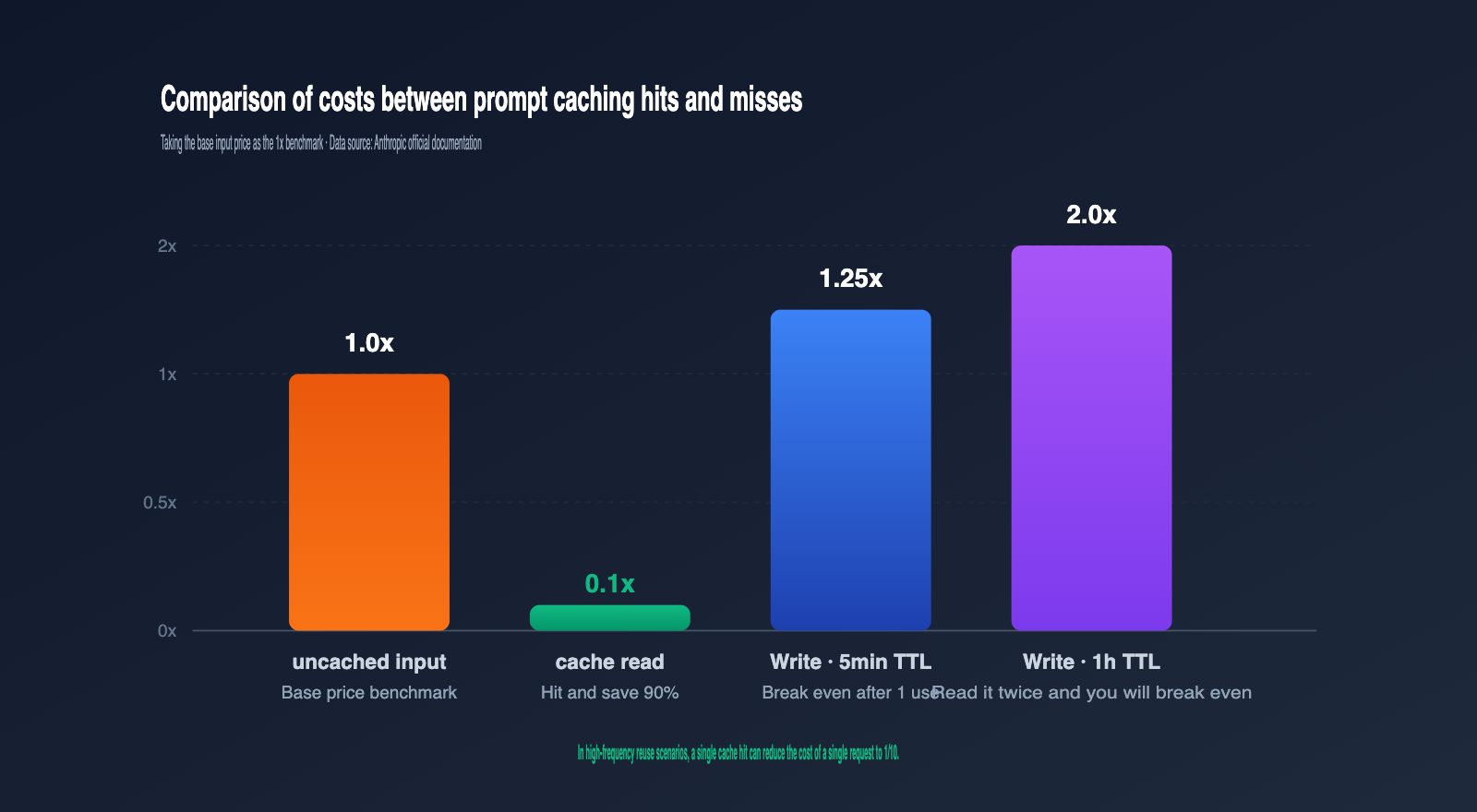
The write cost for a 5-minute TTL is 1.25x the base input price, and 2x for a 1-hour TTL. The read cost is 0.1x. Generally, a 5-minute cache pays for itself after just one read, and a 1-hour cache after two reads. The more you reuse it, the more cost-effective it becomes.
Q3: The old documentation said the minimum for Sonnet was 1024, why is it 2048 now?
That's a new threshold introduced with Sonnet 4.6. Sonnet 4.5 and older versions still use 1024. I recommend maintaining a "model-to-threshold" mapping table in your code and determining the threshold dynamically based on the model being called. When using APIYI (apiyi.com), the model field naming is identical to Anthropic's official API, so you can reuse the same mapping logic directly.
Q4: How can I safely use multiple `cache_control` blocks?
Each cache_control requires the cumulative prefix to meet the threshold; otherwise, that breakpoint will fail. For beginners, I recommend using only one breakpoint and caching the entire system block. If you must layer them, place "rarely changing knowledge bases" in the first layer and "occasionally changing tool definitions" in the second.
Q5: Can I test prompt caching using domestic API proxy services?
Yes. The Claude series interfaces on aggregation platforms like APIYI (apiyi.com) are fully compatible with Anthropic's official API, including the cache_control, ttl, and usage fields. Developers can handle debugging and scaling on these platforms, as the caching logic and billing rules remain consistent.
Summary
Claude prompt caching might seem as simple as adding a cache_control field, but in practice, you'll likely run into issues with "silent failures, minimum token thresholds, and strict prefix matching." The 5-point troubleshooting checklist and hit-rate table provided in this article should help you identify 90% of cache-miss issues within five minutes.
Our recommendation for implementation is to build validation code into your middleware, store model thresholds as constants in your code, and create a separate script for cache warming. If your application frequently switches between different models, you can use the APIYI (apiyi.com) platform to unify your Claude invocation entry points. This allows you to reuse the same caching strategy and monitoring logic, avoiding hidden costs caused by fragmented caching and inconsistent thresholds across different environments.
Author: APIYI Technical Team
Contact: Visit APIYI (apiyi.com) for full Claude model support and prompt caching debugging.
Updated: 2026-05-12