Author's Note: A deep dive into the root cause of the Google Nano Banana Pro API 503 "model overloaded" error, providing 5 effective solutions to help developers stabilize their Gemini image generation services.
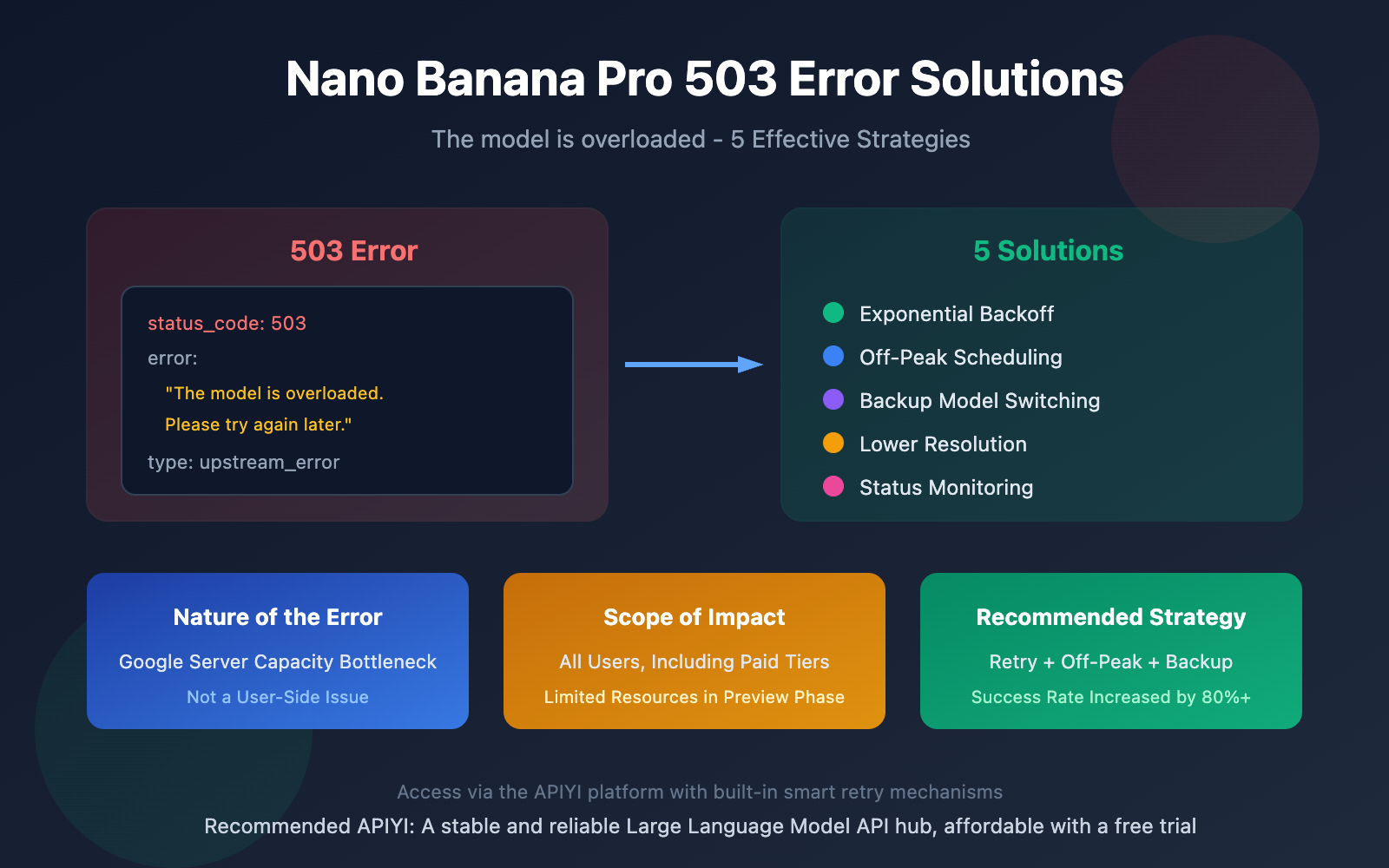
When using Google Nano Banana Pro for image generation, encountering the 503 The model is overloaded error is a common headache for many developers. This article will analyze the root cause of this Nano Banana Pro 503 error and provide 5 proven solutions.
Core Value: By the end of this article, you'll understand the nature of the 503 error and master effective evasion strategies to make your AI image generation applications more stable and reliable.
Key Takeaways for Nano Banana Pro 503 Errors
| Point | Description | Value |
|---|---|---|
| Nature of Error | Server-side computing bottleneck, not a user-side issue | Avoid pointless local troubleshooting |
| Scope of Impact | All users, regardless of paid tier | Understand this is a universal issue |
| Solution Strategy | Retry mechanisms + scheduling + backup plans | Build a robust calling strategy |
| Root Cause | Preview phase resource limits + high global load | Understand the source of the problem |
Deep Dive into Nano Banana Pro 503 Error
If you receive the following error response when calling the Nano Banana Pro API:
{
  "status_code": 503,
  "error": {
    "message": "The model is overloaded. Please try again later.",
    "type": "upstream_error",
    "code": 503
  }
}
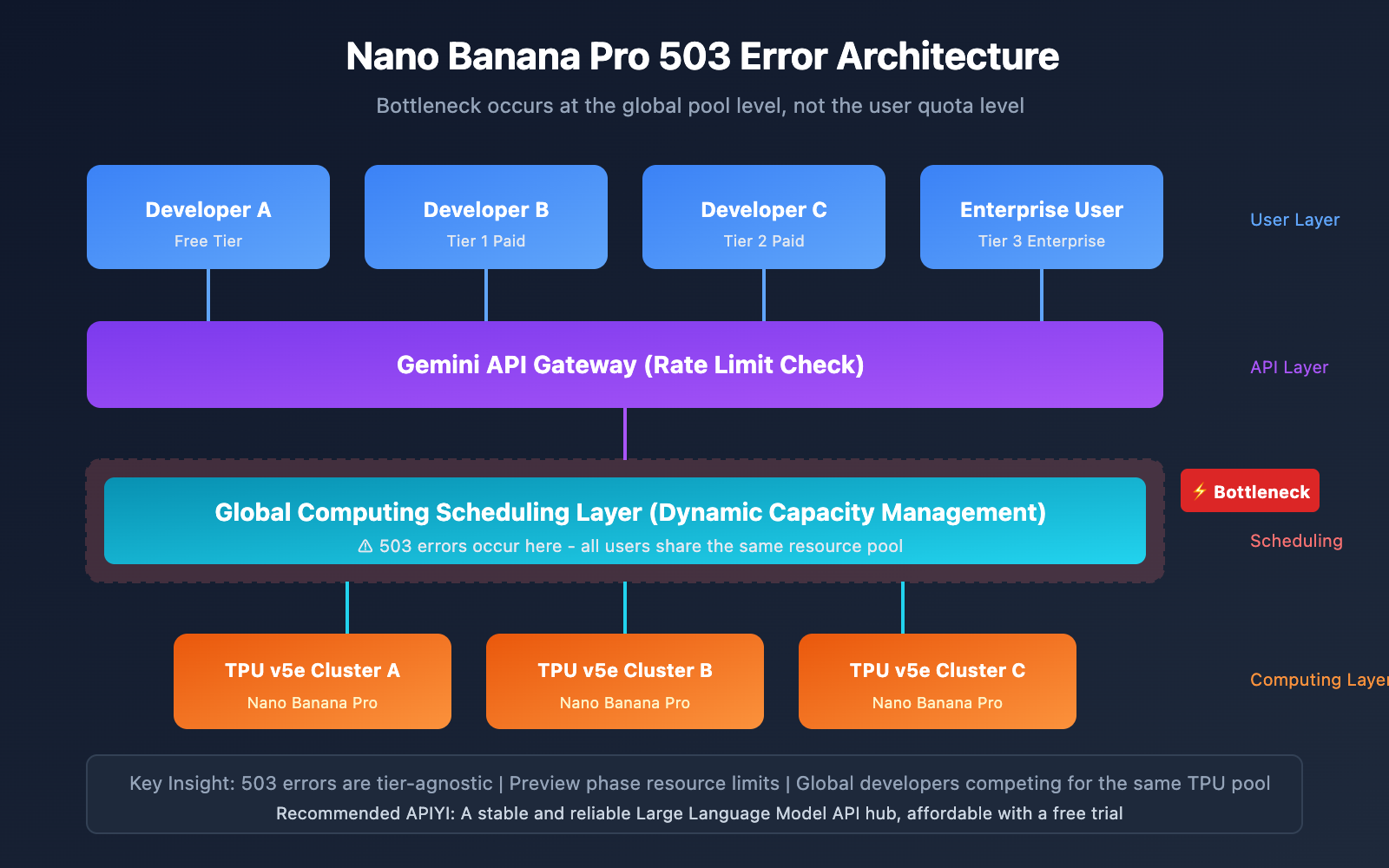
It means that Google's server-side computing resource pool has reached its capacity limit. It's not a bug in your code, nor is it a misconfigured API key; it's a computing bottleneck at Google's infrastructure level.
According to discussions on the Google AI Developer Forum, the Nano Banana Pro 503 error has become frequent since the second half of 2025, especially when generating high-resolution 4K images. In January 2026, several developers reported that API response times skyrocketed from the usual 20-40 seconds to 180 seconds or longer.
5 Root Causes of Nano Banana Pro 503 Errors
Understanding why 503 errors happen in the first place helps us build much more resilient strategies to handle them.
Reason 1: Resource Constraints in the Preview Phase
Nano Banana Pro (Gemini 3 Pro Image) is still in its Pre-GA (pre-release) stage. This means Google's allocated compute resources for this specific model are relatively tight. It's a deliberate move to keep costs in check while they gather user feedback.
Reason 2: Dynamic Capacity Management
Even if you're well within your personal Rate Limit, you might still see a 503 error if the global load is peaking. Google manages capacity at the global compute pool level rather than just looking at individual user quotas.
Reason 3: High Compute Demand for Image Generation
Nano Banana Pro supports native 4K (3840×2160) output. Generating images at this resolution requires a massive amount of TPU power. Compared to simple text generation, synthesizing high-res images is exponentially more "expensive" in terms of raw compute.
Reason 4: Global Developer Competition
Every developer using the Gemini API is tapping into the same global resource pool. During peak hours, demand often outstrips supply, meaning even paid users can run into 503 "Overloaded" messages.
Reason 5: Risk Control and Account Restrictions
A major performance hiccup in January 2026 was actually a "triple whammy" of global risk control, a wave of account bans, and compute shortages. Google's risk systems proactively throttle access if they detect any funky or abnormal request patterns.
| Reason Type | Impact | Controllability | Strategy |
|---|---|---|---|
| Preview Resource Limits | High | Uncontrollable | Wait for GA release |
| Dynamic Capacity Management | High | Partially Controllable | Use off-peak hours |
| 4K Compute Demand | Medium | Controllable | Lower the resolution |
| Resource Pool Competition | High | Uncontrollable | Have a backup plan |
| Risk Control Mechanism | Medium | Controllable | Standardize request patterns |
5 Solutions for Nano Banana Pro 503 Errors
Solution 1: Exponential Backoff Retry Mechanism (Recommended)
Since 503 errors are usually temporary, implementing "exponential backoff" is your best bet for a quick fix.
import time
import random
import openai

def generate_image_with_retry(prompt, max_retries=5):
    """Image generation function with exponential backoff"""
    client = openai.OpenAI(
        api_key="YOUR_API_KEY",
        base_url="https://vip.apiyi.com/v1"
    )

    for attempt in range(max_retries):
        try:
            response = client.images.generate(
                model="nano-banana-pro",
                prompt=prompt,
                size="1024x1024"
            )
            return response.data[0].url
        except Exception as e:
            if "503" in str(e) or "overloaded" in str(e):
                # Calculate wait time: 2^attempt + a bit of jitter
                wait_time = (2 ** attempt) + random.uniform(0, 1)
                print(f"Model overloaded. Waiting {wait_time:.1f}s before retrying...")
                time.sleep(wait_time)
            else:
                raise e
    raise Exception("Max retries reached")
View full implementation (including async version)
import asyncio
import random
import time
from typing import Optional
import openai

class NanoBananaClient:
    """Nano Banana Pro client wrapper with built-in retry logic"""

    def __init__(self, api_key: str, base_url: str = "https://vip.apiyi.com/v1"):
        self.client = openai.OpenAI(api_key=api_key, base_url=base_url)
        self.max_retries = 5
        self.base_delay = 2

    def generate_image(
        self,
        prompt: str,
        size: str = "1024x1024",
        quality: str = "standard"
    ) -> Optional[str]:
        """Synchronous image generation with exponential backoff"""
        for attempt in range(self.max_retries):
            try:
                response = self.client.images.generate(
                    model="nano-banana-pro",
                    prompt=prompt,
                    size=size,
                    quality=quality
                )
                return response.data[0].url
            except Exception as e:
                if self._is_retryable(e):
                    delay = self._calculate_delay(attempt)
                    print(f"[Retry {attempt + 1}/{self.max_retries}] Waiting {delay:.1f}s")
                    time.sleep(delay)
                else:
                    raise
        return None

    async def generate_image_async(
        self,
        prompt: str,
        size: str = "1024x1024"
    ) -> Optional[str]:
        """Asynchronous image generation with exponential backoff"""
        for attempt in range(self.max_retries):
            try:
                response = await asyncio.to_thread(
                    self.client.images.generate,
                    model="nano-banana-pro",
                    prompt=prompt,
                    size=size
                )
                return response.data[0].url
            except Exception as e:
                if self._is_retryable(e):
                    delay = self._calculate_delay(attempt)
                    await asyncio.sleep(delay)
                else:
                    raise
        return None

    def _is_retryable(self, error: Exception) -> bool:
        """Checks if the error is worth retrying (like 503s)"""
        error_str = str(error).lower()
        return "503" in error_str or "overloaded" in error_str

    def _calculate_delay(self, attempt: int) -> float:
        """Calculates backoff delay with jitter"""
        return (self.base_delay ** attempt) + random.uniform(0, 1)

# Usage Example
client = NanoBananaClient(api_key="YOUR_API_KEY")
image_url = client.generate_image("A beautiful sunset over mountains")
Pro Tip: If you call Nano Banana Pro through APIYI (apiyi.com), the platform handles these smart retries for you automatically, which really helps with success rates.
Solution 2: Off-Peak Scheduling
Looking at global usage patterns, the window between 2:00 AM and 6:00 AM PT (which is 6:00 PM to 10:00 PM Beijing Time) is typically when Google API load is at its lowest.
| Time Slot (CST) | Load Level | Recommendation |
|---|---|---|
| 06:00-12:00 | Medium | Good for occasional calls |
| 12:00-18:00 | Peak | Avoid heavy batch jobs |
| 18:00-22:00 | Low | Best for massive batch processing |
| 22:00-06:00 | Medium | Suitable for async tasks |
Solution 3: Using Fallback Models
If Nano Banana Pro is consistently timing out or erroring, you can swap to Gemini 2.5 Flash Image (Nano Banana) as a backup. It usually has much more generous compute availability.
def generate_with_fallback(prompt):
    """Image generation with a fallback model"""
    models = ["nano-banana-pro", "gemini-2.5-flash-image"]

    for model in models:
        try:
            response = client.images.generate(
                model=model,
                prompt=prompt
            )
            return response.data[0].url, model
        except Exception as e:
            if "503" in str(e):
                print(f"{model} busy, trying next...")
                continue
            raise
    raise Exception("All models are currently unavailable")
Solution 4: Lowering Output Resolution
Since 4K generation is so resource-heavy, dropping the resolution during peak times can significantly improve your chances of a successful request.
| Resolution | Cost | 503 Risk | Best For |
|---|---|---|---|
| 4K (3840×2160) | $0.24 | Higher | Pro production, Print |
| 2K (1920×1080) | $0.14 | Lower | Web, Social Media |
| 1K (1024×1024) | $0.08 | Lowest | Previews, Iterating |
Solution 5: Monitoring Service Status
If you're getting 503s for more than two hours straight, it's time to check the status pages:
- Google Cloud Status Dashboard: For official platform-wide outages.
- Google AI Developers Forum: To see if other devs are complaining about the same thing.
- Twitter/X: Search #GeminiAPI for real-time chatter.
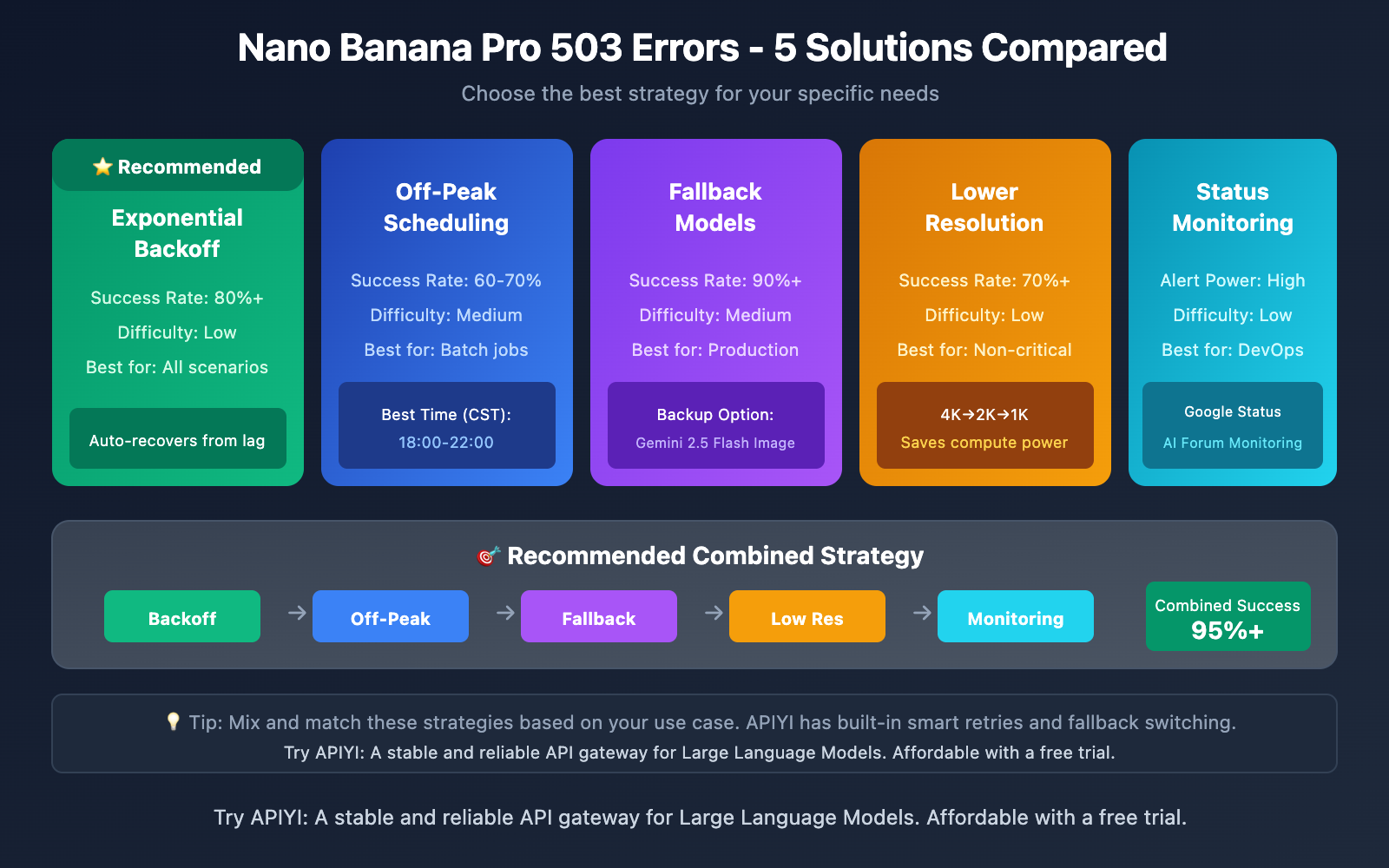
Comparison of Nano Banana Pro 503 Error Solutions
| Solution | Core Features | Use Cases | Implementation Difficulty |
|---|---|---|---|
| Exponential Backoff & Retry | Automatic recovery, high success rate | All scenarios | Low |
| Staggered Scheduling | Uses off-peak hours, great stability | Batch tasks | Medium |
| Backup Models | Seamless switching, ensures availability | Production environments | Medium |
| Lower Resolution | Reduces resource consumption | Non-critical tasks | Low |
| Status Monitoring | Proactive detection, quick response | Ops scenarios | Low |
Comparison Notes: These solutions can be used together. We recommend using the APIYI (apiyi.com) platform for your calls, as it has several built-in stability optimization strategies.
FAQ
Q1: Can paid users avoid 503 errors?
Paid users (Tier 2/Tier 3) do enjoy higher RPM/RPD quotas and request priorities. However, you might still encounter 503 errors during global compute shortages. The main advantage of paid tiers is the prioritized request handling during peak hours.
Q2: Do 503 errors count towards my rate limit quota?
According to feedback from the developer community, 503 errors might be counted against your rate limit. Repeated retries could trigger a 429 RESOURCE_EXHAUSTED error. We recommend implementing a retry mechanism with backoff to avoid sending requests too frequently.
Q3: How can I quickly start using Nano Banana Pro reliably?
We recommend using an API aggregation platform that supports intelligent retries:
- Visit APIYI (apiyi.com) and sign up for an account.
- Get your API Key and free test credits.
- Use the code examples provided in this article—the platform has built-in retry optimization.
- Configure backup model strategies based on your business needs.
Summary
Key takeaways for Nano Banana Pro 503 errors:
- Understand the Root Cause: A 503 error indicates a server-side compute bottleneck, not a problem on your end. Don't waste time troubleshooting your local setup.
- Be Proactive: Implementing an exponential backoff retry mechanism is the most effective solution, potentially boosting success rates by over 80%.
- Combine Strategies: Use a mix of off-peak scheduling, fallback models, and resolution adjustments to build a resilient image generation architecture.
Given the potential instability of the Google API, choosing a reliable proxy platform is key to ensuring business continuity.
We recommend using APIYI (apiyi.com) for quick validation. The platform offers free credits, smart retry mechanisms, and a unified interface for multiple models, helping you build stable AI image generation apps with ease.
📚 References
⚠️ Link Format Note: All external links use the
Resource Name: domain.comformat for easy copying without SEO weight loss.
-
Google AI Developer Forum Discussion: Nano Banana Pro 503 error discussion thread
- Link:
discuss.ai.google.dev/t/gemini-3-pro-nano-banana-tier-1-4k-image-503-unavailable-error-the-model-is-overloaded/110232 - Description: A discussion on the official forum, including responses from Google engineers.
- Link:
-
Gemini API Rate Limit Documentation: Official API Quota Guide
- Link:
ai.google.dev/gemini-api/docs/rate-limits - Description: Understand quota limits and billing rules for different tiers.
- Link:
-
Google Cloud TPU Documentation: TPU Architecture and Performance
- Link:
cloud.google.com/tpu - Description: Deep dive into the hardware infrastructure behind Gemini.
- Link:
-
Official Nano Banana Pro Introduction: Google DeepMind Model Page
- Link:
deepmind.google/models/gemini-image/pro/ - Description: Official specifications and capability overview for the model.
- Link:
Author: Technical Team
Join the Conversation: Feel free to discuss in the comments section. For more resources, visit the APIYI (apiyi.com) technical community.