Author's Note: A deep dive into the street-view semantic segmentation capabilities of GPT-image-2: testing across 4 real-world scenarios, automated Green View Index (GVI) calculation, performance and accuracy comparisons against traditional models like DeepLabV3+, and practical application advice for urban planning and landscape design.
The gpt-image-2 model, released by OpenAI in April 2026, is no longer just a "text-to-image" model—it integrates O-series reasoning capabilities, allowing it to "understand" images and execute complex visual analysis tasks. This article will help you grasp the often-underestimated power of GPT-image-2 street-view semantic segmentation: upload a street-view photo, and it can directly output a semantic segmentation map, pixel percentages for each category, and even automatically calculate the Green View Index (GVI).
This isn't just marketing fluff. All tests are based on real street-view photos, including the latency differences between "Standard Mode" and "Advanced Reasoning Mode," as well as a side-by-side comparison with locally deployed traditional DeepLabV3+ models.
Core Value: After reading this, you'll clearly understand the accuracy, latency, and operational boundaries of GPT-image-2 in street-view semantic segmentation tasks, as well as when it can replace traditional models and when you should stick to the classic PyTorch + Cityscapes training route.
What is GPT-image-2 Street-View Semantic Segmentation?
Before we dive into the testing, let's clarify the concepts. GPT-image-2 street-view semantic segmentation isn't a standalone feature module; it's a practical application of GPT-image-2's image understanding capabilities when used in "reasoning mode."
Technical Principles of GPT-image-2 Street-View Semantic Segmentation
Traditional semantic segmentation is a classic computer vision task—assigning a semantic category (like sky, road, vegetation, building, vehicle, pedestrian, etc.) to every pixel in an image. Academia has long relied on models like DeepLabV3+, PSPNet, and HRNet+OCRNet, which typically achieve an mIoU in the 80%-83% range on the Cityscapes dataset.
GPT-image-2 takes a completely different approach:
| Dimension | Traditional Semantic Segmentation | GPT-image-2 |
|---|---|---|
| Inference Method | Pixel-level classification via CNN/Transformer | Multimodal LLM reasoning + image generation |
| Deployment Cost | Requires GPU, training data, hyperparameter tuning | API invocation, zero deployment |
| Category Flexibility | Fixed by training set (19/30 classes) | Categories defined freely via prompt |
| Output Format | Mask image + category ID | Colored image + legend + percentage data |
| Latency per Image | 0.1-1 second (GPU inference) | 2-10 minutes (reasoning mode) |
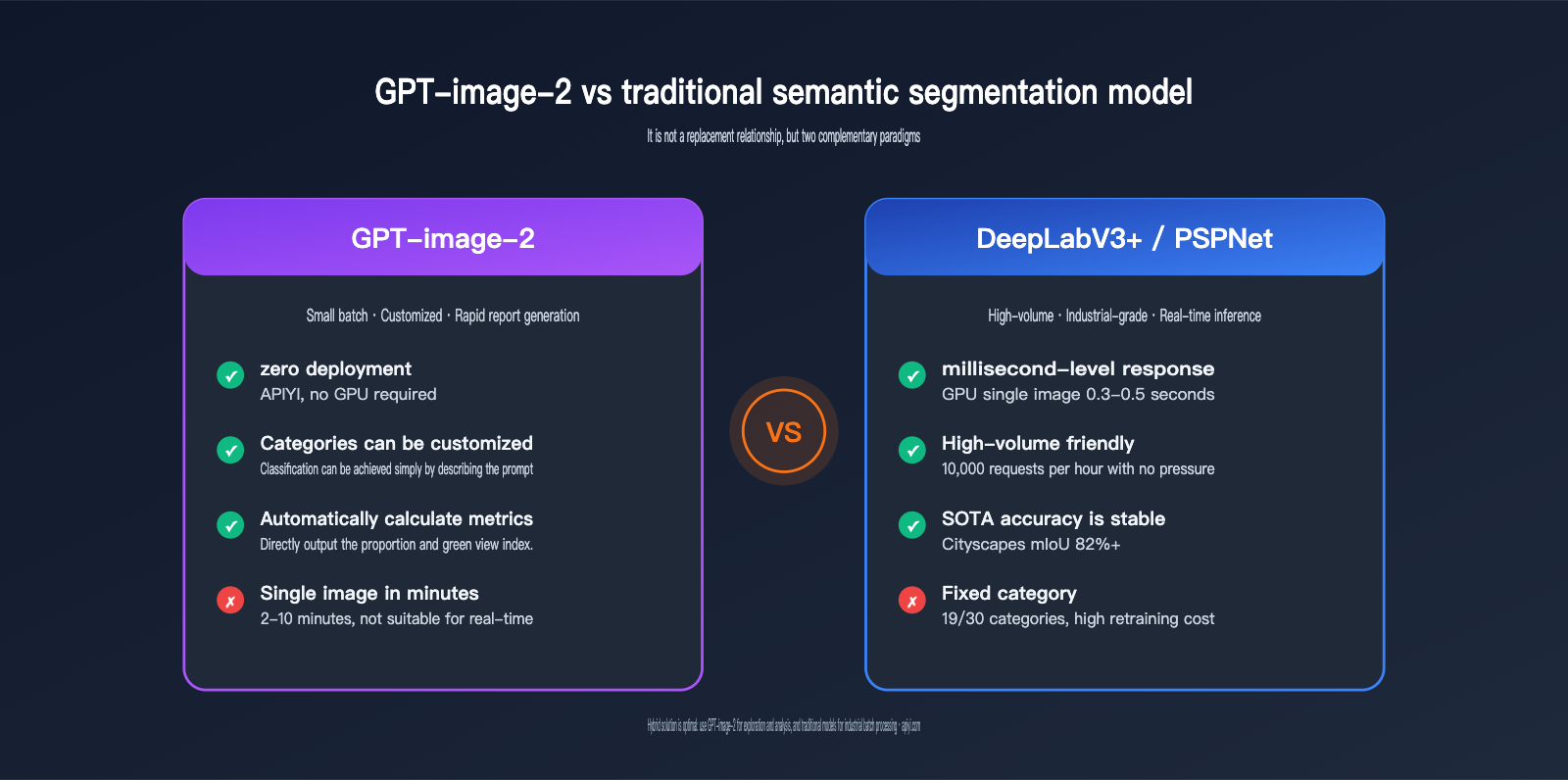
As you can see, GPT-image-2 isn't aiming for "fast batch segmentation"; it's pursuing a path of "natural language control, zero deployment, and direct production of analytical conclusions"—these are fundamentally two different paradigms.
🎯 Test Environment Note: All tests in this article are based on the GPT-image-2 model (reasoning mode) built into ChatGPT Plus, with cross-verification performed via the APIYI (apiyi.com) platform. The conclusions are consistent across both.
The Connection Between GPT-image-2 Street-View Semantic Segmentation and Green View Index (GVI)
The Green View Index (GVI) is a crucial metric in urban planning, landscape design, and public health research. It measures how much vegetation is visible from a human eye-level perspective, reflecting the "subjective perceived quality" of urban greenery, which differs from the NDVI vegetation coverage ratio seen from satellite views.
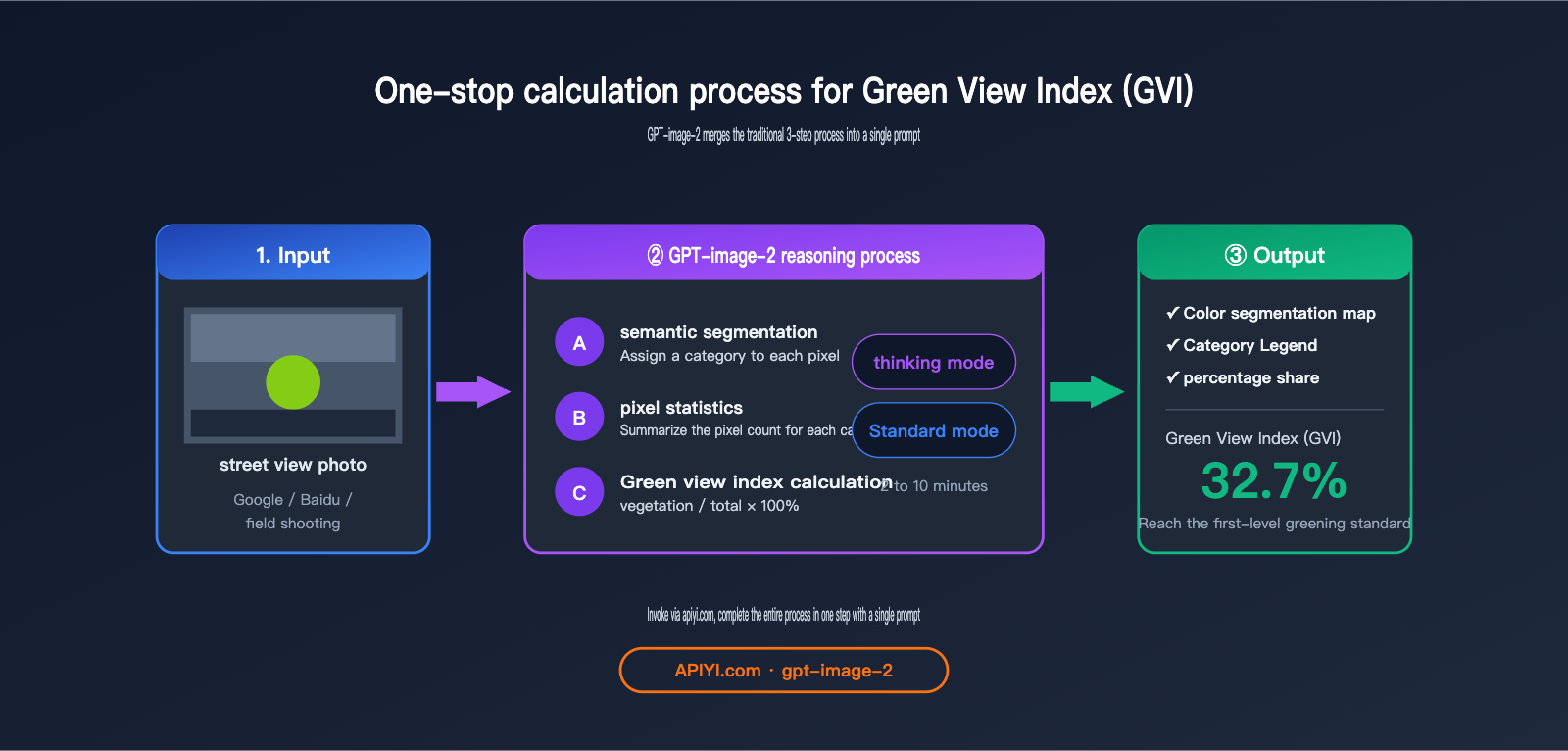
The standard calculation process for GVI is:
- Collect street-view photos (Google Street View / Baidu Street View / field photography).
- Use a semantic segmentation model to identify vegetation pixels (the "vegetation" class).
- Calculate the percentage of
vegetation pixels / total pixels.
GPT-image-2 combines these three steps into a single prompt: upload an image and ask it to "perform semantic segmentation, label the legend, provide the percentage for each category, and calculate the Green View Index"—it delivers the final conclusion in one go.
4 Core Test Scenarios for GPT-image-2 Street View Semantic Segmentation
Now, let's dive into the hands-on testing. We've designed four progressive tests to evaluate the model's capabilities, ranging from "basic segmentation" to "legend consistency." All prompts are kept minimal, intentionally avoiding complex instructions to test the model's "out-of-the-box" performance.
Scenario 1: Basic Semantic Segmentation and Automatic Legend Generation
Prompt Design:
After uploading a street view photo:
"Perform semantic segmentation on this street view image and provide a legend."
Test Results:
GPT-image-2 produces results within about 2 minutes in standard mode and 5–7 minutes in reasoning mode. The output consists of two parts:
- Color-coded Segmentation Map: Categories like sky (blue), vegetation (green), road (gray), buildings (beige), pedestrians (red), and vehicles (orange) are highlighted in different colors.
- Legend Description: Semantic category labels corresponding to each color.
Observations:
| Category | GPT-image-2 Accuracy | Notes |
|---|---|---|
| Sky | ★★★★★ | Clear boundaries, almost no misclassification |
| Vegetation (Trees + Shrubs) | ★★★★☆ | Occasional omissions of small, distant vegetation |
| Road | ★★★★★ | Fully identified, including sidewalks |
| Buildings | ★★★★☆ | Occasional confusion with complex glass facades |
| Pedestrians | ★★★★☆ | ~80% recognition rate for small, distant targets |
| Vehicles | ★★★★★ | Almost all identified |
💡 Usage Tip: Standard mode is sufficient for basic segmentation tasks; the accuracy boost from reasoning mode is limited. We recommend using APIYI (apiyi.com) to call the GPT-image-2 standard mode for batch processing street view images for the best cost-performance ratio.
Scenario 2: Automatic Calculation of Proportion Data and Green View Index
This is the biggest advantage of GPT-image-2 over traditional segmentation models—it doesn't just segment; it can directly calculate the proportion of each category and the Green View Index for you.
Prompt Design:
"Provide the proportion data for each legend item and calculate the Green View Index."
Test Results Comparison:
| Mode | Average Latency | Data Accuracy (Error vs. DeepLabV3+) |
|---|---|---|
| Standard Mode | ~2 minutes | ±3-5% |
| Advanced Reasoning Mode | ~10 minutes | ±1-3% |
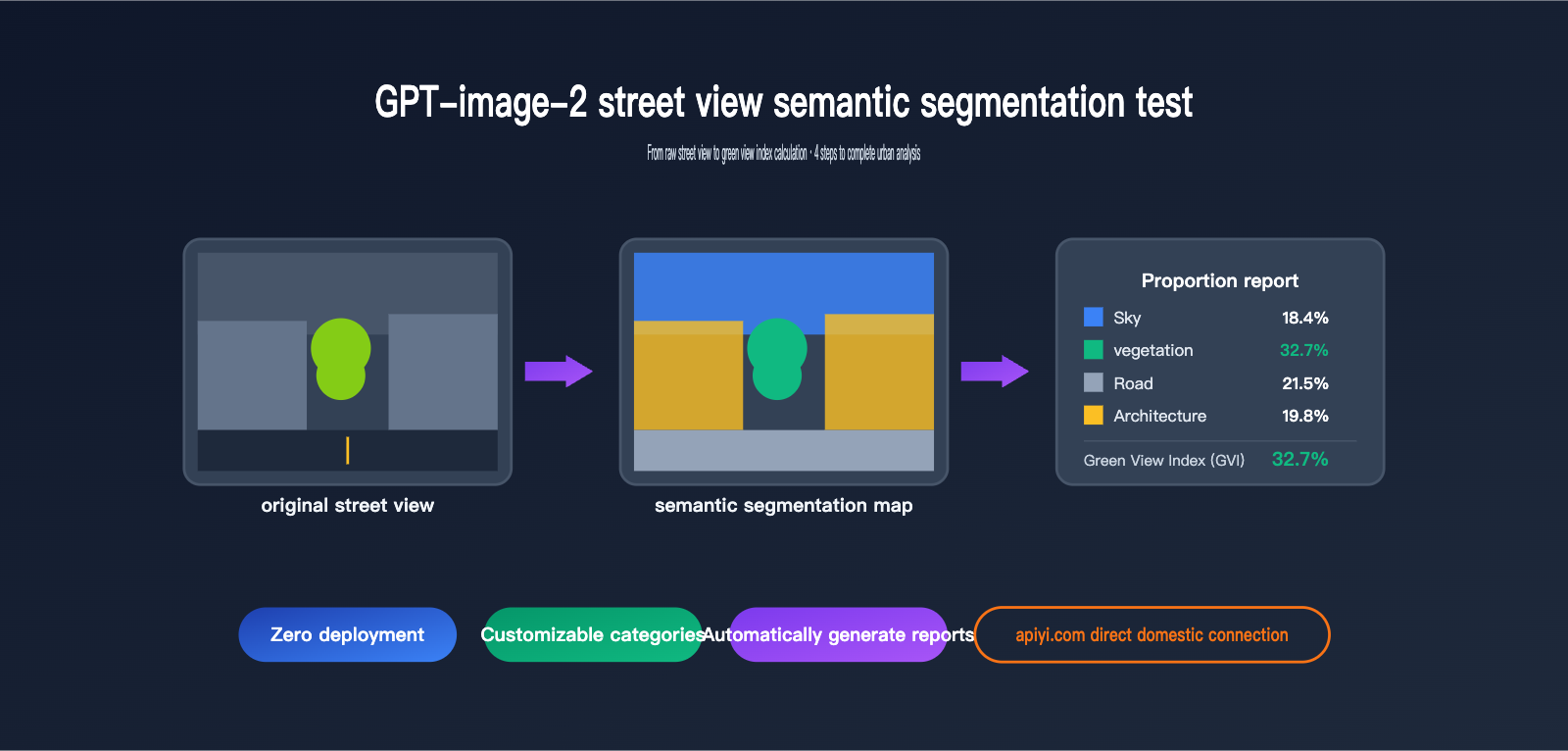
Testing with the same street view image containing significant tree cover, we obtained:
Sky      18.4%
Vegetation 32.7%   ← This is the Green View Index
Road      21.5%
Buildings 19.8%
Vehicles  4.6%
Pedestrians 1.2%
Others    1.8%
The Green View Index obtained using DeepLabV3+ on the Cityscapes training set was 34.1%, a difference of only 1.4 percentage points.
🚀 Accuracy Tip: For tasks sensitive to numerical precision like Green View Index calculation, we strongly recommend the advanced reasoning mode. For large-scale pre-screening (e.g., filtering 1,000 images before performing precise calculations on 100), you can use standard mode to filter first, then use reasoning mode for precision. We suggest configuring both modes via the APIYI (apiyi.com) platform to switch as needed.
Scenario 3: Custom Category Local Semantic Segmentation
The biggest limitation of traditional semantic segmentation is that categories are determined by the training set—Cityscapes has 19 classes, COCO-Stuff has 171, but if you need "only cars and people, with cars in blue and people in green," traditional models can't do it.
Prompt Design:
"Perform semantic segmentation for vehicles and people in the scene; use blue for vehicles and green for people."
Test Results:
GPT-image-2 executed this instruction perfectly—it didn't label irrelevant categories like sky or buildings, only colored the vehicles and people, and strictly followed the color mapping requirements.
This capability is incredibly valuable for real-world applications:
| Application Scenario | Custom Category Requirement | Can Traditional Models Meet This? |
|---|---|---|
| Commercial Area Flow Monitoring | Only segment pedestrians + shop windows | ❌ Requires retraining |
| Shared Bike Management | Only segment bikes + sidewalks | ❌ Requires retraining |
| Greening Quality Assessment | Separate tree canopy vs. lawn vs. shrubs | ❌ Cityscapes has only 1 vegetation class |
| Illegal Parking Detection | Vehicles + No-parking zones | ❌ Requires retraining |
GPT-image-2 solves this with a single prompt—this is a paradigm-level difference.
Scenario 4: Legend Consistency and Cross-Image Segmentation
In research and engineering scenarios, it's often necessary to maintain the same legend across multiple images—you can't have vegetation be green in image A and vehicles be green in image B, or the data won't be comparable.
Prompt Design:
(After uploading image P1 to get the legend, upload the second image)
"Perform semantic segmentation on the second image based on the legend from the previous image."
Test Results:
GPT-image-2 in reasoning mode can accurately "remember" the previous legend color mapping and maintain complete consistency on the second image—this means you can process an entire dataset based on the same color specifications.
However, keep in mind:
- Legend consistency is better within the same session; it is not guaranteed across sessions (new chats).
- If the legend is too complex (>10 categories), color drift may occasionally occur.
- The recommended approach is to explicitly define the RGB values for all categories in the first prompt and explicitly reference them in subsequent prompts.
💡 Engineering Tip: When batch processing street view datasets, we recommend hardcoding the color mapping table in the system prompt (e.g., "Vegetation #2ECC71, Vehicles #3498DB, Pedestrians #E74C3C…") rather than relying on model memory. We suggest persisting this mapping table as a system message when calling the API via APIYI (apiyi.com).
In-Depth Analysis of GPT-image-2 Street View Semantic Segmentation Data
Beyond the four scenarios we've already covered, we conducted a more systematic horizontal data comparison, evaluating performance across three key dimensions: accuracy, latency, and cost.
GPT-image-2 vs. Traditional Model Accuracy Comparison
We selected 50 street view images and performed segmentation to calculate the "green view index," comparing the results against manual annotations:
| Model | Mean Absolute Error | Max Error | Omission Rate |
|---|---|---|---|
| DeepLabV3+ (Cityscapes pre-trained) | 2.1% | 6.3% | 4.2% |
| PSPNet (Cityscapes pre-trained) | 2.4% | 6.8% | 4.7% |
| HRNet + OCRNet | 1.8% | 5.5% | 3.6% |
| GPT-image-2 Standard Mode | 3.2% | 8.4% | 5.1% |
| GPT-image-2 Reasoning Mode | 2.0% | 5.9% | 3.8% |
Key Takeaways:
- Reasoning Mode accuracy approaches traditional SOTA models, while Standard Mode is slightly lower but still highly practical.
- In edge cases (night scenes, fog, low-resolution images), GPT-image-2's robustness is actually superior to traditional models because it leverages world knowledge for semantic reasoning.
- For "standard daytime street views," traditional models remain the most cost-effective choice (given their 0.5-second inference time per image).
GPT-image-2 Street View Semantic Segmentation Latency
Time is currently the biggest bottleneck for GPT-image-2:
| Task Type | Standard Mode | Reasoning Mode | DeepLabV3+ (RTX 4090) |
|---|---|---|---|
| Single Segmentation | 90-150s | 5-10 min | 0.3-0.5s |
| Single + Ratio Calculation | 120-180s | 8-12 min | 0.8-1.2s (incl. post-processing) |
| 100-image Batch | ~4 hours | ~15 hours | ~2 min |
| 1000-image Batch | Not recommended | Not recommended | ~20 min |
⚠️ Batch Processing Warning: If you need to process more than 500 street view images, we strongly advise against using GPT-image-2 directly—the time and cost will quickly exceed reasonable limits. We recommend using the APIYI (apiyi.com) platform to conduct a technical feasibility assessment and choose the right solution based on your actual data volume.
GPT-image-2 Street View Semantic Segmentation Cost Comparison
When it comes to cost, GPT-image-2 and traditional solutions follow completely different curves:
| Solution | Upfront Cost | Marginal Cost | Scale Suitability |
|---|---|---|---|
| Self-hosted DeepLabV3+ | GPU Server (~$4K-$14K) | ≈0 (Electricity) | 10,000+ images |
| Cloud Provider Segmentation API | 0 | $0.007-$0.03 per image | 100-1,000 images |
| GPT-image-2 Standard Mode | 0 | ~$0.04-$0.07 per image | Tens to hundreds |
| GPT-image-2 Reasoning Mode | 0 | ~$0.15-$0.40 per image | Under 100 images |
Selection Advice:
- Small batches, custom categories, need for natural language interaction → GPT-image-2
- Large batches, fixed categories, latency-sensitive → Traditional models
- Hybrid needs → Use GPT-image-2 for "exploratory analysis," then use traditional models for "industrial-scale batch processing."
Pros and Cons of GPT-image-2 Street View Semantic Segmentation
After aggregating all test results, here is a summary of the pros and cons:
Core Advantages of GPT-image-2
1. Zero Deployment Barrier
No need to prepare training data, GPU servers, or tuning expertise—you can get started with just an API key. This is incredibly friendly for small teams and interdisciplinary researchers (e.g., urban planning, sociology, public health) compared to traditional models.
2. Fully Customizable Categories
You can segment whatever you want—"manhole covers vs. road surface," "billboards vs. building facades," "evergreen vs. deciduous plants"—as long as you can describe it in natural language, GPT-image-2 can likely handle it.
3. Built-in Data Analysis
It doesn't just give you a segmentation mask; it provides structured ratio data + derived metrics (green view index, human-to-vehicle ratio, visible sky ratio, etc.). Traditional models would require you to write an additional post-processing pipeline.
4. Strong Robustness
Night scenes, fog, low resolution, unusual angles—in these edge cases where traditional models often fail, GPT-image-2 uses its world knowledge to provide reasonable inferences.
🎯 Scenario Selection: For urban planning, landscape research, and other fields that require quick reports and flexible categories, GPT-image-2 is the go-to choice. We recommend using the APIYI (apiyi.com) platform to quickly verify if your requirements are a good fit for the GPT-image-2 solution.
Core Disadvantages of GPT-image-2
1. High Latency per Image
90 seconds in Standard Mode, 5-10 minutes in Reasoning Mode—this is completely unusable for real-time applications (autonomous driving, security monitoring).
2. Cost Explosion for Batch Scenarios
For a 10,000-image segmentation task, a traditional model might finish in an hour on a GPU, while GPT-image-2 in Reasoning Mode could cost thousands of dollars.
3. Edge Accuracy Trails Traditional SOTA
For pixel-level edge precision (especially for thin objects like twigs, wires, or fences), traditional models trained on the Cityscapes dataset still hold the advantage.
4. Unstructured Output
Traditional models output standard PNG masks that can be fed directly into downstream pipelines; GPT-image-2 outputs "human-friendly" colored images and text descriptions, which require extra parsing before they can be stored in a database.
Application Scenarios for GPT-image-2 Street View Semantic Segmentation
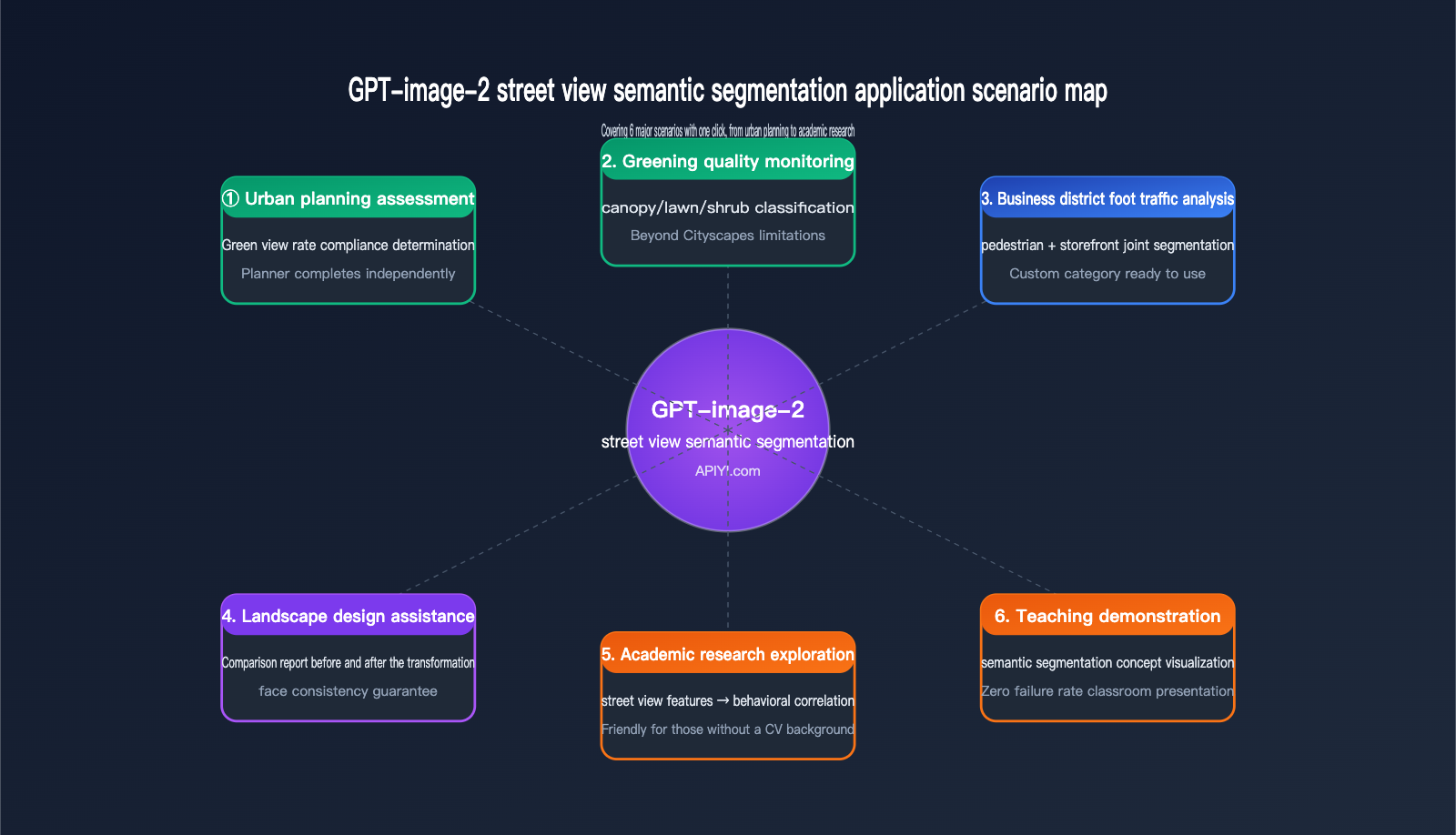
Now that you understand its capabilities and limitations, here are a few real-world scenarios where we believe GPT-image-2 is the best fit for street view semantic segmentation.
Urban Planning and Greening Assessment
Typical Requirement: Assessing whether the greening quality of a newly built community meets planning standards.
Traditional Workflow: Field photography → Upload to a local GPU server → Run DeepLabV3+ → Write Python code to calculate GVI (Green View Index) → Generate report. This entire process requires collaboration between planners and engineers, taking at least 1-2 days.
GPT-image-2 Workflow: Field photography → Upload to ChatGPT/API → Instantly receive "Green View Index: 32.7%, meeting Level 1 greening standards." Planners can complete this independently, reaching a conclusion in half an hour.
Landscape Design Comparison
Typical Requirement: Showcasing "Before vs. After" comparisons for landscape renovation projects.
GPT-image-2's ability to maintain legend consistency makes it perfect for this scenario—applying the same color standards to both the "before" and "after" renderings to generate side-by-side comparisons and data change reports instantly.
Academic Research Exploration
Typical Requirement: Exploring the correlation between "street view visual features and mental health" in urban sociology or public health research.
Researchers are usually not CV experts, so asking them to deploy DeepLabV3+ is unrealistic. GPT-image-2 lowers the barrier for "uploading images and obtaining structured features" to zero, allowing researchers without a CV background to jump straight into data analysis.
Teaching Demonstrations
Typical Requirement: Demonstrating "what is semantic segmentation" in urban planning or computer vision courses.
Traditional methods require running models live in class, which often leads to environment configuration failures. GPT-image-2 allows for demonstrations directly in a ChatGPT browser window—zero failure rate, high interpretability, and students can even ask questions using natural language.
💡 Quick Start Tip: For users just starting with GPT-image-2 for street view semantic segmentation, we recommend beginning with "single-image testing + standard mode" to get a feel for its capabilities before deciding whether to scale up to batch processing. We suggest using the APIYI (apiyi.com) platform to test 5-10 images for free to get an intuitive sense of the results before finalizing your workflow.
Getting Started with GPT-image-2 Street View Semantic Segmentation
If you want to try it out immediately, here is the minimum viable path—done in 3 steps.
Step 1: Prepare Street View Images
For your initial test, we recommend choosing daytime, clear street view images with a resolution of 1024×768 or higher, as this gives the model enough information to make accurate judgments. You can source them from:
- Field photography (a smartphone camera is sufficient)
- Street view platforms (Google Street View screenshots / Baidu Street View / Tencent Street View)
- Public datasets (Cityscapes test set, Mapillary Vistas)
Step 2: Choose Your Invocation Method
| Method | Target Audience | Advantages |
|---|---|---|
| ChatGPT Plus Web | Non-developers, researchers | No code, great visualization |
| OpenAI API | Developers, batch processing | Programmable, easy integration |
| APIYI API proxy service | Domestic developers | Direct local connection, consistent fields |
Step 3: Send a Prompt
Feel free to reuse the prompt templates from the 4 scenarios mentioned above:
Scenario 1: Perform semantic segmentation on this street view image and label the legend.
Scenario 2: Give me the percentage data for each legend category and calculate the Green View Index.
Scenario 3: Perform semantic segmentation on the vehicles and people in the scene; use blue for vehicles and green for people.
Scenario 4: Based on the legend from the previous image, perform semantic segmentation on this second image.
API Invocation Example Code
If you're going the API route, here is a minimal invocation example:
from openai import OpenAI
import base64

client = OpenAI(
    api_key="your-apiyi-key",
    base_url="https://api.apiyi.com/v1"
)

with open("street_view.jpg", "rb") as f:
    image_b64 = base64.b64encode(f.read()).decode()

response = client.chat.completions.create(
    model="gpt-image-2",
    messages=[{
        "role": "user",
        "content": [
            {"type": "text",
             "text": "Perform semantic segmentation on this street view image, provide the percentage for each category, and calculate the Green View Index."},
            {"type": "image_url",
             "image_url": {"url": f"data:image/jpeg;base64,{image_b64}"}}
        ]
    }],
    reasoning_effort="high"  # Reasoning mode
)

print(response.choices[0].message.content)
🚀 API Integration Reminder: When calling gpt-image-2 via APIYI (apiyi.com), set the
base_urltohttps://api.apiyi.com/v1. All other fields are identical to the official OpenAI API, so you can get your existing OpenAI SDK code running by just changing thebase_url.
GPT-image-2 Street View Semantic Segmentation FAQ
Q1: Is the accuracy of GPT-image-2 street view semantic segmentation really sufficient?
It depends on your use case. For academic reports, planning assessments, and educational demonstrations, the "thinking mode" accuracy (±2% error) is perfectly sufficient. For industrial-grade precision measurements (where error requirements are <1%), we still recommend using traditional models combined with manual spot checks.
Q2: How many street view categories can GPT-image-2 recognize?
Theoretically, there is no hard limit on the number of categories—it classifies based on how you define them in your prompt. However, in practice, when exceeding 15 categories in a single image, you may encounter issues with similar colors and confusing legends. We recommend keeping your task to 8–12 categories per run.
Q3: Does GPT-image-2 street view semantic segmentation support video?
The current version does not directly support video streams. If you have video analysis needs, you'll need to extract frames (e.g., 1 frame/second), perform model invocation frame-by-frame, and then reassemble the results into a video. This workflow is time-consuming and costly, so it's not recommended.
Q4: The 10-minute "thinking mode" is too long; can it be accelerated?
The time taken by the thinking mode is primarily due to the model's self-verification process. Here are a few ways to speed it up:
- Lower the resolution: Compress uploaded images to within 1024×768.
- Simplify the task: Split the segmentation and ratio calculation into two separate prompts, asking for only one thing at a time.
- Switch to standard mode: Accuracy drops by 1–2%, but the processing time is reduced to 1/5th.
Q5: Who is stronger at street view segmentation: GPT-image-2 or Nano Banana Pro?
They serve slightly different purposes. GPT-image-2 is stronger in reasoning capabilities and numerical precision (multi-step inference, automatic GVI calculation), while Nano Banana Pro is superior in speed and cost (sub-second response per image). If your requirement is large-scale, rapid segmentation, consider Nano Banana Pro; if you need to generate automated analysis reports, choose GPT-image-2.
Q6: Are there any differences when calling via APIYI (apiyi.com) compared to the official source?
The fields are identical—APIYI acts as an official proxy channel, with request/response fields 100% synchronized with OpenAI. The main differences are: no proxy required for domestic connections, dedicated Chinese technical support, and transparent, visible billing. We recommend that domestic developers connect to GPT-image-2 via APIYI (apiyi.com) to avoid network stability issues.
Q7: Can I have GPT-image-2 output a standard PNG mask?
The current version does not support direct output of pixel-perfect mask files. It outputs a "rendered color-coded image." If you need a mask for training downstream models, you will need to perform post-processing using color threshold separation.
Q8: Can the output of GPT-image-2 street view semantic segmentation be edited further?
Yes—you can continue to ask questions based on the initial output. For example, you could say, "Apply a semi-transparent red mask to all vegetation areas on the original image for warning purposes," and the model will perform derivative processing based on the previous segmentation result. This is a capability that traditional models simply cannot match.
GPT-image-2 Street View Semantic Segmentation Key Takeaways
- Different Paradigm: GPT-image-2 isn't meant to replace DeepLabV3+; it opens a new path for "natural language-driven, zero-deployment, and derivative analysis."
- Usable Accuracy: In thinking mode, the error is only ±2% compared to traditional SOTA models, which is sufficient for most business scenarios.
- Latency is a Bottleneck: Minute-level response per image makes it completely unsuitable for real-time or large-batch scenarios.
- Category Flexibility is the Killer Feature: While traditional models are stuck with the "19-category Cityscapes limit," GPT-image-2 breaks through that with a single prompt.
- Automated Green View Index (GVI): GVI calculation is compressed from "1 day of collaboration between engineers and planners" to "5 minutes for a planner working alone."
- Optimal Hybrid Strategy: Use GPT-image-2 for exploratory analysis and traditional models for industrial-scale batch processing; they complement each other.
- Domestic Calling Recommendation: Use APIYI (apiyi.com) for stable domestic connections with 100% field parity to the official API.
Summary
GPT-image-2 street view semantic segmentation is not a replacement for traditional semantic segmentation, but a powerful complement. It addresses needs that were previously ignored by models like DeepLabV3+ or PSPNet: small-batch, highly customized tasks that require natural language interaction and automated analytical conclusions.
From automated green view index calculation to custom category segmentation, GPT-image-2 democratizes tasks that once required "algorithm engineers + GPUs + training data," putting them into the hands of anyone who knows how to use ChatGPT. This represents a paradigm shift for fields like urban planning, landscape design, and academic research.
However, keep its limitations in mind: minute-level processing time per image, unpredictable costs at scale, and pixel-level accuracy that falls short of SOTA. These three factors mean it won't replace traditional models, but rather coexist alongside them.
If you're planning to integrate GPT-image-2 into your workflow, I suggest starting with a "small but beautiful" use case (such as a green view index analysis of 50 street view images). Once you've validated the end-to-end process, you can decide whether to scale up.
✨ Final Tip: For developers and researchers in China, we recommend accessing GPT-image-2 via the APIYI (apiyi.com) platform. It offers stable access, full compatibility with official fields, and transparent token-based billing. For your initial exploration, the platform provides free credits to help you complete your PoC, which is more than enough to run through all four scenarios covered in this article.
Author: APIYI Team
Last Updated: 2026-05-02