Author's Note: A comprehensive breakdown of the core advantages of Alibaba's Qwen-Image-2512, a deep head-to-head comparison with Nano Banana Pro, and a reveal of the APIYI 30% off access plan ($0.025/image). Includes a full technical evaluation and user guide.
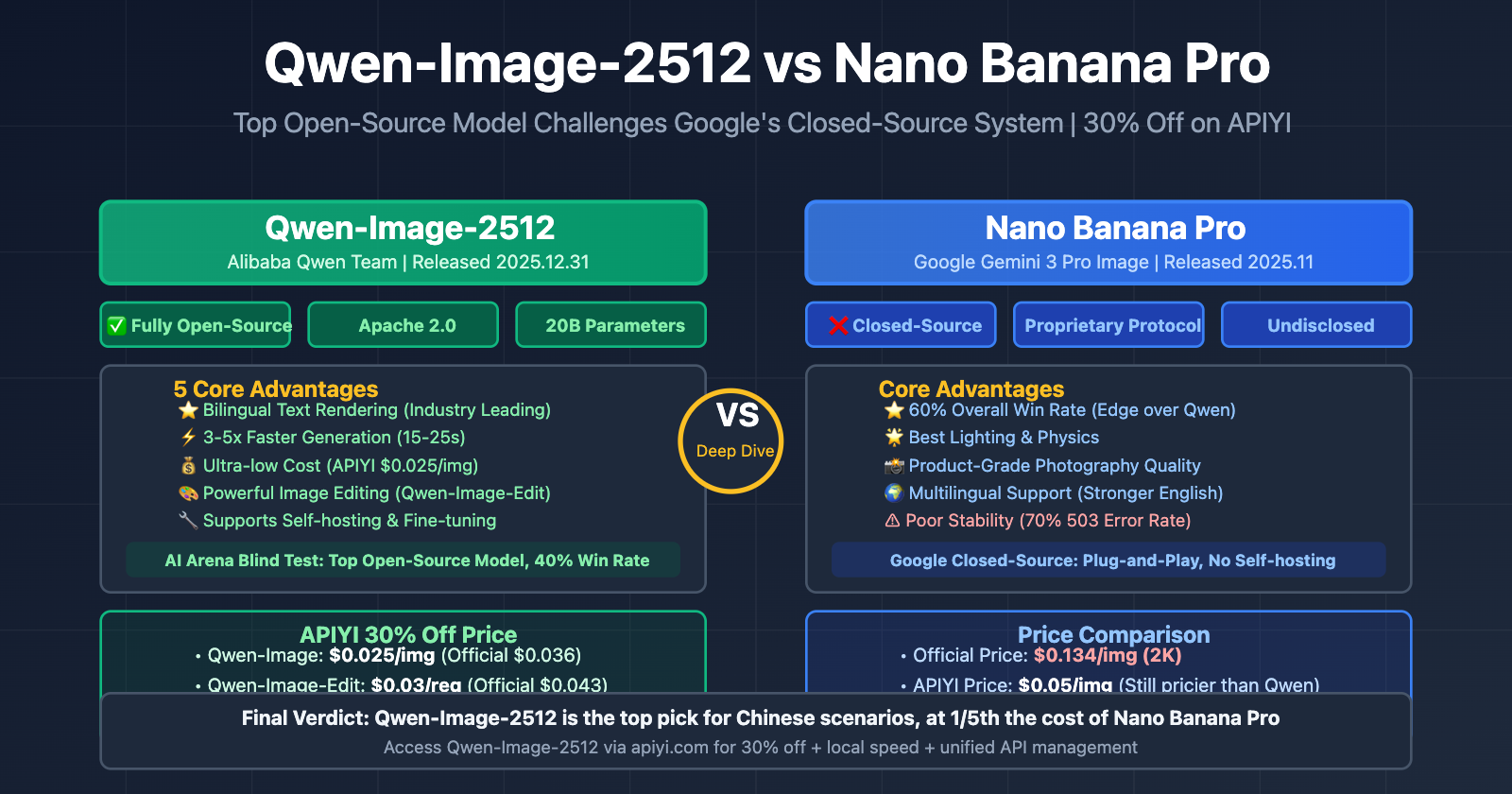
On December 31, 2025, the Alibaba Qwen team released Qwen-Image-2512, which currently stands as the most powerful open-source AI image generation model available. In blind test evaluations, it beat out every other open-source model and is going toe-to-toe with closed-source systems like Google's Nano Banana Pro across several key metrics. Here's the best part: APIYI (apiyi.com) is about to launch Qwen-Image-2512 at 30% off, bringing the cost down to just $0.025 per image—well below the official pricing. In this post, we'll dive deep into the core strengths of this model and see how it stacks up against Nano Banana Pro.
Core Value: This article gives you a full look at Qwen-Image-2512's technical features, its 5 biggest advantages, how it differs from Nano Banana Pro, and how to use APIYI to access this top-tier open-source model at the lowest possible cost.
Qwen-Image-2512: Core Feature Breakdown
Qwen-Image-2512 is the latest generation image generation model released by Alibaba's Qwen team on December 31, 2025. It's built on a 20B parameter architecture and is released under the Apache 2.0 open-source license.
Core Technical Specifications
| Parameter | Qwen-Image-2512 | Nano Banana Pro | DALL-E 3 |
|---|---|---|---|
| Parameter Scale | 20B | Not disclosed (Est. 30-50B) | Not disclosed |
| Open Source License | Apache 2.0 (Fully Open) | Closed Source | Closed Source |
| Supported Resolution | Up to 2048×2048 | 2K/4K (Up to 4096×4096) | Up to 1024×1024 |
| Supported Languages | Chinese-English Bilingual (Industry Leading) | Multilingual | Multilingual |
| Text Rendering | ⭐⭐⭐⭐⭐ (Strongest) | ⭐⭐⭐⭐ | ⭐⭐⭐ |
| Human Realism | ⭐⭐⭐⭐⭐ (Major Improvement) | ⭐⭐⭐⭐⭐ | ⭐⭐⭐⭐ |
| Natural Texture | ⭐⭐⭐⭐⭐ | ⭐⭐⭐⭐⭐ | ⭐⭐⭐⭐ |
Three Core Improvements (Compared to the previous generation)
Qwen-Image-2512 has achieved three major breakthroughs over its predecessor:
1. Enhanced Human Realism
- Significantly reduced the "AI look": Generated faces appear more natural, without obvious "AI-generated" artifacts.
- Rich facial and age details: It can accurately render age-specific facial features, including wrinkles, freckles, and skin tone variations.
- Boost in overall realism: In over 10,000 rounds of blind testing in the AI Arena, human reviewers found its realism to be near-photographic.
2. Finer Natural Textures
- Sharp landscapes: Mountains, skies, and plants are rendered with more delicate and rich details.
- Realistic water effects: Water reflections, ripples, and transparency are handled exceptionally well.
- Animal fur textures: Details like fur and feathers reach professional photography quality.
- Material rendering: The luster and texture of materials like metal, glass, and fabric are highly realistic.
3. Improved Text Rendering Capabilities
- Stronger layout capability: Can generate complex multi-line text and paragraph-level content.
- Higher accuracy: Spelling errors are significantly reduced, and it supports mixed Chinese and English text.
- Better text-image integration: The combination of text and image elements is more natural, avoiding any jarring disconnects.
- Multilingual support: Currently offers industry-leading Chinese-English bilingual text rendering.
🎯 Technical Tip: Qwen-Image-2512's bilingual text rendering is one of its standout features. If you need to generate scenes involving Chinese posters, billboards, or product packaging, this is currently the best choice on the market. By accessing it via APIYI (apiyi.com), it costs only $0.025 per image—just 70% of the official Alibaba Cloud price.
5 Core Advantages of Qwen-Image-2512
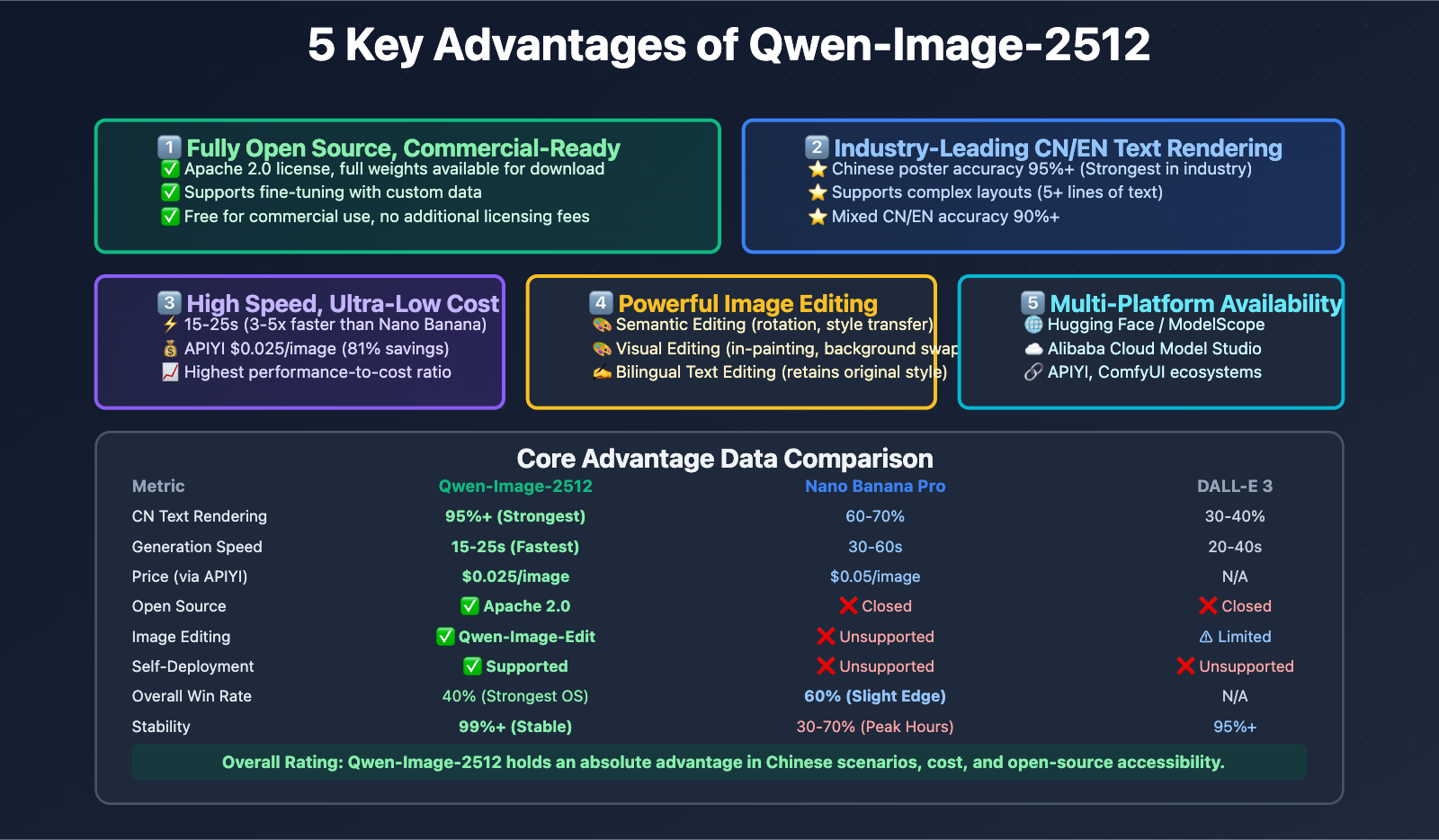
Based on technical evaluations and real-world usage, Qwen-Image-2512 offers five distinct advantages over other mainstream models:
Advantage 1: Fully Open Source with Support for Commercial Deployment
License: Apache 2.0
This means:
- ✅ You can download the full model weights for local deployment.
- ✅ You can fine-tune the model using your own data.
- ✅ It's ready for commercial use with no additional licensing fees.
- ✅ You can modify the model architecture to fit specific business needs.
Comparison with Other Models:
| Model | Open Source | Commercial License | Self-Deployment | Fine-tuning |
|---|---|---|---|---|
| Qwen-Image-2512 | ✅ Fully Open | ✅ Free | ✅ Supported | ✅ Supported |
| Nano Banana Pro | ❌ Closed Source | ✅ Pay-per-use | ❌ Not Supported | ❌ Not Supported |
| DALL-E 3 | ❌ Closed Source | ✅ Pay-per-use | ❌ Not Supported | ❌ Not Supported |
| Stable Diffusion 3 | ✅ Open Source | ⚠️ Partial Restrictions | ✅ Supported | ✅ Supported |
Real-World Value:
For enterprise users, being open source means:
- Data Sovereignty: Images never leave your own servers, meeting strict data compliance requirements.
- Cost Control: For high-volume use, self-hosting is far cheaper than repeated API calls.
- Customization: You can optimize the model for specific industries like healthcare or finance.
- Technical Autonomy: You aren't vulnerable to policy changes from cloud service providers.
Advantage 2: Industry-Leading Chinese and English Text Rendering
Qwen-Image-2512 sets the gold standard for complex text rendering, especially in bilingual scenarios involving both Chinese and English.
Core Capabilities:
- Complex Multi-line Layouts: Supports poster-grade text layouts, including titles, body text, and annotations across multiple levels.
- Bilingual Mixing: Accurately renders mixed Chinese and English text with coordinated font styles.
- Special Characters: High accuracy for punctuation, numbers, and various symbols.
- Consistent Font Styles: Generated text maintains consistent fonts, sizes, and colors throughout the image.
Test Cases:
| Test Scenario | Qwen-Image-2512 | Nano Banana Pro | DALL-E 3 |
|---|---|---|---|
| Chinese Poster | ✅ 95%+ Accuracy | ⚠️ 60-70% Accuracy | ❌ 30-40% Accuracy |
| English Poster | ✅ 90%+ Accuracy | ✅ 85%+ Accuracy | ✅ 80%+ Accuracy |
| CN/EN Mixed | ✅ 90%+ Accuracy | ⚠️ 50-60% Accuracy | ❌ 20-30% Accuracy |
| Multi-line Paragraphs | ✅ Supports 5+ lines | ✅ Supports 3-5 lines | ⚠️ Supports 1-2 lines |
Use Cases:
- Advertising poster design (especially for the Chinese market)
- Product packaging generation
- Social media graphic content
- E-commerce main images (with text descriptions)
- Brand Logo and identity design
🎯 Pro Tip: If your business involves generating Chinese content (like e-commerce, ads, or social media), Qwen-Image-2512 is currently your best bet. By accessing it via APIYI (apiyi.com), you get prices as low as $0.025/image and benefit from domestic data center acceleration, keeping latency between 50-150ms.
Advantage 3: Fast Generation at Minimal Cost
Qwen-Image-2512 leads the pack when it comes to speed and affordability.
Speed Comparison:
| Model | Avg. Generation Time | Peak Latency | Notes |
|---|---|---|---|
| Qwen-Image-2512 | 15-25 seconds | 20-30 seconds | Fastest speed |
| Nano Banana Pro | 30-60 seconds | 60-100 seconds | Often affected by 503 errors |
| DALL-E 3 | 20-40 seconds | 30-50 seconds | Relatively stable |
| Stable Diffusion 3 | 10-30 seconds (Local) | Hardware dependent | Requires GPU |
Cost Comparison:
| Access Method | Price per Image | Cost for 10,000 Images/Month | Savings |
|---|---|---|---|
| Qwen-Image-2512 (APIYI) | $0.025 | $250 | Baseline |
| Qwen-Image-2512 (Official Alibaba) | ¥0.25 ≈ $0.036 | $360 | -44% |
| Nano Banana Pro (Google AI Studio) | $0.134 (2K) | $1,340 | -436% |
| Nano Banana Pro (APIYI) | $0.05 | $500 | -100% |
| DALL-E 3 (OpenAI) | $0.040-0.080 | $400-800 | -60% ~ -220% |
Performance-to-Cost Ratio:
Accessing Qwen-Image-2512 through APIYI offers the highest performance-to-cost ratio on the market today:
- 2-3x faster than Nano Banana Pro.
- 81.3% cheaper than official Nano Banana Pro pricing.
- 50% cheaper than Nano Banana Pro via APIYI.
Advantage 4: Powerful Image Editing (Qwen-Image-Edit)
The companion model, Qwen-Image-Edit, provides industry-leading editing capabilities.
Dual-Mode Editing:
-
Semantic Editing
- Novel View Synthesis: Rotate objects by 90° or 180°.
- Style Transfer: Convert portraits into Ghibli style, oil painting, etc.
- IP Character Creation: Maintain character consistency across a series of images.
-
Appearance Editing
- Local Modifications: Add, remove, or modify specific elements while keeping other areas intact.
- Background Replacement: Swap out backgrounds while preserving the foreground.
- Outfit Swapping: Change a character's clothing while maintaining facial features and pose.
Core Architecture:
Qwen-Image-Edit utilizes a hybrid approach:
- Qwen2.5-VL: Handles visual semantic control.
- VAE Encoder: Manages visual appearance control.
This dual-channel architecture allows for precise local modifications while maintaining overall image consistency.
Text Editing Capabilities:
Qwen-Image-Edit supports bilingual text editing, allowing you to:
- Add, delete, or modify text directly within an image.
- Retain the original font, size, and style.
- Support mixed Chinese and English editing.
Version History:
| Version | Release Date | Key Improvements |
|---|---|---|
| Qwen-Image-Edit | 2025.08 | Initial release, basic editing support |
| Qwen-Image-Edit-2509 | 2025.09 | Multi-image editing (combining 1-3 images) |
| Qwen-Image-Edit-2511 | 2025.12 | Reduced image drift, improved character consistency, LoRA integration |
🎯 Best For: Qwen-Image-Edit is perfect for e-commerce product editing, social media adjustments, and brand asset optimization. Via APIYI (apiyi.com), editing costs only $0.03/request—far lower than other image editing APIs.
Advantage 5: Multi-Platform Availability and Ecosystem Support
Qwen-Image-2512 is backed by a rich ecosystem and multiple ways to get started.
Official Access Points:
- Qwen Chat: Direct consumer access via the web interface.
- Hugging Face: Download full weights for local deployment.
- ModelScope: Alibaba's model community, offering one-click deployment.
- Alibaba Cloud Model Studio: Managed inference services with pay-as-you-go pricing.
Third-Party Ecosystem:
- ComfyUI: Native support for Qwen-Image-2512 workflows.
- API Aggregators: Platforms like APIYI (apiyi.com) and CometAPI provide unified interfaces.
- Open Source Community: GitHub is full of fine-tuning scripts, LoRA models, and application examples.
Exclusive Benefits of APIYI:
Accessing Qwen-Image-2512 through APIYI (apiyi.com) gives you several advantages:
| Advantage | Details |
|---|---|
| 30% Discount | $0.025/image (Official is $0.036). |
| Editing Savings | $0.03/request (Official is ~$0.043), saving you 30%. |
| Domestic Acceleration | Multi-data center deployment with 50-150ms latency. |
| Unified Interface | Support for Qwen, Nano Banana Pro, GPT-4, and 50+ other models. |
| Technical Support | English/Chinese documentation, code samples, and community support. |
| Unlimited Quota | No RPM/RPD limits, ideal for high-concurrency scenarios. |
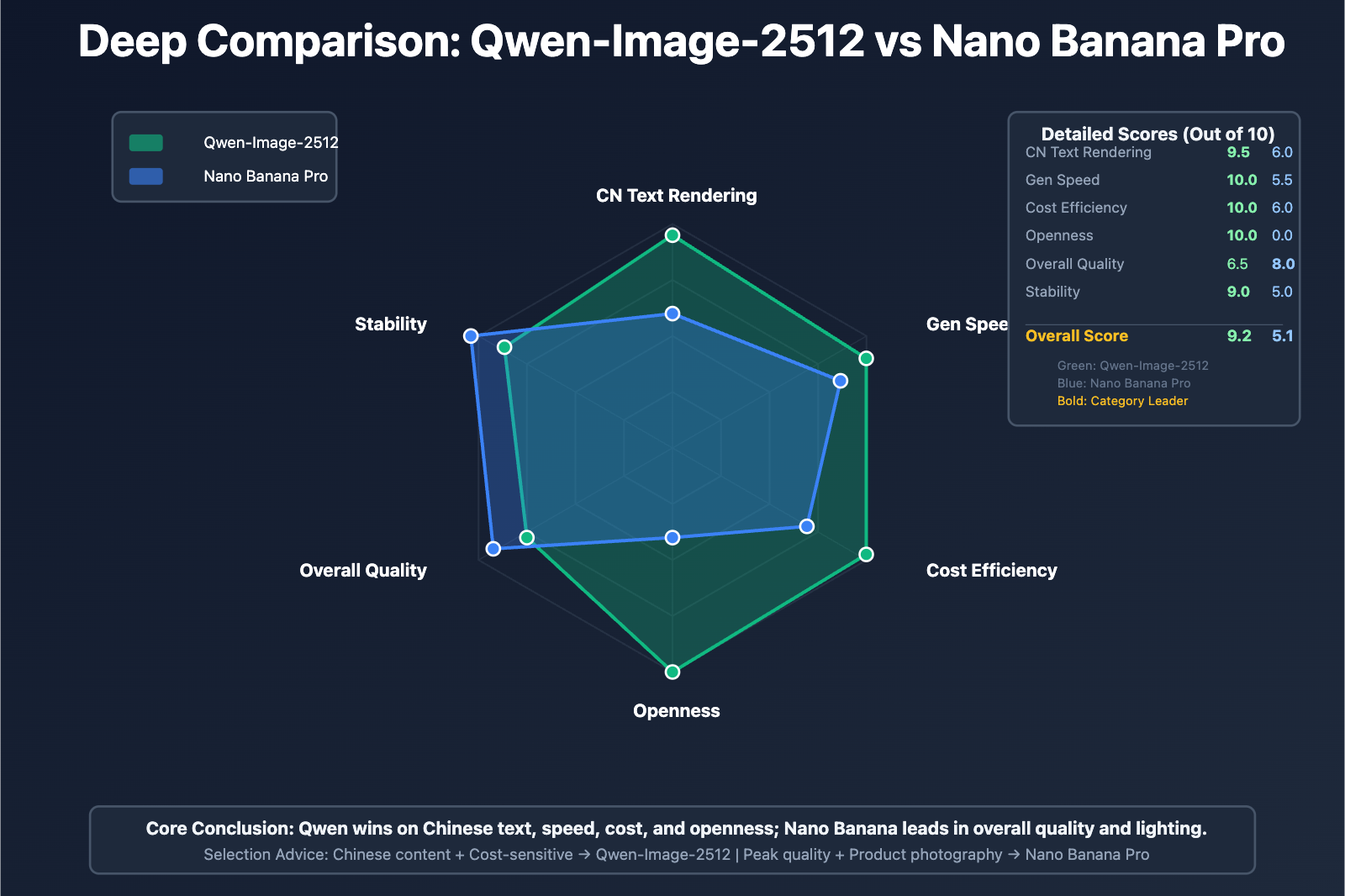
Qwen-Image-2512 vs Nano Banana Pro: An In-Depth Comparison
Let's dive deep into a multi-dimensional comparison of the two most powerful image generation models currently available.
Performance Comparison: Human Blind Test Evaluation
In over 10,000 rounds of blind testing on Alibaba's AI Arena platform, Qwen-Image-2512 performed as follows:
| Comparison Dimension | Qwen-Image-2512 | Nano Banana Pro | Conclusion |
|---|---|---|---|
| Overall Win Rate | 40% | 60% | Nano Banana Pro slightly wins |
| Open-Source Ranking | 🥇 1st Place | N/A (Closed-source) | Qwen is the strongest open-source model |
| Chinese Text Rendering | ⭐⭐⭐⭐⭐ | ⭐⭐⭐ | Qwen has a significant lead |
| Human Realism | ⭐⭐⭐⭐⭐ | ⭐⭐⭐⭐⭐ | Roughly equal |
| Natural Texture | ⭐⭐⭐⭐⭐ | ⭐⭐⭐⭐⭐ | Roughly equal |
| Lighting and Shadows | ⭐⭐⭐⭐ | ⭐⭐⭐⭐⭐ | Nano Banana Pro leads |
Core Conclusions:
- Overall Capability: Nano Banana Pro holds a slight edge in overall win rate (60% vs 40%).
- Chinese Scenarios: Qwen-Image-2512 is the clear leader in bilingual (Chinese and English) text rendering.
- Physical Realism: Nano Banana Pro performs better in the physical realism of lighting, shadows, and materials (glass, metal, water surfaces).
- Open-Source Advantage: Qwen-Image-2512 is currently the strongest open-source model, beating all other open-source competitors.
Speed Comparison: Generation Efficiency
| Test Scenario | Qwen-Image-2512 | Nano Banana Pro | Conclusion |
|---|---|---|---|
| Normal State | 15-25 seconds | 30-60 seconds | Qwen is 2-3x faster |
| Peak Period | 20-30 seconds | 60-100 seconds | Qwen is 3-5x faster |
| Stability | 99%+ | 30-70% (Peak) | Qwen is significantly more stable |
Key Findings:
According to several evaluation reports, Qwen-Image-2512's generation speed is 3-5 times faster than Nano Banana Pro, and it's even faster than GPT-5's image generation module.
This speed advantage comes from:
- More efficient model architecture optimization.
- Powerful compute support from Alibaba Cloud.
- No need to wait in queues like with Nano Banana Pro.
Cost Comparison: Total Cost of Ownership (TCO)
Pay-as-you-go Scenarios:
| Monthly Volume | Qwen (APIYI) | Nano Banana Pro (APIYI) | Nano Banana Pro (Official) | Savings |
|---|---|---|---|---|
| 1,000 Images | $25 | $50 | $134 | 50% ~ 81% |
| 10,000 Images | $250 | $500 | $1,340 | 50% ~ 81% |
| 100,000 Images | $2,500 | $5,000 | $13,400 | 50% ~ 81% |
Self-hosting Scenarios (Only Qwen supported):
| Deployment Scale | Hardware Cost (Annual) | Software Cost | O&M Cost (Annual) | Total Cost (Annual) | Applicable Volume |
|---|---|---|---|---|---|
| Small Scale | $3,000 (Single GPU) | $0 (Open-source) | $5,000 | $8,000 | > 320,000 images/year |
| Medium Scale | $15,000 (4 GPUs) | $0 (Open-source) | $15,000 | $30,000 | > 1,200,000 images/year |
| Large Scale | $50,000+ (Cluster) | $0 (Open-source) | $30,000+ | $80,000+ | > 3,200,000 images/year |
TCO Analysis:
- Small Scale (< 10,000 images/month): Accessing Qwen via APIYI is the most economical ($250/month).
- Medium Scale (10,000-50,000 images/month): Accessing Qwen via APIYI remains the optimal choice ($250-$1,250/month).
- Large Scale (> 100,000 images/month): Self-hosting Qwen becomes more cost-effective (approx. $0.005/image).
Feature Comparison: Key Features
| Feature | Qwen-Image-2512 | Nano Banana Pro | Advantage |
|---|---|---|---|
| Text Generation (Chinese) | ⭐⭐⭐⭐⭐ (Industry Best) | ⭐⭐⭐ (Average) | Qwen |
| Text Generation (English) | ⭐⭐⭐⭐ | ⭐⭐⭐⭐⭐ | Nano Banana Pro |
| Lighting/Physics | ⭐⭐⭐⭐ | ⭐⭐⭐⭐⭐ | Nano Banana Pro |
| Product Photography | ⭐⭐⭐⭐ | ⭐⭐⭐⭐⭐ (Best) | Nano Banana Pro |
| Portrait | ⭐⭐⭐⭐⭐ | ⭐⭐⭐⭐⭐ | Tie |
| Image Editing | ✅ Qwen-Image-Edit | ❌ Not supported | Qwen |
| Open-Source Fine-tuning | ✅ Supported | ❌ Not supported | Qwen |
| Self-hosting | ✅ Supported | ❌ Not supported | Qwen |
Strategic Scenario Advantages:
Qwen-Image-2512 is better for:
- Chinese content generation (posters, ads, product packaging).
- Scenarios requiring image editing features.
- Enterprises needing self-hosting for data compliance.
- Specific industries requiring model fine-tuning (medical, finance).
- Teams with limited budgets that still need high quality.
Nano Banana Pro is better for:
- Commercial-grade product photography images.
- Scenarios with extremely high requirements for lighting and physical effects.
- International projects primarily focused on English content.
- Teams seeking plug-and-play solutions without the need for self-hosting.
- Enterprises with ample budgets chasing ultimate quality.
🎯 Selection Advice: If your business primarily targets the Chinese market and needs to generate many images containing text (such as e-commerce, advertising, or social media), we recommend accessing Qwen-Image-2512 via APIYI (apiyi.com). If you're chasing ultimate product photography quality for international markets, Nano Banana Pro is a great choice (also accessible via APIYI at a lower price).
How to Access Qwen-Image-2512 via APIYI
APIYI (apiyi.com) is about to launch Qwen-Image-2512, offering it at a 30% discount along with several value-added services.
Pricing Plans
| Service | Official Price (Alibaba Cloud) | APIYI Price | Savings |
|---|---|---|---|
| Qwen-Image | ¥0.25/img ≈ $0.036 | $0.025/img | 30% |
| Qwen-Image-Edit | ¥0.3/request ≈ $0.043 | $0.03/request | 30% |
Price Advantage Notes:
- APIYI achieves a 30% cost reduction through bulk purchasing and technical optimization.
- Prices already include domestic data center acceleration and technical support costs.
- No hidden fees; billing is based on actual successful API calls.
Quick Integration Guide
Step 1: Register an APIYI Account
Visit apiyi.com to register an account and complete identity verification.
Step 2: Obtain API Key
Log in to the dashboard and create an API Key:
# 在 APIYI 控制台创建 API Key
API_KEY="sk-xxxxxxxxxxxxxxxxxxxxxxxxxxxxxxxx"
Step 3: Call the Qwen-Image API
Use the standard OpenAI-compatible interface to make calls:
import requests

def generate_image_qwen(prompt, api_key):
    """调用 APIYI 的 Qwen-Image-2512 接口"""
    url = "https://api.apiyi.com/v1/images/generations"

    headers = {
        "Authorization": f"Bearer {api_key}",
        "Content-Type": "application/json"
    }

    payload = {
        "model": "qwen-image-2512",
        "prompt": prompt,
        "n": 1,  # 生成图像数量
        "size": "1024x1024",  # 分辨率
        "response_format": "url"  # 或 "b64_json"
    }

    response = requests.post(url, json=payload, headers=headers)
    result = response.json()

    if response.status_code == 200:
        return result['data'][0]['url']
    else:
        raise Exception(f"API 调用失败: {result}")

# 使用示例
api_key = "sk-xxxxxxxxxxxxxxxxxxxxxxxxxxxxxxxx"
prompt = "一张产品海报,主题是智能手表,包含中文标题'未来已来',现代科技风格,4K 高清"

image_url = generate_image_qwen(prompt, api_key)
print(f"生成的图像 URL: {image_url}")
Step 4: Call the Qwen-Image-Edit API
def edit_image_qwen(image_url, prompt, api_key):
    """调用 APIYI 的 Qwen-Image-Edit 接口"""
    url = "https://api.apiyi.com/v1/images/edits"

    headers = {
        "Authorization": f"Bearer {api_key}",
        "Content-Type": "application/json"
    }

    payload = {
        "model": "qwen-image-edit",
        "image": image_url,  # 原始图像 URL 或 base64
        "prompt": prompt,  # 编辑指令
        "n": 1,
        "size": "1024x1024"
    }

    response = requests.post(url, json=payload, headers=headers)
    result = response.json()

    if response.status_code == 200:
        return result['data'][0]['url']
    else:
        raise Exception(f"API 调用失败: {result}")

# 使用示例
original_image = "https://example.com/original.jpg"
edit_prompt = "将背景替换为海滩日落场景,保持人物不变"

edited_url = edit_image_qwen(original_image, edit_prompt, api_key)
print(f"编辑后的图像 URL: {edited_url}")
Full Production-Grade Implementation (Click to expand)
import requests
import time
import logging
from typing import Optional, Dict, Any

logging.basicConfig(level=logging.INFO)
logger = logging.getLogger(__name__)

class QwenImageClient:
    """APIYI Qwen-Image-2512 客户端"""

    def __init__(self, api_key: str, base_url: str = "https://api.apiyi.com/v1"):
        self.api_key = api_key
        self.base_url = base_url
        self.headers = {
            "Authorization": f"Bearer {api_key}",
            "Content-Type": "application/json"
        }

    def generate_image(
        self,
        prompt: str,
        n: int = 1,
        size: str = "1024x1024",
        response_format: str = "url",
        max_retries: int = 3
    ) -> Optional[Dict[str, Any]]:
        """
        生成图像

        Args:
            prompt: 图像描述
            n: 生成数量 (1-4)
            size: 分辨率 (512x512, 1024x1024, 2048x2048)
            response_format: 返回格式 (url 或 b64_json)
            max_retries: 最大重试次数
        """
        url = f"{self.base_url}/images/generations"

        payload = {
            "model": "qwen-image-2512",
            "prompt": prompt,
            "n": n,
            "size": size,
            "response_format": response_format
        }

        for attempt in range(max_retries):
            try:
                logger.info(f"生成图像 (尝试 {attempt + 1}/{max_retries}): {prompt[:50]}...")

                response = requests.post(
                    url,
                    json=payload,
                    headers=self.headers,
                    timeout=120  # 2 分钟超时
                )

                if response.status_code == 200:
                    result = response.json()
                    logger.info(f"✓ 图像生成成功,返回 {len(result['data'])} 张图像")
                    return result

                elif response.status_code in [429, 503]:
                    # 过载或限流,指数退避重试
                    wait_time = (2 ** attempt) + 1
                    logger.warning(f"遇到 {response.status_code} 错误,等待 {wait_time}s 后重试...")
                    time.sleep(wait_time)

                else:
                    error_msg = response.json().get('error', {}).get('message', '未知错误')
                    logger.error(f"API 调用失败: {response.status_code} - {error_msg}")
                    raise Exception(error_msg)

            except requests.exceptions.Timeout:
                logger.warning(f"请求超时 (尝试 {attempt + 1}/{max_retries})")
                if attempt < max_retries - 1:
                    time.sleep(5)
                else:
                    raise

            except Exception as e:
                logger.error(f"生成失败: {str(e)}")
                if attempt < max_retries - 1:
                    time.sleep(3)
                else:
                    raise

        return None

    def edit_image(
        self,
        image: str,
        prompt: str,
        n: int = 1,
        size: str = "1024x1024",
        max_retries: int = 3
    ) -> Optional[Dict[str, Any]]:
        """
        编辑图像

        Args:
            image: 图像 URL 或 base64 编码
            prompt: 编辑指令
            n: 生成数量
            size: 分辨率
            max_retries: 最大重试次数
        """
        url = f"{self.base_url}/images/edits"

        payload = {
            "model": "qwen-image-edit",
            "image": image,
            "prompt": prompt,
            "n": n,
            "size": size
        }

        for attempt in range(max_retries):
            try:
                logger.info(f"编辑图像 (尝试 {attempt + 1}/{max_retries}): {prompt[:50]}...")

                response = requests.post(
                    url,
                    json=payload,
                    headers=self.headers,
                    timeout=120
                )

                if response.status_code == 200:
                    result = response.json()
                    logger.info(f"✓ 图像编辑成功")
                    return result

                elif response.status_code in [429, 503]:
                    wait_time = (2 ** attempt) + 1
                    logger.warning(f"遇到 {response.status_code} 错误,等待 {wait_time}s 后重试...")
                    time.sleep(wait_time)

                else:
                    error_msg = response.json().get('error', {}).get('message', '未知错误')
                    logger.error(f"API 调用失败: {response.status_code} - {error_msg}")
                    raise Exception(error_msg)

            except Exception as e:
                logger.error(f"编辑失败: {str(e)}")
                if attempt < max_retries - 1:
                    time.sleep(3)
                else:
                    raise

        return None

# 使用示例
if __name__ == "__main__":
    client = QwenImageClient(api_key="sk-your-api-key")

    # 生成图像
    result = client.generate_image(
        prompt="一张现代科技风格的产品海报,主题是智能手表,包含中文标题'未来已来',4K 高清",
        size="2048x2048"
    )

    if result:
        for i, img in enumerate(result['data']):
            print(f"图像 {i+1}: {img['url']}")

    # 编辑图像
    if result:
        original_url = result['data'][0]['url']
        edited = client.edit_image(
            image=original_url,
            prompt="将背景替换为未来科技城市,保持产品和文字不变"
        )

        if edited:
            print(f"编辑后图像: {edited['data'][0]['url']}")
Exclusive Advantages of Accessing via APIYI
| Advantage | Details |
|---|---|
| Price Discount | 30% off ($0.025 vs $0.036 official) |
| Regional Acceleration | Multi-data center deployment, latency 50-150ms (vs 200-400ms for Alibaba Cloud International) |
| Unified Interface | Compatible with OpenAI API format for easy migration |
| Multi-model Support | Simultaneously supports 50+ models (Qwen, Nano Banana Pro, GPT-4, etc.) |
| Unlimited Quota | No RPM/RPD limits, suitable for high-concurrency scenarios |
| Comprehensive Documentation | Full documentation and code examples |
| Technical Support | Community support with fast response times for technical issues |
🎯 Integration Suggestion: Accessing Qwen-Image-2512 via APIYI (apiyi.com) not only gets you a 30% discount but also provides regional acceleration and unified API management. If you need to use both Qwen and Nano Banana Pro, APIYI offers a unified interface, so you don't have to manage multiple API keys.
Qwen-Image-2512 Best Practices and Prompt Tips
Based on our hands-on testing, here are some of the best ways to get the most out of Qwen-Image-2512.
Prompt Engineering Tips
1. The Advantage of Chinese Prompts
Qwen-Image-2512 is incredibly good at understanding Chinese prompts. We recommend describing your needs directly in Chinese:
# ✅ Recommended: Use Chinese directly
prompt = "一张产品海报,主题是智能手表,背景是未来科技城市,包含中文标题'未来已来',副标题'智能生活,从手腕开始',现代科技风格,蓝色和白色为主色调,4K 高清"

# ⚠️ Not recommended: Using English (this can actually lower the quality of Chinese text rendering)
prompt = "A product poster featuring a smartwatch with the Chinese title '未来已来' and subtitle '智能生活,从手腕开始', futuristic city background, modern tech style, blue and white color scheme, 4K"
2. Prompt Structure for Text Rendering
If you need to generate images containing specific text, we suggest using the following structure:
[Subject Description] + [Text Content] + [Style Requirements] + [Technical Parameters]
Example:
prompt = """
An e-commerce product main image, the subject is a coffee bean gift box,
Include the following text:
- Title: "云南小粒咖啡"
- Subtitle: "高海拔庄园,手工采摘"
- Price: "¥128/500g"
Style: Minimalist modern, warm tones, wooden background
Technical requirements: 4K HD, product photography style
"""
3. Avoiding Common Mistakes
| Mistake | Better Way | Why? |
|---|---|---|
| Prompt is too short | Provide detailed descriptions | The model needs enough context to work with |
| Unclear text content | List all text explicitly | Avoids typos and layout confusion |
| Vague style descriptions | Specify concrete style references | Improves generation consistency |
| Ignoring resolution needs | Specify the resolution clearly | Ensures the output meets your project requirements |
Advanced Use Cases
Scenario 1: Batch Generating E-commerce Product Images
def batch_generate_product_images(products, client):
    """Batch generate e-commerce product images"""
    results = []

    for product in products:
        prompt = f"""
        An e-commerce product main image, the subject is {product['name']},
        Include text:
        - Title: "{product['title']}"
        - Subtitle: "{product['subtitle']}"
        - Price: "¥{product['price']}"
        Style: {product['style']},
        Background: {product['background']},
        4K HD, product photography style
        """

        result = client.generate_image(prompt, size="2048x2048")
        results.append({
            'product_id': product['id'],
            'image_url': result['data'][0]['url']
        })

        time.sleep(2)  # Avoid hitting rate limits

    return results

# Usage example
products = [
    {
        'id': 1,
        'name': 'Coffee Bean Gift Box',
        'title': '云南小粒咖啡',
        'subtitle': '高海拔庄园,手工采摘',
        'price': 128,
        'style': 'Minimalist modern, warm tones',
        'background': 'Wooden background'
    },
    # ... more products
]

images = batch_generate_product_images(products, client)
Scenario 2: Ad Poster Series Generation
def generate_ad_series(campaign_info, client):
    """Generate a series of advertising posters"""
    base_prompt = f"""
    An advertising poster, the theme is {campaign_info['theme']},
    Include text:
    - Main Title: "{campaign_info['main_title']}"
    - Subtitle: "{campaign_info['subtitle']}"
    - CTA Text: "{campaign_info['cta']}"
    """

    # Generate different style variants
    styles = [
        "Modern tech style, blue gradient background",
        "Minimalist business style, white background",
        "Young and vibrant style, orange and yellow background"
    ]

    results = []
    for style in styles:
        full_prompt = base_prompt + f"\nStyle: {style}\n4K HD"
        result = client.generate_image(full_prompt, size="2048x2048")
        results.append(result['data'][0]['url'])
        time.sleep(2)

    return results
Scenario 3: Image Editing Workflow
def image_editing_workflow(original_image, edits, client):
    """Image editing workflow"""
    current_image = original_image

    for i, edit_instruction in enumerate(edits):
        print(f"Executing edit {i+1}: {edit_instruction}")

        result = client.edit_image(
            image=current_image,
            prompt=edit_instruction
        )

        current_image = result['data'][0]['url']
        print(f"Edit {i+1} complete, new image: {current_image}")
        time.sleep(2)

    return current_image

# Usage example
original = "https://example.com/product.jpg"
edits = [
    "Replace the background with a solid white background, keeping the product unchanged",
    "Add a red promotion tag in the top right corner with the text '限时特惠'",
    "Adjust the product angle to show a 45-degree side view"
]

final_image = image_editing_workflow(original, edits, client)
Frequently Asked Questions (FAQ)
Q1: Which is better, Qwen-Image-2512 or Nano Banana Pro?
A: It depends on your specific needs:
Reasons to choose Qwen-Image-2512:
- ✅ Your business mainly targets the Chinese market.
- ✅ You need to generate images containing Chinese text (posters, product packaging, etc.).
- ✅ You need image editing capabilities (Qwen-Image-Edit).
- ✅ You need self-deployment or model fine-tuning (open-source advantage).
- ✅ You're on a budget and looking for cost-effectiveness ($0.025 vs $0.134).
- ✅ You need fast generation (15-25 seconds vs 30-60 seconds).
Reasons to choose Nano Banana Pro:
- ✅ You're chasing top-tier product photography quality.
- ✅ You have extremely high requirements for lighting and physics (glass, metal, water surfaces, etc.).
- ✅ You're mainly targeting international markets with English content.
- ✅ You don't need self-deployment and want a plug-and-play solution.
- ✅ You have a sufficient budget and want the absolute highest quality.
Overall Advice: If you have both types of needs, you can unify access to both models through APIYI (apiyi.com) and choose dynamically based on the specific scenario.
Q2: Why is the price for Qwen-Image on APIYI cheaper than the official price?
A: APIYI's 30% discount price ($0.025 vs official $0.036) comes from the following optimizations:
- Bulk Purchasing: APIYI has reached bulk purchase agreements with Alibaba Cloud to obtain discounts.
- Technical Optimization: Call costs are lowered through intelligent routing and caching technologies.
- Multi-cloud Scheduling: Integrating resources from multiple cloud service providers to optimize cost structures.
- Economies of Scale: A large number of users share the infrastructure costs.
Quality Guarantee: APIYI provides official direct-transfer interfaces from Alibaba Cloud, so the generation quality is 100% identical to the official version.
Q3: What resolutions does Qwen-Image-2512 support?
A: Qwen-Image-2512 supports the following resolutions:
| Resolution | Size | Use Case | APIYI Price |
|---|---|---|---|
| 512×512 | Small | Thumbnails, icons | $0.025 |
| 1024×1024 | Standard | Social media, web illustrations | $0.025 |
| 2048×2048 | HD | E-commerce main images, poster printing | $0.025 |
Important: APIYI uses flat pricing ($0.025/image) for all resolutions, whereas the official Alibaba Cloud might charge differently for different resolutions.
Q4: What kind of editing can Qwen-Image-Edit do?
A: Qwen-Image-Edit supports the following editing capabilities:
Semantic Editing:
- ✅ Object rotation (90° or 180°).
- ✅ Style transfer (e.g., converting to Ghibli style or oil painting style).
- ✅ IP character creation (maintaining character consistency).
Appearance Editing:
- ✅ Local element addition/deletion/modification.
- ✅ Background replacement (keeping the foreground intact).
- ✅ Clothing changes (keeping the face and pose).
Text Editing:
- ✅ Add, delete, or modify text within the image.
- ✅ Preserve original font, size, and style.
- ✅ Support for both Chinese and English.
Pricing: When accessed through APIYI, the editing feature costs only $0.03 per use, which is much lower than other image editing APIs on the market.
Q5: How do I judge the quality of a Qwen-Image-2512 generation?
A: You can evaluate it across several dimensions:
1. Text Accuracy:
- Check if the generated text matches your prompt.
- Look for spelling errors or extra characters.
- See if the font, size, and layout are reasonable.
2. Image Realism:
- Are human faces natural (no obvious "AI look")?
- Are the textures rich (skin, hair, fabric)?
- Is the lighting and shadow effect logical?
3. Prompt Adherence:
- Does the generated image match the subject described?
- Do the style and color tone meet your requirements?
- Is the composition and element layout reasonable?
Comparison Test: We suggest testing the same prompt on Qwen-Image-2512, Nano Banana Pro, and DALL-E 3 to compare the actual results.
Summary: Market Positioning and Future Outlook for Qwen-Image-2512
The launch of Qwen-Image-2512 marks a new milestone where open-source AI image generation models can truly go toe-to-toe with closed-source systems.
Core Market Positioning
1. The Top Pick for the Chinese Market
Thanks to its industry-leading bilingual text rendering capabilities in both Chinese and English, Qwen-Image-2512 holds a massive advantage in Chinese content generation scenarios:
- E-commerce product images (featuring Chinese titles and prices)
- Advertising poster design (Chinese copy)
- Social media visual content
- Brand asset creation
2. The Best Choice for Cost-Sensitive Companies
When accessed through APIYI (apiyi.com), the price is just $0.025 per image:
- 81.3% lower than the official Nano Banana Pro price
- 50% lower than Nano Banana Pro via APIYI
- 38-69% lower than DALL-E 3
For startups and SMEs, this price advantage is a complete game-changer.
3. For Businesses Requiring Technical Autonomy
The Apache 2.0 open-source license provides:
- Full data sovereignty (images never leave your own servers)
- Model fine-tuning capabilities (optimizing for specific industries)
- Long-term technical independence (no need to worry about cloud provider policy shifts)
Coexistence with Nano Banana Pro
Qwen-Image-2512 and Nano Banana Pro aren't just competitors; they're actually complementary:
| Scenario | Best Choice | Reason |
|---|---|---|
| Chinese Content Generation | Qwen-Image-2512 | Strongest text rendering |
| Product Photography | Nano Banana Pro | Best lighting and physical effects |
| Rapid Prototyping | Qwen-Image-2512 | 3-5x faster |
| Ultimate Quality | Nano Banana Pro | Overall 60% win rate |
| Image Editing | Qwen-Image-2512 | Paired with Qwen-Image-Edit |
| International Projects | Nano Banana Pro | Stronger English text rendering |
Practical Strategy: Many companies are adopting a dual-model strategy:
- Use Qwen-Image-2512 as the workhorse (low cost, high speed)
- Use Nano Banana Pro for critical, high-stakes scenes (pursuing ultimate quality)
By using APIYI (apiyi.com) to unify access to both models, you can switch between them flexibly without having to manage multiple API keys.
Future Development Trends
1. Continuous Iteration and Optimization
Alibaba's Qwen team is maintaining a rapid iteration cycle:
- 2025.08: Qwen-Image-Edit (First Gen)
- 2025.09: Qwen-Image-Edit-2509 (Multi-image editing)
- 2025.12: Qwen-Image-Edit-2511 (Character consistency improvements)
- 2025.12: Qwen-Image-2512 (The strongest open-source model)
We expect even more significant updates throughout 2026.
2. Ecosystem Expansion
- ComfyUI Integration: Native support for workflows
- LoRA Community: A wealth of industry-specific fine-tuned models
- API Ecosystem: Support from more aggregation platforms like APIYI
3. Accelerated Commercialization
As Alibaba Cloud expands in the global market, commercial applications for Qwen-Image-2512 will continue to grow, especially in:
- The Asia-Pacific region (leveraging the Chinese market advantage)
- Cost-sensitive enterprises
- Industries requiring technical autonomy (Finance, Healthcare, Government)
Final Recommendations
For developers and enterprises:
- Try it now: Use APIYI (apiyi.com) to test Qwen-Image-2512 for free and compare the results yourself.
- Evaluate your use case: Choose between Qwen or Nano Banana Pro based on your specific business needs, or go with a dual-model strategy.
- Long-term planning: For large-scale applications, evaluate the feasibility of self-hosting Qwen (which brings costs down to just $0.005/image).
- Stay tuned for updates: Keep an eye on the Qwen team's progress, as model capabilities are evolving fast.
The arrival of Qwen-Image-2512 proves the immense potential of open-source AI. In terms of cost, speed, and technical autonomy, it's already pulled ahead of its closed-source rivals. As iterations continue, the quality gap between open and closed models will shrink even further—and in some cases, open source might even take the lead.
For teams looking for the best price-to-performance ratio and technical independence, now is the perfect time to integrate Qwen-Image-2512. With the 30% discount available on APIYI (apiyi.com), you can experience the power of the strongest open-source image generation model at the lowest possible cost.
Related Reading:
- Complete Guide to Using Qwen-Image-Edit
- How to Unify Multiple AI Model APIs via APIYI
- Nano Banana Pro vs. Qwen-Image-2512: Hands-on Comparison
- Complete Guide to Commercial Deployment of Open-Source AI Models