description: "Why did Nano Banana 2 Pro image sizes drop from 30MB to 8MB? We break down the technical reality behind this change and what it means for your workflow."
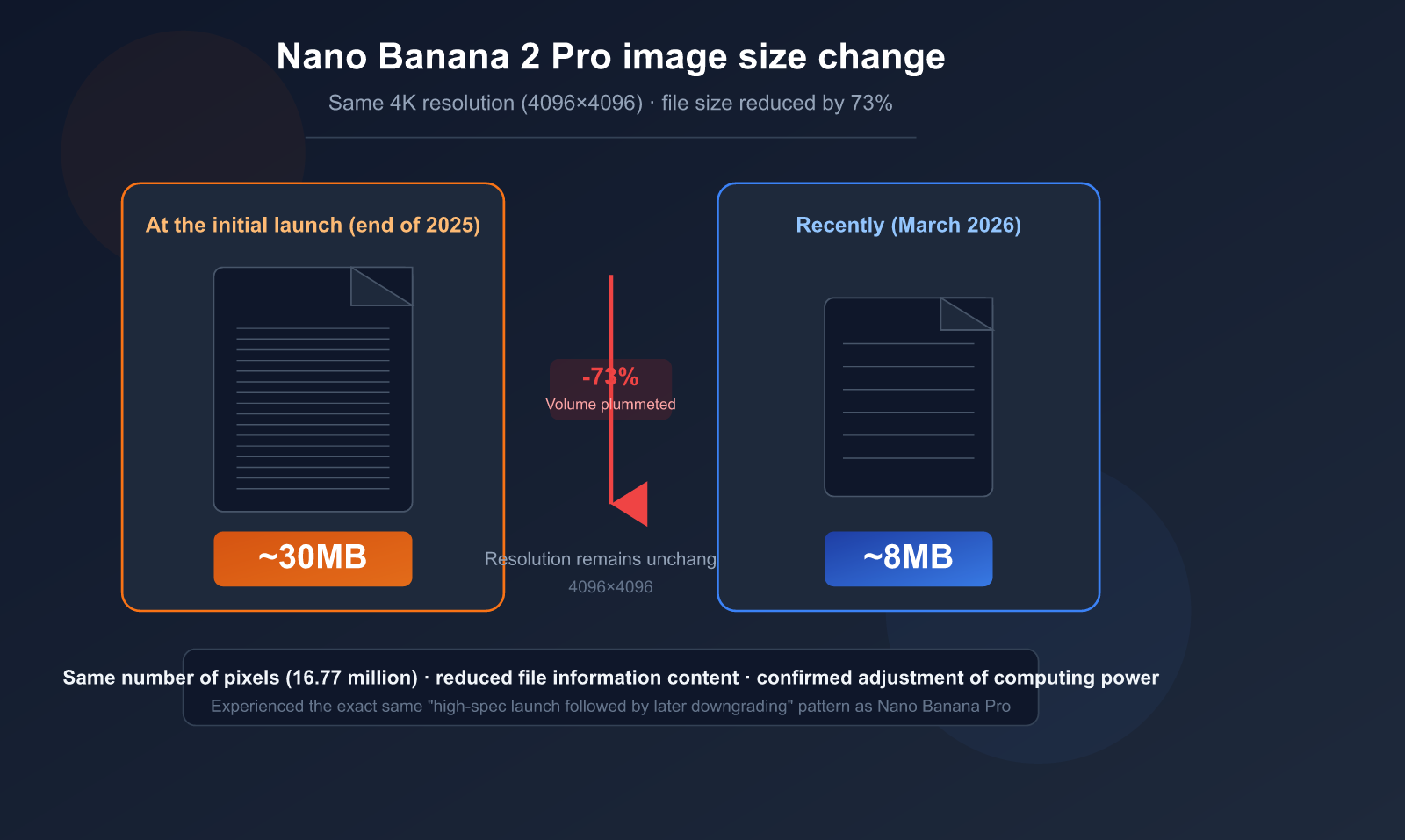
Recently, many users have noticed something unusual: 4K images generated by Nano Banana 2 Pro have seen their file sizes drop sharply from around 30MB to about 8MB. The resolution remains 4096×4096, but the file volume has shrunk by nearly four times. This isn't just your imagination—it's a clear signal of Google's recent compute adjustments.
Key Takeaway: In 3 minutes, you'll understand the technical nature of this file size change, its real impact on image quality, and how you should respond.
Nano Banana 2 Pro Image Size Changes: The Core Facts
Let's lay out the known facts before diving into the analysis.
User Test Data Comparison
| Comparison Dimension | Initial Launch (Late 2025) | Recent (March 2026) | Change Magnitude |
|---|---|---|---|
| Output Resolution | 4096×4096 (4K) | 4096×4096 (4K) | No Change |
| File Size (Single) | ~30MB | ~8MB | Shrunk ~73% |
| Output Format | PNG (Base64) | PNG (Base64) | No Change |
| Total Pixels | 16.77 Million Pixels | 16.77 Million Pixels | No Change |
Key finding: The resolution (pixel count) hasn't changed at all; only the file volume has.
This follows the exact same trajectory as the original Nano Banana Pro—images were large and highly detailed at launch, only to see a significant reduction in file size after a period of time.
This Isn't the First Time
Nano Banana Pro (Gemini 3 Pro Image) went through a similar adjustment:
| Timeline | Event |
|---|---|
| Nov 2025 | Nano Banana Pro launched, 3 free generations/day, large image files |
| Dec 2025 | Free quota dropped from 3 to 2, RPM reduced from 10 to 5 |
| Jan 2026 | Users reported a decline in image quality and detail |
| Mar 2026 | Nano Banana 2 exhibits the same file size reduction pattern |
🎯 Recommendation: If you require high image quality, we suggest using the APIYI (apiyi.com) platform to perform model invocation for the Nano Banana 2 API. This allows you to flexibly switch between different resolutions and parameter settings, while saving outputs from different periods to track quality changes over time.
title: "3 Technical Reasons Why File Sizes Shrink While Resolution Stays the Same"
description: "Ever wondered why an image's file size drops by 4x while the resolution remains identical? Here are the 3 most likely technical mechanisms behind it."
tags: ["AI", "Image Generation", "Technical Analysis", "Optimization"]
3 Technical Reasons Why File Sizes Shrink While Resolution Stays the Same
The resolution is the same, yet the file size has shrunk by nearly 4 times—how is that technically possible? Here are the 3 most likely mechanisms.
Reason 1: Reducing Diffusion Model Denoising Steps (The Prime Suspect)
This is the most likely core reason and the most common "cost-cutting" measure in the field of AI image generation.
How Diffusion Models Work:
- Start with a pure noise image.
- Gradually restore a clear image through multiple rounds of "denoising."
- The more denoising steps, the richer the details, the higher the file entropy, and the larger the file.
The Impact of Reducing Denoising Steps:
| Dimension | High Steps (Original) | Low Steps (Current) |
|---|---|---|
| Denoising Steps | Likely 50-100 steps | Likely 20-40 steps |
| Detail Richness | Extremely fine | Generally clear, fewer local details |
| Color Gradients | Smooth | May show slight banding |
| Texture Complexity | High (more information) | Medium (less information) |
| File Size | Large (high entropy) | Small (low entropy) |
| Generation Speed | Slower | Faster |
| Compute Cost | High | Low |
Academic research has confirmed that reducing denoising steps can lower inference costs significantly, but the trade-off is a noticeable increase in FID (image quality score) and a decrease in CLIP Score (semantic matching).
A Simple Analogy: Think of it like painting an oil painting—painting 100 strokes versus 40 strokes. From a distance, the composition looks the same, but up close, the details are completely different. The resolution (canvas size) hasn't changed, but the amount of information (number of brushstrokes) has decreased.
Reason 2: Adjusting Output Compression Parameters
Even with lossless formats like PNG, there are different compression levels. However, since PNG compression is lossless, it's unlikely to cause a change as drastic as 30MB to 8MB.
A more likely scenario is that the output underwent some form of lossy processing on the server side before being encoded as a PNG:
- Slight blurring/denoising applied to detailed areas.
- Reduced precision in color gradients.
- These processes significantly lower the final entropy of the PNG, thereby shrinking the file.
Reason 3: Lowering Internal Rendering Precision
Diffusion models can use different floating-point precisions for internal calculations:
- FP32 (32-bit float): Highest precision, extremely delicate color transitions.
- FP16 (16-bit float): Precision is halved, but speed is doubled, and GPU usage is halved.
- BF16/INT8: Further reduces precision, significantly saving computing power.
Switching from FP32 to FP16 might not show a visible difference to the naked eye, but the file size can decrease significantly because color depth and gradient details are reduced.
💡 Technical Verdict: Overall, the 30MB to 8MB drop is likely a combined effect of "reducing denoising steps" and "lowering rendering precision." It's hard for a single factor to cause such a massive change in volume. If you need to test the output of Nano Banana 2 under different parameters, we recommend using the APIYI (apiyi.com) platform to invoke the API, which supports flexible adjustments to resolution and parameters.
4 Solid Pieces of Evidence for Google's Compute Adjustments
Why are we calling this a "compute adjustment" rather than a bug? Here are four pieces of evidence to back it up.
Evidence 1: Repeated Quota Reductions
Google has publicly reduced the usage quota for Nano Banana Pro multiple times:
| Date | Adjustment | Official Stance |
|---|---|---|
| 2025.12 | Free quota 3→2 images/day | "Ensuring sustainable service quality" |
| 2025.12 | Gemini 2.5 Pro removed from free tier | Resource reallocation |
| 2026.01 | RPM reduced from 10 to 5 | Infrastructure capacity limits |
Evidence 2: 4K Generation Success Rate Below 50%
User testing data shows that the success rate for 4K resolution generation has dropped below 50%, with a large number of requests returning 503 (service overloaded) or 429 (resource exhausted) errors.
Success Rate Comparison by Resolution:
| Resolution | Success Rate | Typical Error |
|---|---|---|
| 1K (1024×1024) | >95% | Occasional timeout |
| 2K (2048×2048) | ~85% | 503 Service overloaded |
| 4K (4096×4096) | <50% | 429 Resource exhausted |
Evidence 3: The Ceiling of 4K Computational Complexity
The computational complexity of the Self-Attention mechanism in Diffusion models grows quadratically with resolution:
| Resolution | Pixel Count | Self-Attention Compute |
|---|---|---|
| 1K | 1 Million | 1x (Baseline) |
| 2K | 4.2 Million | 16x |
| 4K | 16.77 Million | 256x |
The computational load for 4K is 256 times that of 1K. Image generation already requires 5-10 times the compute resources of text generation; when you add the 256x coefficient for 4K, the pressure on compute resources is immense.
Evidence 4: TPU Capacity Not Yet Caught Up
Google's TPU v7 (Ironwood) production line won't complete its ramp-up until mid-2026. Until new compute capacity is added, the only way to maintain service availability is through "quality degradation."
🎯 Pro Tip: Given the current strain on Google's compute, you can achieve a more stable service experience by using third-party API platforms to invoke Nano Banana 2. The multi-cloud scheduling mechanism at APIYI (apiyi.com) automatically selects the best nodes, effectively increasing the success rate for 4K generation.
How Much Does File Shrinkage Actually Affect Image Quality?
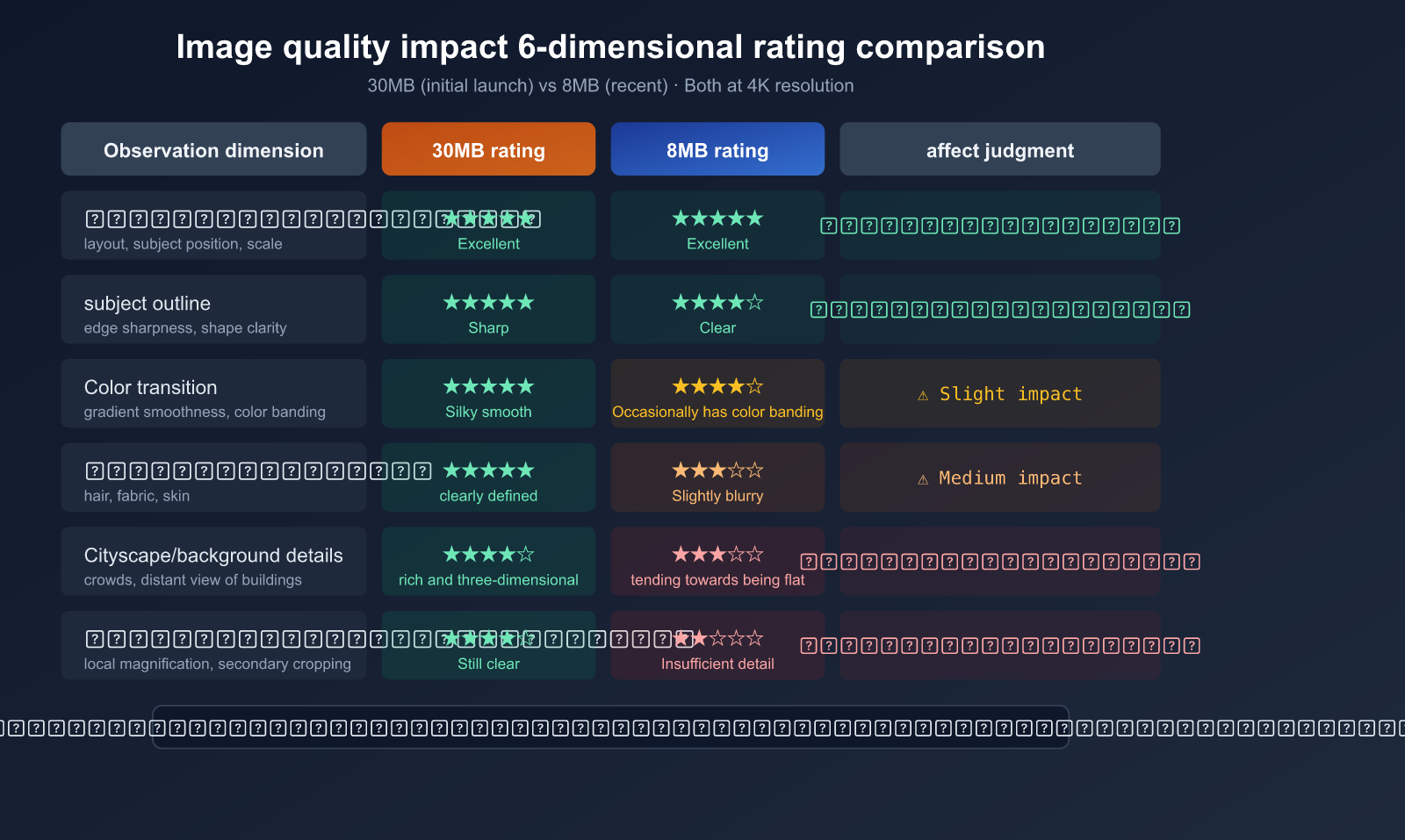
This is the question users care about most: even though the file size is smaller, how much has the image quality actually dropped?
Macro vs. Micro Differences
| Observation Dimension | 30MB Era | 8MB Era | Impact Level |
|---|---|---|---|
| Overall Composition | Clear and complete | Clear and complete | Almost no impact |
| Subject Outline | Sharp | Sharp | Almost no impact |
| Large Color Blocks | Accurate | Accurate | Almost no impact |
| Fine Texture | Crisp (hair/fabric) | Slightly blurred | Moderate impact |
| Color Gradients | Smooth transitions | Potential banding | Minor impact |
| Background Details | Rich and 3D | Tends to be flat | Moderate impact |
| Complex Scenes | Clear crowd/building details | Distant details "blurred" | Significant impact |
| Zoomed Cropping | Still clear after crop | Insufficient detail after crop | Significant impact |
Conclusion: Good for Daily Use, Not for Professional Work
- Social Media: Perfectly fine; you can't tell the difference between an 8MB 4K image and a 30MB one on a mobile screen.
- Web Graphics: Sufficient, and often better (faster loading).
- Printing/Large Format: Likely insufficient; lack of detail becomes apparent when enlarged.
- Commercial Design Assets: Use with caution; quality drops in fine textures and gradient areas.
Impact on Different Use Cases
High Quality Requirements ←——————————————→ Daily Use
  Printing    Commercial Design   Web Graphics   Social Media   Chat Sharing
     ❌             ⚠️               ✅              ✅              ✅
  Roll back      Watch details    Perfectly fine  Perfectly fine  Perfectly fine
💰 Cost Advice: For most AI application scenarios (web graphics, social sharing, prototyping), 8MB 4K images are perfectly adequate. By using the Nano Banana 2 API through APIYI (apiyi.com), the cost per image is as low as $0.06, which is far lower than the official price and offers excellent value for money.
User Strategies: 5 Ways to Ensure Image Quality
Strategy 1: Lower Resolution, Higher Quality Density
If you don't strictly need full 4K output, opting for 2K or 1K resolution can make a big difference:
- The success rate for 2K (~85%) is significantly higher than for 4K (<50%).
- With the same amount of compute, lower resolutions allow for more denoising steps, resulting in better details.
- 1K resolution has a success rate of >95% and almost never fails.
Strategy 2: Switch to Nano Banana Pro
Although Nano Banana Pro (Gemini 3 Pro) has also undergone compute adjustments, it still outperforms Nano Banana 2 in complex scenes and fine details.
import openai

client = openai.OpenAI(
    api_key="YOUR_API_KEY",
    base_url="https://api.apiyi.com/v1"  # APIYI unified interface
)

# Use Nano Banana Pro for higher quality output
response = client.images.generate(
    model="nano-banana-pro",
    prompt="A photorealistic portrait with intricate hair details",
    size="2048x2048",
    quality="hd"
)
print(response.data[0].url)
Strategy 3: Generate Multiple Times and Pick the Best
Generate the same prompt multiple times and select the best result. File sizes often fluctuate at the same resolution; choosing the version with a larger file size usually yields better details.
Strategy 4: Post-Processing Enhancement
Use super-resolution tools to post-process 8MB outputs:
- Real-ESRGAN: An open-source super-resolution model.
- Topaz Gigapixel AI: A commercial-grade upscaling tool.
- Pro tip: Scaling down to 2K first and then using an upscaling tool to reach 4K often produces better results than generating 4K directly.
Strategy 5: API Parameter Optimization
import openai

client = openai.OpenAI(
    api_key="YOUR_API_KEY",
    base_url="https://api.apiyi.com/v1"  # APIYI unified interface
)

# Experiment with different parameter combinations for optimal quality
response = client.images.generate(
    model="nano-banana-2",
    prompt="Detailed landscape with mountains, "
           "ultra detailed textures, 8K quality, "
           "masterpiece, best quality",
    size="2048x2048",   # 2K offers better stability
    quality="hd"
)
View batch generation comparison test code
import openai
import os
import time

client = openai.OpenAI(
    api_key=os.getenv("API_KEY"),
    base_url="https://api.apiyi.com/v1"
)

models = ["nano-banana-2", "nano-banana-pro"]
sizes = ["1024x1024", "2048x2048", "4096x4096"]

for model in models:
    for size in sizes:
        try:
            start = time.time()
            response = client.images.generate(
                model=model,
                prompt="A detailed cityscape at sunset",
                size=size,
                quality="hd"
            )
            elapsed = time.time() - start
            print(f"{model} | {size} | {elapsed:.1f}s | OK")
        except Exception as e:
            print(f"{model} | {size} | FAILED: {e}")
        time.sleep(2)
🚀 Recommended Approach: For scenarios requiring high quality, we suggest using APIYI (apiyi.com) to test both Nano Banana 2 and Nano Banana Pro at different resolutions simultaneously. This helps you find the best balance between quality and cost. The platform supports one-click model switching, making comparisons quick and easy.
Nano Banana 2 vs. Nano Banana Pro Compute Adjustment Comparison
Both models have followed a similar pattern: high quality at launch, followed by gradual scaling back.
| Comparison Dimension | Nano Banana Pro | Nano Banana 2 |
|---|---|---|
| Launch Date | Nov 2025 | Early 2026 |
| Initial File Size (4K) | Larger | ~30MB |
| Current File Size (4K) | Reduced | ~8MB |
| Quota Reduction | 3→2 images/day | TBD |
| RPM Adjustment | 10→5 | TBD |
| 4K Success Rate | <50% | Pending test |
| Official Pricing (4K) | $0.30/image | $0.16/image |
| APIYI Pricing | From $0.06/image | From $0.06/image |
Pattern Summary: Google's AI image generation models follow a clear "Launch-to-Reduction" cycle:
- Honeymoon Period (1-2 months after launch): Full compute power, maximum quality to attract users.
- Adjustment Period (3-4 months after launch): Compute resources are reallocated, quotas are reduced, and file sizes shrink.
- Stability Period: Runs on reduced resources until new compute (TPU v7) becomes available.
💡 Pro Tip: If you're looking for a consistent image quality experience, use APIYI (apiyi.com) to test the actual performance of both models at various resolutions. Choose the best solution based on the output file size and visual results.
FAQ
Q1: The file size dropped from 30MB to 8MB—did the resolution really stay the same?
Yes, the resolution remains unchanged at 4096×4096 pixels. File size depends on the "information density" (academically known as "information entropy") within the image, not just the pixel count. A solid-color 4K image might only be a few hundred KB, while a highly detailed 4K image can exceed 30MB. Reducing the file size means the amount of detail information has been compressed, even though the pixel dimensions remain the same.
Q2: Is this adjustment temporary or permanent?
Based on the precedent set by Nano Banana Pro, this is likely a long-term adjustment. Google's TPU v7 (Ironwood) isn't expected to reach full production capacity until mid-2026. Until then, reducing the computational resources per image is a logical strategy to maintain service availability. We recommend using APIYI (apiyi.com) to regularly test output quality, as things may improve once new computing power comes online.
Q3: Is there any way to get back to the previous 30MB quality?
Restoring the previous quality directly via API parameters is currently unlikely, as this is a server-side resource adjustment. However, you can try these workarounds: (1) Use 2K resolution to achieve higher quality density; (2) Generate multiple versions and pick the best one; (3) Use post-processing enhancement tools like Real-ESRGAN. You can quickly switch between Nano Banana 2 and Pro models via APIYI (apiyi.com) to compare the results.
Q4: What scenarios are 8MB 4K images suitable for?
They are perfectly fine for social media sharing, web graphics, prototyping, and PPT presentations. On a 1080p screen, you'll barely notice the difference. However, for printing, large-format output, or commercial designs that require zooming and cropping, we recommend using a 2K resolution + post-processing super-resolution workflow.
Q5: Which is better to use now: Nano Banana 2 or Pro?
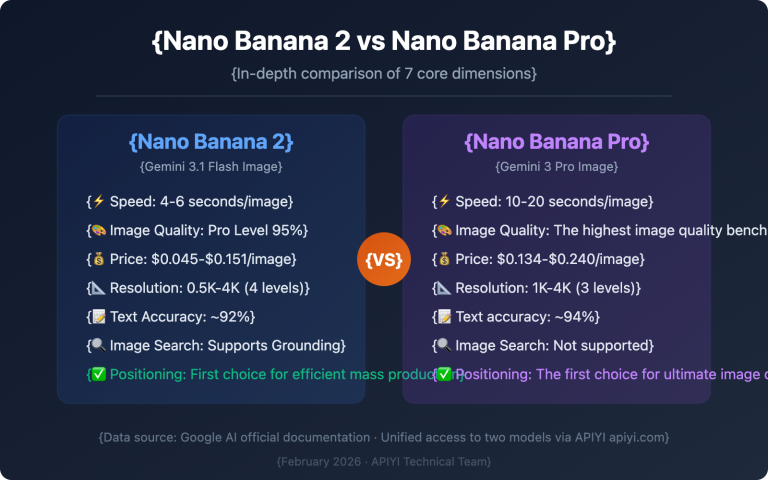
It depends on your needs. Nano Banana 2 is faster (4-8 seconds) and cheaper ($0.16 per 4K image), making it great for high-volume daily generation. Nano Banana Pro has a higher quality ceiling but is slower (10-20 seconds) and more expensive ($0.30 per 4K image). Through APIYI (apiyi.com), both models start at just $0.06 per image, allowing you to switch flexibly based on your specific project requirements.
Summary: Computing Power Adjustments are the New Normal, Flexibility is Key
The reduction of Nano Banana 2 Pro images from 30MB to 8MB is primarily due to Google reallocating computing resources amid tight TPU capacity. The combination of reducing denoising steps and lowering rendering precision has significantly shrunk file sizes while keeping the resolution intact.
3 Key Takeaways:
- It’s an Industry Standard: The "launch with high specs, optimize later" model is common for AI models, and it's not just Google doing it.
- Good Enough for Daily Use: For 90% of use cases, an 8MB 4K image is more than sufficient.
- Stay Flexible: You can effectively maintain quality by adjusting resolution, generating multiple versions for selection, and using post-processing enhancements.
We recommend using APIYI (apiyi.com) to flexibly invoke both Nano Banana 2 and Pro models to find the perfect balance between quality and cost.
References
-
Google AI Image Generation Documentation: Official API parameters and specifications
- Link:
ai.google.dev/gemini-api/docs/image-generation
- Link:
-
Nano Banana Pro 4K Quality Analysis: Resolution, limitations, and real-world performance
- Link:
datastudios.org
- Link:
-
Research on Diffusion Model Inference Optimization: Trade-offs between quality and cost when reducing denoising steps
- Link:
arxiv.org
- Link:
Author: APIYI Team | Keeping track of the latest in AI image generation. Visit APIYI at apiyi.com for the full range of Nano Banana API services and technical support.