Model knowledge has a cutoff date, but real-world business problems often require "up-to-the-minute" data. In 2025, Claude officially launched the native web_search tool, and in 2026, it upgraded to the web_search_20260209 version, which supports dynamic filtering. This transformed Claude API web searching from a "DIY headache" into a simple "one-line parameter" implementation.
This article systematically breaks down the latest implementation of Claude API web search in 2026. We'll focus on the parameters, billing, limitations, and code templates for the official native web_search / web_fetch tools, while comparing them against third-party MCPs and self-built RAG approaches. At the end, we provide an integration example using APIYI (apiyi.com)—simply swap the base_url and api_key to get the full workflow running in a domestic environment.
Key Points of Claude API Web Search
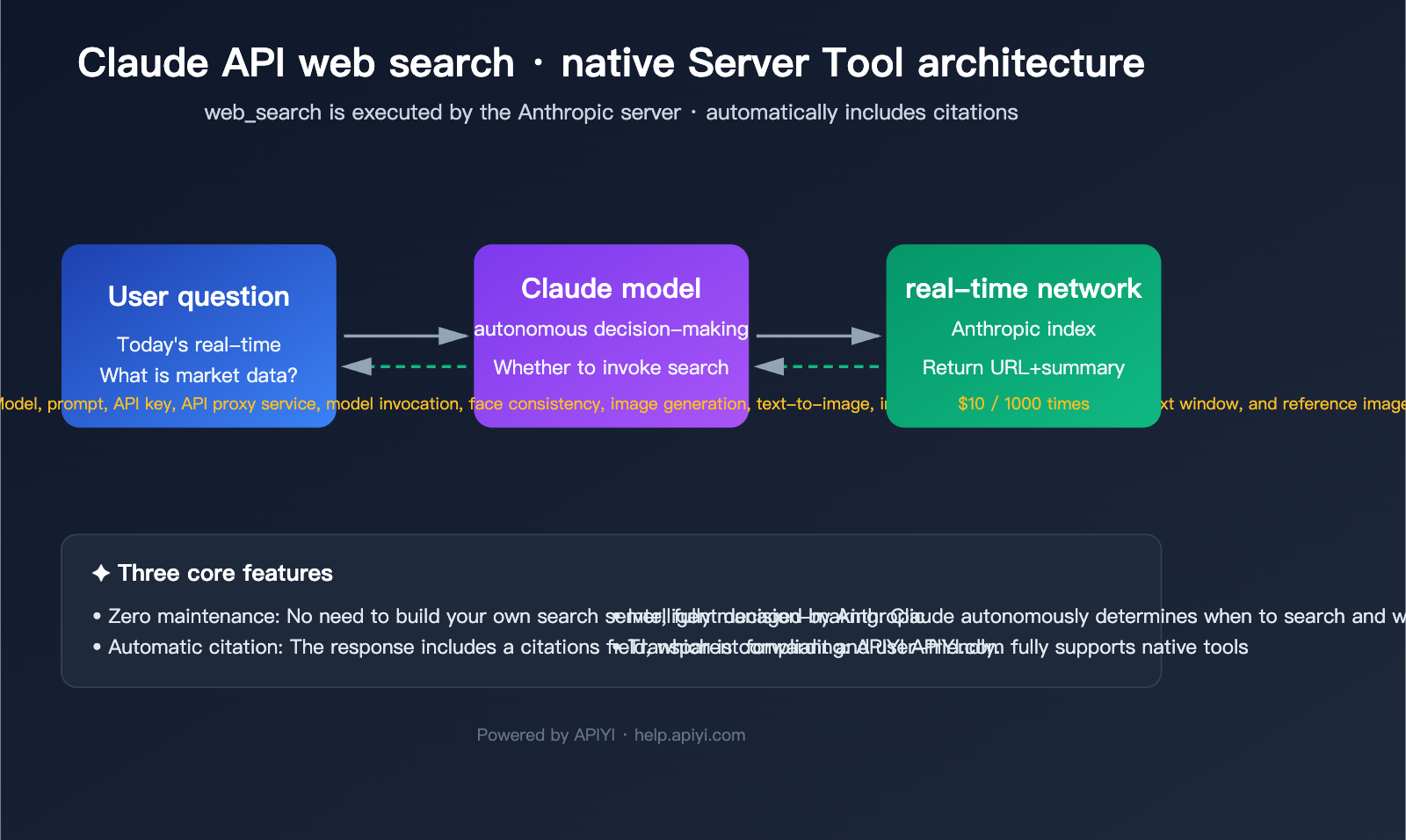
Before diving into the code, let's clarify the concepts. Claude API web search is essentially a Server Tool provided by Anthropic. This means the search is executed by Anthropic in the cloud; you don't need to connect to Google/Bing APIs yourself, nor do you need to deploy web crawlers.
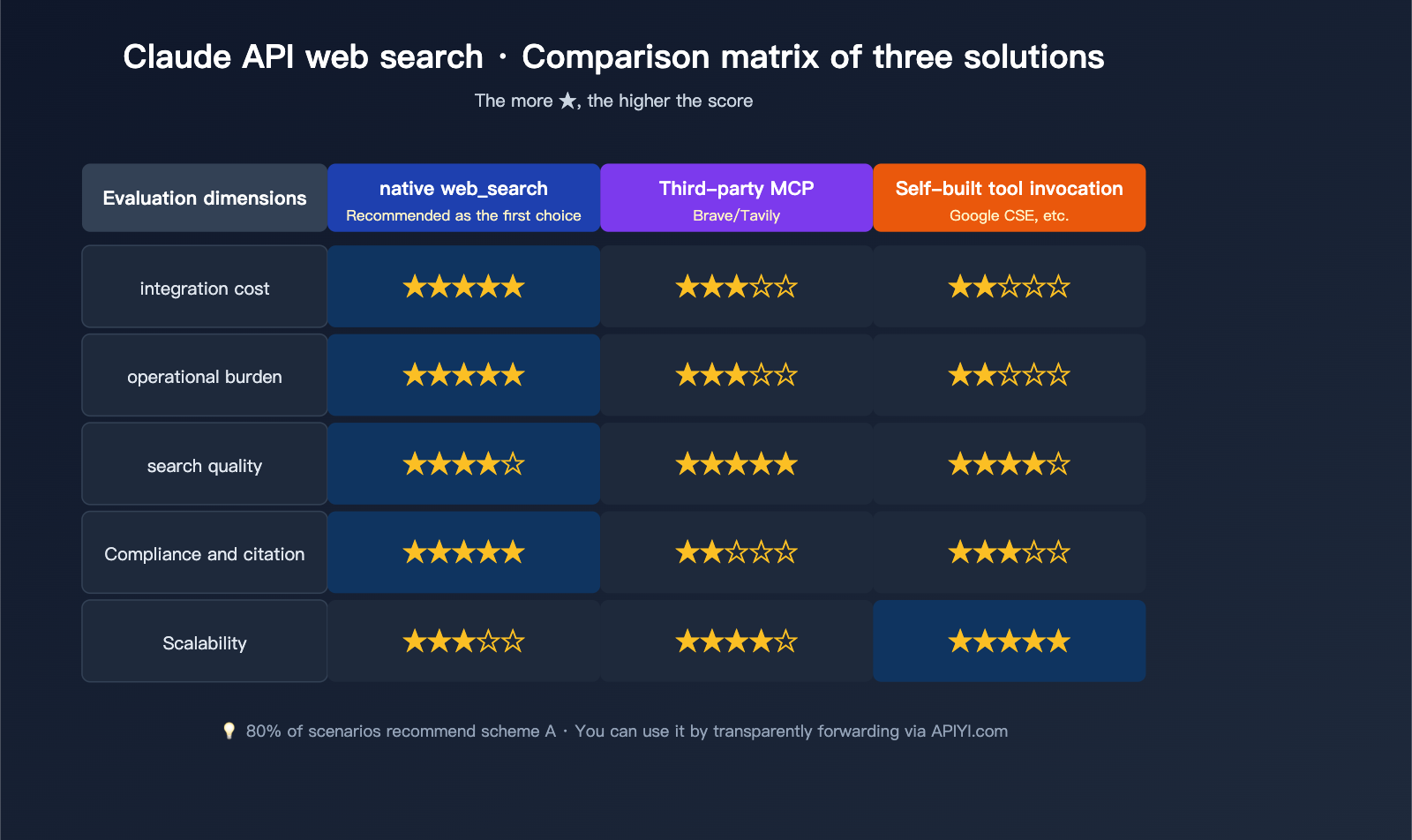
Quick Overview of Three Main Implementation Approaches
| Approach | Integration Complexity | Cost | Real-time Capability | Citations & Compliance |
|---|---|---|---|---|
Official Native web_search |
★☆☆ (One tool field) | $10 / 1000 requests + tokens | High (Anthropic real-time index) | Automatic citations |
| Third-party MCP (e.g., Brave/Tavily) | ★★☆ (Requires MCP server) | Third-party search API billing | Medium-High | Manual handling required |
| Self-built (Google CSE + tool calling) | ★★★ (Custom tool + parsing) | Google API quota | Medium | Fully self-managed |
🎯 Recommendation: If your core goal is to "enable Claude to answer recent events and supplement real-time data," the official native
web_searchis the current optimal solution. It offers zero maintenance, compliant citations, and supports flagship models like Sonnet 4.6 and Opus 4.7. We recommend connecting via the APIYI (apiyi.com) proxy service, which allows you to access the full capabilities of the official Anthropic API without needing a VPN.
Claude API Web Search Model Matrix
Not all Claude models support web_search. The new web_search_20260209 version has specific requirements for models:
| Model | Basic Version web_search_20250305 |
Dynamic Filtering Version web_search_20260209 |
|---|---|---|
| Claude Opus 4.7 | ✅ | ✅ |
| Claude Opus 4.6 | ✅ | ✅ |
| Claude Sonnet 4.6 | ✅ | ✅ |
| Claude Sonnet 4.5 | ✅ | ❌ |
| Claude Haiku 4.5 | ✅ | ❌ |
Dynamic Filtering is the core upgrade in the 2026 version: Claude will use a code execution tool to filter search results before they enter the context window, retaining only the relevant snippets. For long-document retrieval and technical literature reviews, this significantly reduces token consumption.
A Detailed Guide to Official Native Tools for Claude API Web Search
Anthropic provides two complementary native tools. Understanding the boundaries between them is the prerequisite for mastering Claude API web search.
The Division of Labor: web_search vs. web_fetch
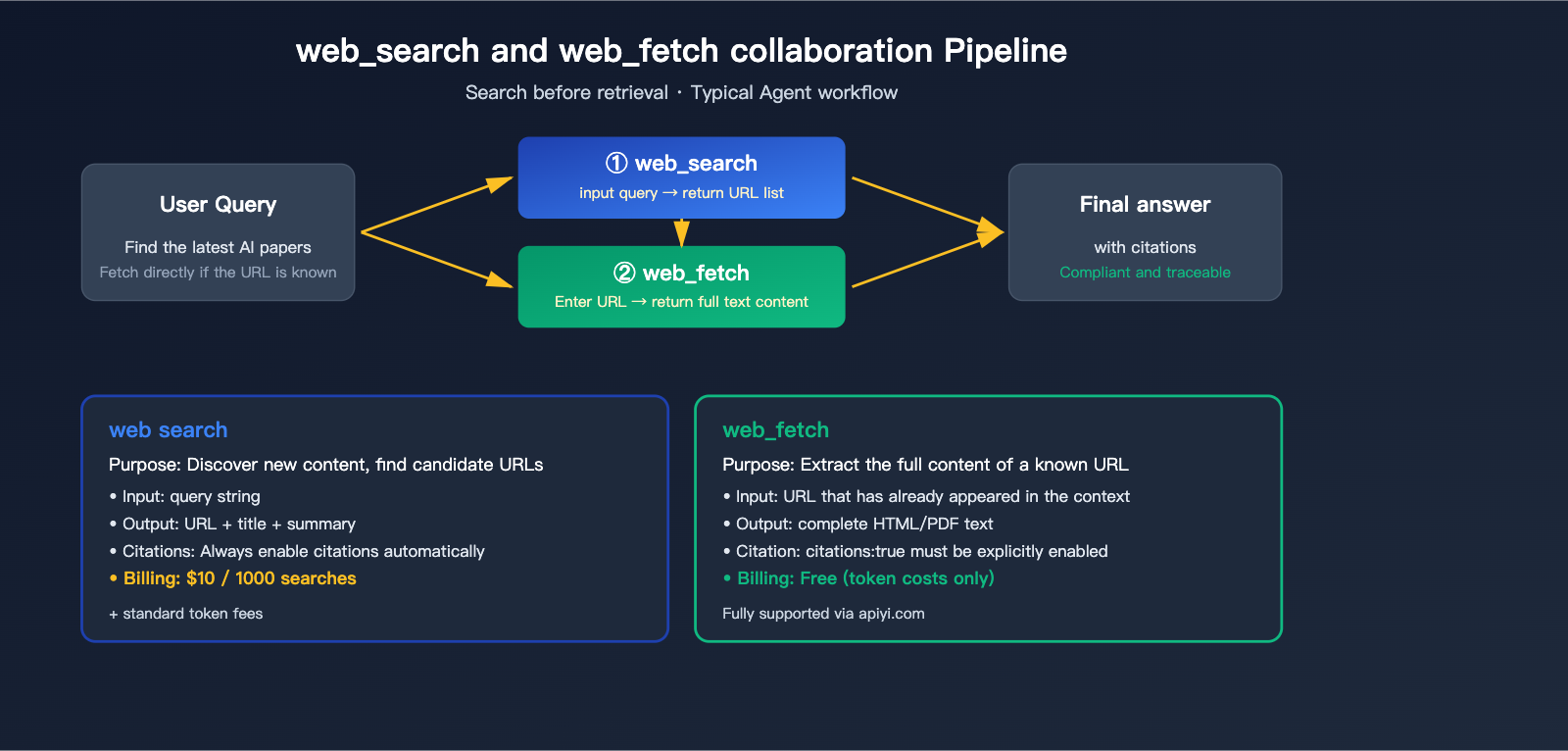
| Tool | Purpose | Input | Output | Billing |
|---|---|---|---|---|
web_search |
Discover new content | query string | URL + Title + Summary | $10 / 1000 calls |
web_fetch |
Extract full text from known URL | url string | Full HTML/PDF text | Free (only token usage applies) |
🎯 Architecture Tip: A typical Agent workflow is "search first, then fetch"—use
web_searchto find candidate pages, andweb_fetchto pull the full text of the most relevant ones. If the user has already provided a URL (e.g., "Analyze this article at example.com/article"), you can useweb_fetchdirectly without consuming search quotas. On APIYI (apiyi.com), both tools are transparently supported with no extra configuration required.
Full Parameter Definition for web_search
The table below outlines the official JSON parameters. You can combine them as needed:
| Parameter | Type | Required | Default | Description |
|---|---|---|---|---|
type |
string | ✅ | – | Fixed as web_search_20250305 or web_search_20260209 |
name |
string | ✅ | – | Fixed as web_search |
max_uses |
integer | ❌ | Unlimited | Max number of searches allowed per request |
allowed_domains |
string[] | ❌ | – | Only allow results from these domains (mutually exclusive with blocked) |
blocked_domains |
string[] | ❌ | – | Block results from these domains |
user_location |
object | ❌ | – | User's approximate location for localized search |
Structure of user_location:
{
  "type": "approximate",
  "city": "Shanghai",
  "region": "Shanghai",
  "country": "CN",
  "timezone": "Asia/Shanghai"
}
Error Handling for Claude API Web Search
When a search fails, the Anthropic API still returns HTTP 200, with error details embedded in the web_search_tool_result of the response body. Make sure to handle these error codes in your client code:
| Error Code | Meaning | Handling Suggestion |
|---|---|---|
too_many_requests |
Rate limit triggered | Implement backoff and retry, reduce concurrency |
max_uses_exceeded |
Exceeded max_uses limit |
Increase the limit or split the request |
query_too_long |
Query string too long | Truncate or rewrite the query |
invalid_input |
Invalid parameter format | Check the JSON structure |
unavailable |
Internal Anthropic error | Retry after a short delay |
⚠️ Billing Note: Failed
web_searchrequests are not billed. However, if you trigger a successful search and then encounter a failure, the previous successful call will still be billed at $10 / 1000 calls. We recommend checking the detailed request billing logs in the APIYI (apiyi.com) console to troubleshoot any abnormal consumption.
Getting Started with Claude API Web Search
Let's run through the complete workflow with minimal code. All examples use the transparent proxy interface from APIYI (apiyi.com)—you don't need to change any business logic; just point your base_url to the proxy node and replace your ANTHROPIC_API_KEY with your APIYI key.
Minimal cURL Example
A minimal, runnable Claude API web search request:
curl https://vip.apiyi.com/v1/messages \
  -H "x-api-key: $APIYI_API_KEY" \
  -H "anthropic-version: 2023-06-01" \
  -H "content-type: application/json" \
  -d '{
    "model": "claude-sonnet-4-6",
    "max_tokens": 1024,
    "messages": [
      {"role": "user", "content": "Summarize in Chinese the latest models released by OpenAI in April 2026"}
    ],
    "tools": [{
      "type": "web_search_20250305",
      "name": "web_search",
      "max_uses": 5
    }]
  }'
The response structure will contain three content blocks: Claude's decision text, server_tool_use (the actual query executed), web_search_tool_result (the list of URLs), and the final answer text with citations.
Full Python SDK Example (Including web_fetch)
import anthropic

client = anthropic.Anthropic(
    base_url="https://vip.apiyi.com",
    api_key="sk-your-apiyi-key",
)

response = client.messages.create(
    model="claude-opus-4-7",
    max_tokens=4096,
    messages=[{
        "role": "user",
        "content": "Find papers on AI Agent evaluation from the last month and provide a detailed summary of the most relevant one"
    }],
    tools=[
        {
            "type": "web_search_20260209",
            "name": "web_search"
        },
        {
            "type": "web_fetch_20260209",
            "name": "web_fetch",
            "max_uses": 3,
            "citations": {"enabled": True}
        }
    ]
)

for block in response.content:
    if block.type == "text":
        print(block.text)
    elif block.type == "server_tool_use":
        print(f"[Tool Call] {block.name}: {block.input}")
🎯 Code Tip: The example above uses a dynamic filtering combination of
web_search_20260209+web_fetch_20260209. Paired with Claude Opus 4.7, this can significantly reduce token consumption in long-document scenarios. For simple real-time Q&A, you can switch the model toclaude-sonnet-4-6and use the basicweb_search_20250305for lower costs. All calls are proxied via APIYI (apiyi.com) with stability identical to the official service.
TypeScript / Node.js Example
import Anthropic from "@anthropic-ai/sdk";

const client = new Anthropic({
  baseURL: "https://vip.apiyi.com",
  apiKey: process.env.APIYI_API_KEY,
});

const response = await client.messages.create({
  model: "claude-sonnet-4-6",
  max_tokens: 2048,
  messages: [
    { role: "user", content: "What's the weather like in Shanghai today?" }
  ],
  tools: [{
    type: "web_search_20250305",
    name: "web_search",
    max_uses: 3,
    user_location: {
      type: "approximate",
      city: "Shanghai",
      region: "Shanghai",
      country: "CN",
      timezone: "Asia/Shanghai"
    }
  }]
});

console.log(response.content);
Handling Streaming Responses
When stream: true is enabled, the search process will be pushed in real-time via SSE events. You will notice a "pause" during the search execution—this is because Claude is waiting for the Anthropic server to complete the search:
with client.messages.stream(
    model="claude-sonnet-4-6",
    max_tokens=2048,
    messages=[{"role": "user", "content": "Check the latest pricing for Claude 4.7"}],
    tools=[{"type": "web_search_20250305", "name": "web_search", "max_uses": 2}]
) as stream:
    for event in stream:
        if event.type == "content_block_start":
            block = event.content_block
            if block.type == "server_tool_use":
                print(f"\n[Searching] Query streaming will begin shortly...")
            elif block.type == "web_search_tool_result":
                print(f"[Search Complete] Found {len(block.content)} results")
        elif event.type == "content_block_delta":
            if hasattr(event.delta, "text"):
                print(event.delta.text, end="", flush=True)
Comparison and Selection of Claude API Web Search Solutions
Now that we’ve covered the official interface, let’s dive into the decision-making process. There are actually three paths for Claude API web search, each suited for different scenarios.
Option A: Official Native web_search (Recommended)
Pros:
- Zero maintenance: No need to build your own server; it's fully managed by Anthropic.
- Automatic citations: Every response automatically includes
citations, making it compliant and user-friendly. - Model integration: Claude decides autonomously when to search and what to search for.
- Transparent billing: $10 per 1,000 requests, consolidated into your Anthropic bill.
Cons:
- Limited to sources indexed by Anthropic (you can't swap out the search engine).
- Some model versions have restrictions (Haiku/older Sonnet versions only support the basic version).
Best for: 90% of general conversational agents, Q&A assistants, and research tasks.
Option B: Third-party MCP Services (Brave/Tavily/Serper, etc.)
You can use the Model Context Protocol to launch a local or remote MCP server, injecting search capabilities into Claude:
# Using Tavily MCP as an example, you'll need to run this first: npm install -g @tavily/mcp-server
claude mcp add tavily-search npx -- @tavily/mcp-server
Pros:
- Flexibility: You can freely swap search backends (Brave for privacy, Tavily for LLM-friendliness).
- Customization: You can clean up results or add metadata.
- Native support: Works out-of-the-box with clients like Claude Code and Cursor.
Cons:
- Requires maintaining an additional MCP server process.
- Search results won't automatically generate
citationsthat follow Anthropic's specific format. - You'll need to manage the quotas and billing for third-party search APIs yourself.
Best for: When you already have an enterprise account with Brave/Tavily or have specific requirements for the search backend.
Option C: Custom Tool Invocation (Google CSE + Custom Tool)
The traditional approach—define a tool yourself, call Google Custom Search / Bing API in your backend code, and feed the results back into the messages array:
tools = [{
    "name": "google_search",
    "description": "Search Google and return top N results",
    "input_schema": {
        "type": "object",
        "properties": {
            "query": {"type": "string"}
        },
        "required": ["query"]
    }
}]
Pros: Complete control; you can integrate internal enterprise search or private knowledge bases.
Cons: You're responsible for everything: prompt design, result ranking, citation generation, and error retries. Plus, Claude won't "automatically" call it—you'll need to explicitly guide it in the system prompt.
Best for: Enterprise-level scenarios requiring strict compliance, heavy customization, or integration with private data sources.
Decision Tree for the Three Solutions
| Your Needs | Recommended Solution |
|---|---|
| Want to get up and running fast, no specific requirements | Option A Native web_search |
| Need to swap search backends (privacy/compliance) | Option B Third-party MCP |
| Must integrate private data sources | Option C Custom Tool + RAG |
| Unstable access to Anthropic in China | Option A + APIYI apiyi.com proxy |
🎯 Note for developers in China: Official Anthropic API access can be unstable in China and requires a foreign phone number for registration. We recommend using the transparent proxy service from APIYI (apiyi.com)—it fully supports all Anthropic Server Tools (including
web_search,web_fetch, andcode_execution). Your code requires zero modifications; simply change thebase_urltohttps://vip.apiyi.comand use your APIYI API key.
Advanced Usage of Claude API Web Search
Domain Whitelisting: Performing "Vertical Search"
Need Claude to restrict its search to specific domains? Use allowed_domains:
tools=[{
    "type": "web_search_20250305",
    "name": "web_search",
    "max_uses": 5,
    "allowed_domains": [
        "docs.python.org",
        "pypi.org",
        "github.com"
    ]
}]
Keep these boundaries in mind:
allowed_domainsandblocked_domainscannot be used simultaneously.- Subdomain matching is exact:
docs.example.comwill not includeapi.example.com. - Request-level domain restrictions must be compatible with organization-level configurations; you cannot expand the scope set by your organization administrator.
Enabling web_fetch Citations
While web_search has citations enabled by default, web_fetch requires explicit activation:
{
    "type": "web_fetch_20250910",
    "name": "web_fetch",
    "max_uses": 5,
    "citations": {"enabled": True},
    "max_content_tokens": 50000
}
max_content_tokens is used to truncate massive documents, preventing a single fetch from blowing up your context window. Here’s a quick reference:
| Content Type | Size | Approx. Tokens |
|---|---|---|
| Standard Webpage | 10 KB | ~2,500 |
| Large Documentation Page | 100 KB | ~25,000 |
| Research Paper PDF | 500 KB | ~125,000 |
encrypted_content in Multi-turn Conversations
Every result returned by web_search includes an encrypted_content field. If you want Claude to continue referencing previous search results in a multi-turn conversation, you must pass this field back exactly as it was received—otherwise, the context for those citations will be lost in subsequent turns.
messages.append({
    "role": "assistant",
    "content": previous_response.content  # Keep it intact, including encrypted_content
})
messages.append({
    "role": "user",
    "content": "Analyze the second article found earlier in more detail."
})
🎯 Engineering Tip: When integrating with Agent frameworks (like LangChain or LlamaIndex), always verify that the framework fully passes through all content blocks from the Claude response. Many frameworks "sanitize" fields like
server_tool_use, which breaks citations. We recommend building directly on the Anthropic SDK and using the APIYI (apiyi.com) API proxy service, which ensures behavior identical to the official API.
Practical Use Cases for Claude API Web Search
Now that we've covered the theory, let's look at some best-practice combinations for Claude API web search in real-world business scenarios.
Scenario 1: Real-time News Assistant
If a user asks, "How is the stock market doing today?", you clearly need real-time data. Here’s the configuration strategy:
response = client.messages.create(
    model="claude-sonnet-4-6",
    max_tokens=1024,
    system="You are a financial assistant. Always use web_search for real-time quotes or news. Answers must include citations.",
    messages=[{"role": "user", "content": "What is the closing price of the Shanghai Composite Index today? How did it perform?"}],
    tools=[{
        "type": "web_search_20250305",
        "name": "web_search",
        "max_uses": 3,
        "allowed_domains": ["sina.com.cn", "eastmoney.com", "163.com"],
        "user_location": {
            "type": "approximate",
            "country": "CN",
            "timezone": "Asia/Shanghai"
        }
    }]
)
Key Point: Use allowed_domains to lock in authoritative financial sites and user_location to ensure Claude prioritizes Chinese-language results.
Scenario 2: Technical Documentation RAG Enhancement
Ensure Claude prioritizes official documentation when answering technical questions:
response = client.messages.create(
    model="claude-opus-4-7",
    max_tokens=4096,
    messages=[{
        "role": "user",
        "content": "How do I implement WebSocket keep-alive in FastAPI? Provide a complete example."
    }],
    tools=[
        {
            "type": "web_search_20260209",
            "name": "web_search",
            "max_uses": 5,
            "allowed_domains": [
                "fastapi.tiangolo.com",
                "docs.python.org",
                "github.com",
                "stackoverflow.com"
            ]
        },
        {
            "type": "web_fetch_20260209",
            "name": "web_fetch",
            "max_uses": 3,
            "citations": {"enabled": True}
        }
    ]
)
Key Point: Use the dynamic filtering of web_search_20260209 to strip away irrelevant HTML, then use web_fetch to pull the full text of the most relevant official documentation.
Scenario 3: Academic Research Assistant
For scenarios requiring strict citations and long context analysis, we recommend Opus 4.7 with dual tools:
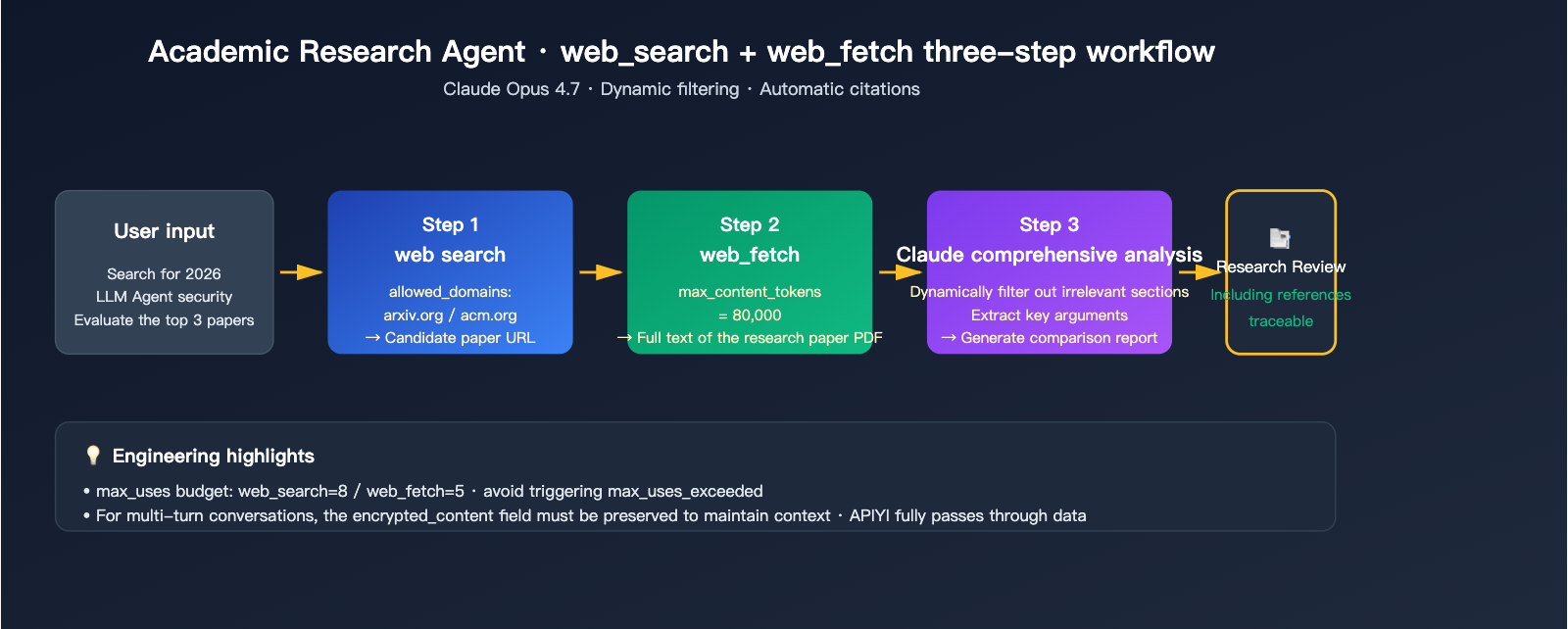
response = client.messages.create(
    model="claude-opus-4-7",
    max_tokens=8192,
    messages=[{
        "role": "user",
        "content": "Find papers from 2026 regarding LLM Agent security evaluation and select the Top 3 for a comprehensive comparison."
    }],
    tools=[
        {
            "type": "web_search_20260209",
            "name": "web_search",
            "max_uses": 8,
            "allowed_domains": ["arxiv.org", "openreview.net", "acm.org"]
        },
        {
            "type": "web_fetch_20260209",
            "name": "web_fetch",
            "max_uses": 5,
            "citations": {"enabled": True},
            "max_content_tokens": 80000
        }
    ]
)
🎯 Scenario-based Advice: Different business needs have varying priorities regarding search quality, citation compliance, and cost. We recommend creating separate API keys for each business scenario on APIYI (apiyi.com). This makes it easier to split billing data and monitor actual search counts and token consumption per scenario, rather than mixing all calls together.
Engineering Best Practices for Claude API Web Search
Getting a demo running is easy, but there are a few hurdles to clear before you can truly deploy Claude API web search in a production environment.
Practice 1: Cost Optimization with Prompt Caching
Even though the Server Tool definition is concise, it still represents a significant fixed cost when combined with a system prompt. Enable prompt caching to save:
response = client.messages.create(
    model="claude-sonnet-4-6",
    max_tokens=2048,
    system=[{
        "type": "text",
        "text": "You are a professional research assistant...(500-word system prompt omitted)",
        "cache_control": {"type": "ephemeral"}
    }],
    messages=[...],
    tools=[
        {
            "type": "web_search_20250305",
            "name": "web_search",
            "max_uses": 5,
            "cache_control": {"type": "ephemeral"}
        }
    ]
)
Real-world test: For repeated requests within 5 minutes, the token cost for the system + tools portion can be reduced by up to 90%.
Practice 2: Use Streaming to Avoid Timeouts
A single web_search execution can take 5-15 seconds. If your downstream services (gateways, clients) have a 30-second timeout limit, make sure to enable stream=True to keep the connection alive via streaming heartbeats.
Practice 3: Maintaining Consistency in Multi-turn Conversations
In multi-turn dialogues, Claude might reference search results from previous turns. You must retain the full content array of all previous assistant messages in every request; don't just keep the text portion:
# ❌ Incorrect approach
messages.append({"role": "assistant", "content": response.content[-1].text})

# ✅ Correct approach
messages.append({"role": "assistant", "content": response.content})
Practice 4: Rate Limiting and Retry Strategies
The rate limit for web_search is independent of the standard message interface. It's recommended to wrap a retry logic with exponential backoff at the SDK level:
| Error Code | Retry Strategy | Max Retries |
|---|---|---|
too_many_requests |
Exponential backoff (2s/4s/8s) | 3 |
unavailable |
Fixed delay (5s) | 2 |
max_uses_exceeded |
Do not retry, increase max_uses | – |
query_too_long |
Do not retry, truncate query | – |
🎯 Production Tip: Log all
web_searcherror responses to your monitoring system and regularly analyze the percentage oftoo_many_requests—this is a key metric for determining if you need to scale your concurrency. When using the APIYI (apiyi.com) platform, you can view success rates and average response times directly in the console, making operations much easier.
Claude API Web Search FAQ
Q1: Does the APIYI API proxy service support native web_search? Do I need to change my code?
Yes, and no code changes are required. APIYI (apiyi.com) uses a transparent forwarding architecture that fully passes through all official Anthropic Server Tools. Simply change your base_url to https://vip.apiyi.com and swap in your APIYI API key. Your existing code will run without a single modification—including all native tools like web_search, web_fetch, and code_execution.
Q2: How is web_search billed? Is $10/1000 requests expensive?
Each search costs $0.01, regardless of how many results are returned. Failed searches are not billed. For comparison: Tavily is $0.005/search, Brave is $0.006/search, and Google CSE is $0.005/query (after the free tier). Native web_search is slightly more expensive, but it eliminates the engineering costs of maintaining MCP servers and handling citation compliance, making it more cost-effective for small to medium-sized teams overall.
Q3: Why am I getting a max_uses_exceeded error?
Claude may call web_search multiple times in a single conversation (it decides autonomously how many times to search). If you set "max_uses": 1 but the question requires 3 searches to answer, this error will trigger. We recommend a budget of 5-10 uses for complex questions, and 1-2 for simple Q&A.
Q4: Can web_search search Chinese websites?
Yes. web_search is powered by Anthropic's real-time index and has excellent coverage of Chinese content (including WeChat Official Accounts, Zhihu, CSDN, etc.). If you want to restrict searches to Chinese sites only, you can use the allowed_domains whitelist.
Q5: web_search consumes a lot of tokens for long-form research. How can I optimize this?
Three optimization strategies:
- Use the
web_search_20260209dynamic filtering version (requires Claude Opus/Sonnet 4.6+), which automatically discards irrelevant snippets. - Use the
max_content_tokensparameter inweb_fetchto limit the pull limit per page. - Enable prompt caching to cache tool definitions and system prompts, reducing the cost of repeated requests.
Q6: Can I mix third-party MCP search solutions with native web_search?
Yes. Claude supports defining multiple tools simultaneously, but be careful to clearly describe the differences in the tool descriptions—for example, describe the MCP tavily_search as "search academic papers" and the native web_search as "search general web pages." Claude will choose based on these descriptions. However, to reduce ambiguity, we recommend using a single search tool per scenario.
Q7: What should I do if Claude API web search fails when called from within China?
There are two main reasons: unstable direct connections to the Anthropic API, and the fact that Anthropic's backend may block IP addresses from mainland China during web_search execution. The most direct solution is to use the APIYI (apiyi.com) API proxy service—all web_search requests are forwarded to Anthropic via APIYI's overseas nodes, and responses are sent back, ensuring stability comparable to a direct overseas connection.
Summary and Selection Guide for Claude API Web Search Solutions
Looking back at this guide, Claude API web search has matured to the point of being "plug-and-play" in 2026. Here’s the bottom line:
✅ For 80% of projects, the official native
web_searchis sufficient—it’s easy to configure, compliant with citation standards, and maintained by Anthropic. Only consider third-party MCPs or custom-built tools for the remaining 20% of scenarios with highly specific requirements.
Implementation Checklist
If you're ready to integrate Claude API web search into your project today:
- Choose your model: Use
claude-sonnet-4-6for general tasks (great cost-performance ratio) andclaude-opus-4-7for complex research. - Select the tool version: Prioritize
web_search_20260209(for dynamic filtering), and fall back toweb_search_20250305for older models. - Design
max_uses: Set it to 1-3 for simple Q&A, and 5-10 for complex research. - Pair with
web_fetch: When you need full-text analysis, use it alongsideweb_fetchto extract content from candidate pages. - Configure access: If you're in China, use the APIYI (apiyi.com) API proxy service for transparent forwarding—no VPN required, and no code changes needed.
🎯 Final Advice: The key to Claude API web search isn't just "whether it works," but "how to balance search quality, token costs, and response latency." We recommend running a few real-world business cases on the APIYI (apiyi.com) platform first. Track the actual number of searches and token consumption per conversation before deciding whether to implement advanced optimizations like prompt caching or dynamic filtering. The platform supports the full range of Claude models and native Server Tools, making it perfect for rapid iteration.
Author: APIYI Technical Team | For more practical Claude API tutorials, visit help.apiyi.com