Author's Note: A comprehensive breakdown of the Claude Code March-April 2026 Changelog, covering the Opus 4.6 1M context window, NO_FLICKER rendering, /powerup interactive tutorials, team onboarding, and other major functional iterations.
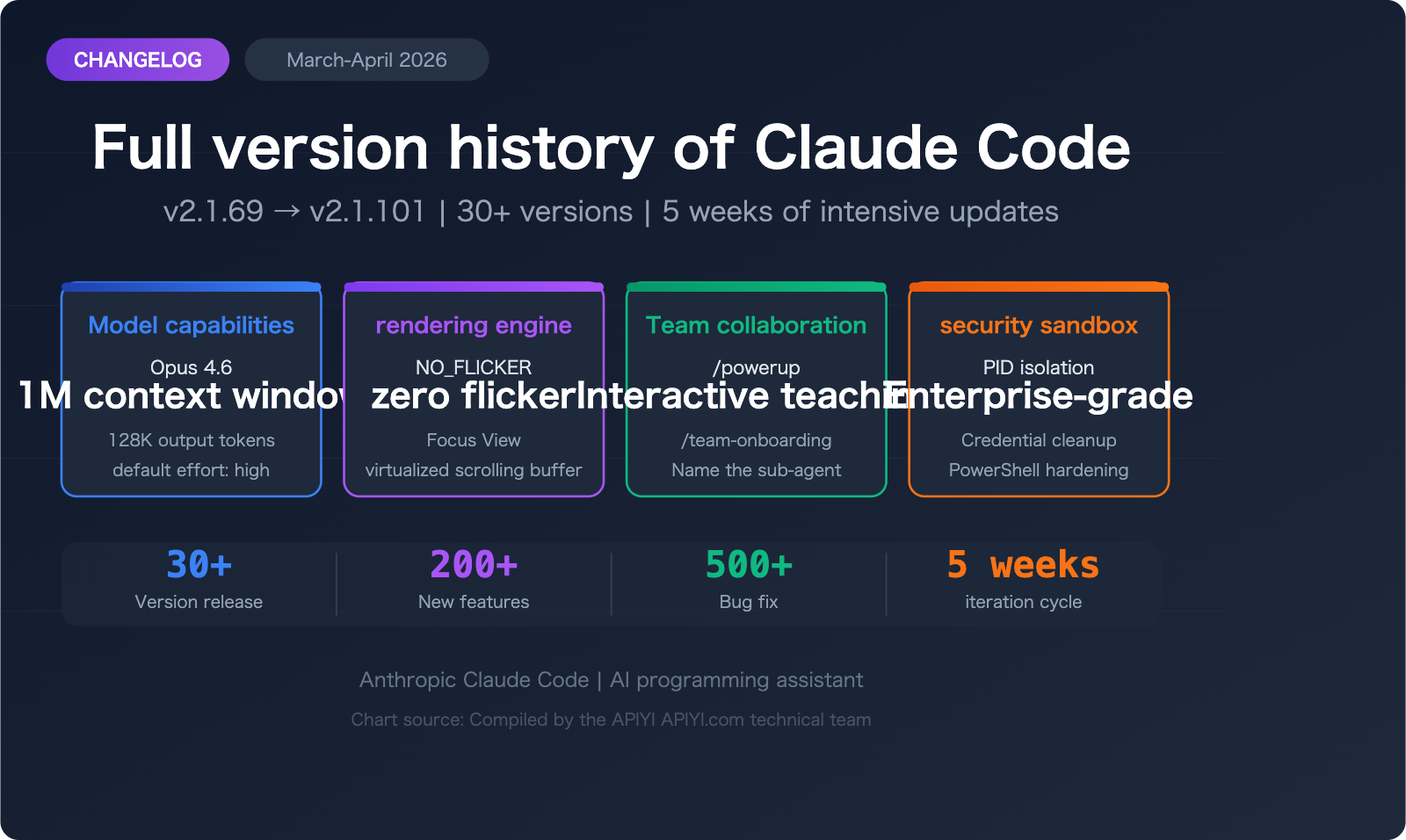
Anthropic's Claude Code entered its most intensive iteration cycle ever between March and April 2026, pushing from v2.1.69 to v2.1.101 in just five weeks—that's over 30 releases! From the full rollout of the Opus 4.6 1M context window to the brand-new flicker-free rendering engine, interactive learning system, and enterprise-grade security sandbox, every update is redefining the boundaries of what an AI programming assistant can do.
Core Value: Get up to speed on all major Claude Code updates in just 3 minutes, and master the key feature changes and practical tips.
Claude Code Changelog: Core Updates Overview
| Update Area | Key Features | Scope |
|---|---|---|
| Model Capability | Opus 4.6 1M context window, default effort increased to "high" | All users |
| Rendering Engine | NO_FLICKER mode, Focus View | Terminal experience |
| Team Collaboration | /team-onboarding, /powerup interactive tutorials | Team users |
| Security Sandbox | PID namespace isolation, PowerShell permission hardening | Linux/Windows |
| MCP Ecosystem | OAuth RFC 9728 support, 500K result persistence, plugin system | Developers |
Claude Code Changelog: Iteration Pace
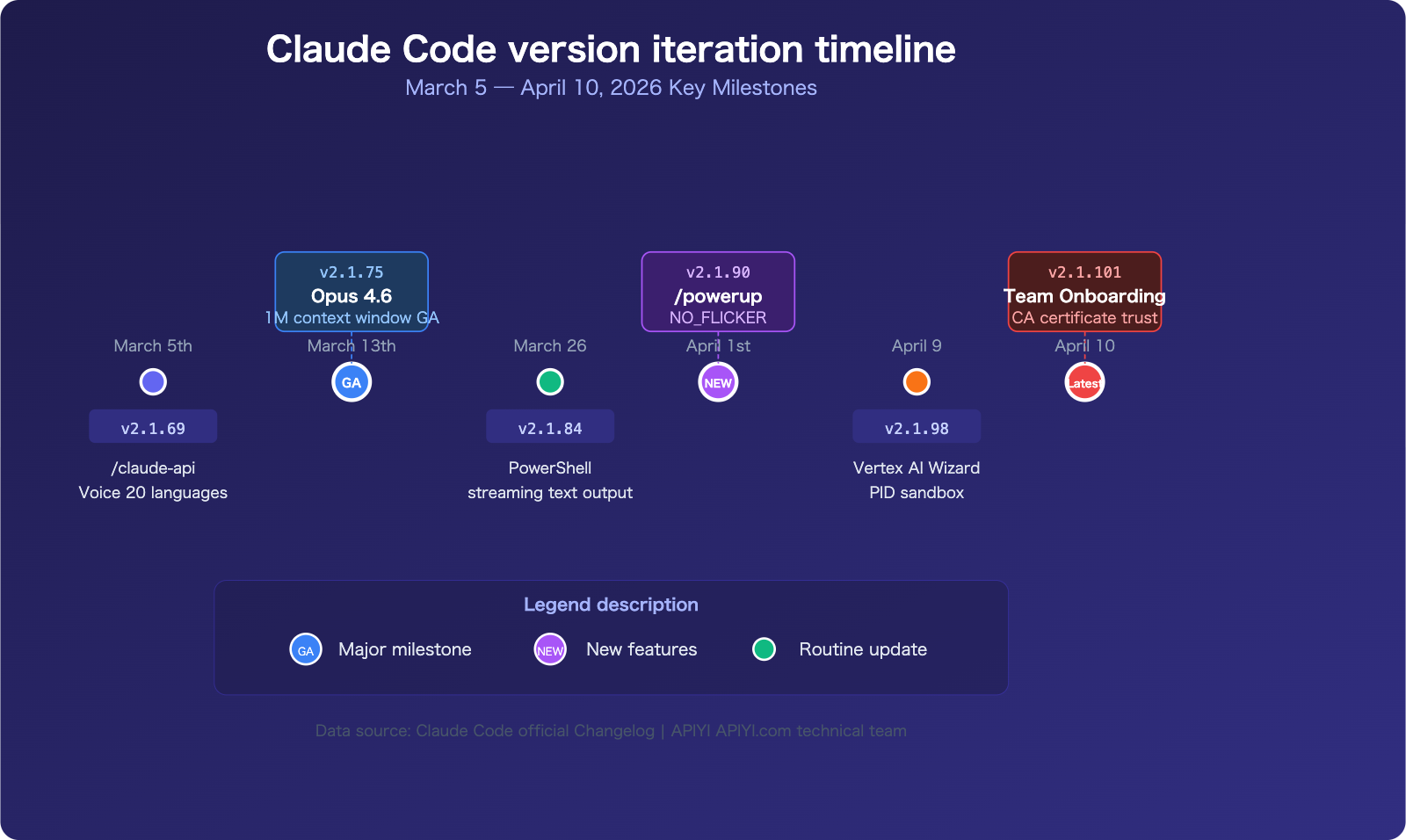
Throughout March and April 2026, Claude Code maintained an almost daily release frequency. Here are the major milestone versions:
- v2.1.75 (March 13): Opus 4.6 1M context window officially GA
- v2.1.84 (March 26): PowerShell tool preview, linear text streaming output
- v2.1.90 (April 1): /powerup interactive tutorials, NO_FLICKER rendering engine
- v2.1.92 (April 4): Bedrock interactive setup wizard, /release-notes version selector
- v2.1.98 (April 9): Vertex AI setup wizard, Monitor tool, child process sandbox
- v2.1.101 (April 10): /team-onboarding, OS CA certificate trust
This pace of iteration is nearly unmatched in the AI programming tool space. By connecting to the Claude API via APIYI (apiyi.com), developers can experience these latest capabilities in their own projects immediately.
Decoding the Major Features of the Claude Code Changelog
1. Opus 4.6 1M Context Window (v2.1.75)
This is arguably the most significant milestone for Claude Code to date. On March 13, 2026, Anthropic announced that the 1M context window for Opus 4.6 is now fully available to Max, Team, and Enterprise users.
What does this mean for you?
- A single conversation can now handle approximately 750,000 words of code and context.
- It scored 76% on the MRCR v2 8-needle benchmark, far outperforming the 18.5% score of Sonnet 4.5.
- There’s no long-context surcharge—1 million tokens cost the same as 10,000 tokens.
- The default output token limit has been increased to 64K (with a maximum of 128K).
This is a massive leap forward for understanding and refactoring large codebases. Combined with the allowRead sandbox file system setting added in v2.1.77, Claude Code can now safely read and analyze your entire project.
2. NO_FLICKER Rendering Engine (v2.1.89-90)
The terminal flickering issue that the community has been reporting for a long time has finally been resolved. By setting the environment variable CLAUDE_CODE_NO_FLICKER=1, you can enable the brand-new alt-screen rendering engine, which provides virtualized scroll buffering.
Core issues resolved:
- Flickering caused by content changes above the visible area in non-fullscreen mode.
- Terminal scroll buffers being cleared during long sessions.
- Mouse scroll escape sequences occasionally leaking into the prompt.
v2.1.97 further introduced the Focus View (toggle with Ctrl+O), which, when used in NO_FLICKER mode, displays only the prompt, tool summaries, and the final response, significantly boosting your focus while coding.
3. /powerup Interactive Learning System (v2.1.90)
This is Claude Code’s first official interactive learning system, teaching you core features through in-terminal animations. Currently, it covers modules including:
- Context management
- Hooks system
- MCP protocol
- Subagents
- /loop command
For developers joining a new team, /powerup is far more efficient than reading through documentation.
4. /team-onboarding (v2.1.101)
The latest version adds the /team-onboarding command, which can automatically generate a quick-start guide for team members based on your local Claude Code usage history. This is incredibly practical for teams looking to scale their AI programming practices quickly.
This version also adds default trust for OS CA certificate stores, meaning enterprise TLS proxies will work out of the box without extra configuration.
Claude Code Changelog: Security and Permission Enhancements
| Version | Security Enhancement | Description |
|---|---|---|
| v2.1.84 | PowerShell Tool (Windows Preview) | Added native Windows script support |
| v2.1.90 | PermissionDenied Hook | Triggered after auto-mode classifier rejection; supports retry |
| v2.1.97 | Composite Command Hardening | Fixed backslash escape bypass for Bash permissions |
| v2.1.98 | PID Namespace Isolation | Sandboxing for Linux subprocesses |
| v2.1.101 | Command Injection Fix | LSP detection in POSIX which fallback |
Deep Dive: Claude Code Sandbox Security System
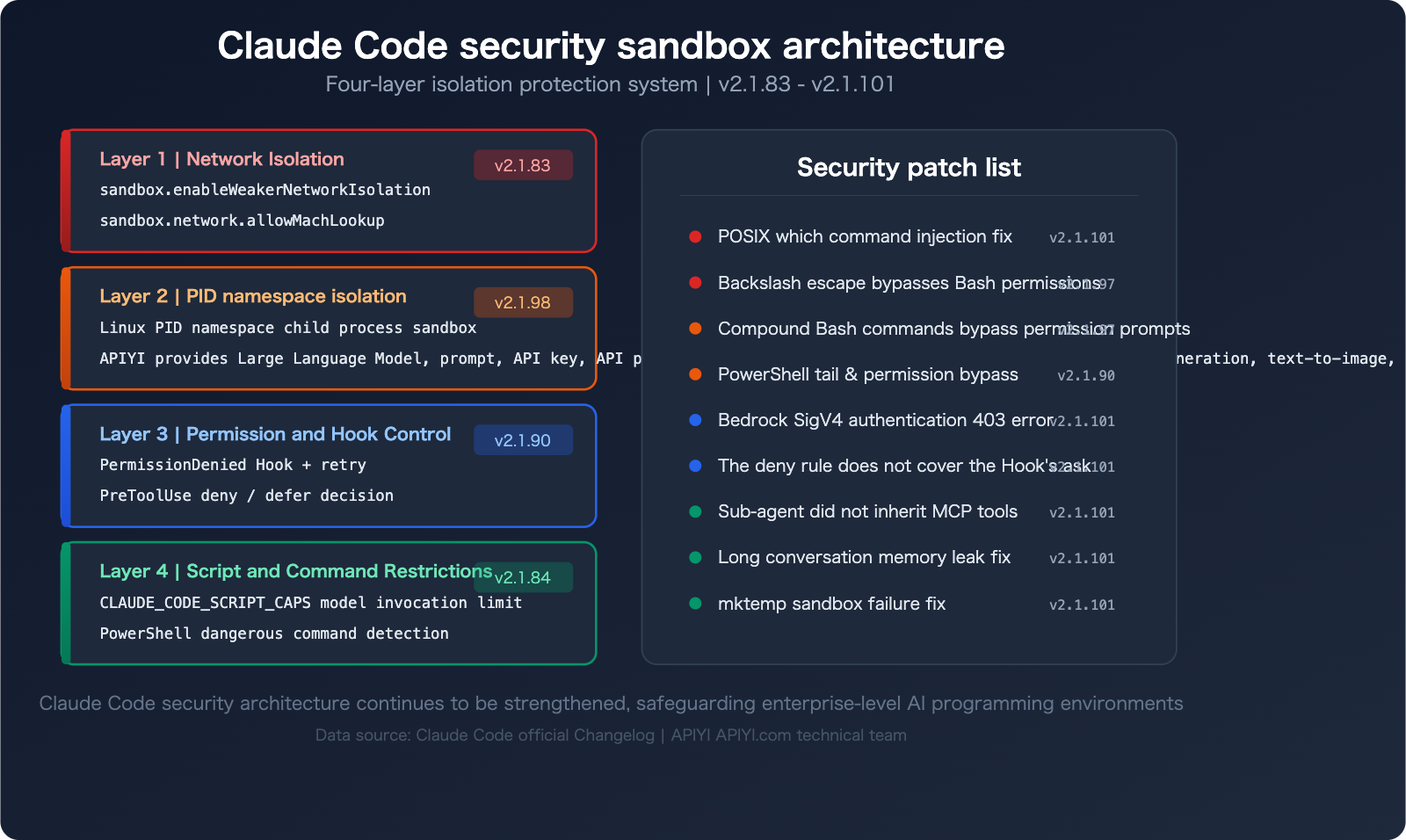
The subprocess sandbox introduced in v2.1.98 is a major security milestone:
- PID Namespace Isolation: On Linux, subprocesses executed by Bash tools now run in an isolated PID namespace.
- Credential Scrubbing:
CLAUDE_CODE_SUBPROCESS_ENV_SCRUB=1can remove sensitive credentials from the subprocess environment. - Script Call Limits: The
CLAUDE_CODE_SCRIPT_CAPSenvironment variable allows you to limit the number of script calls per session. - Network Isolation: Includes
sandbox.enableWeakerNetworkIsolation(macOS) andsandbox.failIfUnavailableoptions.
These security features are vital for using Claude Code in enterprise environments. When calling the Claude API via the APIYI (apiyi.com) platform, you can also combine these sandbox strategies for enhanced security.
Claude Code Changelog: Developer Experience Enhancements
MCP Ecosystem Upgrades
The MCP (Model Context Protocol) ecosystem has received a significant boost in this update:
- 500K Large Result Persistence: MCP tool results now support persistence for up to 500K characters via the
_meta["anthropic/maxResultSizeChars"]annotation. - OAuth RFC 9728 Support: Automatic discovery for Protected Resource Metadata.
- Interactive OAuth Dialogs: Added support for MCP elicitation (v2.1.76).
- Server Deduplication: Local configurations now take precedence over organization-hosted connectors.
- Non-blocking Connections: Added
MCP_CONNECTION_NONBLOCKING=truefor-ppipe mode.
Enhanced Hooks System
| New Hook | Version | Purpose |
|---|---|---|
PermissionDenied |
v2.1.90 | Triggered after denial in auto mode |
CwdChanged / FileChanged |
v2.1.83 | Listeners for working directory and file changes |
TaskCreated |
v2.1.84 | Triggered when a task is created |
WorktreeCreate |
v2.1.84 | Added support for type: "http" |
Elicitation / ElicitationResult |
v2.1.76 | Interactive MCP dialogs |
PostCompact |
v2.1.76 | Triggered after context compression |
InstructionsLoaded |
v2.1.69 | Triggered when instructions finish loading |
StopFailure |
v2.1.78 | Triggered when a stop operation fails |
The Hooks system now also supports conditional filtering (via the if field) and includes agent_id and agent_type context information, making your automated workflows much more precise and controllable.
Sub-agent and Worktree Improvements
- Named Sub-agents: Sub-agents can now be referenced by name using
@mentions. - Worktree Isolation: Each sub-agent can operate in an independent git worktree, enabling parallel editing.
- ExitWorktree Tool: Added in v2.1.72 to make it easier for sub-agents to exit after completing their work.
- Model Inheritance: Team agents now correctly inherit the permission patterns of their leader.
Claude Code Changelog: Performance Optimization Highlights
The recent versions bring some noteworthy performance improvements:
- Write Tool Speedup (60%): Diff calculation speed for large files containing Tabs,
&, or$has improved by 60%. - Reduced Startup Memory: v2.1.80 saves about 80MB of startup memory, with an additional 18MB reduction in v2.1.79.
- –resume Optimization: v2.1.77 improves session recovery speed for branch-heavy sessions by 45% and reduces memory usage by 100-150MB.
- Scrolling Performance: v2.1.85 migrated the scrolling engine for large transcriptions from WASM yoga to TypeScript.
- SSE Linear Processing: Large-frame SSE transmission complexity reduced from O(n²) to O(n).
- Bash Command Parsing: Switched to native modules for faster execution and to eliminate memory leaks.
- macOS Startup Speedup (60ms): v2.1.77 optimized startup performance.
- Prompt Rendering Reduction (74%): v2.1.69 significantly reduced redundant rendering cycles.
🎯 Performance Tip: If you're working on large projects, we recommend enabling NO_FLICKER mode and utilizing the 1M context window of Opus 4.6. By accessing the Claude API through APIYI (apiyi.com), you can flexibly choose the model and context window size that best fit your specific needs.
Other Useful Claude Code Updates
There are a few "small but mighty" updates worth noting:
/loopcommand (v2.1.71): Supports scheduled, repeated execution of prompts or commands./effortcommand (v2.1.76): Manually control Claude's reasoning depth (low/medium/high)./colorcommand (v2.1.75): Customize the color of the session prompt bar./plandescription parameter (v2.1.72): The planning command now supports optional descriptions./contextsuggestions (v2.1.74): Provides actionable suggestions for context management./copy wcommand (v2.1.72): Writes selected content directly to a file./release-notesinteractive version selector (v2.1.92): Makes it easy to view historical version changes./claude-apiskill (v2.1.69): Built-in assistance for Claude API development.- Vertex AI setup wizard (v2.1.98): Interactive guidance for GCP authentication and configuration.
- Bedrock setup wizard (v2.1.92): Interactive guidance for AWS configuration.
- Monitor tool (v2.1.98): Streams and monitors background script events.
- Speech-to-Text (STT) adds 10 new languages (v2.1.69): Now supports a total of 20 languages.
FAQ
Q1: How do I enable the NO_FLICKER mode in Claude Code?
Simply set the environment variable CLAUDE_CODE_NO_FLICKER=1. You can add this to your shell configuration file (like .zshrc or .bashrc) to make it permanent. Once enabled, you can use Ctrl+O to toggle the Focus View.
Q2: Is there an extra charge for the Opus 4.6 1M context window?
No extra charge. Anthropic has clearly stated there are no long-context surcharges; 1 million tokens are billed at the same rate as 10k tokens. Max, Team, and Enterprise users can use it directly. If you're using the Claude API via APIYI (apiyi.com), standard billing rates apply there as well.
Q3: How do I get started with the latest version of Claude Code quickly?
- Run
claude --versionto check your current version. - Run
claude updateor update via npm to get the latest version. - Try the
/powerupcommand to quickly learn about new features. - If you need to call Claude via API, you can visit APIYI (apiyi.com) to get an API key and free credits.
Summary
Here are the key highlights from the Claude Code March-April 2026 Changelog:
- Major Model Upgrades: Opus 4.6 with a 1M context window is now GA, leading in MRCR v2 benchmarks, with output token limits increased to 64K-128K.
- Enhanced Developer Experience: Features the new NO_FLICKER rendering engine, Focus View, and a 60% speed boost for the Write tool.
- Team Collaboration Empowerment: Includes
/powerupinteractive tutorials,/team-onboardingguides, and support for named sub-agents. - Strengthened Security: Implements PID namespace isolation, credential scrubbing, hardened PowerShell permissions, and fixes for command injection vulnerabilities.
- Ecosystem Expansion: Adds MCP OAuth 9728 support, 500K result persistence, conditional filtering for Hooks, and setup wizards for Vertex/Bedrock.
Claude Code is evolving at an incredible pace. For developers, staying updated and leveraging these new features will significantly boost your AI-assisted programming efficiency. We recommend accessing the Claude API through APIYI (apiyi.com), which offers free credits and a unified interface for multiple models, making it easy to quickly verify and integrate your workflows.
📚 References
-
Official Claude Code Changelog: Complete version update history
- Link:
code.claude.com/docs/en/changelog - Note: The authoritative source for the latest release information.
- Link:
-
Claude Code GitHub Releases: Source-level version releases
- Link:
github.com/anthropics/claude-code/releases - Note: View detailed code changes for every version.
- Link:
-
Claude Code CHANGELOG.md: Change log within the GitHub repository
- Link:
github.com/anthropics/claude-code/blob/main/CHANGELOG.md - Note: The most comprehensive file for version change records.
- Link:
-
Anthropic Official Blog – 1M Context GA Announcement: Official release notes for Opus 4.6 1M context
- Link:
anthropic.com/news/claude-opus-4-6 - Note: Learn about the core capability improvements and benchmark data for Opus 4.6.
- Link:
-
Claude Code Hooks Documentation: Reference manual for the hook system
- Link:
code.claude.com/docs/en/hooks - Note: Learn how to use Hooks to build automated workflows.
- Link:
Author: APIYI Technical Team
Technical Discussion: Feel free to join the discussion in the comments. For more resources, visit the APIYI documentation center at docs.apiyi.com.