xAI officially launched Grok Build in May 2026, and it has been the talk of the developer community for less than a week. Elon Musk has previously admitted that xAI lagged behind Anthropic and OpenAI in "coding capability," but Grok Build is xAI's first true AI coding agent designed to compete for market share, directly targeting "terminal-resident coding assistants" like Claude Code.
In this article, we'll provide a beginner-friendly guide to what Grok Build is, what makes the underlying Grok-4.3 model special, how to use its 5 core features, and how to access the Grok-4.3 API more affordably without subscribing to SuperGrok Heavy ($300/month).
Core Value: By the end of this article, you'll be able to explain what Grok Build is, determine if it's a good fit for your projects, and master the complete path for installation, onboarding, and low-cost model invocation of Grok-4.3.
What is Grok Build: A Quick Overview
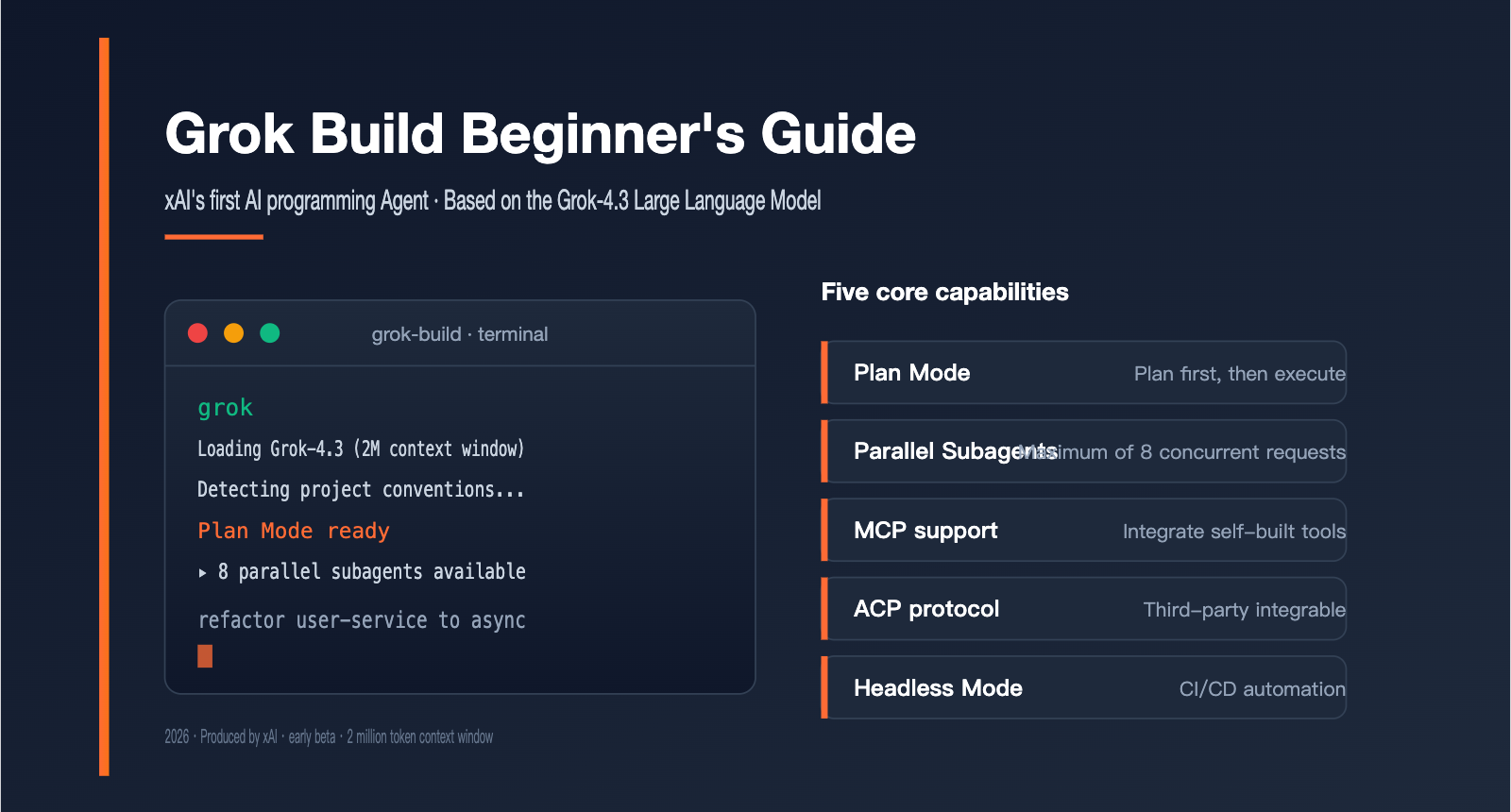
Grok Build is the first AI coding agent released by xAI, essentially a CLI tool that runs in your terminal. It's geared toward "professional software engineering and complex coding tasks," emphasizing structured planning, parallel execution, and embeddable automation workflows, rather than simple code completion.
The model driving Grok Build is Grok-4.3 beta, released in April 2026, which currently boasts the largest context window among Western closed-source models. Understanding these two points captures the essence of what sets Grok Build apart from other AI coding assistants.
| Key Point | Description | Value for Developers |
|---|---|---|
| Product Form | Terminal CLI + Agent Architecture | Doesn't replace your IDE; works alongside VS Code, JetBrains |
| Underlying Model | Grok-4.3 beta, 2 million token context window | Can load entire large codebases and long stack traces |
| Core Philosophy | Plan before Build, up to 8 parallel agents | Controllable, explainable, breaks down complex tasks |
| Extensibility | Native support for MCP, ACP, Headless mode | Easy to integrate custom tools, CI/CD friendly |
| Release Status | Early beta (May 14, 2026) | Early stage, best for observation or small-scale trials |
Core Positioning of Grok Build
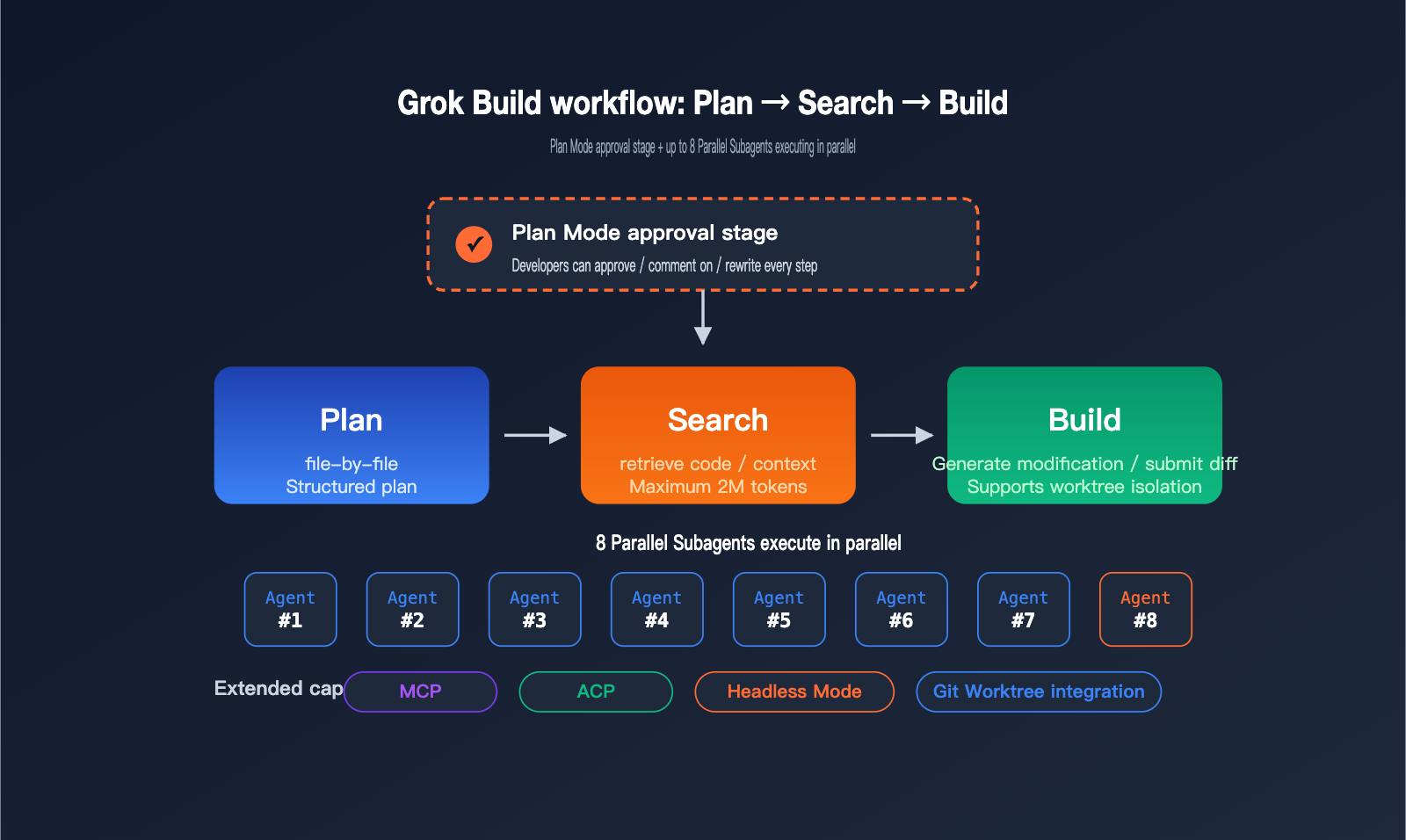
Grok Build isn't just another "smart completion plugin"; it's an "engineer's assistant that executes tasks," designed with an agent-first mindset. It breaks tasks into three stages: plan → search → build. It writes out a structured plan of what needs to be done before it starts searching through code and executing changes.
The benefit of this design is transparency: developers can review and modify the plan before execution, preventing the agent from "running blindly for half an hour and breaking a bunch of files." For beginners new to AI coding agents, this "approval step" significantly lowers the risk of errors.
Complementing this are engineering capabilities like AGENTS.md project-level instructions, Arena Mode for automated evaluation, and a plugin marketplace, making Grok Build not just a temporary tool, but a "configurable assistant" that can be integrated into a team's long-term workflow. This "get the process right first, then talk about productivity" approach is exactly how xAI aims to differentiate itself from other AI coding products.
Key Parameters of the Grok-4.3 Model
The biggest highlights of Grok-4.3 are its 16-agent Heavy architecture and 2-million-token context window. The former means the model itself uses multiple agents to collaborate on reasoning, while the latter means a single conversation can hold hundreds of thousands of lines of code.
xAI revealed that this generation of models was trained using reinforcement learning on a Colossus cluster of 200,000 GPUs, with a focus on optimizing for "multi-step, tool-calling, and verifiable" work scenarios—perfectly matching the real-world needs of professional software engineering.
In other words, Grok-4.3 isn't a general-purpose model "optimized for chat scores"; it's a version specifically fine-tuned for engineering tasks like "writing code, running tests, reading stack traces, and fixing bugs" where there are objective verification standards. This is why Grok Build puts its 2-million-token context window front and center: the model's capability is built specifically for long-chain code understanding.
🎯 Technical Tip: If you want to test Grok-4.3 for code understanding, long-context summarization, or cross-file refactoring without installing the Grok Build CLI, you can call the Grok-4.3 API directly via the APIYI (apiyi.com) platform. The platform provides standard interfaces consistent with the official ones, making it easy to perform horizontal comparisons across multiple models.
A Deep Dive into the 5 Core Features of Grok Build
To quickly grasp what Grok Build is all about, looking at its 5 core capabilities is much more direct than reading the product landing page. Below, I’ve broken them down by "what problem this feature solves" to help you get up to speed.
| Feature | Problem Solved | Ideal Scenario |
|---|---|---|
| Plan Mode | Prevents the Agent from making reckless code changes | Multi-file refactoring, complex feature development |
| Parallel Subagents | Single-threaded Agent is too slow | Large-scale migrations, cross-module batch refactoring |
| MCP Support | Integrates team-built tools | Private knowledge bases, internal API integration |
| ACP Protocol | Allows IDEs/third-party tools to integrate Grok Build | Engineering platforms, custom DevTools |
| Headless Mode | Embeds Agent into automated workflows | CI/CD, scheduled tasks, batch processing |
Grok Build's Plan Mode
Plan Mode is the feature new users should pay the most attention to. When you give it a complex task, it won't start hacking away at your code immediately. Instead, it generates a "file-by-file, step-by-step" execution plan.
You can approve the entire plan, comment on individual steps, or even rewrite any step yourself. The Agent only begins execution once you've confirmed the plan. This "plan-first, execute-later" approach prevents the common issue where "the AI turns your project upside down, and you have no idea what happened."
Grok Build's Parallel Subagents
Grok Build supports up to 8 Agents working in parallel, with each following the plan → search → build workflow. This means you can break down a large refactoring task and assign it to multiple Agents, making it significantly faster than running the same task on a single thread.
To avoid conflicts during parallel modifications, Grok Build is deeply integrated with Git worktree. Each sub-agent works independently in its own worktree, making it much easier to perform diff reviews when merging results.
Grok Build's MCP and ACP Extension Capabilities
MCP (Model Context Protocol) is an open protocol championed by Anthropic, and Grok Build natively supports "Bring Your Own MCP." In other words, your team's internal knowledge bases, proprietary APIs, or internal MCP gateways can be plugged directly into Grok Build.
ACP (Agent Client Protocol) is designed for engineering platforms that want to build on top of Grok Build. External tools can directly tap into Grok Build's agent capabilities without having to wrap raw APIs from scratch. Combined with project-level AGENTS.md instructions, a plugin marketplace, and Arena Mode for automated evaluation, Grok Build forms a complete, extensible engineering ecosystem.
Grok Build's Headless Mode
Headless Mode is enabled via the -p flag. The CLI skips the interactive UI and instead accepts a single prompt to output structured results. This mode is designed specifically for scripts, CI/CD pipelines, and scheduled tasks, allowing you to embed Grok Build into your existing engineering workflows just like any other command-line tool.
Here’s a common scenario: you can have GitHub Actions automatically run Grok Build after every PR submission to perform structured code reviews, security scans, or dependency upgrade suggestions, and then write the results back as a PR comment. You can also embed Headless Mode into cron jobs to automatically inspect logs, generate exception reports, and organize a weekly technical debt list every morning—letting Grok Build work while your team is offline, so you have results waiting for you when you start your day.
How to Install and Get Started with Grok Build
xAI has kept the installation experience incredibly streamlined: you can get set up with a single curl command. However, to actually use Grok Build, you currently need a SuperGrok Heavy subscription.
Minimalist Installation Steps for Grok Build
# Install the Grok Build CLI
curl -fsSL https://x.ai/cli/install.sh | bash

# Log in to your account (requires SuperGrok Heavy subscription)
grok login

# Launch Grok Build in your project root
cd your-project
grok
When you launch it for the first time, Grok Build scans your project structure and attempts to identify local conventions (such as package managers, test frameworks, linters, etc.). If an AGENTS.md file exists, Grok Build will prioritize running according to the project-level instructions defined within it.
View Advanced Usage Examples
# Start Plan Mode to handle multi-file refactoring
grok plan "Refactor all callback-style APIs to async/await"

# Enable up to 8 parallel sub-agents
grok --max-agents 8 "Add missing TypeScript types to the entire project"

# Headless mode for CI/CD automation
grok -p "review this PR for security issues" > review.md

# Run experimental refactoring in an isolated worktree
grok --worktree experimental-refactor "Try refactoring the homepage using React Server Components"
🚀 Quick Start Tip: If you don't want to pay the $300/month subscription fee for SuperGrok Heavy right now, but still want to use the Grok-4.3 model in your own scripts or agent frameworks, you can access it directly via API using APIYI (apiyi.com). The platform is compatible with standard OpenAI SDK specifications, allowing you to complete integration testing in just 5 minutes.
Example of Calling Grok Build via API
While the Grok Build CLI is tied to a subscription, the Grok-4.3 model itself can be called via API. Below is a minimal example of integrating Grok-4.3 into a Python project.
# Calling Grok-4.3 via the APIYI compatible interface
from openai import OpenAI

client = OpenAI(
    api_key="YOUR_API_KEY",
    base_url="https://api.apiyi.com/v1"
)

response = client.chat.completions.create(
    model="grok-4.3",
    messages=[
        {"role": "system", "content": "You are a senior Python engineer"},
        {"role": "user", "content": "Explain the potential bugs in the following code:\n\n" + open("app.py").read()}
    ]
)
print(response.choices[0].message.content)
This approach is better suited for scenarios where you just want to use the Grok-4.3 model without necessarily needing the CLI experience. For instance, if you're building your own agent framework or need to switch models to compare results within LangChain, LlamaIndex, or custom toolchains, using the Grok-4.3 API is much more flexible than a CLI subscription.
Comparison: Grok Build vs. Claude Code
Many people's first reaction is, "Is Grok Build just the xAI version of Claude Code?" In terms of product form, they are indeed very similar—both are Agent + CLI combinations—but there are significant differences in their models, pricing, and extension mechanisms.
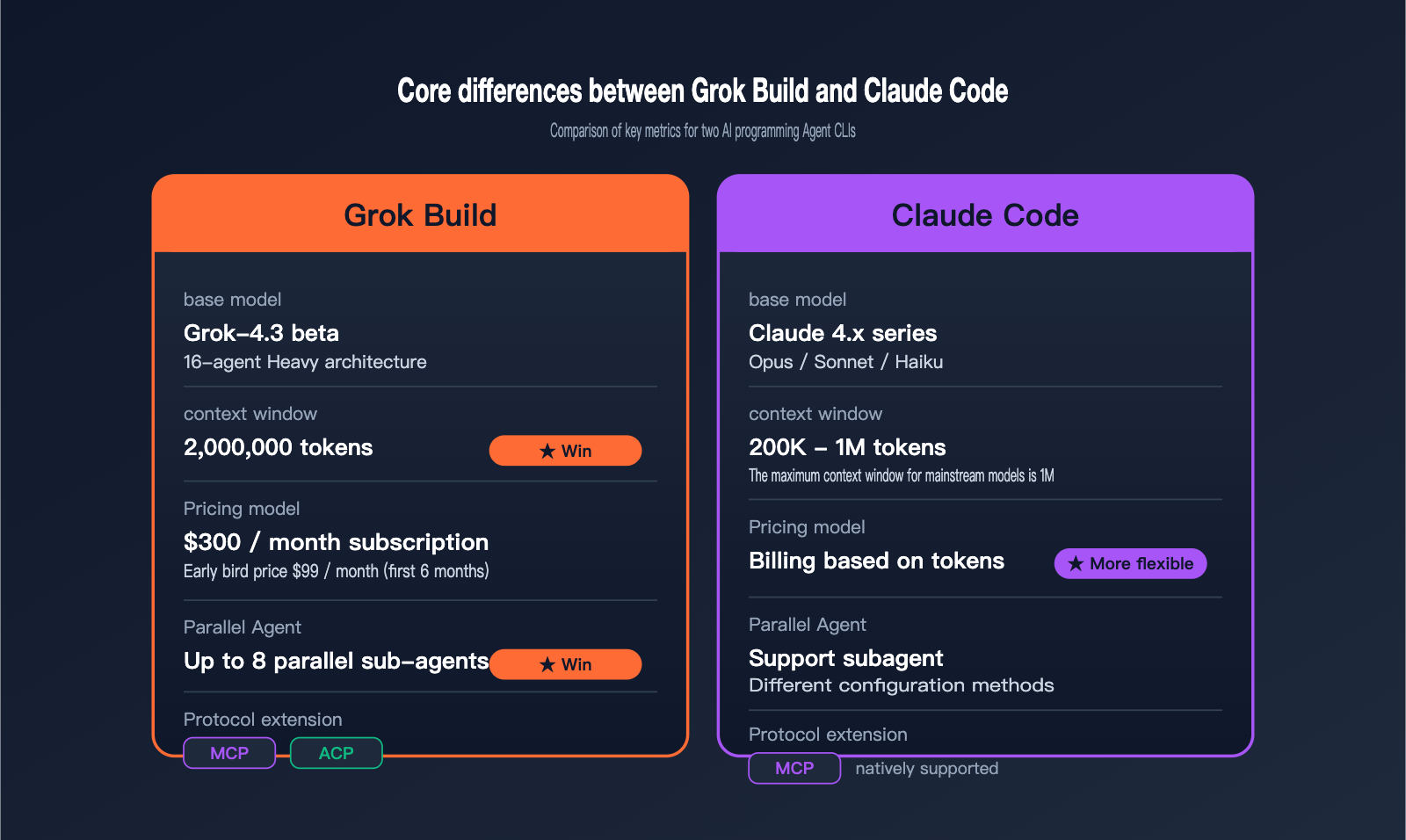
| Comparison Dimension | Grok Build | Claude Code | Winner |
|---|---|---|---|
| Base Model | Grok-4.3 beta (16-agent Heavy) | Claude 4.5/4.6/4.7 series | Varies |
| Context Window | 2 Million tokens | 200 K – 1 M tokens | Grok Build |
| Core Pricing | $300/mo (Early bird $99/mo) | Token-based billing | Claude Code is more flexible |
| Parallel Agents | Up to 8 parallel sub-agents | Supports sub-agents, different config | Grok Build is more intuitive |
| Protocol Extension | Native MCP + ACP | Native MCP | Tie |
| Available Platforms | xAI official, 3rd-party API platforms | Anthropic official, 3rd-party API platforms | Tie |
When to Choose Grok Build
If your project is massive (hundreds of thousands of lines of code) and you need the AI to "read the entire monorepo" at once for refactoring, Grok Build's 2-million-token context window is the most direct choice. If you're already accustomed to the xAI ecosystem or your team needs a controllable Plan Mode workflow, Grok Build will feel more natural.
When to Choose Claude Code
If you prefer pay-as-you-go and have inconsistent usage, Claude Code's token-based billing is more economical. If you need a long-term stable ecosystem and a rich set of third-party plugins, Anthropic's maturity currently still holds the lead.
💡 Recommendation: These two tools aren't mutually exclusive, and many teams use both. We suggest using the APIYI (apiyi.com) platform to test both Grok-4.3 and the Claude series models, then choose your primary tool based on the characteristics of your codebase. The platform supports a unified interface for various mainstream models, making it easy to compare and switch between them quickly.
How to Experience Grok-4.3 and Grok Build on a Budget
The biggest hurdle for newcomers isn't the technology—it's deciding whether to drop $300 a month on a SuperGrok Heavy subscription. Here are three approaches, ranging from low to high cost, so you can choose what fits your needs.
Option 1: Grok-4.3 API Only (Lowest Cost)
If you just want to experience Grok-4.3's code comprehension, long-context summarization, and complex reasoning capabilities without relying heavily on the Grok Build CLI's Plan Mode, you can simply use the API.
APIYI (apiyi.com) offers Grok-4.3 API pricing that matches xAI's official rates. Plus, with their "get 10% extra on $100 deposits" promotion, you're effectively getting a 15% discount compared to the official site. For individual developers and small teams, a $100 deposit will last a long time for testing purposes.
| Option | Monthly Cost | Best For |
|---|---|---|
| Grok-4.3 API Only (APIYI apiyi.com) | Pay-as-you-go, ~15% off official | Individual developers, small teams |
| xAI Early Bird ($99/mo, first 6 months) | $99 | Power users, those wanting the full CLI experience |
| xAI Standard Subscription ($300/mo) | $300 | Enterprise teams, long-term users |
Option 2: SuperGrok Heavy Subscription (The Full Experience)
If your workflow relies heavily on terminal and agent interactions, and you need native access to features like Plan Mode and Parallel Subagents, subscribing to SuperGrok Heavy is the most direct path.
xAI currently offers an early bird price of $99/month for the first 6 months (roughly 33% off). This is a great way to spend half a year seeing if Grok Build truly integrates into your development workflow before deciding whether to pay the full $300/month price.
Option 3: API + CLI Hybrid (Recommended for Advanced Users)
The most recommended approach is actually a hybrid one: handle daily code editing and CI/CD automation tasks via the Grok-4.3 API using a cost-effective and stable provider like APIYI (apiyi.com). Then, when you truly need complex multi-file refactoring or long-chain planning, use the full Grok Build CLI from your SuperGrok Heavy subscription.
This combination keeps costs under control (since most daily calls don't require a subscription) while ensuring you have the best experience for critical tasks. It's a strategy many professional teams are already using. Note that the Grok Build CLI and the Grok-4.3 API share the same underlying model, so regardless of the method, the model's capabilities remain identical—the difference lies in the interaction experience and engineering integration.
Grok Build FAQ
Q1: Is Grok Build free? Can regular users use it?
Currently, the Grok Build CLI is in early beta and is only available to SuperGrok Heavy subscribers at $300/month (or $99/month for early birds). Regular users cannot access the CLI directly, but the underlying Grok-4.3 model is available via API on a pay-as-you-go basis, which has a much lower barrier to entry.
Q2: Which operating systems and programming languages does Grok Build support?
The Grok Build CLI provides installation scripts for macOS and Linux; Windows users are advised to run it via WSL. In terms of languages, the Grok-4.3 model covers almost all mainstream languages (Python, JavaScript, TypeScript, Go, Rust, Java, C/C++, etc.), and you can use an AGENTS.md file to customize code styles and rules for specific projects.
Q3: What does the 2 million token context window actually mean?
Simply put: 1 token is roughly 0.75 English words or 0.5 Chinese characters. 2 million tokens can hold about 300,000 to 500,000 lines of code or a dozen medium-sized technical books. This means a medium-scale monorepo can be fed into Grok-4.3's context all at once for holistic refactoring suggestions or architectural analysis, without needing to read it in chunks.
Q4: How does Grok Build relate to Cursor and Copilot?
They operate at different levels. Cursor and Copilot are AI editors/completion tools that "live inside the IDE," excelling at interactive coding experiences. Grok Build is an Agent CLI that "lives in the terminal," leaning more toward automating complex tasks. Both types of tools can coexist and cover different work scenarios.
Q5: Is Grok Build better for individual developers, small teams, or enterprises?
In the short term, it's better suited for medium-to-large teams: the $300/month subscription and the 2 million token context window really shine in large codebase scenarios. Individual developers and small teams should start with the Grok-4.3 API to test their specific use cases before committing to a subscription, avoiding fixed costs upfront.
Q6: How can I call the Grok-4.3 API stably and affordably?
You can use the APIYI (apiyi.com) platform to call the Grok-4.3 API. Their pricing matches the official xAI rates, and they offer a "get 10% extra on $100 deposits" promotion, effectively providing a 15% discount. The platform also supports unified interfaces for other mainstream models like Claude, GPT, and Gemini, making it easy to perform side-by-side comparisons—perfect for developers who need to switch between different models.
Summary: Is Grok Build Worth It for Beginners?
The emergence of Grok Build is essentially xAI’s way of "productizing" the 2-million-token context window of Grok-4.3 and its 16-agent Heavy architecture. For developers who frequently work with large codebases and want AI to take over complex, multi-file tasks, it certainly opens up some exciting new possibilities.
However, for the vast majority of beginners, a more practical path is to first test the Grok-4.3 model via API to see how it handles your most important use cases before deciding if the SuperGrok Heavy monthly subscription is worth the investment. This allows you to realistically evaluate the capabilities of Grok-4.3 without committing to the full cost right out of the gate.
If you're planning to evaluate how Grok-4.3 performs for your specific business needs, we recommend using the Grok-4.3 API through APIYI (apiyi.com). It provides an interface specification consistent with the official one, and with their top-up bonus offers, it’s effectively 15% off the official price—making it a great, low-cost starting point for beginners to verify the Grok series models.
Author: APIYI Technical Team | For technical questions regarding Grok-4.3 API and unified multi-model access, feel free to visit apiyi.com to connect with us.