模型知識有截止日期,而真實業務問題往往需要"現在"的數據。Claude 官方在 2025 年推出原生
web_search工具,2026 年又升級到支持動態過濾的web_search_20260209版本,讓 Claude API 聯網搜索從"折騰自建"變成了"一行參數"。
本文系統梳理 Claude API 聯網搜索 在 2026 年的最新實現方案,重點講解官方原生 web_search / web_fetch 工具的參數、計費、限制與代碼模板,並對比第三方 MCP、自建 RAG 三種路徑的取捨。文末給出基於 API易 apiyi.com 的透明轉發集成範例,只需替換 base_url 與 api_key 即可在國內環境跑通完整流程。
Claude API 聯網搜索的核心要點
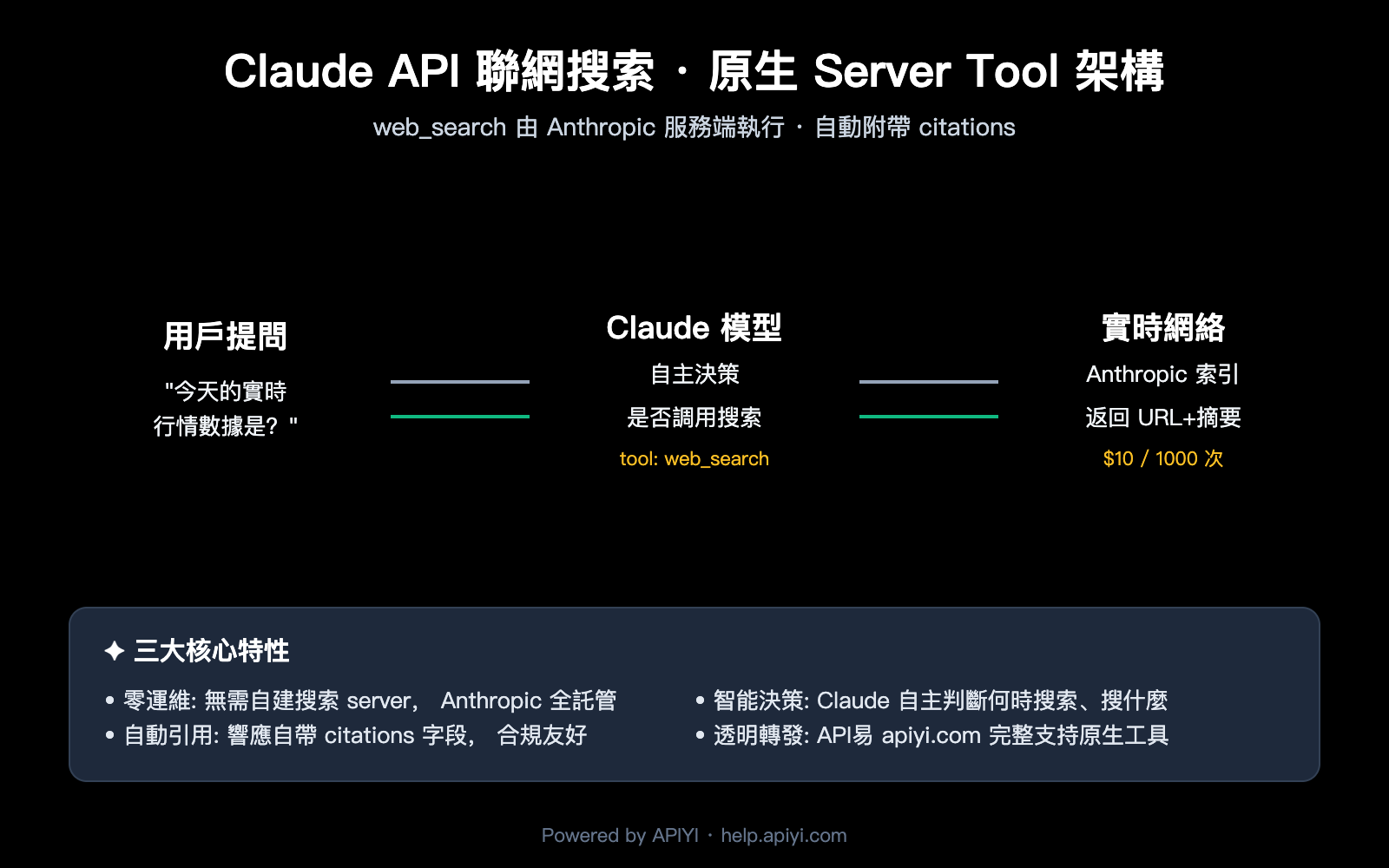
在動手寫代碼之前,先把概念理順。Claude API 聯網搜索本質上是 Anthropic 官方提供的 Server Tool(服務端工具)——這意味着搜索由 Anthropic 在雲端執行,你不需要自己接 Google/Bing API,也不需要部署爬蟲。
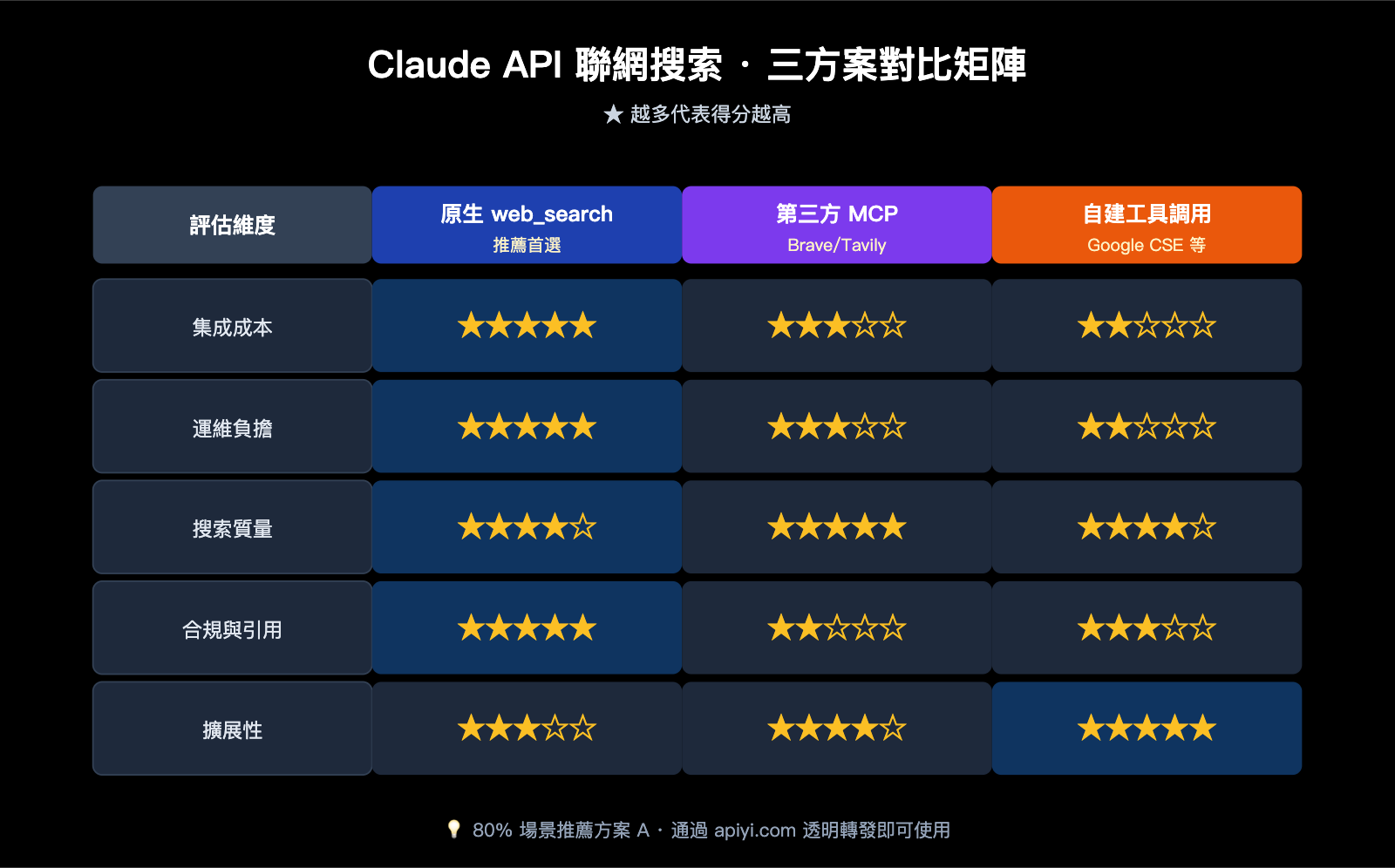
三種主流實現方案速覽
| 方案 | 集成複雜度 | 成本 | 實時性 | 引用與合規 |
|---|---|---|---|---|
官方原生 web_search |
★☆☆ (一個 tool 字段) | $10 / 1000 次 + token | 強 (Anthropic 實時索引) | 自動 citations |
| 第三方 MCP (如 Brave/Tavily) | ★★☆ (需起 MCP server) | 第三方搜索 API 計費 | 中-強 | 需自行處理 |
| 自建 (Google CSE + 工具調用) | ★★★ (自定義 tool + 解析) | Google API 配額 | 中 | 完全自管 |
🎯 方案選擇建議: 如果你的核心訴求是"讓 Claude 能回答近期事件、補充實時數據",官方原生
web_search是當前最優解——零運維、引用合規、覆蓋 Sonnet 4.6 / Opus 4.7 等主力模型。我們建議直接通過 API易 apiyi.com 的透明轉發接入,無需 VPN 即可調用 Anthropic 官方接口的全部能力。
Claude API 聯網搜索支持的模型矩陣
並不是所有 Claude 模型都支持 web_search,新版 web_search_20260209 對模型有明確要求:
| 模型 | 基礎版 web_search_20250305 |
動態過濾版 web_search_20260209 |
|---|---|---|
| Claude Opus 4.7 | ✅ | ✅ |
| Claude Opus 4.6 | ✅ | ✅ |
| Claude Sonnet 4.6 | ✅ | ✅ |
| Claude Sonnet 4.5 | ✅ | ❌ |
| Claude Haiku 4.5 | ✅ | ❌ |
動態過濾(Dynamic Filtering) 是 2026 年版本的核心升級:Claude 會在搜索結果進入上下文之前,先用代碼執行工具過濾一遍,只保留相關片段。對於長文檔檢索、技術文獻綜述,這能顯著降低 token 消耗。
Claude API 聯網搜索的官方原生工具詳解
Anthropic 提供了兩個互補的原生工具,理解它們的邊界是用好 Claude API 聯網搜索 的前提。
web_search 與 web_fetch 的分工
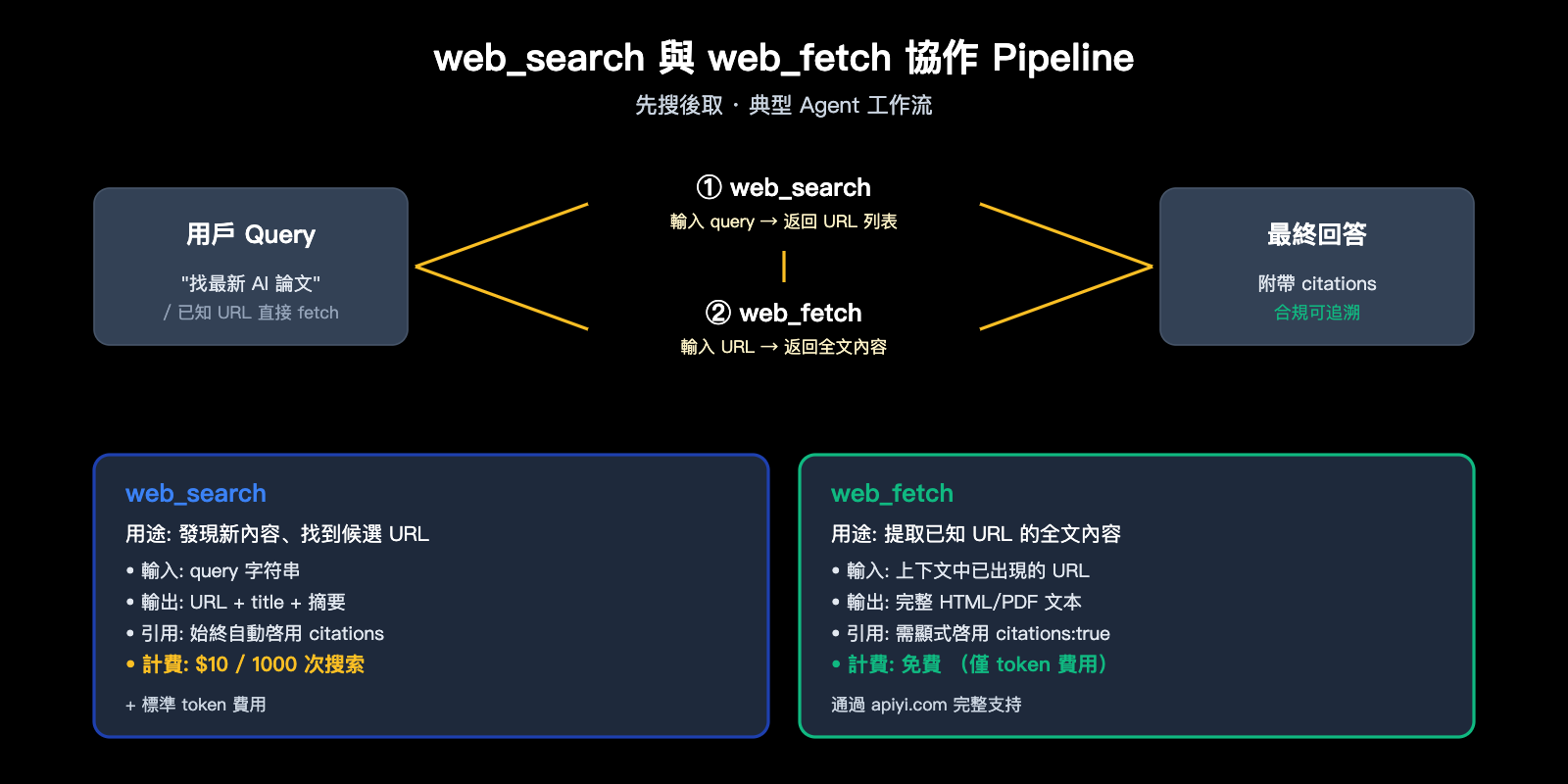
| 工具 | 用途 | 輸入 | 輸出 | 計費 |
|---|---|---|---|---|
web_search |
發現新內容 | query 字符串 | URL + 標題 + 摘要 | $10 / 1000 次 |
web_fetch |
提取已知 URL 的全文 | url 字符串 | 完整 HTML/PDF 文本 | 免費 (僅按 token 計) |
🎯 架構提示: 典型 Agent 工作流是「先 search,再 fetch」——
web_search找出候選頁面,web_fetch把最相關的幾篇拉全文。如果用戶已給出 URL(如"分析 example.com/article 這篇文章"),直接用web_fetch即可,無需消耗搜索配額。在 API易 apiyi.com 上,這兩個工具都已透明支持,無需額外配置。
web_search 工具的完整參數定義
下表是官方 JSON 參數說明,實際使用時按需組合:
| 參數 | 類型 | 必選 | 默認 | 說明 |
|---|---|---|---|---|
type |
string | ✅ | – | 固定爲 web_search_20250305 或 web_search_20260209 |
name |
string | ✅ | – | 固定爲 web_search |
max_uses |
integer | ❌ | 無限制 | 單次請求允許的最大搜索次數 |
allowed_domains |
string[] | ❌ | – | 僅允許這些域名的結果(與 blocked 互斥) |
blocked_domains |
string[] | ❌ | – | 禁止這些域名的結果 |
user_location |
object | ❌ | – | 用戶大致位置,用於本地化搜索 |
user_location 的字段結構:
{
  "type": "approximate",
  "city": "Shanghai",
  "region": "Shanghai",
  "country": "CN",
  "timezone": "Asia/Shanghai"
}
Claude API 聯網搜索的錯誤處理
當搜索失敗時,Anthropic API 仍會返回 HTTP 200,錯誤信息嵌在響應體的 web_search_tool_result 中。務必在客戶端代碼裏識別這些錯誤碼:
| 錯誤碼 | 含義 | 處理建議 |
|---|---|---|
too_many_requests |
觸發速率限制 | 退避重試,降低併發 |
max_uses_exceeded |
超出 max_uses 限制 |
調高上限或拆分請求 |
query_too_long |
查詢字符串過長 | 截斷或重寫 query |
invalid_input |
參數格式錯誤 | 檢查 JSON 結構 |
unavailable |
Anthropic 內部錯誤 | 短時間後重試 |
⚠️ 計費提示: 錯誤的 web_search 請求不會被計費。但如果你已經觸發過一次成功搜索後再失敗,前面的成功調用仍會按 $10 / 1000 次扣費。建議在 API易 apiyi.com 控制檯查看詳細的請求計費明細,便於排查異常消費。
Claude API 聯網搜索快速上手
接下來用最少的代碼跑通完整鏈路。所有示例使用 API易 apiyi.com 的透明轉發接口——你無需修改任何業務邏輯,只要把 base_url 指向中轉節點、把 ANTHROPIC_API_KEY 替換成 API易的 Key 即可。
cURL 極簡示例
最小可運行的 Claude API 聯網搜索 請求:
curl https://vip.apiyi.com/v1/messages \
  -H "x-api-key: $APIYI_API_KEY" \
  -H "anthropic-version: 2023-06-01" \
  -H "content-type: application/json" \
  -d '{
    "model": "claude-sonnet-4-6",
    "max_tokens": 1024,
    "messages": [
      {"role": "user", "content": "用中文總結 2026 年 4 月 OpenAI 發佈的最新模型有哪些"}
    ],
    "tools": [{
      "type": "web_search_20250305",
      "name": "web_search",
      "max_uses": 5
    }]
  }'
返回結構會包含三段內容塊:Claude 的決策文本、server_tool_use(實際執行的 query)、web_search_tool_result(URL 列表)、以及最終帶 citations 的回答文本。
Python SDK 完整示例 (含 web_fetch 聯用)
import anthropic

client = anthropic.Anthropic(
    base_url="https://vip.apiyi.com",
    api_key="sk-your-apiyi-key",
)

response = client.messages.create(
    model="claude-opus-4-7",
    max_tokens=4096,
    messages=[{
        "role": "user",
        "content": "查找最近一個月關於 AI Agent 評測的論文,選最相關的一篇做詳細摘要"
    }],
    tools=[
        {
            "type": "web_search_20260209",
            "name": "web_search"
        },
        {
            "type": "web_fetch_20260209",
            "name": "web_fetch",
            "max_uses": 3,
            "citations": {"enabled": True}
        }
    ]
)

for block in response.content:
    if block.type == "text":
        print(block.text)
    elif block.type == "server_tool_use":
        print(f"[工具調用] {block.name}: {block.input}")
🎯 代碼提示: 上面用了
web_search_20260209+web_fetch_20260209的動態過濾組合,搭配 Claude Opus 4.7 能在長文檔場景下顯著降低 token 消耗。如果只想做簡單的實時問答,把 model 換成claude-sonnet-4-6並使用基礎版web_search_20250305即可,成本更低。所有調用通過 API易 apiyi.com 轉發,穩定性與官方一致。
TypeScript / Node.js 示例
import Anthropic from "@anthropic-ai/sdk";

const client = new Anthropic({
  baseURL: "https://vip.apiyi.com",
  apiKey: process.env.APIYI_API_KEY,
});

const response = await client.messages.create({
  model: "claude-sonnet-4-6",
  max_tokens: 2048,
  messages: [
    { role: "user", content: "上海今天的天氣怎麼樣?" }
  ],
  tools: [{
    type: "web_search_20250305",
    name: "web_search",
    max_uses: 3,
    user_location: {
      type: "approximate",
      city: "Shanghai",
      region: "Shanghai",
      country: "CN",
      timezone: "Asia/Shanghai"
    }
  }]
});

console.log(response.content);
流式響應處理
啓用 stream: true 後,搜索過程會以 SSE 事件實時推送,搜索執行期間會出現一次"暫停"——這是因爲 Claude 在等待 Anthropic 服務端完成搜索:
with client.messages.stream(
    model="claude-sonnet-4-6",
    max_tokens=2048,
    messages=[{"role": "user", "content": "查詢最新的 Claude 4.7 定價"}],
    tools=[{"type": "web_search_20250305", "name": "web_search", "max_uses": 2}]
) as stream:
    for event in stream:
        if event.type == "content_block_start":
            block = event.content_block
            if block.type == "server_tool_use":
                print(f"\n[搜索中] query 即將開始流式返回...")
            elif block.type == "web_search_tool_result":
                print(f"[搜索完成] 共 {len(block.content)} 條結果")
        elif event.type == "content_block_delta":
            if hasattr(event.delta, "text"):
                print(event.delta.text, end="", flush=True)
Claude API 聯網搜索的方案對比與選型
瞭解了官方接口後,我們回到選型決策。Claude API 聯網搜索 實際有三條路可選,各有適用場景。
方案 A: 官方原生 web_search(推薦首選)
優勢:
- 零運維:無需自建 server,Anthropic 全託管
- 自動引用:每條回答自動附
citations,合規友好 - 模型一體化:Claude 自主決策何時搜索、搜什麼
- 計費透明:$10 / 1000 次,統一在 Anthropic 賬單中
劣勢:
- 僅支持 Anthropic 索引的源(無法替換搜索引擎)
- 部分模型版本受限(Haiku/舊版 Sonnet 僅支持基礎版)
適用場景: 90% 的通用對話型 Agent、問答助手、研究類任務。
方案 B: 第三方 MCP 服務(Brave/Tavily/Serper 等)
通過 [Model Context Protocol](https://modelcontextprotocol.io/) 啓動一個本地或遠程 MCP server,把搜索能力注入 Claude:
# 以 Tavily MCP 爲例,需先 npm install -g @tavily/mcp-server
claude mcp add tavily-search npx -- @tavily/mcp-server
優勢:
- 可自由替換搜索後端(Brave 注重隱私、Tavily 注重 LLM 友好)
- 可定製:可對結果做二次清洗、加 metadata
- Claude Code、Cursor 等客戶端原生支持
劣勢:
- 需要額外維護 MCP server 進程
- 搜索結果不會自動生成符合 Anthropic 規範的
citations - 需要自己處理第三方搜索 API 的額度與計費
適用場景: 你已經有 Brave/Tavily 的企業賬戶,或對搜索後端有強定製需求。
方案 C: 自建工具調用(Google CSE + Custom Tool)
最傳統的做法——自己定義一個 tool,在後端代碼裏調用 Google Custom Search / Bing API,把結果塞回 messages:
tools = [{
    "name": "google_search",
    "description": "Search Google and return top N results",
    "input_schema": {
        "type": "object",
        "properties": {
            "query": {"type": "string"}
        },
        "required": ["query"]
    }
}]
優勢: 完全可控,可接入企業內網搜索、私有知識庫。
劣勢: 你要承擔 prompt 設計、結果排序、引用生成、錯誤重試的全部工作量,且 Claude 不會"自動"調用——需要在 system prompt 中顯式引導。
適用場景: 強合規、強定製、需對接私有數據源的企業級場景。
三種方案的決策樹
| 你的需求 | 推薦方案 |
|---|---|
| 想最快跑通,功能不挑剔 | 方案 A 原生 web_search |
| 需要替換搜索後端(隱私/合規) | 方案 B 第三方 MCP |
| 必須接入私有數據源 | 方案 C 自建工具 + RAG |
| 國內訪問 Anthropic 不穩定 | 方案 A + API易 apiyi.com 透明轉發 |
🎯 國內開發者特別提示: Anthropic 官方 API 在國內訪問存在不穩定問題,且需要海外手機號註冊。我們建議通過 API易 apiyi.com 的透明轉發接入——它完整透傳 Anthropic 的所有 Server Tool(包括
web_search/web_fetch/code_execution),你的代碼無需任何修改,只需把base_url改爲https://vip.apiyi.com、api_key換成 API易 Key 即可。
Claude API 聯網搜索的高級用法
域名白名單:做"垂直搜索"
需要讓 Claude 只在指定域名內檢索?用 allowed_domains:
tools=[{
    "type": "web_search_20250305",
    "name": "web_search",
    "max_uses": 5,
    "allowed_domains": [
        "docs.python.org",
        "pypi.org",
        "github.com"
    ]
}]
注意幾個邊界:
allowed_domains與blocked_domains不能同時出現- 子域名是精確匹配:
docs.example.com不會包含api.example.com - 請求級的域名限制必須與組織級配置兼容,不能擴大組織管理員設定的範圍
啓用 web_fetch 引用
web_search 默認開啓 citations,但 web_fetch 需要顯式打開:
{
    "type": "web_fetch_20250910",
    "name": "web_fetch",
    "max_uses": 5,
    "citations": {"enabled": True},
    "max_content_tokens": 50000
}
max_content_tokens 用於截斷超大文檔,避免一次 fetch 把上下文撐爆。參考量:
| 內容類型 | 大小 | 約 token |
|---|---|---|
| 普通網頁 | 10 KB | ~2,500 |
| 大型文檔頁 | 100 KB | ~25,000 |
| 研究論文 PDF | 500 KB | ~125,000 |
多輪對話中的 encrypted_content
web_search 返回的每條結果都帶一個 encrypted_content 字段。多輪對話中如果想讓 Claude 繼續引用之前的搜索結果,必須把這個字段原樣回傳——否則後續輪次會丟失引用上下文。
messages.append({
    "role": "assistant",
    "content": previous_response.content  # 完整保留,含 encrypted_content
})
messages.append({
    "role": "user",
    "content": "針對剛纔搜到的第 2 篇文章,詳細展開分析"
})
🎯 工程提示: 在 Agent 框架(如 LangChain、LlamaIndex)中接入時,務必檢查框架是否完整透傳 Claude 響應的所有內容塊——很多框架會"清洗"掉
server_tool_use等字段,導致引用失效。我們建議直接基於 anthropic SDK 構建,通過 API易 apiyi.com 調用,行爲與官方完全一致。
Claude API 聯網搜索的實戰場景案例
理論講完了,我們看幾個真實業務場景下 Claude API 聯網搜索 的最佳實踐組合。
場景一: 實時新聞問答助手
用戶問"今天 A 股大盤怎麼樣",顯然需要實時數據。配置策略:
response = client.messages.create(
    model="claude-sonnet-4-6",
    max_tokens=1024,
    system="你是一名財經助手。涉及實時行情、新聞時,務必使用 web_search。回答必須附引用。",
    messages=[{"role": "user", "content": "今天上證指數收盤多少點?漲跌如何?"}],
    tools=[{
        "type": "web_search_20250305",
        "name": "web_search",
        "max_uses": 3,
        "allowed_domains": ["sina.com.cn", "eastmoney.com", "163.com"],
        "user_location": {
            "type": "approximate",
            "country": "CN",
            "timezone": "Asia/Shanghai"
        }
    }]
)
要點: 用 allowed_domains 鎖定權威財經站點,用 user_location 讓 Claude 優先返回中文結果。
場景二: 技術文檔 RAG 增強
讓 Claude 在回答技術問題時,優先檢索官方文檔:
response = client.messages.create(
    model="claude-opus-4-7",
    max_tokens=4096,
    messages=[{
        "role": "user",
        "content": "如何在 FastAPI 中實現 WebSocket 心跳保活?給我一個完整示例"
    }],
    tools=[
        {
            "type": "web_search_20260209",
            "name": "web_search",
            "max_uses": 5,
            "allowed_domains": [
                "fastapi.tiangolo.com",
                "docs.python.org",
                "github.com",
                "stackoverflow.com"
            ]
        },
        {
            "type": "web_fetch_20260209",
            "name": "web_fetch",
            "max_uses": 3,
            "citations": {"enabled": True}
        }
    ]
)
要點: 用 web_search_20260209 的動態過濾裁掉無關 HTML,再用 web_fetch 拉取最相關的官方文檔全文。
場景三: 學術研究助手
需要嚴格引用、長上下文分析的場景,推薦 Opus 4.7 + 雙工具:
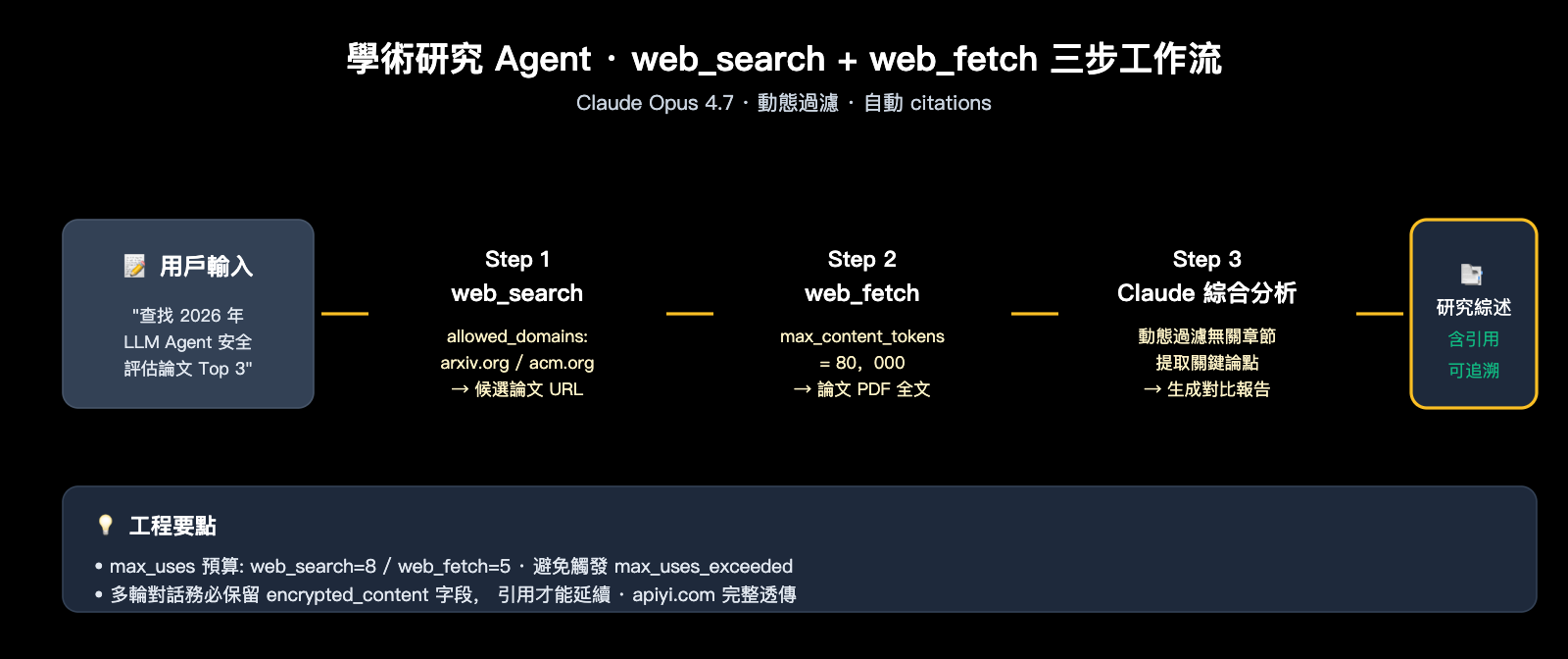
response = client.messages.create(
    model="claude-opus-4-7",
    max_tokens=8192,
    messages=[{
        "role": "user",
        "content": "查找 2026 年關於 LLM Agent 安全性評估的論文,選 Top 3 做綜合對比"
    }],
    tools=[
        {
            "type": "web_search_20260209",
            "name": "web_search",
            "max_uses": 8,
            "allowed_domains": ["arxiv.org", "openreview.net", "acm.org"]
        },
        {
            "type": "web_fetch_20260209",
            "name": "web_fetch",
            "max_uses": 5,
            "citations": {"enabled": True},
            "max_content_tokens": 80000
        }
    ]
)
🎯 場景化建議: 不同業務對搜索質量、引用合規、成本的權重不同。我們建議在 API易 apiyi.com 上爲每個業務場景獨立創建 API Key,便於按場景拆分計費數據、監控真實搜索次數與 token 消耗,而不是把所有調用混在一起。
Claude API 聯網搜索的工程最佳實踐
跑通 demo 不難,把 Claude API 聯網搜索 真正放到生產環境還有幾道坎要過。
實踐一: prompt caching 降本增效
Server Tool 的定義雖然簡短,但配合 system prompt 時仍是不小的固定開銷。開啓 prompt caching:
response = client.messages.create(
    model="claude-sonnet-4-6",
    max_tokens=2048,
    system=[{
        "type": "text",
        "text": "你是一個專業的研究助手...(此處省略 500 字 system prompt)",
        "cache_control": {"type": "ephemeral"}
    }],
    messages=[...],
    tools=[
        {
            "type": "web_search_20250305",
            "name": "web_search",
            "max_uses": 5,
            "cache_control": {"type": "ephemeral"}
        }
    ]
)
實測:5 分鐘內的重複請求,system + tools 部分的 token 成本可降低 90%。
實踐二: 流式響應避免超時
web_search 單次執行可能需要 5-15 秒。如果你的下游(網關、客戶端)有 30 秒超時限制,務必啓用 stream=True,通過流式心跳保持連接活躍。
實踐三: encrypted_content 的多輪一致性
多輪對話中,Claude 可能引用前幾輪搜索的結果。必須在每輪請求中保留之前所有 assistant 消息的完整 content 數組,不要只保留 text 部分:
# ❌ 錯誤做法
messages.append({"role": "assistant", "content": response.content[-1].text})

# ✅ 正確做法
messages.append({"role": "assistant", "content": response.content})
實踐四: 速率限制與重試策略
web_search 的速率限制獨立於普通消息接口。建議在 SDK 層面包裝一個帶指數退避的重試邏輯:
| 錯誤碼 | 重試策略 | 最大重試次數 |
|---|---|---|
too_many_requests |
指數退避 (2s/4s/8s) | 3 |
unavailable |
固定延遲 (5s) | 2 |
max_uses_exceeded |
不重試,提升 max_uses | – |
query_too_long |
不重試,截斷 query | – |
🎯 生產環境建議: 把
web_search的所有錯誤響應記入日誌監控系統,定期分析too_many_requests的佔比——這是評估當前併發是否需要擴容的核心指標。在 API易 apiyi.com 平臺上調用時,可直接在控制檯查看請求成功率、平均響應時間等關鍵指標,便於運維。
Claude API 聯網搜索常見問題 FAQ
Q1: APIYI 的中轉支持原生 web_search 嗎?需要改代碼嗎?
支持,且無需改代碼。API易 apiyi.com 是透明轉發架構,完整透傳 Anthropic 官方的所有 Server Tool。你只需要把 base_url 改成 https://vip.apiyi.com、api_key 換成 API易的 Key,原本調用官方 API 的代碼可以一行不改地跑起來——包括 web_search / web_fetch / code_execution 等所有原生工具。
Q2: web_search 的計費是怎麼算的?$10/1000 次貴嗎?
每次搜索 = $0.01,不論返回多少條結果都按一次計算。失敗的搜索不計費。橫向對比:Tavily $0.005/搜索、Brave $0.006/搜索、Google CSE $0.005/查詢(超出免費額度後)。原生 web_search 略貴,但省掉了 MCP server 運維與引用合規處理的工程成本,綜合算下來對中小團隊往往更划算。
Q3: 爲什麼我的請求報 max_uses_exceeded 錯誤?
Claude 在一輪對話中可能多次調用 web_search(它會自主決策搜幾次)。如果你設了 "max_uses": 1,而問題需要 3 次搜索才能回答,就會觸發這個錯誤。建議複雜問題給到 5-10 次預算,簡單問答留 1-2 次即可。
Q4: web_search 能搜中文網頁嗎?
可以。web_search 底層是 Anthropic 的實時索引,對中文內容覆蓋良好(包括微信公衆號、知乎、CSDN 等)。如果你想限制只搜中文站點,可以配合 allowed_domains 白名單使用。
Q5: 用 web_search 做長文研究 token 消耗很大,如何優化?
三個優化方向:
- 使用
web_search_20260209動態過濾版(需 Claude Opus/Sonnet 4.6+),自動剔除無關片段 - 配合
web_fetch的max_content_tokens參數,限制單頁拉取上限 - 啓用 prompt caching,把工具定義和系統提示詞緩存,降低重複請求成本
Q6: 第三方 MCP 搜索方案與原生 web_search 能混用嗎?
可以。Claude 支持同時定義多個工具,但要注意工具描述要寫清差異——例如把 MCP 的 tavily_search 描述爲"搜索學術論文",把原生 web_search 描述爲"搜索通用網頁",Claude 會基於描述自主選擇。但爲了減少歧義,我們建議單一場景使用單一搜索工具。
Q7: 在國內調用 Claude API 聯網搜索失敗,怎麼辦?
主要原因有兩個:直連 Anthropic API 網絡不穩定,以及 web_search 執行時 Anthropic 後端可能阻斷中國大陸 IP。最直接的解法是通過 API易 apiyi.com 中轉——所有 web_search 請求經 API易海外節點轉發到 Anthropic,響應再回傳國內,穩定性與海外直連一致。
Claude API 聯網搜索方案總結與選擇建議
回顧全文,Claude API 聯網搜索 在 2026 年已經成熟到"開箱即用"的程度。一句話決策:
✅ 80% 的項目用官方原生
web_search就夠了——配置簡單、引用合規、Anthropic 維護。剩下 20% 有強定製需求的場景,再考慮第三方 MCP 或自建工具。
落地行動清單
如果你準備今天就把 Claude API 聯網搜索 接入項目:
- 選模型: 通用場景用
claude-sonnet-4-6(性價比高),複雜研究用claude-opus-4-7 - 選工具版本: 優先
web_search_20260209(動態過濾),舊模型回退到web_search_20250305 - 設計 max_uses: 簡單問答 1-3 次,複雜研究 5-10 次
- 配合 web_fetch: 需要全文分析時,搭配
web_fetch提取候選頁面 - 配置訪問: 國內通過 API易 apiyi.com 透明轉發,無需 VPN、不改代碼
🎯 最後建議: Claude API 聯網搜索的關鍵不是"能不能用",而是"怎麼把搜索結果質量、token 成本、響應延遲三者平衡好"。我們建議先用 API易 apiyi.com 平臺跑幾個真實業務樣例,統計一輪對話的實際搜索次數與 token 消耗,再決定是否引入 prompt caching、動態過濾等進階優化。該平臺支持 Claude 全系模型 + 原生 Server Tool,便於快速迭代。
作者: APIYI 技術團隊 | 更多 Claude API 實戰教程,訪問 help.apiyi.com