Author's Note: A detailed breakdown of the causes behind the Gemini 3.1 Pro API 429 Quota Exceeded error and 5 practical solutions, including key rotation across multiple AI Studio accounts, high-concurrency API proxy services, and exponential backoff retry strategies.
Running into frequent 429 rate limit errors when using the Gemini 3.1 Pro API is one of the most frustrating hurdles for developers. In this article, I’ll walk you through 5 field-tested solutions for the Gemini 3.1 Pro 429 error to help you get your model invocations back on track.
Core Value: By the end of this article, you'll understand the root causes of the Gemini 3.1 Pro 429 error and learn 5 specific solutions, including 2 methods that can eliminate rate limiting at the source.
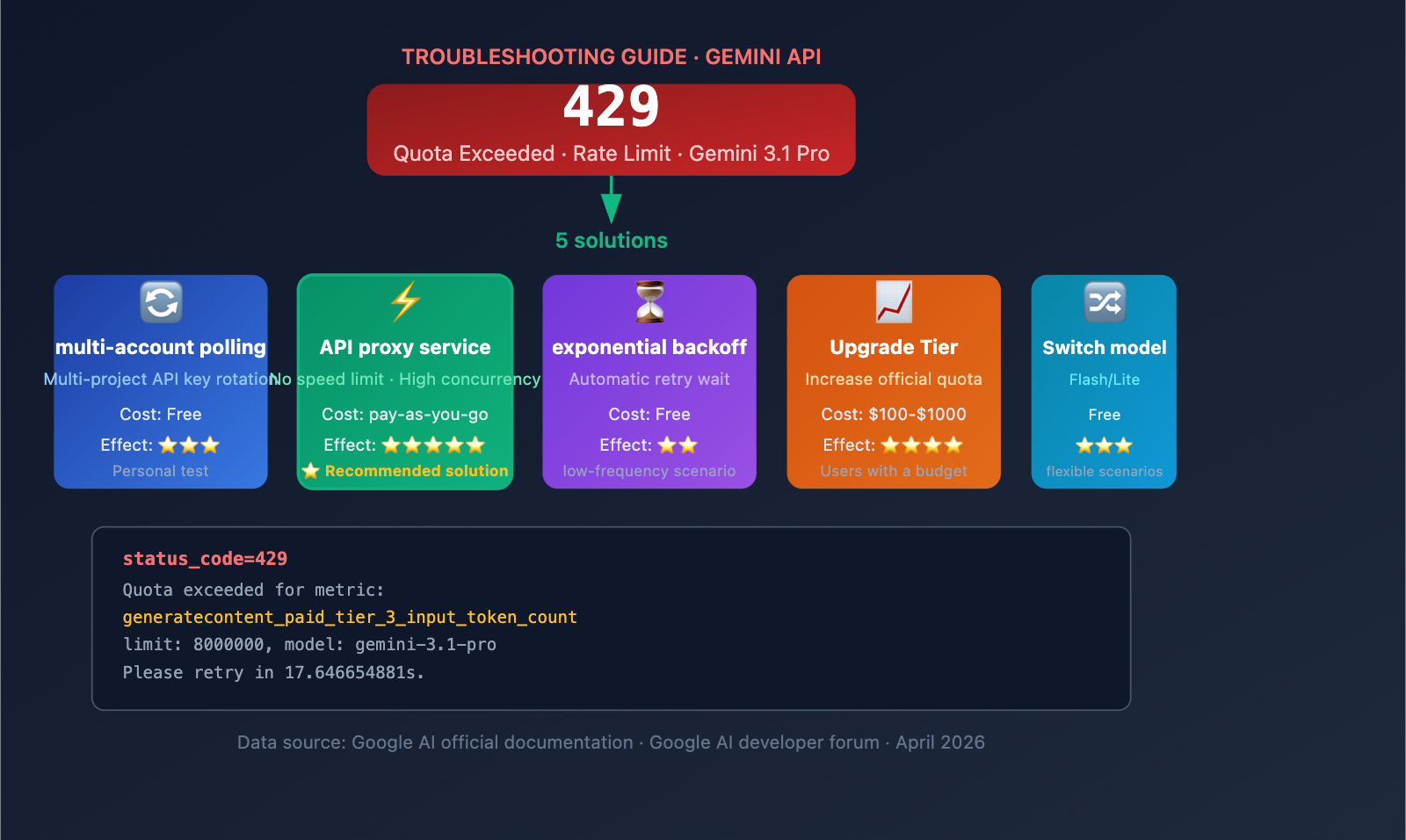
Understanding the Gemini 3.1 Pro 429 Error
Decoding the Gemini 3.1 Pro 429 Error
When you encounter the following error message, it means your API request has hit Google's rate limits:
status_code=429
You exceeded your current quota, please check your plan and billing details.
Quota exceeded for metric: generatecontent_paid_tier_3_input_token_count
limit: 8000000
model: gemini-3.1-pro
Please retry in 17.646654881s.
This error message contains three key pieces of information:
| Information Item | Meaning | Significance |
|---|---|---|
| status_code=429 | HTTP 429 = Too Many Requests (Rate Limit) | Not an account issue; it's a rate limit |
| paid_tier_3_input_token_count | You're on the Tier 3 paid plan, and input tokens hit the limit | Confirms you're on the highest paid tier |
| limit: 8000000 | Current quota limit is 8 million input tokens | This is your per-minute/day token cap |
| retry in 17.6s | Google suggests waiting 17.6 seconds to retry | Waiting helps, but it's just a temporary fix |
Why Gemini 3.1 Pro Frequently Triggers 429 Errors
Gemini 3.1 Pro is one of Google's most powerful reasoning models. Here’s why you’ll see 429 errors so often:
High Computational Demand — Since Gemini 3.1 Pro is a Preview version, the global compute resources allocated by Google are limited, leading to competition among users for the same resource pool.
Strict Tier Limits — Even for Tier 3 paid users (with $1,000+ in cumulative spending), quotas remain relatively tight:
| Tier | Unlock Condition | Monthly Spend Cap | RPM (Requests/Min) | Daily Request Limit |
|---|---|---|---|---|
| Free | No payment required | Free | 2-15 | 50-1,000 |
| Tier 1 | Enable billing | $250 | 150-300 | 1,500 |
| Tier 2 | Spend $100 + 3 days | $2,000 | 500-1,500 | 10,000 |
| Tier 3 | Spend $1,000 + 30 days | $20,000-$100,000 | 1,000-4,000 | Custom |
Key Takeaway: Even as a Tier 3 user, you'll still hit 429 errors during high-concurrency scenarios. This isn't a problem on your end; it's a structural limitation of the Google Gemini API.
Gemini 3.1 Pro 429 Solution 1: API Key Rotation with Multiple AI Studio Accounts
Core Principle
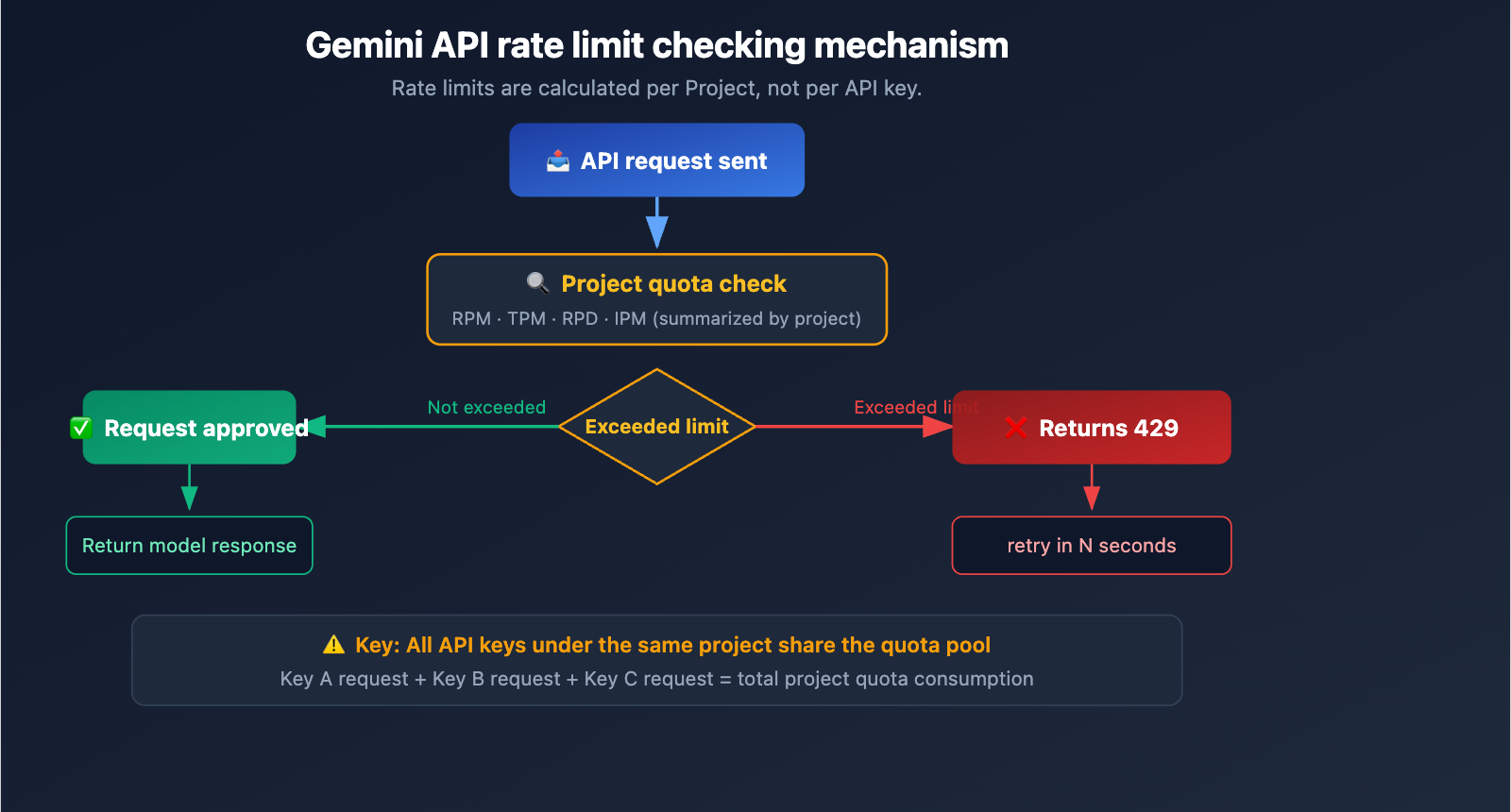
Google Gemini API rate limiting is calculated per project, not per API key.
This means:
- ❌ Creating multiple API keys within the same project → Ineffective; all keys share the same quota pool.
- ✅ Using multiple Google accounts to create separate projects → Effective; each project has an independent quota.
How to Implement Key Rotation
Step 1: Prepare multiple Google accounts, create a separate project in AI Studio for each, and obtain an API key for each.
Step 2: Implement the key rotation logic.
import openai
import random

# API keys from multiple AI Studio accounts (each from a different project)
GEMINI_KEYS = [
    "AIzaSy_account1_project1_key",
    "AIzaSy_account2_project2_key",
    "AIzaSy_account3_project3_key",
    "AIzaSy_account4_project4_key",
]

def call_gemini_with_rotation(prompt, max_retries=3):
    """Gemini API invocation with key rotation"""
    keys = GEMINI_KEYS.copy()
    random.shuffle(keys)

    for i, key in enumerate(keys):
        try:
            client = openai.OpenAI(
                api_key=key,
                base_url="https://generativelanguage.googleapis.com/v1beta/openai/"
            )
            response = client.chat.completions.create(
                model="gemini-3.1-pro",
                messages=[{"role": "user", "content": prompt}]
            )
            return response.choices[0].message.content
        except openai.RateLimitError:
            if i < len(keys) - 1:
                continue  # Switch to the next key
            raise  # All keys exhausted

result = call_gemini_with_rotation("Hello, Gemini!")
Pros and Cons of the Multi-Account Approach
| Pros | Cons |
|---|---|
| Free (uses Free Tier) | Requires managing multiple Google accounts |
| Linear quota growth | Risk of violating Google's Terms of Service |
| Simple to implement | Free Tier quota is extremely low (2-15 RPM) |
| No extra cost | Accounts may be banned |
⚠️ Risk Warning: Creating multiple Google accounts to bypass rate limits may violate Google's Terms of Service. Google reserves the right to detect and ban such behavior. This method is suitable for personal learning and testing; it is not recommended for production environments.
Gemini 3.1 Pro 429 Solution 2: Using an API Proxy Service (Recommended)
Why an API proxy service solves the 429 issue
The core advantage of an API proxy service (like APIYI) is that it aggregates a massive amount of Gemini API quota. The proxy service maintains multiple high-tier API accounts and projects on the backend, using intelligent load balancing to distribute your requests across various quota pools.
For an individual developer, the result is simple: no rate limits, high concurrency, and no 429 errors.
How to connect via an API proxy service
You only need to modify the base_url; the rest of your code remains exactly the same:
import openai

client = openai.OpenAI(
    api_key="your-apiyi-key",
    base_url="https://api.apiyi.com/v1"  # APIYI proxy service
)

response = client.chat.completions.create(
    model="gemini-3.1-pro",
    messages=[{"role": "user", "content": "Analyze the time complexity of this code"}]
)
print(response.choices[0].message.content)
View high-concurrency batch invocation example
import openai
import asyncio
from typing import List

client = openai.AsyncOpenAI(
    api_key="your-apiyi-key",
    base_url="https://api.apiyi.com/v1"
)

async def call_gemini(prompt: str) -> str:
    """Single asynchronous invocation"""
    response = await client.chat.completions.create(
        model="gemini-3.1-pro",
        messages=[{"role": "user", "content": prompt}]
    )
    return response.choices[0].message.content

async def batch_call(prompts: List[str]) -> List[str]:
    """Batch concurrent invocation - no 429 limits via APIYI"""
    tasks = [call_gemini(p) for p in prompts]
    return await asyncio.gather(*tasks)

# Send 50 requests simultaneously - no 429 triggered
prompts = [f"Question {i}: Please explain the quicksort algorithm" for i in range(50)]
results = asyncio.run(batch_call(prompts))
print(f"Successfully completed {len(results)} requests")
Direct Connection vs. API Proxy Service Comparison
| Comparison Dimension | Google Direct (Tier 3) | APIYI Proxy Service |
|---|---|---|
| RPM Limit | 1,000-4,000 | No limit |
| 429 Errors | Frequent during high concurrency | Rarely occurs |
| Unlock Requirements | $1,000+ spend & 30 days | Ready to use upon registration |
| Monthly Spend Cap | $20,000-$100,000 | Pay-as-you-go, no cap |
| Configuration Complexity | Requires GCP project + billing | Just change the base_url |
| Multi-model Support | Gemini only | Claude/GPT/Gemini/Qwen, etc. |
🚀 Quick Start: Register at apiyi.com to get your API key, then change the
base_urlin your code tohttps://api.apiyi.com/v1to immediately resolve the Gemini 3.1 Pro 429 rate-limiting issue.
Gemini 3.1 Pro 429 Solution 3: Exponential Backoff Retry
Use Case
If your usage is low and you only encounter 429 errors occasionally, exponential backoff is the most lightweight solution.
Implementation Code
import time
import random
import openai

def call_with_backoff(client, prompt, max_retries=5):
    """Exponential backoff retry strategy"""
    for attempt in range(max_retries):
        try:
            response = client.chat.completions.create(
                model="gemini-3.1-pro",
                messages=[{"role": "user", "content": prompt}]
            )
            return response.choices[0].message.content
        except openai.RateLimitError as e:
            if attempt == max_retries - 1:
                raise
            # Exponential backoff + random jitter
            wait = (2 ** attempt) + random.uniform(0, 1)
            print(f"429 rate limited, retrying after {wait:.1f}s...")
            time.sleep(wait)
Backoff strategy explanation:
- 1st retry: Wait ~2 seconds
- 2nd retry: Wait ~4 seconds
- 3rd retry: Wait ~8 seconds
- 4th retry: Wait ~16 seconds
💡 Note: Exponential backoff simply "waits for the rate limit to pass" and does not actually increase your throughput. If you need sustained high-concurrency calls, we recommend Solution 2 (API proxy service) or Solution 4 (Upgrading your Tier).
Gemini 3.1 Pro 429 Solution 4: Upgrade Google API Tiers
Tier Upgrade Path
Google Gemini API tier upgrades are triggered automatically—the system upgrades you once you hit specific spending thresholds:
| Current Tier | Upgrade To | Requirements | Effective Time |
|---|---|---|---|
| Free → Tier 1 | Tier 1 | Enable GCP billing | Instant |
| Tier 1 → Tier 2 | Tier 2 | $100 cumulative spend + 3 days | Within 10 minutes |
| Tier 2 → Tier 3 | Tier 3 | $1,000 cumulative spend + 30 days | Within 10 minutes |
Ghost 429 Bug Warning
If you've just upgraded from Free to Tier 1, you might encounter the "Ghost 429" issue within the first 24-48 hours—where you get a 429 error despite low usage. This is a known bug acknowledged by Google; the quota system simply needs time to calibrate.
Temporary Workarounds:
- Wait 24-48 hours for the quota system to recalibrate.
- Switch to a different model variant (e.g., from
gemini-3.1-protogemini-3-pro). - Use an API proxy service to bypass the issue.
Gemini 3.1 Pro 429 Solution 5: Switch Model Variants
Rate Limit Differences Between Models
If you don't strictly need to use Gemini 3.1 Pro, switching to a model variant with more lenient rate limits is an effective solution:
| Model | Use Case | Rate Limit Flexibility | Capability Level |
|---|---|---|---|
| gemini-3.1-pro | Complex reasoning, long context | Most strict | Strongest |
| gemini-3.1-flash | Fast response, daily tasks | More lenient | Above average |
| gemini-3-pro | General reasoning | Moderate | Strong |
| gemini-3.1-flash-lite | High-volume simple tasks | Most lenient | Basic |
🎯 Selection Advice: For most development scenarios,
gemini-3.1-flashoffers a great balance between speed and quality, and it comes with more lenient rate limits. If you need to switch between different models flexibly within the same project, you can use APIYI (apiyi.com) to access the entire lineup of Gemini, Claude, GPT, and more with a single API key.
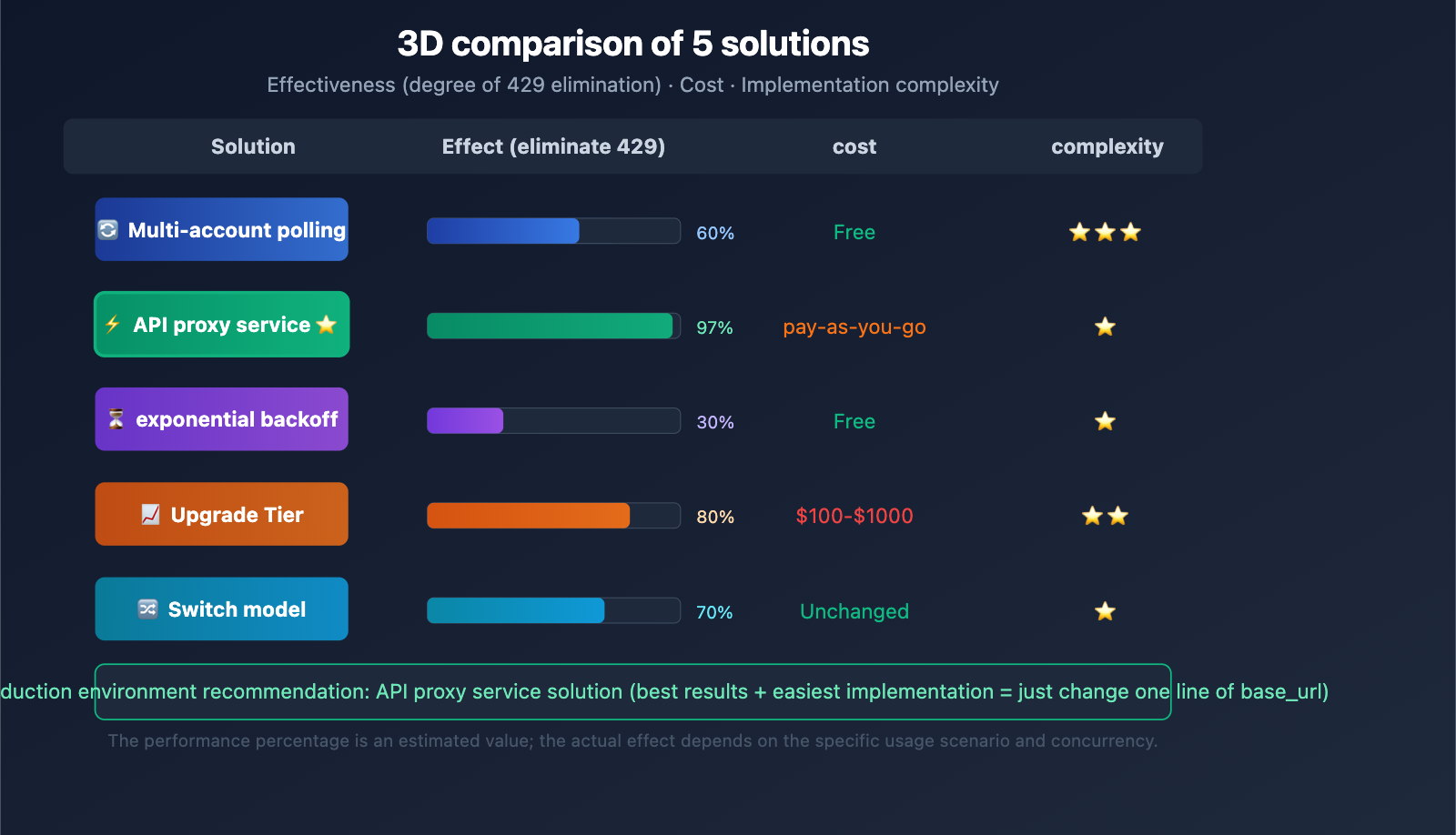
Overview of 5 Solutions for Gemini 3.1 Pro 429 Errors
| Solution | Cost | Effectiveness | Complexity | Recommended Scenario |
|---|---|---|---|---|
| Multi-account Rotation | Free | Moderate | Medium | Personal learning/testing |
| API Proxy Service | Pay-as-you-go | Best | Lowest | Production/High concurrency |
| Exponential Backoff | Free | Low | Low | Occasional 429s, low frequency |
| Upgrade Tier | $100-$1,000 | Medium-High | Low | Budget available, medium concurrency |
| Switch Models | Unchanged | Moderate | Lowest | When non-Pro models suffice |
FAQ
Q1: Can I bypass 429 errors by creating multiple API keys under the same Google project?
No. Google Gemini API rate limits are calculated per project, not per API key. All API keys under the same project share the same quota pool. To bypass limits via key rotation, you must use keys from different Google accounts or different projects. However, we highly recommend using an API proxy service like APIYI (apiyi.com), which allows you to handle high concurrency without the hassle of managing multiple accounts.
Q2: What does “retry in 17.6s” mean in a Gemini 3.1 Pro 429 error?
This is Google telling you that your current quota window will refresh in approximately 17.6 seconds. You could wait and retry, but that's just a temporary fix. If your application requires sustained, high-frequency model invocation, waiting won't solve the root cause. We suggest implementing an exponential backoff strategy for automatic retries or switching to an API proxy service to eliminate rate limits entirely.
Q3: Why can API proxy services avoid rate limits?
API proxy services (like APIYI) maintain multiple high-tier Google Cloud projects and extensive API quotas on the backend. When your request reaches the proxy, it uses intelligent load balancing to distribute the traffic across various quota pools. For an individual developer, this effectively provides a total quota that far exceeds personal tier limits. You can get started with high-concurrency Gemini API access by registering at APIYI (apiyi.com).
Summary
Here’s the core strategy for resolving the Gemini 3.1 Pro 429 rate limit error:
- Understand the Rate Limiting Mechanism: The 429 error is applied per project, not per API key. Using multiple keys under the same project won't help.
- Multi-Account Rotation: Rotating keys from different Google accounts is an option for personal testing, but keep in mind it carries a risk of account suspension.
- API Proxy Service: Modifying the
base_urlto use an API proxy service is the best solution for production environments to bypass rate limits. - Exponential Backoff: A lightweight approach suitable for low-frequency scenarios where 429 errors occur only occasionally.
- Upgrade Tier or Switch Models: Increase your quota at the source or scale down your requirements.
For developers who need stable, high-concurrency Gemini 3.1 Pro model invocation, we recommend using APIYI (apiyi.com). By simply changing one line of base_url, you can get unrestricted access to the Gemini API, with unified support for the entire suite of models, including Claude and GPT.
📚 References
-
Official Google Rate Limit Documentation: Gemini API Rate Limits
- Link:
ai.google.dev/gemini-api/docs/rate-limits - Description: Official rate limit rules and tier explanations.
- Link:
-
Google AI Developer Forum: 429 Error Discussion Thread
- Link:
discuss.ai.google.dev/t/constant-429-no-capacity-available-for-model-gemini-3-1-pro-preview-on-the-server - Description: Developer community discussions and official responses from Google.
- Link:
-
Official Google Pricing Page: Gemini API Pricing and Tiers
- Link:
ai.google.dev/gemini-api/docs/pricing - Description: Details on spending thresholds and pricing for each tier.
- Link:
-
Gemini API Troubleshooting Guide: Handling 429/400/500 Errors
- Link:
ai.google.dev/gemini-api/docs/troubleshooting - Description: Official documentation for troubleshooting errors.
- Link:
Author: APIYI Technical Team
Technical Discussion: Feel free to discuss Gemini API rate limit issues in the comments. For more AI development resources, visit the APIYI documentation center at docs.apiyi.com.