On January 21, 2026, at 6:00 PM (CST), a wave of developers reported that Nano Banana Pro API calls were hitting constant timeouts, and failure rates for 4K resolution requests were skyrocketing. This article provides a full post-mortem of the outage, breaks down the root cause, and offers three practical emergency workarounds.
Key Takeaways: Get the real scoop on Google Imagen API's stability, learn how to handle emergencies when things go south, and minimize your business downtime.
Nano Banana Pro Full Outage Timeline
This outage began around 6:00 PM CST and lasted for at least 5.5 hours, affecting a wide range of users.
| Time (CST) | Event Description | Impact Level |
|---|---|---|
| 18:00 | First batch of timeout reports appears; 4K requests start failing | Some users |
| 18:30 | Failure rate climbs; error message shows Deadline expired |
40% of users |
| 19:00 | 1-2K resolutions still normal; 4K requests almost all timeout | 70% of users |
| 20:00 | Official timeout threshold extended from 300s to 600s | All users |
| 21:00 | A few 4K requests succeed occasionally, but remains unstable | Ongoing |
| 23:30 | Outage not yet fully recovered; 4K success rate ~15% | Ongoing |
Key Phenomena of the Nano Banana Pro Outage
During this incident, we noticed three distinct patterns:
Phenomenon 1: Resolution Dependency
- 1K-2K resolution: Requests were mostly normal, with success rates > 90%.
- 4K resolution: Extremely high failure rate, with success rates < 20%.
Phenomenon 2: Model Isolation
Gemini text APIs under the same account worked perfectly fine, indicating this wasn't an account-level restriction but a specific failure within the image generation module.
Phenomenon 3: Changing Timeout Windows
Google quietly bumped the timeout threshold from 300 to 600 seconds. This suggests they were aware of the issue and tried to mitigate it by extending the wait time, though it was more of a band-aid than a real fix.
Nano Banana Pro Root Cause Analysis
Technical Analysis
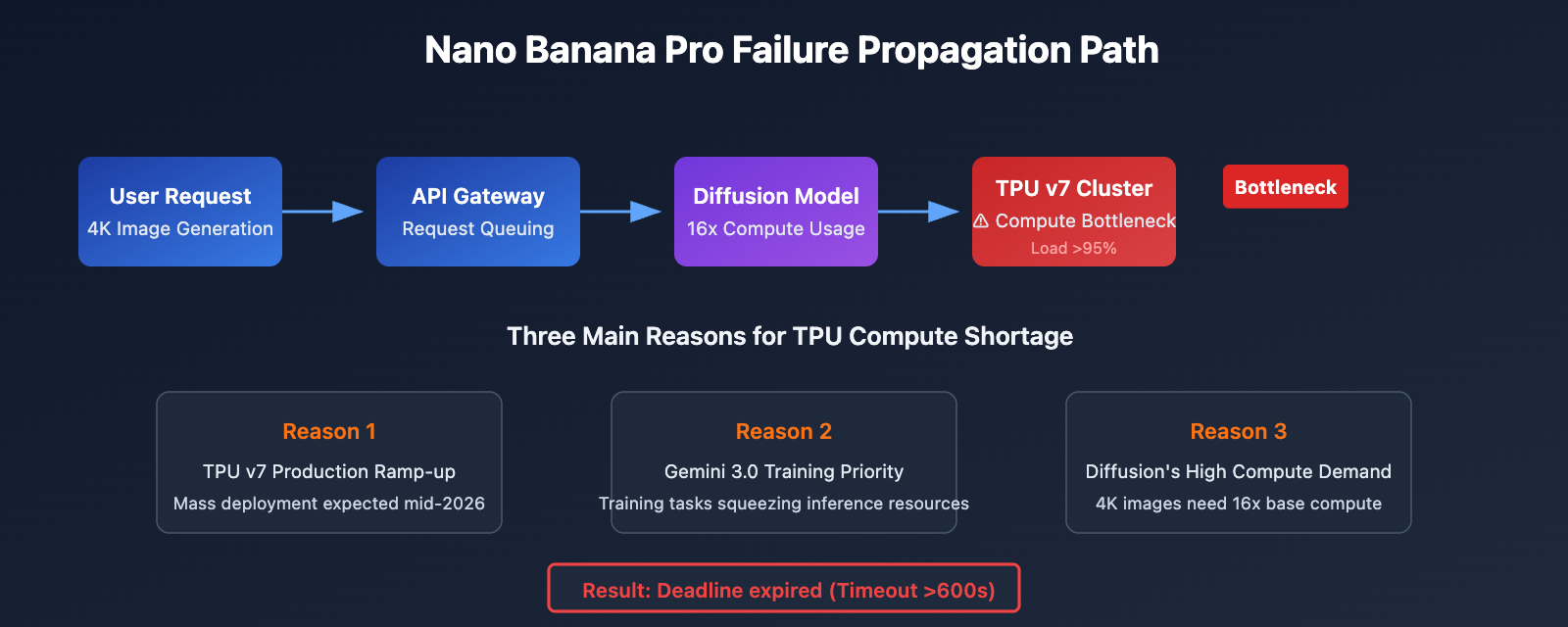
The outages with Nano Banana Pro (Gemini 3 Pro Image) stem from issues with Google's backend TPU compute allocation.
| Factor | Description | Impact |
|---|---|---|
| TPU v7 Compute Bottleneck | Released in April 2025; mass deployment is still ongoing. | Insufficient compute during peak load periods. |
| Diffusion Model Overhead | Image generation consumes 5-10x more compute than text inference. | 4K generation is particularly resource-intensive. |
| Gemini 3.0 Training Tasks | Massive TPU resources are prioritized for training tasks. | Inference services are being squeezed. |
| Paid Preview Phase Limits | Currently still in the Paid Preview stage. | Conservative capacity planning. |
Based on discussions in the Google AI Developers Forum, the instability issues with Nano Banana Pro started surfacing in the second half of 2025, and the official team hasn't been able to fully resolve the root cause yet.
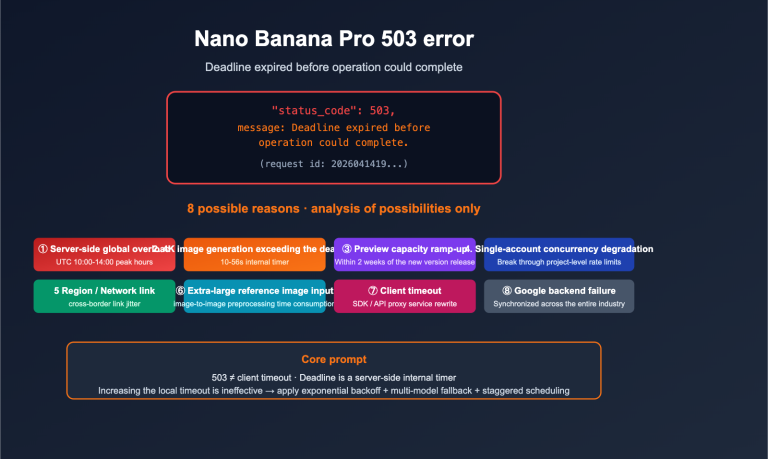
Deciphering the "Deadline expired" Error
Error: Deadline expired before operation could complete.
The meaning of this error message is quite clear:
- Deadline: The timeout threshold set by Google's server-side (originally 300s, now 600s).
- expired: The image generation didn't finish within the allotted time.
- Root Cause: The TPU queue is congested, and the request spent too long waiting in line.
🎯 Technical Tip: When you run into these kinds of widespread outages, it's a good idea to monitor API status via the APIYI (apiyi.com) platform. They sync upstream service statuses in real-time, helping developers catch outages as they happen.
Nano Banana Pro Resolution Impact Detailed
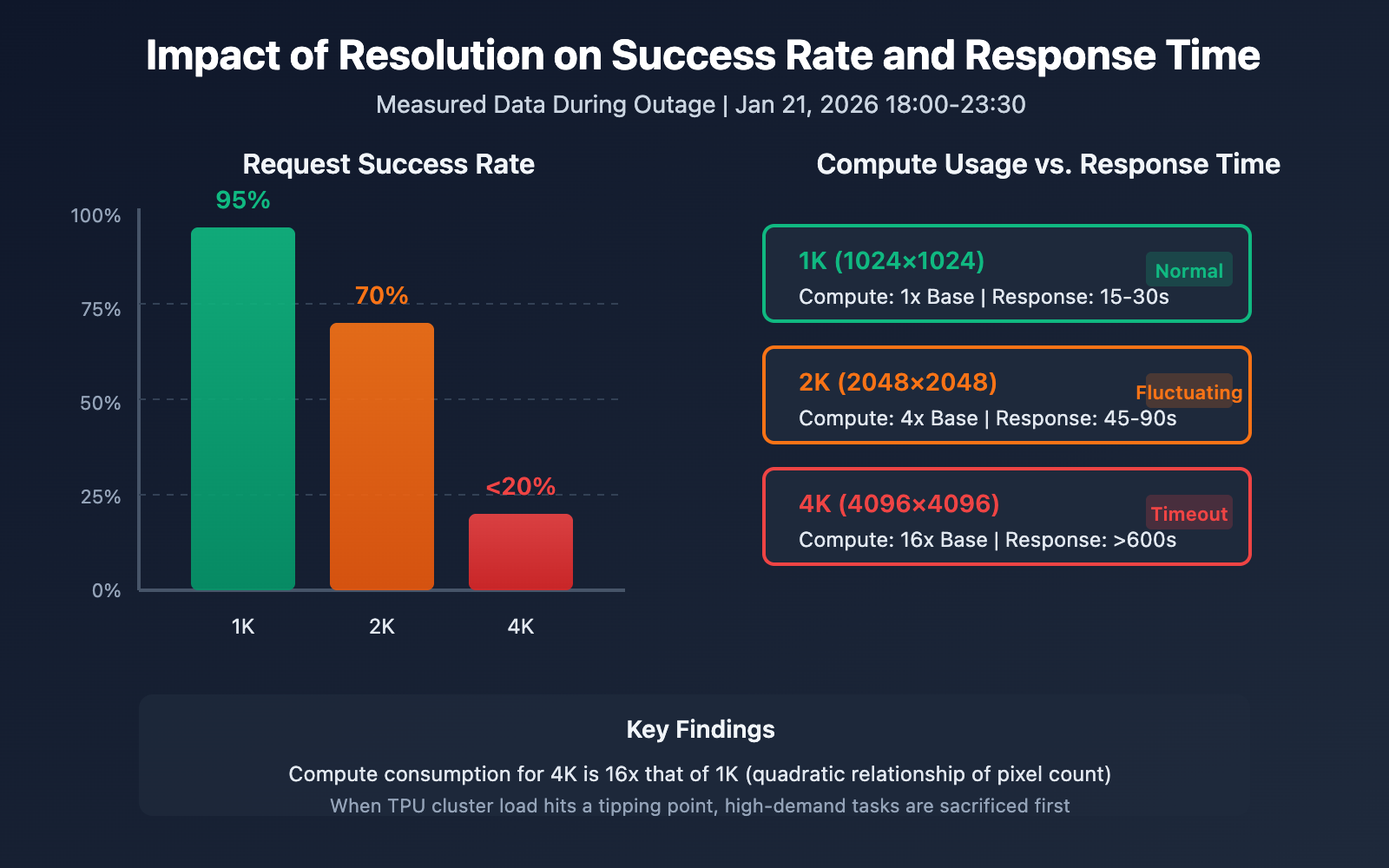
Ever wondered why 4K resolution takes the biggest hit? It's directly tied to how Diffusion models consume compute.
| Resolution | Pixel Count | Relative Compute Usage | Success Rate During Outage | Avg Response Time |
|---|---|---|---|---|
| 1024×1024 (1K) | 1M pixels | 1x (Base) | ~95% | 15-30s |
| 2048×2048 (2K) | 4M pixels | ~4x | ~70% | 45-90s |
| 4096×4096 (4K) | 16M pixels | ~16x | <20% | Timeout (>600s) |
The Compute Formula
The computational load for Diffusion models follows a quadratic relationship with resolution:
Compute Usage ≈ (Width × Height) × Diffusion Steps × Model Complexity
This means generating a 4K image requires roughly 16 times the compute of a 1K image. When TPU cluster load hits its limit, these high-demand tasks are the first to be sacrificed.
Resolution Fallback Strategy
If your business logic allows it, you can implement a resolution fallback strategy during outages:
# Example fallback code for outages
from openai import OpenAI

client = OpenAI(
    api_key="YOUR_API_KEY",
    base_url="https://api.apiyi.com/v1"
)

def generate_with_fallback(prompt, preferred_size="4096x4096"):
    """Image generation function with fallback logic"""
    size_fallback = ["4096x4096", "2048x2048", "1024x1024"]

    for size in size_fallback:
        try:
            response = client.images.generate(
                model="nano-banana-pro",
                prompt=prompt,
                size=size,
                timeout=120  # 2-minute timeout per attempt
            )
            print(f"Successfully generated {size} image")
            return response
        except Exception as e:
            print(f"Failed to generate {size}: {e}")
            continue

    return None
View full fallback strategy code
import time
from typing import Optional
from openai import OpenAI

class NanoBananaProClient:
    """Nano Banana Pro client with failure fallback"""

    def __init__(self, api_key: str):
        self.client = OpenAI(
            api_key=api_key,
            base_url="https://api.apiyi.com/v1"
        )
        self.size_priority = ["4096x4096", "2048x2048", "1024x1024"]
        self.max_retries = 3

    def generate_image(
        self,
        prompt: str,
        preferred_size: str = "4096x4096",
        allow_downgrade: bool = True
    ) -> Optional[dict]:
        """
        Generates an image, supporting resolution fallback/downgrade.

        Args:
            prompt: Image description
            preferred_size: Preferred resolution
            allow_downgrade: Whether to allow falling back to lower resolutions
        """
        sizes_to_try = (
            self.size_priority
            if allow_downgrade
            else [preferred_size]
        )

        for size in sizes_to_try:
            for attempt in range(self.max_retries):
                try:
                    response = self.client.images.generate(
                        model="nano-banana-pro",
                        prompt=prompt,
                        size=size,
                        timeout=180
                    )
                    return {
                        "success": True,
                        "size": size,
                        "data": response,
                        "downgraded": size != preferred_size
                    }
                except Exception as e:
                    wait_time = (attempt + 1) * 30
                    print(f"Attempt {attempt + 1}/{self.max_retries} "
                          f"({size}) failed: {e}")
                    if attempt < self.max_retries - 1:
                        time.sleep(wait_time)

        return {"success": False, "error": "All attempts failed"}

# Usage Example
client = NanoBananaProClient(api_key="YOUR_API_KEY")
result = client.generate_image(
    prompt="A futuristic cityscape at sunset",
    preferred_size="4096x4096",
    allow_downgrade=True
)
💡 Recommendation: For production environments, we suggest calling the Nano Banana Pro API via the APIYI (apiyi.com) platform. The platform features automatic failure detection and intelligent routing, which can automatically switch to backup channels if upstream services go down.
Nano Banana Pro Emergency Solutions
If you're facing these kinds of failures, here are 3 emergency solutions you can take.
Option 1: Resolution Downgrade
Scenario: Your business can accept lower-resolution images.
| Strategy | Action | Expected Outcome |
|---|---|---|
| Immediate Downgrade | 4K → 2K | Success rate jumps to 70% |
| Conservative Downgrade | 4K → 1K | Success rate jumps to 95% |
| Hybrid Strategy | Auto Waterfall Downgrade | Maximizes success rate |
Option 2: Retries and Queues
Scenario: You absolutely need 4K and can handle some latency.
import asyncio
from collections import deque

class RetryQueue:
    """带退避的重试队列"""

    def __init__(self, max_concurrent=2):
        self.queue = deque()
        self.max_concurrent = max_concurrent
        self.base_delay = 60  # 起始重试间隔 60 秒

    async def add_task(self, task_id, prompt):
        self.queue.append({
            "id": task_id,
            "prompt": prompt,
            "attempts": 0,
            "max_attempts": 5
        })

    async def process_with_backoff(self, task):
        delay = self.base_delay * (2 ** task["attempts"])
        print(f"等待 {delay}s 后重试任务 {task['id']}")
        await asyncio.sleep(delay)
        # 执行实际调用...
Option 3: Switching to Alternative Models
Scenario: Your business can handle a slightly different visual style.
| Alternative Model | Pros | Cons | Recommendation |
|---|---|---|---|
| DALL-E 3 | Highly stable, great text rendering | Distinct style differences | ⭐⭐⭐⭐ |
| Midjourney API | Highly artistic | Requires separate integration | ⭐⭐⭐ |
| Stable Diffusion 3 | Self-hostable, full control | Requires GPU resources | ⭐⭐⭐⭐⭐ |
| Flux Pro | High quality, fast | Higher price point | ⭐⭐⭐⭐ |
💰 Cost Optimization: By using the APIYI (apiyi.com) platform, you can call multiple image generation models with a single API Key. This lets you quickly switch to a backup model if the primary service fails without having to change your code architecture.
Nano Banana Pro Stability History
This isn't the first time Nano Banana Pro has dealt with a large-scale outage.
| Date | Failure Type | Duration | Official Response |
|---|---|---|---|
| Aug 2025 | Widespread 429 quota errors | ~3 days | Adjusted quota policy |
| Oct 2025 | Peak-hour timeouts | ~12 hours | Capacity expansion |
| Dec 2025 | Free tier quotas heavily tightened | Permanent | Policy adjustment |
| Jan 21, 2026 | Massive 4K timeouts | >5.5 hours | Extended timeout thresholds |
According to the Google AI developer community, the root causes of these issues are:
- TPU v7 Production Ramp-up: It was released in April 2025, but large-scale deployment won't be finished until 2026.
- Gemini 3.0 Training Priority: Training tasks are hogging a ton of TPUs, which squeezes the inference services.
- Diffusion Model Compute Demands: Generating images takes 5 to 10 times more compute power than Large Language Model inference.
FAQ
Q1: Why is the Gemini text API working fine for the same account, but the image API keeps timing out?
Gemini's text API and Nano Banana Pro (image generation) use different backend resource pools. Image generation relies on Diffusion models, which require 5 to 10 times more computing power than text inference. When TPU resources get tight, these high-compute services are the first to be affected. This confirms the issue is at the resource level rather than a problem with account permissions.
Q2: What does it mean that the official timeout was extended from 300s to 600s?
This is a sign that Google acknowledges the issue, but they can't fundamentally solve the TPU shortage in the short term. Extending the timeout is just a band-aid fix—it simply gives requests a longer time to wait in the queue. For developers, this means you'll need to adjust your client-side timeout settings accordingly and manage expectations for longer wait times.
Q3: As an official relay, what can APIYI do when these outages happen?
As an official relay service, the APIYI (apiyi.com) platform is indeed restricted when upstream services fail. however, the platform's value lies in real-time status monitoring, failure alerts, automatic retry mechanisms, and the ability to switch models quickly. When Nano Banana Pro is down, you can switch to alternative models like DALL-E 3 or Flux Pro with a single click.
Q4: When will Nano Banana Pro become completely stable?
According to industry analysis, two conditions need to be met: first, the large-scale deployment of TPU v7 must be completed (expected mid-2026), and second, the training phase for the Gemini 3.0 series must wrap up. Until then, instability during peak hours may continue to pop up. We recommend designing your architecture with multi-model redundancy in mind.
Summary
Key takeaways from the Nano Banana Pro API outage on January 21, 2026:
- Failure Profile: Failure rates for 4K resolution are extremely high, while 1-2K is mostly normal. The problem lies in TPU resource allocation.
- Root Cause: A combination of insufficient Google TPU v7 capacity, the high compute demands of Diffusion models, and Gemini 3.0 training sessions squeezing inference resources.
- Emergency Workarounds: Lower your resolution, implement retry queues with backoff, and prepare for a quick switch to alternative models.
For production services that rely on Nano Banana Pro, we suggest connecting via the APIYI (apiyi.com) platform. The platform offers a unified multi-model interface supporting mainstream models like DALL-E 3, Flux Pro, and Stable Diffusion 3, allowing for a quick failover during primary service outages to ensure business continuity.
Author: APIYI Technical Team
Technical Exchange: Visit APIYI (apiyi.com) for more AI image generation API news and technical support.
References
-
Google AI Developers – Nano Banana Image Generation: Official Documentation
- Link:
ai.google.dev/gemini-api/docs/image-generation - Description: The official guide for image generation using the Gemini API.
- Link:
-
Google Cloud Service Health: Service Status Dashboard
- Link:
status.cloud.google.com - Description: Real-time monitoring of various Google Cloud service statuses.
- Link:
-
StatusGator – Google AI Studio and Gemini API: Third-party Status Monitoring
- Link:
statusgator.com/services/google-ai-studio-and-gemini-api - Description: Historical records of outages and status tracking.
- Link:
-
Gemini API Rate Limits: Official Rate Limiting Documentation
- Link:
ai.google.dev/gemini-api/docs/rate-limits - Description: Explanation of IPM (Images Per Minute) and quota policies.
- Link: