Author's Note: A detailed explanation of the complete workflow for generating flowcharts from text using AI: Step 1 uses a Large Language Model to organize structured content, Step 2 uses image models like Nano Banana Pro to generate professional flowcharts.
"I have a bunch of text descriptions and want to generate a nice-looking flowchart. Which AI tool is suitable?"—The answer to this question isn't a single tool, but a two-step workflow.
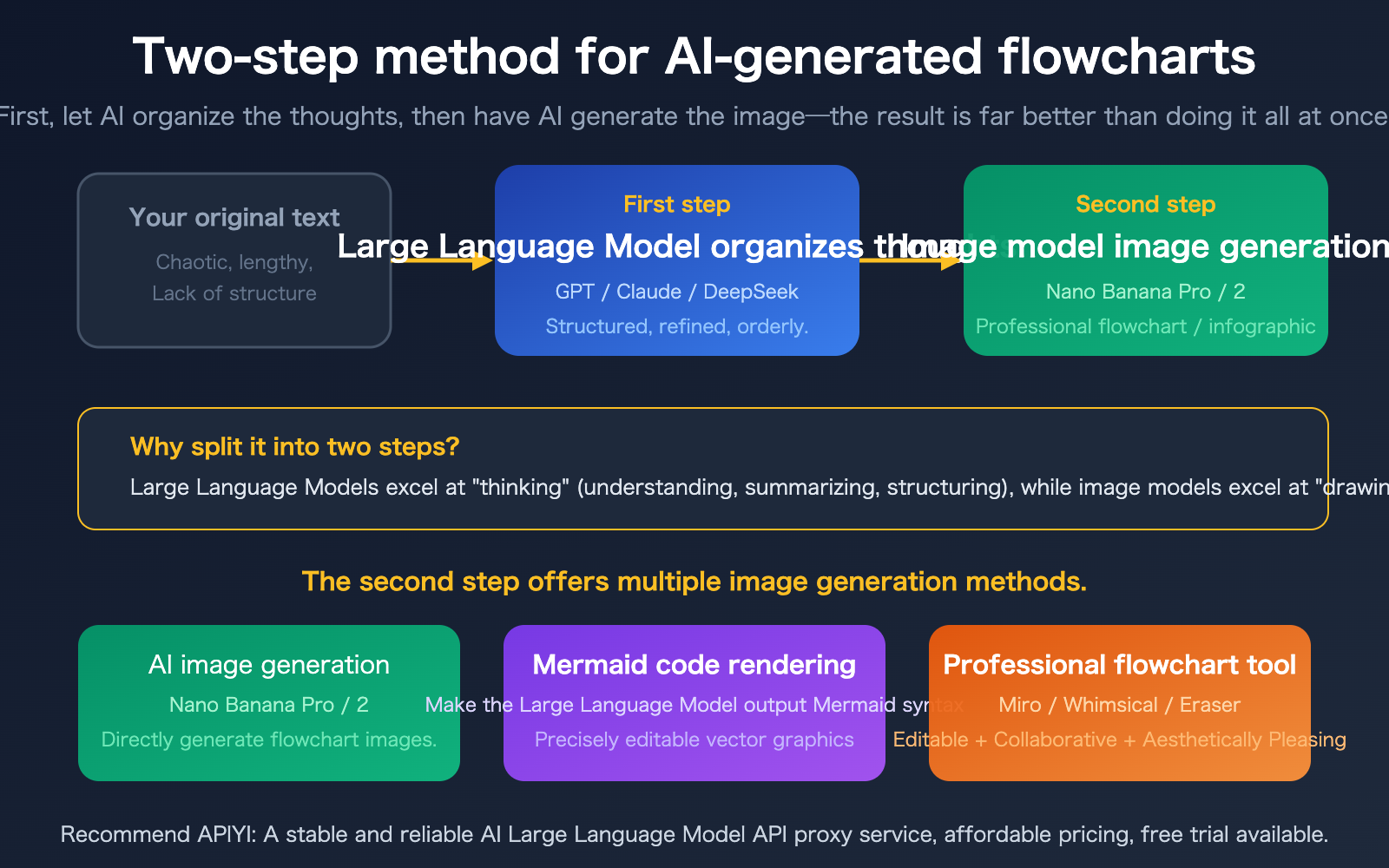
Dumping a large chunk of text directly into an AI image generation tool often yields poor results—because AI image models are good at "drawing," but not at "thinking." The correct approach is a two-step process: First, use a Large Language Model to organize your thoughts, turning messy text into orderly, structured, and concise content; Then, use an image model to generate the diagram, transforming the structured content into a professional flowchart.
Core Value: After reading this article, you'll master the complete AI workflow from "a piece of text" to "a professional flowchart," including which tools to use at each step.
Core Principles for AI-Generated Flowcharts
| Key Point | Explanation | Value |
|---|---|---|
| Structure First, Visualize Second | Large Language Models handle understanding and structuring, image models handle visual presentation | Far better results than a single-step approach |
| Multiple Output Methods | AI image generation, Mermaid code, professional flowchart tools | Choose based on need, don't limit yourself to one |
| Nano Banana Pro Excels at Infographics | Clear text rendering, supports chart and flowchart styles | Generates professional images directly from prompts |
| APIYI AI Image Master | Online tool supporting rapid testing of multiple image models | Zero-code image generation, test and use immediately |
Why a Two-Step Process for AI Flowchart Generation?
Many people's first instinct is to tell the AI directly, "Help me draw a flowchart," but the results are often disappointing. The reason is simple:
Limitations of Image Models: Image generation models like Nano Banana Pro and DALL-E excel at visual creation, but they don't truly "understand" your messy text description. If the input information isn't refined and the structure isn't clear, the generated image will have missing information and logical confusion.
Strengths of Large Language Models: Text-based Large Language Models like GPT-4o, Claude, and DeepSeek are good at understanding, summarizing, and structuring. They can distill your lengthy description into a clear logical chain like "Step 1 → Step 2 → Decision → Branch A / Branch B."
Therefore, the correct method is: Let the Large Language Model do the "thinking" work, and let the image model do the "drawing" work. Each excels at its own task for the best results.
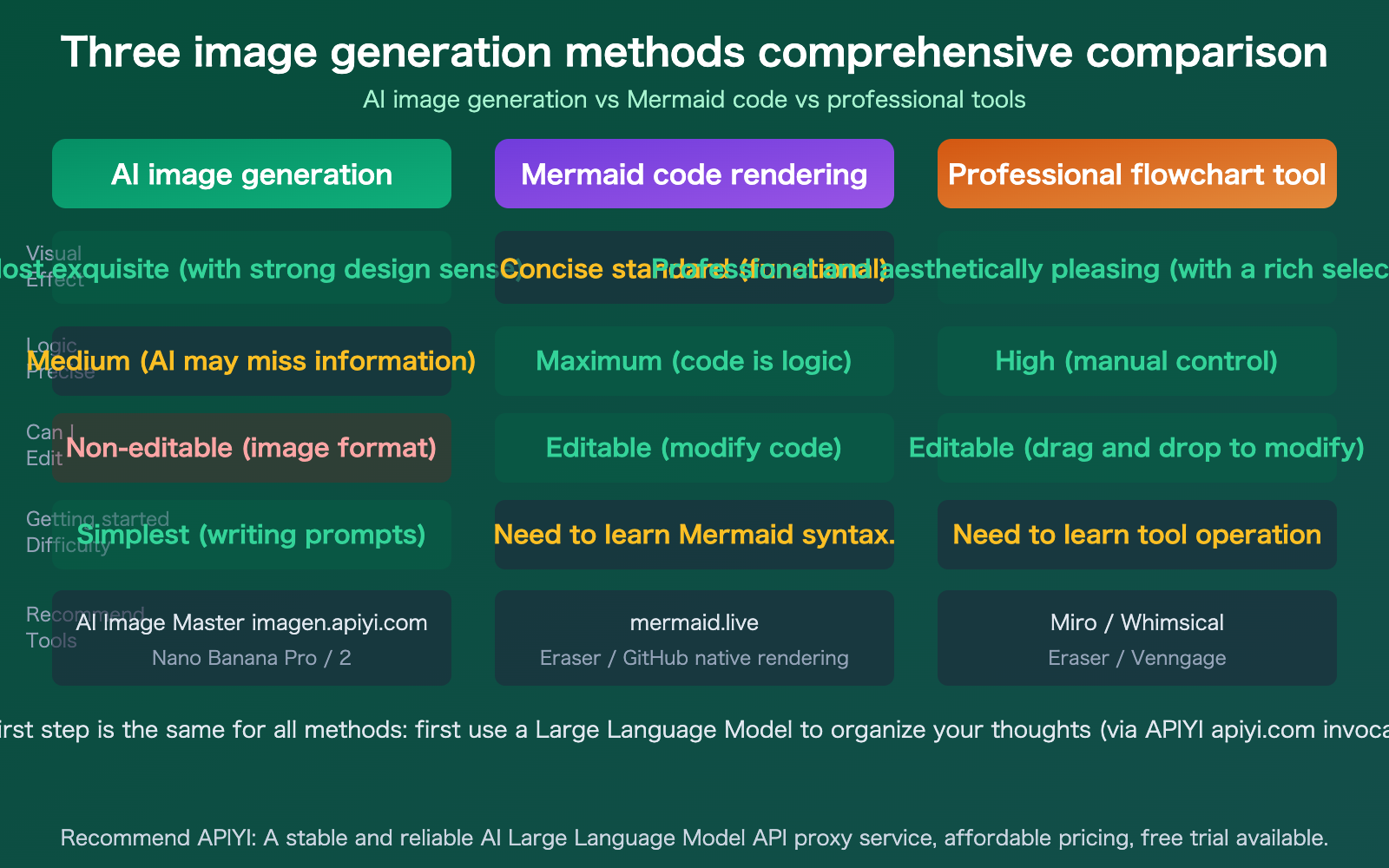
3 Output Methods for AI-Generated Flowcharts
| Output Method | Tools | Advantages | Best For |
|---|---|---|---|
| AI Image Generation | Nano Banana Pro/2, DALL-E | Visually appealing, direct output | Presentation decks, social sharing, infographics |
| Mermaid Code Rendering | LLM-generated code + mermaid.live | Precise, editable, logically accurate | Technical documentation, developer scenarios |
| Professional Flowchart Tools | Miro, Whimsical, Eraser | Editable, collaborative, rich templates | Team collaboration, formal documentation |
🎯 Selection Advice: If you need a quick, good-looking flowchart for a presentation or share, we recommend the AI image generation method (Nano Banana Pro). If you need a precise, editable flowchart, we recommend the Mermaid code method. You can use APIYI (apiyi.com) to call a Large Language Model to organize your thoughts, then use AI Image Master (imagen.apiyi.com) to quickly generate the image.
Step 1 for AI Flowchart Generation: Let the LLM Organize Your Thoughts
The goal of this step is to turn your raw text into a structured, refined, and ordered process description.
Prompt Template for Organizing Thoughts
I have a text description of the following business process. Please help me:
1. Extract the core steps (no more than 8)
2. Indicate the logical relationships between steps (sequential/decision/parallel)
3. If there are decision branches, clarify the conditions and directions
4. Reorganize using concise language, no more than 10 words per step

Original description:
{Your text content here}
Code Example for Organizing Thoughts
import openai

client = openai.OpenAI(
    api_key="YOUR_API_KEY",
    base_url="https://api.apiyi.com/v1"
)

response = client.chat.completions.create(
    model="gpt-4o",
    messages=[{
        "role": "user",
        "content": """I have the following business process description. Please refine it into structured process steps:
1. Extract core steps (no more than 8)
2. Indicate logical relationships (sequential/decision/parallel)
3. No more than 10 words per step

Original description: After a user submits an order, the system first verifies inventory. If inventory is available, it calculates the price and generates a payment link.
Upon successful payment, it automatically ships the order. If inventory is insufficient, it notifies the user of the shortage and recommends alternative products..."""
    }]
)
print(response.choices[0].message.content)
The Large Language Model will output a structured result similar to this:
1. User submits order
2. System verifies inventory
   ├── Inventory available → 3. Calculate price
   │                       → 4. Generate payment link
   │                       → 5. User payment
   │                       → 6. Auto-ship order
   └── Inventory unavailable → 7. Notify user of shortage
                             → 8. Recommend alternative products
Suggestion: Get an API Key from APIYI (apiyi.com). You can use multiple models like GPT-4o, Claude, and DeepSeek to organize your thoughts separately, then compare and select the clearest structure.
Step 2 of AI Flowchart Generation: Detailed Output Methods
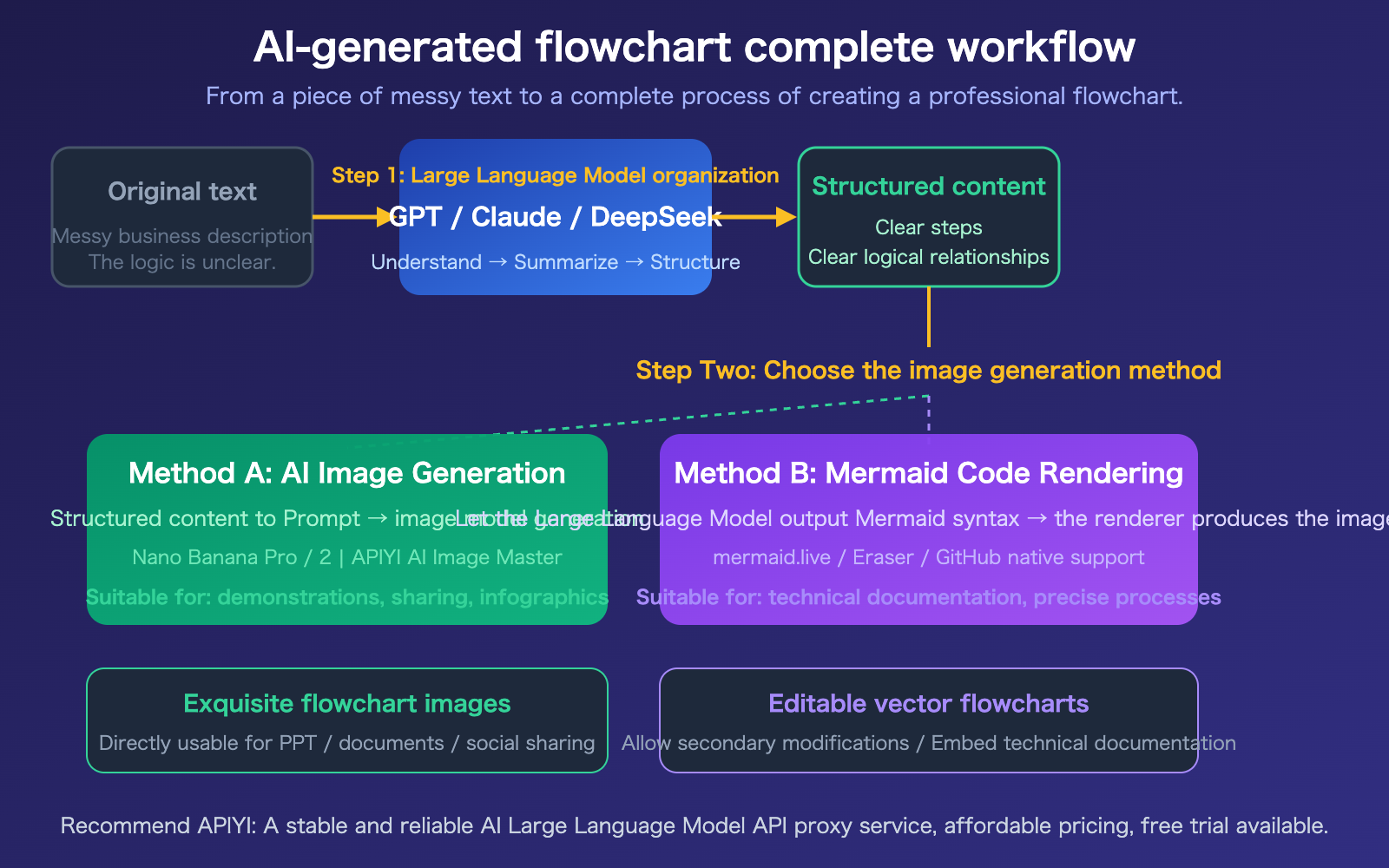
Method A: Generate Flowcharts Directly with AI Image Models
New-generation image models like Nano Banana Pro can now generate infographics and flowcharts with clear text annotations. The key is to base your prompt on the structured content organized in the first step.
Recommended Tool: APIYI AI Image Master (imagen.apiyi.com), which supports mainstream image models like Nano Banana Pro and Nano Banana 2. You can test generation results online.
Tips for Image Generation Prompts:
Please generate a professional flowchart infographic with the following content:

Process Steps:
1. User submits an order
2. System verifies inventory
3. [Decision] Is inventory sufficient?
   - Yes → Calculate price → Generate payment link → User payment → Automatic shipment
   - No → Notify out-of-stock → Recommend alternative products

Style Requirements: Modern business style, dark background, steps displayed in cards, connected by arrows,
decision nodes in diamond shapes, text must be clear and readable.
Best For: Scenarios where you need a polished final image for visual presentations like PowerPoint slides, public account articles, or social media sharing.
Method B: Have a Large Language Model Output Mermaid Code
Mermaid is a standard for describing diagrams with text syntax, and all mainstream Large Language Models can generate Mermaid code. The generated code can be rendered directly on platforms like mermaid.live, GitHub, and Notion.
Prompt for Getting a Large Language Model to Generate Mermaid:
Please output flowchart code in Mermaid syntax based on the following process description:

1. User submits an order
2. System verifies inventory
   - Sufficient inventory → Calculate price → Generate payment → User payment → Automatic shipment
   - Insufficient inventory → Notify out-of-stock → Recommend alternatives
The Large Language Model will output:
flowchart TD
    A[User submits order] --> B{System verifies inventory}
    B -->|Sufficient inventory| C[Calculate price]
    C --> D[Generate payment link]
    D --> E[User payment]
    E --> F[Automatic shipment]
    B -->|Insufficient inventory| G[Notify user of shortage]
    G --> H[Recommend alternative products]
Paste the code into mermaid.live to see the rendered result.
Best For: Technical documentation, developer READMEs, and scenarios requiring precise control over process logic. Mermaid code can be version-controlled, facilitating team collaboration.
🎯 Output Method Selection Advice: Need it to "look good"? → AI image generation (imagen.apiyi.com). Need it to be "precise"? → Mermaid code. Need it to be "editable + collaborative"? → Professional tools like Miro/Whimsical. The first step for all three methods is the same—first have the Large Language Model organize the ideas. You can use APIYI (apiyi.com) to call Large Language Models and complete the organization work in one stop.
AI Image Master: Generate Flowcharts with Zero Code
If you don't want to write code, APIYI offers an online image generation tool—AI Image Master (imagen.apiyi.com). It supports mainstream image generation models like Nano Banana Pro and Nano Banana 2, allowing you to test results directly in your browser.
How to Use AI Image Master
- Visit imagen.apiyi.com
- Select Model: Nano Banana Pro (recommended for clearest text rendering) or Nano Banana 2
- Input Prompt: Write an image generation prompt based on the structured content organized in step one
- Generate Image: Click generate, review the result, and adjust the prompt to regenerate if unsatisfied
- Download & Use: Download the image directly once satisfied
Image Models Supported by AI Image Master
| Model | Characteristics | Best Use Case |
|---|---|---|
| Nano Banana Pro | Clearest text rendering, strong infographic capability | Flowcharts, infographics, charts containing text |
| Nano Banana 2 | Fine image quality, rich creative styles | Conceptual diagrams, stylized flowcharts |
| Other Models | Each has unique features | Choose based on specific needs |
Suggestion: Nano Banana Pro offers the best support for flowcharts and infographics. It can generate clear, readable text annotations and is currently one of the best image models for generating flowcharts. Experience it directly on imagen.apiyi.com, no programming required.
Frequently Asked Questions
Q1: Will text in flowcharts generated by AI image models appear garbled?
Nano Banana Pro is currently one of the image models with the strongest text rendering capabilities, producing clear, readable text in flowcharts. However, occasional spelling errors or less-than-ideal layouts can still occur.
Recommendation: Clearly specify the text content for each step in your prompt (organize it in the first step), and keep each step name short (no more than 6 characters) for more stable results. You can try multiple times on imagen.apiyi.com.
Q2: What if I don’t know how to write Mermaid code?
You don't need to write it yourself at all. Just let a Large Language Model generate it for you—call GPT-4o or Claude via APIYI at apiyi.com, and tell it "Please output Mermaid flowchart code based on the following description." It will write the code for you. You just need to paste the code into mermaid.live to preview it, and if you're not satisfied, ask the Large Language Model to modify it.
Q3: Which method is the most efficient?
- For speed → Use AI Image Master at imagen.apiyi.com to generate directly (1 minute to produce an image).
- For precision → Use a Large Language Model to generate Mermaid code (2-3 minutes).
- For professional, editable results → Use Miro/Whimsical (5-10 minutes).
Regardless of the method, it's recommended to use the first step of organizing your thoughts by calling a Large Language Model via APIYI at apiyi.com.
Summary
The key points for generating flowcharts with AI are:
- Take a two-step approach: First, use a Large Language Model (GPT/Claude/DeepSeek) to organize your thoughts and turn messy text into structured content. Then, use an image tool to create the diagram.
- Choose from 3 output methods based on your needs: AI image generation is the most polished (imagen.apiyi.com), Mermaid code is the most precise, and professional tools are the most editable.
- Nano Banana Pro is recommended: It's currently the image model with the clearest text rendering, producing excellent results for flowcharts and infographics.
Don't try to do it all in one go—"Think clearly first, then draw it out." That's the right way to use AI for flowcharts.
We recommend organizing your thoughts by calling a Large Language Model via APIYI at apiyi.com, then quickly testing the output with AI Image Master at imagen.apiyi.com.
📚 References
-
Mermaid Official Documentation: Flowchart syntax reference
- Link:
mermaid.js.org - Description: Mermaid flowchart syntax and online editor
- Link:
-
Mermaid Live Editor: Online Mermaid code renderer
- Link:
mermaid.live - Description: Paste code to preview, supports SVG/PNG export
- Link:
-
Nano Banana Pro Documentation: Google image generation model
- Link:
ai.google.dev/gemini-api/docs/image-generation - Description: Nano Banana Pro capabilities and API usage
- Link:
-
APIYI AI Image Master: Online image generation testing tool
- Link:
imagen.apiyi.com - Description: Supports various models like Nano Banana Pro/2, generate images with zero code
- Link:
-
APIYI Platform Documentation: Large Language Model API integration guide
- Link:
docs.apiyi.com - Description: API key acquisition and model invocation instructions
- Link:
Author: APIYI Technical Team
Technical Discussion: Feel free to discuss in the comments. For more resources, visit the APIYI docs.apiyi.com documentation center.