Author's Note: This guide explores how to efficiently create PPTs using AI tools. We'll compare two approaches—Gamma.app's one-click generation and Nano Banana Pro's high-precision output—and provide practical steps and a cost analysis.
Can AI really boost your efficiency when making PPTs? It's a question many professionals and creators are asking. In this post, we'll introduce two mainstream AI PPT solutions to help you choose the best tool and method for your specific needs.
Core Value: By the end of this article, you'll master both the quick-generation method with Gamma.app and the high-precision output method with Nano Banana Pro. You'll be able to choose flexibly between them to significantly boost your presentation workflow.
Key Points of AI PPT Creation
| Key Point | Description | Value |
|---|---|---|
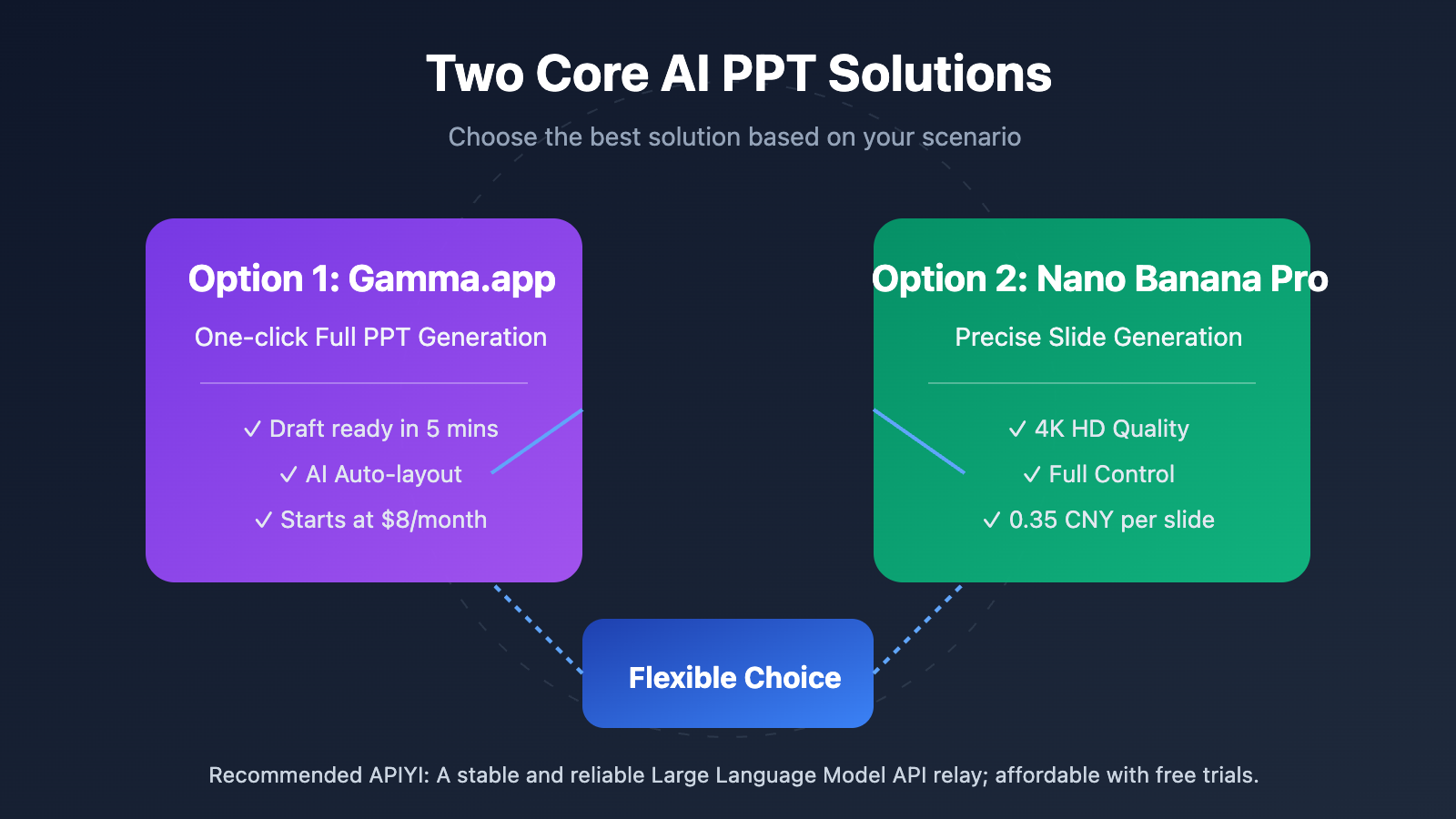
| Option 1: Gamma.app | One-click full PPT generation with AI-driven design and layout. | Complete a full presentation in 5 minutes. |
| Option 2: Nano Banana Pro | Precise slide-by-slide generation with 4K HD quality. | Control the visual impact of every single slide. |
| Cost Comparison | Gamma uses a monthly subscription; Nano Banana Pro is pay-per-use. | Choose the best option based on your usage frequency. |
| Scenarios | Quick demos vs. high-end presentations. | Match the quality to your specific requirements. |
Deep Dive into AI PPT Solutions
The Gamma.app approach is ideal for scenarios that require a quick turnaround. This AI presentation tool can generate a complete PPT—including text, images, and layout—in just a few minutes based on a topic or prompt you provide. Gamma uses a unique "card-based" layout rather than traditional slides and supports embedding interactive content from platforms like Figma, Airtable, and Google Drive, making your presentations much more engaging. Gamma currently offers a free trial, with paid plans starting at $8/month.
The Nano Banana Pro approach is for those who want top-tier visual impact. As Google's latest AI image generation model, Nano Banana Pro supports native 4K output and excels at text rendering, allowing it to accurately display multi-language text within images. By designing slide-by-slide and using image prompts to maintain style consistency, you can have total control over the visual presentation of every single slide.
Getting Started with AI PPT Creation
Option 1: One-Click Generation with Gamma.app
Here's the basic workflow for creating an AI PPT using Gamma.app:
- Access the Platform: Head over to gamma.app and sign up. New users get 400 free credits to start with.
- Enter Your Subject: On the creation page, type in your presentation topic or upload an existing document.
- Pick a Style: Choose a visual style that fits your needs from a variety of preset templates.
- AI Generation: Hit generate and wait about 1-2 minutes. The system will automatically build a complete presentation for you.
- Fine-tune and Optimize: Tweak the generated content, edit the text, or swap out images as needed.
- Export and Share: You can share a live link online or export the file as a PDF or PPT.
Tip: Gamma's exported PPT files might have some formatting glitches in PowerPoint. I'd recommend using the online share link or PDF format whenever possible.
Option 2: Precision Design with Nano Banana Pro
If you want more control, here’s the workflow for creating a PPT page-by-page using Nano Banana Pro:
Step 1: Prepare Your Prompt Template
To keep your PPT looking consistent, start by designing a base prompt template:
Professional business presentation page design, dark blue gradient background,
Title: {Page Title}
Content: {Core Points}
Style: Minimalist and modern, high-end texture, 2K HD
Step 2: Use the APIYI Image Tool
Visit imagen.apiyi.com and use the Nano Banana Pro model to generate your PPT visuals:
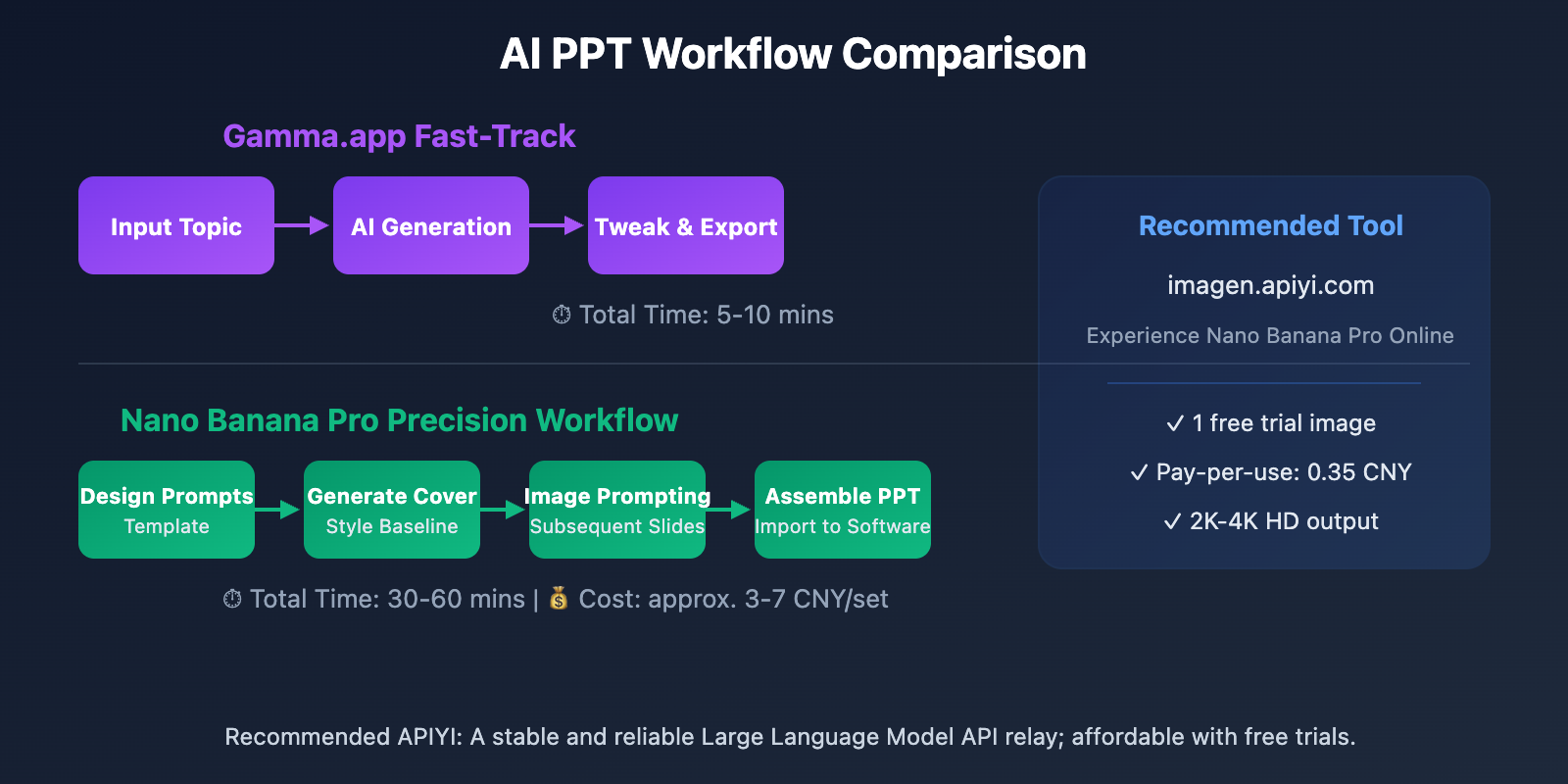
- New users get 1 free trial image.
- Pay-as-you-go pricing, roughly 0.35 CNY per image (0.05 × 7 steps).
- Supports 2K-4K high-definition output.
- Great support for Chinese prompts.
Step 3: Use Reference Images for Consistency
When generating subsequent pages, upload your first image as a reference:
Follow the style of the reference image, keeping the color scheme and design language consistent,
Title: Page Two Title
Content: Page Two Key Points
Step 4: Assemble Your PPT
Import your generated images into PowerPoint or Keynote. Set each image as the slide background and add editable text layers on top as needed.
Suggestion: You can quickly test out Nano Banana Pro's image generation capabilities via the APIYI (apiyi.com) tool at imagen.apiyi.com. The platform offers free trial credits and a unified interface for various AI image models.
AI PPT Solution Comparison
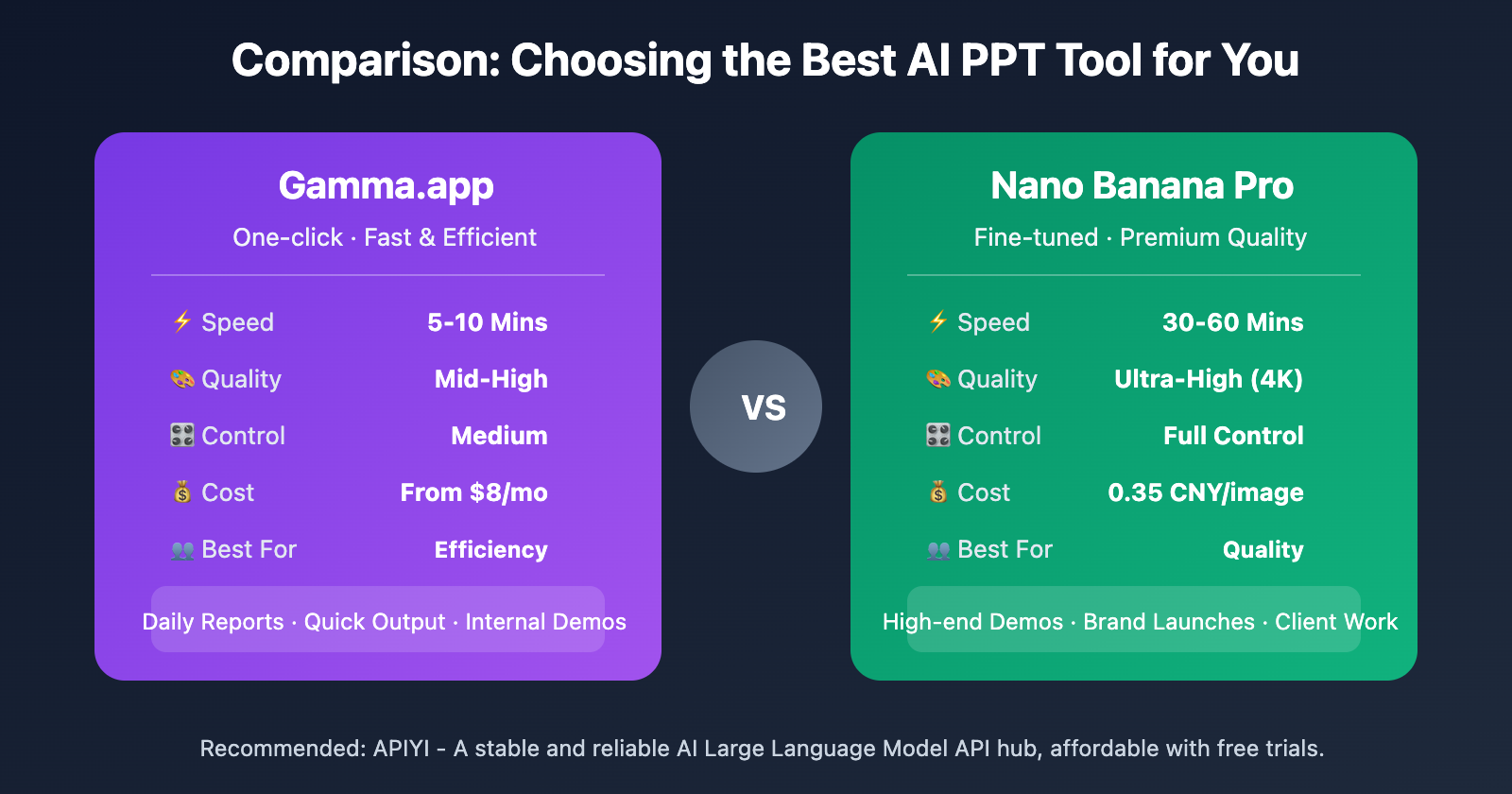
| Dimension | Gamma.app | Nano Banana Pro |
|---|---|---|
| Method | One-click full PPT generation | Page-by-page image generation |
| Creation Time | 5-10 minutes per deck | 30-60 minutes per deck |
| Output Quality | Mid-high, auto-layout | Ultra-high, 4K resolution |
| Controllability | Medium, allows tweaks | Full control |
| Chinese Support | Good | Excellent |
| Text Rendering | AI auto-layout | Precise and controllable |
| Cost Model | Monthly $8-$100 | 0.35 CNY per image |
| Best Use Cases | Routine reports, quick output | High-end presentations, brand launches |
Comparison Summary: Both options have their strengths. If you need to knock out a presentation quickly, Gamma.app is the way to go. But if you're after top-tier visual quality for every single slide, Nano Banana Pro gives you that extra level of control.
Advanced AI PPT Creation Tips
Leverage the Google Ecosystem for More Capabilities
Beyond the image generation tools on APIYI, you can also access Nano Banana Pro through these Google products:
NotebookLM Presentation Features
Google's NotebookLM has integrated Nano Banana Pro's image generation capabilities, allowing you to turn research notes directly into slides:
- Visit notebooklm.google and upload your materials.
- Use the "Create Slides" feature.
- The AI will automatically generate a presentation complete with illustrations.
- Free users can generate basic-length decks, while AI Ultra subscribers enjoy higher limits.
Gemini Chat Generation
Through the "Create Image" feature at gemini.google.com, you can select the Thinking model to call Nano Banana Pro for image generation. This is perfect for scenarios where you just need a single, high-quality supporting image on the fly.
AI PPT Cost Analysis
| Usage Frequency | Gamma.app Cost | Nano Banana Pro Cost | Recommended Solution |
|---|---|---|---|
| Occasional (1-2 decks/mo) | Covered by free credits | Approx. $0.40 – $1.00 per deck | Nano Banana Pro |
| Regular (4-8 decks/mo) | $8/mo | Approx. $1.70 – $4.00/mo | Choose based on preference |
| High Frequency (10+ decks/mo) | $18/mo | Approx. $5.00+/mo | Gamma.app |
| Corporate Teams | $20-40/user/mo | API bulk calls are more cost-effective | Hybrid approach |
Cost Advice: For individual users, we recommend trying the free credits for both options first, then deciding based on your actual needs. Enterprise users can get unlimited concurrent API calls through APIYI (apiyi.com), which offers better cost efficiency for batch generation.
FAQ
Q1: Can PPTs generated by Gamma be edited in Microsoft PowerPoint?
Yes, you can export them to PPTX format, but the formatting and layout might differ from what you see in Gamma. Gamma uses a unique card-based layout that's different from the traditional slide structure of PowerPoint. We recommend using Gamma's online sharing feature or exporting to PDF to keep the original layout intact.
Q2: How well does Nano Banana Pro support Chinese prompts?
Nano Banana Pro is currently one of the best AI image models for Chinese prompt support. It accurately understands Chinese descriptions and can correctly render Chinese text within generated images. You can experience its Chinese generation capabilities directly through the APIYI (apiyi.com) image tool at imagen.apiyi.com.
Q3: How do I maintain a consistent visual style across the whole PPT?
When using Nano Banana Pro, the key is to use the "Image Reference" feature:
- Carefully design the first page to serve as your style benchmark.
- When generating subsequent pages, upload the first page as a reference image.
- Use phrases like "maintain consistent style" in your prompt.
- Use the same color descriptions and design language.
When calling the model via the APIYI (apiyi.com) platform, you can specify a reference image in the parameters for style transfer.
Summary
Key takeaways for creating AI-powered PPTs:
- Choose Gamma for quick results: Generate a complete presentation with one click—perfect for knocking out daily reports in 5 minutes.
- Choose Nano Banana Pro for fine control: Generate page-by-page 4K images to create high-end visual effects.
- Flexible and controllable costs: Pick between subscriptions or pay-per-use so there's no waste.
You can combine both methods: use Gamma to quickly build your content framework, then swap in Nano Banana Pro images for key slides to balance efficiency and quality.
We recommend trying out Nano Banana Pro's image generation capabilities via APIYI's (apiyi.com) image tool at imagen.apiyi.com. New users get a free trial, and the pay-as-you-go pricing is transparent and affordable.
References
⚠️ Link Format Note: All external links use the
Resource Name: domain.comformat for easy copying without clickable links, helping to preserve SEO weight.
-
Gamma Official Site: AI presentation platform
- Link:
gamma.app - Note: Free trial available; paid plans start at $8/month.
- Link:
-
APIYI Image Tool: Nano Banana Pro online experience
- Link:
imagen.apiyi.com - Note: Trial 1 image for free; pay-per-use at 0.35 RMB per image.
- Link:
-
Google NotebookLM: AI research assistant
- Link:
notebooklm.google - Note: Integrates Nano Banana Pro and supports automatic slide generation.
- Link:
-
Gemini: Google AI chat platform
- Link:
gemini.google.com - Note: Select the Thinking model to trigger Nano Banana Pro image generation.
- Link:
Author: Technical Team
Tech Talk: Feel free to discuss in the comments. For more AI image generation resources, visit the APIYI (apiyi.com) tech community.