Author's Note: APIYI has officially launched the gpt-image-2-all reverse-engineered model. It’s priced at $0.03 per request with no concurrency limits and supports text-to-image, multi-image fusion, and natural language image editing. It mirrors the latest image generation capabilities of the ChatGPT web interface. This article provides a complete guide on how to integrate it.
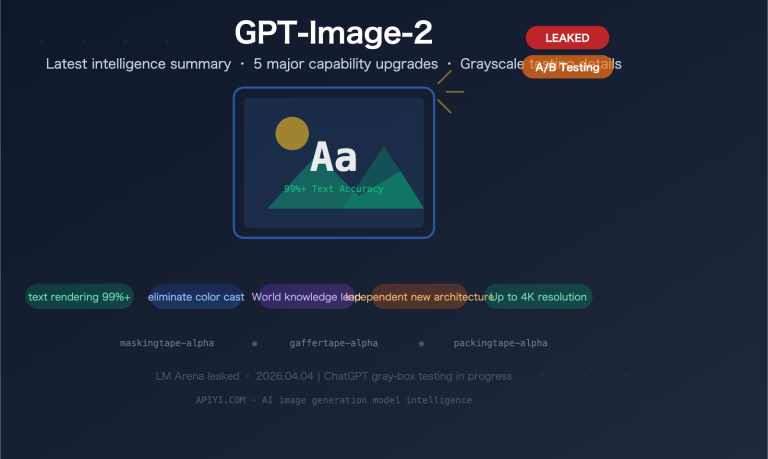
In April 2026, the ChatGPT web interface began A/B testing its next-generation image generation capabilities—users still see the "GPT Image 1.5" label, but some requests are actually handled by the new model. OpenAI has not yet officially released the gpt-image-2 model ID via their API, so please be cautious of any services claiming to provide "direct API access to gpt-image-2."
APIYI has now officially launched gpt-image-2-all via a reverse-engineered solution, mirroring the latest image generation capabilities of the ChatGPT web interface, priced at $0.03 per request with no concurrency limits. This isn't just a promise; it's a production-ready interface you can call with standard HTTP requests right now.
Core Value: After reading this article, you'll master the 3 API endpoints for gpt-image-2-all, learn multi-image fusion techniques, understand how to use natural language for image editing, and be able to complete your integration within 10 minutes.
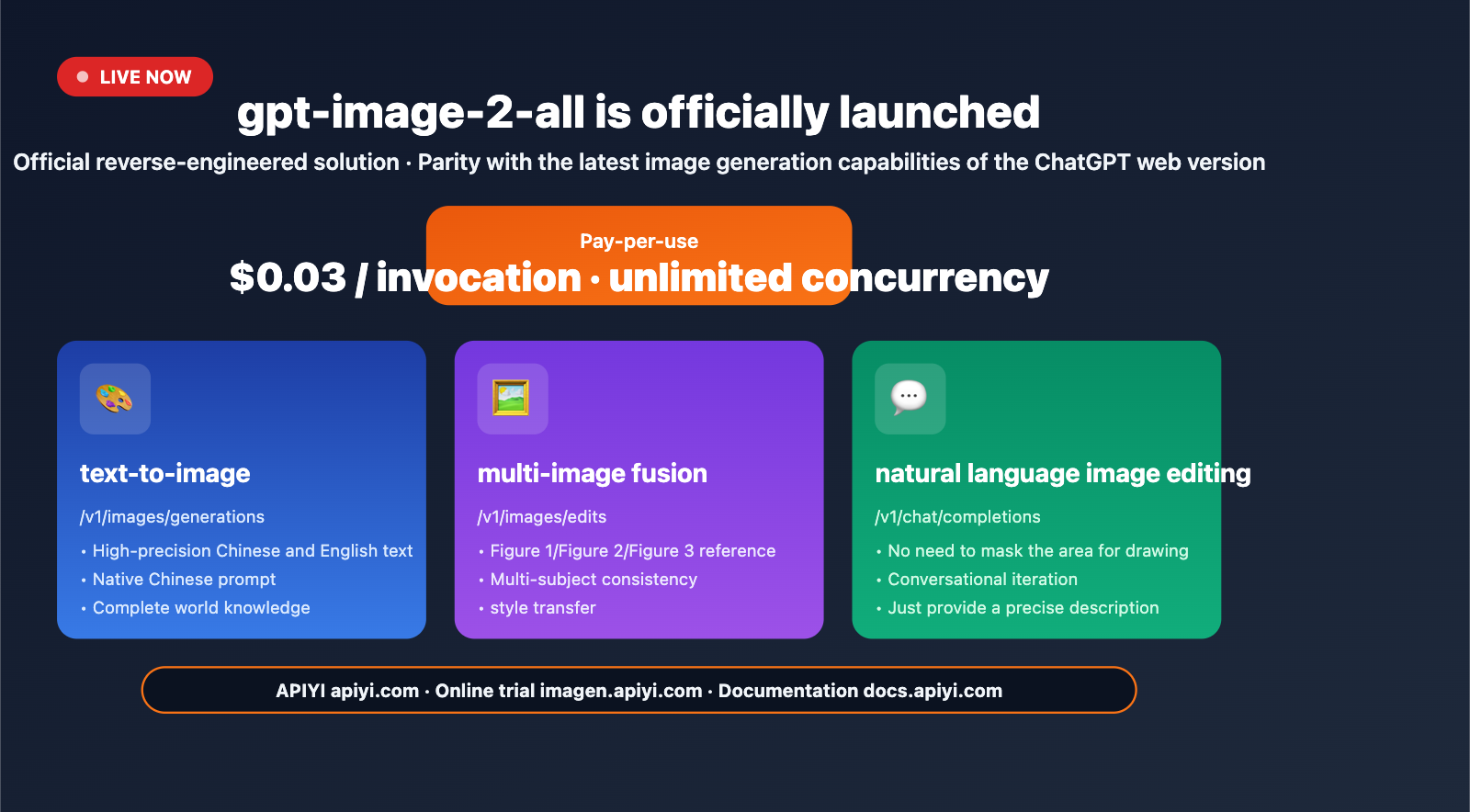
gpt-image-2-all Key Highlights
| Capability | Description | Value |
|---|---|---|
| ChatGPT Web Mirroring | Reverse-engineered solution synced with official capabilities | No need to wait for official OpenAI API |
| Pay-per-request | $0.03/request, no limits on resolution/quality/prompt | Transparent and predictable costs |
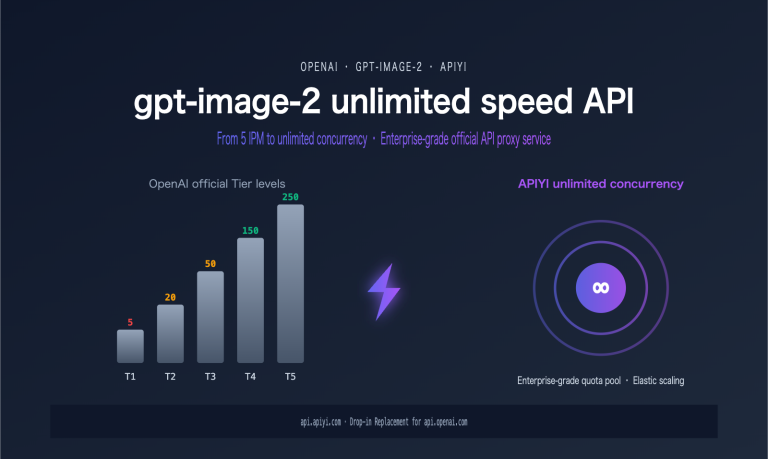
| No Concurrency Limits | No request count restrictions | Friendly for batch pipelines |
| Multi-image Fusion | Reference images using "Image1/Image2/Image3" in prompt | Consistent multi-subject generation |
| Natural Language Editing | Conversational editing without masks | Significantly lowers the barrier for iteration |
Understanding the gpt-image-2-all Positioning
What does "reverse-engineered" mean? It's a proxy service that connects to the latest image generation capabilities of the ChatGPT web interface via reverse engineering. It is not the same interface as the official gpt-image-2 that OpenAI will release in the future, but the underlying model capabilities are identical. Before the official API is released, this is the only production-ready solution that can stably call the latest ChatGPT image generation capabilities.
Why integrate now? Three practical reasons: (1) The official release date for OpenAI's gpt-image-2 is uncertain (expected late April to mid-May 2026); (2) There will inevitably be quota shortages and cold-start issues during the initial launch phase; (3) By running your business processes on gpt-image-2-all early, you can seamlessly migrate by simply switching the model name once the official version is released.
Getting Started with gpt-image-2-all
Three Core API Endpoints
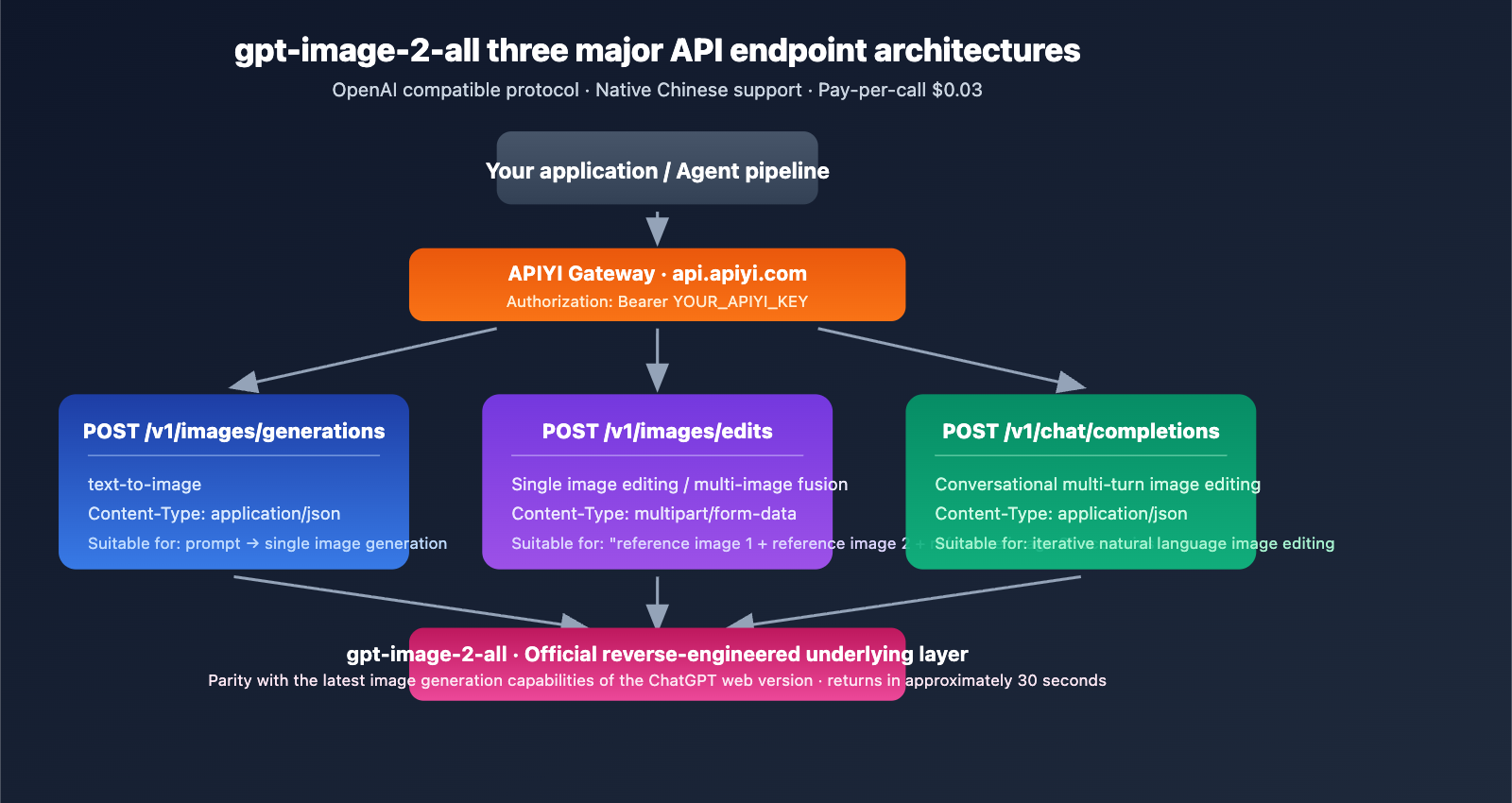
gpt-image-2-all provides three endpoints to cover the full spectrum of image generation tasks:
| Endpoint | Purpose | Content-Type |
|---|---|---|
POST /v1/images/generations |
text-to-image | application/json |
POST /v1/images/edits |
Single-image editing / multi-image fusion | multipart/form-data |
POST /v1/chat/completions |
Conversational multi-turn editing | application/json |
Base URL: https://api.apiyi.com (Backups: b.apiyi.com, vip.apiyi.com)
Minimal Text-to-Image Example
import requests

response = requests.post(
    "https://api.apiyi.com/v1/images/generations",
    headers={
        "Authorization": "Bearer YOUR_APIYI_KEY",
        "Content-Type": "application/json"
    },
    json={
        "model": "gpt-image-2-all",
        "prompt": "16:9 landscape, a cup of latte, table sign says 'Morning Blend $4.50', morning light through cafe window",
    },
    timeout=120
)

result = response.json()
print(result["data"][0]["url"])
View Full Integration Code (includes error handling, concurrency, multi-image fusion, and conversational editing)
import requests
import time
from typing import Optional, List

API_KEY = "YOUR_APIYI_KEY"
BASE_URL = "https://api.apiyi.com"

def text_to_image(prompt: str, timeout: int = 120) -> Optional[str]:
    """Text-to-image: via /v1/images/generations endpoint"""
    for attempt in range(3):
        try:
            r = requests.post(
                f"{BASE_URL}/v1/images/generations",
                headers={
                    "Authorization": f"Bearer {API_KEY}",
                    "Content-Type": "application/json"
                },
                json={"model": "gpt-image-2-all", "prompt": prompt},
                timeout=timeout
            )
            if r.status_code == 200:
                return r.json()["data"][0]["url"]
            if r.status_code == 429:
                time.sleep(2 ** attempt)
                continue
        except requests.Timeout:
            continue
    return None

def multi_image_fusion(prompt: str, image_paths: List[str]) -> Optional[str]:
    """Multi-image fusion: via /v1/images/edits endpoint"""
    files = [
        ("image[]", (f"img{i}.png", open(p, "rb"), "image/png"))
        for i, p in enumerate(image_paths)
    ]
    data = {"model": "gpt-image-2-all", "prompt": prompt}

    r = requests.post(
        f"{BASE_URL}/v1/images/edits",
        headers={"Authorization": f"Bearer {API_KEY}"},
        data=data,
        files=files,
        timeout=120
    )
    return r.json()["data"][0]["url"] if r.status_code == 200 else None

def conversational_edit(messages: List[dict]) -> Optional[str]:
    """Conversational editing: via /v1/chat/completions endpoint"""
    r = requests.post(
        f"{BASE_URL}/v1/chat/completions",
        headers={
            "Authorization": f"Bearer {API_KEY}",
            "Content-Type": "application/json"
        },
        json={"model": "gpt-image-2-all", "messages": messages},
        timeout=120
    )
    return r.json()["choices"][0]["message"]["content"] if r.status_code == 200 else None

url = text_to_image("9:16 portrait mobile poster, a cup of iced latte, large text at the top 'Summer Sale 50% OFF'")
print(f"Generated: {url}")

fusion_url = multi_image_fusion(
    "Place the person from image 1 into the beach scene in image 2, keeping the person's clothing unchanged",
    ["person.png", "beach.png"]
)
print(f"Fusion: {fusion_url}")
Integration Tip: Register at APIYI (apiyi.com) to get testing credits. A single API key supports all models, including gpt-image-2-all, GPT-4o, and Claude, saving you the hassle of managing multiple vendor accounts.
Key Features of gpt-image-2-all
Feature 1: High-Precision Text Rendering
For gpt-image-2-all, stable Chinese and English text rendering is a core strength of the latest official ChatGPT image generation capabilities. Text on signs, posters, and infographics is rendered correctly on the first try—something that was difficult for gpt-image-1.5.
Real-world scenarios:
- Coffee menu boards:
"Americano $4.00, Latte $4.50"with character-level accuracy. - Product packaging: Mixed Chinese and English ingredient lists are clear and readable.
- UI mockups: Button text and navigation labels are rendered accurately.
- Infographics: Titles, subtitles, and data labels maintain a clear hierarchy.
Feature 2: Multi-Image Fusion
You can upload multiple reference images via the /v1/images/edits endpoint and reference them directly in your prompt as "image 1", "image 2", "image 3", etc.
prompt = """
Place the product from image 1 into the scene in image 2,
use the color style from image 3,
set the camera angle to a slight high-angle shot,
4K high-definition details.
"""
Use cases:
| Scenario | Application |
|---|---|
| E-commerce Lifestyle Shots | Product image + Scene image → Lifestyle composition |
| Face Consistency | Original character image + New scene → Multi-angle shots |
| Style Transfer | Content image + Style image → Stylized output |
| Brand Visual Systems | Product + LOGO + Color palette → Unified visuals |
Feature 3: Natural Language Editing (No Mask Required)
The biggest efficiency breakthrough is conversational editing—you no longer need to draw masks or select regions; simply describe your changes using natural language.
messages = [
    {
        "role": "user",
        "content": [
            {"type": "text", "text": "Generate an exterior view of a cafe with afternoon sunlight hitting it at an angle"},
        ]
    },
    {
        "role": "assistant",
        "content": "[Generated image link]"
    },
    {
        "role": "user",
        "content": "Change the weather to rainy, but keep the building the same"
    }
]
What this workflow means: The old "generate → edit in Photoshop → regenerate" loop is now replaced by conversational iteration. You only need to describe the changes for each adjustment, without having to rewrite the entire prompt.
Feature 4: Native Chinese Support
Prompts can be written directly in Chinese, no need to translate to English before calling the API. For Chinese development teams and localized businesses, this provides a natural and intuitive experience:
prompt = "9:16 vertical Xiaohongshu cover, an Asian woman drinking coffee, title 'Weekend Cafe Hopping · The Secret Cafe in the Hutong', soft lighting, realistic style"
gpt-image-2-all Size and Aspect Ratio Control
Important Note
gpt-image-2-all does not accept parameters like size, n, quality, or aspect_ratio—passing these will trigger a validation error. You must control the dimensions exclusively through your prompt text.
Recommended Prompt Formatting
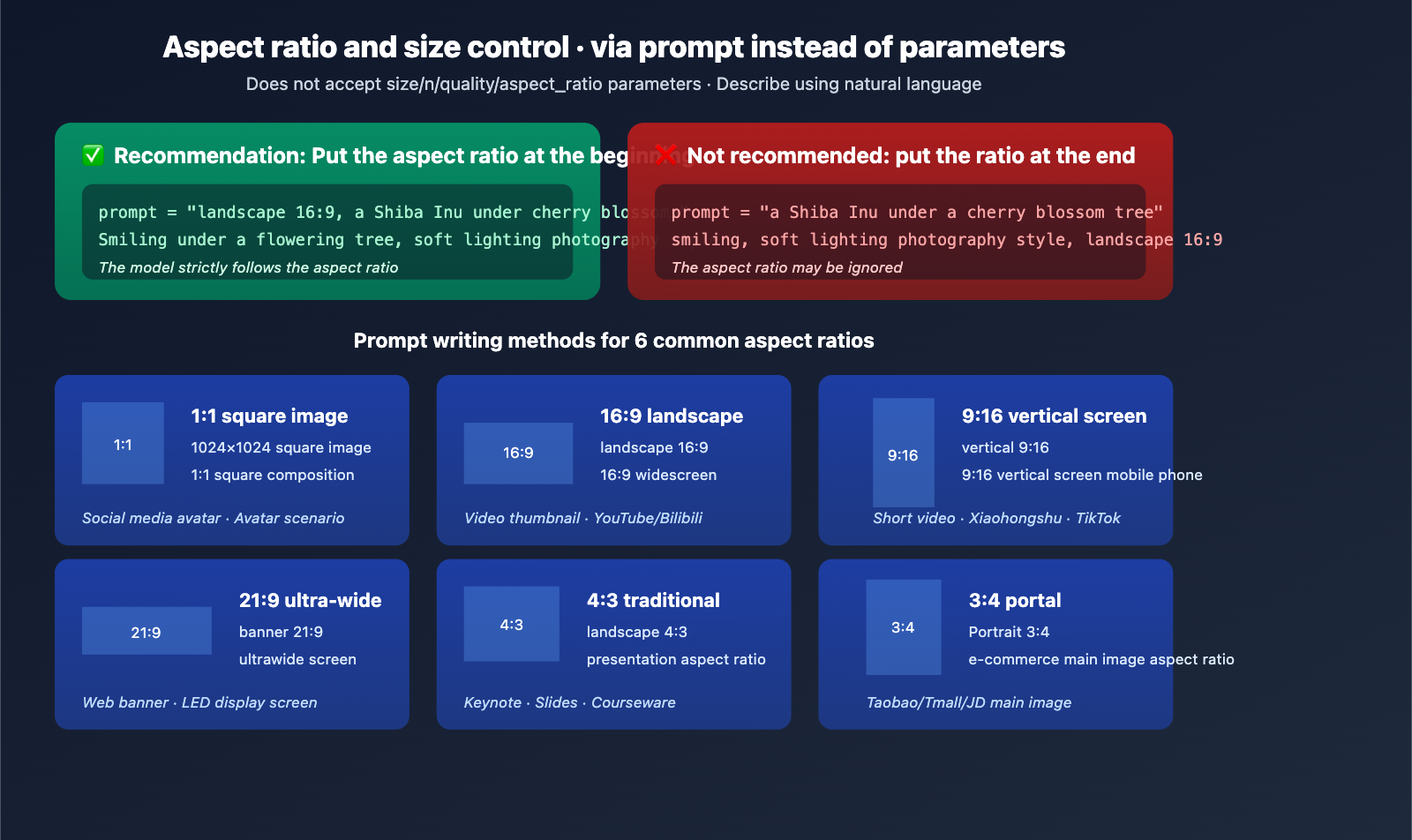
| Target Ratio | Recommended Prompt | Usage |
|---|---|---|
| 1:1 Square | "1024×1024 square" or "1:1 square composition" | Social media avatars |
| 16:9 Landscape | "Landscape 16:9" or "16:9 widescreen" | Video thumbnails |
| 9:16 Portrait | "Portrait 9:16" or "9:16 vertical phone" | Short videos/social posts |
| 21:9 Ultrawide | "Banner 21:9" or "ultrawide screen" | Web banners |
| 4:3 Classic | "Landscape 4:3" | Slideshows |
| 3:4 Portrait | "Portrait 3:4" | E-commerce main images |
Key Tips
Place the aspect ratio description at the very beginning of your prompt. The model is much more likely to follow instructions provided at the start; putting them at the end might cause the model to ignore them.
# ✅ Recommended
prompt = "Landscape 16:9, a Shiba Inu smiling under a cherry blossom tree, soft lighting photography style"

# ❌ Not Recommended
prompt = "A Shiba Inu smiling under a cherry blossom tree, soft lighting photography style, landscape 16:9"
gpt-image-2-all Pricing and Concurrency Strategy
Billing Rules
| Item | Rule |
|---|---|
| Unit Price | $0.03 / request |
| Billing Unit | Per successful generation |
| No Charge for Failures | No charges for 401/4xx/5xx errors |
| Parameter Impact | None (independent of resolution/quality) |
| Concurrency Limit | None (naturally limited by account balance) |
Typical Cost Estimates
| Business Scenario | Monthly Volume | Monthly Cost |
|---|---|---|
| Personal Project | 500 requests | $15 |
| Small Team | 5,000 requests | $150 |
| E-commerce Batch | 50,000 requests | $1,500 |
| Large-scale Pipeline | 500,000 requests | $15,000 |
Cost Optimization Tip: By using the unified account scheduling on APIYI (apiyi.com), you can route tasks to the most cost-effective model among gpt-image-2-all, gpt-image-1.5, and Nano Banana Pro based on real-time requirements, avoiding the need to pay the highest unit price for every scenario.
gpt-image-2-all Error Handling and Best Practices
Common Error Codes and Handling
| Status Code | Handling Method |
|---|---|
| 401 | Verify that your Authorization Bearer Token is correct |
| 429 | Implement exponential backoff (2s → 4s → 8s) |
| 5xx | Retry 1-2 times; if it still fails, trigger an alert |
| Timeout | Recommended client timeout is ≥ 120 seconds |
Troubleshooting Tips
Every response includes a request-id header. If you run into issues, record this ID and submit it to APIYI technical support so we can quickly locate the server-side logs.
Unsupported Features
- Streaming Output:
stream=trueis not supported; only single-response returns are available. - Multiple Image Output: Each request returns only one image. If you need multiple images, please perform concurrent calls.
- OpenAI SDK Default Parameters: The official SDK's default
size/nparameters will trigger validation errors. We recommend usingrequeststo send calls directly.
FAQ
Q1: What is gpt-image-2-all?
gpt-image-2-all is an API proxy service provided by APIYI that bridges the latest image generation capabilities from the ChatGPT web version via a reverse-engineered solution. Before OpenAI officially releases the gpt-image-2 API, it offers a production-grade channel that matches the latest ChatGPT capabilities, supporting three core scenarios: text-to-image, multi-image fusion, and natural language image editing.
Q2: What is the difference between gpt-image-2-all and the official gpt-image-2?
The underlying model capabilities are identical, but the interface methods differ. The official OpenAI API has not yet released the gpt-image-2 model ID (please be cautious of any services claiming to offer direct API access), while the ChatGPT web version is currently running A/B tests for this new model. gpt-image-2-all provides a stable invocation channel through a reverse-engineered solution. Once the official version is released, you can seamlessly migrate to the official interface simply by switching the model field.
Q3: How should I understand the $0.03/request pricing?
You are billed per successful generation, with no limits on resolution, quality, or prompt length. Compared to the estimated official OpenAI gpt-image-2 pricing ($0.15–$0.20), gpt-image-2-all costs about 1/5 to 1/6 of that. Failed requests (due to authentication or parameter errors) are not charged, and there is no hard limit on concurrency (it's naturally limited by your account balance).
Q4: Why does it take 30 seconds to generate an image?
30 seconds is the current average response time for our reverse-engineered solution, which is similar to the speed of the ChatGPT web version. While the official gpt-image-2 is expected to be faster (around 3 seconds) once released, gpt-image-2-all is currently the only way to stably access these latest capabilities before the official API launch. We recommend setting your client timeout to ≥120 seconds to avoid false timeouts.
Q5: How do I integrate gpt-image-2-all?
Integration takes three simple steps:
- Visit APIYI at apiyi.com to register an account and get your API key.
- Set your Base URL to
https://api.apiyi.com. - Use the
requestslibrary to call the/v1/images/generationsendpoint (official SDKs require custom HTTP handling to avoid issues with thesizeparameter).
Detailed documentation: docs.apiyi.com/api-capabilities/gpt-image-2-all/overview · Try it online: imagen.apiyi.com
Q6: How many reference images are supported for multi-image fusion?
A single /v1/images/edits request supports multiple reference images. Each image must be ≤10MB, and supported formats include PNG, JPG, and WebP. You can reference them in your prompt as "Image 1", "Image 2", "Image 3", etc. Testing shows that fusion works most stably with 3–5 reference images; using more than 10 may lead to missing elements.
Q7: Why can’t I use the official OpenAI SDK for direct calls?
The official OpenAI SDK's images.generate() method automatically sends parameters like size and n, which gpt-image-2-all does not accept (this will trigger a validation error). Recommended solutions: (1) Use requests to send HTTP requests directly; or (2) override the SDK's request body to strip out these parameters. Once the official version is released, the SDK will be fully compatible.
Q8: What are the known limitations of gpt-image-2-all?
Here are the current limitations:
- Single output per request: If you need multiple images, you'll need to call the API concurrently.
- No streaming support: Returns a single response; no stream support.
- Beta stage: Stability is being continuously optimized, and you may occasionally experience minor jitters.
- Dependency on reverse-engineering: If ChatGPT web capabilities are adjusted, it may briefly impact the service.
- Recommendation for stable pairing: For critical business tasks, we suggest configuring gpt-image-1.5 or Nano Banana Pro as a fallback.
gpt-image-2-all Key Takeaways
- Reverse-engineered solution · Latest ChatGPT capabilities: The only production-grade channel available before the official API release.
- $0.03/request · Unlimited concurrency: Pay-per-success billing, transparent costs, and friendly for batch pipelines.
- Three endpoints covering all scenarios: Text-to-image / Multi-image fusion / Conversational editing.
- Native Chinese + High-precision text: Stable rendering for both Chinese and English text; no need to translate prompts.
- Getting started: Register at APIYI apiyi.com → Set 120s timeout → Use
requestsfor direct calls.
Summary
The core value of gpt-image-2-all:
- Bridging the Official Gap: Provides a production-grade interface for calling ChatGPT's latest image generation capabilities before OpenAI officially releases the
gpt-image-2API. - Significantly Lower Costs: Priced at $0.03/request compared to the estimated official price of $0.15–$0.20, offering a clear cost advantage for high-volume scenarios.
- Seamless Migration Design: Built on the OpenAI-compatible protocol, allowing you to switch by simply updating the model name once the official version is released.
For team decision-making, we recommend integrating gpt-image-2-all via APIYI (apiyi.com) immediately to validate your business workflows. The current $0.03/request price makes large-scale testing virtually cost-free, and you can switch to the official gpt-image-2 as needed when it launches. Teams that get a head start will establish a significant product advantage during the new model's initial rollout.
Experience it online: imagen.apiyi.com · Documentation: docs.apiyi.com/api-capabilities/gpt-image-2-all/overview
Related Articles
If you're interested in gpt-image-2-all, we recommend checking out these resources:
- 📘 gpt-image-2 vs. gpt-image-1.5: A Comprehensive Analysis of the 8 Major Upgrades – Understand the underlying reasons for this leap in capability.
- 📊 6 Key Use Cases for gpt-image-2 – Master the paths for practical business implementation.
- 🚀 gpt-image-2 vs. Nano Banana Pro: A Deep Dive Comparison – Make an informed choice for the optimal model.
📚 References
-
APIYI Official Documentation: gpt-image-2-all complete technical specifications
- Link:
docs.apiyi.com/api-capabilities/gpt-image-2-all/overview - Description: Authoritative integration documentation, including parameters, error codes, and best practices.
- Link:
-
APIYI Online Playground: imagen.apiyi.com
- Link:
imagen.apiyi.com - Description: Test the image generation capabilities of gpt-image-2-all without writing any code.
- Link:
-
OpenAI Official Image API Documentation: Latest image model API
- Link:
openai.com/index/image-generation-api - Description: Compare and understand the specifications of the official OpenAI gpt-image-1.5 API.
- Link:
-
LM Arena Canary Test Observations: GPT Image 2 leaked information
- Link:
mindstudio.ai/blog/what-is-gpt-image-2 - Description: A preview of the capabilities of the next-generation image model.
- Link:
Author: APIYI Technical Team
Technical Discussion: Feel free to join the discussion in the comments section. For more resources, visit the APIYI documentation center at docs.apiyi.com.