Author's Note: A field-by-field breakdown of the real reasons behind the PROHIBITED_CONTENT error in Nano Banana Pro, an analysis of the trigger mechanisms for e-commerce virtual try-on prompts, and a guide to rewriting prompts to pass safety filters.
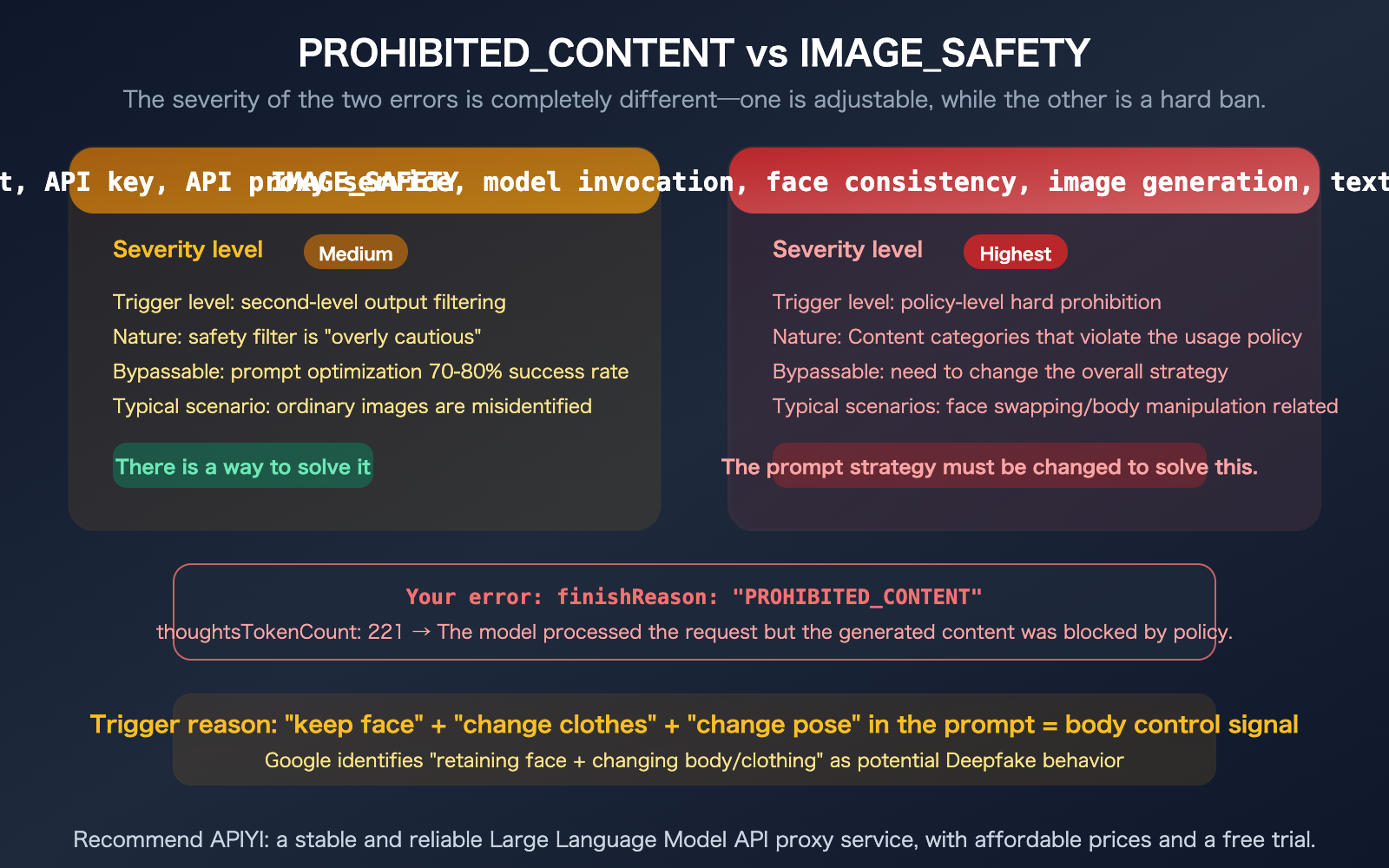
When working on e-commerce virtual try-ons, you might encounter this error: finishReason: PROHIBITED_CONTENT. Even when your prompt is a perfectly normal request for a model to try on clothes, why is it flagged as "violating Google's Generative AI Prohibited Use Policy"? This is more severe than IMAGE_SAFETY—PROHIBITED_CONTENT is Google's highest level of content blocking, usually implying a hard ban. However, e-commerce virtual try-on is a completely legitimate business use case; Google's own Shopping product uses Nano Banana for virtual try-ons. This article will analyze this error field by field, identify which terms in your prompt are triggering the filter, and provide rewriting strategies that will pass the audit.
Core Value: After reading this, you'll understand the difference between PROHIBITED_CONTENT and IMAGE_SAFETY, know exactly which parts of your e-commerce try-on prompt are triggering the filter, and learn how to rewrite them to get approved.
Breakdown of Error Fields
Let's clarify what each field in the response actually means.
| Field | Value | Meaning |
|---|---|---|
finishReason |
PROHIBITED_CONTENT |
Top-level block—policy-based hard prohibition |
finishMessage |
"sensitive words that violate…" | Google determined the output contains sensitive content violating usage policies |
content.parts |
null |
No content returned |
promptTokenCount |
1150 | Input consumed 1150 tokens (includes significant image tokens) |
candidatesTokenCount |
0 | Output is 0—blocked, image costs are not charged |
thoughtsTokenCount |
221 | Model spent 221 tokens "thinking"—a deeper reasoning process than IMAGE_SAFETY |
TEXT: 118 |
118 tokens | Your Chinese outfit change description |
IMAGE: 1032 |
1032 tokens | Your uploaded reference images (model photo + clothing material) |
PROHIBITED_CONTENT is More Severe than IMAGE_SAFETY
| Comparison Dimension | IMAGE_SAFETY | PROHIBITED_CONTENT |
|---|---|---|
| Trigger Stage | Output image safety review | Policy-level content category review |
| Severity | Medium (potential false positive) | Highest (hard policy prohibition) |
| Primary Reason | Generated image "looks unsafe" | Request involves prohibited content categories |
| Adjustability | Prompt optimization has 70-80% success rate | Requires changing the overall strategy |
| Google's Stance | Admits to being "overly cautious," false positives exist | Viewed as a policy bottom line, not easily relaxed |
Why Your Prompt Triggered PROHIBITED_CONTENT
Original Prompt Analysis
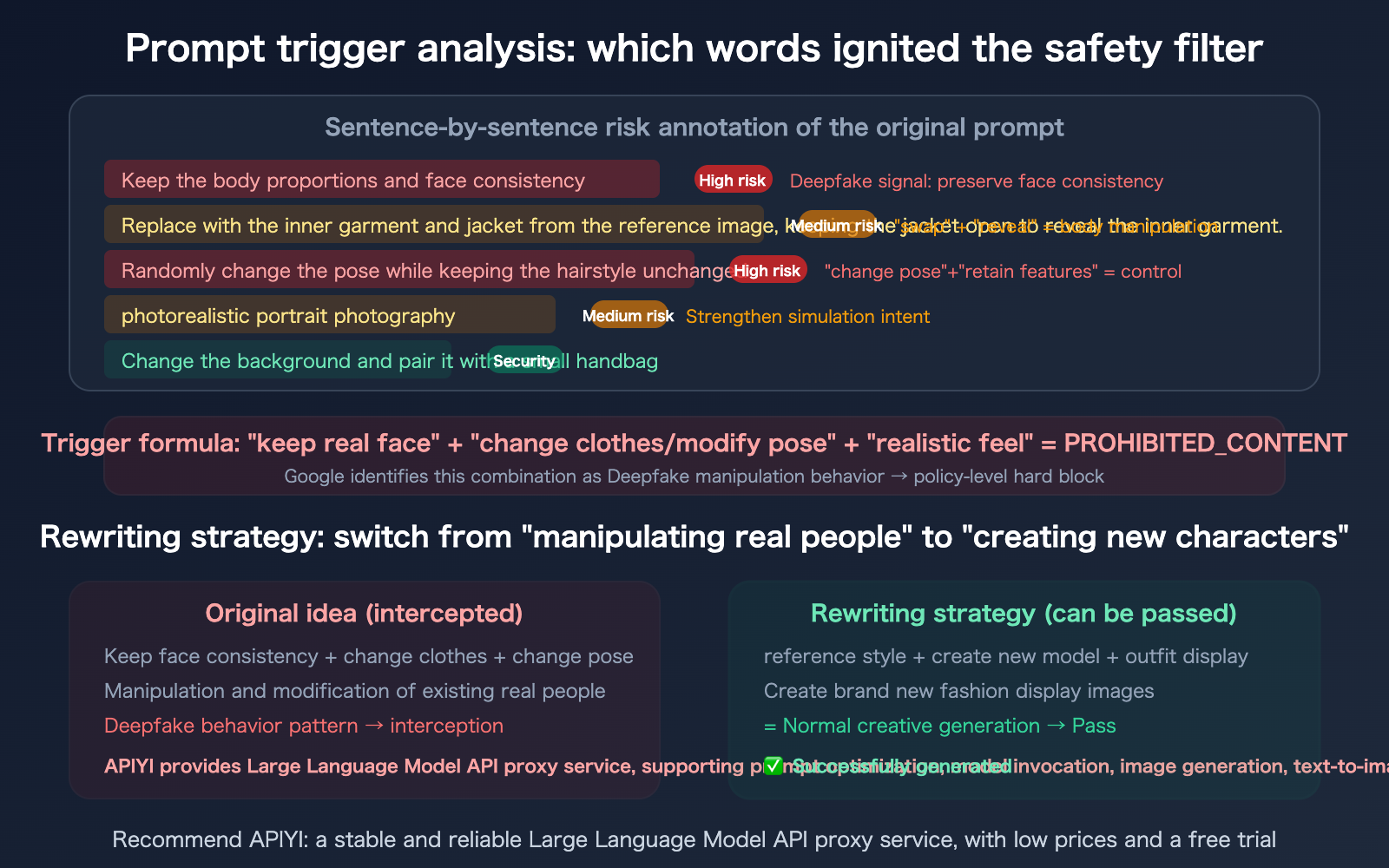
We've broken down your prompt sentence by sentence to identify the sensitive points that triggered the safety filter:
| Prompt Fragment | Safety Risk Assessment | Trigger Reason |
|---|---|---|
| "Keep body proportions, keep face" | High Risk | "Keep face" = Deepfake behavioral signal |
| "Change into inner and outer wear from material" | Medium Risk | "Change into" + reference image = Body manipulation signal |
| "Oversize jacket, open to reveal inner wear" | Medium Risk | "Reveal" + clothing description may be misjudged |
| "Change background" | Low Risk | Normal operation |
| "Keep hairstyle" | Medium Risk | Reinforced signal to "keep original character features" |
| "Randomly change pose" | High Risk | "Change pose" = Body manipulation signal |
| "Photorealistic image" | Medium Risk | "Photorealistic" reinforces the intent for realism/simulation |
Core Trigger Mechanism
Google's safety filter identified your prompt as "performing body manipulation and appearance modification on a real person"—which hits the Deepfake protection policy directly.
Specifically, the combination of these three keywords triggered the PROHIBITED_CONTENT error:
- "Keep face" — Tells the model, "This is a real person's face, do not change it."
- "Change into clothes" + "Change pose" — Asks the model to change the physical state of this real person.
- "Photorealistic image" — Further reinforces that this is a simulated manipulation of a real person.
Google's Logic: Keep real face + change body/clothing/pose = Potential for creating Deepfakes → Triggers PROHIBITED_CONTENT.
While this logic makes sense for preventing Deepfakes, it's a false positive for legitimate commercial needs like e-commerce virtual try-ons. Ironically, Google's own Shopping product uses Nano Banana for virtual try-ons—but it runs through an internal API channel, bypassing public API safety filters.
🎯 Key Insight: Your prompt itself isn't "prohibited content"; rather, the way the prompt is phrased triggered the Deepfake protection mode. Changing how you phrase it will solve the issue.
When using APIYI (apiyi.com), the platform has optimized configurations for e-commerce try-on scenarios, and failed requests are not charged.
Prompt Rewriting Strategy
Core Rewriting Principles
Shift from "manipulating a real person" to "creating a new character"—don't make the model feel like you're editing a real individual; instead, frame it as creating a brand-new fashion showcase image.
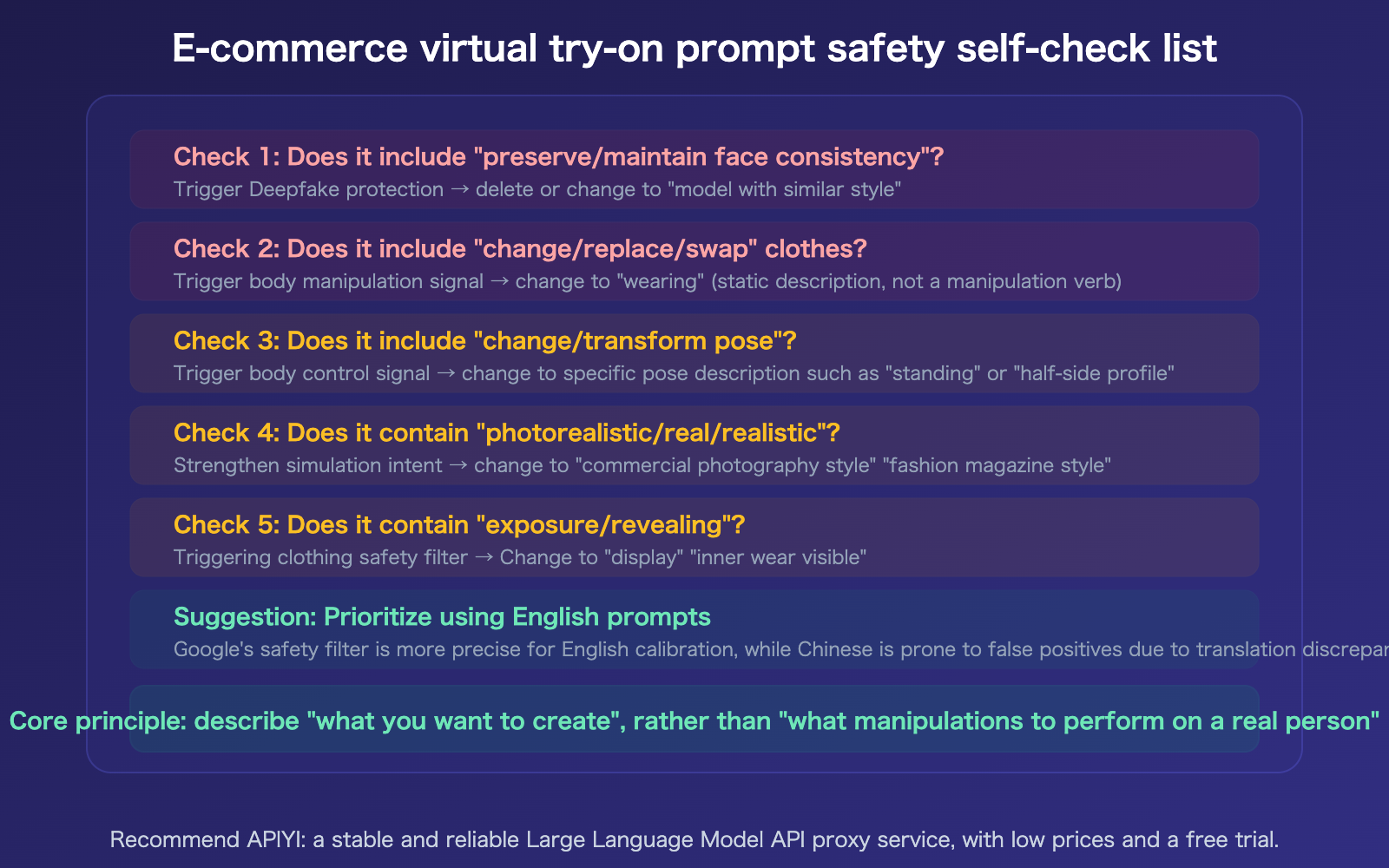
| Rewriting Principle | Original Phrasing (Blocked) | Rewritten Phrasing (Allowed) |
|---|---|---|
| Character | "Keep the face" | "Generate a model with a similar style" or omit face mentions |
| Outfit Change | "Change into the clothes from the reference" | "Wearing the outfit shown in the reference material" |
| Pose | "Change the pose" | "Fashion magazine-style standing pose" |
| Intent | "Realistic photo" | "Commercial fashion photography style" |
| Body | "Keep body proportions" | "Standard fashion model physique" |
Rewriting Option A: Completely Avoid "Manipulation" Semantics (Recommended)
Generate a professional fashion photography image:
A female model wearing the outfit shown in the reference image
(oversized coat open over a layered top).
Standing pose, mid-shot framing, model fills 2/3 of the frame.
Carrying a small handbag. Natural and expressive pose with
scene interaction. Urban outdoor background.
Commercial fashion photography style, high quality.
Why use English: Google’s safety filters are more precisely calibrated for English prompts, resulting in a lower false-positive rate.
Rewriting Option B: Keep Chinese but Reconstruct Semantics
Professional fashion photography:
A fashionable female model, wearing the outfit combination shown in the reference image
(oversized coat with layered inner wear),
coat naturally open to show details of the inner wear.
Urban street background, natural lighting.
Mid-shot composition, model occupies two-thirds of the frame,
natural and elegant standing pose, carrying a small handbag.
Commercial fashion magazine photography style, high quality.
Key Changes:
- Removed "keep the face"—no longer implies manipulating a real person.
- Changed "change into" to "wearing"—shifts from an active manipulation to a static description.
- Changed "change pose" to "natural and elegant standing pose"—makes it specific and avoids the verb "change."
- Changed "realistic" to "commercial fashion magazine photography style"—shifts from simulation intent to style description.
- Deleted "keep body proportions" entirely—no longer mentions body manipulation.
Rewriting Option C: Step-by-Step Execution Strategy
If you truly need to maintain certain features of the model (like skin tone or hairstyle), you can use a step-by-step strategy:
Step 1: First, generate a pure outfit image without the reference character.
Fashion lookbook image: [Outfit description], worn by a model,
[Skin tone/Hairstyle] hair, mid-shot, fashion photography style.
Step 2: Use multi-turn dialogue to adjust details based on the first step.
Adjust the background to urban street scene,
add a small handbag accessory.
Executing in steps prevents triggering filters by stacking all "sensitive" operations at once.
🎯 Pro Tip: Option A (English prompts) has the highest success rate. If you must use Chinese, Option B also has a significantly higher pass rate than the original prompt.
When calling via APIYI (apiyi.com), failed requests aren't charged, so you can safely test various prompt strategies to find the optimal solution.
Before and After Comparison
| Dimension | Original Prompt | Rewritten (Option B) |
|---|---|---|
| Character Description | "Keep body proportions, keep face" | "A fashionable female model" |
| Outfit Change Action | "Change into the inner and outer wear from the material" | "Wearing the outfit combination shown in the reference image" |
| Body Manipulation | "Randomly change pose" | "Natural and elegant standing pose" |
| Realistic Intent | "Realistic photo" | "Commercial fashion magazine photography style" |
| Sensitive Word Count | 5+ high/medium risk combinations | 0 |
| Expected Result | PROHIBITED_CONTENT | Successful generation |
FAQ
Q1: Google Shopping’s virtual try-on also uses Nano Banana, so why isn’t it blocked?
Google Shopping's virtual try-on feature uses an internal API channel that isn't subject to the same security filters as the public API. Google employs a dedicated try-on pipeline (g.co/shop/tryon) for its own products, which goes through an independent security review process. Public API security filters are much stricter because Google can't control how third parties use the generated results. It's an asymmetry in platform policy—the same technology is fine for Google's internal use, but gets blocked when developers try to use it.
Q2: Will I be charged if I get a PROHIBITED_CONTENT block?
Just like with IMAGE_SAFETY, a candidatesTokenCount: 0 indicates that output tokens aren't billed. Google has stated that blocked images are not charged. However, input tokens (1150) and thinking tokens (221) might incur a negligible cost (approx. $0.0003, which is effectively ignorable). When you use the APIYI (apiyi.com) API proxy service, you aren't charged for failed requests—including those blocked by PROHIBITED_CONTENT.
Q3: What should I do if I still get blocked after rewriting my prompt?
Try this three-step upgrade: 1) Switch to English prompts (Option A), as the security filters are calibrated more accurately for English; 2) Stop uploading reference images of models and only upload the clothing assets—removing "real person references" can significantly lower the Deepfake risk score; 3) Use the APIYI (apiyi.com) API proxy service, as the platform has optimized security parameter configurations specifically for e-commerce scenarios. If these steps still fail, consider using specialized virtual try-on tools (like SellerPic or TapNow) instead of a general-purpose image generation API.
Q4: Does uploading multiple reference images (model + clothing) increase the risk of being triggered?
Yes, it does. The IMAGE: 1032 token count in your error message indicates that you've uploaded a reference image containing a large amount of information. If your reference image includes a real person's face, the security filter will identify it as "a real person," which further reinforces the Deepfake signal. My advice: 1) Only upload the clothing asset (without a face); 2) If you need to reference the model's style, crop the face out of the model image before uploading.
Summary
Key takeaways regarding the Nano Banana Pro PROHIBITED_CONTENT error:
- More severe than
IMAGE_SAFETY:PROHIBITED_CONTENTis a policy-level hard block. Google identifies the combination of "keeping the face + changing clothes + changing poses" as Deepfake manipulation behavior. - It's about the phrasing, not the content: E-commerce clothing swaps are legitimate use cases, but prompts containing combinations like "keep the face," "put on," "change pose," or "realistic feel" trigger the protection mechanism.
- Core rewriting principles: Shift from "manipulating a real person" to "creating a new fashion display image." Use "wearing" instead of "put on," use "fashion photography style" instead of "realistic feel," and remove "keep the face." English prompts generally have a higher success rate.
We recommend calling Nano Banana Pro via APIYI (apiyi.com)—you won't be charged for failures, allowing you to safely test various prompt strategies, and the platform includes security parameter optimizations for e-commerce scenarios.
📚 References
-
Gemini API Safety Settings Documentation: Official explanation of safety filter parameters.
- Link:
ai.google.dev/gemini-api/docs/safety-settings - Description: Includes the meanings of various
finishReasonvalues and safety categories.
- Link:
-
Gemini Image Generation and Responsible AI: Vertex AI safety filter documentation.
- Link:
docs.cloud.google.com/vertex-ai/generative-ai/docs/multimodal/gemini-image-responsible-ai - Description: Includes trigger conditions for
PROHIBITED_CONTENTandIMAGE_SAFETY.
- Link:
-
Nano Banana Pro IMAGE_SAFETY Fix Guide: 8 ways to improve success rates.
- Link:
help.apiyi.com/en/nano-banana-pro-image-safety-error-fix-guide-en.html - Description: Includes prompt optimization templates and scenario-based solutions.
- Link:
-
APIYI Documentation Center: Safety parameter optimization for e-commerce virtual try-on scenarios.
- Link:
docs.apiyi.com - Description: No charges for failed requests + optimized configurations for e-commerce scenarios.
- Link:
Author: APIYI Technical Team
Technical Discussion: Feel free to join the discussion in the comments section. For more resources, visit the APIYI documentation center at docs.apiyi.com.