Author’s note: If you want to know which edited image is more popular, check the final leaderboard. If you want transparent backgrounds, per-image billing, and layer separation today, check the Seedream 5.5 docs. These are two separate judgments.
Teams producing e-commerce hero images, campaign posters, and transparent-background assets have probably spent the past couple of days wrestling with the same question. On one side, MAI-Image-2.7 just took #1 on the image-editing leaderboard. On the other, Seedream 5.5 is available for invocation today. Let’s be clear up front: ByteDance’s current latest model—and the one ranked higher on the leaderboard—is Seedream 5.5, not 5.0 Pro.
This isn’t an article declaring who’s “stronger across the board.” Leaderboard ranks based on preference and the transparent backgrounds, reference-image counts, and layer separation described in the docs aren’t measuring the same thing at all. We’ll split the two kinds of information into two tracks, then wrap up with a scenario-by-scenario mapping.
Core value: By the end, you’ll know when to trust leaderboard ranks, when to open the docs and run the billing numbers, and how to plug Seedream 5.5 into your image pipeline today.
Core Differences Between MAI-Image-2.7 and Seedream 5.5
Let’s start by laying out the two product lines in a table. The two model columns draw on different information sources, so pay attention to the source listed in the last column when reading.
| Comparison Dimension | MAI-Image-2.7 | Seedream 5.5 | Source |
|---|---|---|---|
| Image editing preference ranking | No. 1 (possible range 1–3) | No. 8 (possible range 8–11) | Artificial Analysis final leaderboard, accessed 2026-11-18 |
| Text-to-image preference ranking | No. 4 (possible range 3–5) | No. 14 (possible range 13–17) | Same as above |
| Transparent background | Officially stated as supported, for product shots, logos, icons, and illustrations | Parameters documented; native transparent PNG | Microsoft announcement / APIYI documentation |
| Number of reference images | Announcement does not give a specific number | Up to 10 for standard editing | APIYI documentation |
| Layer separation | Not mentioned in the announcement | Up to 1 base image plus 99 layers; text layers can be OCR’d | APIYI documentation |
| Status on APIYI | Not yet listed | Two channels already live | APIYI model master list |
The main point of this table is: the first two rows are about “which image people prefer when they look at it,” while the last four rows are about “whether the API can do it and how it’s billed.” These two kinds of information can’t substitute for each other.
Final Preference Leaderboard Data for MAI-Image-2.7 vs. Seedream 5.5
The final leaderboard uses Elo scores computed from human pairwise preference votes. The price column is the normalized cost of generating 1,000 images through each vendor’s own API at 1024×1024 with default settings. The range after the rank is the statistically plausible rank range, and the range after the score is the 95% confidence interval.
| Leaderboard | Model | Rank (plausible range) | Score (95% interval) | Sample count | Normalized price / 1,000 images |
|---|---|---|---|---|---|
| Image editing leaderboard | MAI-Image-2.7 | 1 (1–3) | 1215 (1201–1229) | 5478 | $34.82 |
| Image editing leaderboard | MAI-Image-2.7-Flash | 7 (5–7) | 1179 (1166–1192) | 5891 | $10.24 |
| Image editing leaderboard | Seedream 5.5 | 8 (8–11) | 1160 (1146–1174) | 5101 | $28.00 |
| Text-to-image leaderboard | MAI-Image-2.7 | 4 (3–5) | 1214 (1200–1228) | 5008 | $34.82 |
| Text-to-image leaderboard | MAI-Image-2.7-Flash | 11 (9–12) | 1158 (1146–1170) | 5951 | $10.24 |
| Text-to-image leaderboard | Seedream 5.5 | 14 (13–17) | 1134 (1122–1146) | 5260 | $20.00 |
On the image editing leaderboard it’s 1215 vs. 1160, and on the text-to-image leaderboard it’s 1214 vs. 1134. In both cases the confidence intervals for MAI-Image-2.7 and Seedream 5.5 don’t overlap, so the statement “in this batch of votes, people preferred MAI-Image-2.7’s outputs” holds up. That said, on the image editing leaderboard MAI-Image-2.7’s interval overlaps with both max tiers of GPT Image 2.6, so the 4-point and 10-point leads shouldn’t be written up as a stable, established gap.
The Flash version and Seedream 5.5 are a more nuanced story. On the image editing leaderboard their intervals clearly overlap, and on the text-to-image leaderboard they touch right at the boundary point of 1146. A gap of a few points like that isn’t enough to draw conclusions from.
MAI-Image-2.7: Official Claims Need to Be Read Separately
The following comes from Microsoft’s November 17, 2026 announcement and Ignite post. These are official claims, not an independent evaluation:
- MAI Image 2.7 and MAI Image 2.7 Flash launched the same day and are in public preview on Foundry. The former costs about $35 per thousand images, while the latter costs about $10 per thousand images.
- You can change an object’s color, material, or position while leaving the rest of the image untouched, and edits stay consistent across successive changes.
- Both support transparent backgrounds for product images, logos, icons, and illustrations, so you don’t have to cut them out by hand.
- The announcement’s footnote says the data is current as of November 16, 2026, and claims the cost is about one-fifth of GPT Image 2.6 Sunburst (max).
There’s a difference in how the numbers are calculated. If you use the two normalized price tiers on the final leaderboard, 210.72 ÷ 34.82 ≈ 6.05, which is roughly one-sixth. One-fifth is Microsoft’s figure; one-sixth is the result calculated from Artificial Analysis prices. Each statement has its own source. Also, the ranking in the October 27, 2026 preview draft is an old snapshot and shouldn’t be treated as this result.
Seedream 5.5 Documentation Capabilities: Transparent Backgrounds, Reference Images, and Layer Separation
This section is documentation only — no rankings. The preference score didn’t test “can it produce transparent backgrounds, can it separate layers” — those questions can only be answered by the docs.
Seedream 5.5’s Two Model IDs and How Billing Works
Seedream 5.5 has two official routing channels: seedream-5-5-261028 goes through overseas BytePlus, and doubao-seedream-5-5-261028 goes through Volcano Engine. The docs state that both have identical pricing, parameters, and capabilities; the difference is that the Volcano Engine channel applies stricter content moderation.
When it comes to billing, input images and output images are priced separately — you can’t lump them into one flat unit price:
| Billing item | Unit price | Notes |
|---|---|---|
| Input image (reference image) | $0.008/image | Charged once per reference image uploaded |
| Output 1K or 1.5K | $0.020/image | You must explicitly pass the corresponding size |
Output 2K or custom WxH |
$0.035/image | Defaults to 2K pricing when size is omitted |
| Layer separation | Number of returned images × output unit price + 1 input image | Doc example: a 1K split returning 2 images is billed 2×$0.020 + $0.008 = $0.048 |
| Top-up bonus | Up to about 83% of list price (roughly 17% off) | Check the console for actual terms |
This also explains why Seedream 5.5 shows up with two different prices on the final leaderboard. The $20 per thousand images on the text-to-image leaderboard corresponds to a single 1K output; the $28 per thousand on the image-editing leaderboard is one 1K output plus one input image. These aren’t two separate official price lists — they’re just different billing line items.
Seedream 5.5’s Capability Boundaries
Here are the documented capabilities that are directly relevant to building e-commerce assets:
- Native transparent images: pass
background: "transparent"together withoutput_format: "png". - Reference images: put them in the
imagefield; up to 10 for regular editing, and multi-turn editing is supported. - Layer separation: returns up to 100 images — 1 base image plus up to 99 layers; text layers can come back with OCR results.
- Sizes: 1K, 1.5K, 2K, and custom
WxH; total pixels between 921,600 and 4,624,220; aspect ratio from 1:16 to 16:1. - Quantity limits: regular image generation returns only 1 image per call, and
nis ignored; don’t passsequential_image_generation— doing so returns a 400.
By contrast, look at MAI-Image-2.7: Microsoft’s announcement says both models support transparent backgrounds, but it doesn’t give a parameter name you can copy. So don’t take Seedream 5.5’s background syntax and apply it to Microsoft’s model, and don’t assume the two share the same parameter set.
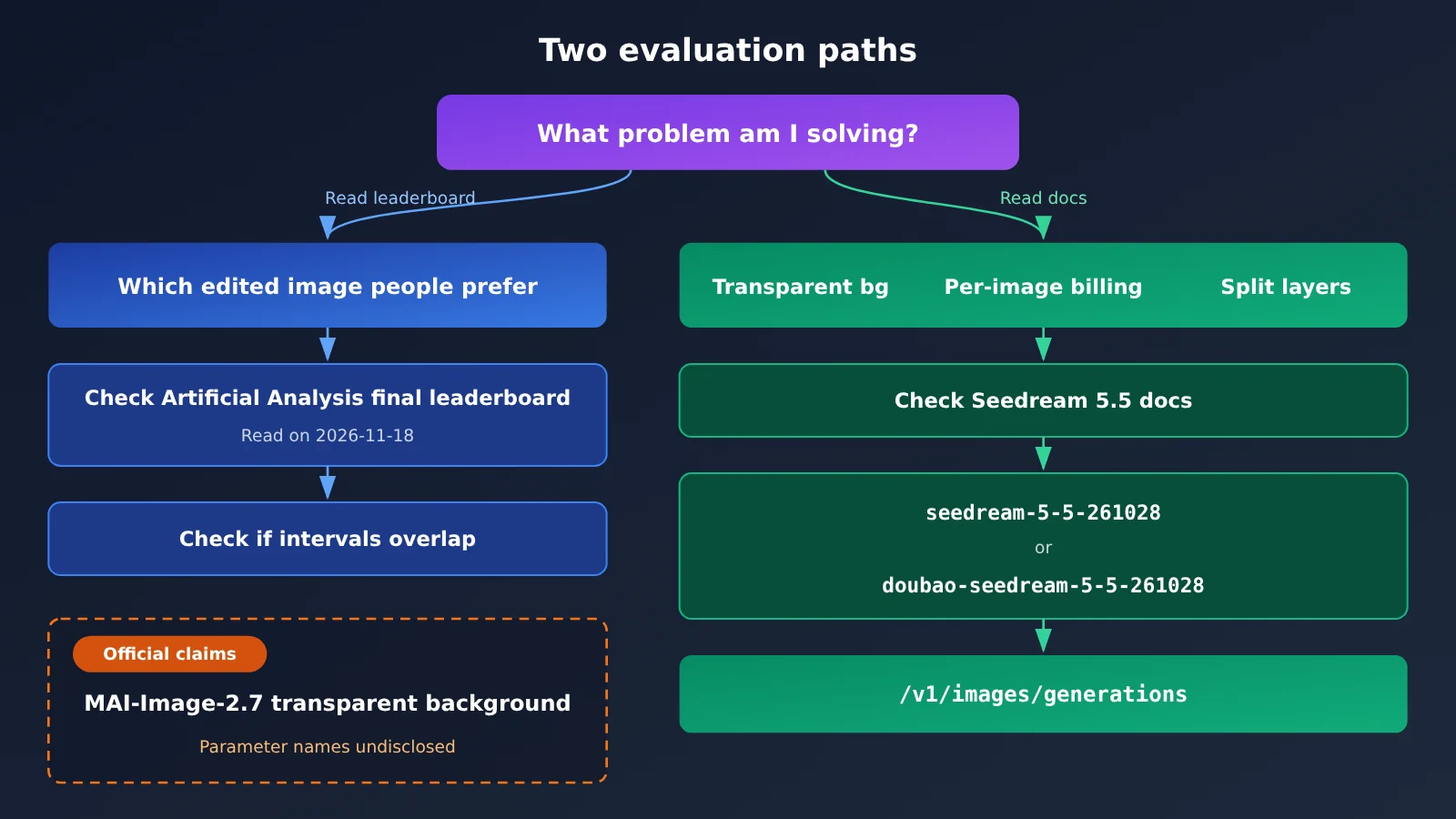
The diagram above draws the two decision paths separately. Read the leaderboard for intervals, read the docs for parameters, and you can verify the model’s status at integration time in the model list on APIYI apiyi.com.
MAI-Image-2.7 Availability Status and Pricing on APIYI
Based on the model list as of 2026-11-17 15:54 (UTC+8) and live pricing read on 2026-11-18, the only Microsoft image models available on APIYI apiyi.com are from the 2.6 generation:
| Model | Billing | Endpoint | Status |
|---|---|---|---|
MAI-Image-2.6 |
Per call, $0.12 | images | Available |
MAI-Image-2.6-Flash |
Per call, $0.06 | images | Available |
MAI-Image-2.7 |
— | — | Not yet available |
MAI-Image-2.7-Flash |
— | — | Not yet available |
seedream-5-5-261028 / doubao-seedream-5-5-261028 |
Input and output images billed separately | generations | Available |
MAI-Image-2.7 and MAI-Image-2.7-Flash are not yet available—we’ll get this model listed as soon as possible. Model availability and pricing are subject to the platform’s model list.
One thing to keep in mind: the $0.12 and $0.06 prices in the table are for the 2.6 generation, so don’t mistake them for 2.7’s pricing. The 2.6’s leaderboard scores also differ from 2.7’s: 11th on the image editing leaderboard and 9th on the text-to-image leaderboard. If you’re eyeing 2.7’s ranking on image editing, switching to 2.6 now won’t get you the same results.
How to Call Seedream 5.5 Today
Seedream 5.5 Quick Start
APIYI offers an OpenAI-compatible API, so one key is all you need. Here are the integration essentials:
- Set the base URL to
https://api.apiyi.com/v1and includeAuthorization: Bearer YOUR_API_KEYin the request headers. - Use the
/images/generationsendpoint — the full URL ishttps://api.apiyi.com/v1/images/generations. Seedream 5.5 has no/v1/images/editsendpoint, so image editing also goes through generations. - Set
modeltoseedream-5-5-261028ordoubao-seedream-5-5-261028. - For transparent backgrounds, the request body should contain at least
{"model": "seedream-5-5-261028", "prompt": "白色陶瓷马克杯,产品主图,居中构图", "background": "transparent", "output_format": "png"}.
This minimal request doesn’t pass a size, so it’s billed at the default 2K rate of $0.035 per image. If your hero image only needs 1K or 1.5K, remember to pass the corresponding size explicitly — that comes to $0.020 per image. For the exact values to use, refer to the docs.
When editing an image, put your reference images in the image field — up to 10 of them, each billed at $0.008 for input. If you’re using the official OpenAI SDK’s images.generate and your current SDK version doesn’t recognize fields like background or image, you can pass them through via extra_body.
🚀 Quick start: Get the whole flow working end to end with a single 1K transparent-background product image first, then add reference images and adjust sizes as needed. Sign up at APIYI (apiyi.com) to claim free test credits, and you can see the per-image cost right on the bill in your dashboard.
Common Traps When Calling Seedream 5.5
- Passing
nto get multiple images at once: it gets ignored — regular image generation returns 1 image per call, so for batches, fire multiple requests concurrently. - Adding
sequential_image_generationby mistake: it returns a 400 straight away. - Forgetting to pass
size: you get billed at the 2K rate, which doesn’t match the 1K price you expected. - Using the edits endpoint: Seedream 5.5 doesn’t have one — stick to generations across the board.
- Slight differences between the two channels: parameters and pricing are the same, but the Volcano Engine channel has stricter moderation, so the occasional prompt may get blocked.
MAI-Image-2.7 vs Seedream 5.5: Which Scenarios Each Fits
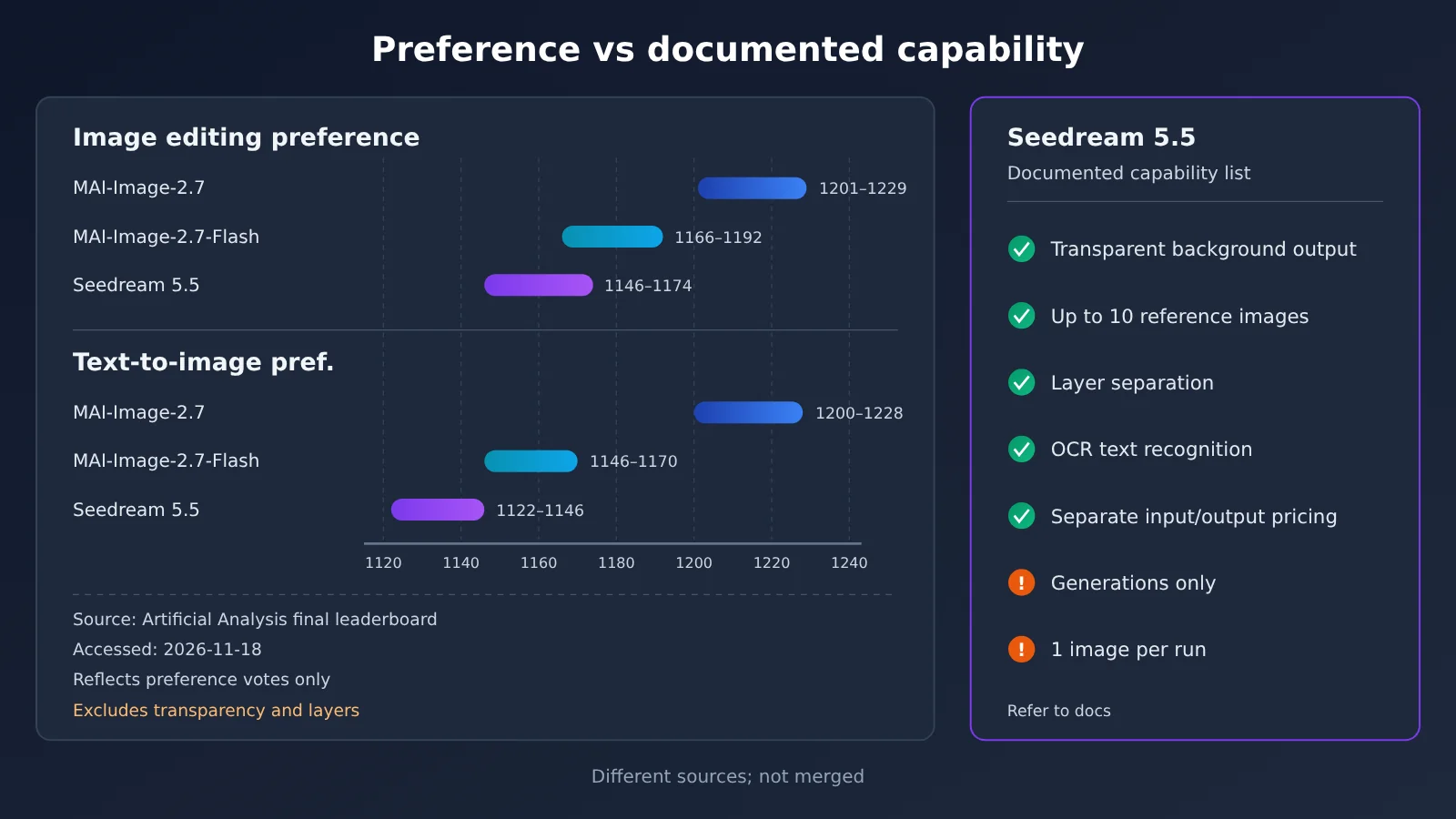
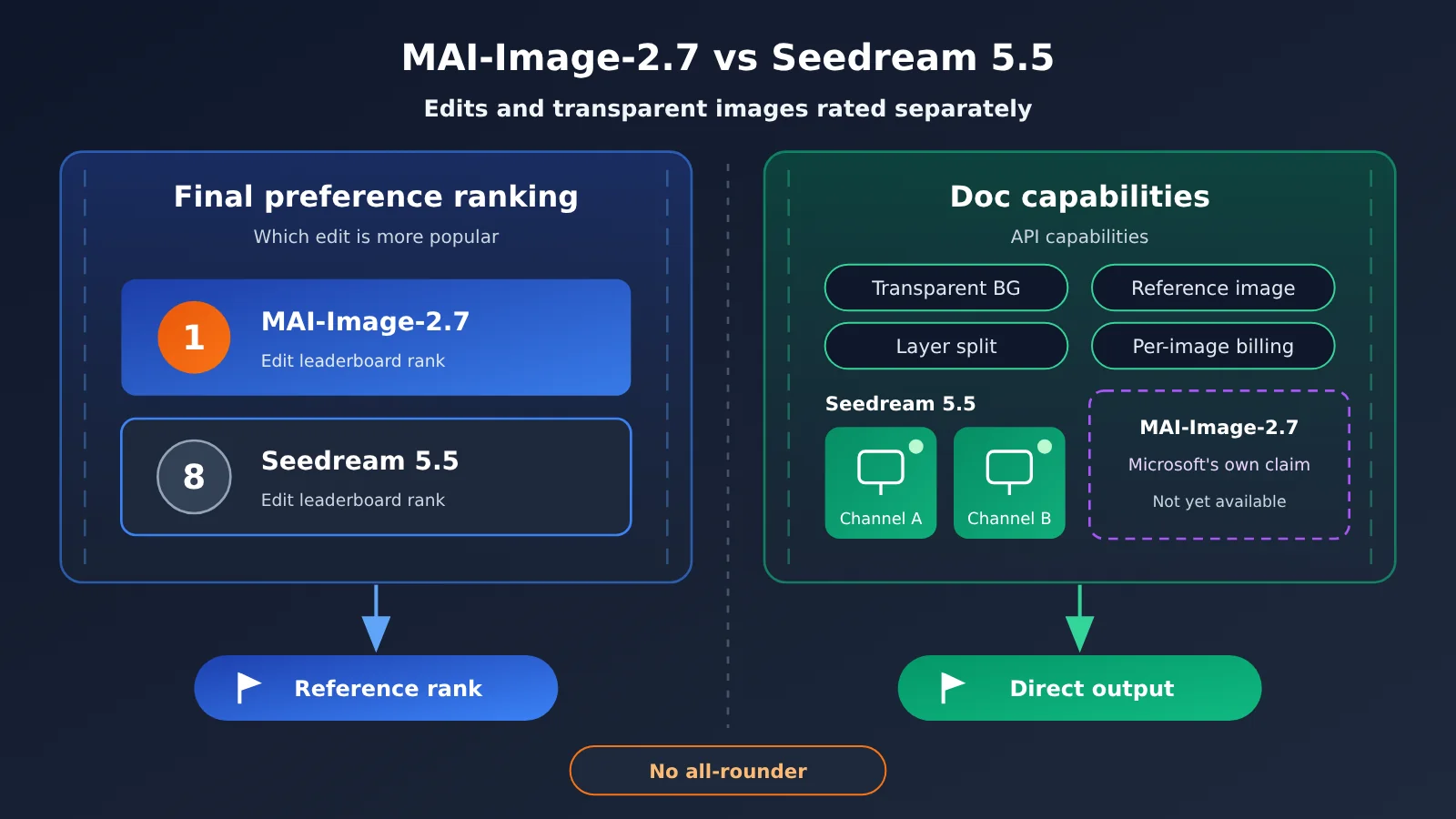
In the chart above, the left side shows preference ranges and the right side shows documented capabilities — the two columns are kept deliberately separate. The range data comes from the final leaderboard, and you can check every item on the Seedream 5.5 capability list in the documentation center at APIYI apiyi.com.
| What you need | What to look at | What you can do today | Where it’s available |
|---|---|---|---|
| Find out whose image editing people prefer | Image-editing final leaderboard + whether the ranges overlap | Go by MAI-Image-2.7’s #1 result | Not yet listed on APIYI |
| Transparent-background product shots, icons | The transparency parameters in the docs | Seedream 5.5, background + output_format |
Available on APIYI |
| Compositing a hero image from multiple reference images | Reference image limit and input billing | Seedream 5.5, image up to 10 |
Available on APIYI |
| Splitting poster layers, extracting text | Layer splitting and OCR | Seedream 5.5 layer splitting | Available on APIYI |
| Calculating per-image cost precisely | Input and output priced separately | Work through the Seedream 5.5 pricing table item by item | Available on APIYI |
When to choose MAI-Image-2.7
- Human preference is your core metric: For image editing in marketing or consumer goods, for example, the final leaderboard puts it at #1 across several image-editing use cases.
- You need precise local edits: The official description says you can change only the color, material, or position while leaving the rest untouched. Worth validating with your own assets once it’s listed.
When to choose Seedream 5.5
- You need transparent-background assets delivered today: The parameters are documented and ready to call — no waiting for a listing.
- You need layer splitting or text recognition: Explicitly supported in the docs, and the preference leaderboard doesn’t cover these kinds of capabilities.
- You need to cost things out line by line: Input and output images are priced separately, which makes billing easy to break down.
Decision Recommendation: How to Split Work Between MAI-Image-2.7 and Seedream 5.5
💡 Selection advice: Separate “which image people like more” from “what the API can deliver today.” For the former, look at the final leaderboard read on 2026-11-18; for the latter, look at the docs and the bill. We recommend first getting Seedream 5.5’s transparent-background and reference-image workflows running on APIYI apiyi.com. Then, once MAI-Image-2.7 goes live, run your own comparison using the same batch of product images.
When putting this into practice, you can follow these three steps:
- Define the task type first: Is it freeform image editing, or output with strict formatting requirements such as transparent backgrounds or layer separation?
- Then choose the information source: For freeform editing, refer to the final leaderboard; for format-specific tasks, rely on the documentation. Don’t mix the two.
- Finally, do the math: For Seedream 5.5, calculate item by item as “number of input images × $0.008 + number of output images × output unit price.” Don’t apply a vague flat rate.
Frequently Asked Questions (FAQ)
Q1: What are MAI-Image-2.7 and Seedream 5.5?
MAI-Image-2.7 is an image model released by Microsoft AI on 2026-11-17. It supports text-to-image and image editing, and a Flash version was released at the same time. Seedream 5.5 is the latest currently listed version in ByteDance’s Seedream series. APIYI offers two channels for it: `seedream-5-5-261028` and `doubao-seedream-5-5-261028`.
Q2: MAI-Image-2.7 ranks No. 1 on the image-editing leaderboard. Does that mean it’s better than Seedream 5.5 across the board?
No, you can’t infer that. The final leaderboard only shows that in preference voting, people preferred MAI-Image-2.7’s output images, and the two intervals don’t overlap. Capabilities like transparent backgrounds, the number of reference images, and layer separation aren’t covered by the preference score, so you need to evaluate them separately.
Q3: What time period does this leaderboard data cover?
This article cites the Artificial Analysis final leaderboard read on 2026-11-18. The statistics in the footnote of Microsoft’s announcement are as of 2026-11-16. The 2026-10-27 preview ranking is an old snapshot and shouldn’t be treated as this round’s result.
Q4: How do you generate a transparent-background image with Seedream 5.5?
In a generations request, pass both `background: “transparent”` and `output_format: “png”`. For MAI-Image-2.7, transparent backgrounds are currently only described by Microsoft itself; there are no publicly available parameter names you can copy, so don’t just apply this exact pattern.
Q5: How can I quickly call Seedream 5.5 via API?
Register at APIYI apiyi.com and get an API key. Set the base URL to `https://api.apiyi.com/v1`, use `/images/generations` as the endpoint, and set `model` to one of the two Seedream 5.5 IDs. New users get free trial credits, which is handy for first running one 1K transparent image to check the results.
Q6: What are the limitations of Seedream 5.5?
Standard image generation produces only 1 image per request, and `n` has no effect. Passing `sequential_image_generation` returns 400. There’s no edits endpoint. If no size is passed, billing defaults to 2K. The Volcano Engine channel has stricter moderation than the BytePlus channel.
Q7: When will MAI-Image-2.7 be available on APIYI?
It’s not listed yet. We’ll make it available as soon as possible. Model IDs and pricing are subject to the model list on APIYI apiyi.com. The existing `MAI-Image-2.6` series is the previous generation, and neither its pricing nor its leaderboard performance represents 2.7.
MAI-Image-2.7 vs. Seedream 5.5: Key Takeaways
- Rankings and capabilities are two different things: a final preference leaderboard doesn’t measure transparent backgrounds or layer separation.
- The preference results hold up: 1215 vs. 1160 on image editing, 1214 vs. 1134 on text-to-image — and the intervals don’t overlap.
- The latest version is 5.5: what’s currently listed for Seedream is 5.5, not 5.0 Pro.
- Pricing is calculated per item: $0.008 for an input image, $0.020 for 1K output and $0.035 for 2K; if you don’t pass a size, it’s billed as 2K.
- Transparent backgrounds have parameters: Seedream 5.5 uses
backgroundplusoutput_format; Microsoft’s transparent background is only a first-party claim. - What you can use today: both Seedream 5.5 channels are already live on APIYI, and the endpoint is generations.
Summary
When comparing MAI-Image-2.7 and Seedream 5.5, the key is to keep the two kinds of information separate:
- For preference, use the final leaderboard: on the leaderboard read on 2026-11-18, MAI-Image-2.7’s intervals were higher than Seedream 5.5’s on both the image-editing and text-to-image boards.
- For delivery formats, use the docs: transparent backgrounds, up to 10 reference images, layer separation, and OCR are all documented for Seedream 5.5.
- Do the math line by line: input and output images are priced separately, and the size tier directly affects the unit price.
If the job at hand has clear format requirements — a transparent-background hero image, a poster with split layers — you can start today by calling Seedream 5.5 through APIYI at apiyi.com; once MAI-Image-2.7 is listed, run another round of image-editing comparisons with your own assets.
📚 References
-
Artificial Analysis Image Editing Final Leaderboard: Source for this article’s image editing rankings and intervals (accessed 2026-11-18)
- Link:
artificialanalysis.ai/image/leaderboard/editing - Notes: Human pairwise preference voting, with ranking intervals and 95% confidence intervals
- Link:
-
Artificial Analysis Text-to-Image Final Leaderboard: Source for this article’s text-to-image rankings
- Link:
artificialanalysis.ai/image/leaderboard/text-to-image - Notes: The price column shows normalized per-thousand-image pricing under default 1024×1024 settings
- Link:
-
Microsoft AI announcement · Introducing MAI-Image-2.7: Official description
- Link:
microsoft.ai/news/introducing-mai-image-2-7 - Notes: Descriptions of capabilities such as transparent backgrounds and local edits, plus approximate price per thousand images
- Link:
-
Microsoft Foundry model catalog: MAI-Image-2.7 preview information
- Link:
ai.azure.com/catalog/models/MAI-Image-2.7 - Notes: Lifecycle is Preview; inputs are text and image
- Link:
-
Artificial Analysis announcement thread: Sub-score and use-case rankings
- Link:
x.com/ArtificialAnlys/status/2122754535206846610 - Notes: Explanation of the No. 1 image editing sub-score; the thread body is truncated in places
- Link:
Author: APIYI Technical Team
Technical inquiries: Feel free to contact us via the APIYI website homepage. Full Seedream 5.5 parameters are available in the docs.apiyi.com documentation center.