Author’s note: Comparing Qwen4-Max and Kimi K3.1 Pro across five dimensions—open weights, terminal tasks, long-task delivery, vision and video, and cost per million tokens—and explaining why the two official Terminal-Bench scores don’t match.
Here’s the bottom line: If you need the weights for fine-tuning, quantization, or private deployment, choose Kimi K3.1 Pro. If you need a hosted API and also care about vision, video, and long-task delivery—and want to push cost per million tokens as low as possible—choose Qwen4-Max. If your core workload is a command-line agent in the terminal, Kimi K3.1 Pro currently has a clear edge.
This isn’t a fence-sitting “each has its merits” analysis. Every number below is sourced: Qwen figures come from Alibaba’s official blog and the company’s official self-reported side-by-side comparison; Kimi figures come from Moonshot’s official documentation; third-party data comes from a public arena leaderboard snapshot (2026-11-14). We’ll break down separately why the two companies’ self-reported numbers for the same benchmark don’t agree.
Core value: After reading this, you’ll have a clear dividing line for model selection and know how to map the two advantages—”cheaper” and “you can get the weights”—onto your own tasks.
Qwen4-Max vs Kimi K3.1 Pro: The Core Differences
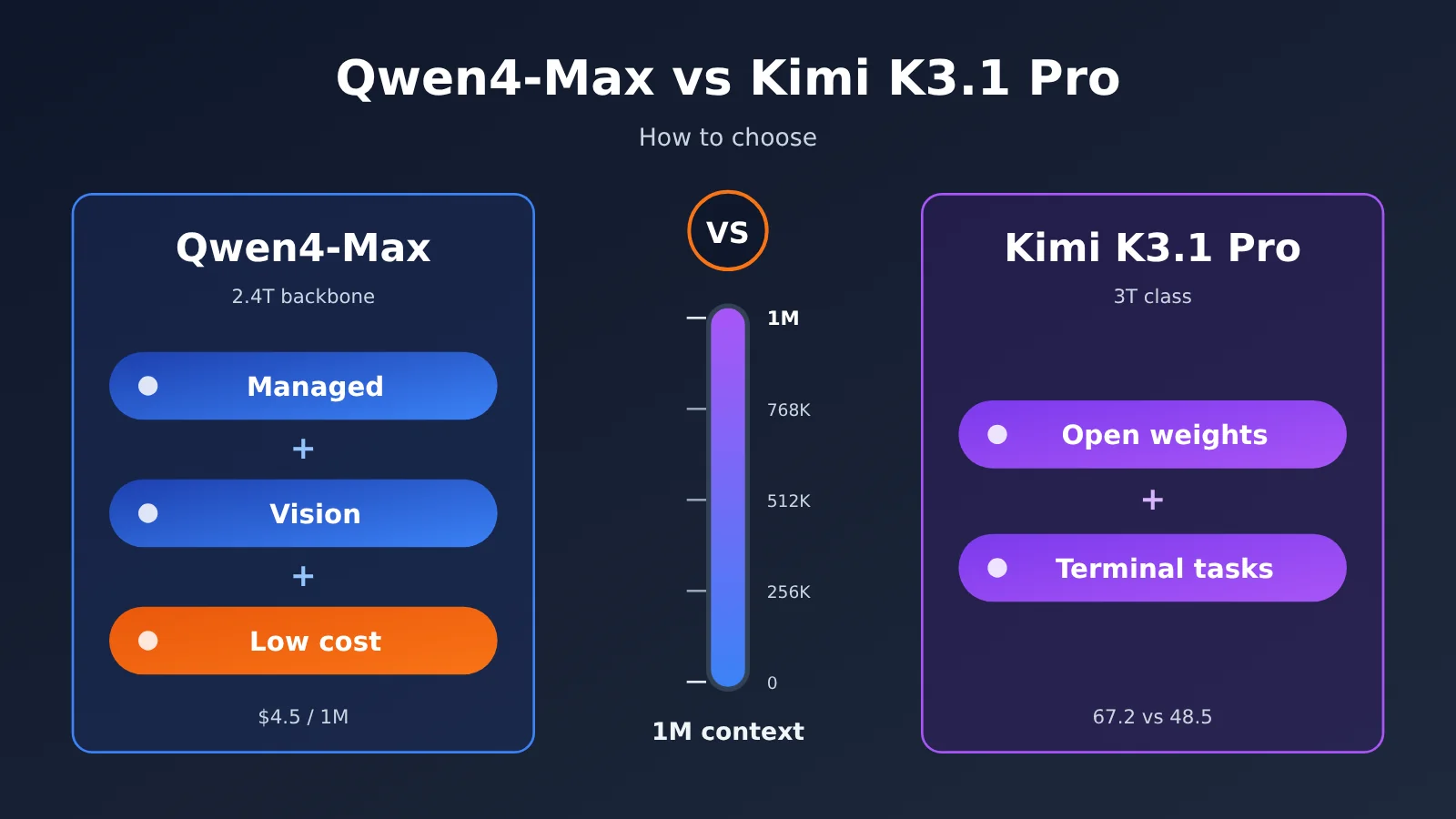
Both are Chinese flagship models from the second half of 2026. Their context windows are both in the 1M range, and on paper the specs look similar, but they’re aimed at very different use cases. Qwen4-Max uses a 2.4T backbone with 71B activated parameters, plus a 328B N-gram Embedding. It supports vision natively, maxes out at 393K output tokens, has a maximum chain of thought of 262K, and defaults reasoning_effort to high. Kimi K3.1 Pro is the first model in the K3.1 series and sits in the 3T class. Officially, it’s described as the most capable 3T-class open-weight model, with a context window of 1,048,576 tokens.
| Comparison dimension | Qwen4-Max | Kimi K3.1 Pro | Edge |
|---|---|---|---|
| Scale | 2.4T backbone / 71B activated + 328B N-gram Embedding | 3T class | — |
| Weights | Public materials mention only the QwenCloud hosted API | Open weights | Kimi |
| Context | 1M, max output 393K | 1,048,576 tokens | Tie |
| Terminal tasks (Alibaba chart) | 48.5 | 67.2 | Kimi |
| Long tasks and industry delivery | Leads in multiple areas | Slightly higher on AutomationBench | Qwen4 |
| Vision and video | Native vision, leads on chart and video metrics | Lags on metrics | Qwen4 |
| Price per 1M output tokens | $4.5 | $10 | Qwen4 |
In a nutshell: Kimi’s edge is being modifiable and strong at running terminal tasks, while Qwen4’s edge is broad delivery coverage and lower cost. Here’s the breakdown across five dimensions.
Can You Modify the Weights of Kimi K3.1 Pro and Qwen4-Max?
This is the hardest dividing line between the two. Kimi K3.1 Pro is an open-weight model, so teams can pull it onto their own clusters for domain fine-tuning, quantization and compression, distillation, or offline deployment in environments with strict compliance requirements. For teams that need to “change the model itself,” there’s no substitute for this — no benchmark score, however high, can buy it.
Qwen4-Max’s public materials so far only mention that it’s offered as a hosted API through QwenCloud; the references don’t mention open weights. Hosting saves you from worrying about GPUs, inference frameworks, and scaling — but the downside is that you can only adapt it to your business through prompts, context, and tool calls. It’s worth noting that open weights don’t automatically mean safer; security still depends on your deployment, access controls, and audit processes.
How to weigh this: if you’re only “calling the model,” open weights are worth roughly zero to you. If you clearly need fine-tuning or private deployment, Kimi is the only option in this comparison, and the dimensions that follow are just there to assess whether it’s “good enough.”
Qwen4-Max vs Kimi K3.1 Pro: Who Wins on Terminal Tasks?
Terminal tasks are about a model reading and writing files, running commands, and iterating on fixes based on error output inside a command-line environment — the scenario that comes closest to real-world work for a coding agent. Kimi K3.1 Pro is clearly the stronger one here: in Alibaba’s own same-chart comparison, Qwen4-Max scores 48.5 on Terminal-Bench 4.0 while Kimi K3.1 hits 67.2 — a gap of 18.7 points, and the category where Qwen4 falls behind the most across the entire chart.
Why the two Terminal-Bench numbers don’t match
There’s a detail that’s easy to overlook: the same Kimi K3.1 Pro gets different Terminal-Bench 4.0 scores in the two vendors’ official materials.
| Source | Kimi K3.1 Pro | Other reference points |
|---|---|---|
| Moonshot official docs | 65.7% | Claude Opus 5.5 at 66.4%, GPT-6 Astra at 58.2% |
| Qwen’s self-reported same-chart comparison | 67.2 | Qwen4-Max at 48.5 |
Kimi’s own docs say 65.7%, while Alibaba’s chart labels Kimi at 67.2 — a 1.5-point difference. That delta comes from differences in the eval harness (agent framework, tool definitions, timeout and retry policies), the reasoning effort setting, and the task-set version. It shouldn’t be read as either side faking numbers, and you can’t merge the two figures into a single “Kimi terminal task score” and cite it. By the same logic, Claude Opus 5.5’s 66.4% in Moonshot’s docs would come out as a different number under Alibaba’s eval setup — cross-document ranking mashups just don’t hold up.
The right way to read this: compare relative positions only within the same chart and the same harness. Under Moonshot’s setup, Kimi sits slightly below Opus 5.5 and clearly above GPT-6 Astra; under Alibaba’s setup, Kimi leads Qwen4-Max by a wide margin. Both conclusions hold, and they point the same direction — Kimi K3.1 Pro’s terminal capability is top-tier.
🎯 Technical tip: Benchmark scores drift with the harness and effort settings, so the most reliable approach is to run a round yourself using your own agent framework and real tasks. With APIYI at apiyi.com, you can call models like
kimi-k3.1-prousing the same API key — keep the framework fixed and only switch themodelparameter, and the comparison you get will actually mean something.
Another related dimension is the remaining code-task metrics. In Alibaba’s chart, the two are essentially tied on DeepSWE v1.1 (75.7 vs 75.5), and Qwen4-Max is 6.5 points ahead on ProgramBench (31.5 vs 25.0). Moonshot’s official docs also report Kimi Code Bench 3.0 Long-horizon at 61.2%, a notable jump over the previous K3 generation’s 55.95%. So the accurate statement is this: Kimi is strong at terminal interaction, while Qwen4 holds its own on some non-terminal coding tasks.
Qwen4-Max vs. Kimi K3.1 Pro: Long Tasks and Industry Delivery
If your agent’s job is to “deliver a piece of work end to end” — assembling a report, running a business process from start to finish, handling problems in a specialized domain — Qwen4-Max does better in Alibaba’s same-chart comparison. The table below pulls out the metrics from Qwen’s officially self-reported same-chart comparison that relate to long tasks and industry scenarios.
| Benchmark (Qwen official self-reported, same chart) | Qwen4-Max | Kimi K3.1 | Difference |
|---|---|---|---|
| JobBench | 68.5 | 61.2 | Qwen4 ahead by 7.3 |
| APEX-Agents v1.1 | 72.1 | 65.5 | Qwen4 ahead by 6.6 |
| HLAB-Vals-1.1 | 21.3 | 11.7 | Qwen4 ahead by 9.6 |
| AA-Briefcase v1.1 Elo | 1686 | 1674 | Qwen4 ahead by 12 |
| AgentArena Net Improvement | 7.5 | 3.9 | Qwen4 ahead by 3.6 |
| AutomationBench-AA | 72.5 | 73.3 | Kimi ahead by 0.8 |
| BioMysteryBench | 85.0 | 80.6 | Qwen4 ahead by 4.4 |
| HealthBench Professional | 60.0 | 57.2 | Qwen4 ahead by 2.8 |
| Humanity’s Last Exam | 51.7 | 51.1 | Roughly even |
The pattern in this data is pretty clear: Qwen4-Max leads on most professional tasks, agent delivery, and specialized domains like biomedicine and healthcare, with margins in the 3-to-10 point range. Kimi only edges ahead on AutomationBench-AA by a slim 0.8 points, and the two are nearly identical on HLE. One caveat worth flagging: this is Alibaba’s own evaluation framework, so Kimi’s numbers under its own harness could look different.
Qwen4-Max’s 393K max output and 262K max chain-of-thought are also genuinely useful for long tasks. They mean a single call can generate a very long report or code file without constantly splitting and stitching things back together, which cuts down on the number of failure points in your agent orchestration.
Qwen4-Max vs Kimi K3.1 Pro: Vision and Video Capabilities
Qwen4-Max natively supports visual input, and that shows up in Alibaba’s own comparison charts too: on the chart-understanding benchmark Chartography, Qwen4 scores 54.2 versus Kimi’s 50.0, and on the video-understanding benchmark Video-Index, Qwen4 scores 68.1 versus Kimi’s 63.2 — leads of 4.2 and 4.9 points respectively.
For businesses that need to read screenshots, parse charts in reports, understand product screen recordings, or do video content analysis, Qwen4-Max is the less troublesome choice. Kimi does post numbers on both of these, but if vision is your main workload, the gap will get amplified once you scale up.
For front-end generation, third-party data is worth a look. In the public arena leaderboard snapshot (2026-11-14) for Code Arena WebDev, Qwen4-Max (xHigh) ranks 6th with 1,750 points but is still marked Preliminary with 1,814 votes; Kimi K3.1 Pro (Max) ranks 13th with 1,686 points and 5,215 votes, and is no longer preliminary. Qwen4 scores higher, but on a smaller sample, so its ranking may still shift.
How to Calculate Costs for Qwen4-Max vs Kimi K3.1 Pro
Official List Prices (per 1M tokens, as of 2026-11-16)
| Billing item | Qwen4-Max (QwenCloud) | Kimi K3.1 Pro (Moonshot) | Kimi K3.1 Pro Highspeed |
|---|---|---|---|
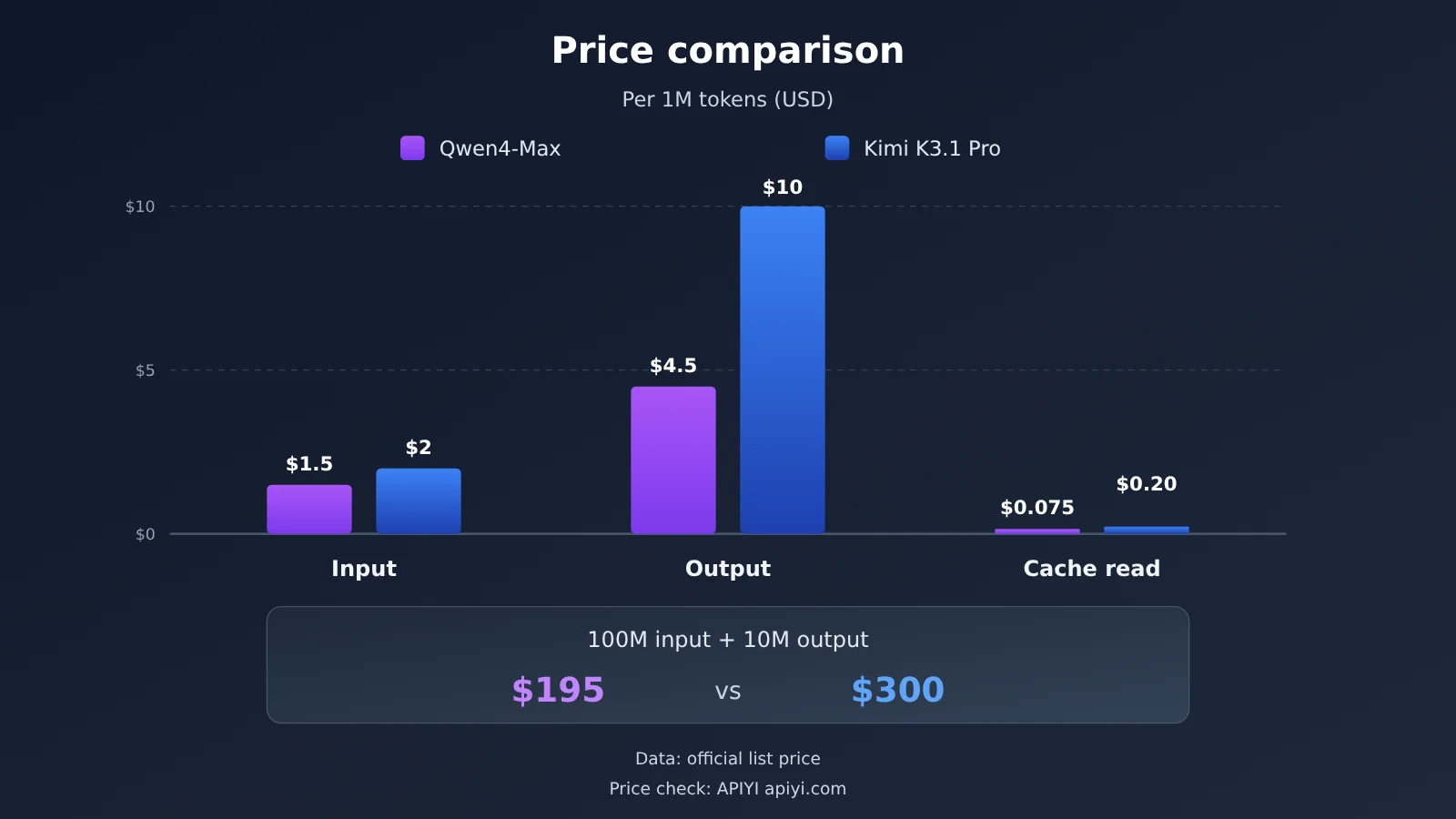
| Input | $1.5 | $2 | $4 |
| Output | $4.5 | $10 | $20 |
| Cache read / cache hit | $0.075 | $0.20 | $0.20 |
| 5-minute cache write | $1.875 | $2 | — |
| 1-hour cache write | $3 | $4 | — |
At list prices, Qwen4-Max’s input price is 75% of Kimi’s, output is 45%, and cache read is just 37.5%. For a typical agent workload of 100M input + 10M output, Qwen4-Max comes out to about $195, while Kimi K3.1 Pro is about $300. Kimi also has a Batch mode priced at 60% of the standard rate, which makes it a good fit for offline batch jobs; the Highspeed version costs double but gives you roughly 2–3x the speed.
Cheaper per Token Doesn’t Mean Cheaper per Task
Here’s the most counterintuitive part of the cost comparison. The arena snapshot shows Qwen4-Max (xHigh) at $4.18 per task, while Kimi K3.1 Pro (Max) comes in at only $0.89. Qwen4 is cheaper per token, yet several times more expensive per task, because at the high effort setting the model generates a large amount of chain-of-thought tokens, far more output than Kimi.
So when you calculate real costs, look at “price × actual token usage.” Qwen4-Max defaults reasoning_effort to high; if a task doesn’t need deep reasoning, you’ll want to lower the effort setting yourself so the lower unit price actually turns into a lower total cost.
APIYI Current Prices (2026-11-16)
| Model ID | Input | Output | Cache read | Status |
|---|---|---|---|---|
kimi-k3.1-pro |
$2 | $10 | $0.2 | Available |
kimi-k3.1-pro-highspeed |
$4 | $20 | $0.2 | Available |
qwen3.8-max |
$1.65 | $4.95 | $0.20625 | Available |
qwen4-max |
— | — | — | Not yet available; we’ll list it soon |
The prices above are per 1M tokens. qwen4-max isn’t in APIYI’s model list yet, but we’ll list it as soon as possible; until then, you can use qwen3.8-max to get your model invocation pipeline set up. All model names and prices are subject to the model list on the APIYI apiyi.com platform. Before you switch models, it’s a good idea to check the model ID, compare the price, and then confirm the invocation protocol.
How to Call Kimi K3.1 Pro and the Qwen Series via APIYI
APIYI provides an OpenAI-compatible interface. To connect, you only need three changes, and you don’t have to swap SDKs:
- Set the client’s base_url to
https://api.apiyi.com/v1; the request path is/chat/completions. - Enter the API key you obtained from the APIYI console.
- Set the
modelparameter tokimi-k3.1-pro,kimi-k3.1-pro-highspeed, orqwen3.8-max. Onceqwen4-maxis available, just swap in that model ID.
When running A/B comparisons, it’s best to keep the prompt, tool definitions, and effort level fixed, change only the model field, and record the input, output, and cached token counts for each call. This lets you both reproduce the “harness changes the score” phenomenon discussed earlier and calculate the true per-task cost of each model for your business.
🚀 Quick start: New users get free trial credits after signing up at APIYI (apiyi.com). You can use the same key to switch between the Kimi and Qwen series—validate the results with a small amount of traffic first, then decide on the primary model for production.
Qwen4-Max and Kimi K3.1 Pro: Recommended Scenarios
When to choose Kimi K3.1 Pro
- Private deployment and fine-tuning: You need open weights for domain fine-tuning, quantization, or offline deployment.
- Terminal coding agents: The main workload is the read, write, execute, and fix loop in the command line.
- Offline batch processing: You can accept asynchronous results and use Batch’s 40% discount to lower costs.
- Low-latency interaction: When speed matters, choose the Highspeed version to trade price for 2–3x speed.
When to choose Qwen4-Max
- Managed-first: You don’t want to maintain an inference cluster and just need a stable API.
- Vision and video: Screenshot understanding, chart parsing, and video analysis are the primary inputs.
- Long-task delivery: Report generation, business-process agents, and specialized Q&A in fields such as healthcare and biology.
- Sensitive to token costs: With effort controlled, this offers the lowest cost per million tokens.
Qwen4-Max vs. Kimi K3.1 Pro: Decision Recommendations
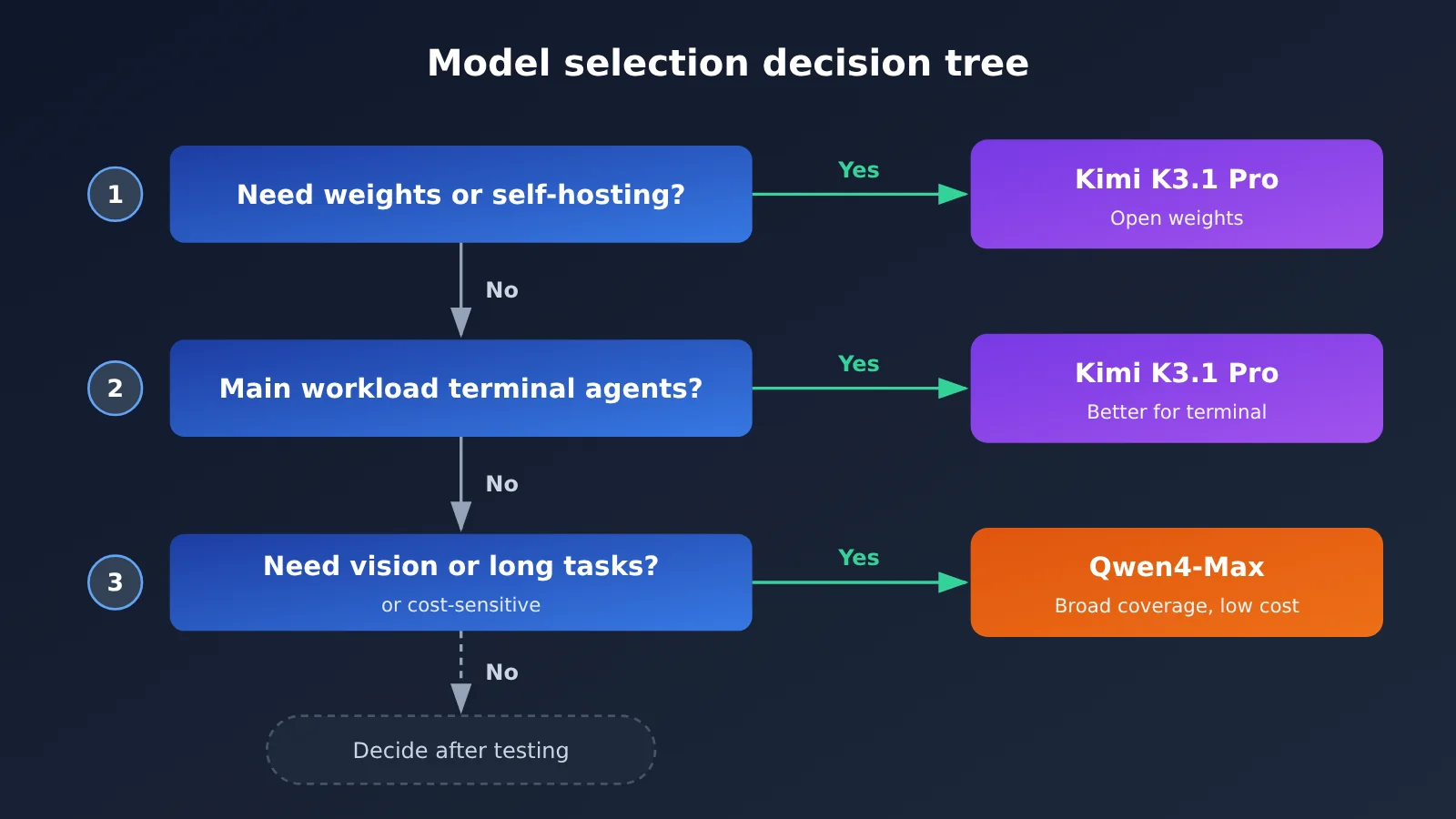
Let’s compress the five dimensions into three questions. First, do you absolutely need access to the weights? If so, go straight to Kimi K3.1 Pro. Second, is your primary workload a terminal command-line agent? If so, Kimi is the steadier choice. Third, if neither applies, Qwen4-Max has the edge in vision, long-task delivery, and unit price.
Mixed use is also common: use Kimi K3.1 Pro for terminal execution and the Qwen series for visual understanding and report delivery. This orchestration requires both models to go through the same interface, and a unified gateway saves you a lot of integration work.
💡 Selection advice: Choosing a model ultimately comes down to your task distribution. We recommend running a real-task comparison on APIYI apiyi.com, recording success rates and token consumption for both through the same base_url, and then deciding which model will be your primary.
Frequently Asked Questions
Q1: What’s the biggest difference between Qwen4-Max and Kimi K3.1 Pro?
Kimi K3.1 Pro is a 3T-class open-weight model that you can deploy and fine-tune yourself. Qwen4-Max is offered as a hosted API, with native vision and a lower list price. The former is stronger at terminal tasks; the latter is stronger at vision and long-task delivery.
Q2: Is Kimi K3.1 Pro’s Terminal-Bench score 65.7 or 67.2?
Both are correct, but the definitions differ. 65.7% comes from Moonshot’s official documentation, while 67.2 comes from a same-chart comparison self-reported by Qwen. The difference comes from the harness, effort, and task-set version. When citing, you must state the source; you can’t mix them, and you can’t splice together rankings from different documents.
Q3: Do the two models have the same context length?
Essentially the same. Kimi K3.1 Pro is 1,048,576 tokens, and Qwen4-Max is 1M. Qwen4-Max additionally publishes a maximum output of 393K and a maximum chain-of-thought of 262K, which is friendlier for single long outputs.
Q4: Why is Qwen4-Max cheaper per unit but more expensive per task on arena?
In the arena snapshot, Qwen4-Max uses the xHigh setting, so chain-of-thought token consumption is high and the per-task cost is $4.18, while Kimi K3.1 Pro (Max) is $0.89. Real cost equals unit price times token consumption; you need to lower `reasoning_effort` to cash in on the unit-price advantage.
Q5: Can I call Qwen4-Max through APIYI now?
`qwen4-max` isn’t listed yet, but we’ll list it as soon as we can. For now, you can call `kimi-k3.1-pro`, `kimi-k3.1-pro-highspeed`, and `qwen3.8-max` on APIYI apiyi.com. The base_url is `https://api.apiyi.com/v1`; model names and prices are subject to the platform’s model list.
Q6: What are the known shortcomings of each model?
Qwen4-Max clearly trails on terminal tasks (Alibaba’s same-chart comparison: 48.5 vs. 67.2), and its arena ranking is still Preliminary; the default high effort can inflate per-task cost. Kimi K3.1 Pro’s output price is more than twice Qwen4’s, and it trails on vision, video, and most industry delivery metrics.
Qwen4-Max vs. Kimi K3.1 Pro: Key Takeaways
- Weights are a hard dividing line: For fine-tuning or private deployment, Kimi K3.1 Pro is the only option.
- Kimi is strong on terminal tasks: On Alibaba’s chart, Kimi leads Qwen4-Max by 18.7 points.
- Benchmarks depend on methodology: 65.7 and 67.2 come from different harnesses and can’t be mixed.
- Qwen4 is strong on delivery and vision: It leads on several benchmarks, including JobBench, APEX-Agents, and Video-Index.
- Qwen4 has a lower unit price: Its output price is only 45% of Kimi’s, but you need to control effort.
- How to get started: On APIYI, use the same API key to switch between
kimi-k3.1-proand the Qwen series for comparison.
Summary
The core conclusions from Qwen4-Max vs. Kimi K3.1 Pro:
- Can you modify the model?: Open weights are an exclusive advantage of Kimi K3.1 Pro.
- Terminal and delivery: Kimi is stronger at command-line agents, while Qwen4-Max is stronger at long-horizon task delivery, vision, and video.
- Cost: Qwen4-Max is the cheapest per million tokens, but your actual bill depends on the token consumption driven by effort.
Benchmark scores can only point you in a direction; the final answer has to come from your own tasks. We recommend running a small-volume comparison through APIYI apiyi.com with a unified interface. Once qwen4-max is available, you can also swap in the model seamlessly and keep validating.
📚 References
- Qwen4-Max Official Blog: Model specs, context window, and QwenCloud pricing
- Link:
qwen.ai/blog?id=qwen4-max -
Note: Includes Qwen’s officially self-reported side-by-side comparison data on the same image
-
Kimi K3.1 Pro Quick Start: Official Moonshot documentation
- Link:
platform.kimi.ai/docs/guide/kimi-k3-1-pro-quickstart.md -
Note: Includes officially self-reported scores for Terminal-Bench 4.0 and Kimi Code Bench 3.0
-
Kimi Chat Model Pricing: Official Moonshot pricing page
- Link:
platform.kimi.ai/docs/pricing/chat.md -
Note: Billing rules for the Standard, Highspeed, and Batch tiers
-
Arena Code Arena WebDev: Public leaderboard snapshot, 2026-11-14
- Link:
arena.ai - Note: Third-party voting rankings and per-task cost
Author: APIYI Technical Team
Technical Discussion: Feel free to reach us through the APIYI website homepage; for more resources, visit the documentation center at docs.apiyi.com