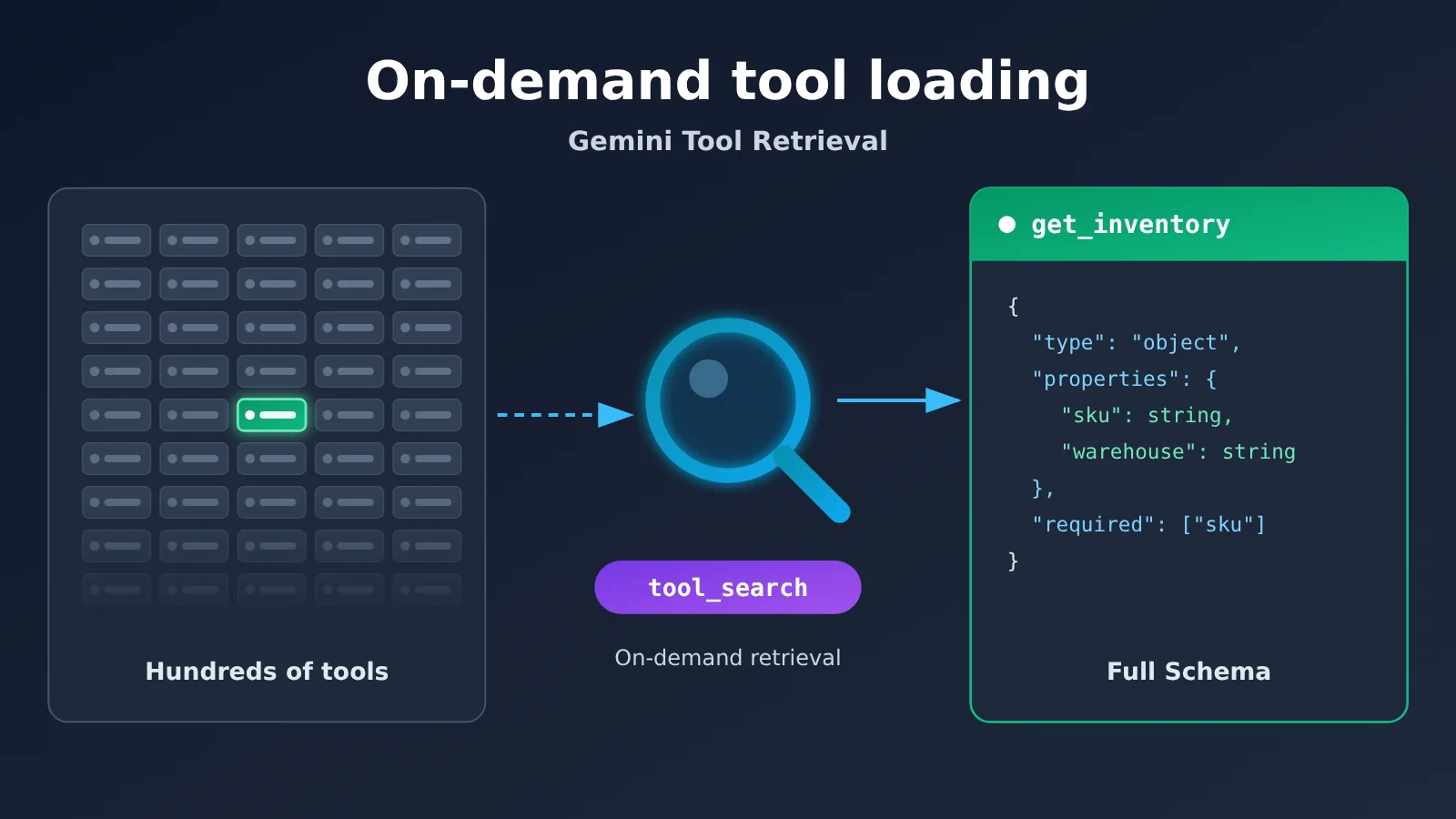
Integrating Gemini Tool Retrieval comes down to three steps. First, add {"type": "tool_search"} to the tools array, and set defer_loading: True on low-frequency business functions. Second, send the request through the v1beta version of the Interactions API, then pull the function_call out of interaction.steps. Third, execute the function locally, build a function_result keyed by call_id, and send it back together with the full tools array. You don’t need to write your own tool searcher — the server handles tool retrieval and parameter Schema loading for you.
Let’s get one thing straight first: Tool Retrieval only changes when tool parameter definitions enter the model’s context — the functions still have to be executed by the developer. It also doesn’t guarantee you’ll save money. In scenarios with few tools and a long context, token consumption can actually go up.
What will you learn from this article?
- Which models Gemini Tool Retrieval supports, which SDK version you need, and why
v1betamust be specified explicitly - A complete Python example with consistent variable names: two deferred tools, inventory and orders, from retrieval to the final answer
- Who handles
tool_search_call,tool_search_result,function_call, andfunction_resultrespectively - The differences between three extension paths: remote MCP deferred loading, client-side retrieval, and a self-built Tool Registry
- How to troubleshoot common errors like HTTP 400 in one place, and how to decide whether it’s worth enabling beforehand
Outline: We’ll start with a “To Know” table explaining the core fields, then use “Impact at a Glance” to show what this preview feature means for different roles. The “Hard Facts” section follows the integration order: set up the environment, define tools, observe the retrieval steps, return function results, and finally extend to MCP and client-side retrieval — with troubleshooting gathered at the end of that section. The “Analysis” section draws on Google’s two hypothetical worked examples to discuss where Tool Retrieval fits and where it doesn’t.
Gemini Tool Retrieval Key Concepts (To Know)
| Concept | Brief Explanation |
|---|---|
| google-genai | The official Google Python SDK package, imported with from google import genai |
| v1beta | The preview API version. Tool Retrieval requires it, and this article specifies it explicitly when initializing the client |
| Interactions API | Google’s interface built for agent workflows, supporting stateful conversations and observable execution steps |
tool_search |
A special tool type that declares tool retrieval enabled; at most one per request |
defer_loading |
Keeps the full parameter definitions of specified functions or MCP servers from entering the model context until later |
short_description |
The brief summary of a deferred function that the model sees at first; only usable on deferred functions |
tool_search_call |
The search step the model initiates during the server-side retrieval process |
tool_search_result |
The step where the server returns the full schema of the matched tools |
function_call |
The model asking your code to execute a function, along with the parameters |
function_result |
The input type your application uses to hand the function’s execution result back to the model |
call_id |
The identifier that maps a function’s execution result back to the original function_call.id |
previous_interaction_id |
The identifier that lets follow-up requests pick up from interactions already saved on the server |
signature |
The signature field you must pass back unchanged with the original step when replaying historical steps in a stateless session |
Gemini Tool Retrieval Impact at a Glance
| Audience | Practical impact |
|---|---|
| Agent developers | Agents with lots of tools can defer-load their long-tail tools instead of building their own vector retrieval — but they’ll need to switch to the Interactions API |
| Teams already using generateContent | The old method doesn’t support Tool Retrieval, so you’ll need to migrate the interface and the response-structure parsing |
| MCP integrators | You can set defer_loading globally at the mcp_server level instead of declaring each tool individually |
| Cost owners | There’s no separate feature fee, but every server-side search triggers an extra billable model call, so keep an eye on total_tool_use_tokens |
| Projects with small tool libraries | With a dozen tools and long context, it may not pay off — static loading can be cheaper |
Gemini Tool Retrieval: The Facts — Release Info and Integration Process
Gemini Tool Retrieval release status and supported models
On November 19, 2026 (early morning November 20, Beijing time), Google published “Introducing Tool Retrieval in the Gemini API” on its official blog, opening Tool Retrieval in preview within the Interactions API. The authors are Lucia Loher, a Gemini API product manager, and Nora Kassner, a research scientist at Google DeepMind. The feature is currently in Preview status, and the interface may change before general availability.
The announcement is fairly broad: “Gemini 3.6 and newer models, including all Gemini 4 models.” But as of November 20, 2026, the developer documentation explicitly lists only four model IDs: gemini-4-hydrogen, gemini-4-argon, gemini-3.8-flash, and gemini-3.6-flash. When integrating, go by the list in the documentation. Setting defer_loading on an unsupported model returns HTTP 400 directly.
Before integrating Gemini Tool Retrieval: SDK and v1beta
Google’s official Python SDK, googleapis/python-genai, released v3.6.0 on November 18, 2026, adding public schemas for Tool Retrieval and function results. The install command is:
pip install -U "google-genai>=3.6.0"
export GEMINI_API_KEY="your-key"   # Don't put your real key in code
There’s an easy versioning pitfall. Starting with v3.0.0, the SDK’s Gemini Developer API client uses v1 by default, while Tool Retrieval requires v1beta. So you must specify it explicitly during initialization:
from google import genai

client = genai.Client(
    http_options={"api_version": "v1beta"}
)
The SDK reads credentials from the GEMINI_API_KEY environment variable. If you’re using REST, the corresponding endpoint is POST https://generativelanguage.googleapis.com/v1beta/interactions, and the auth header is x-goog-api-key.
Step 1: Defining Gemini tools with tool_search and defer_loading
The demo scenario has just two business tools: get_inventory for looking up product stock and get_order_status for looking up order status — both set to deferred loading. Here’s what each field in the tools array does:
{"type": "tool_search"}: turns on server-side retrieval, withexecutiondefaulting toserver. If you setdefer_loadingwithout it, you’ll getdefer_loading requires tool_search.defer_loading: True: the fullparametersstay out of the initial context, so at first the model only sees the name and a brief description.short_description: the brief summary shown in the initial list. If you leave it out, the first sentence ofdescriptionis used. Supplying it on a non-deferred function gets rejected as invalid.parameters: still must be submitted in full. What’s deferred is when the schema enters the model’s context — the server still needs the complete definition.
So which tools are good candidates for deferral? Google’s recommendation is to mix them: keep high-frequency tools directly loaded, and defer low-frequency, specialized long-tail tools. Also, don’t defer tools that the system instructions name explicitly. Otherwise the model might bypass the search and call them directly, then error out because the loading context is missing. For tools with similar names, add a business namespace — for example, distinguish billing_get_customer from crm_get_customer instead of calling both get_customer.
Step 2: Send the request and observe Gemini’s tool retrieval steps
Below is the complete demo code. The inventory count of “12 items” and the order status demo_pending are both local mock data — nothing queries a real system. To run the code, you’ll need a valid Gemini API key and model access.
import json
from google import genai

MODEL = "gemini-4-hydrogen"

client = genai.Client(
    http_options={"api_version": "v1beta"}
)

tools = [
    {"type": "tool_search"},
    {
        "type": "function",
        "name": "get_inventory",
        "description": "Retrieve the available inventory for a product SKU.",
        "short_description": "Check product inventory by SKU.",
        "defer_loading": True,
        "parameters": {
            "type": "object",
            "properties": {"sku": {"type": "string"}},
            "required": ["sku"]
        }
    },
    {
        "type": "function",
        "name": "get_order_status",
        "description": "Retrieve the status of a customer order.",
        "short_description": "Check an order's current status.",
        "defer_loading": True,
        "parameters": {
            "type": "object",
            "properties": {"order_id": {"type": "string"}},
            "required": ["order_id"]
        }
    }
]

def execute_demo_tool(name, arguments):
    """Locally simulated business function; doesn't query real inventory or orders."""
    if name == "get_inventory":
        return {"sku": arguments["sku"], "available": 12, "data_source": "local_demo"}
    if name == "get_order_status":
        return {"order_id": arguments["order_id"], "status": "demo_pending", "data_source": "local_demo"}
    raise ValueError(f"Unknown tool: {name}")

# First request: the model discovers and selects the tools it needs
interaction = client.interactions.create(
    model=MODEL,
    input="查询商品 SKU-42 的可用库存。",
    tools=tools
)

print("执行步骤:")
for step in interaction.steps:
    print(step.type, getattr(step, "name", ""))
The printed interaction.steps typically show up in the following order. The exact order and retrieval results are decided by the model, and a single turn can involve multiple searches.
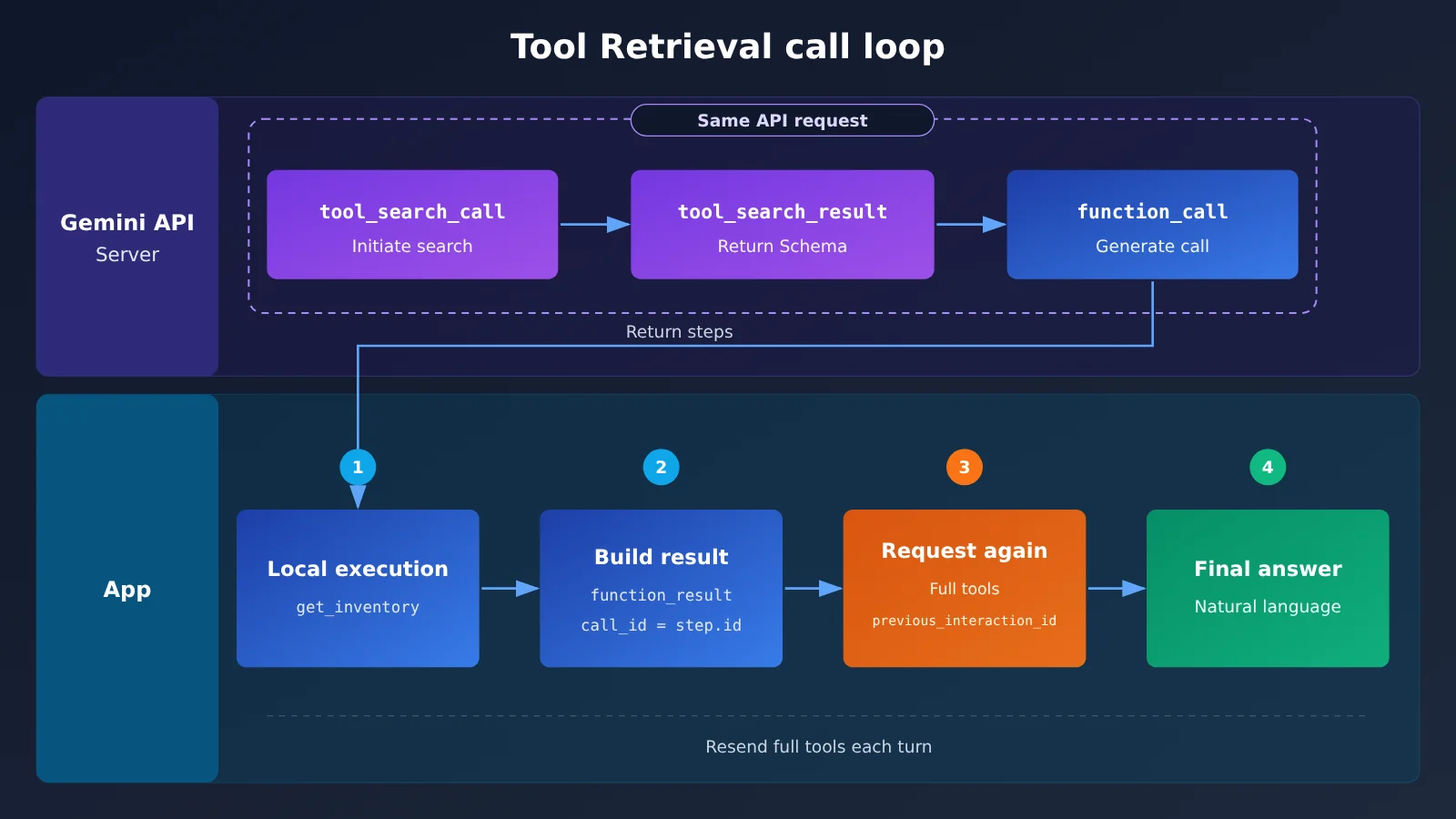
tool_search_call: the model realizes none of the currently loaded tools fit, so it kicks off a server-side search.tool_search_result: the API returns the full parameter schema for the matchingget_inventory.function_call: after reading the schema, the model produces a call likeget_inventory(sku="SKU-42").
All three steps happen inside the same external API request — the application doesn’t need to write its own search logic or send a second retrieval request. The first two steps are for observation and logging only; don’t repeat the search locally. But “the same request” doesn’t mean “just one round of inference”: every server-side search triggers extra model calls, and those tokens are billed as usual. One more thing to watch for when debugging: don’t rely on interaction.status alone. Even when the status isn’t requires_action, the steps may still contain a function_call waiting to be executed.
Step 3: Execute the functions and send back function_result
Tool Retrieval is only responsible for finding tools and loading arguments — the actual business functions are still executed by your application, using the standard Function Calling mechanism. Continuing from the code above:
# Only execute the actual business function calls; don't execute tool_search_call on the application side
function_results = []

for step in interaction.steps:
    if step.type != "function_call":
        continue
    result = execute_demo_tool(step.name, step.arguments)
    function_results.append({
        "type": "function_result",
        "name": step.name,
        "call_id": step.id,
        "result": [{"type": "text", "text": json.dumps(result, ensure_ascii=False)}]
    })

# Send the local function results back to Gemini
if function_results:
    followup = client.interactions.create(
        model=MODEL,
        previous_interaction_id=interaction.id,
        tools=tools,
        input=function_results
    )
    print("最终回答:", followup.output_text)
else:
    print("当前回答:", interaction.output_text)
There are three things to watch out for in this code. First, call_id must come from the step.id of the original function_call. When a turn contains multiple calls, that’s how the model matches each result. Second, previous_interaction_id=interaction.id lets the server continue the saved interaction record, including the tools that have already been retrieved. Third, you still need to pass the entire tools array on the second turn. The API keeps the step history, but it doesn’t keep the tool declarations — tool_search, all deferred and non-deferred tools, and the MCP config must be resubmitted every turn.
This example only demonstrates a single function-call loop; it doesn’t include a general-purpose multi-turn agent orchestrator. If followup contains another function_call, just keep handling it the same way.
🎯 Technical tip: Tool Retrieval itself relies on Google’s official
v1betaInteractions API. If you’d rather first get your business functions working with standard Function Calling and compare how different models pick tools and fill in arguments, you can use the same key on APIYI apiyi.com to switch between Gemini, Claude, GPT, and other models for baseline testing.
Extension: Remote MCP and Gemini Client-Side Retrieval
A remote MCP server can set up lazy loading at the server layer, and the tools it exposes get loaded on demand:
mcp_tools = [
    {"type": "tool_search"},
    {
        "type": "mcp_server",
        "name": "weather_service",
        "url": "https://gemini-api-demos.uc.r.appspot.com/mcp",
        "defer_loading": True
    }
]
Unlike custom functions, remote MCP tools are executed on behalf of your app by the API. What shows up in steps is mcp_server_tool_call and mcp_server_tool_result, and your application doesn’t need to send results back. The official docs don’t currently specify a “maximum number of deferrable tools.”
If your company already has its own tool registry, vector search, or user-level permission filtering, you can switch to client-side retrieval: set "execution": "client" and provide the full name, description, and parameters. In this case, the first round returns an ordinary function_call to search_tool_registry. After your app performs the search, return the full array of tool declaration objects in function_result.result—don’t serialize it into a single JSON string. Client mode doesn’t use defer_loading, and you can’t mix the two modes in the same request.
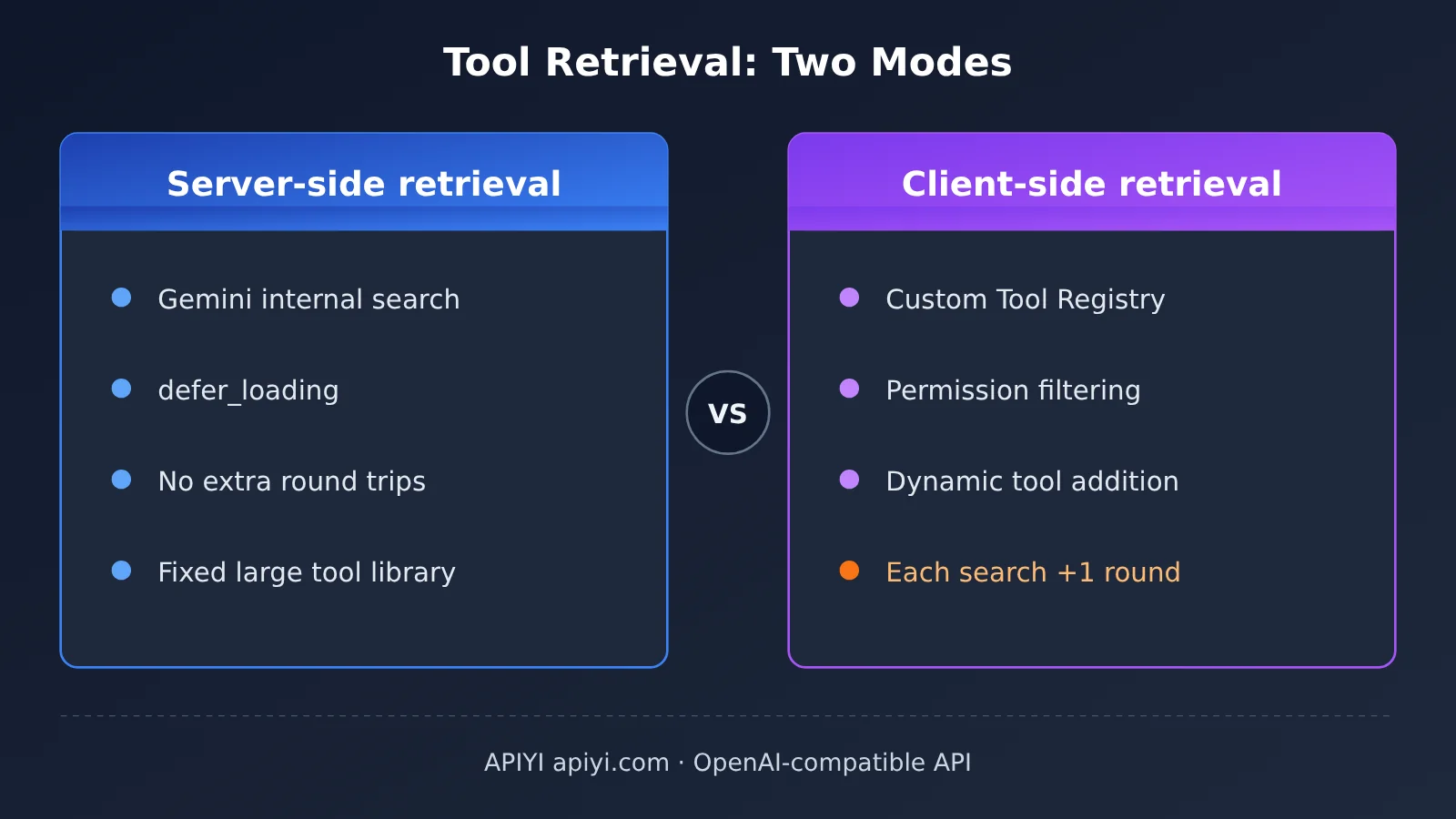
| Dimension | Server-Side Retrieval | Client-Side Retrieval (Gemini) | Self-Built Tool Registry (General Approach) |
|---|---|---|---|
| Who runs the retrieval | Gemini API | Developer application | Developer application |
| Key configuration | tool_search + defer_loading |
tool_search + execution: client |
Ordinary Function Calling |
| Must all tools be declared upfront? | Yes | No | No |
| Extra network round trips | None | +1 round per search | +1 round per search |
| Dynamically add tools | Inconvenient | Supported | Supported |
| Typical scenario | Large, relatively fixed tool library | Multi-tenant, private registry | Cross-model reuse, multi-vendor switching |
| Available platform | Google official v1beta | Google official v1beta | OpenAI-compatible interfaces such as APIYI apiyi.com |
The last column isn’t Gemini Tool Retrieval—it’s a similarly-minded engineering approach: expose only a search function first, then add the matching schema into tools once retrieval hits. It suits teams that need to switch between multiple models. Here’s the minimal setup:
import os
from openai import OpenAI

client = OpenAI(
    api_key=os.environ["APIYI_API_KEY"],
    base_url="https://api.apiyi.com/v1"  # APIYI OpenAI-compatible interface
)
MODEL = "your-model-name"  # Refer to the platform's model list

search_tool = {"type": "function", "function": {
    "name": "search_tool_registry",
    "description": "Search internal business tools by keyword.",
    "parameters": {"type": "object", "properties": {"query": {"type": "string"}}, "required": ["query"]}}}
View the complete two-stage invocation of a self-built Tool Registry
import json, os
from openai import OpenAI

client = OpenAI(
    api_key=os.environ["APIYI_API_KEY"],
    base_url="https://api.apiyi.com/v1"
)
MODEL = "your-model-name"  # Refer to the platform's model list

TOOL_REGISTRY = {
    "get_inventory": {"type": "function", "function": {
        "name": "get_inventory",
        "description": "Retrieve the available inventory for a product SKU.",
        "parameters": {"type": "object", "properties": {"sku": {"type": "string"}}, "required": ["sku"]}}},
    "get_order_status": {"type": "function", "function": {
        "name": "get_order_status",
        "description": "Retrieve the status of a customer order.",
        "parameters": {"type": "object", "properties": {"order_id": {"type": "string"}}, "required": ["order_id"]}}},
}
search_tool = {"type": "function", "function": {
    "name": "search_tool_registry",
    "description": "Search internal business tools (inventory, orders) by keyword.",
    "parameters": {"type": "object", "properties": {"query": {"type": "string"}}, "required": ["query"]}}}

def search_registry(query):
    q = query.lower()
    return [name for name, t in TOOL_REGISTRY.items()
            if any(w in t["function"]["description"].lower() for w in q.split())]

def execute_demo_tool(name, args):
    if name == "get_inventory":
        return {"sku": args["sku"], "available": 12, "data_source": "local_demo"}
    if name == "get_order_status":
        return {"order_id": args["order_id"], "status": "demo_pending", "data_source": "local_demo"}
    raise ValueError(name)

messages = [{"role": "user", "content": "查询商品 SKU-42 的可用库存。"}]
tools = [search_tool]

for _ in range(4):  # Simple loop cap to prevent an infinite loop
    resp = client.chat.completions.create(model=MODEL, messages=messages, tools=tools)
    msg = resp.choices[0].message
    if not msg.tool_calls:
        print("最终回答:", msg.content)
        break
    messages.append(msg)
    for call in msg.tool_calls:
        args = json.loads(call.function.arguments)
        if call.function.name == "search_tool_registry":
            names = search_registry(args["query"])
            tools += [TOOL_REGISTRY[n] for n in names if TOOL_REGISTRY[n] not in tools]
            content = json.dumps({"loaded_tools": names})
        else:
            content = json.dumps(execute_demo_tool(call.function.name, args), ensure_ascii=False)
        messages.append({"role": "tool", "tool_call_id": call.id, "content": content})
💡 Which approach to pick: How well the registry approach retrieves tools depends on your search function—the keyword matching in this example is only for demonstration. Switch models on APIYI (apiyi.com) and run the same set of tasks, then compare “did it find the right tool” and “were the arguments filled in correctly”—that’ll tell you which model suits your tool library better.
Common Gemini Tool Retrieval Errors at a Glance
| Symptom | Cause | Fix |
|---|---|---|
defer_loading requires tool_search |
You declared a deferred function but there’s no server-side tool_search |
Add {"type": "tool_search"} to tools |
short_description is invalid |
It’s set on a function that isn’t deferred | Only use it on functions with defer_loading=True |
| HTTP 400 unsupported model | The model isn’t on the supported list | Switch to one of the 4 model IDs listed in the docs |
| Request has no effect, or you get a version error | The SDK defaults to v1, or you called generateContent |
Explicitly set api_version="v1beta" and switch to the Interactions API |
| HTTP 400 on the second turn | With store=False, you dropped a retrieval step or the signature |
Replay tool_search_call/result and every signature exactly as they were |
| Model uses stale tools, or tools are unavailable | Later requests omit tools |
Resubmit the full tools array on every turn |
| Parameters are empty after retrieval | The deferred tool only sent a name and short description | Deferred tools need the full parameters too |
| Client-side retrieval config fails | Fields like name and description are missing |
Fill in the complete client-side search function definition |
Stateless mode (store=False) deserves its own note. In this mode you can’t rely on previous_interaction_id—the app has to save and replay the user input, tool_search_call, tool_search_result, function_call, function_result, and every signature exactly as they were. Drop or edit any one of those steps and the server may not be able to rebuild the retrieval context. Also, when the server finds no matching tools, it may just return a block of text instead of a structured error. So “the request didn’t throw an error” doesn’t mean “retrieval succeeded”—when you validate, walk through each step and check whether the expected retrieval steps and function calls actually appear there.
Gemini Tool Retrieval: Key Takeaways — When Is It Actually Worth Wiring In
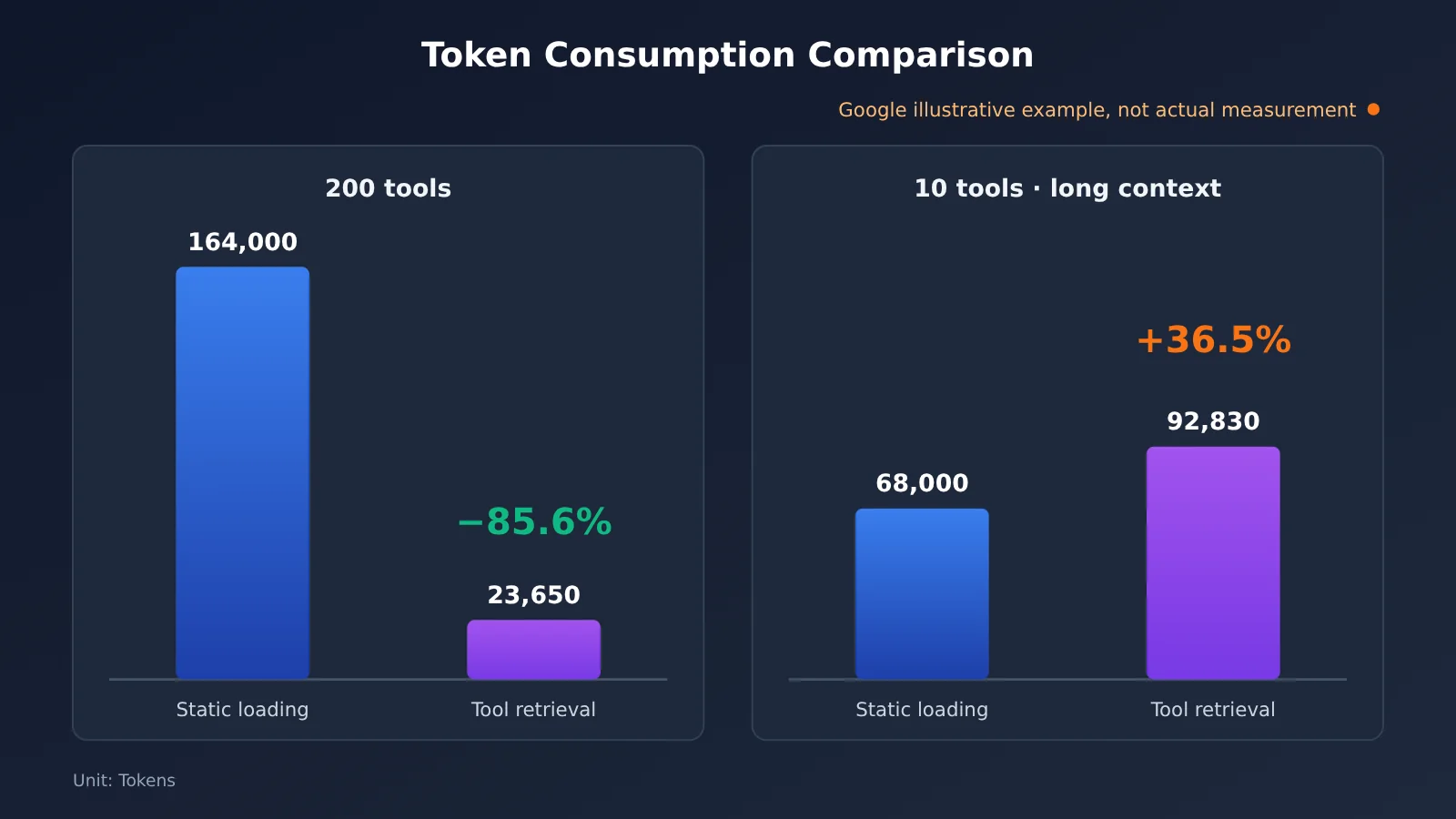
Takeaway 1: The payoff depends on tool library size and context length — turning it on doesn’t automatically save you money. Google’s docs offer two hypothetical worked examples that point in opposite directions, and they’re explicit that neither is a production benchmark. The first: 200 tools at 400 tokens each, a 2,000-token base context, and 2 requests — static loading lands around 164,000 tokens, while Tool Retrieval comes to about 23,650, a projected drop of roughly 85.6%. The second: 10 tools with a 30,000-token base context — static loading is 68,000 tokens, but Tool Retrieval actually reaches 92,830 tokens, up about 36.5%, because the extra search reasoning has to reprocess the whole long context. Google’s engineering guidance: under about 20 stable tools, static loading is usually good enough.
Takeaway 2: Judge cost by total_tool_use_tokens, not by first-round input alone. In Google’s early tests, the short description for each deferred tool averaged about 26 tokens — roughly 2,600 tokens for 100 tools; these are approximations. What you really need to watch is the extra model calls triggered by search, plus how loaded schemas pile up across a session. The current docs describe no mechanism for unloading a retrieved tool, so the more tools you retrieve in a long session, the larger the context grows. Caching isn’t a guaranteed win either: once the initial prompt gets shorter, it may dip below the minimum threshold for implicit caching.
Takeaway 3: On-demand tool loading is now an industry consensus, but numbers from one vendor don’t transfer to another. Anthropic shipped its Tool Search Tool in November 2025, and OpenAI rolled out Tool Search with GPT-5.4 in March 2026; both published measured savings under their own conditions. Google gave us only hypothetical examples this time. As of November 20, 2026, there’s no verifiable independent production measurement of Gemini Tool Retrieval. So claims like “Gemini cuts tokens 85% in real tests” don’t hold up right now.
Advice for developers: First, tier your existing agent’s tools by call frequency — load the high-frequency ones directly and defer the long tail. Then run the same batch of tasks against both static loading and Tool Retrieval, comparing total tokens, end-to-end latency, the share of correct tool selections, and argument accuracy. The feature is still in preview with no announced release date, so it’s wise to keep a fallback switch to static loading in production. During model selection, you can cheaply establish a standard Function Calling baseline through APIYI (apiyi.com)’s unified interface, then move to the official v1beta to verify Tool Retrieval’s net gain.
The more tools you have, the more you need to think about when to pull each one out. As the Analects (Wei Ling Gong) puts it: “A craftsman who wants to do his work well must first sharpen his tools.”
📚 References
-
Introducing Tool Retrieval in the Gemini API: Google’s official announcement
- Link:
blog.google/innovation-and-ai/technology/developers-tools/gemini-api-tool-retrieval - Details: Release date, design goals, MCP, and the two retrieval modes
- Link:
-
Tool retrieval official docs: configuration, limits, billing, and worked examples
- Link:
aistudio.google.com/docs/tool-retrieval - Details: The primary source for this article’s code, error rules, stateless replay, and token examples
- Link:
-
Function Calling official docs: function execution and returning results
- Link:
aistudio.google.com/docs/function-calling - Details: Standard usage of
function_resultandcall_id
- Link:
-
Interactions API official docs: API structure and execution steps
- Link:
aistudio.google.com/docs/interactions-overview - Details: Differences between stateful conversations, steps, and generateContent
- Link:
-
python-genai v3.6.0 / v3.0.0 Release: SDK release notes
- Link:
github.com/googleapis/python-genai/releases - Details: Tool Retrieval schema support and changes to the default API version
- Link:
Author: APIYI Technical Team
Technical discussion: For multi-model Function Calling comparison tests, visit APIYI at apiyi.com. For more integration resources, see the docs.apiyi.com documentation center.