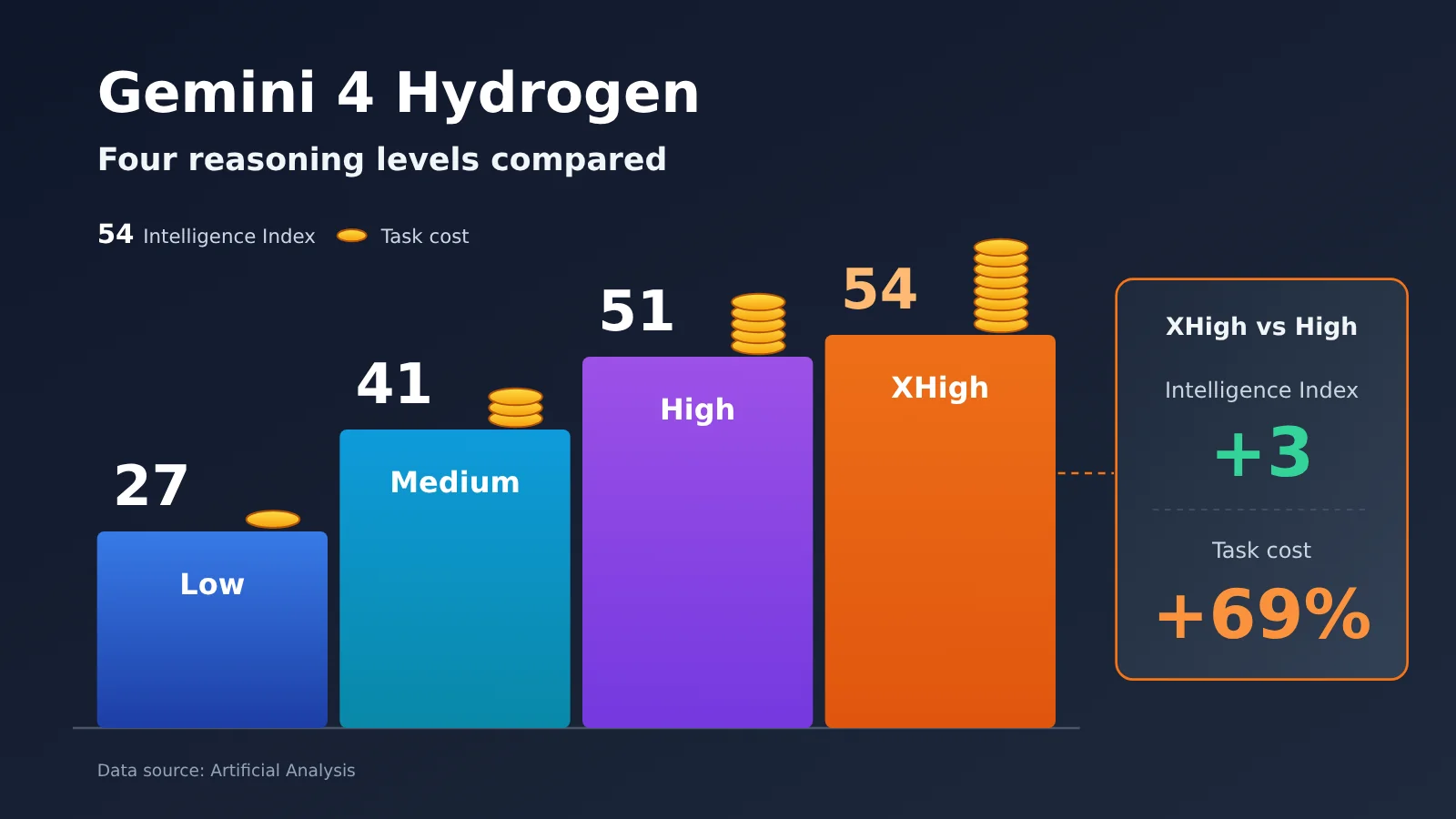
One-sentence summary: Artificial Analysis’s four-tier evaluation shows that moving Gemini 4 Hydrogen from High to XHigh adds only 3 points to its intelligence index while increasing evaluation task cost by about 69%. That makes it better suited to configuring thinking tiers by task difficulty.
Google officially launched Gemini 4 Hydrogen on November 12, 2026, and offers four thinking tiers: Low, Medium, High, and XHigh. All four use the same model ID and the same token pricing, but their scores, costs, and latency in third-party evaluations vary widely.
This isn’t a “higher tier is always better” recommendation. This article uses Artificial Analysis’s standardized benchmark data to calculate the marginal return of each tier and gives clear tier recommendations by task type.
Key takeaway: After reading this, you’ll be able to decide which tier your business should use and how to control thinking costs with the thinking_level parameter.
Terms to Know Before Comparing Gemini 4 Hydrogen’s Four Thinking Levels
- thinking_level: The parameter that controls how deeply the model reasons. Hydrogen supports four values: Low, Medium, High, and XHigh.
- Thinking tokens: Tokens the model uses to reason before producing its final answer. According to Google’s official pricing page, these are billed at the output rate.
- Token: The unit the model uses to measure text, images, and other information. The API bills per million tokens.
- Harness: The test framework that organizes model inputs, executes tool calls, and scores tasks. Scores from different harnesses can’t be compared directly.
- API: An interface that lets programs call a service. The code examples in this article use the OpenAI-compatible format.
Same Gemini 4 Hydrogen — Why Do the Four Levels Perform So Differently?
Gemini 4 Hydrogen is a high-efficiency model released by Google DeepMind, mainly built for everyday coding and AI Agent task execution. Its API model ID is gemini-4-hydrogen. The four thinking levels aren’t four different models — they’re four reasoning depths of the same model. Google Cloud’s documentation labels a recommended use case for each level:
| Thinking level | Official recommended use | Reasoning depth | Default? |
|---|---|---|---|
| Low | Simple tasks like classification | Shallow | No |
| Medium | Routine coding | Medium | No (the default for 3.8 Flash) |
| High | Multi-step Agents | Deep | ✅ Hydrogen default |
| XHigh | Complex, deep reasoning | Deepest | No |
The Four Hydrogen Thinking Levels Cost the Same per Unit — So Why Do the Bills Differ?
As of November 13, 2026, Google’s official Standard pricing is $1.50 per million tokens for input and $7.50 per million tokens for output — identical across all four levels. The difference comes from token usage: the higher the level, the more thinking tokens the model generates before answering, and those tokens are billed at the output rate.
So “same unit price” doesn’t mean “same cost per task.” The same question under XHigh might generate several times the thinking content of High, and your bill rises with it. When estimating cost, don’t just look at the length of the final answer — factor in the invisible reasoning too.
Gemini 4 Hydrogen Four-Tier Benchmark Data: Score, Cost, and Speed Comparison
The data below comes from the third-party organization Artificial Analysis, with the evaluation completed on release day. The Intelligence Index, benchmark task cost, and average time per task come from its Intelligence Index v5.0.1; the time to first answer token and total output tokens come from a page snapshot dated November 13, 2026. All figures below are third-party standardized benchmark results, not our own tests.
| Thinking level | Intelligence Index | Average cost per task | Average time per task | Time to first answer token | Full evaluation output tokens |
|---|---|---|---|---|---|
| Low | 27 | $0.29 | 1.3 min | ~5.7 s | 20.3 million |
| Medium | 41 | $0.80 | 3.7 min | ~11.8 s | 54.4 million |
| High (default) | 51 | $1.87 | 8.3 min | ~18.9 s | 110 million |
| XHigh | 54 | $3.16 | 13.5 min | ~37.8 s | 304 million |
Don’t Mix Up the Three Time Metrics
This table includes three kinds of metrics, and they don’t mean the same thing:
- Intelligence Index: A capability score aggregated across several benchmarks; it only reflects relative performance within this benchmark suite.
- Average time per task: A weighted metric calculated from the task’s output token count and end-to-end generation speed, representing a standardized benchmark workload. If a user asks a simple question, they won’t necessarily have to wait 8.3 minutes.
- Time to first answer token: The wait time from sending a request to seeing the first answer token, including the reasoning model’s thinking phase; it’s the metric users notice most in chat scenarios.
As the table shows, the score gap from Medium to High (10 points) is much larger than the gap from High to XHigh. With the same model name, the actual capability gap between different levels can exceed 20 points, so when comparing Hydrogen with other models, you first need to confirm which level the other model is using.
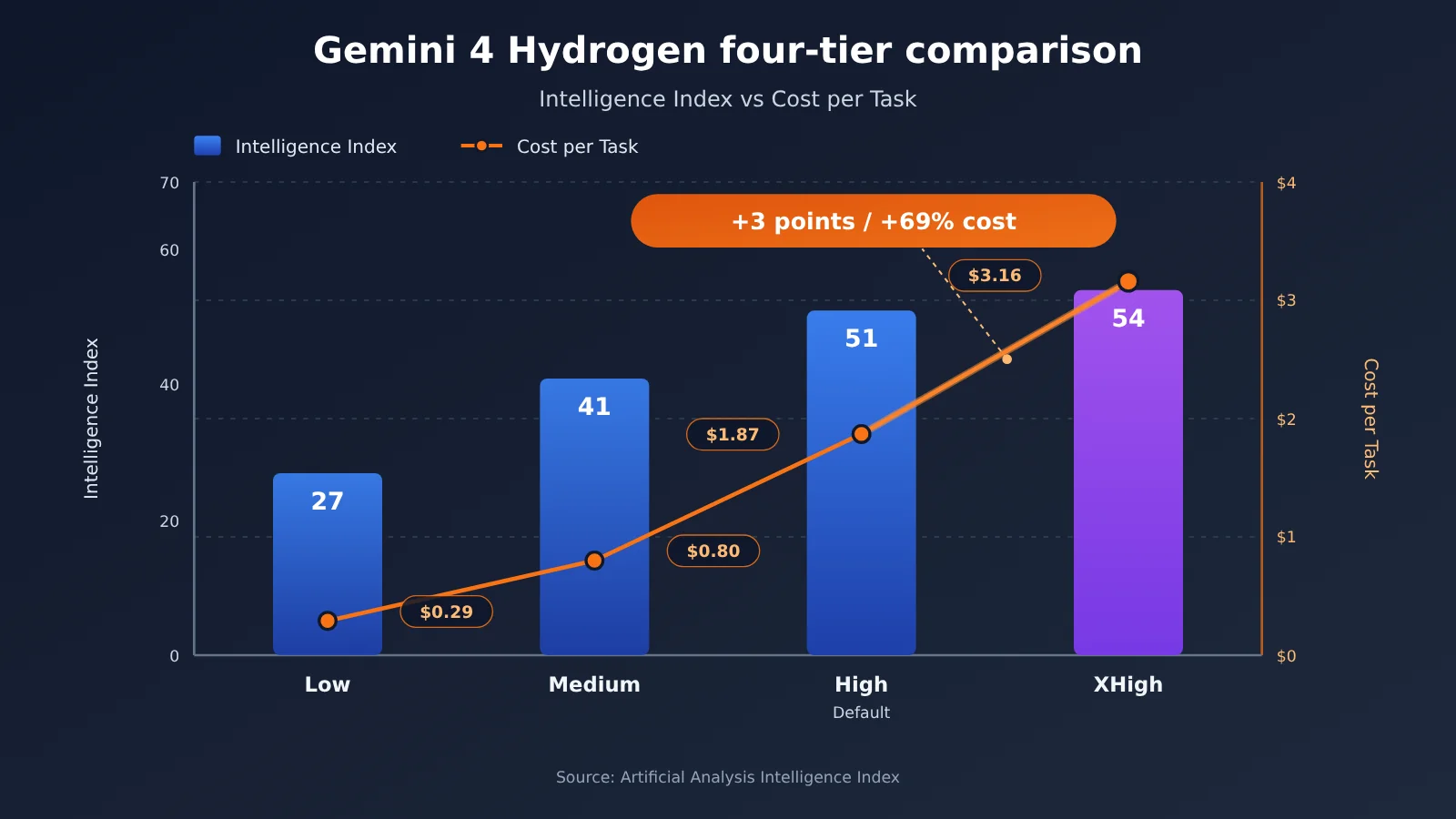
Gemini 4 Hydrogen XHigh Costs 69% More Than High — What Are You Actually Buying?
Compare the four tiers pairwise and you get the gain and the cost of each step up. The incremental percentages in the table below were calculated by the editors based on data published by Artificial Analysis.
| Step-up path | Intelligence Index change | Task cost change | Average time change | Extra cost per additional point |
|---|---|---|---|---|
| Low → Medium | +14 points | +176% | +185% | about $0.036 |
| Medium → High | +10 points | +134% | +124% | about $0.107 |
| High → XHigh | +3 points | +69% | +63% | about $0.43 |
Diminishing Returns: The Marginal Cost of Hydrogen’s Four Thinking Tiers
Going from High to XHigh, the Intelligence Index rises from 51 to 54 — roughly 5.9%. Cost per task climbs from $1.87 to $3.16, time goes from 8.3 minutes to 13.5 minutes, and first-answer latency doubles from about 18.9 seconds to about 37.8 seconds. Measured as “per additional point,” XHigh’s marginal cost is about 12 times that of Low → Medium.
The main driver is token usage. The full High evaluation suite outputs about 110 million tokens; XHigh about 304 million — roughly 2.76 times as many. But the bill doesn’t rise by 2.76x, because total cost also includes input tokens, cache hits, and how the evaluation tasks are weighted. You can’t extrapolate cost directly from the output-token multiplier.
A Lower Average Score Doesn’t Mean Lower Gains on Complex Tasks
The Intelligence Index is an average across many tasks, and a 3-point gap can come from two scenarios: most tasks perform identically in both tiers, while a handful of high-difficulty tasks are clearly better on XHigh. For tasks where “one wrong step means everything is wrong” — scientific reasoning, mathematical proofs, large cross-file refactors — XHigh’s extra thinking can be the difference between success and failure.
So the more accurate framing is: XHigh offers very poor value on ordinary tasks, but can be essential for a few high-difficulty ones. Whether it’s worth paying 69% more has to be validated against your own task samples — you can’t judge it by average score alone.
🎯 Technical Recommendation: Start by picking 20–50 real task samples and running each with both High and XHigh, then compare success rate and per-task cost. With APIYI apiyi.com, you can switch parameters using the same API key to run an A/B test — no changes to your business code structure required.
What Tasks Are the Four Gemini 4 Hydrogen Thinking Levels Suited For?
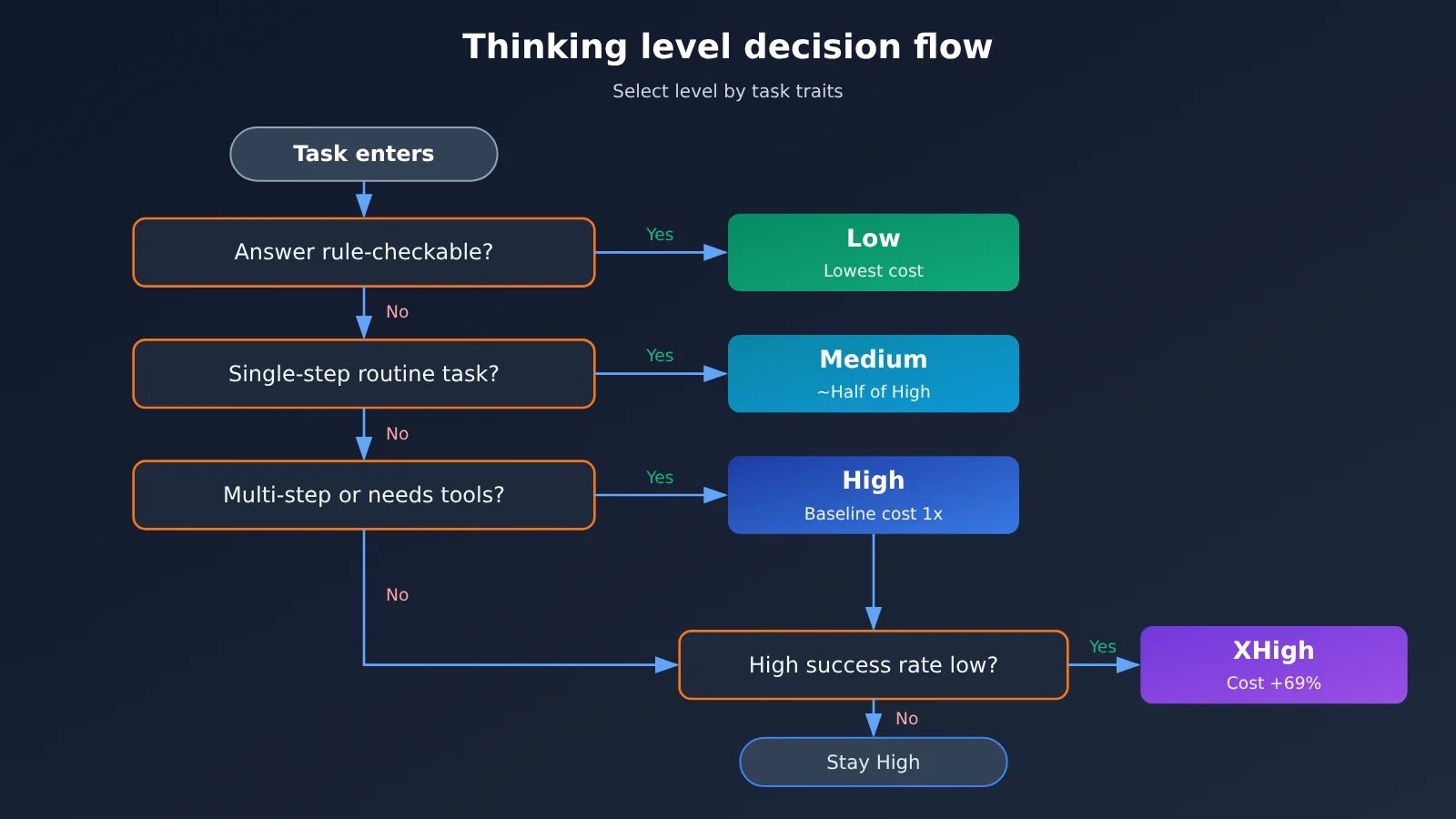
Combining Google’s official recommendations with the cost data above, here are suggestions organized by task difficulty:
| Task Type | Recommended Level | Typical Examples | Why This Level |
|---|---|---|---|
| Classification, extraction, format cleanup | Low | Ticket classification, field extraction, JSON formatting, simple Q&A | Lowest cost, ~5.7s time-to-first-token, great for high concurrency |
| Routine code and content processing | Medium | Single-file function writing, copy rewriting, document summarization, general business automation | Scores 14 points higher than Low, yet costs less than half of High |
| Multi-step agents and tool calls | High | Cross-file bug fixing, chained tool calls, analysis after retrieval | Google’s default level, balanced capability and cost |
| High-complexity reasoning | XHigh | Scientific reasoning, mathematical proofs, large-scale software refactoring | Only use when High’s success rate clearly isn’t enough |
When the low Hydrogen levels make sense
Low and Medium fit scenarios where the goal is clear and answers are easy to verify. Extracting amounts and dates from a contract, or sorting user feedback into ten categories—tasks like these rarely get more accurate with extra thinking; you just pay more in latency and cost. For latency-sensitive use cases like real-time chat and search autocomplete, Low’s ~5.7s is clearly better than XHigh’s ~37.8s.
When the high Hydrogen levels make sense
High is Google’s configured default and works for most agent workflows. You should only move up to XHigh when “High keeps failing and the retry cost already exceeds the cost of upgrading.” Keep in mind that Google’s official model card also notes that higher thinking levels can significantly increase time and cost, with occasional delays or timeouts, so long-chain tasks need solid timeout and retry strategies in place.
How Developers Can Control Gemini 4 Hydrogen Thinking Costs
The thinking_level Parameter and Defaults
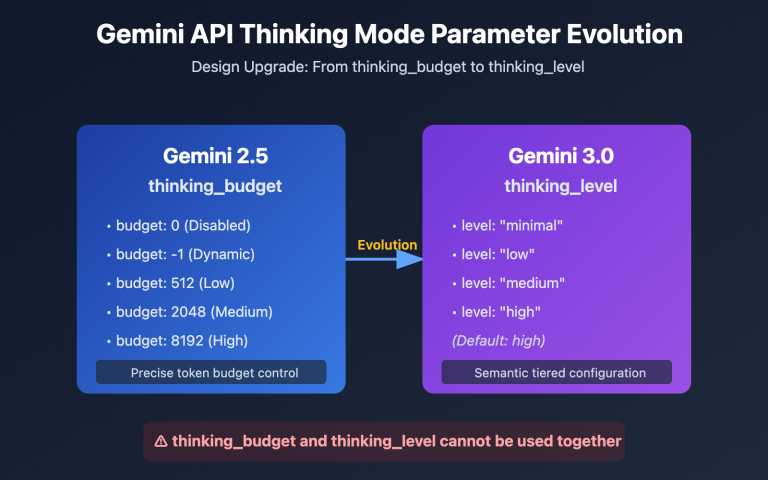
Hydrogen uses the thinking_level parameter to choose a thinking tier. If you don’t pass it, the default is High. There are a few things to keep in mind when migrating from Gemini 3.8 Flash:
- Gemini 3.8 Flash defaulted to Medium. After you migrate, omitting the parameter automatically bumps it to High, which can increase your bill.
thinking_budgetandMINIMALare no longer supported. Using them returns HTTP 400.- Custom temperature, top_p, and top_k values are ignored.
- Multi-turn tool calls require you to correctly save and send back thought signatures.
Minimal Example: Calling Hydrogen by Level
Below we use the OpenAI-compatible format and pass the thinking level through extra_body. Different platforms may forward this parameter under different field names, so check your platform’s docs for the exact field name.
import openai

client = openai.OpenAI(
    api_key="YOUR_API_KEY",
    base_url="https://api.apiyi.com/v1"  # APIYI unified endpoint
)

resp = client.chat.completions.create(
    model="gemini-4-hydrogen",
    messages=[{"role": "user", "content": "Classify this feedback: refund too slow"}],
    extra_body={"thinking_level": "low"}  # Use Low for simple classification
)
print(resp.choices[0].message.content)
View the full implementation: tier tasks by difficulty and auto-escalate
import openai
from typing import Optional

client = openai.OpenAI(
    api_key="YOUR_API_KEY",
    base_url="https://api.apiyi.com/v1"
)

# Mapping of task types to default levels
LEVEL_MAP = {
    "classify": "low",
    "extract": "low",
    "content": "medium",
    "code": "medium",
    "agent": "high",
    "reasoning": "xhigh",
}
ESCALATE = {"low": "medium", "medium": "high", "high": "xhigh"}


def call_hydrogen(prompt: str, level: str) -> tuple[str, dict]:
    resp = client.chat.completions.create(
        model="gemini-4-hydrogen",
        messages=[{"role": "user", "content": prompt}],
        extra_body={"thinking_level": level},
    )
    usage = resp.usage.model_dump() if resp.usage else {}
    return resp.choices[0].message.content, usage


def run_task(prompt: str, task_type: str, validator=None,
             max_level: Optional[str] = "high") -> str:
    """Start low, escalate level by level on validation failure; max_level caps the highest level"""
    level = LEVEL_MAP.get(task_type, "medium")
    while True:
        answer, usage = call_hydrogen(prompt, level)
        print(f"[{level}] usage={usage}")  # Log tokens for calculating cost per successful task
        if validator is None or validator(answer):
            return answer
        if level == max_level or level not in ESCALATE:
            return answer
        level = ESCALATE[level]


result = run_task(
    prompt="Extract the order number, return digits only: order A-20261113-889 has shipped",
    task_type="extract",
    validator=lambda s: s.strip().replace("-", "").isalnum(),
)
print(result)
🚀 Quick start: APIYI apiyi.com offers OpenAI-compatible endpoints — a single API key lets you call mainstream models like Gemini, Claude, and OpenAI, and new users get free trial credits. Perfect for getting the tiering strategy above working before you ship it.
Tiering Strategy: Start Low, Upgrade on Failure
The recommended approach is “default to low, upgrade as needed”: for simple tasks, stick with Low or Medium; for complex tasks, start at High and only bump up to XHigh when validation fails; and set a maximum tier for each task type so you don’t get an unexpected cost spike. This mirrors the way Google divides work among different models in Antigravity Orchestrator — except here you’re adjusting the thinking depth of the same model.
Measuring Hydrogen Tier Optimization with Four Metrics
| Optimization Metric | Calculation | Why It Matters |
|---|---|---|
| Accuracy / Success Rate | Validated tasks ÷ total tasks | Quality shouldn’t drop noticeably when you lower the tier |
| End-to-End Time | Total time from request to usable result, including retries | Time to first token is only one part of it |
| Token Usage | Input + output (including thinking) tokens | Thinking tokens are billed at output rates |
| Cost per Successful Task | Total spend ÷ successful tasks | Lots of failed retries at a low tier can end up costing more than a high tier |
“Cost per successful task” is the best reflection of what you actually spend. If 30% of Medium tasks need to be rerun while High succeeds on the first attempt, High can actually end up with a lower cost per successful task.
FAQ
Q1: Are the four thinking tiers of Gemini 4 Hydrogen four different models?
No. The four tiers are different reasoning depths of the same model, `gemini-4-hydrogen`, switched via the thinking_level parameter. The per-token price is the same — the difference is how many thinking tokens get generated.
Q2: XHigh scores only 3 points above High — is it basically pointless to use?
That’s not the right way to read it. Those 3 points are an average across many tasks; on scientific reasoning, mathematical proofs, and large engineering tasks, XHigh can be the difference between finishing the job and not. For everyday tasks, XHigh is a poor value; for a handful of very hard tasks, it may be necessary.
Q3: High averages 8.3 minutes — does that mean every question takes that long?
No. The 8.3 minutes is the weighted latency for Artificial Analysis’s standardized benchmark tasks. For ordinary conversations, you should really look at time-to-first-answer-token: about 18.9 seconds for High and about 5.7 seconds for Low. Actual duration also depends on the length of the task.
Q4: What happens if I don’t pass thinking_level?
It defaults to High. If you’re migrating a project from Gemini 3.8 Flash (which defaults to Medium) and keep the old code without passing the parameter, the thinking tier will silently bump up — and costs may rise with it. It’s better to set the tier explicitly.
Q5: How can I quickly compare different tiers against my own workload?
Put together a batch of real task samples, run them through each tier, and track success rate and token usage:
1. Sign up at APIYI apiyi.com and grab an API key plus the free testing quota
2. Use the code from this article and change the value of `thinking_level`
3. Pick the tier with the best “cost per successful task”
Q6: What are the known issues with Hydrogen’s high thinking tiers?
Google’s model card notes that high thinking levels can significantly increase latency and cost, with occasional delays or timeouts. On Hacker News, some users have also reported over-execution on certain agent tasks. It’s a good idea to set timeouts, a maximum tier, and stopping conditions for long-running tasks.
Q7: What’s the most common mistake when estimating cost by tokens?
Estimating only from the word count of the final answer. Thinking tokens are billed at the output price, and the output tokens for the full XHigh benchmark suite run about 2.76x those of High. Checking the actual usage breakdown in the APIYI apiyi.com console is more reliable than doing the math by hand.
Gemini 4 Hydrogen: Key Takeaways from Four Thinking Levels
- Same model, different levels: All four levels share the same unit price; actual task cost depends on thinking token usage.
- Clear diminishing returns: High → XHigh adds 3 points, while benchmark task cost rises by about 69%.
- Latency doubles: XHigh’s time to first answer is about 37.8 seconds, twice that of High.
- The default is High: When migrating from 3.8 Flash, you need to set the level explicitly.
- Choose by difficulty: Use Low for classification, Medium for routine work, High for agents, and XHigh only for hard problems.
- Measure cost per successful task: Include retries to compare the real cost of different levels.
- Validate with samples: You can compare all four levels through APIYI apiyi.com with a single key.
Summary
The core conclusions from comparing Gemini 4 Hydrogen’s four thinking levels:
- Large capability gap: Low scores 27 and XHigh scores 54—under the same model name, capability differs by a factor of two.
- Increasing marginal cost: The additional cost per extra point rises from about $0.036 for Low → Medium to about $0.43 for High → XHigh.
- Use XHigh only when needed: The average score gap is small, but it can still be critical for a few high-difficulty tasks.
For day-to-day business, the recommendation is: set thinking_level explicitly, use lower levels for simple tasks, raise the level for complex steps, and use cost per successful task as the final benchmark.
We recommend validating each level quickly with real task samples through APIYI apiyi.com. The platform provides an OpenAI-compatible API and free trial credits.
📚 References
- Artificial Analysis — Gemini 4 Hydrogen four-tier evaluation pages: intelligence index, task cost, runtime, and latency data
- Links:
artificialanalysis.ai/models/gemini-4-hydrogen-low - Links:
artificialanalysis.ai/models/gemini-4-hydrogen-medium - Links:
artificialanalysis.ai/models/gemini-4-hydrogen-high - Links:
artificialanalysis.ai/models/gemini-4-hydrogen -
Note: This is the source for all the four-tier comparison data in this article; latency is a dynamic metric
-
Google Official Blog — Introducing Gemini 4 Hydrogen: release announcement
- Link:
blog.google/innovation-and-ai/models-and-research/gemini-models/introducing-gemini-4-hydrogen/ -
Note: Model positioning, capability scope, and partner case studies
-
Google Cloud Developer Guide — Gemini 4 Hydrogen:
thinking_leveland migration considerations - Link:
docs.cloud.google.com/gemini-enterprise-agent-platform/models/guides/gemini-4-hydrogen -
Note: Recommended uses for each of the four tiers, the default tier, and incompatible parameters
-
Google AI Studio pricing page: official API pricing for Hydrogen
- Link:
aistudio.google.com/docs/pricing -
Note: Pricing for Standard, Batch, Flex, and Priority modes, plus the rules for billing thinking tokens
-
Google DeepMind model card: limitations and safety evaluation
- Link:
deepmind.google/models/model-cards/gemini-4-hydrogen/ - Note: Known issues such as the runtime risk of high thinking levels, refusals, and hallucinations
Author: APIYI Technical Team
Technical discussion: Feel free to reach out to us through the APIYI official website homepage to get more material on integrating the Gemini family of models