Author’s note: If you watched the Gemini 4 Neon Three.js motion graphics demo and want to try it yourself, the first thing you need to figure out isn’t how to write the prompt — it’s how to control the bill. This article lays out a testing method: define your acceptance criteria first, cap the number of attempts, then pick the thinking tier.
A 15-second Three.js motion graphics clip has been spreading fast through developer circles lately, and the person who posted it says Gemini 4 Neon made it with pure three.js. A lot of people’s first reaction after watching is “I want to make one of those,” but once they actually get started, they realize that a creative experiment with no acceptance criteria is the easiest way to burn through your budget in endless retries.
This isn’t an article about how to replicate that clip — it’s an operations guide to help you keep your Gemini 4 Neon experiment costs under control. The clip itself hasn’t released any token data, so we won’t — and can’t — work out a dollar figure for it.
Core value: By the end of this article, you’ll understand why you can’t reverse-engineer costs from the finished piece, how to write down acceptance criteria before you start, how to limit trial rounds and the thinking tier, and why the cost of the same prompt in the API and in Antigravity can’t be estimated the same way.
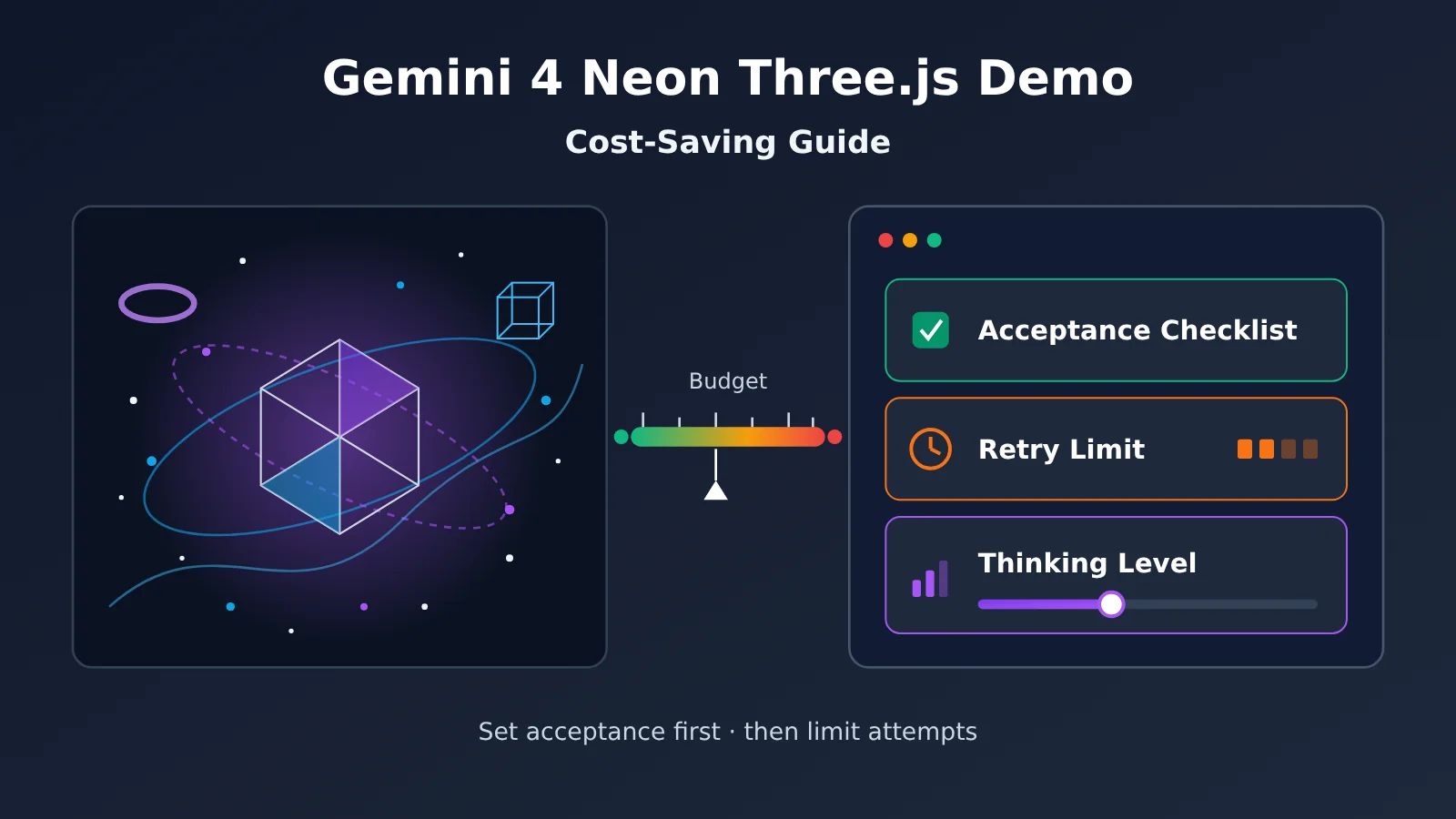
Key Cost-Saving Takeaways from the Gemini 4 Neon Three.js Demo
| Takeaway | What it means | Why it matters |
|---|---|---|
| A finished clip can’t tell you the cost | That 15-second video has no prompt, no source file, no thinking level, and no token count | Keeps you from budgeting against someone else’s output |
| Write acceptance criteria first | Before you start, break “what counts as done” into checkable items | You know each round whether to keep going |
| Cap your trial and error | Set a round limit for each acceptance item; if you hit it, change approach | Stops you from redoing the same thing forever |
| Pick the thinking level you actually need | Thinking tokens are billed as output, and higher levels produce more output | Directly drives the biggest line on your bill |
| Context windows differ by entry point | The Gemini API gives you about 1M, Antigravity tops out at 512K | You can’t mix costs across entry points |
Why you can’t reverse-engineer cost from Gemini 4 Neon’s 15-second clip
According to a roundup by OrcaRouter on 2026-11-19, the clip was posted by @chetaslua at 16:51 UTC that day. It’s 15 seconds, 1920×1080, and the poster says it’s motion graphics made by Gemini 4 Neon using pure three.js. But the post has no prompt, no source file, no mention of which thinking level was used, no token count—and it doesn’t even say whether it ran in the API, AI Studio, or Antigravity.
That means “Gemini 4 Neon made this clip” is the poster’s attribution, not a measurement. You don’t know how many rounds it took, how much was hand-edited along the way, or how much of the output was thinking tokens. Trying to estimate “roughly how much this would cost me” from a finished piece like that could put you off by orders of magnitude.
Google’s own Gemini 4 Neon demos don’t come with a bill either
It’s not just community work. Google’s own launch announcement on 2026-11-18 showcased a ski simulator, a Turing study, a hundred-thousand-cell spreadsheet, and a Blender MCP lab bench—and none of them came with a public token bill. The Shibuya 3D parkour demo in Google’s official X post on November 19 mentions using nearly 1 million tokens of OpenStreetMap data. That’s a self-reported input size, not a full bill; the output and thinking portions are still unknown.
The announcement also cites third-party leaderboards: Artificial Analysis Intelligence Index scores 61 at the xhigh level, ranking 3rd overall, and Vals Index ranks 2nd with a score of 70.9%. These are third-party leaderboards cited in Google’s announcement. They tell you about capability ranking, and again contain nothing about “how much it costs to build a demo.” Demos and leaderboard scores can help you decide whether something is worth trying, but they can’t do your budgeting for you.
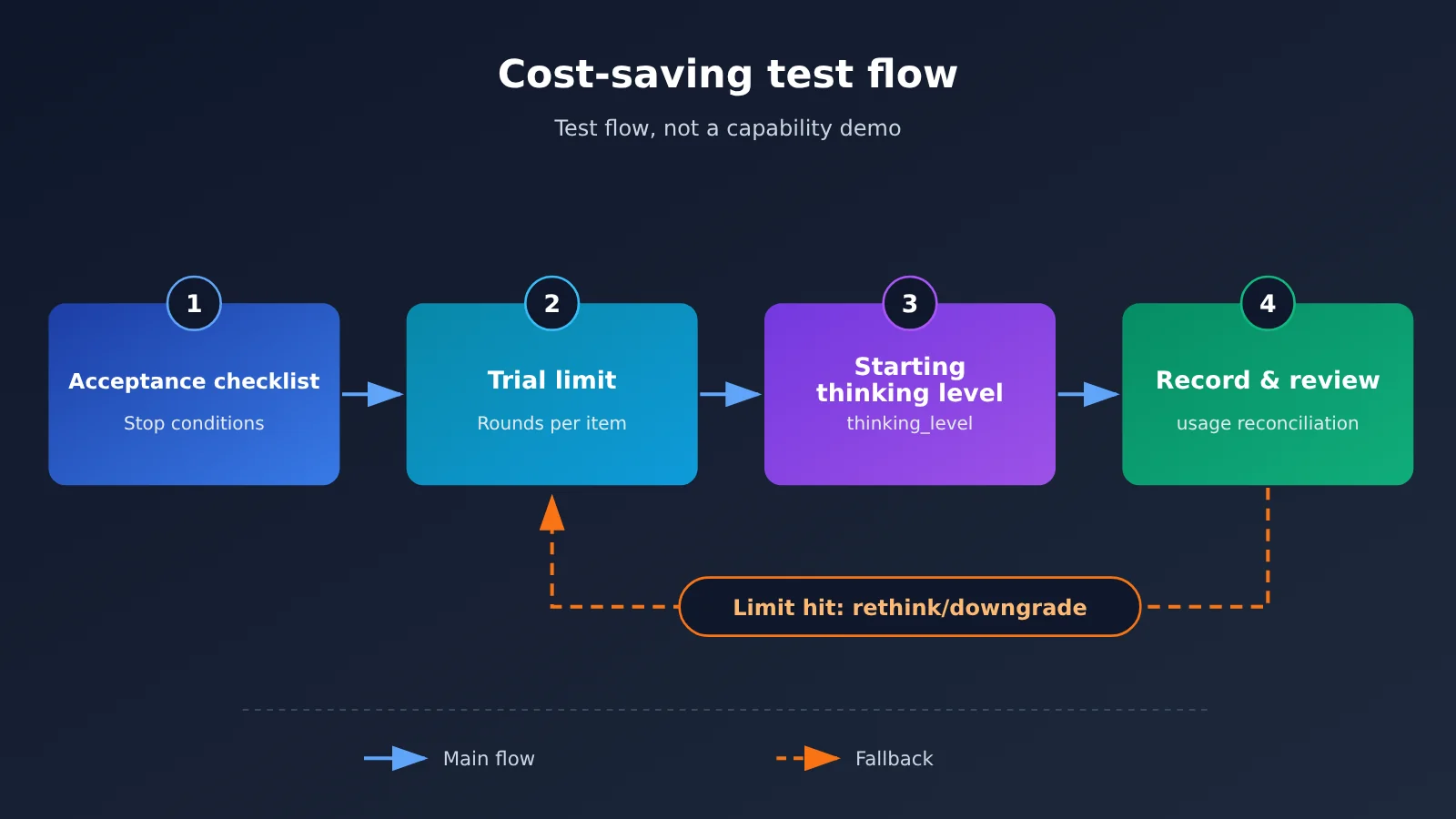
Gemini 4 Neon Three.js Demo: Write the Acceptance Criteria Before You Start
The biggest cost trap in creative tasks is “it feels like it’s almost there.” Without criteria, every round of output has something to nitpick, so you just keep redoing it. Writing acceptance criteria upfront is essentially giving yourself a stopping condition, so every call has a clear pass or fail.
Acceptance criteria should be as checkable as possible, not subjective words like “good-looking” or “has texture.” Here’s a breakdown you can reference for a Three.js motion graphics experiment:
| Acceptance dimension | Checkable phrasing | Phrasings to avoid |
|---|---|---|
| Runtime | Single HTML file, opens in the browser with no errors | “As long as it runs” |
| Dependencies | Only three.js, no other animation libraries | “Keep dependencies minimal” |
| Duration and pacing | Loop is about 15 seconds, split into three camera segments | “Pacing should be good” |
| Visual elements | Specify the order of magnitude for particle count, geometry types, color scheme | “Make it cool” |
| Performance | Plays smoothly on an ordinary laptop, no obvious frame drops | “Don’t lag too much” |
| Delivery scope | No video export needed, just runnable source code | “Make it a bit more complete” |
After you finish this table, you’ll find that many ideas can actually be split across different rounds and checked separately. For example, the first round might only require “it runs + only three.js + basic composition,” then you add pacing and visual details item by item later, instead of demanding everything be perfect on the first try.
How to Cap Trial-and-Error Rounds for Gemini 4 Neon So You Spend Fewer Attempts
Once you have an acceptance checklist, the next step is to set a round limit for each acceptance item. You decide the exact limit based on your own budget. A practical approach: if the same acceptance item fails several rounds in a row, stop and change your approach instead of piling on more prompt tweaks and saying “let’s try again.” Changing your approach could mean splitting the task into smaller pieces, providing a reference structure, or pasting the problematic piece of code back in and asking the model to fix only that one spot.
Another easily overlooked point is context accumulation. In a multi-turn conversation, each round re-sends all the previous code and discussion as input, so the more rounds you have, the heavier each round’s input gets. A more economical approach: whenever an acceptance item passes, consolidate the currently working source code into a clean new starting point and open a new session to continue, rather than toughing it out in an ever-growing conversation.
- Ask for only one or two acceptance items per round.
- At the end of each round, record the input and output tokens from usage and calculate what that round cost.
- When you hit the round limit, stop, review why it failed, and then decide whether to continue.
- As soon as an item passes, “archive” the source code and use a new session to move on to the next item.
🎯 Experiment tip: If you want to see exactly what each round costs, you can run your experiments on APIYI apiyi.com with the same API key — pay-as-you-go billing, with every call’s token usage reconcilable, which is far more controllable than estimating by feel inside an interactive interface.
How to Choose Gemini 4 Neon Thinking Levels — and When to Stop
The thinking level is the most direct “billing knob” in the Gemini 4 Neon trial. According to Google Cloud documentation, Neon’s thinking_level has four settings — LOW, MEDIUM, HIGH (the default), and XHIGH — and thinking tokens are billed as output. Output pricing is already five times the input rate, so the higher the level and the longer the thinking, the faster the bill climbs. Note that the thinking_budget parameter and the MINIMAL level return HTTP 400 on Neon, so don’t copy the old patterns you used for other models.
Thinking levels aren’t universal across the family either, so pay attention when you switch models:
| Model | Available thinking levels | Default level | Official recommended use (Neon docs) |
|---|---|---|---|
gemini-4-neon |
low / medium / high / xhigh | high | LOW for classification and summaries, MEDIUM for general coding, HIGH for multi-step tool loops, XHIGH for the heaviest proofs and multi-file engineering |
gemini-4-hydrogen |
low / medium / high / xhigh | high | Has an xhigh level |
gemini-4-carbon |
low / medium / high | medium | No xhigh |
For a single-file Three.js animated graphic, the task is closer to “general coding,” so starting at MEDIUM makes sense. Only when an acceptance item keeps failing under MEDIUM — and the failure really is down to logical complexity (say, choreographing the timeline across multiple shots) — should you bump that one item up to HIGH. XHIGH is better suited to multi-file projects; a single-page animation rarely needs it.
The rule for when to stop should also go into your prompt: if the same item still fails after you upgrade, the problem probably isn’t “not enough thinking” but an unclear requirement — and continuing to upgrade just means paying more output fees.
💡 Level tip: When calling Gemini 4 Neon through APIYI apiyi.com, you can run the same acceptance item once with
MEDIUMand once withHIGH, compare the output tokens in the usage data and the pass/fail results, then decide which level to use as your default going forward.
Gemini 4 Neon: Context Window Differences Between API and Antigravity
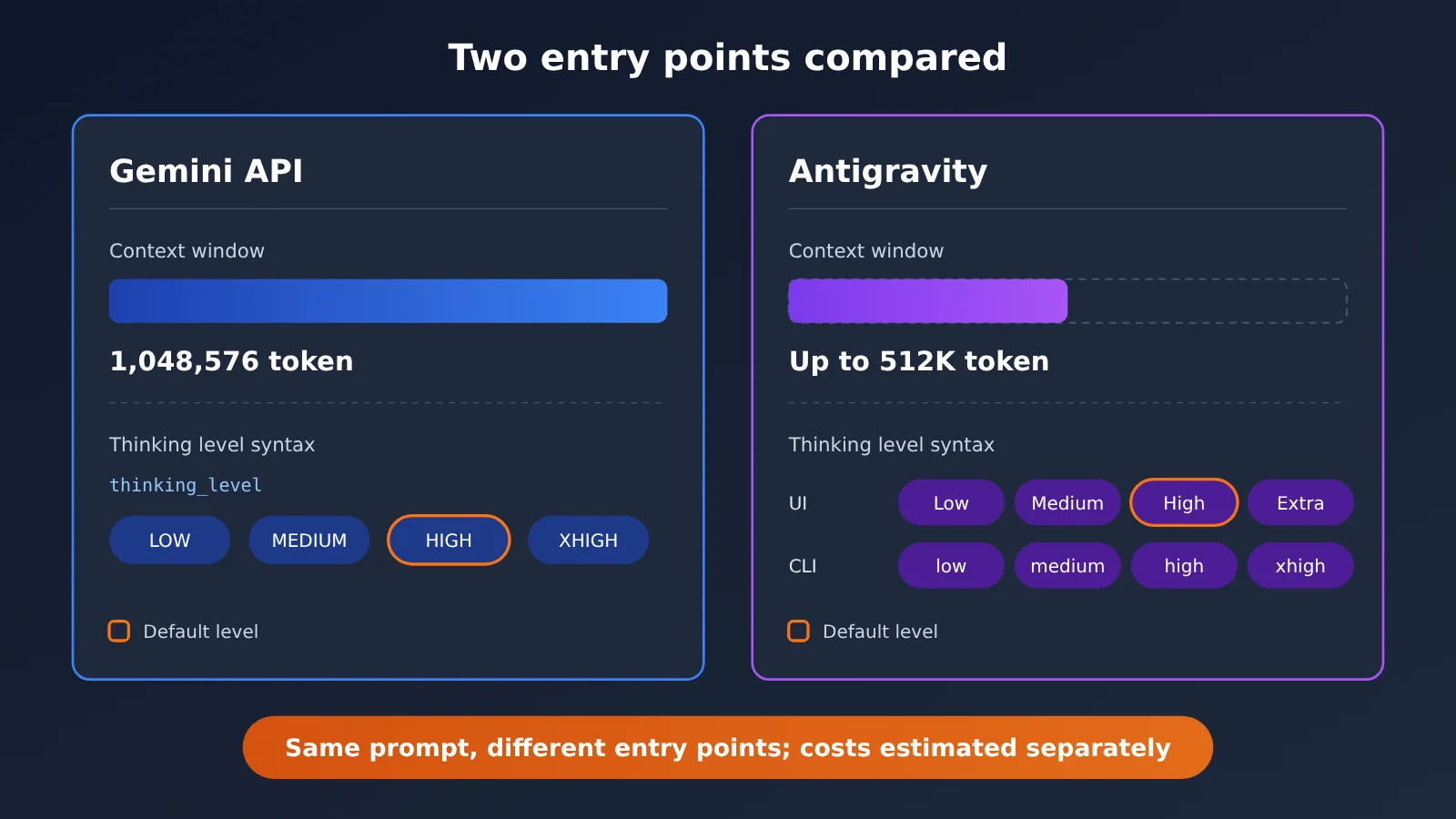
Same model, different entry point—and a different amount of content you can fit in. In the Gemini API, Neon’s context window is 1,048,576 tokens, while Antigravity’s docs state that Gemini 4 Neon maxes out at 512K tokens—roughly a 2x difference. The thinking-level notation differs too: in the Antigravity UI, they’re called Low, Medium, High (default), and Extra; in the CLI, they’re written as low, medium, high, and xhigh.
| Item | Gemini API | Antigravity |
|---|---|---|
| Context window | 1,048,576 tokens | Up to 512K tokens |
| Thinking-level notation | thinking_level: LOW / MEDIUM / HIGH / XHIGH |
UI: Low / Medium / High / Extra; CLI: low / medium / high / xhigh |
| Default thinking level | HIGH | High |
| How costs work | Billed per token on each call, so you can reconcile it directly | Governed by in-product rules—don’t mix it with API unit pricing |
What this table tells you is that the same prompt, sent through two different entry points, faces different available windows and context management approaches—so token usage and cost will naturally differ. A budget estimated on the API can’t be applied directly to Antigravity; conversely, just because it feels like you “didn’t spend much” in Antigravity doesn’t mean the same workload will be just as cheap on the API. For a scenario like the Shibuya parkour one, where the input approaches 1 million tokens, it simply won’t fit in a 512K window—you’ll either need to split the data or switch entry points.
Gemini 4 Neon Quick Start: Run Your First Three.js Experiment with the API
Gemini 4 Neon Minimal Request Setup
APIYI provides an OpenAI-compatible interface with two endpoints, chat and gemini, and two groups, Default and SVIP. For your first experiment, you only need to confirm a few settings:
- Endpoint URL: set
base_urltohttps://api.apiyi.com/v1 - Model ID:
gemini-4-neon - API key: create one in the console and paste it in; the example uses
YOUR_API_KEY - Thinking level: start with
MEDIUMas suggested above; on the gemini endpoint, use thethinking_levelfield. For the chat endpoint, check the platform docs for the field mapping - Prompt: paste in the acceptance checklist you’ve written, and state that the model should “deliver only a single HTML file and use only three.js”
After each call, record the usage field in the response. You can estimate the cost per round with this formula: input tokens × input unit price + cache-hit tokens × cache unit price + (visible output + thinking) tokens × output unit price.
One pricing detail needs to be clear: APIYI’s master model list, in the version from 2026-11-19 10:59 (UTC+8), didn’t list gemini-4-neon yet, and Neon didn’t have its own model page either. But the pricing API queried on 2026-11-20 already included it: after conversion, input is $3 / million tokens, output is $15 / million tokens, and cache read is $0.15 / million tokens, matching Google’s list price. Actual pricing is subject to the platform’s model list.
🚀 Quick start: We recommend registering at APIYI (apiyi.com) first and claiming the free trial credit for new users. Run the first acceptance item with it, get real usage data, and then plan your ongoing budget. That’s much more reliable than eyeballing someone else’s finished render and guessing.
How Your Gemini 4 Neon Bill Changes When You Switch to Carbon or Hydrogen
If some acceptance items don’t need Neon’s capabilities, switching to an adjacent model that’s already available can directly lower the unit price. Here’s how the three are priced on APIYI:
| Model | Input | Cache read | Output | Context / Notes | Available platform |
|---|---|---|---|---|---|
gemini-4-neon |
$3 / million tokens |
$0.15 / million tokens |
$15 / million tokens |
Gemini API approx. 1M | APIYI (apiyi.com) |
gemini-4-carbon |
$2 / million tokens |
$0.1 / million tokens |
$10 / million tokens |
Context 1048576, max output 65536 | APIYI |
gemini-4-hydrogen |
$1.5 / million tokens |
$0.075 / million tokens |
$7.5 / million tokens |
Has an xhigh level | APIYI |
Looking at the unit-price ratios, Carbon’s input and output are about two-thirds of Neon’s, and Hydrogen’s about half. But there are three things you need to change together when switching: first, Carbon doesn’t have xhigh, so requests that previously used XHIGH can’t be carried over as-is. Second, Carbon’s default level is medium, while Neon and Hydrogen default to high; if you don’t set the level explicitly, the amount of thinking for the same prompt will change too. Third, Carbon’s current price corresponds to Google’s introductory pricing as of 2026-11-30. Google’s standard price from December 1 is $4 / million tokens for input and $20 / million tokens for output, so for long-term budgeting, keep an eye on whether the platform adjusts its pricing.
The switch itself is simple: base_url stays https://api.apiyi.com/v1; you only change the model field. A practical split is to use Hydrogen or Carbon for building basic scenes and fixing minor bugs, and switch back to Neon only for tricky parts like pacing and sequencing.
Frequently Asked Questions (FAQ)
Q1: Is the Gemini 4 Neon Three.js demo an official benchmark?
No. That 15-second clip was posted by a community user, and the model attribution comes from the poster themselves. There’s no prompt, no source file, no thinking tier, and no token count — it’s a showcase, not a measurement, so it can’t be treated as an official benchmark or a cost reference.
Q2: Can I estimate how much a similar demo would cost based on the finished video?
No. How many rounds were tried, which thinking tier was used, and whether any manual edits were made are all unknown — and since thinking tokens are billed as output, any one of these variables can make the cost differ wildly. The reliable approach is to run a round yourself and calculate from the usage data.
Q3: What do Gemini 4 Neon’s leaderboard scores actually tell you?
Google’s announcement cited third-party leaderboards: Artificial Analysis Intelligence Index at 61 under xhigh, ranking 3rd overall; Vals Index 2nd at 70.9%. These reflect capability rankings and can help you judge whether it’s worth trying, but they contain no cost information whatsoever.
Q4: Which thinking tier should I use for Three.js dynamic graphics?
Single-file animations are closer to general coding, so start with `MEDIUM` and only bump up to `HIGH` if you keep failing the same complex acceptance check. `XHIGH` targets multi-file projects and the heaviest reasoning workloads — a single-page animation usually doesn’t need it.
Q5: How do I quickly call Gemini 4 Neon through an API to run experiments?
Register at APIYI (apiyi.com) and get an API key, set `base_url` to the platform address and `model` to `gemini-4-neon`, explicitly specify the thinking tier, then send your acceptance checklist. New users get free test credits — great for running your first acceptance check and getting real usage numbers.
Q6: What are the common pitfalls when experimenting with Gemini 4 Neon?
– Parameters: `thinking_budget` and `MINIMAL` return HTTP 400.
– Context: Antigravity tops out at 512K — don’t plan your input around the API’s 1M.
– Switching models: Carbon has no xhigh, and its default tier is different too.
– Pricing: the November 19 version of the master price table doesn’t list Neon, so go by the platform’s model list.
Gemini 4 Neon Three.js Demo Cost-Saving Key Takeaways
- A finished video isn’t a bill: A 15-second clip comes with no token data, so you can’t reverse-engineer the cost.
- Official demos don’t have bills either: None of Google’s demos published a token bill.
- Acceptance before prompts: Break “it works” into checkable items before you start.
- Cap your trial and error: Set a round limit for each item; when you hit it, change approach instead of forcing it.
- Thinking level is the main dial: Thinking tokens are billed as output, so start from MEDIUM.
- Estimate entry points separately: The API gives you roughly a 1M window; Antigravity tops out at 512K.
- Models can split the work: Carbon and Hydrogen have lower unit prices — just watch the tier differences when you switch.
Summary
The core cost-saving takeaways for the Gemini 4 Neon Three.js demo:
- Don’t let finished videos set your pace: Neither community clips nor official demos publish bills, so your budget can only come from your own usage data.
- Set acceptance first, then limit rounds: The acceptance checklist gives you a stopping condition, and the round limit prevents endless retries — together they actually keep spending under control.
- Manage tiers and entry points separately: The thinking level determines output volume, the entry point determines window size, and when you switch models you also need to check which tiers are available and what the defaults are.
Spending ten minutes writing an acceptance checklist before you start is often cheaper than trying a few more rounds. We recommend using free credits on APIYI apiyi.com to get your first acceptance item working, then using a single API key to divide tasks among Neon, Carbon, and Hydrogen — prices follow the platform’s model list.
📚 References
-
OrcaRouter – Gemini 4 Neon Three.js Motion Graphic Roundup: Release date, specs, and information gaps for the community clip
- Link:
orcarouter.ai/blog/gemini-4-neon-threejs-motion-graphic - Notes: Documents the missing prompt, source files, thinking level, and token count for the clip
- Link:
-
Google Blog – Gemini 4 Neon Launch Announcement: Official pricing, context window, and cited third-party leaderboard
- Link:
blog.google/innovation-and-ai/models-and-research/gemini-models/introducing-gemini-4-neon - Notes: Includes an overview of the official demo and the unit prices for input, cached input, and output
- Link:
-
Google Cloud – Gemini 4 Neon Model Guide: Thinking levels and parameter constraints
- Link:
docs.cloud.google.com/gemini-enterprise-agent-platform/models/guides/gemini-4-neon - Notes: Explains what the four
thinking_leveltiers are for and which parameters trigger HTTP 400
- Link:
-
Antigravity Model Documentation: Entry window and thinking-level syntax
- Link:
antigravity.google/docs/models - Notes: Lists Neon’s maximum 512K context window in Antigravity
- Link:
Author: APIYI Technical Team
Technical Support: Feel free to contact us from the APIYI homepage. For more models and model invocation guides, visit the docs.apiyi.com documentation center.