Author’s note: This article compares Gemini 4 Argon and Carbon in reasoning effort, response speed, and per-task cost, so developers can pick a model based on task difficulty.
Google released Gemini 4 Argon on October 13, 2026, first announced Gemini 4 Carbon on October 28, and opened Carbon to developers, enterprises, and consumers on November 10. A lot of developers had the same first reaction: is Carbon just an upgraded replacement for Argon? This article compares the two across five dimensions: reasoning effort, response latency, per-task cost, use cases, and thinking levels.
This isn’t a “the higher tier is always better” comparison. Google’s official developer documentation says Argon is still the recommended choice for most engineering and knowledge work, while Carbon is aimed at tasks that need deeper reasoning and longer verification cycles. This article relies mainly on Google’s official documentation. Where I use third-party data, I note the benchmark version and reasoning level.
What you’ll get from this article: You’ll know which tasks to give Argon, which ones are worth giving Carbon, and how to use Thinking Level to balance quality, speed, and cost.
7 Terms to Know Before Comparing Gemini 4 Argon and Carbon
When you compare two reasoning models, a few concepts are easy to mix up. Let’s separate them first so the data later on doesn’t get misread:
- Thinking Level: The setting that controls how much effort the model puts into thinking. Carbon offers three levels: LOW, MEDIUM, and HIGH.
- Thinking tokens: The tokens the model generates while reasoning. They’re billed as output tokens.
- Task cost: The total cost of all model invocations needed to finish a task. This isn’t the same as the cost of a single request.
- Inference latency: The time from when the model receives a request to when it produces a result. In this article, we focus on the latency to the first answer token.
- Cache read: A billing mode that reuses existing input context. It costs far less than regular input.
- Agent: An intelligent agent that can carry out multi-step tasks through tools, such as writing code, running tests, and then fixing failures.
- Benchmark: A method for evaluating and comparing models using a fixed set of tasks. The conclusions only hold for that specific test configuration.
Why Google Launched Both Gemini 4 Argon and Carbon
According to the Carbon model card from Google DeepMind, Gemini 4 Carbon is built on top of Gemini 4 Argon. In other words, the two share a common model foundation, and Carbon is a version further strengthened for hard reasoning, complex software engineering, long-horizon Agent workflows, scientific research, and cybersecurity defense. One caveat: Google hasn’t disclosed Carbon’s parameter count, and it hasn’t published the differences in internal compute architecture between the two. So claims like “Carbon is several times the size of Argon” have no basis.
If Carbon is stronger, why not just let it replace Argon? Because the two handle different kinds of work. Everyday feature development and frequent, interactive code edits care more about response speed and the token overhead of each turn. Tasks like architecture design, root-cause investigation across subsystems, and scientific proofs care more about whether the model can repeatedly form hypotheses, verify them, and correct itself. The guidance Google gives in its developer documentation is also about dividing the work rather than replacing one model with the other: Argon handles most day-to-day engineering, while Carbon handles harder, longer-running reasoning tasks.
You can see this division of labor in Google’s own products too. In Antigravity’s /swarm multi-Agent preview feature, Google recommends having Carbon take on overall architecture design, task coordination, and security review, while routine code implementation and parallel file edits go to faster, lighter models. It’s the same on the consumer side: the Google AI Pro subscription mainly gives you Argon, and only the Ultra subscription includes Carbon.
Gemini 4 Argon vs. Carbon: The Core Difference Is How Much Reasoning Each Turn Gets
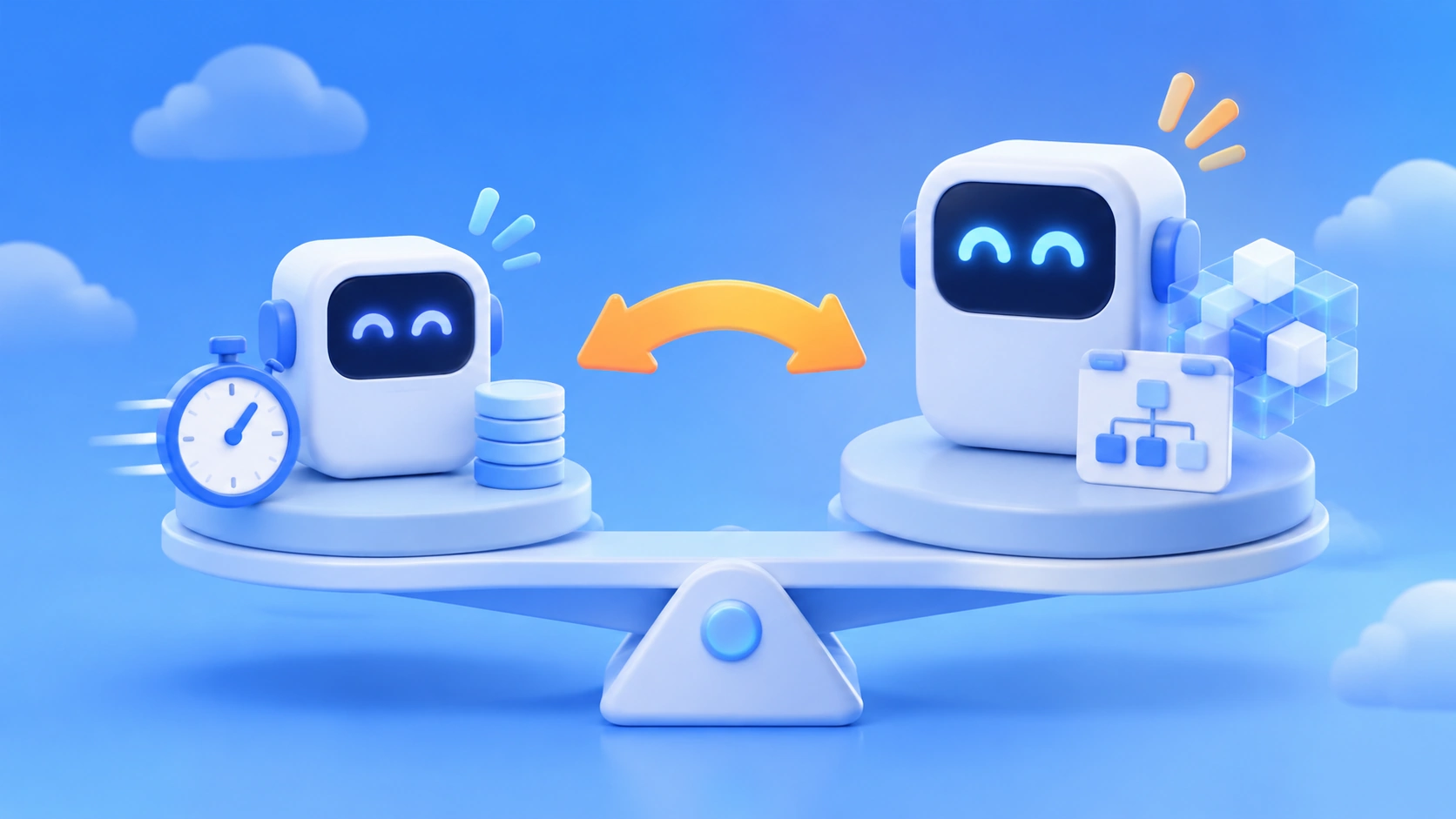
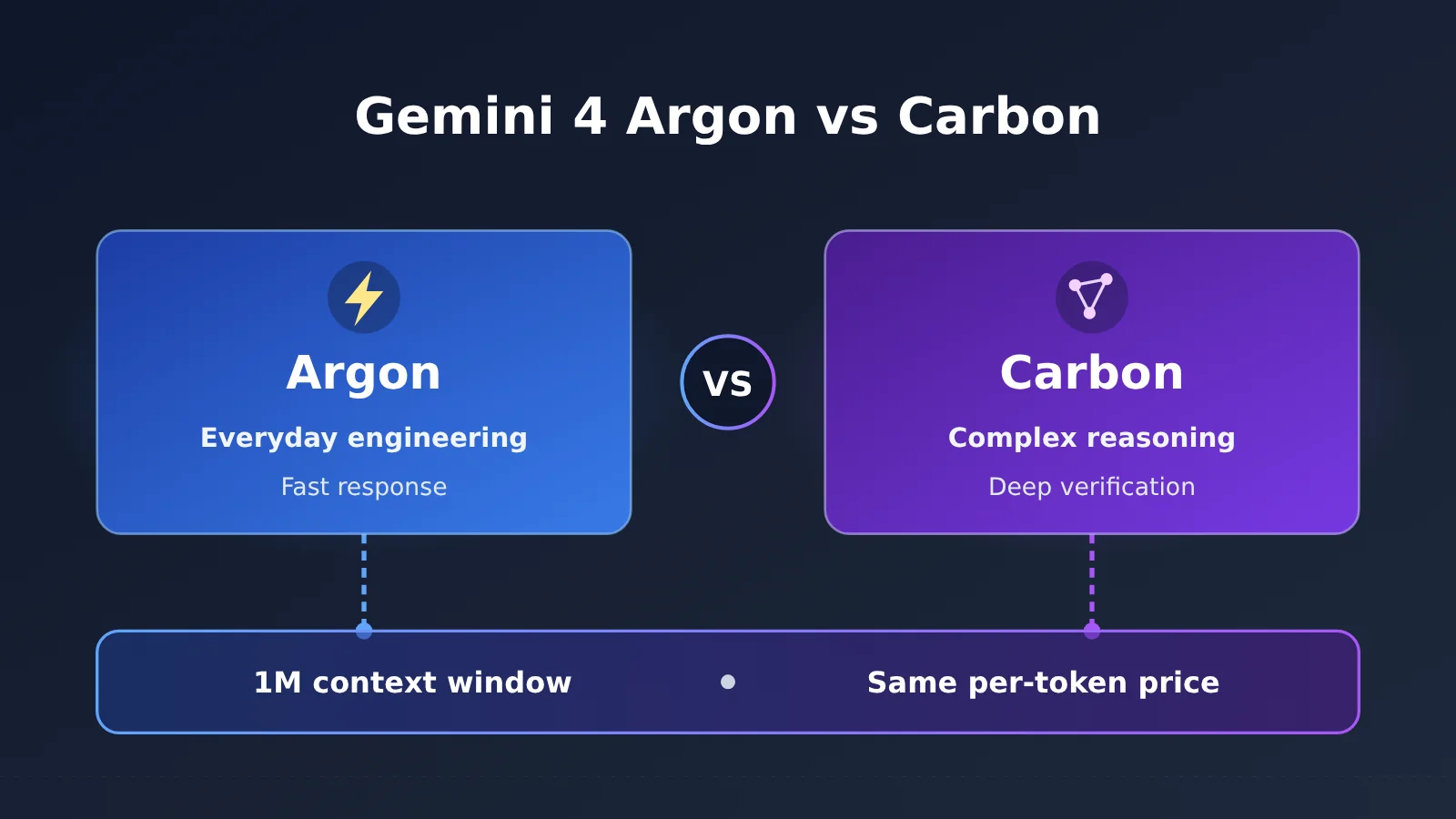
Google gives the most direct explanation in the “Choosing between Carbon and Argon” section of the Carbon developer guide. Carbon spends more thinking tokens on each turn, so it can explore more thoroughly and verify its own work. Argon responds faster and uses fewer tokens per turn, which suits interactive coding and everyday feature development. Both share a 1M-token unified context window (1,048,576 tokens, shared between input and output), share the same built-in tool capabilities, and use the same per-token pricing.
| Dimension | Gemini 4 Argon | Gemini 4 Carbon | Better Fit |
|---|---|---|---|
| Positioning | High-performance, efficient general-purpose reasoning model | Deeper reasoning model for complex problems | Depends on the task |
| Thinking tokens per turn | Relatively few | Noticeably more per turn | Argon is cheaper |
| Response speed | Faster | Slower on complex tasks | Argon |
| Interactive development | Better suited | Usable for hard tasks | Argon |
| Everyday feature development | Recommended | Usually unnecessary | Argon |
| Architecture design, root-cause investigation | Capable | Better for extremely complex, in-depth investigations | Carbon |
| Scientific proofs, security audits | Capable / supported | Better for complex reasoning and verification | Carbon |
| Context and per-token price | 1M shared context, same price | 1M shared context, same price | Tie |
The table makes it clear that the line between Gemini 4 Argon and Carbon isn’t “can it do this?” but “is it worth thinking harder about?” Argon can handle architecture design and root-cause investigation too. But when a problem gets complex enough to need several rounds of hypotheses and verification, Carbon is willing to spend more thinking tokens to get a more reliable result.
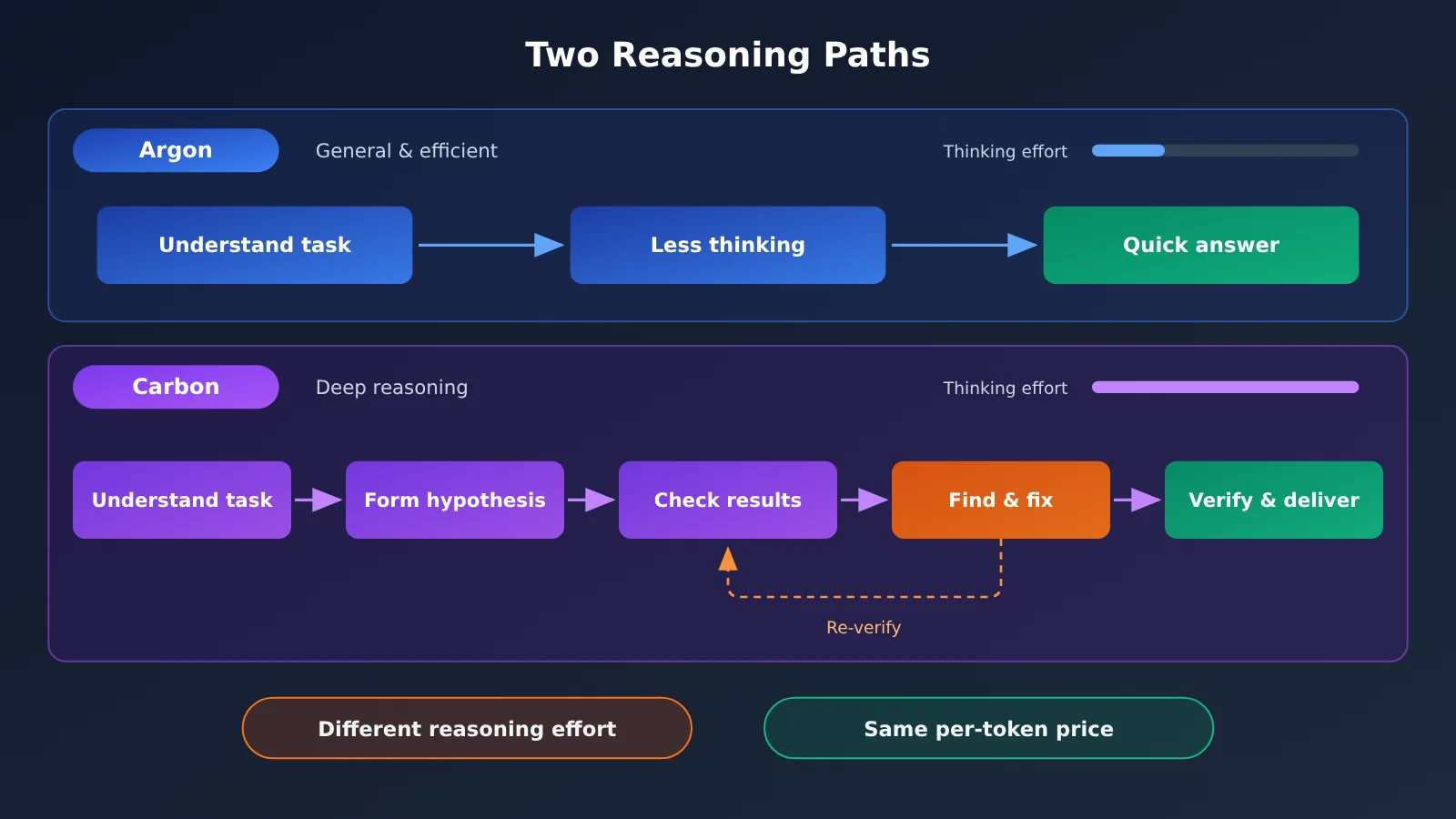
Carbon works more like a complete execution loop: understand the goal and constraints, break down the task, make a plan, call tools, check intermediate results, spot errors, fix them and re-verify, then deliver. That loop gives it an edge on long-running tasks, and it also explains why you wait longer for the first response.
Gemini 4 Argon vs. Carbon: Independent Benchmark Comparison
Official claims need independent data to back them up. Artificial Analysis offers a direct Carbon vs. Argon comparison page in its Intelligence Index v5.0.1. All figures below are results under the High reasoning configuration.
| Metric (AA v5.0.1, High reasoning) | Carbon High | Argon High | Gap |
|---|---|---|---|
| Intelligence Index | 60 | 50 | Carbon +10 |
| AutomationBench-AA | 77.8% | 77.5% | Roughly even |
| Terminal-Bench 4.0 | 65.2% | 57.1% | Carbon ahead |
| FrontierCode 2.0 | 40.6% | 25.7% | Carbon clearly ahead |
| AA-Omniscience (knowledge reliability score) | 54 | 46 | Carbon ahead |
| HLE-Diamond | 69.1% | 56.7% | Carbon ahead |
| Cost per task | $7.76 | $9.95 | Carbon cheaper |
| Time per task | 25.6 minutes | 28.9 minutes | Carbon shorter |
| Time to first answer token | ~68 seconds | ~37 seconds | Argon faster |
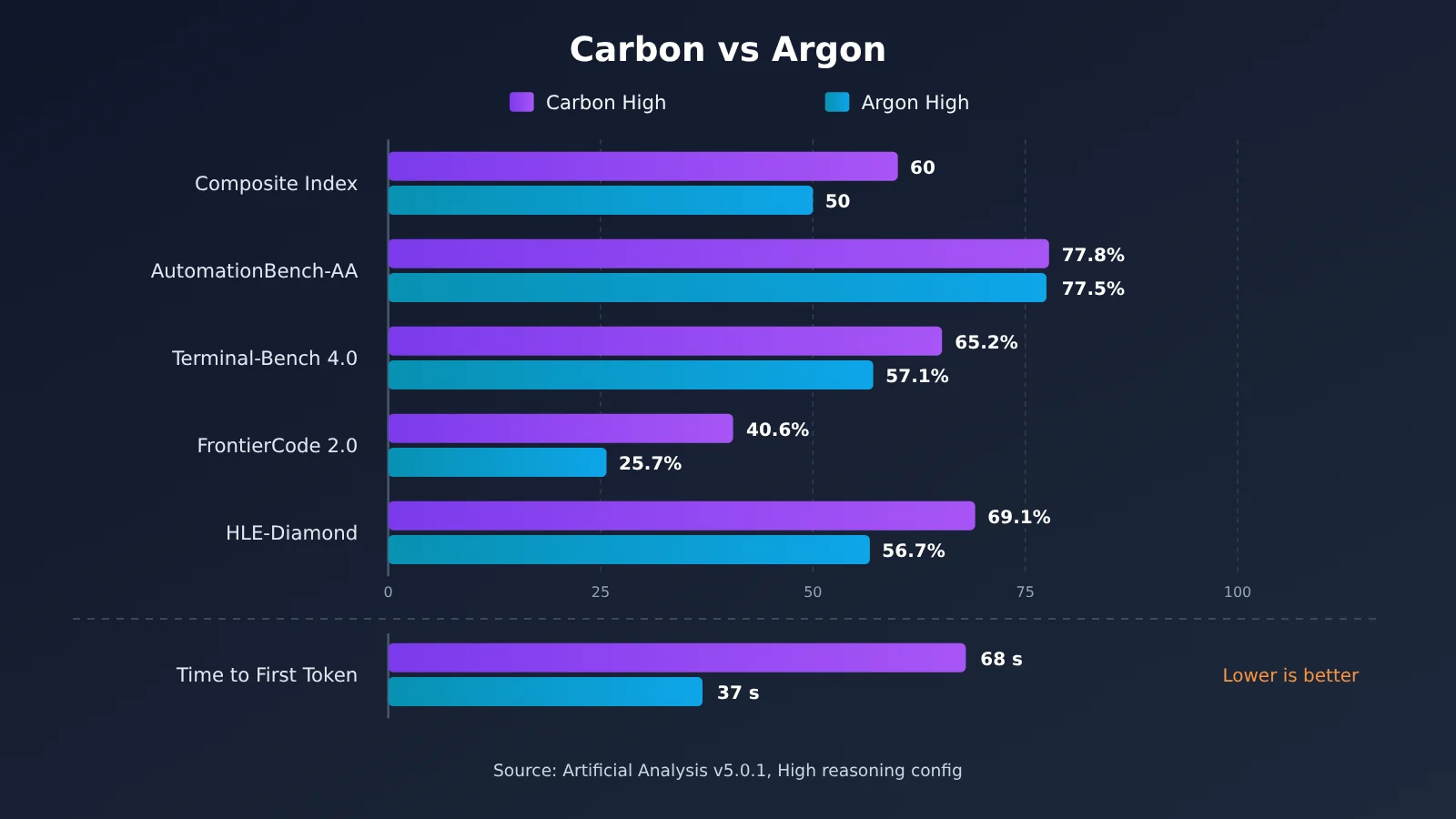
A few takeaways worth noting:
- The biggest gaps show up in complex engineering and complex reasoning: Carbon leads by nearly 15 percentage points on FrontierCode 2.0, about 12 points on HLE-Diamond, and about 8 points on Terminal-Bench 4.0.
- The gap is tiny on routine automation tasks: AutomationBench-AA differs by only 0.3 percentage points, which suggests Argon is already good enough for workflow-style automated tasks.
- Knowledge reliability improved: AA-Omniscience scores are 54 vs. 46, and the Agentic Honesty Benchmark in Google’s model card also shows Carbon at 92% and Argon at 70%.
- Argon responds noticeably faster at first: about 37 seconds vs. about 68 seconds. That’s the direct price of Carbon spending more effort on reasoning.
Google’s official model card (evaluation date listed as October 2026, generally Pass@1 with the highest available reasoning level) shows the same trend: on SWE-sweep, Carbon scores 9.6% and Argon 4.3%; on GraphWalks (256k–1M, BFS F1), Carbon scores 96.2% and Argon 84.2%; on Terminal-Bench Science 0.1, Carbon scores 64.8% and Argon 52.9%. The official model card and Artificial Analysis use different evaluation frameworks and different points in time, so you shouldn’t mix them into a single ranking. Also, the Carbon model page lists a High time per task of 24.9 minutes, slightly different from the 25.6 minutes on the comparison page. The comparison table in this article uses the comparison page’s figures.
Benchmark scores aren’t everything, either. In the MKA multimodal knowledge-work evaluation jointly launched by Google DeepMind and Artificial Analysis, no model led in all 10 industries: Argon led in science, while Carbon led in healthcare. It’s a good reminder that Carbon’s higher overall score doesn’t mean it beats Argon in every specific domain.
💡 A note on comparing: Benchmarks only reflect performance on a fixed set of tasks. The most reliable way to decide whether your use case needs Carbon is to run both models on your own real tasks. With APIYI (apiyi.com), you can switch between the two models using the same API key and the same OpenAI-compatible code, which makes small-scale side-by-side tests easy.
Why Gemini 4 Carbon Uses More Tokens Per Turn but Isn’t Necessarily More Expensive
This is the easiest point to get wrong. Gemini 4 Argon and Carbon have the same per-token price. Through November 30, 2026, the launch price is $2 per million input tokens and $10 per million output tokens. From December 1, it goes up to $4 and $20. Cached input gets a 95% discount off the input price. Thinking tokens count toward output token charges, so because Carbon thinks more on each turn, its per-turn bill is usually higher.
But the cost of a task isn’t the same as the cost of a single turn. In Artificial Analysis v5.0.1’s High-configuration comparison, Carbon costs $7.76 per task versus $9.95 for Argon. That makes Carbon about 22% cheaper, and it finishes roughly 3 minutes faster too. A reasonable explanation is that the total cost of a full task depends on how many turns it takes, how many detours the model makes, and how many times it has to redo work. If Carbon thinks more up front and makes fewer mistakes, it may need fewer retry and fix turns later.
| Configuration (AA v5.0.1) | Composite Score | Cost per Task | Time per Task | Time to First Answer |
|---|---|---|---|---|
| Carbon Low | 54 | $7.19 | 22.3 min | 12.37 s |
| Carbon Medium | 58 | $6.59 | 23.3 min | 23.16 s |
| Carbon High | 60 | $7.76 | 24.9 min | 67.54 s |
| Argon High | 50 | $9.95 | 28.9 min | ~37 s |
There’s another counterintuitive finding in this data: Carbon Medium’s cost per task is lower than Low’s. A lower reasoning level makes each turn cheaper, but the model may need more turns to finish the task. Still, you should pay close attention to the limits of this comparison:
- These costs are the average cost per task in this evaluation framework, calculated at the standard $4/$20 pricing. They aren’t the price of an ordinary API request. At the launch price, the same token usage would cost roughly half as much.
- A figure like 24.9 minutes is the weighted duration of an Agent evaluation task. It doesn’t mean an ordinary question will make you wait 25 minutes.
- The conclusions only apply to the tasks in the AA Index. If your own tasks are simple and can be finished in one or two turns, Argon’s (or a lower reasoning level’s) per-turn advantage will show up directly as a lower bill.
💰 Cost tip: When you evaluate models, record the total tokens and total time it takes to complete one task, rather than just comparing unit prices. APIYI (apiyi.com) uses pay-as-you-go billing, and its console shows usage details for every call, which makes it a good way to work out the real per-task cost of Argon versus Carbon on your own workload.
When to Choose Gemini 4 Argon vs. Carbon
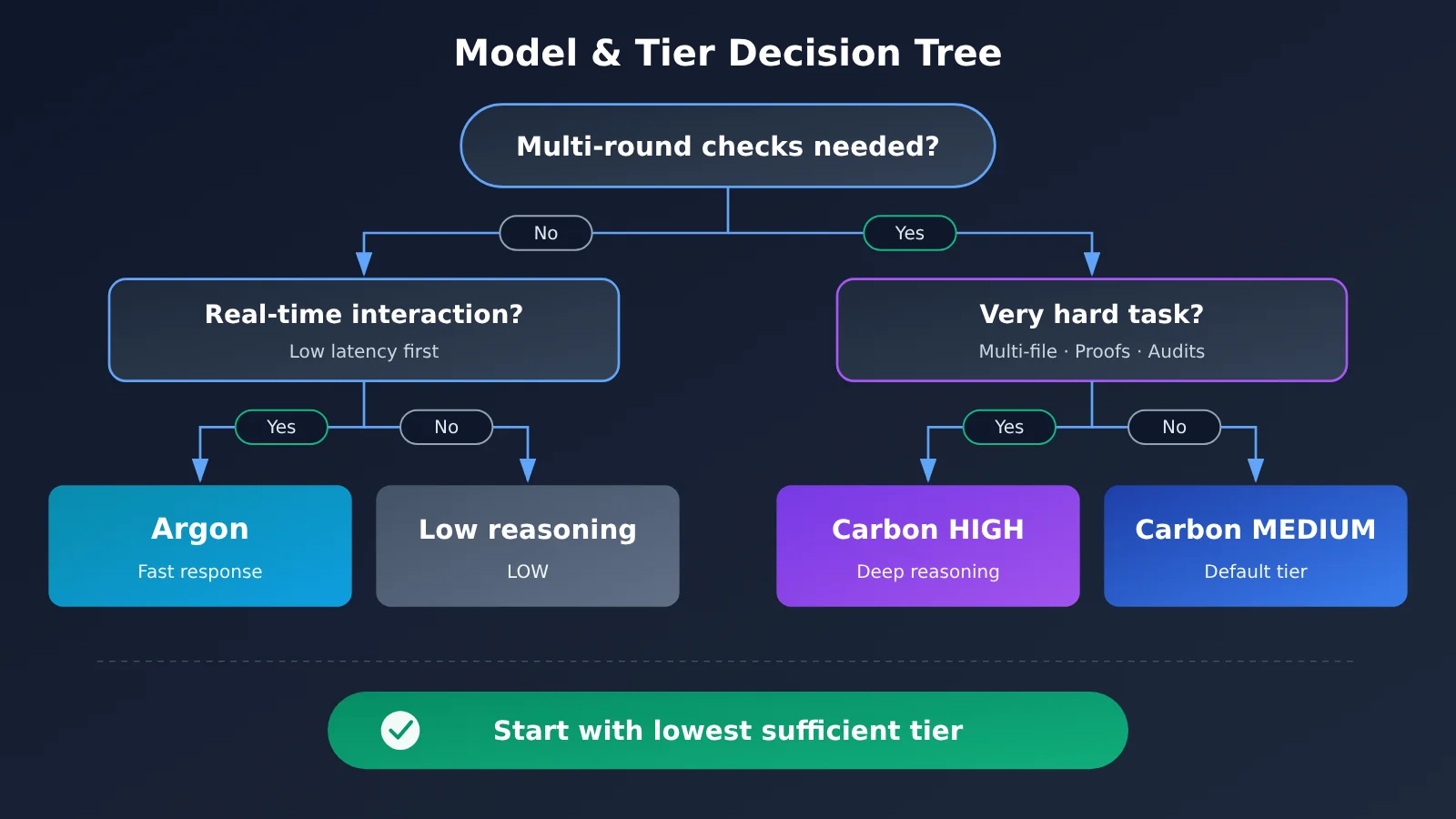
Based on Google’s official positioning and the data above, you can route tasks by difficulty. The core principle: first ask whether the task is worth deeper reasoning, then decide which model and which tier to use.
| Task Type | Recommended Model | Recommended Tier | Why |
|---|---|---|---|
| Everyday feature development, routine code changes | Argon | Default or Medium | Fast responses and low per-turn overhead, great for frequent back-and-forth |
| Interactive coding, real-time IDE assistance | Argon | Medium | Noticeably lower time to first response |
| Complex multi-file projects, architecture design | Carbon | HIGH | Clear gap on FrontierCode and Terminal-Bench |
| Deep root-cause investigation across subsystems | Carbon | MEDIUM / HIGH | Requires exploring multiple hypotheses and verifying repeatedly |
| Hard scientific reasoning, formal proofs | Carbon | HIGH | Google lists formal proofs as a HIGH use case |
| Security audits, vulnerability discovery | Carbon | HIGH | Officially positioned as better suited to complex audits |
| Simple classification, summarization, metadata extraction | Low-reasoning tier | LOW | Cost-sensitive, no deep reasoning needed |
When to Choose Gemini 4 Argon
- Highly interactive development work: When you’re writing a single function, tweaking styles, or adding tests, waiting 37 seconds versus 68 seconds feels very different.
- Routine knowledge work and automated workflows: On AutomationBench-AA the two are nearly tied, so there’s no reason to pay for a gap that isn’t there.
- Scientific knowledge work: On the MKA benchmark, Argon leads in the science domain, so it’s worth trying first.
When to Choose Gemini 4 Carbon
- Long-running background agent tasks: You don’t care much about first-response latency, just about getting it right the first time.
- Complex engineering and architecture decisions: Multi-file migrations, system refactors, and complex code audits.
- Tasks where verifiability matters: Scientific reasoning, security audits, and analysis reports that need self-checking.
Early community feedback backs up this split. On Hacker News and Reddit, some developers say Carbon catches issues other models miss, while others complain about long waits for the first answer and fast quota burn. One Reddit user used Carbon Medium to migrate a library with 230 files in a Go project and got it running on the first try. The author notes, though, that the sample covered only 4 phases and wasn’t a controlled experiment, so treat it as an anecdote rather than evidence.
How to Use Thinking Level to Balance Quality, Speed, and Cost in Gemini 4 Carbon
Carbon offers three reasoning levels: LOW, MEDIUM, and HIGH. The public model gemini-4-carbon defaults to MEDIUM. Here’s how the official guidance maps levels to use cases:
- LOW: classification, summarization, metadata extraction
- MEDIUM: everyday coding, tool calling, document Q&A, video understanding
- HIGH: multi-file software engineering, architecture design, formal proofs, vulnerability discovery
The MEDIUM default makes sense. In AA v5.0.1, Carbon Medium scores 58 overall, just 2 points below High. It also has the lowest per-task cost, and its time to first answer is about a third of High’s. In the AA-Omniscience factual reliability test, Medium’s rate of fabricated answers is 4.2%, compared with 11.4% for High and 20.0% for Low. (That’s a metric from one specific test, not a general hallucination rate.) Google also recommends that developers try out different levels and pick the lowest level that meets your quality bar, rather than defaulting to HIGH every time.
There are a few Carbon-specific technical limits to keep in mind when you make calls:
thinking_budgetisn’t supported, and using it returns an HTTP 400 error.- The MINIMAL level isn’t supported.
temperature,top_p, andtop_kare ignored.- Explicit Context Caching isn’t supported. However, if your shared prompt prefix reaches 4096 tokens or more, automatic implicit caching can kick in.
Minimal Example
Here’s how to call Gemini 4 Carbon through the OpenAI-compatible interface. It runs in just over 10 lines of code:
import openai

client = openai.OpenAI(
    api_key="YOUR_API_KEY",
    base_url="https://api.apiyi.com/v1"  # APIYI unified interface
)

response = client.chat.completions.create(
    model="gemini-4-carbon",  # Use the model ID from the platform's model list
    messages=[{"role": "user", "content": "分析这段服务超时日志的可能根因"}]
)
print(response.choices[0].message.content)
View the full implementation: routing between Argon and Carbon by task difficulty
import time
import openai
from typing import Literal

client = openai.OpenAI(
    api_key="YOUR_API_KEY",
    base_url="https://api.apiyi.com/v1"
)

# Model names are examples; use the actual IDs from the platform's model list
ARGON_MODEL = "gemini-4-argon"
CARBON_MODEL = "gemini-4-carbon"

Difficulty = Literal["simple", "daily", "complex", "extreme"]

def route(difficulty: Difficulty) -> tuple[str, str]:
    """Return (model, reasoning level) based on task difficulty"""
    if difficulty == "simple":
        return CARBON_MODEL, "low"      # Classification, summarization, metadata extraction
    if difficulty == "daily":
        return ARGON_MODEL, "medium"    # Everyday development, frequent interactions
    if difficulty == "complex":
        return CARBON_MODEL, "medium"   # Root cause investigation, standard Agent tasks
    return CARBON_MODEL, "high"         # Multi-file engineering, proofs, security audits

def run_task(prompt: str, difficulty: Difficulty) -> dict:
    model, effort = route(difficulty)
    start = time.time()
    resp = client.chat.completions.create(
        model=model,
        messages=[{"role": "user", "content": prompt}],
        # How the reasoning level parameter is mapped depends on the platform docs;
        # Carbon doesn't support thinking_budget, and passing it returns a 400 error
        reasoning_effort=effort,
    )
    usage = resp.usage
    return {
        "model": model,
        "effort": effort,
        "seconds": round(time.time() - start, 1),
        "prompt_tokens": usage.prompt_tokens,
        "completion_tokens": usage.completion_tokens,  # Includes thinking tokens
        "answer": resp.choices[0].message.content,
    }

if __name__ == "__main__":
    result = run_task("为订单服务设计分库分表迁移方案,并列出验证步骤", "extreme")
    print(result["model"], result["effort"], result["seconds"], "s")
    print("输出 Token:", result["completion_tokens"])
🚀 Quick start tip: Sign up at APIYI (apiyi.com) and grab the free test credits first. Then use the routing function above to run the same batch of real tasks through Argon and Carbon at different levels, and record the latency and
completion_tokensfor each. One API key covers the whole comparison, so you don’t need to integrate multiple SDKs.
Decision Guide: Gemini 4 Argon vs. Carbon
If you only remember one rule, make it this: default to Argon, and upgrade to Carbon when a task really deserves deeper thinking. Here’s how to put that into practice in three steps:
- Set up routing rules: Use the scenario table above to sort your tasks into four buckets: simple, everyday, complex, and extremely hard. Everyday tasks go to Argon by default.
- Run a small-sample comparison: Pick 10–20 real tasks from each bucket and compare Argon against each Carbon tier on pass rate, total tokens, and total latency.
- Pick the tier by task cost: Choose the lowest tier that still meets your quality bar, and re-test periodically, since models, pricing, and leaderboards can all change.
For multi-agent systems, you can also borrow from Google’s /swarm approach: let Carbon handle planning, coordination, and review, while Argon or an even lighter model handles the bulk execution. That way you get Carbon’s deep reasoning without making every step pay for its latency.
💡 Recommendation: Both models cost the same per token, so what really separates them is how your tasks are structured. We suggest connecting Argon and Carbon together through the OpenAI-compatible interface on APIYI (apiyi.com), and switching between them with routing at the code level. That way, you won’t need to touch your business code when you adjust your strategy later.
FAQ
Q1: How are Gemini 4 Argon and Carbon related?
According to the Google DeepMind model card, Gemini 4 Carbon is built on top of Gemini 4 Argon. Both belong to the Gemini 4 reasoning model family and share a 1M-token context window and built-in tool capabilities. Carbon spends more thinking tokens on exploration and verification in each turn, while Argon puts more emphasis on response speed and per-turn efficiency. Google hasn’t disclosed the parameter counts or architectural differences between the two.
Q2: Will Carbon completely replace Argon?
No. Google has said explicitly that Argon is still the ideal choice for most engineering and knowledge-work tasks, while Carbon is meant for harder, longer-horizon tasks. The benchmark data backs this up: the two are nearly tied on AutomationBench-AA, and Argon leads in scientific domains on MKA. Argon stays competitive in a lot of scenarios.
Q3: Do the two models cost the same? When does the price change?
Google’s developer docs show that both models use the same per-token pricing. The launch price is $2 / $10 per million input/output tokens, valid through November 30, 2026. Starting December 1, it goes up to $4 / $20. Thinking tokens count toward output costs, so the same unit price doesn’t mean the same cost per task.
Q4: Carbon is slow to give its first answer. Is it a good fit for a chat app?
Not really, at least not when real-time responsiveness matters. In AA v5.0.1, Carbon High’s latency to the first answer token is about 68 seconds, versus about 37 seconds for Argon High and about 12 seconds for Carbon Low. For real-time interaction, go with Argon. Carbon is better suited to complex background analysis and long-running Agent tasks.
Q5: How can I quickly compare Argon and Carbon through the API?
We recommend using an API aggregation platform that supports multiple models:
1. Go to APIYI (apiyi.com), sign up for an account, and grab your API key along with some free testing credit.
2. Set `base_url` in your code to `https://api.apiyi.com/v1`.
3. Just change the `model` parameter to switch between the two models, then compare them across different reasoning levels.
Q6: Can I use Carbon without a Google AI Ultra subscription?
Yes. The Ultra subscription only determines whether you can pick Carbon directly on the consumer side (the Gemini app, for example), while AI Pro mainly includes Argon. Developers can call Carbon through the paid tier of the Gemini API without buying Ultra. Keep in mind that Google’s official Carbon API has no free tier.
Q7: What are Carbon’s known limitations?
The model card lists these: it can still hallucinate, high reasoning levels may burn through a lot of tokens, responses may be slow or time out, its knowledge cutoff is March 2026, and its prompt injection defenses still need improvement. Also, `thinking_budget` isn’t supported and sampling parameters are ignored, so check for both when migrating older code.
Gemini 4 Argon and Carbon Key Takeaways
- How they relate: Carbon is built on top of Argon. The two complement each other, so neither is a “high-end vs. budget” replacement for the other.
- Core difference: Carbon thinks more per turn and verifies its work more thoroughly. Argon responds faster and costs less per turn.
- Benchmark results: On AA v5.0.1 at High settings, Carbon scores 60 overall and Argon scores 50.
- The real cost story: Unit prices are the same, and on AA tasks Carbon High actually costs less per task than Argon High.
- Choosing a tier: Carbon defaults to MEDIUM. Pick LOW, MEDIUM, or HIGH using the “lowest tier that’s good enough” rule.
- Getting started: Use APIYI (apiyi.com) to test both models with a single set of OpenAI-compatible code.
Summary
The differences between Gemini 4 Argon and Carbon boil down to three points:
- Different reasoning investment: Argon is built for efficiency, while Carbon spends more thinking tokens to push the limits of complex reasoning.
- Look at latency and cost separately: Carbon is slower to give its first response, but on certain benchmarks its cost per completed task can actually be lower.
- Task difficulty should drive your choice: Use Argon for everyday engineering work, and hand complex engineering, scientific reasoning, and security audits to Carbon.
Don’t send every request to the highest reasoning level. The key to balancing quality, speed, and cost is to run your own real tasks first and find the “good enough tier” for each type of work. We recommend using APIYI (apiyi.com) to quickly check how both models perform on your actual workloads. The platform supports pay-as-you-go billing and a unified interface across multiple models.
📚 References
- Gemini 4 Carbon Model Card: Official Google DeepMind model card
- Link:
deepmind.google/models/model-cards/gemini-4-carbon -
Notes: How Carbon is built on Argon, context specs, official benchmarks, and known limitations
-
Choosing between Carbon and Argon: Google AI Studio developer docs
- Link:
aistudio.google.com/docs/whats-new-gemini-4-carbon -
Notes: The official positioning differences between the two models, plus Thinking Level recommendations
-
Gemini 4 Carbon Developer Guide: Google Cloud developer guide
- Link:
docs.cloud.google.cn/gemini-enterprise-agent-platform/models/guides/gemini-4-carbon -
Notes: Reasoning levels, API parameter restrictions, and long-decoding details
-
Gemini API Pricing: Google AI for Developers
- Link:
ai.google.dev/gemini-api/docs/pricing -
Notes: Launch pricing, the December price adjustment, and billing rules for caching and thinking tokens
-
Gemini 4 Carbon vs Gemini 4 Argon: Artificial Analysis comparison page
- Link:
artificialanalysis.ai/zh/models/comparisons/gemini-4-carbon-vs-gemini-4-argon -
Notes: Capability, cost, and latency comparison under the AA Index v5.0.1 High configuration
-
MKA Multimodal Knowledge Work Benchmark: Artificial Analysis
- Link:
artificialanalysis.ai/zh/evaluations/mka - Notes: Leading models by industry, plus per-task cost data
Author: APIYI Technical Team
Get in touch: Reach out to us via the APIYI website homepage. For more on integrating models, visit the docs.apiyi.com documentation center.