Author’s note: This article walks through, in 5 steps, how to design agent acceptance gates so that long-running agents have a clear finish line, reliable feedback, and controllable costs.
After an agent runs continuously for hours or even days, it hands back results that look complete — yet nobody dares merge them. That’s a problem many development teams run into. This article introduces a 5-step method for designing agent acceptance gates, to help you define “done” as something a machine can check over and over again before you kick off a long task.
On October 27, 2026, Gregory Kurtzer — one of the founders of CentOS — announced the Ginux project. According to reports, over 11 days he leaned mainly on a single continuously running Codex task, which left behind roughly 139,000 lines of code, enough for this independent kernel to boot Rocky Linux 10 and run systemd. When someone pressed him on how he pulls a drifting agent back on track, his answer was simple: set more gates.
This is not another collection of prompt tricks. What this article focuses on is the engineering structure that long tasks actually depend on: goals, gates, evidence, regression, and stopping conditions.
The key takeaway: by the end of this article, you’ll be able to write a set of agent acceptance gates for your own project, and decide which steps to hand to the machine and which decisions must stay with a human.
Key Points of Agent Acceptance Gates
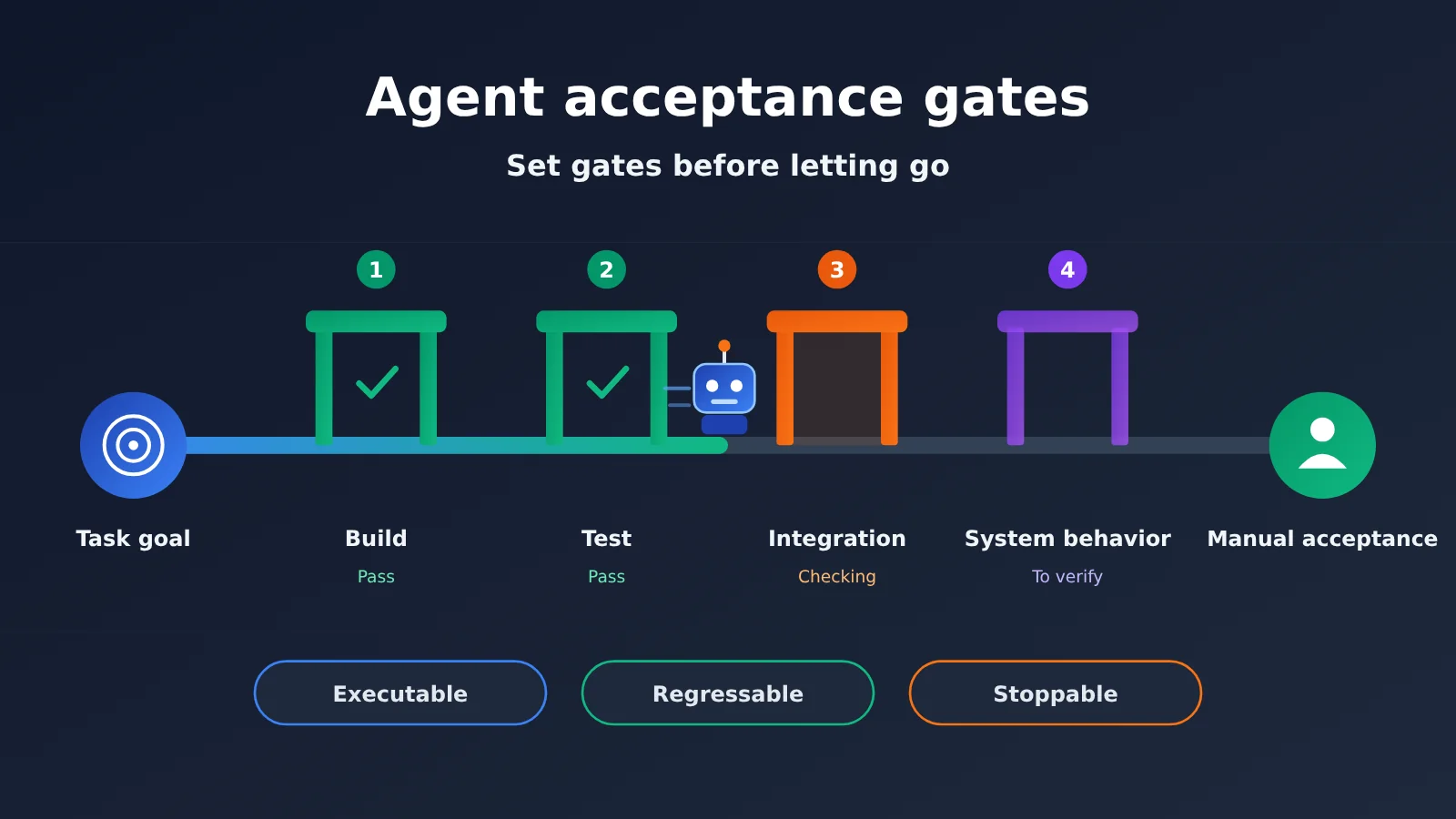
An Agent acceptance gate is a set of predefined, repeatable checkpoints. It tells the Agent whether the current result meets the bar, and it tells humans which evidence is worth reviewing.
| Key point | Description | Value |
|---|---|---|
| Acceptance criteria up front | Write down the finish line and milestone goals before starting a long task | Reduces the chance that the Agent substitutes partial success for overall completion |
| Executable gates | Judge with commands, scripts, CI, or actual runtime results | The Agent can iterate on its own without waiting for a human |
| Check system behavior | Focus on how the program actually behaves at runtime | Catches “plausible-looking” incorrect output |
| Layered human-agent ownership | Humans set architecture and acceptance; the Agent handles implementation and regression | Humans are no longer the slowest part of the loop |
| Controllable budget | Set failure counts, usage limits, and pause conditions in advance | Prevents long tasks from burning resources in the wrong direction |
Agent Acceptance Gates in the Ginux Case
Kurtzer didn’t just hand “write a kernel” to the Agent. He chose hard gates such as whether Linux userspace programs can run and whether systemd can start. systemd depends on a large number of system components, and it is the core process that starts and runs the entire system, so it is a good test of whether the kernel is actually usable.
The project runs in two coordinated loops. The outer loop is led by humans, from vision, architecture and constraints, and acceptance gates all the way to reviewing actual behavior and deciding whether to fix or accept. The inner loop is handled by the Agent, repeatedly implementing, building and running in QEMU, measuring and analyzing failures, revising, and regression testing.
Kurtzer also specifically warned that many failures produce highly convincing output while actually violating semantics, isolation requirements, or lifecycle behavior. Without gates, it’s easy to end up with code that runs on the surface but is structurally weak.
Why Agent Acceptance Gates Need to Run Automatically
Cursor engineer Lauren Tan also treats verification as the most important skill when using Agents. By verification, she means letting the Agent actually run code, collect CPU traces or heap snapshots, open the iOS simulator, and operate the app the way a user would.
She has publicly claimed she can merge 4,000 PRs into production every month. Even if a human reviewed each PR for only 5 minutes, that would still add up to about 333 hours, so at that scale the checking system has to run without human intervention. This extreme case is controversial, but it illustrates a lesson that applies to ordinary teams as well: an Agent can keep working only if it can check its own output; if it can’t, it can only hand you a diff and stop.
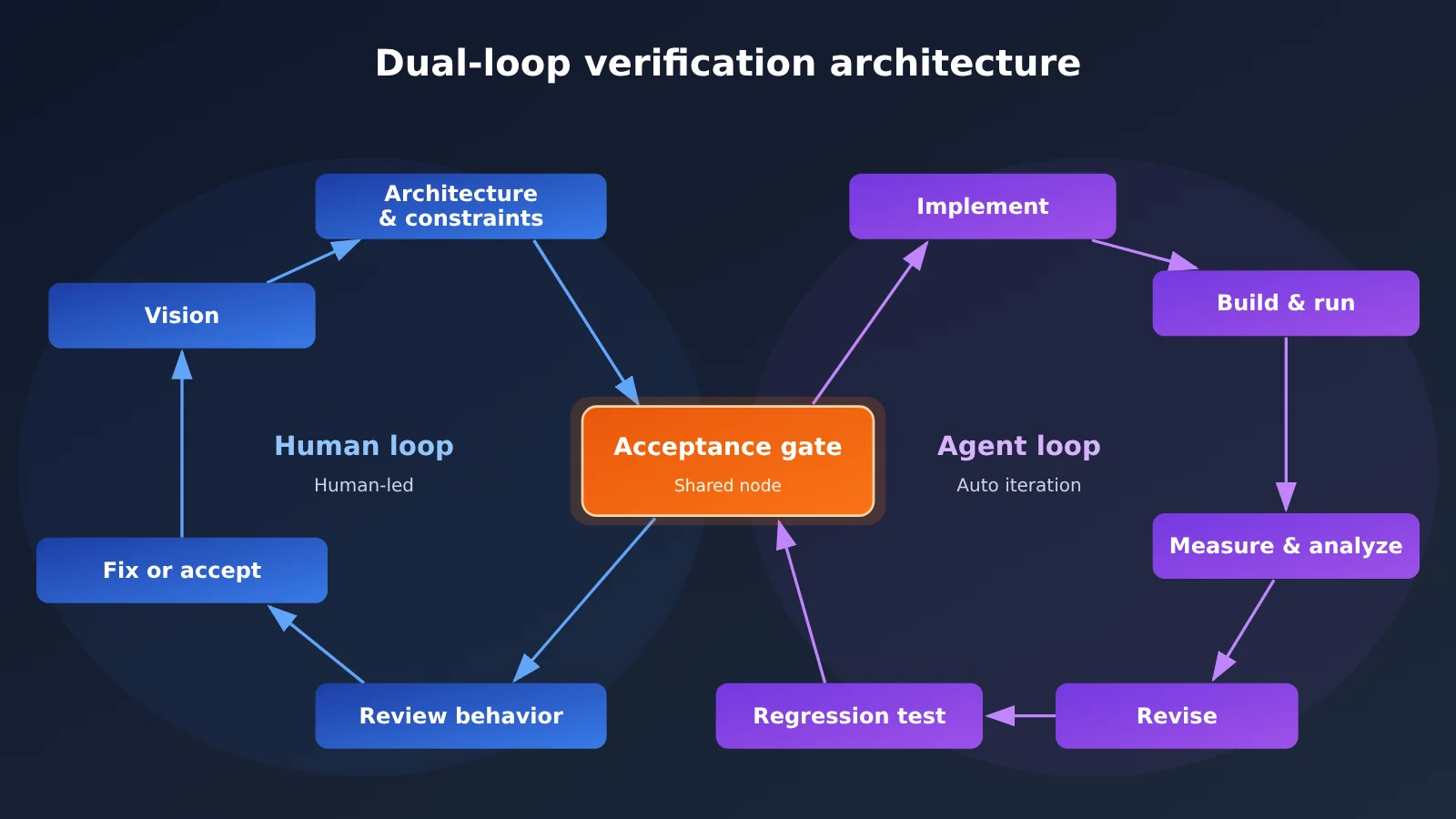
The dual loops in the diagram can be applied directly to everyday projects. If you want different models to handle implementation and review separately, you can connect through APIYI (apiyi.com) and bring model invocation into the inner loop.
Agent Acceptance Gates Quick Start: The 5-Step Design Method
Here’s a common task as an example: have the Agent migrate a legacy REST service to a new framework while keeping existing clients unaffected. You can swap the checks in the example for your own project’s build, test, and deployment workflows.
Step 1: Define a system-level finish line for the Agent’s acceptance gates
Start by writing one observable sentence describing what should happen to the system when the task is done. “Finish the service migration” is too vague. “Using the same batch of replay requests, the old and new services return matching status codes and key response fields” is something you can actually verify.
A good finish line usually comes from a real usage path. For Ginux, the finish line is Rocky Linux 10 reaching systemd’s multi-user.target. For a web app, it can be getting the core user flow working end-to-end. For a data task, it can be the output matching a benchmark dataset.
Step 2: Break Agent Acceptance Gates into Five Layers
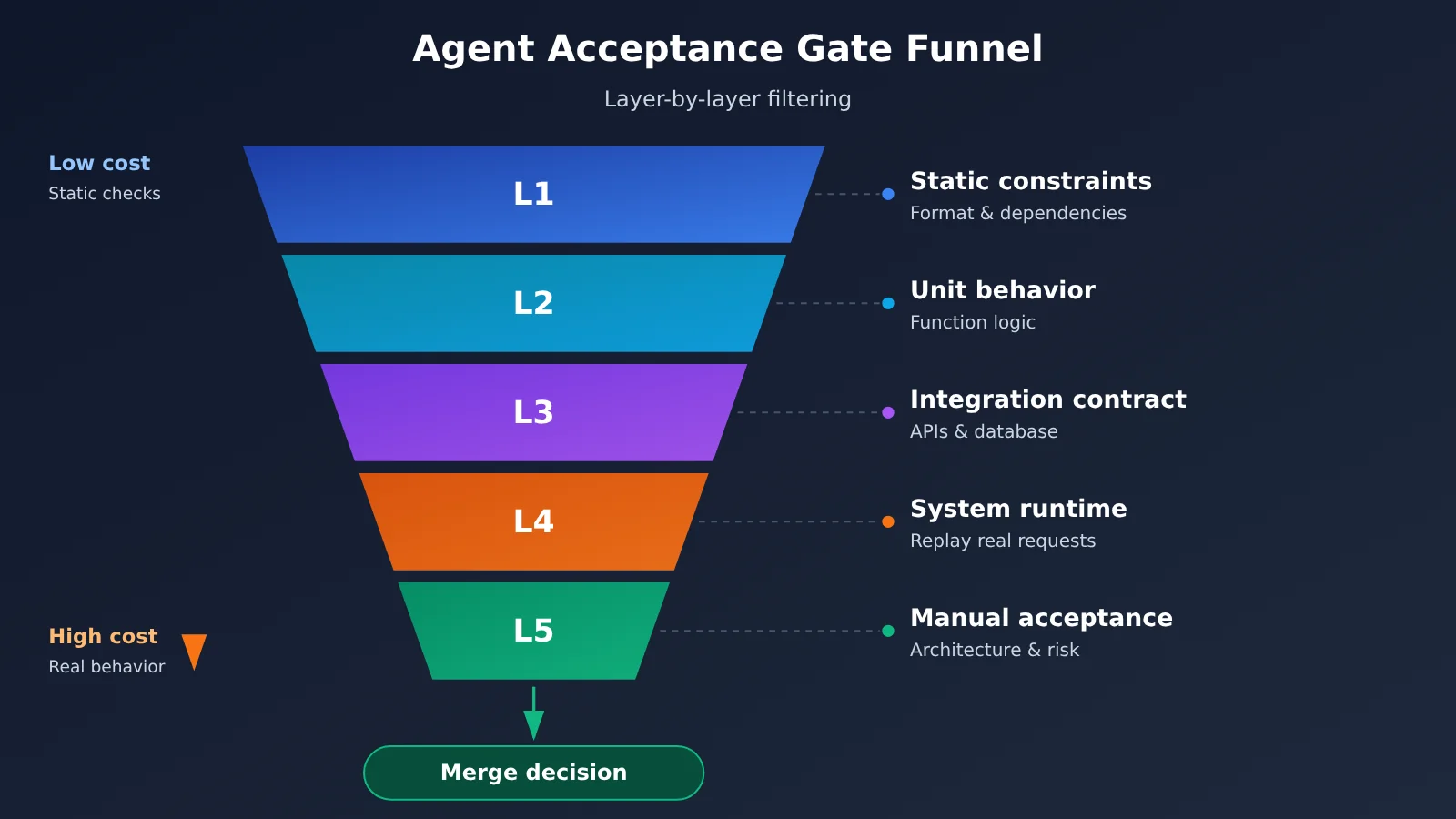
A single final test as the only feedback loop is too slow, and when the Agent fails, it’s hard to pinpoint what went wrong. A better approach is to set up gates ordered from low to high runtime cost, so cheap checks can catch obvious mistakes first.
| Gate level | What it checks | Example | Action after failure |
|---|---|---|---|
| L1 Static constraints | Format, types, dependency boundaries | Cross-module imports prohibited | Agent fixes immediately |
| L2 Unit behavior | Function and module logic | Core unit tests | Agent locates and fixes |
| L3 Integration contracts | Interfaces, databases, external dependencies | API contract tests | Agent compares the differences and revises |
| L4 System runtime | Real behavior of the full service | Start the service and replay requests | Agent collects logs and performance data |
| L5 Human acceptance | Architecture, risk, and business tradeoffs | Review the evidence bundle and decide whether to merge | A human gives new constraints or stops the task |
Lauren Tan’s Dune architecture offers an extreme example of L1. She refactored the project through more than 600 PRs and used CI to validate the dependency graph, ensuring that Electron’s main and renderer directories don’t cross-import. She also disabled useEffect and banned code comments. These rules may not suit your codebase, but the practice of turning team constraints into automated checks is worth borrowing.
Step 3: Turn Agent acceptance gates into executable cards
Every gate should have a short card, placed in the project docs that the Agent reads at startup. Once the card is clear, the Agent doesn’t have to guess what “passing” means, and people can trace the evidence from it.
| Field | What to fill in | Service migration example |
|---|---|---|
| Gate name | Name it by behavior | Replay request consistency |
| Runtime environment | Fixed versions and dependencies | Isolated test environment, using a fixed data snapshot |
| Execution entry point | Provide one clear command | make gate-replay (example command) |
| Pass criteria | Use comparable results | Status codes and key fields all match |
| Evidence artifacts | Save files that can be reviewed | Diff report, service logs, performance records |
| Protection rules | Mark what must not be modified | Acceptance samples and judgment scripts are read-only |
| Failure strategy | State the next action | Pause if the same error goes unresolved for 3 consecutive rounds |
Among these, protection rules are the easiest to overlook. Agents tend to pick the path of least resistance in front of them — if they can modify the acceptance samples or loosen the judgment scripts, the test results become meaningless. I’d suggest putting this part in a protected directory and checking related changes in CI.
Step 4: Put Agent acceptance gates into an automatic regression loop
Write the inner loop into the task instructions: make a small change first, run the current-level gate, read the failure evidence, revise, then re-run the gates that already passed. Regression matters here—without it, the Agent might silently break something else while fixing one thing.
At the end of each round, have the Agent record what changed, which gates it ran, the results, and any unresolved issues. Context keeps growing on long tasks, and this log helps later sessions recover state quickly. It also lets humans judge whether the Agent is making real progress or just spinning in place.
Acceptance gates also need to guard against “fake passes.” A few patterns show up especially often during long runs:
| Fake-pass type | Typical symptom | Corresponding safeguard |
|---|---|---|
| Tests get modified | Failing cases are deleted or assertions loosened | Make acceptance files read-only; CI checks for changes |
| Only happy paths tested | Normal requests pass, error scenarios crash | Add fault injection and edge-case samples |
| Mocks replace real dependencies | All mocks green, integration environment fails | L4 must run against real services |
| Output looks right but semantics are wrong | Logs complete, lifecycle behavior incorrect | Compare state, timing, and side effects |
| Local success masks risk | One metric improves, overall stability drops | Run full regression at every milestone |
Step 5: Set Up Human Decision Points and Stop Conditions for Agent Acceptance Gates
Human work should focus on judgments that Agents can’t easily replace. Kurtzer handles architecture, Linux compatibility goals, the operating model, failure interpretation, and stop decisions; when he’s unhappy with code generated by the Agent, he’ll even close the IDE, resist the urge to fix it by hand, and provide new guidance instead.
Set at least three kinds of pause conditions: multiple failed rounds at the same gate, the Agent trying to modify protected content, and task usage approaching budget. After a pause, the review should also shift earlier to the evidence package—look at system behavior and risks first, then decide whether to dig into the diff.
Quick-start advice: Pick a small milestone you can finish in a day and write only 3 to 5 gate cards. APIYI apiyi.com provides API access to the GPT, Claude, and other model series mentioned in this article, and is compatible with OpenAI and Anthropic interface formats. Existing tools usually just need their API endpoint and key adjusted according to the docs; you can confirm the specific available models on the APIYI pricing page.
How Agent Acceptance Gates Change the Cost of Long Tasks
The cost of a long task can’t be judged by “how many tokens were used in total” alone. The report notes that the token stats on Cursor’s homepage include at least four categories—regular input, model output, cache writes, and cache reads—and their prices vary widely. The community once used the same 1.5 trillion token usage to estimate a bill, and different methods produced wildly different results; the main disagreement came from billing assumptions and cache share.
| Billing item | Main source in long tasks | Control method | Pricing basis |
|---|---|---|---|
| Regular input | Task descriptions, logs, code snippets | Send only failure-related evidence | Based on actual data on the APIYI pricing page |
| Model output | Code, analysis, and revision plans | Limit the output scope per round | Based on actual data on the APIYI pricing page |
| Cache writes | New or changed stable context | Keep the project rule structure stable | Based on actual data on the APIYI pricing page |
| Cache reads | Context reused across multiple rounds | Monitor hit rates and avoid frequently changing the prefix | Based on actual data on the APIYI pricing page |
Public case totals can help you understand project scale, but they can’t be directly converted into a unit price. Ginux’s API invocation cost was reported at about $8,000, and Nicholas Carlini’s experiment building a C compiler with 16 parallel Claude agents cost about $20,000. The models, caching, and task structures behind those numbers are all different, so your project still needs its own estimate.
A more reliable approach is to run one complete milestone first, record the four types of token usage and the number of gate failures, then calculate based on the current data on the APIYI pricing page at https://docs.apiyi.com/models. The budget you get this way comes from your own task shape and is more reliable than copying someone else’s average unit price.
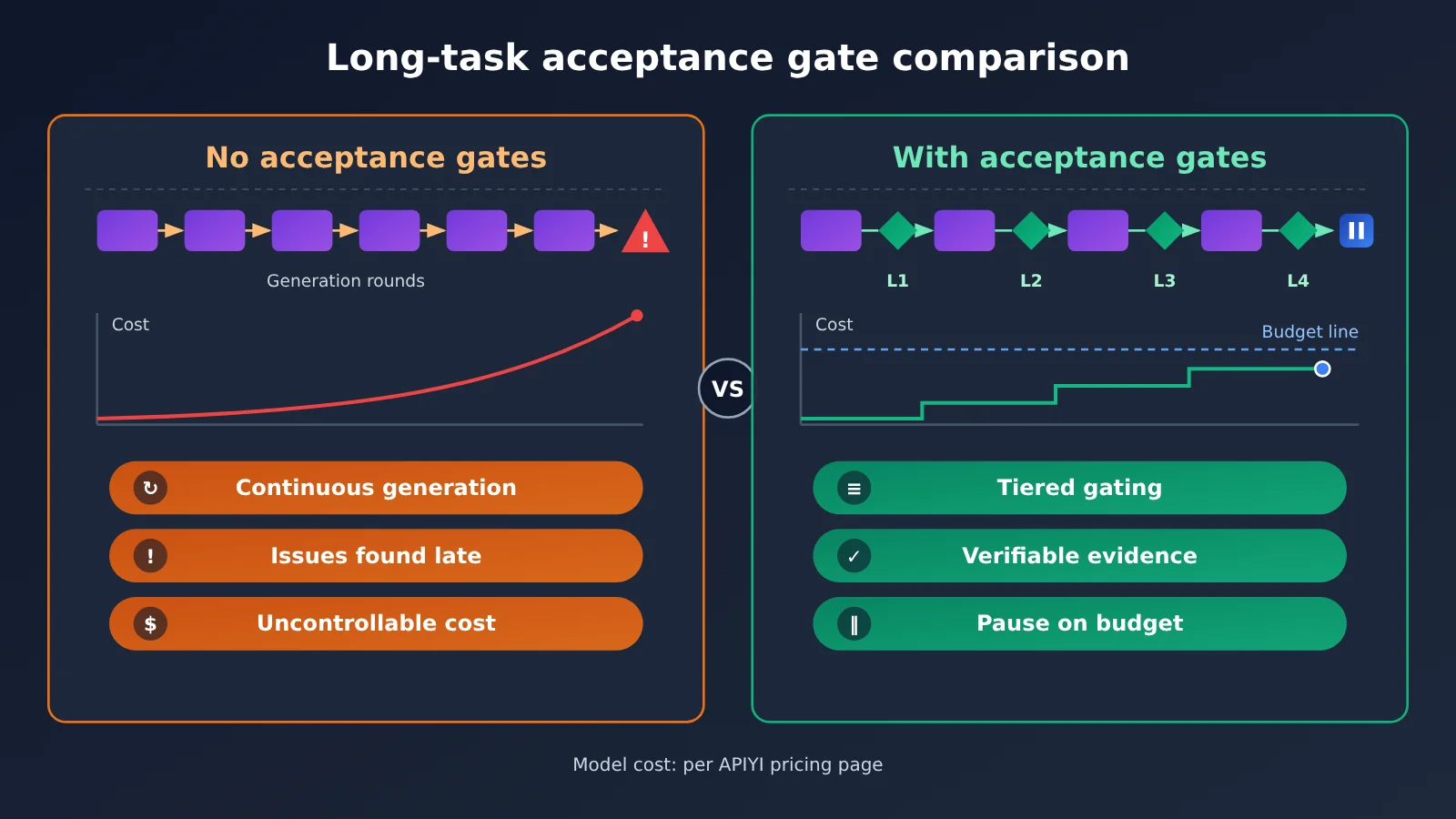
The point of the figure above is that gates themselves consume resources, but they expose failures earlier. For most teams, the goal should be to trade a limited budget for enough confidence—not to run the most expensive full validation on every change.
Agent Acceptance Gates FAQ
Q1: What is an Agent acceptance gate?
It’s a predefined, executable checkpoint used to determine whether an Agent’s stage output meets the bar. A complete gate includes the runtime environment, execution entry point, pass criteria, evidence artifacts, and failure strategy.
Q2: What’s the difference between an Agent acceptance gate and ordinary CI?
CI is a common execution vehicle, while an acceptance gate is a more complete task-control design. Besides determining whether code passes tests, it also defines system behavior, evidence, regression scope, human decision points, and pause conditions.
Q3: When must I design Agent acceptance gates?
You should design them in advance when a task requires multiple rounds of changes, spans multiple modules, runs for a long time, or produces errors that are hard to spot by eye. One-off small scripts can be simplified, but at minimum you should define one runnable verification method.
Q4: With Agent acceptance gates in place, do I still need human code review?
Yes. Automated gates are good for judging known criteria, but humans are still responsible for architecture choices, risk tradeoffs, and final acceptance. Kurtzer also emphasizes that experience remains critical when judging whether results are complete and whether local success creates system-level risk.
Q5: How do I connect to models through the API to run this process?
1. Sign up at APIYI apiyi.com and create an API key.
2. Check the documentation center at `docs.apiyi.com` to confirm the endpoint and invocation method.
3. Configure the integration using the OpenAI or Anthropic API format, depending on your tool.
4. Confirm model names and pricing at `https://docs.apiyi.com/models`, then start with a small-scale trial run.
Q6: How can I streamline Agent acceptance gates when the budget is limited?
Prioritize keeping the low-cost L1 and L2 gates and run them every round; move L3 and L4 to feature-completion or milestone points. Jellyfish’s stats on 12,000 developers show that a typical user consumes about 51 million tokens per month, a huge gap from extreme cases, so verification frequency should be based on task risk. For model costs, refer to the actual data on the APIYI pricing page.
Q7: What are the limitations of Agent acceptance gates?
Gates can only cover the risks you’ve defined, and all-green tests don’t mean the code is suitable for long-term maintenance. Ginux can boot Rocky Linux 10, but it’s still a long way from a production-grade kernel; hardware support, interface stability, security review, and community maintenance can’t be proven by a single run. Community criticism of the high-frequency PR pattern also reminds us to keep paying attention to code maintainability.
Key Takeaways: Core Points of Agent Acceptance Gates
- Define the endpoint first: Describe task completion in terms of observable system behavior, and avoid vague goals.
- Layer the gates: Progress gradually from static constraints to real execution and human acceptance.
- Keep the evidence: Save logs, diff reports, and performance records for every run.
- Lock down the judgments: Acceptance samples and scripts should be protected so the Agent can’t take shortcuts.
- Make regression routine: After fixing a new issue, rerun the related gates that already passed.
- Humans hold the decisions: Architecture, risk, stopping, and final acceptance are judged by the person in charge.
- Try out costs first: Validate on a small scale through APIYI apiyi.com, then estimate the budget based on the pricing page.
Summary: Start Building Autonomous Workflows from Agent Acceptance Gates
Whether an Agent can work autonomously for a long time depends on whether it has clear goals and reliable feedback. When designing Agent acceptance gates, keep three things in mind:
- Turn “done” into an executable standard: Let the Agent judge progress based on run results.
- Let machines handle high-frequency verification: Use layered gates, automated regression, and evidence packages to shorten the feedback cycle.
- Leave key judgments to humans: The person in charge decides the architecture direction, risk boundaries, and when to stop.
Start with your next medium-sized task: write the gate card first, then launch the Agent. When you need to test different models, you can integrate through APIYI apiyi.com using interfaces compatible with both OpenAI and Anthropic formats. For configuration, see the documentation center at docs.apiyi.com; for model pricing and billing standards, refer to the actual data at https://docs.apiyi.com/models.
📚 References
- InfoQ – Ginux project coverage: How Codex built a Linux-compatible kernel, and how it was validated
- Link:
infoq.cn/article/OiyNEtFwV05opvsLTcvK -
Notes: Covers the HDAE dual loop, project scale, and an analysis of limitations
-
InfoQ – Report on a Cursor engineer’s token bill: High-intensity agent workflows and the cost controversy
- Link:
infoq.cn/article/q9iebpvFozfy4bgCYUyE -
Notes: Covers the validation loop, the Dune architecture, and community criticism
-
Ginux technical report: The project technical report published by Gregory Kurtzer
- Link:
zenodo.org/records/23682548 -
Notes: Best for a deeper look at the research goals, methods, and where the results stop
-
Ginux GitHub repository: Project source code
- Link:
github.com/gmkurtzer/ginux -
Notes: Lets you browse the project code and open source license details
-
APIYI docs and pricing page: Interface configuration and model pricing details
- Docs link:
docs.apiyi.com - Pricing link:
https://docs.apiyi.com/models - Notes: For model names, prices, and billing rules, always refer to the actual data on the page
Author: APIYI Technical Team
Technical discussion: You’re welcome to visit APIYI at apiyi.com to talk agent engineering practices with us. For more integration material, check out the docs center at docs.apiyi.com.